Page 86 of 331
�µ�µ
�µ �µ
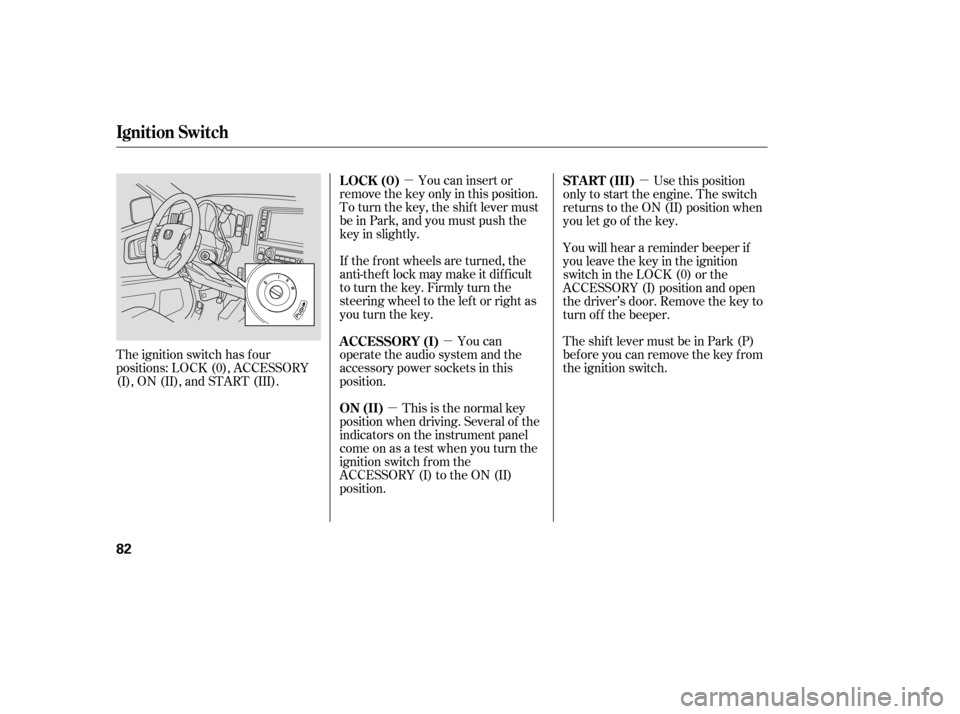
The ignition switch has f our
positions: LOCK (0), ACCESSORY
(I), ON (II), and START (III). You can insert or
remove the key only in this position.
To turn the key, the shift lever must
be in Park, and you must push the
key in slightly.
If the f ront wheels are turned, the
anti-theft lock may make it difficult
to turn the key. Firmly turn the
steering wheel to the lef t or right as
you turn the key.
You can
operate the audio system and the
accessory power sockets in this
position.
This is the normal key
position when driving. Several of the
indicators on the instrument panel
come on as a test when you turn the
ignition switch f rom the
ACCESSORY (I) to the ON (II)
position. Use this position
only to start the engine. The switch
returns to the ON (II) position when
you let go of the key.
You will hear a reminder beeper if
you leave the key in the ignition
switch in the LOCK (0) or the
ACCESSORY (I) position and open
the driver’s door. Remove the key to
turn of f the beeper.
TheshiftlevermustbeinPark(P)
bef ore you can remove the key f rom
the ignition switch.
LOCK (0)
A CCESSORY (I)
ON (II) ST A RT (III)
Ignition Switch
82
Page 132 of 331

�µ
Select
. The system
au tomatically switches to fresh air
mode and turns on the A/C. The
A/C indicator does not come on if
it was off to start with.
Select .
Set the fan and temperature
controls to maximum level.
To clear the windows faster, you can
close the dashboard corner vents by
rotating the wheel next to
(passenger’s side) or below it
(driver’s side). This will send more
warm air to the windshield defroster
vents. Once the windshield is clear,
select fresh air mode to avoid
fogging the windows. The
system automatically selects the
proper mix of conditioned and/or
heated air that will, as quickly as
possible, raise or lower the interior
temperature to your preference.
When you set the temperature to its
lower limit ( ) or its upper limit
( ), the system runs at full
cooling or heating only. It does not
regulate the interior temperature.
In cold weather, the fan will not
come on automatically until the
heater starts to develop warm air.
When
the indicator in the DUAL button is
on, the driver’s side and passenger’s
side temperature can be controlled
independently (see page ).
For your saf ety, make sure you have
a clear view through all the windows
bef ore driving. Set the desired temperature by
turning the temperature control
dial. You will see AUTO in the
system’s display. Press the AUTO button.
The automatic climate control
system adjusts the f an speed and
airflow levels to maintain the interior
temperature you select.
1.
2.
3.
130Dual Temperature Control
On RTS, RTL, and Canadian EXL
models
Vents, Heating, and A/C
T o Remove Exterior Frost or Ice
From the Windows Using A utomatic Climate Control
128
Page 165 of 331

�Û�Ý�Û
�Ý
�Û �Ý
The VOL button adjusts the volume
up ( ) or down ( ). Press the top
or bottom of the button, hold it until
the desired volume is reached, then
release it. Three controls f or the audio system
are mounted in the steering wheel
hub. They let you control basic
f unctions without removing your
hand f rom the steering wheel. The MODE button changes the
mode. Pressing the button
repeatedly selects FM1, FM2, AM,
XM Radio (U.S. models), CD (if a
disc is loaded) or a tape (if the
optional tape player is installed and a
tape is loaded).
If you are listening to the radio, use
the CH button to change stations.
Each time you press the top ( ) of
the button, the system goes to the
next preset station on the band you
are listening to. Press the bottom
( ) to go back to the previous
station.
If youareplayingaCD,thesystem
skips to the beginning of the next
track each time you press the top
( ) of the CH button. Press the
bottom ( ) to return to the
beginning of the current track. Press
it again to return to the previous
track. You will see the disc and track
numbers in the display.
When the appropriate audio unit is
connected to the auxiliary input jack,
press the CD/AUX or AUX button to
select the unit. The auxiliary input jack is on the tray
above the glove box. The system will
accept auxiliary input f rom standard
audio accessories.
On RTS, RTL, and Canadian EXL
models On vehicles with navigation system
Auxiliary Input Jack
Remote A udio Controls, Playing an Optional A udio Unit
Features
161
MODE BUTTON
VOL BUTTON
CH BUTTON AUXILIARY
INPUT JACK
Page 169 of 331
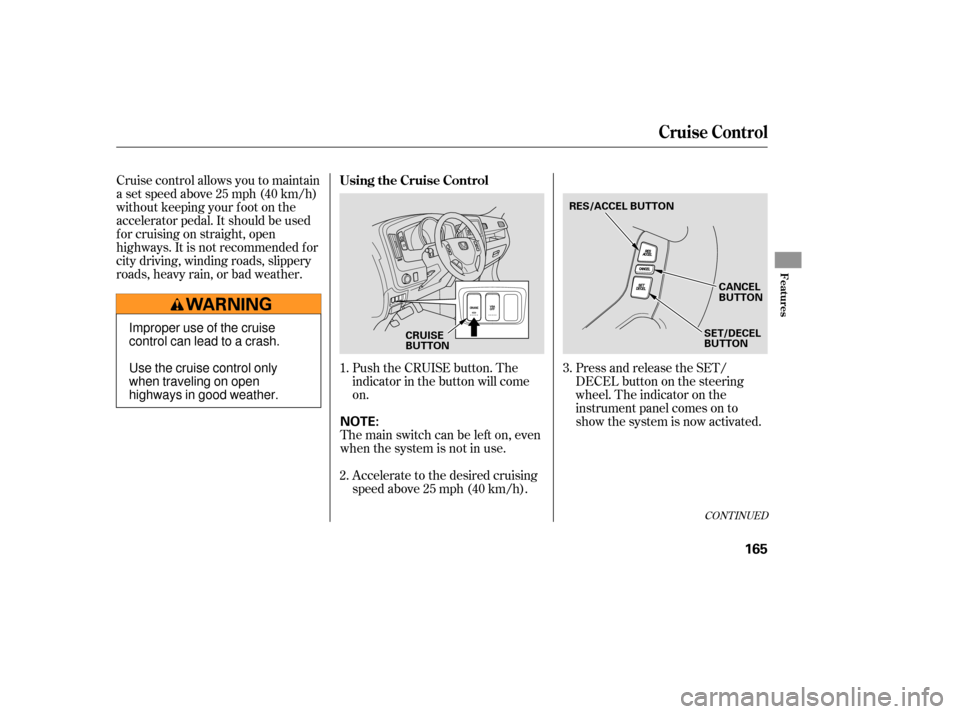
Cruise control allows you to maintain
asetspeedabove25mph(40km/h)
without keeping your f oot on the
accelerator pedal. It should be used
f or cruising on straight, open
highways. It is not recommended f or
city driving, winding roads, slippery
roads, heavy rain, or bad weather.Press and release the SET/
DECELbuttononthesteering
wheel. The indicator on the
instrument panel comes on to
show the system is now activated.
Push the CRUISE button. The
indicator in the button will come
on.
Accelerate to the desired cruising
speedabove25mph(40km/h).
1.
2.
3.
CONT INUED
Using the Cruise Control
Cruise Control
Features
165
CRUISE
BUTTONRES/ACCEL BUTTON
CANCEL
BUTTON
SET/DECEL
BUTTONImproper use of the cruise
control can lead to a crash.
Use the cruise control only
when traveling on open
highways in good weather. The main switch can be left on, even
when the system is not in use. NOTE:
Page 171 of 331
When you push the CANCEL button
or tap on the brake pedal, the system
will remember the previously set
cruising speed. To return to that
speed, accelerate to above 25 mph
(40 km/h) and then press and
release the RES/ACCEL button. The
CRUISE CONTROL indicator comes
on. The vehicle will accelerate to the
same cruising speed as bef ore.
Pressing the CRUISE button turns
the system off and erases the
previous cruising speed.
You can cancel cruise control in any
of these ways:
Tap the brake pedal.
Push the CANCEL button on the
steering wheel.
Push the CRUISE button on the
dashboard.
Resting your f oot on the brake pedal
causes cruise control to cancel. Even with cruise control turned on,
you can still use the accelerator
pedal to speed up f or passing. Af ter
completing the pass, take your foot
of f the accelerator pedal. The vehicle
will return to the set cruising speed. Resuming the Set Speed
Canceling Cruise Control
Cruise Control
Features
167
Page 180 of 331
�µ
Always check the TPMS malf unction
telltale af ter replacing one or more
tires or wheels on your vehicle to
ensure that the replacement or
alternate tires and wheels allow the
TPMS to continue to f unction
properly.
Your vehicle has also been equipped
with a TPMS malf unction indicator
to indicate when the system is not
operating properly. The TPMS
malf unction indicator is provided by
a separate telltale, which displays the
symbol ‘‘TPMS’’ when illuminated.
When the malf unction indicator is
illuminated,
the system may not be able to detect
or signal low tire pressure as
intended.
TPMS malf unctions may occur f or a
variety of reasons, including the
installation of replacement or
alternate tires or wheels on the
vehicle that prevent the TPMS f rom
f unctioning properly.
Tire Pressure Monitoring System (TPMS) Required Federal Explanation
176
Page 189 of 331

Larger or smaller wheels and tires
can interf ere with the operation of
your vehicle’s anti-lock brakes and
other systems.
Modif ying your steering wheel or
any other part of your vehicle’s
saf ety systems could make the
systems inef f ective.
If you plan to modif y your vehicle,
consult your dealer.
Removing parts f rom your vehicle,
or replacing components with
non-Honda components could
seriously af f ect your vehicle’s
handling, stability, and reliability.
Some examples are:
Lowering the vehicle with a non-
Honda suspension kit that
signif icantly reduces ground
clearance can allow the
undercarriage to hit speed bumps
or other raised objects, which
could cause the airbags to deploy.
Raising your vehicle with a
non-Honda suspension kit can
af f ect the handling and stability.
Non-Honda wheels, because they
are a universal design, can cause
excessive stress on suspension
components and will not be
compatible with the tire pressure
monitoring system.
Bef ore installing any electronic
accessory, have the installer
contact your dealer f or assistance.
If possible, have your dealer
inspect the f inal installation.
Do not install accessories on the
side pillars or across the rear
windows. In these areas,
accessories may interf ere with
proper operation of the side
curtain airbags.
A ccessories and Modif ications
Modif ying Your Vehicle
Bef ore Driving
185
Page 199 of 331

Youshoulddothefollowingchecks
and adjustmen ts before you drive
your vehicle.
Make sure all windows, mirrors,
and outside lights are clean and
unobstructed. Remove frost, snow,
or ice.
Check that the hood is fully closed.
Check that the tailgate is fully
closed when it is not used as an
exte nded pickup bed.
Vi sually check the tires. If a tire
looks low, use a gauge to check its
pressure.
Check that any items you may be
carrying are stored properly or
fastened down securely. Check
the adjustment of the
inside and outside mirrors (see
page ).
Check the steering wheel
ad justment (see page ).
Make sure the doors and In-Bed
Trunk are securely closed and
locked.
Fasten your seat belt. Check that
your passengers have fastened
their seat belts (see page ).
Wh en you start the engine, check
the gauges and indicato rs in the
instrument panel (see page ).
Check the seat adjustment (see
pages and ).
1.
2.
3.
4.
5.
6.
8. 7.
9.
10.
11. 14
110
79
59
98 100
Preparing to Drive
Driving
195