Page 75 of 331

This meter shows the number of
miles (U.S.) or kilometers (Canada)
driven since you last reset it.
There are two trip meters: TRIP A
and TRIP B. Switch between these
displays by pressing the SELECT
button repeatedly. Each trip meter
works independently, so you can
keep track of two dif f erent distances.To reset a trip meter, display it, and
then press and hold the RESET
button until the number resets to
‘‘0.0’’. Both trip meters will reset if
the vehicle’s battery goes dead or is
disconnected. And both continue to
track mileage, even when only one is
displayed. When you turn the ignition switch to
the ON (II) position, the meter you
last selected is displayed.
This shows how much f uel you have.
It may show slightly more or less
than the actual amount. The needle
returns to the bottom after you turn
of f the ignition.
Trip Meter Fuel Gauge
Gauges
Inst rument s and Cont rols
71
SELECT BUTTON
RESET BUTTON
Avoid driving with an extremely low
f uel level. Running out of f uel could
cause the engine to misf ire, damaging
the catalytic converter.
Page 78 of 331
�Î
�Î
�Î �Î
�Î
�Î
To
use the horn, press the pad around the ‘‘H’’ logo.
If equipped.
1
2
Controls
Near the Steering Wheel
74
SHIFT LEVER
CRUISE BUTTON
CRUISE
CONTROLS
HORN
STEERING WHEEL
ADJUSTMENT VTM-4
LOCK
Vehicle with navigation system is shown.
BED
LIGHT SWITCH
MULTI-CONTROL
LEVER
(WINDSHIELD WIPERS/
WASHERS/TURN SIGNALS/
HEADLIGHT HIGH BEAMS)
MOONROOF
SWITCH
INTERIOR LIGHT
CONTROL SWITCH
INSTRUMENT
PANEL
BRIGHTNESS
HEADLIGHT CONTROL
DIAL RESET
BUTTON
SELECT
BUTTON
REMOTE AUDIO
CONTROLS
(P.108)
(P.75) (P.120)
(P.76)
(P.165) (P.161)(P.79) (P.165)
(P.118)
(P.78)
(P.70)
(P.70) PASSENGER AIRBAG
OFF INDICATOR
(P.29)
HAZARD WARNING
BUTTON
(P.79)
SEAT HEATERS
(P.104) (P.203)
(P.211) VEHICLE STABILITY
ASSIST (VSA)
SYSTEM OFF SWITCH (P.197)
1
2
2 2
Page 79 of 331

�µ
�µ
OFF
INT: Intermittent
INT TIME ring
LO: Low speed
HI: High speed
MIST
Windshield washer (spray nozzles)
Turn signal
High beams
Flashhighbeams The multi-control lever has many
f unctions, including windshield
wipers and washers, turn signals,
headlight high beams, and headlight
high beam f lashing.
To select a position, turn the rotary
switch,pushthebuttonontheendof
the lever, or push the lever up, down,
f orward, or backward.
The wipers are not activated.
The length of the wiper interval is varied
automatically according to the
vehicle’s speed.
Vary the delay by turning the
INT TIME ring. If you turn it
to the shortest delay, the
wipers change to low speed
when the vehicle speed
exceeds 12 mph (20 km/h). The wipers run at low speed.
The wipers run at high speed. The wipers run at high speed
until you release the lever.
Push the
buttonontheendof the
multi-control lever. The
washers spray until you
release the button. The
wipers run at low speed, then
complete one more sweep
after you release the button.
1.
2.
3.
4.
5.
6.
7.
8.
9.
10. OFF:
INT :LO
HI
MIST :
Windshield Washer:
Multi-Control L ever
Inst rument s and Cont rols
75
Page 80 of 331
�µ�µ
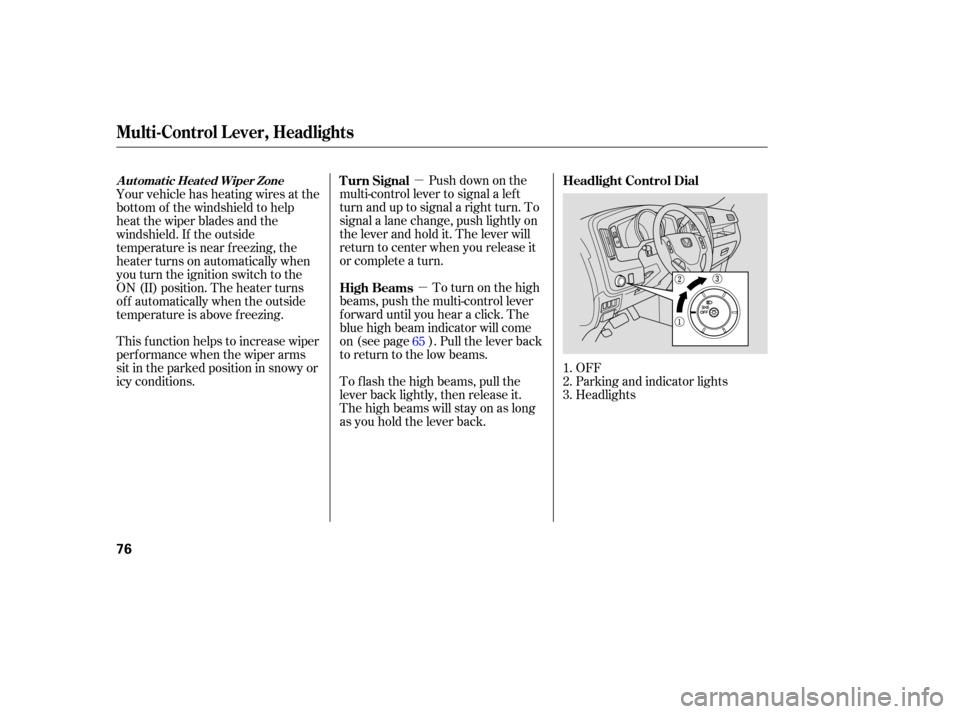
OFF
Parking and indicator lights
Headlights
Push
down on the
multi-control lever to signal a left
turn and up to signal a right turn. To
signal a lane change, push lightly on
the lever and hold it. The lever will
return to center when you release it
or complete a turn.
To turn on the high
beams, push the multi-control lever
fo rward until you hear a click. The
blue high beam indicator will come
on (see page ). Pull the lever back
to return to the low beams.
To f lash the high beams, pull the
lever back lightly, then release it.
The high beams will stay on as long
as you hold the lever back.
Your vehicle has heating wires at the
bottom of the windshield to help
heat the wiper blades and the
windshield. If the outside
temperature is near f reezing, the
heater turns on automatically when
you turn the ignition switch to the
ON (II) position. The heater turns
of f automatically when the outside
temperature is above f reezing.
This f unction helps to increase wiper
perf ormance when the wiper arms
sit in the parked position in snowy or
icy conditions.
1.
2.
3.
65 Headlight Control Dial
Turn Signal
High Beams
Automatic Heated Wiper Zone
Multi-Control L ever, Headlights
76
Page 81 of 331

�µIf you remove the key f rom the
ignition switch with the headlight
control dial on, but do not open the
door, the lights will turn of f af ter 10
minutes.
Turning the dial to
the ‘‘ ’’ position turns on the
parking lights, taillights, instrument
panel lights, and license plate lights.
Turning the dial to the ‘‘ ’’
position turns on the headlights. If
you leave the lights on and remove
the key from the ignition switch, you
will hear a reminder chime when you
open the driver’s door.
When the dial is in the ‘‘ ’’ or
‘‘ ’’ position, the lights on
indicator comes on as a reminder.
This indicator stays on if you leave
the lights on and turn the ignition
switch to the ACCESSORY (I) or
LOCK (0) position. The automatic lighting of f f eature
turns off the headlights, all other
exterior lights, and the instrument
panel lights within 15 seconds of
removing the key from the ignition
switch and closing the driver’s door. The lights will turn on again when
you unlock or open the driver’s door.
This feature activates if you leave
the headlight control dial in the
‘‘ ’’ or ‘‘ ’’ position, remove
the key, then open and close the
driver’s door. If you unlock the door, but do not
open it within 15 seconds, the lights
go of f . With the driver’s door open,
you will hear a lights-on reminder
chime.
Automatic Lighting Of f Feature
Headlights
Headlights
Inst rument s and Cont rols
77
Page 82 of 331

The dial on the instrument panel
controls the brightness of the
instrument panel lights and the
console compartment light. Turn the
dial to adjust the brightness.
With the headlight control dial of f ,
the high beam headlights and the
high beam indicator come on with
reduced brightness when you turn
the ignition switch to the ON (II)
position and release the parking
brake. They remain on until you turn
the ignition switch of f , even if you
set the parking brake.
The headlights revert to normal
operation when you turn them on
with the headlight control dial.
The instrument panel will illuminate
with reduced brightness when you
unlock and open the driver’s door.
The brightness will increase and go
to a normal level when you insert the
key in the ignition switch.If you do not insert the key in the
ignition switch af ter opening the
driver’s door, the illumination turns
of f about 30 seconds af ter you close
the door.
If you insert the key but do not turn
the ignition switch to the ON (II)
position, the illumination turns of f in
about 10 seconds.
The instrument panel brightness is
dimmedwhenyouturntheheadlight
controldialtothe‘‘ ’’or
‘‘ ’’ position to reduce glare at
night. To cancel it, turn the
instrument panel brightness control
dial upward f ully until you hear a
click.
Canadian models only
Instrument Panel Brightness
Daytime Running L ights
Headlights, Instrument Panel Brightness
78
INSTRUMENT PANEL
BRIGHTNESS CONTROL DIAL
Page 83 of 331

Push the lever up to lock the
steering wheel in position.
Make sure you have securely
locked the steering wheel in place
by trying to move it up and down.
Make any steering wheel adjustment
bef ore you start driving.
Move the steering wheel so it
points toward your chest, not
toward your f ace. Make sure you
can see the instrument panel
gauges and indicators. Push the lever on the lef t side of
the steering column all the way
down.
Pushthebuttontoturnonthe
hazard warning lights (f our-way
flashers). This causes all four
outside turn signals and both turn
indicators in the instrument panel to
f lash. Use the hazard warning lights
if you need to park in a dangerous
area near heavy traffic, or if your
vehicle is disabled. 3.
4.
1.
2. Steering Wheel A djustment
Hazard Warning Button
Hazard Warning Button, Steering Wheel A djustment
Inst rument s and Cont rols
79
Adjusting the steering wheel
position while driving may
cause you to lose control of the
vehicle and be seriously injured
inacrash.
Adjust the steering wheel only
when the vehicle is stopped.
Page 84 of 331
These keys contain electronic
circuits that are activated by the
immobilizer system. They will not
work to start the engine if the
circuits are damaged.
Protect the keys from direct
sunlight, high temperature, and
high humidity.
Donotdropthekeysorsetheavy
objects on them.
Keep the keys away from liquids.
If they get wet, dry them
immediately with a soft cloth.
The
master key fits all the locks on
your vehicle. The valet key works
only in the ignition and the driver’s
door lock. You can keep the glove
boxlockedwhenyouleaveyour
vehicle and the valet key at a parking
facility.
You can also keep the In-Bed Trunk
locked by using the main switch in
theglovebox(seepage ). Youshouldhavereceivedakey
number tag with your keys. You will
need this key number if you ever
have to get a lost key replaced. Use
only Honda-approved key blanks.
97
Keys
80
VALET KEY
(LIGHT GRAY)
MASTER KEY
WITH REMOTE
TRANSMITTER
KEY
NUMBER
TAG

