2007 GMC SIERRA CLASSIC tow
[x] Cancel search: towPage 293 of 674
Setting the Tone (Bass/Treble)
AUDIO:To adjust bass or treble, press and
release AUDIO until BAS (bass) or TRE (treble)
appears on the display. Then press and hold
the up or the down arrow to increase or to
decrease. If a station is weak or has static,
decrease the treble.
To adjust bass or treble to the middle position,
select BAS or TRE. Then press and hold AUDIO
for more than two seconds until you hear a
beep. B (balance) and a zero or T (treble) and a
zero appears on the display.
To adjust both tone controls and both speaker
controls to the middle position, rst end out of audio
mode by pressing another button, causing the radio
to perform that function or wait ve seconds for the
display to return to time of day. Then press and hold
AUDIO for more than two seconds until you hear a
beep. CEN (center) appears on the display.
Adjusting the Speakers (Balance/Fade)
AUDIO:To adjust the balance between the right
and the left speakers, press and release AUDIO
until BAL (balance) appears on the display. Then
press and hold the up or the down arrow to move
the sound toward the right or the left speakers.
To adjust the fade between the front and the rear
speakers, press and release AUDIO until FAD
(fade) appears on the display. Then press and hold
the up or the down arrow to move the sound toward
the front or the rear speakers.
To adjust balance or fade to the middle position,
select BAL or FAD. Then press and hold AUDIO for
more than two seconds until you hear a beep.
B (balance) and a zero or F (fade) and a zero
appears on the display.
To adjust both tone controls and both speaker
controls to the middle position, rst end out of audio
mode by pressing another button, causing the radio
to perform that function or wait ve seconds for the
display to return to time of day. Then press and hold
AUDIO for more than two seconds until you hear a
beep. CEN (center) appears on the display.
Fade may not be available if the vehicle is a regular
cab model.
293
Page 298 of 674

Setting the Tone (Bass/Treble)
AUDIO:Push and release the AUDIO knob until
BASS or TREB (treble) appears on the display.
Turn the knob to increase or to decrease.
The display will show the bass or treble level. If a
station is weak or noisy, decrease the treble.
To adjust the bass or treble to the middle position,
while it is displayed, push and hold the AUDIO
knob. The radio will produce one beep and adjust
the display level to the middle position.
To adjust all tone and speaker controls to the
middle position, push and hold the AUDIO knob
when no tone or speaker control is displayed. ALL
CENTERED will appear on the display, you will
hear a beep, and the display level will be adjusted
to the middle position.
AUTO EQ (Automatic Equalization):Press this
button to select customized equalization settings
designed for country/western, jazz, talk, pop, rock,
and classical. Selecting CUSTOM or changing
bass or treble, returns the EQ to the manual bass
and treble settings.The radio will save separate AUTO EQ settings
for each preset and source.
If the radio is equipped with the Bose®audio
system, the equalization settings are either
CUSTOM or TALK.
Adjusting the Speakers (Balance/Fade)
AUDIO:To adjust the balance between the
right and the left speakers, push and release the
AUDIO knob until BAL (balance) appears on
the display. Turn the knob to move the sound
toward the right or the left speakers.
To adjust the fade between the front and the rear
speakers, push and release the AUDIO knob
until FADE appears on the display. Turn the knob
to move the sound toward the front or the rear
speakers.
To adjust the balance or fade to the middle
position, while it is displayed, push the AUDIO
knob, then push it again and hold it until the radio
produces one beep. The balance or fade will
be adjusted to the middle position and the display
will show the speaker balance.
298
Page 308 of 674
Setting the Tone (Bass/Treble)
AUDIO:Push and release the AUDIO knob until
BASS or TREB (treble) appears on the display.
Turn the knob to increase or to decrease.
The display will show the bass or treble level. If a
station is weak or noisy, decrease the treble.
To adjust the bass or treble to the middle position
while it is displayed, push and hold the AUDIO
knob. The radio will produce one beep and adjust
the display level to the middle position.
To adjust all tone and speaker controls to the
middle position, push and hold the AUDIO knob
when no tone or speaker control is displayed. ALL
CENTERED will appear on the display, you will
hear a beep, and the display level will be adjusted
to the middle position.AUTO EQ (Automatic Equalization):Press this
button to select customized equalization settings
designed for country/western, jazz, talk, pop, rock,
and classical. Selecting CUSTOM or changing
bass or treble, returns the EQ to the manual bass
and treble settings.
The radio will save separate AUTO EQ settings
for each preset and source.
If the radio is equipped with the Bose
®audio
system, the equalization settings are either
CUSTOM or TALK.
Adjusting the Speakers (Balance/Fade)
AUDIO:To adjust the balance between the
right and the left speakers, push and release the
AUDIO knob until BAL (balance) appears on
the display. Turn the knob to move the sound
toward the right or the left speakers.
To adjust the fade between the front and the rear
speakers, push and release the AUDIO knob
until FADE appears on the display. Turn the knob
to move the sound toward the front or the rear
speakers.
308
Page 322 of 674
AUTO EQ (Automatic Equalization):Press this
button to select customized equalization settings
designed for country/western, jazz, talk, pop, rock,
and classical.
The radio will save separate AUTO EQ settings
for each preset and source.
If the radio is equipped with the Bose
®audio
system, the equalization settings are either
CUSTOM or TALK.
Adjusting the Speakers (Balance/Fade)
AUDIO:To adjust the balance between the
right and the left speakers, push and release the
AUDIO knob until BAL (balance) appears on
the display. Turn the knob to move the sound
toward the right or the left speakers.
To adjust the fade between the front and rear
speakers, push and release the AUDIO knob until
FAD (fade) appears on the display. Turn the
knob to move the sound toward the front or the
rear speakers.
To adjust the balance or fade to the middle
position while it is displayed, push and hold the
AUDIO knob. The radio will produce one beep and
adjust the display level to the middle position.To adjust all tone and speaker controls to the
middle position, push and hold the AUDIO knob
when no tone or speaker controls are displayed.
ALL CENTERED will appear on the display
and you will hear a beep.
Finding a Program Type (PTY) Station
(RDS and XM™)
To select and nd a desired PTY perform the
following:
1. Press the TYPE button to activate program
type select mode. P-TYPE and the last
selected PTY will appear on the display.
2. Turn the TYPE knob or press and release the
TYPE button to select a PTY.
3. Once the desired PTY is displayed, press
either the TYPE or the SEEK arrows to
select and to take you to the PTY’s rst
station.
4. To go to another station within that PTY,
press the TYPE button then, press either
the TYPE or the SEEK arrows once. If
the PTY is not displayed, go back to Step 1.
5. Press either the TYPE or the SEEK arrows
twice to exit program type select mode.
322
Page 345 of 674
Problem Recommended Action
After stopping the player,
I push Play but
sometimes the DVD
starts where I left off and
sometimes at the
beginning.If the stop button was
pressed one time, the
DVD player will resume
playing where the DVD
was stopped. If the stop
button was pressed
two times the DVD player
will begin to play from the
beginning of the DVD.
The auxiliary source is
running but there is no
picture or sound.Check that the DVD
player is in the auxiliary
source mode.
Check the auxiliary input
connections at both
devices.
My disc is stuck in the
player. The Load/Eject
button does not work.Turn the DVD power off,
then on, then press the
load/eject button on the
DVD player.
Do not attempt to forcibly
remove the disc from the
DVD player. This could
permanently damage the
disc and DVD player.Problem Recommended Action
Sometimes the wireless
headphone audio cuts out
or buzzes.Check for obstructions,
low batteries, reception
range, and interference
from cellular telephone
towers or by using your
cellular telephone in the
vehicle.
Check that the
headphones are facing
the front of the vehicle.
I lost the remote and/or
the headphones.See your dealer for
assistance.
The DVD is playing, but
there is no picture or
sound.Check that the DVD
player is in DVD mode.
The audio/video skips
or jumps.The DVD or CD could be
dirty, scratched, or
damaged.
The audio from the radio
for the Radio with
Six-Disc CD and XM™
has taken over the audio
from the DVD or CD when
using the wired
headphones.The RSE is working
correctly.
Use the wireless
headphones or have the
front seat passengers
listen to another audio
source.
345
Page 355 of 674
Your Driving, the Road, and
Your Vehicle............................................ 356
Defensive Driving...................................... 356
Drunken Driving........................................ 357
Control of a Vehicle.................................. 360
Braking...................................................... 360
Anti-Lock Brake System (ABS).................. 361
Braking in Emergencies............................. 363
Traction Assist System (TAS).................... 363
Manual Selectable Ride............................. 365
Locking Rear Axle..................................... 366
Steering.................................................... 367
Off-Road Recovery.................................... 369
Passing..................................................... 369
Loss of Control.......................................... 371
Off-Road Driving........................................ 372
Driving at Night......................................... 391
Driving in Rain and on Wet Roads............ 392
City Driving............................................... 396
Freeway Driving........................................ 397Before Leaving on a Long Trip.................. 398
Highway Hypnosis..................................... 399
Hill and Mountain Roads........................... 400
Winter Driving........................................... 402
If Your Vehicle is Stuck in Sand, Mud,
Ice, or Snow.......................................... 406
Rocking Your Vehicle to Get It Out........... 407
Recovery Hooks........................................ 408
Loading Your Vehicle................................ 409
Adding a Snow Plow or Similar
Equipment.............................................. 416
Truck-Camper Loading Information............ 421
Pickup Conversion to Chassis Cab.............. 423
Towing........................................................ 423
Towing Your Vehicle ................................. 423
Recreational Vehicle Towing...................... 424
Towing a Trailer........................................ 429
Trailer Recommendations.......................... 460
Power Take-Off (PTO)............................... 461
Section 4 Driving Your Vehicle
355
Page 374 of 674
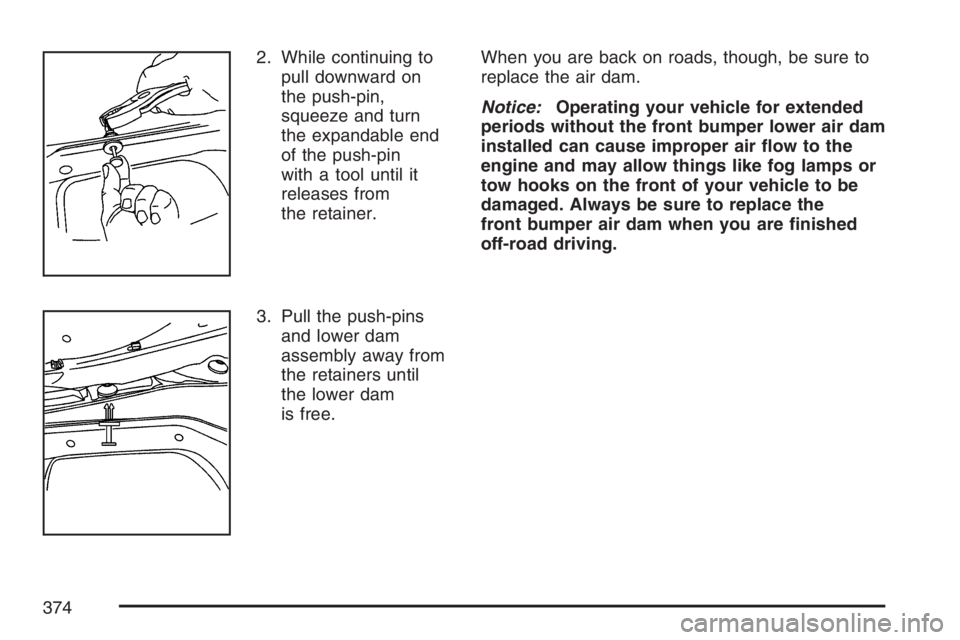
2. While continuing to
pull downward on
the push-pin,
squeeze and turn
the expandable end
of the push-pin
with a tool until it
releases from
the retainer.
3. Pull the push-pins
and lower dam
assembly away from
the retainers until
the lower dam
is free.When you are back on roads, though, be sure to
replace the air dam.
Notice:Operating your vehicle for extended
periods without the front bumper lower air dam
installed can cause improper air ow to the
engine and may allow things like fog lamps or
tow hooks on the front of your vehicle to be
damaged. Always be sure to replace the
front bumper air dam when you are nished
off-road driving.
374
Page 375 of 674
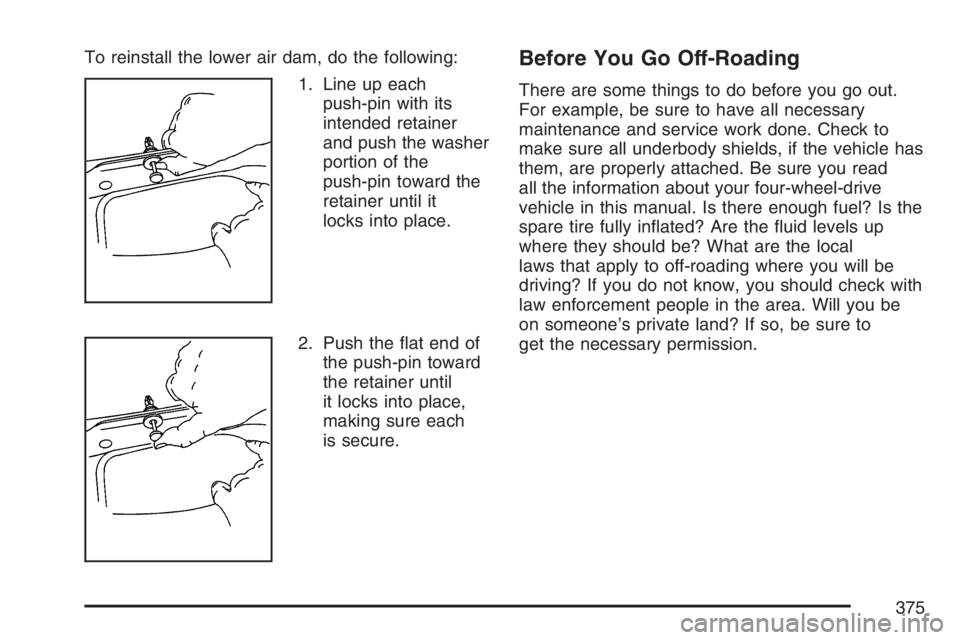
To reinstall the lower air dam, do the following:
1. Line up each
push-pin with its
intended retainer
and push the washer
portion of the
push-pin toward the
retainer until it
locks into place.
2. Push the at end of
the push-pin toward
the retainer until
it locks into place,
making sure each
is secure.Before You Go Off-Roading
There are some things to do before you go out.
For example, be sure to have all necessary
maintenance and service work done. Check to
make sure all underbody shields, if the vehicle has
them, are properly attached. Be sure you read
all the information about your four-wheel-drive
vehicle in this manual. Is there enough fuel? Is the
spare tire fully inated? Are the uid levels up
where they should be? What are the local
laws that apply to off-roading where you will be
driving? If you do not know, you should check with
law enforcement people in the area. Will you be
on someone’s private land? If so, be sure to
get the necessary permission.
375