2007 GMC SIERRA CLASSIC CD player
[x] Cancel search: CD playerPage 351 of 674
The tape player should be cleaned regularly after
every 50 hours of use. The radio may display
CLEAN to indicate that the tape player has been
used for 50 hours without resetting the tape
clean timer. If this message appears on the
display, the cassette tape player needs to be
cleaned. It will still play tapes, but it should
be cleaned as soon as possible to prevent damage
to the tapes and player. If there is a reduction in
sound quality, try a known good cassette to
see if the tape or the tape player is at fault. If this
other cassette has no improvement in sound
quality, clean the tape player.
For best results, use a scrubbing action,
non-abrasive cleaning cassette with pads which
scrub the tape head as the hubs of the cleaner
cassette turn. The recommended cleaning cassette
is available through your dealer.When cleaning the cassette tape player with the
recommended non-abrasive cleaning cassette, it is
possible that the cassette may eject, because
the cut tape detection feature on the radio
may recognize it as a broken tape, in error. To
prevent the cleaning cassette from being ejected,
use the following steps:
1. Turn the ignition on.
2. Turn the radio off.
3. Press and hold the TAPE DISC button for
ve seconds. READY will appear on the
display and the cassette symbol will ash for
ve seconds.
4. Insert the scrubbing action cleaning cassette.
5. Eject the cleaning cassette after the
manufacturer’s recommended cleaning time.
When the cleaning cassette has been ejected,
the cut tape detection feature will be active
again.
351
Page 352 of 674
A non-scrubbing action, wet-type cleaner which
uses a cassette with a fabric belt to clean the tape
head can be used. This type of cleaning cassette
will not eject on its own. A non-scrubbing
action cleaner may not clean as thoroughly as the
scrubbing type cleaner. The use of a
non-scrubbing action, dry-type cleaning cassette is
not recommended.
After the player is cleaned, press and hold the
eject button for ve seconds to reset the CLEAN
indicator. The radio will display --- or CLEANED to
show the indicator was reset.
Cassettes are subject to wear and the sound
quality may degrade over time. Always make sure
the cassette tape is in good condition before
the tape player is serviced.Care of Your CDs and DVDs
Handle CDs carefully. Store them in their original
cases or other protective cases and away from
direct sunlight and dust. The CD player scans the
bottom surface of the disc. If the surface of a
CD is damaged, such as cracked, broken,
or scratched, the CD will not play properly or not
at all. If the surface of a CD is soiled, take a
soft, lint free cloth or dampen a clean, soft cloth in
a mild, neutral detergent solution mixed with
water, and clean it. Make sure the wiping process
starts from the center to the edge.
Do not touch the bottom side of a CD while
handling it; this could damage the surface. Pick up
CDs by grasping the outer edges or the edge of
the hole and the outer edge.
Care of the CD and DVD Player
The use of CD lens cleaners for CDs is not
advised, due to the risk of contaminating the lens
of the CD optics with lubricants internal to the
CD mechanism.
352
Page 660 of 674
Appearance Care (cont.)
Washing Your Vehicle.............................. 592
Weatherstrips........................................... 592
Windshield and Wiper Blades................... 594
Ashtray(s).................................................... 229
Audio System(s).......................................... 289
AM-FM Radio.......................................... 291
Audio Steering Wheel Controls................. 349
Care of Your Cassette Tape Player.......... 350
Care of Your CD and DVD Player............ 352
Care of Your CDs and DVDs................... 352
Chime Level Adjustment........................... 353
Fixed Mast Antenna................................. 353
Radio with Cassette and CD.................... 304
Radio with CD......................................... 294
Radio with Six-Disc CD............................ 318
Rear Seat Audio (RSA)............................ 347
Setting the Time for Radios with
Radio Data Systems (RDS).................. 291
Setting the Time for Radios without
Radio Data Systems (RDS).................. 290
Theft-Deterrent Feature............................ 348
Understanding Radio Reception............... 350
XM™ Satellite Radio Antenna System...... 353
Automatic Headlamp System....................... 223Automatic Transmission
Fluid...............................................494, 497
Operation................................................. 140
Auxiliary Roof Mounted Lamp Switch.......... 226
B
Battery........................................................ 520
Battery Warning Light.................................. 253
Before Leaving on a Long Trip.................... 398
Brake
Anti-Lock Brake System (ABS)................. 361
Emergencies............................................ 363
Parking.................................................... 169
System Warning Light.............................. 254
Brakes........................................................ 517
Braking....................................................... 360
Braking in Emergencies............................... 363
Break-In, New Vehicle................................. 134
Bulb Replacement....................................... 532
Center High-Mounted Stoplamp (CHMSL)
and Cargo Lamp.................................. 537
Front Turn Signal, Sidemarker and
Daytime Running Lamps....................... 534
Halogen Bulbs......................................... 532
660
Page 661 of 674
Bulb Replacement (cont.)
Headlamps............................................... 533
License Plate Lamps................................ 541
Pickup Box Identication and Fender
Marker Lamps...................................... 538
Replacement Bulbs.................................. 541
Roof Marker Lamps................................. 535
Taillamps, Turn Signal, Stoplamps
and Back-up Lamps.............................. 539
Buying New Tires........................................ 556
C
Calibration..........................................176, 180
California Fuel............................................. 471
California Proposition 65 Warning................ 469
Canadian Owners........................................... 3
Capacities and Specications...................... 609
Carbon Monoxide..............127, 174, 402, 429
Care of
Safety Belts............................................. 592
Your Cassette Tape Player....................... 350
Your CD and DVD Player........................ 352
Your CDs and DVDs................................ 352
Cargo Lamp................................................ 228
Center Console Storage Area...................... 202Center Front Passenger Position,
Safety Belts............................................... 37
Center High-Mounted Stoplamp
(CHMSL) and Cargo Lamp...................... 537
Chains, Tire................................................. 562
Check
Engine Light............................................ 258
Checking Things Under the Hood ................ 478
Chemical Paint Spotting .............................. 596
Child Restraints
Child Restraint Systems............................. 51
Infants and Young Children........................ 47
Lower Anchors and Tethers
for Children............................................ 58
Older Children........................................... 44
Securing a Child Restraint in a
Rear Seat Position................................. 71
Securing a Child Restraint in the
Center Front Seat Position..................... 74
Securing a Child Restraint in the Right
Front Seat Position (Crew Cab).............. 74
Securing a Child Restraint in the Right
Front Seat Position (Regular and
Extended Cab)................................ 78, 85
Where to Put the Restraint........................ 55
Chime Level Adjustment .............................. 353
661
Page 669 of 674
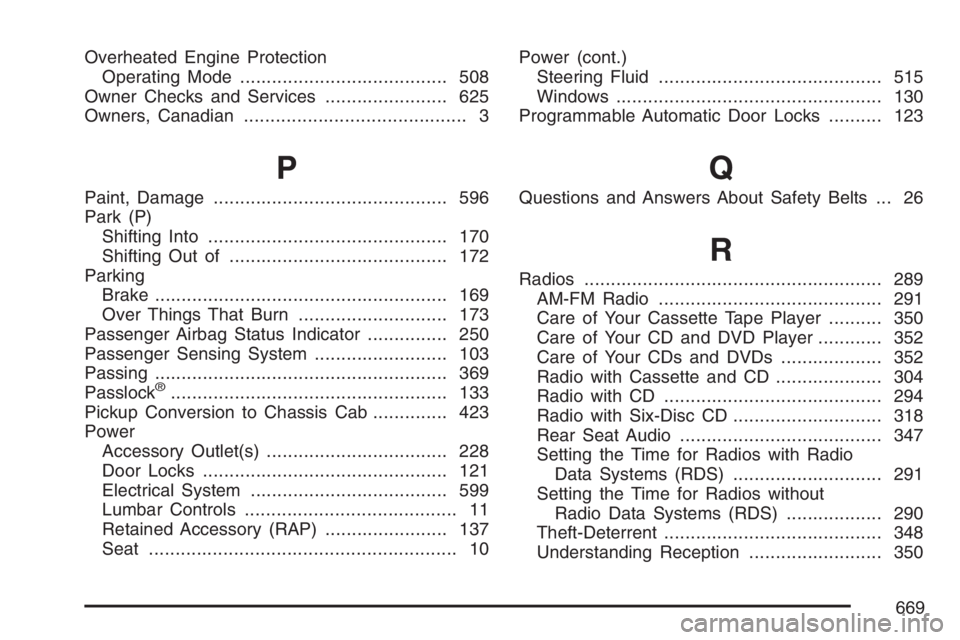
Overheated Engine Protection
Operating Mode....................................... 508
Owner Checks and Services....................... 625
Owners, Canadian.......................................... 3
P
Paint, Damage............................................ 596
Park (P)
Shifting Into............................................. 170
Shifting Out of......................................... 172
Parking
Brake....................................................... 169
Over Things That Burn............................ 173
Passenger Airbag Status Indicator............... 250
Passenger Sensing System......................... 103
Passing....................................................... 369
Passlock
®.................................................... 133
Pickup Conversion to Chassis Cab.............. 423
Power
Accessory Outlet(s).................................. 228
Door Locks.............................................. 121
Electrical System..................................... 599
Lumbar Controls........................................ 11
Retained Accessory (RAP)....................... 137
Seat.......................................................... 10Power (cont.)
Steering Fluid.......................................... 515
Windows.................................................. 130
Programmable Automatic Door Locks.......... 123
Q
Questions and Answers About Safety Belts ... 26
R
Radios........................................................ 289
AM-FM Radio.......................................... 291
Care of Your Cassette Tape Player.......... 350
Care of Your CD and DVD Player............ 352
Care of Your CDs and DVDs................... 352
Radio with Cassette and CD.................... 304
Radio with CD......................................... 294
Radio with Six-Disc CD............................ 318
Rear Seat Audio...................................... 347
Setting the Time for Radios with Radio
Data Systems (RDS)............................ 291
Setting the Time for Radios without
Radio Data Systems (RDS).................. 290
Theft-Deterrent......................................... 348
Understanding Reception......................... 350
669