2007 GMC ACADIA door lock
[x] Cancel search: door lockPage 186 of 554
Fog Lamps
Use the fog lamps for better vision in foggy or
misty conditions.
-(Fog Lamps):The fog lamps button is located
on the exterior lamps control. The exterior lamps
control is located on the instrument panel to the
left of the steering column.
The ignition must be on for the fog lamps to work.
Press the exterior lamps button to turn the fog
lamps on or off. A light will come on in the
instrument panel cluster when the fog lamps
are in use.
When the headlamps are changed to high-beam,
the fog lamps will turn off. The fog lamps come
back on again when the high-beam headlamps are
turned off.
Some localities have laws that require the
headlamps to be on along with the fog lamps.
Instrument Panel Brightness
D(Instrument Panel Brightness):The knob
with this symbol on it is located next to the exterior
lamps control. Push the knob in all the way until
it pops out and then turn the knob clockwise
to brighten or counterclockwise to dim the lights.
Push the knob back in when nished.
Courtesy Lamps
When a door is opened, the courtesy lamps
automatically come on. They make it easy for you
to enter and leave your vehicle. You can also
manually turn these lamps on by fully turning the
instrument panel brightness control clockwise.
The reading lamps, located on the headliner, can
be turned on or off independent of the automatic
courtesy lamps, when the doors are closed.
186
Page 187 of 554
Entry Lighting
Your vehicle may have courtesy lamps that will
come on and stay on for a set time whenever
the unlock symbol is pressed on the Remote
Keyless Entry (RKE) Transmitter, if the vehicle
has one.
If a door is opened, the lamps will stay on while
it is open and then turn off automatically about
25 seconds after the door is closed. If the
unlock symbol is pressed and you do not
open a door, the lamps will turn off after about
20 seconds.
Entry lighting includes a feature called theater
dimming. With theater dimming, the lamps do not
turn off at the end of the delay time. Instead,
they slowly dim after the delay time until they go
out. The delay time is canceled if you turn the
ignition key to ON or press the power door
lock switch. The lamps will dim right away.
When the ignition is on, illuminated entry is
inactive, which means the courtesy lamps will
not come on unless a door is opened.
Delayed Entry Lighting
Delayed entry lighting illuminates the interior for
a period of time after all the doors have been
closed.
The ignition must be off for delayed entry lighting
to work. Immediately after all the doors have
been closed, the delayed entry lighting feature
will continue to work until one of the following
occurs:
The ignition is in ON.
The doors are locked.
An illumination period of 25 seconds
has elapsed.
If during the illumination period a door is opened,
the timed illumination period will be canceled
and the interior lamps will remain on because a
door is open.
187
Page 188 of 554
Delayed Exit Lighting
This feature illuminates the interior for a period of
time after the key is removed from the ignition.
The ignition must be off for delayed exit lighting to
work. When the key is removed, interior illumination
will activate and remain on until one of the following
occurs:
The ignition is in ON.
The power door locks are activated.
An illumination period of 20 seconds
has elapsed.
If during the illumination period a door is opened,
the timed illumination period will be canceled
and the interior lamps will remain on because a
door is open.
Parade Dimming
The instrument panel has an added feature called
parade mode. It automatically prohibits the
dimming of the instrument panel displays during
the daylight while the headlamps are on so
that you will still be able to see the displays.
Reading Lamps
The vehicle has reading lamps that also act as the
dome lamp. Press the button to turn them on and off.
Electric Power Management
The vehicle has Electric Power Management (EPM)
that estimates the battery’s temperature and state
of charge. It then adjusts the voltage for best
performance and extended life of the battery.
When the battery’s state of charge is low, the
voltage is raised slightly to quickly put the charge
back in. When the state of charge is high, the
voltage is lowered slightly to prevent overcharging.
If the vehicle has a voltmeter gage or voltage
display on the Driver Information Center (DIC),
you may see the voltage move up or down. This
is normal. If there is a problem, an alert will be
displayed.
The battery can be discharged at idle if the
electrical loads are very high. This is true for all
vehicles. This is because the generator (alternator)
may not be spinning fast enough at idle to
produce all the power that is needed for very
high electrical loads.
188
Page 257 of 554

Choose one of the available settings and press
the set/reset button while it is displayed on the
DIC to select it.
You can also change the language by pressing
the trip odometer reset stem. See “Language”
under DIC Operation and Displays (Without DIC
Buttons) earlier in this section for more information.
AUTO DOOR LOCK
This feature allows you to select when the vehicle’s
doors will automatically lock. SeeProgrammable
Automatic Door Locks on page 107for more
information.
Press the customization button until AUTO DOOR
LOCK appears on the DIC display. Press the
set/reset button once to access the settings for this
feature. Then press the customization button to
scroll through the following settings:
SHIFT OUT OF PARK (default):The doors will
automatically lock when the vehicle is shifted out
of PARK (P).
AT VEHICLE SPEED:The doors will
automatically lock when the vehicle speed is
above 8 mph (13 km/h) for three seconds.NO CHANGE:No change will be made to this
feature. The current setting will remain.
Choose one of the available settings and press
the set/reset button while it is displayed on the
DIC to select it.
AUTO DOOR UNLOCK
This feature allows you to select whether or not to
turn off the automatic door unlocking feature. It also
allows you to select which doors and when the
doors will automatically unlock. SeeProgrammable
Automatic Door Locks on page 107for more
information.
Press the customization button until AUTO DOOR
UNLOCK appears on the DIC display. Press
the set/reset button once to access the settings
for this feature. Then press the customization
button to scroll through the following settings:
OFF:None of the doors will automatically unlock.
DRIVER AT KEY OUT:Only the driver’s door
will unlock when the key is taken out of the
ignition.
257
Page 258 of 554

DRIVER IN PARK:Only the driver’s door will
unlock when the vehicle is shifted into PARK (P).
ALL AT KEY OUT:All of the doors will unlock
when the key is taken out of the ignition.
ALL IN PARK (default):All of the doors will
unlock when the vehicle is shifted into PARK (P).
NO CHANGE:No change will be made to this
feature. The current setting will remain.
Choose one of the available settings and press
the set/reset button while it is displayed on the
DIC to select it.
REMOTE DOOR LOCK
This feature allows you to select the type of
feedback you will receive when locking the vehicle
with the Remote Keyless Entry (RKE) transmitter.
You will not receive feedback when locking the
vehicle with the RKE transmitter if the doors are
open. SeeRemote Keyless Entry (RKE) System
Operation on page 100for more information.Press the customization button until REMOTE
DOOR LOCK appears on the DIC display. Press
the set/reset button once to access the settings
for this feature. Then press the customization
button to scroll through the following settings:
OFF:There will be no feedback when you press
the lock button on the RKE transmitter.
LIGHTS ONLY:The exterior lamps will ash
when you press the lock button on the RKE
transmitter.
HORN ONLY:The horn will sound on the second
press of the lock button on the RKE transmitter.
HORN & LIGHTS (default):The exterior
lamps will ash when you press the lock button
on the RKE transmitter, and the horn will
sound when the lock button is pressed again
within ve seconds of the previous command.
NO CHANGE:No change will be made to
this feature. The current setting will remain.
Choose one of the available settings and press
the set/reset button while it is displayed on the
DIC to select it.
258
Page 259 of 554

REMOTE DOOR UNLOCK
This feature allows you to select the type of
feedback you will receive when unlocking the
vehicle with the Remote Keyless Entry (RKE)
transmitter. You will not receive feedback when
unlocking the vehicle with the RKE transmitter if the
doors are open. SeeRemote Keyless Entry (RKE)
System Operation on page 100for more
information.
Press the customization button until REMOTE
DOOR UNLOCK appears on the DIC display.
Press the set/reset button once to access
the settings for this feature. Then press the
customization button to scroll through the
following settings:
LIGHTS OFF:The exterior lamps will not ash
when you press the unlock button on the
RKE transmitter.
LIGHTS ON (default):The exterior lamps will
ash when you press the unlock button on
the RKE transmitter.
NO CHANGE:No change will be made to this
feature. The current setting will remain.Choose one of the available settings and press
the set/reset button while it is displayed on the
DIC to select it.
DELAY DOOR LOCK
This feature allows you to select whether or not
the locking of the vehicle’s doors and liftgate
will be delayed. When locking the doors and
liftgate with the power door lock switch and a
door or the liftgate is open, this feature will delay
locking the doors and liftgate until ve seconds
after the last door is closed. You will hear
three chimes to signal that the delayed locking
feature is in use. The key must be out of the
ignition for this feature to work. You can
temporarily override delayed locking by pressing
the power door lock switch twice or the lock
button on the RKE transmitter twice. SeeDelayed
Locking on page 107for more information.
Press the customization button until DELAY DOOR
LOCK appears on the DIC display. Press the
set/reset button once to access the settings for this
feature. Then press the customization button to
scroll through the following settings:
OFF:There will be no delayed locking of the
vehicle’s doors.
259
Page 260 of 554

ON (default):The doors will not lock until
ve seconds after the last door or the liftgate
is closed.
NO CHANGE:No change will be made to this
feature. The current setting will remain.
Choose one of the available settings and press
the set/reset button while it is displayed on the
DIC to select it.
EXIT LIGHTING
This feature allows you to select the amount of
time you want the exterior lamps to remain
on when it is dark enough outside. This happens
after the key is turned from ON to OFF.
Press the customization button until EXIT
LIGHTING appears on the DIC display. Press the
set/reset button once to access the settings for
this feature. Then press the customization button
to scroll through the following settings:
OFF:The exterior lamps will not turn on.
30 SECONDS (default):The exterior lamps will
stay on for 30 seconds.
1 MINUTE:The exterior lamps will stay on for
one minute.2 MINUTES:The exterior lamps will stay on for
two minutes.
NO CHANGE:No change will be made to this
feature. The current setting will remain.
Choose one of the available settings and press
the set/reset button while it is displayed on the
DIC to select it.
APPROACH LIGHTING
This feature allows you to select whether or not to
have the exterior lights turn on briey during
low light periods after unlocking the vehicle using
the Remote Keyless Entry (RKE) transmitter.
Press the customization button until APPROACH
LIGHTING appears on the DIC display. Press
the set/reset button once to access the settings for
this feature. Then press the customization
button to scroll through the following settings:
OFF:The exterior lights will not turn on when you
unlock the vehicle with the RKE transmitter.
ON (default):If it is dark enough outside, the
exterior lights will turn on briey when you unlock
the vehicle with the RKE transmitter.
260
Page 362 of 554
Tire and Loading Information Label
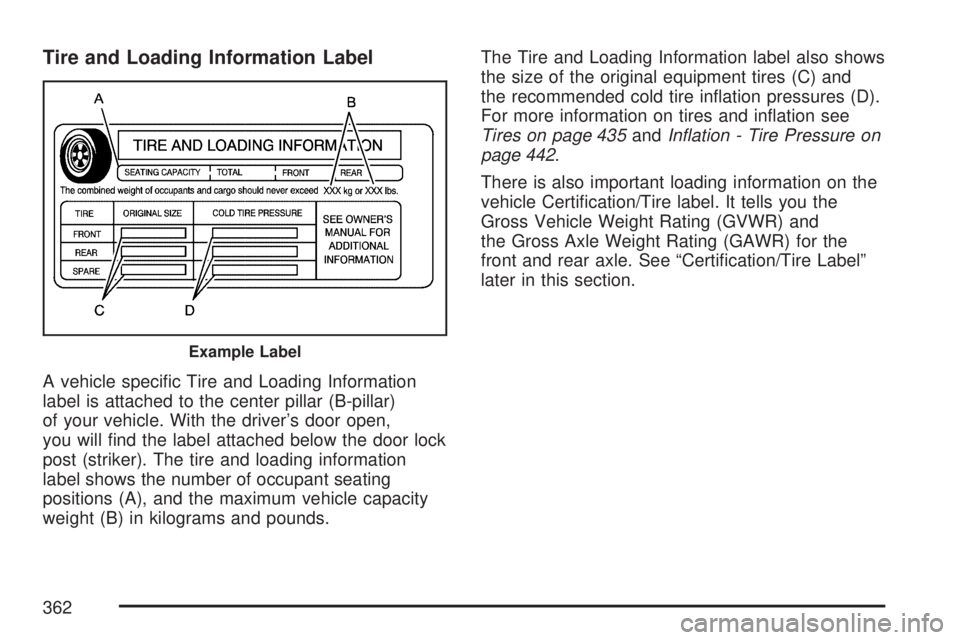
A vehicle specic Tire and Loading Information
label is attached to the center pillar (B-pillar)
of your vehicle. With the driver’s door open,
you will nd the label attached below the door lock
post (striker). The tire and loading information
label shows the number of occupant seating
positions (A), and the maximum vehicle capacity
weight (B) in kilograms and pounds.The Tire and Loading Information label also shows
the size of the original equipment tires (C) and
the recommended cold tire ination pressures (D).
For more information on tires and ination see
Tires on page 435andInflation - Tire Pressure on
page 442.
There is also important loading information on the
vehicle Certication/Tire label. It tells you the
Gross Vehicle Weight Rating (GVWR) and
the Gross Axle Weight Rating (GAWR) for the
front and rear axle. See “Certication/Tire Label”
later in this section.
Example Label
362