2007 GMC ACADIA rear entertainment
[x] Cancel search: rear entertainmentPage 292 of 554

y(Menu):Press this button to access the DVD
menu. The DVD menu is different on every
DVD. Use the pushbuttons located under the
navigation arrows to navigate the cursor through
the DVD menu. After making a selection press
the enter button. This button only operates when
using a DVD.
Nav (Navigate):Press this button to display
directional arrows for navigating through the
menus.
q(Return):Press this button to exit the
current active menu and return to the previous
menu. This button operates only when a DVD is
playing and a menu is active.
DVD-A (Audio) Display Buttons
Once a DVD-A is inserted, radio display menu
shows several tag options for DVD playing. Press
the pushbuttons located under any desired tag
option during DVD playback. See the tag options
listed below for more information.The rear seat operator can navigate the DVD-A
menus and controls through the remote control.
See “Remote Control”, underRear Seat
Entertainment System on page 311for more
information. The Video Screen does not
automatically power on when the DVD-A is
inserted into the DVD slot. It must be manually
turned on by the rear seat occupant through
the remote control power button.
r/j(Play/Pause):Press either the play or
pause icon displayed on the radio system,
to toggle between pausing or restarting playback
of a DVD. If the forward arrow is showing on
display, the system is in pause mode. If the pause
icon is showing on display, the system is in
playback mode.
qGroupr:Press this button to cycle through
musical groupings on the DVD-A disc.
Nav (Navigate):Press this button to display
directional arrows for navigating through the
menus.
292
Page 295 of 554

O(Power/Volume):Turn this knob clockwise or
counterclockwise to increase or decrease the
volume of the portable player. You might need
to do additional volume adjustments from
the portable device if the volume does not go
loud or soft enough.
BAND:Press this button to listen to the radio
when a portable audio device is playing. The
portable audio device continues playing, so you
might want to stop it or power it off.
DVD/CD AUX (CD/Auxiliary):Press this button
to cycle through DVD, CD, or Auxiliary when
listening to the radio. The DVD/CD text label and
a message showing track or chapter number
displays when a disc is in either slot. Press this
button again and the system automatically
searches for an auxiliary input device, such as a
portable audio player. If a portable audio player is
not connected, “No aux input device” displays.
If a disc is in both the DVD slot and the CD slot the
DVD/CD AUX button cycles between the two
sources and not indicate “No aux input device”.
If a front auxiliary device is connected, the
DVD/CD AUX button cycles through all available
options, such as: DVD slot, CD slot, Front
Auxiliary, and Rear Auxiliary (if available).See “Using the Auxiliary Input Jack(s)” later in this
section, or “Audio/Video (A/V) Jacks” under,
Rear Seat Entertainment System on page 311for
more information.
Using an MP3 (Radio with CD or
Six-Disc CD Player)
MP3/WMA CD-R or CD-RW Disc
The radio plays MP3/WMA les that were recorded
on a CD-R or CD-RW disc. The les can be
recorded with the following xed bit rates: 32 kbps,
40 kbps, 56 kbps, 64 kbps, 80 kbps, 96 kbps,
112 kbps, 128 kbps, 160 kbps, 192 kbps,
224 kbps, 256 kbps, and 320 kbps or a variable
bit rate. Song title, artist name, and album
are available for display by the radio when
recorded using ID3 tags version 1 and 2.
Compressed Audio
The radio also plays discs that contain both
uncompressed CD audio (.CDA les) and
MP3/WMA les. By default the radio shows the
MP3 label on the left side of the screen but
plays both le formats in the order in which
they were recorded to the disc.
295
Page 308 of 554

BAND:Press this button to listen to the radio
when a CD or a DVD is playing. The CD or DVD
remains inside the radio for future listening or
viewing entertainment.
DVD/CD AUX (Auxiliary):Press this button
to cycle through DVD, CD, or Auxiliary when
listening to the radio. The DVD/CD text label
and a message showing track or chapter
number displays when a disc is in either slot.
Press this button again and the system
automatically searches for an auxiliary input
device, such as a portable audio player.
If a portable audio player is not connected,
“No Aux Input Device” displays. If a disc is in
both the DVD slot and the CD slot the DVD/CDAUX button cycles between the two sources and
not indicate “No Aux Input Device”. If a front
auxiliary device is connected, the DVD/CD AUX
button cycles through all available options,
such as: DVD slot, CD slot, Front Auxiliary, and
Rear Auxiliary (if available). See “Using the
Auxiliary Input Jack(s)” later in this section, or
“Audio/Video (A/V) Jacks” under,Rear Seat
Entertainment System on page 311for more
information.
If a MP3/WMA is inserted into top DVD slot, the
rear seat operator can turn on the video screen
and use the remote control to navigate the
CD (tracks only) through the remote control.
308
Page 311 of 554

Navigation/Radio System
Your vehicle may have a navigation radio system.
The navigation system has built-in features
intended to minimize driver distraction. Technology
alone, no matter how advanced, can never
replace your own judgment. See the Navigation
System manual for some tips to help you
reduce distractions while driving.
Rear Seat Entertainment System
Your vehicle may have a DVD Rear Seat
Entertainment (RSE) system. The RSE system
works with the vehicle’s audio system. The
DVD player is part of the front radio. The RSE
system includes a radio with a DVD player, a video
display screen, audio/video jacks, two wireless
headphones, and a remote control. SeeRadio with
CD and DVD on page 278for more information
on the vehicle’s audio/DVD system.
Before You Drive
The RSE is designed for rear seat passengers
only. The driver cannot safely view the video
screen while driving and should not try to do so.
In severe or extreme weather conditions the
RSE system might not work until the temperature
is within the operating range. The operating
range for the RSE system is above−4°F (−20°C)
or below 140°F (60°C). If the temperature of
your vehicle is outside of this range, heat or cool
the vehicle until the temperature is within the
operating range of the RSE system.
Parental Control
The RSE system may have a Parental Control
feature, depending on which radio you have.
To enable Parental Control, press and hold the
radio power button for more than two seconds to
stop all system features such as: radio, video
screen, RSA, DVD and/or CD. While Parental
Control is on, a padlock icon displays.
When the radio is turned back on, Parental
Control is unlocked.
311
Page 314 of 554
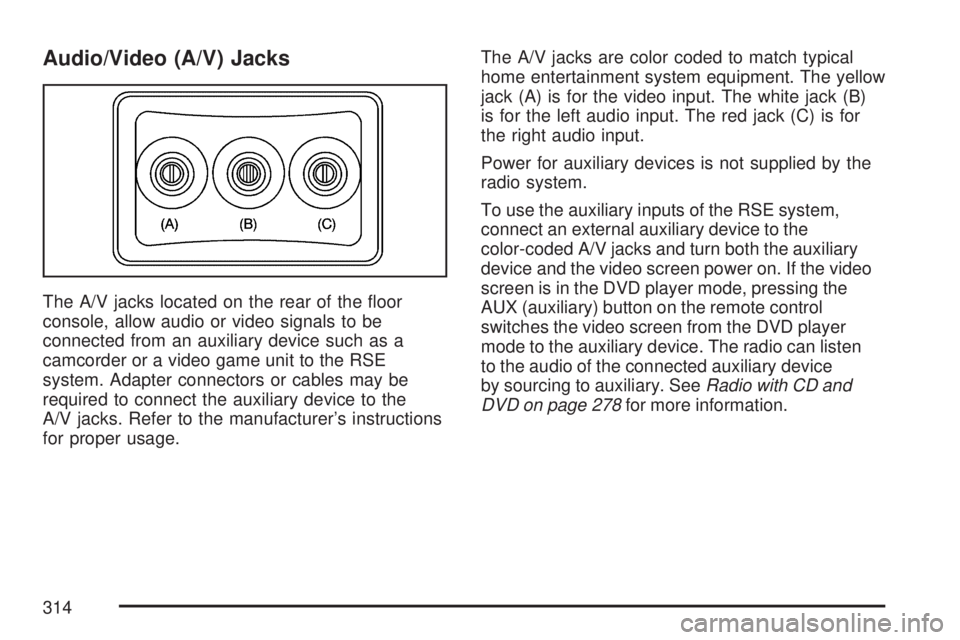
Audio/Video (A/V) Jacks
The A/V jacks located on the rear of the oor
console, allow audio or video signals to be
connected from an auxiliary device such as a
camcorder or a video game unit to the RSE
system. Adapter connectors or cables may be
required to connect the auxiliary device to the
A/V jacks. Refer to the manufacturer’s instructions
for proper usage.The A/V jacks are color coded to match typical
home entertainment system equipment. The yellow
jack (A) is for the video input. The white jack (B)
is for the left audio input. The red jack (C) is for
the right audio input.
Power for auxiliary devices is not supplied by the
radio system.
To use the auxiliary inputs of the RSE system,
connect an external auxiliary device to the
color-coded A/V jacks and turn both the auxiliary
device and the video screen power on. If the video
screen is in the DVD player mode, pressing the
AUX (auxiliary) button on the remote control
switches the video screen from the DVD player
mode to the auxiliary device. The radio can listen
to the audio of the connected auxiliary device
by sourcing to auxiliary. SeeRadio with CD and
DVD on page 278for more information.
314
Page 543 of 554
D
Daytime Running Lamps/Automatic
Headlamp System.................................... 185
Defensive Driving........................................ 330
Delayed Entry Lighting................................ 187
Delayed Exit Lighting................................... 188
Delayed Headlamps.................................... 184
Delayed Locking.......................................... 107
Disc, MP3..........................................295, 301
Doing Your Own Service Work.................... 386
Door
Delayed Locking...................................... 107
Locks....................................................... 106
Power Door Locks................................... 107
Programmable Automatic Door Locks....... 107
Rear Door Security Locks........................ 108
Driver
Position, Safety Belt................................... 30
Seat Height Adjuster.................................. 10
Driver Information Center (DIC)................... 232
DIC Operation and Displays............233, 239
DIC Vehicle Customization....................... 255
DIC Warnings and Messages................... 244Driving
At Night................................................... 346
City.......................................................... 350
Defensive................................................. 330
Drunken................................................... 331
Freeway................................................... 351
Hill and Mountain Roads.......................... 354
In Rain and on Wet Roads...................... 347
Rocking Your Vehicle to Get it Out.......... 361
Winter...................................................... 356
Dual Automatic Climate Control System....... 203
DVD
Rear Seat Entertainment System............. 311
E
EDR ............................................................ 536
Electrical System
Add-On Equipment................................... 489
Fuses and Circuit Breakers...................... 490
Instrument Panel Fuse Block................... 490
Power Windows and Other
Power Options...................................... 490
Underhood Fuse Block............................. 493
Windshield Wiper Fuses........................... 490
543
Page 550 of 554

Q
Questions and Answers About Safety Belts.... 28
R
Radiator Pressure Cap................................ 410
Radio Frequency Identication (RFID),
Privacy..................................................... 538
Radios........................................................ 264
Care of Your CD and DVD Player............ 328
Care of Your CDs and DVDs................... 328
Navigation/Radio System,
see Navigation Manual......................... 311
Radio with CD......................................... 268
Radio with CD and DVD.......................... 278
Rear Audio Controller (RAC).................... 324
Rear Seat Audio...................................... 322
Setting the Time...................................... 266
Theft-Deterrent......................................... 325
Understanding Reception......................... 326
Reading Lamps........................................... 188
Rear Air Conditioning and Heating System ... 211
Rear Air Conditioning and Heating System
and Electronic Climate Controls............... 212
Rear Audio Controller (RAC)....................... 324Rear Door Security Locks........................... 108
Rear Safety Belt Comfort Guides.................. 43
Rear Seat Armrest...................................... 163
Rear Seat Audio (RSA)............................... 322
Rear Seat Entertainment System................. 311
Rear Seat Operation..................................... 18
Rear Seat Passengers, Safety Belts.............. 40
Rear Windshield Washer/Wiper.................... 179
Rearview Mirror, Automatic Dimming
with OnStar
®and Compass..................... 140
Rearview Mirror with OnStar®...................... 140
Reclining Seatbacks...................................... 15
Recommended Fluids and Lubricants.......... 511
Recreational Vehicle Towing........................ 367
Remote Keyless Entry (RKE) System............ 98
Remote Keyless Entry (RKE) System,
Operation................................................. 100
Removing the Flat Tire and
Installing the Spare Tire........................... 463
Removing the Spare Tire and Tools............ 459
Replacement Bulbs..................................... 433
Reporting Safety Defects
Canadian Government............................. 534
General Motors........................................ 534
United States Government....................... 533
550