Page 72 of 400

A new engine may consume some oil during its first few
thousand miles of operation. This is a normal part of the
break-in and is not an indication of difficulty.
SAFETY TIPS
Exhaust System
WARNING!
Exhaust gases contain carbon monoxide, an ex-
tremely toxic gas that by itself is colorless and
odorless. To avoid inhaling these gases, the follow-
ing precautions should be observed:
•Do not run the engine in a closed garage or in confined
areas any longer than needed to move your vehicle in
or out of the area.
•It may be necessary to sit in a parked vehicle with the
engine running for more than a short period. If so,
adjust your climate control system to force outside air
into the vehicle. Set the blower at high speed and the
controls in any position except OFF or RECIRC.
•The best protection against carbon monoxide entry
into the vehicle body is a properly maintained engine
exhaust system.
Be aware of changes in the sound of the exhaust system;
exhaust fumes detected inside the vehicle; or damage to
the underside or rear of the vehicle. Have a competent
mechanic inspect the complete exhaust system and adja-
cent body areas for broken, damaged, deteriorated or
mispositioned parts. Open seams or loose connections
could permit exhaust fumes to seep into the passenger
compartment. In addition, inspect the exhaust system
each time the vehicle is raised for lubrication or oil
change. Replace or adjust as required.
72 THINGS TO KNOW BEFORE STARTING YOUR VEHICLE
Page 77 of 400

▫Reset Button.........................104
▫Global Reset.........................105
▫Step Button.........................105
▫Average Fuel Economy (AVG ECO)........106
▫Distance To Empty (DTE)...............106
▫Trip Odometer (ODO)..................106
▫Elapsed Time (ET).....................106
▫C/T Button.........................107
▫Compass/Temperature Display...........107
▫Automatic Compass Calibration...........107
▫Manual Compass Calibration.............108
▫To Put Into a Calibration Mode...........108
▫Outside Temperature...................109�Garage Door Opener — If Equipped.........110
▫Programming HomeLink................112
▫Canadian Programming/Gate Programming . . 114
▫Using HomeLink.....................114
▫Erasing HomeLink Buttons..............115
▫Reprogramming a Single HomeLink Button . . . 115
▫Security............................115
�Power Sunroof — If Equipped.............116
▫Express Open Feature..................118
▫Sunroof Maintenance...................119
�Electrical Power Outlets..................119
▫Electrical Outlet Use With Engine Off (Battery Fed
Configuration).......................120
UNDERSTANDING THE FEATURES OF YOUR VEHICLE 77
3
Page 93 of 400

To minimize the possibility of scratching the lenses and
reducing light output, avoid wiping with a dry cloth. To
remove road dirt, wash with a mild soap solution fol-
lowed by rinsing.
Do not use abrasive cleaning components, solvents, steel
wool or other abrasive materials to clean the lenses.
Daytime Running Lights (Canada Only)
The headlights on your vehicle will illuminate when the
engine is started. This provides a constant�Lights ON�
condition until the ignition is turned OFF. The lights
illuminate at less than 50% of normal intensity. If the
parking brake is applied the Daytime Running Lights
will turn off.
Lights-on Reminder
If the headlights, parking lights, courtesy lights or cargo
lights are left on, after the ignition is turned off, a chime
will sound when the driver’s door is opened.
Fog Lights — If Equipped
The foglights are turned ON by placing the head-
light rotary control in the parking light or head-
light position and pressing on the headlight rotary
control. The fog lights will operate only when the parking
lights are ON or when the vehicle headlights are ON low
beam. An indicator light located in the instrument cluster
will illuminate when the fog lights are on. The fog lights
will turn off when the switch is pressed a second time,
also when the headlight switch is rotated to the OFF
position, or the high beam is selected.
UNDERSTANDING THE FEATURES OF YOUR VEHICLE 93
3
Page 99 of 400
WARNING!
Tilting the steering column while the vehicle is
moving is dangerous. Without a stable steering col-
umn, you could lose control of the vehicle and have
an accident. Adjust the column only while the ve-
hicle is stopped. Be sure it is locked before driving.
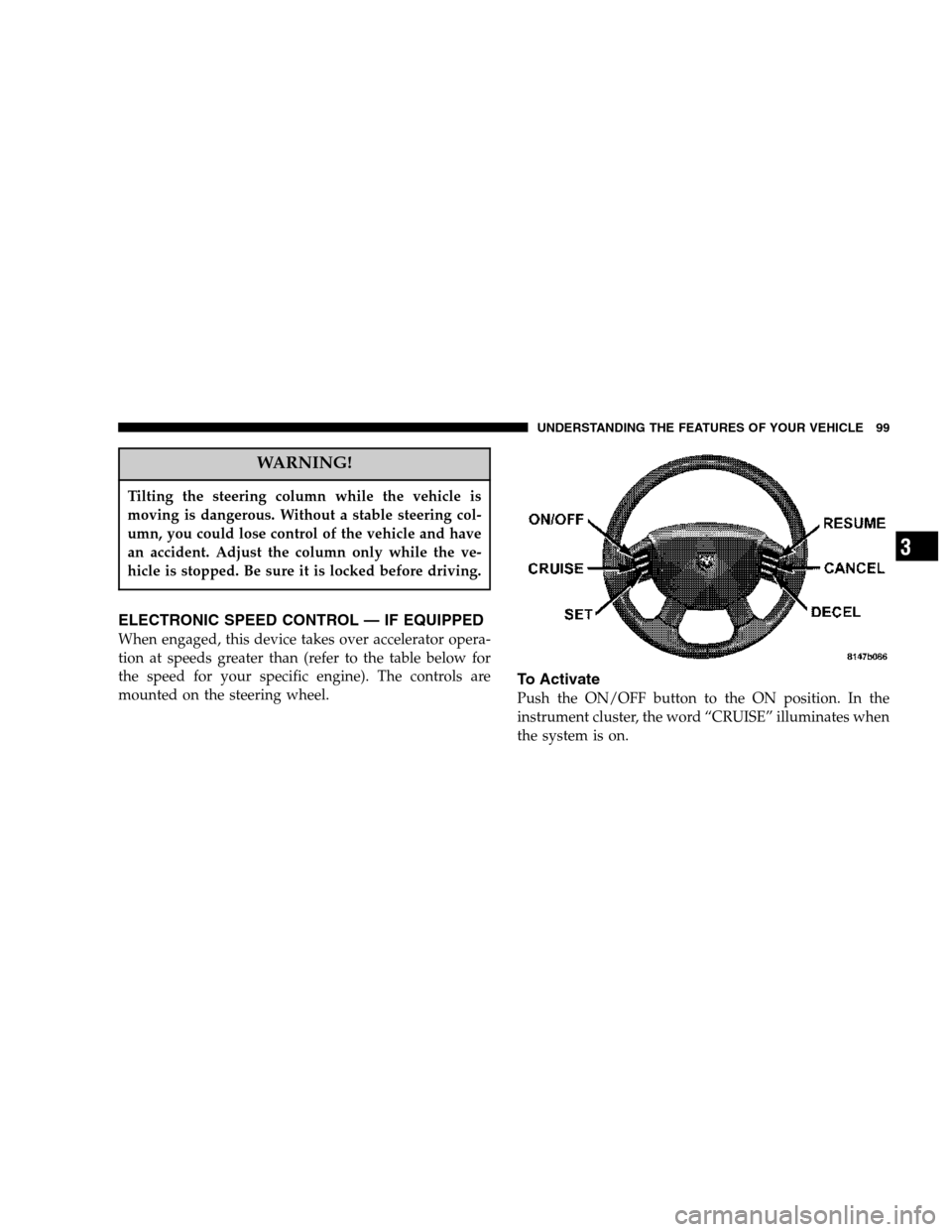
ELECTRONIC SPEED CONTROL — IF EQUIPPED
When engaged, this device takes over accelerator opera-
tion at speeds greater than (refer to the table below for
the speed for your specific engine). The controls are
mounted on the steering wheel.
To Activate
Push the ON/OFF button to the ON position. In the
instrument cluster, the word “CRUISE” illuminates when
the system is on.
UNDERSTANDING THE FEATURES OF YOUR VEHICLE 99
3
Page 100 of 400

To Set At A Desired Speed
When the vehicle has reached the desired speed, press
and release the SET button. Release the accelerator and
the vehicle will operate at the selected speed.
To Deactivate
A soft tap on the brake pedal, normal braking, or pressing
the CANCEL button will deactivate speed control with-
out erasing the memory. Pushing the ON/OFF button to
the OFF position or turning off the ignition erases the
memory.
WARNING!
Leaving the Speed Control ON when not in use is
dangerous. You could accidentally set the system to
cause it to go faster than you want. You could lose
control and have an accident. Always leave the
system OFF when you aren’t using it.
To Resume Speed
To resume a previously set speed, push and release the
RESUME button. Resume can be used at any speed above
(refer to the table below for the speed for your specific
engine).
To Vary The Speed Setting
When the speed control is on, speed can be increased by
pressing and holding the ACCEL button. When the
button is released, a new set speed will be established.
Tapping the ACCEL button once will result in a speed
increase (refer to the table below for the speed for your
specific engine). Each time the button is tapped, speed
increases so that tapping the button three times will
increase speed by three increments.
100 UNDERSTANDING THE FEATURES OF YOUR VEHICLE
Page 101 of 400
Tapping the DECEL button once will result in a speed
decrease (refer to the table below for the speed for your
specific engine). Each time the button is tapped, speed
will decrease. For example, tapping the button 3 times
will decrease the speed by 3 times the speed listed in the
table below (refer to the table below for the speed for
your specific engine).To decrease speed while the speed control is on, press
and hold the DECEL button. Release the button when the
desired speed is reached, and the new speed will be set.
Functions All Engines
Engage Speed 30 mph (48 km/h)
Minimun RESUME Speed 25 mph (40 km/h)
ACCEL Increase 2 mph (3km/h)
DECEL Decrease 1 mph (2 km/h)
Dropout Speed 25 mph (40 km/h)
UNDERSTANDING THE FEATURES OF YOUR VEHICLE 101
3
Page 102 of 400

To Accelerate For Passing
Depress the accelerator as you would normally. When the
pedal is released, the vehicle will return to the set speed.
NOTE:When driving uphill, at elevations above 2,000
feet (610 meters), or when the vehicle is heavily loaded
(especially when towing) the vehicle may slow below the
SET speed. If the vehicle speed drops below (refer to the
table below for the speed for your specific engine), the
speed control will automatically disengage. If this hap-
pens, you can push down on the accelerator pedal to
maintain the desired speed.
Vehicles equipped with a Automatic transmission may
exhibit several downshifts under the above conditions.
To reduce the frequency of the downshifts and to im-
prove vehicle performance, it is advisable to lock out
overdrive by pressing the “TOW/HAUL” button located
at the end of the gear shifter.WARNING!
Speed Control can be dangerous where the system
can’t maintain a constant speed. Your vehicle could
go too fast for the conditions, and you could lose
control. An accident could be the result. Don’t use
Speed Control in heavy traffic or on roads that are
winding, icy, snow-covered, or slippery.
102 UNDERSTANDING THE FEATURES OF YOUR VEHICLE
Page 109 of 400
To set the variance: Turn the ignition ON and set the
display to “Compass/Temperature.” Press and hold the
RESET button approximately five seconds. The last vari-
ance zone number will be displayed. Press the STEP
button to select the new variance zone and press the
RESET button to resume normal operation.
Outside Temperature
Because the ambient temperature sensor is located un-
derhood, engine temperature can influence the displayed
temperature, therefore, temperature readings are slowly
updated when the vehicle speed is below 20 mph (30
km/h) or during stop and go driving.
Compass Variance Map
UNDERSTANDING THE FEATURES OF YOUR VEHICLE 109
3