Page 157 of 464
5. Press and hold the just trained HomeLink button and
observe the indicator light or the EVIC display. If the
indicator lightstays on constantly, programming is
completeand your device should activate when the
HomeLink button is pressed and released. If the EVIC
display shows “Channel X Transmit” (where X is Chan-
nel 1, 2, or 3), programming is complete and your device
should activate when the HomeLink button is pressed
and released.
NOTE:To program the remaining two HomeLink but-
tons, begin with�Programming�Step Two. Do not repeat
Step One.
NOTE:If your hand-held transmitter appears to pro-
gram the universal transceiver, but your garage door
does not operate using the transmitter and your garage
door opener was manufactured after 1995, your garage
door opener may have a multiple security code system(rolling code system). If your garage door is the “rolling
code” type, please proceed to the heading “Programming
A Rolling Code System.”
Programming A Rolling Code System
1. At the garage door opener receiver (motor-head unit)
in the garage, locate the�learn�or�smart�button. This
can usually be found where the hanging antenna wire is
attached to the motor-head unit.
2. Firmly press and release the�learn�or�smart�button.
(The name and color of the button may vary by manu-
facturer.)
NOTE:There are 30 seconds in which to initiate Step
Three.
UNDERSTANDING THE FEATURES OF YOUR VEHICLE 157
3
Page 159 of 464
Using HomeLink
To operate, simply press and release the programmed
HomeLink button. Activation will now occur for the
trained device (i.e. garage door opener, gate operator,
security system, entry door lock, home/office lighting,
etc.). For convenience, the hand-held transmitter of the
device may also be used at any time. In the event that
there are still programming difficulties or questions,
contact HomeLink at:www.homelink.com or 1-800-355-
3515.
Erasing HomeLink Buttons
To erase programming from the three buttons (individual
buttons cannot be erased but can be�reprogrammed�-
note below), follow the step noted:
•Press and hold the two outer HomeLink buttons until
the indicator light begins to flash and the EVIC display
shows “Channels Cleared” (after 20 seconds). Release
both buttons. Do not hold for longer that 30 seconds.HomeLink is now in the train (or learning) mode and
can be programmed at any time beginning with�Pro-
gramming�- Step Two.
Reprogramming a Single HomeLink Button
To program a device to HomeLink using a HomeLink
button previously trained, follow these steps:
1. Press and hold the desired HomeLink button.Do
NOTrelease the button.
2. The indicator light will begin to flash after 20 seconds
and the EVIC display will show “Channel X Transmit”
(where X is Channel 1, 2, or 3) for 20 seconds and then
change to “Channel X Training”. Without releasing the
HomeLink button, proceed with�Programming�Step
Two.
UNDERSTANDING THE FEATURES OF YOUR VEHICLE 159
3
Page 160 of 464
Security
If you sell your vehicle, be sure to erase the frequencies
by following the “Erasing HomeLink Buttons” instruc-
tions in this section.
This device complies with part 15 of FCC rules and with
RSS-210 of Industry Canada. Operation is subject to the
following conditions:
•This device may not cause harmful interference.
•This device must accept any interference that may be
received including interference that may cause undes-
ired operation.
NOTE:Changes or modifications not expressly ap-
proved by the party responsible for compliance could
void the user’s authority to operate the equipment.
HomeLink�is a trademark owned by Johnson Controls,
Inc.In the event that you are still having programming
difficulties, questions, or comments, contact HomeLink
at:www.homelink.com or 1-800-355-3515.
POWER SUNROOF — IF EQUIPPED
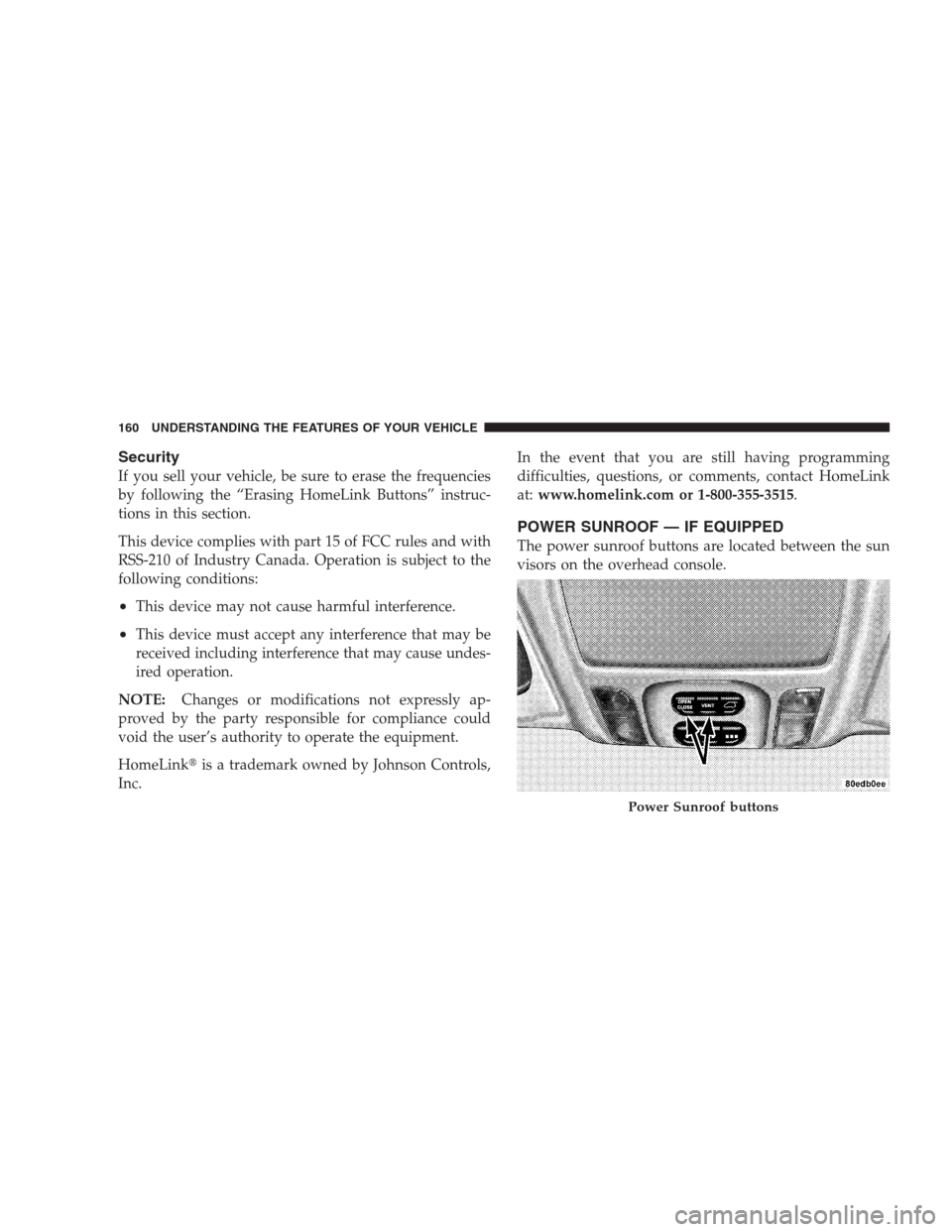
The power sunroof buttons are located between the sun
visors on the overhead console.
Power Sunroof buttons
160 UNDERSTANDING THE FEATURES OF YOUR VEHICLE
Page 162 of 464
To close the sunroof, press and hold the “CLOSE” button
forward. Again, any release of the button will stop the
movement and the sunroof will remain in a partial open
condition until the button is pushed forward again.
The sunshade can be opened manually. It will also open
as the sunroof opens. The sunshade cannot be closed if
the sunroof is open.WARNING!
•NEVER leave children alone in a vehicle. Occu-
pants, particularly unattended children, can become
entrapped by the power sunroof while operating
the power sunroof switch. Such entrapment may
result in serious injury or death. Don’t leave the
keys in the ignition. A child could operate power
windows, other controls, or move the vehicle
•In an accident, there is a greater risk of being
thrown from a vehicle with an open sunroof. You
could also be seriously injured or killed. Always
fasten your seat belt properly and make sure all
passengers are properly secured too.
•Do not allow small children to operate the sunroof.
Never allow fingers or other body parts, or any
object to project through the sunroof opening. In-
jury may result.
162 UNDERSTANDING THE FEATURES OF YOUR VEHICLE
Page 168 of 464
3. Insert the pins on the ends of the cover into the slots
located on the trim panel behind the third row seatbacks.
4. Grasp the center portion of the cover flap. Pull it over
the cargo area.
5. Insert the pins on the ends of the cover flap into the
slots on the rear trim panel.
6. The liftgate may be opened or closed with the cargo
cover in place.
Cargo Tie-Down Hooks
The tie-downs located on cargo area floor and on the rear
trim panels should be used to safely secure loads when
vehicle is moving.
WARNING!
•Cargo tie-down hooks are not safe anchors for a
child seat tether strap. In a sudden stop or colli-
sion a hook could pull loose and allow the child
seat to come loose. A child could be badly injured.
Use only the anchors provided for child seat
tethers.
•The weight and position of cargo and passengers
can change the vehicle center of gravity and
vehicle handling. To avoid loss of control result-
ing in personal injury, follow these guidelines for
loading your vehicle:
•Always place cargo evenly on the cargo floor. Put
heavier objects as low and as far forward as possible.
168 UNDERSTANDING THE FEATURES OF YOUR VEHICLE
Page 170 of 464
Distribute cargo weight evenly on the roof rack crossbars.
The roof rack does not increase the total load carrying
capacity of the vehicle. Be sure the total load of cargo
inside the vehicle plus that on the external rack does not
exceed the maximum vehicle load capacity.
To move the cross bars, press the upper edge of each
cross bar button, then move the cross bar to the desired
position, keeping the crossbars parallel to the rack frame.
This is can be done with one person standing on each
side of the vehicle, moving the cross bar at the same time.
Once the cross bar is in place, press the lower edge of the
cross bar button to lock it into position.Attempt to move the crossbar again to ensure that it has
properly locked into position.
NOTE:To reduce the amount of wind noise when the
cross bars are not in use, move both cross bars next to
each other towards the rear of the vehicle in the rear most
position.
The tie down holes on the cross bar ends should always
be used to tie down the load. Check the straps frequently
to be sure that the load remains securely attached.
170 UNDERSTANDING THE FEATURES OF YOUR VEHICLE
Page 171 of 464
CAUTION!
•Crossbars should remain equally spaced or parallel at
any luggage rack position for proper function. Non-
compliance could result in damage to the luggage rack,
cargo and/or vehicle.
•To avoid damage to the roof rack and vehicle, do not
exceed the maximum roof rack load capacity of 150 lbs
(68 kg). Always distribute heavy loads as evenly as
possible and secure the load appropriately.
•Long loads which extend over the windshield, such as
wood panels or surfboards, or loads with large frontal
area should be secured to both the front and rear of the
vehicle.
•Travel at reduced speeds and turn corners carefully
when carrying large or heavy loads on the roof rack.
Wind forces, due to natural causes or nearby truck
traffic, can add sudden upward lift to loads. This is
especially true on large flat loads and may result in
damage to the cargo or your vehicle.
WARNING!
Cargo must be securely tied before driving your
vehicle. Improperly secured loads can fly off the
vehicle, particularly at high speeds, resulting in
personal injury or property damage. Follow the Roof
Rack Cautions when carrying cargo on your roof
rack.
UNDERSTANDING THE FEATURES OF YOUR VEHICLE 171
3
Page 272 of 464

Reset Mode - Electronic Transmission
The transmission is monitored electronically for abnor-
mal conditions. If a condition is detected that could cause
damage, the transmission automatically shifts into sec-
ond gear. The transmission remains in second gear
despite the forward gear selected. Park (P), Reverse (R),
and Neutral (N) will continue to operate. This Reset
feature allows the vehicle to be driven to a dealer for
service without damaging the transmission.
In the event that the problem has been momentary, the
transmission can be reset to regain all forward gears.
•Stop the vehicle and shift into Park (P).
•Turn the key to OFF then restart the engine.
•Shift into the desired range and resume driving.NOTE:Even if the transmission can be reset, it is
recommended that you visit a dealer at your earliest
possible convenience. Your dealer has diagnostic equip-
ment to determine if the problem could recur.
If the transmission cannot be reset, dealer service is
required.
Gear Ranges
DO NOT race the engine when shifting from PARK or
NEUTRAL positions into another gear range.
“P” Park
Supplements the parking brake by locking the transmis-
sion. The engine can be started in this range. Never
attempt to use PARK while vehicle is in motion.
Apply parking brake when leaving vehicle in this range.
272 STARTING AND OPERATING