Page 141 of 464
TILT STEERING COLUMN
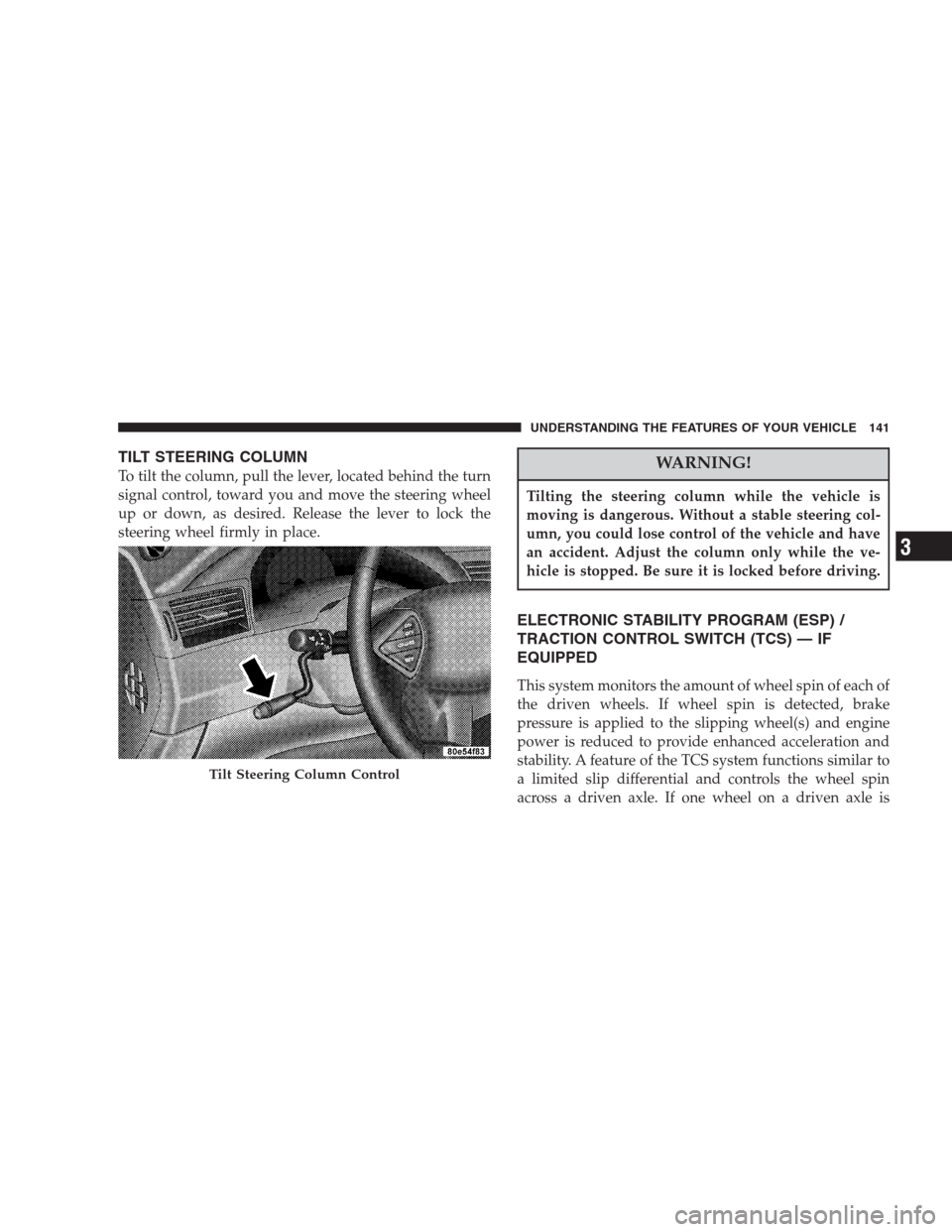
To tilt the column, pull the lever, located behind the turn
signal control, toward you and move the steering wheel
up or down, as desired. Release the lever to lock the
steering wheel firmly in place.WARNING!
Tilting the steering column while the vehicle is
moving is dangerous. Without a stable steering col-
umn, you could lose control of the vehicle and have
an accident. Adjust the column only while the ve-
hicle is stopped. Be sure it is locked before driving.
ELECTRONIC STABILITY PROGRAM (ESP) /
TRACTION CONTROL SWITCH (TCS) — IF
EQUIPPED
This system monitors the amount of wheel spin of each of
the driven wheels. If wheel spin is detected, brake
pressure is applied to the slipping wheel(s) and engine
power is reduced to provide enhanced acceleration and
stability. A feature of the TCS system functions similar to
a limited slip differential and controls the wheel spin
across a driven axle. If one wheel on a driven axle is
Tilt Steering Column Control
UNDERSTANDING THE FEATURES OF YOUR VEHICLE 141
3
Page 142 of 464
spinning faster than the other, the system will apply the
brake of the spinning wheel. This will allow more engine
torque to be applied to the wheel that is not spinning.
This feature remains active even if TCS and ESP are in
either the “Partial Off” or “ESP Off” modes.
The ESP / TCS Indicator Lamp, located in the instrument
cluster, will light up when the Traction Control is in use.
To turn the system OFF, press the ESP “OFF” switch
located on center console next to the ash tray, until the
Traction Control Indicator in the instrument cluster lights
up.
To turn the system back ON, press the switch a second
time until the Traction Control Indicator turns OFF.
Traction Control Switch
142 UNDERSTANDING THE FEATURES OF YOUR VEHICLE
Page 145 of 464

WARNING!
•Drivers must be careful when backing up even when
using the Rear Park Assist System. Always check
carefully behind your vehicle, and be sure to check for
pedestrians, animals, other vehicles, obstructions, or
blind spots before backing up. You are responsible for
the safety of your surroundings and must continue to
pay attention while backing up. Failure to do so can
result in serious injury or death.
•Before using the Rear Park Assist System, it is strongly
recommended that the ball mount and hitch ball
assembly be disconnected from the vehicle when the
vehicle is not used for towing. Failure to do so can
result in injury or damage to vehicles or obstacles
because the hitch ball will be much closer to the
obstacle than the rear fascia when the warning display
turns the red LEDs ON. Also, the sensors could detect
the ball mount and hitch ball assembly, depending on
its size and shape, giving a false indication that an
obstacle is behind the vehicle.
CAUTION!
•To avoid vehicle damage the Rear Park Assist
System should only be used as a parking aid and
is unable to recognize every obstacle, including
small objects. Parking curbs might be temporarily
detected or not detected at all. Obstacles located
above or below the sensors will not be detected
when they are in close proximity to the rear of the
vehicle.
•To avoid vehicle damage the vehicle must be
driven slowly when using the Rear Park Assist
System to be able to stop in time when an obstacle
is detected. It is recommended that the driver look
over his/her shoulder when using the Rear Park
Assist System.
UNDERSTANDING THE FEATURES OF YOUR VEHICLE 145
3
Page 147 of 464
WARNING!
Drivers must be careful when backing up even when
using the Rear Camera System. Always check care-
fully behind your vehicle, and be sure to check for
pedestrians, animals, other vehicles, obstructions, or
blind spots before backing up. You are responsible
for the safety of your surroundings and must con-
tinue to pay attention while backing up. Failure to
do so can result in serious injury or death.
CAUTION!
•To avoid vehicle damage the Rear Camera System
should only be used as a parking aid and is unable
to view every obstacle, or object in your drive path.
•To avoid vehicle damage the vehicle must be driven
slowly when using the Rear Camera System to be
able to stop in time when an obstacle is detected. It
is recommended that the driver look over his/her
shoulder when using the Rear Camera System.
NOTE:If snow, ice, mud, or anything else builds up on
the camera lens, clean the lens, rinse with water, and dry
with a soft cloth. Do not cover the lens.
UNDERSTANDING THE FEATURES OF YOUR VEHICLE 147
3
Page 160 of 464
Security
If you sell your vehicle, be sure to erase the frequencies
by following the “Erasing HomeLink Buttons” instruc-
tions in this section.
This device complies with part 15 of FCC rules and with
RSS-210 of Industry Canada. Operation is subject to the
following conditions:
•This device may not cause harmful interference.
•This device must accept any interference that may be
received including interference that may cause undes-
ired operation.
NOTE:Changes or modifications not expressly ap-
proved by the party responsible for compliance could
void the user’s authority to operate the equipment.
HomeLink�is a trademark owned by Johnson Controls,
Inc.In the event that you are still having programming
difficulties, questions, or comments, contact HomeLink
at:www.homelink.com or 1-800-355-3515.
POWER SUNROOF — IF EQUIPPED
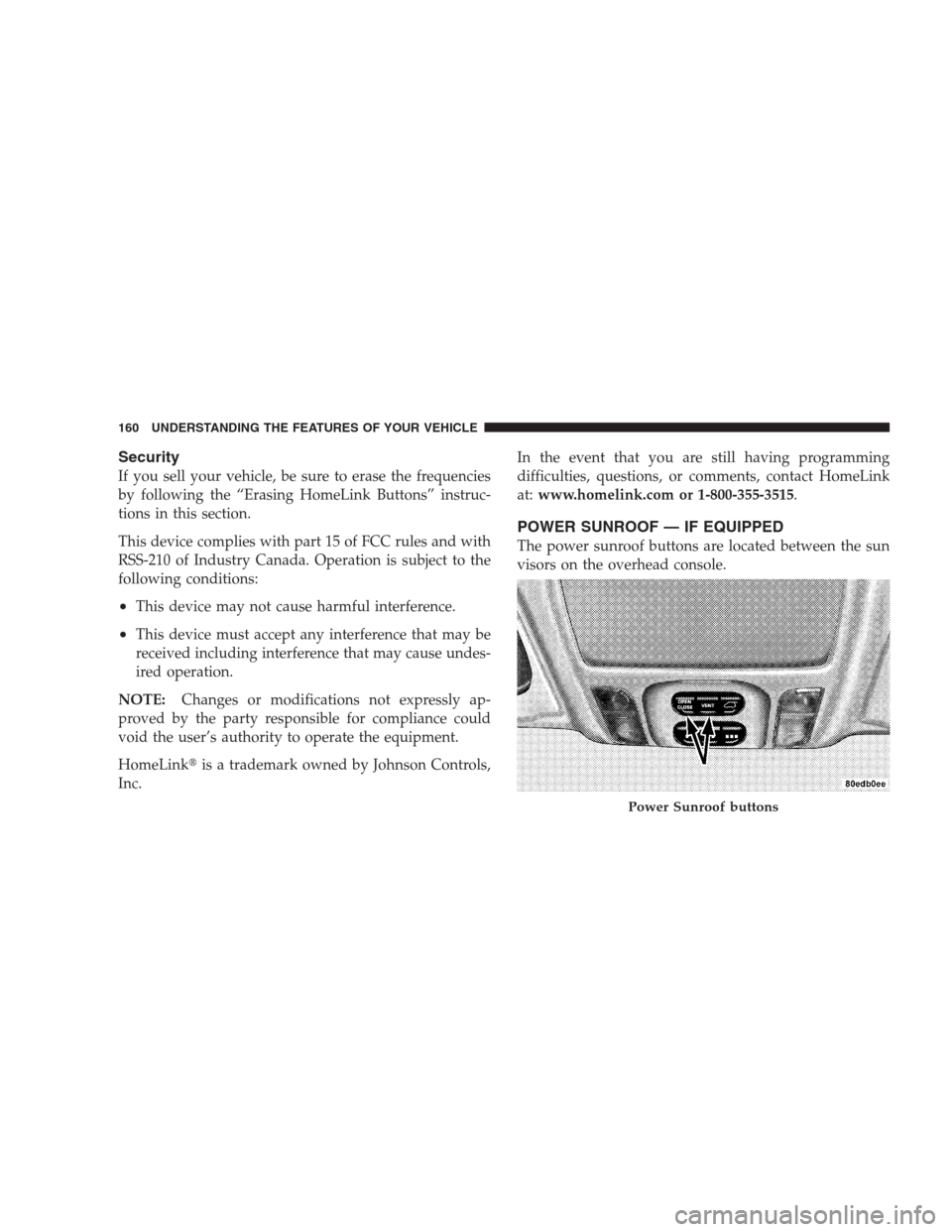
The power sunroof buttons are located between the sun
visors on the overhead console.
Power Sunroof buttons
160 UNDERSTANDING THE FEATURES OF YOUR VEHICLE
Page 171 of 464
CAUTION!
•Crossbars should remain equally spaced or parallel at
any luggage rack position for proper function. Non-
compliance could result in damage to the luggage rack,
cargo and/or vehicle.
•To avoid damage to the roof rack and vehicle, do not
exceed the maximum roof rack load capacity of 150 lbs
(68 kg). Always distribute heavy loads as evenly as
possible and secure the load appropriately.
•Long loads which extend over the windshield, such as
wood panels or surfboards, or loads with large frontal
area should be secured to both the front and rear of the
vehicle.
•Travel at reduced speeds and turn corners carefully
when carrying large or heavy loads on the roof rack.
Wind forces, due to natural causes or nearby truck
traffic, can add sudden upward lift to loads. This is
especially true on large flat loads and may result in
damage to the cargo or your vehicle.
WARNING!
Cargo must be securely tied before driving your
vehicle. Improperly secured loads can fly off the
vehicle, particularly at high speeds, resulting in
personal injury or property damage. Follow the Roof
Rack Cautions when carrying cargo on your roof
rack.
UNDERSTANDING THE FEATURES OF YOUR VEHICLE 171
3
Page 187 of 464
21. Tire Pressure Monitoring Telltale Lamp — If
Equipped
Each tire, including the spare (if provided),
should be checked monthly when cold and
inflated to the inflation pressure recommended
by the vehicle manufacturer on the vehicle
placard or tire inflation pressure label. (If your vehicle
has tires of a different size than the size indicated on the
vehicle placard or tire inflation pressure label, you should
determine the proper tire inflation pressure for those
tires.)
As an added safety feature, your vehicle has been
equipped with a Tire Pressure Monitoring System
(TPMS) that illuminates a low tire pressure telltale when
one or more of your tires is significantly underinflated.
Accordingly, when the low tire pressure telltale illumi-
nates, you should stop and check your tires as soon as
possible, and inflate them to the proper pressure. Driving
on a significantly underinflated tire causes the tire tooverheat and can lead to tire failure. Underinflation also
reduces fuel efficiency and tire tread life, and may affect
the vehicle’s handling and stopping ability.
NOTE:The Tire Pressure Monitoring System (TPMS) is
not a substitute for proper tire maintenance, and it is the
driver ’s responsibility to maintain correct tire pressure,
even if underinflation has not reached the level to trigger
illumination of the Tire Pressure Monitoring System low
tire pressure telltale.
The Tire Pressure Monitoring Telltale Lamp will illumi-
nate in the instrument cluster and an audible chime will
be activated when one or more tire pressures is low. The
Tire Pressure Monitoring Telltale Lamp will flash one and
off for 60 seconds when a system fault is detected. The
flash cycle will repeat every ten minutes or until the fault
conditions is removed and reset.
UNDERSTANDING YOUR INSTRUMENT PANEL 187
4
Page 189 of 464

25. Liftgate Ajar — If Equipped
This light turns on if the liftgate is not com-
pletely closed.
26. Door Ajar Light — If Equipped
This light turns on if a door is not completely
closed.
27. Washer Fluid Light — If Equipped
This light turns on when the washer fluid level
falls below approximately 1/4 filled. The light will
remain on until fluid is added.
28. Electronic Stability Program (ESP) Warning
Light/Brake Assist System (BAS) Warning Light — If
Equipped
The malfunction indicator for the ESP is com-
bined with the BAS indicator. The yellow
“ESP/BAS Warning Lamp” and the yellow“ESP/TCS Indicator Light” in the instrument cluster both
come on when the ignition switch is turned to the “ON”
position. They should both go out with the engine
running. If the “ESP/BAS Warning Lamp” comes on
continuously with the engine running, a malfunction has
been detected in either the ESP or BAS system, or both. If
this light remains on after several ignition cycles, and the
vehicle has been driven several miles at speeds greater
than 30 mph (48 km/h), see your authorized dealer as
soon as possible to have the problem diagnosed and
corrected.
The “ESP/BAS Warning Lamp”:
— The “ESP Indicator Light” and the “ESP/BAS Warning
Lamp” come on momentarily each time the ignition
switch is turned ON.
— Each time the ignition is turned ON, the ESP System
will be ON even if it was turned off previously.
UNDERSTANDING YOUR INSTRUMENT PANEL 189
4
