2007 CHEVROLET SUBURBAN lock
[x] Cancel search: lockPage 136 of 634
The theft-deterrent system will not activate if you
lock the doors with a key, the manual door lock, or
the power door lock switch. It activates only if you
use the RKE transmitter. You should also
remember that you can start your vehicle with the
correct ignition key if the alarm has been set off.
Here is how to avoid setting off the alarm by
accident:
If you do not want to activate the
theft-deterrent system, the vehicle should be
locked with the door key after the doors
are closed.
Always unlock a door with the RKE transmitter.
Unlocking a door any other way will set off the
alarm if the system has been armed.
If you set off the alarm by accident, turn off the
alarm by pressing unlock on the RKE transmitter or
by placing the key in the ignition and turning it
to START.
Testing the Alarm
The alarm can be tested by following these steps:
1. From inside the vehicle, lower the driver’s
window and open the driver’s door.
2. Activate the system by locking the doors with
the RKE transmitter.
3. Get out of the vehicle, close the door and wait
for the security light to go out.
4. Then reach in through the window, unlock the
door with the manual door lock and open the
door. This should set off the alarm.
If the alarm does not sound when it should, but
the vehicle’s headlamps ash, check to see if the
horn works. The horn fuse may be blown. To
replace the fuse, seeFuses and Circuit Breakers
on page 564.
If the alarm does not sound or the vehicle’s
headlamps do not ash, see your dealer for
service.
136
Page 138 of 634
If the engine still does not start, and the key
appears to be undamaged, try another ignition
key. At this time, you may also want to check the
fuse, seeFuses and Circuit Breakers on
page 564. If the engine still does not start with the
other key, your vehicle needs service. If your
vehicle does start, the rst key may be faulty. See
your dealer who can service the PASS-Key
®III+
to have a new key made. In an emergency,
contact Roadside Assistance.
It is possible for the PASS-Key
®III+ decoder to
learn the transponder value of a new or
replacement key. Up to nine additional keys may
be programmed for the vehicle. The following
procedure is for programming additional keys only.
If all the currently programmed keys are lost or
do not operate, you must see your dealer or
a locksmith who can service PASS-Key
®III+ to
have keys made and programmed to the system.
See your dealer or a locksmith who can service
PASS-Key
®III+ to get a new key blank that is cut
exactly as the ignition key that operates the
system.To program the new additional key do the
following:
1. Verify that the new key has a
1stamped on it.
2. Insert the original, already programmed, key
in the ignition and start the engine. If the
engine will not start, see your dealer
for service.
3. After the engine has started, turn the key to
OFF, and remove the key.
4. Insert the new key to be programmed and turn
it to the RUN position within ve seconds of
removing the original key.
5. The security light will turn off once the key
has been programmed.
6. Repeat Steps 1 through 5 if additional keys
are to be programmed.
If you are driving and the security light comes on
and stays on, you may be able to restart your
engine. Your PASS-Key
®III+ system, however,
may not be working properly and must be serviced
by your dealer.
If you lose or damage your PASS-Key
®III+ key,
see your dealer or a locksmith who can service
PASS-Key
®III+ to have a new key made.
138
Page 140 of 634
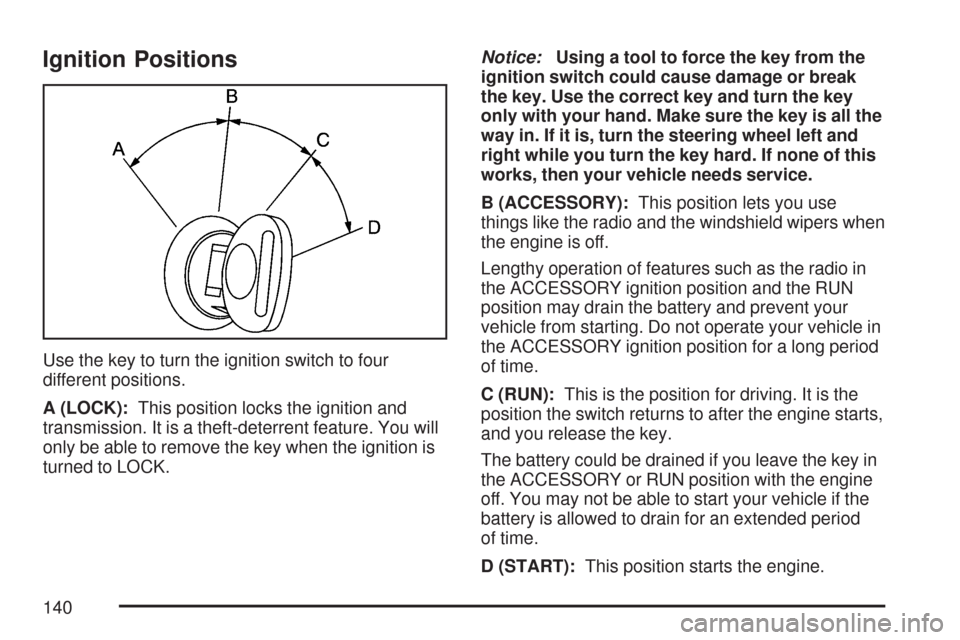
Ignition Positions
Use the key to turn the ignition switch to four
different positions.
A (LOCK):This position locks the ignition and
transmission. It is a theft-deterrent feature. You will
only be able to remove the key when the ignition is
turned to LOCK.Notice:Using a tool to force the key from the
ignition switch could cause damage or break
the key. Use the correct key and turn the key
only with your hand. Make sure the key is all the
way in. If it is, turn the steering wheel left and
right while you turn the key hard. If none of this
works, then your vehicle needs service.
B (ACCESSORY):This position lets you use
things like the radio and the windshield wipers when
the engine is off.
Lengthy operation of features such as the radio in
the ACCESSORY ignition position and the RUN
position may drain the battery and prevent your
vehicle from starting. Do not operate your vehicle in
the ACCESSORY ignition position for a long period
of time.
C (RUN):This is the position for driving. It is the
position the switch returns to after the engine starts,
and you release the key.
The battery could be drained if you leave the key in
the ACCESSORY or RUN position with the engine
off. You may not be able to start your vehicle if the
battery is allowed to drain for an extended period
of time.
D (START):This position starts the engine.
140
Page 141 of 634
Key In the Ignition
Never leave your vehicle with the keys inside, as it
is an easy target for joy riders or thieves. If you
leave the key in the ignition and park your vehicle, a
chime will sound, when you open the driver’s door.
Always remember to remove your key from the
ignition and take it with you. This will lock your
ignition and transmission. Also, always remember
to lock the doors.
The battery could be drained if you leave the key in
the ignition while your vehicle is parked. You may
not be able to start your vehicle after it has been
parked for an extended period of time.
Retained Accessory Power (RAP)
Your vehicle has a Retained Accessory Power
(RAP) feature which will allow certain features on
your vehicle to continue to work up to 10 minutes
after the ignition key is turned to LOCK.
The radio, power windows, and if the vehicle has a
sunroof and the OnStar
®System, will work when
the ignition key is in RUN or ACCESSORY. Once
the key is turned from RUN to LOCK, the windows
and sunroof will continue to work until a door is
opened. The radio will continue to work for up to
10 minutes or until the driver’s door is opened.
Starting the Engine
To place the transmission in the proper gear:
Move your shift lever to PARK (P) or
NEUTRAL (N). Your engine will not start in
any other position -- this is a safety feature. To
restart when you are already moving, use
NEUTRAL (N) only.
Starting Procedure
1. With your foot off the accelerator pedal, turn
the ignition key to START. When the engine
starts, let go of the key. The idle speed will go
down as your engine gets warm. Do not
race the engine immediately after starting it.
Operate the engine and transmission gently to
allow the oil to warm up and lubricate all
moving parts.
Your vehicle has a Computer-Controlled
Cranking System. This feature assists
in starting the engine and protects
components. If the ignition key is turned to the
START position, and then released when
the engine begins cranking, the engine
will continue cranking for a few seconds or
until the vehicle starts.
141
Page 142 of 634
If the engine does not start and the key is
held in START for many seconds, cranking will
be stopped after 15 seconds to prevent
cranking motor damage. To prevent gear
damage, this system also prevents cranking if
the engine is already running. Engine
cranking can be stopped by turning the ignition
switch to the ACCESSORY or LOCK
position.
Notice:Cranking the engine for long periods
of time, by returning the key to the START
position immediately after cranking has ended,
can overheat and damage the cranking
motor, and drain the battery. Wait at least
15 seconds between each try, to allow
the cranking motor to cool down.2. If the engine does not start after 5-10 seconds,
especially in very cold weather (below 0°F or
−18°C), it could be ooded with too much
gasoline. Try pushing the accelerator pedal all
the way to the oor and holding it there as
you hold the key in START for up to a
maximum of 15 seconds. Wait at least
15 seconds between each try, to allow the
cranking motor to cool down. When the engine
starts, let go of the key and accelerator. If
the vehicle starts briey but then stops again,
do the same thing. This clears the extra
gasoline from the engine. Do not race the
engine immediately after starting it. Operate
the engine and transmission gently until the oil
warms up and lubricates all moving parts.
Notice:Your engine is designed to work with
the electronics in your vehicle. If you add
electrical parts or accessories, you could
change the way the engine operates. Before
adding electrical equipment, check with your
dealer. If you do not, your engine might not
perform properly. Any resulting damage would
not be covered by your vehicle’s warranty.
142
Page 146 of 634
PARK (P):This position locks your rear wheels. It
is the best position to use when you start your
engine because your vehicle cannot move easily.
{CAUTION:
It is dangerous to get out of your vehicle
if the shift lever is not fully in PARK (P)
with the parking brake rmly set. Your
vehicle can roll.
Do not leave your vehicle when the engine
is running unless you have to. If you have
left the engine running, the vehicle can
move suddenly. You or others could be
injured. To be sure your vehicle will not
move, even when you are on fairly level
ground, always set your parking brake
and move the shift lever to PARK (P). See
Shifting Into Park (P) on page 157.Ifyou
are pulling a trailer, seeTowing a Trailer
on page 422.
{CAUTION:
If you have four-wheel drive, your vehicle
will be free to roll — even if your shift
lever is in PARK (P) — if your transfer
case is in NEUTRAL. So, be sure the
transfer case is in a drive gear, two-wheel
high, four-wheel high or four-wheel
low — not in NEUTRAL. SeeShifting Into
Park (P) on page 157.
REVERSE (R):Use this gear to back up.
Notice:Shifting to REVERSE (R) while your
vehicle is moving forward could damage the
transmission. The repairs would not be covered
by your warranty. Shift to REVERSE (R) only
after your vehicle is stopped.
To rock your vehicle back and forth to get out of
snow, ice, or sand without damaging your
transmission, seeIf Your Vehicle is Stuck in Sand,
Mud, Ice, or Snow on page 404.
146
Page 150 of 634
Four-Wheel Drive
If your vehicle has four-wheel drive, you can send
your engine’s driving power to all four wheels
for extra traction. Read the part that follows before
using four-wheel drive.
Notice:Driving on clean, dry pavement in
Four-Wheel-Drive High or Four-Wheel-Drive
Low for an extended period of time may cause
premature wear on your vehicle’s powertrain.
Do not drive on clean, dry pavement in
Four-Wheel-Drive High or Four-Wheel-Drive
Low for extended periods of time.
While driving on clean dry pavement and during
tight turns, you may experience a vibration in
the steering system.
Front Axle Locking Feature
The front axle locks and unlocks automatically
when you shift the transfer case. Some delay for
the axle to lock or unlock is normal.
Automatic Transfer Case
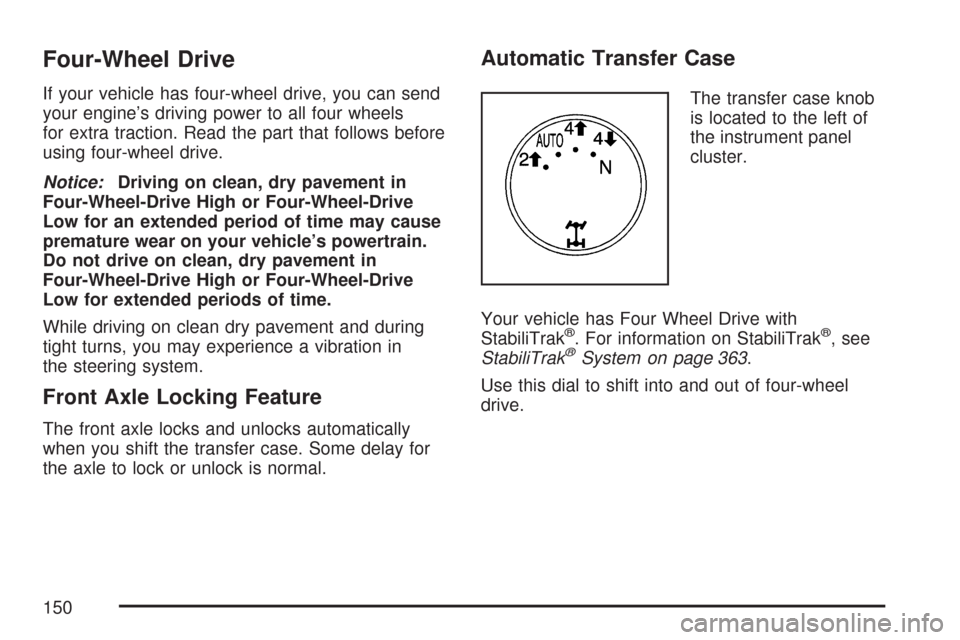
The transfer case knob
is located to the left of
the instrument panel
cluster.
Your vehicle has Four Wheel Drive with
StabiliTrak
®. For information on StabiliTrak®, see
StabiliTrak®System on page 363.
Use this dial to shift into and out of four-wheel
drive.
150
Page 155 of 634

6. Turn the transfer case dial clockwise to
NEUTRAL till it stops and hold it for
10 seconds. Then slowly release the dial to
the four low position. The NEUTRAL light will
come on when the transfer case shift to
NEUTRAL is complete.
7. If the engine is running, verify that the
transmission is in NEUTRAL (N) by shifting the
transmission to REVERSE (R) for one second,
then shift the transmission to DRIVE (D) for
one second.
8. Turn the ignition to ACCESSORY, which will
turn the engine off.
9. Place the transmission shift lever in PARK (P).
10. Release the parking brake prior to moving
the vehicle.
11. Turn the ignition to LOCK.
Shifting Out of NEUTRAL
To shift out of NEUTRAL do the following:
1. Set the parking brake and apply the regular
brake pedal.
2. Shift the transmission to NEUTRAL (N) and
turn the ignition to RUN with the engine off.3. Turn the transfer case dial to the desired
transfer case shift position (Two-Wheel
Drive High, Four-Wheel Drive High, AUTO).
After the transfer case has shifted out of
NEUTRAL the NEUTRAL light will go out.
4. Release the parking brake prior to moving the
vehicle.
Notice:Shifting the transmission into gear
before the Four-Wheel Drive Low indicator light
has stopped ashing could damage the
transfer case. To help avoid damaging your
vehicle, always wait for the Four-Wheel
Drive Low indicator light to stop ashing
before shifting the transmission into gear.
5. Start the engine and shift the transmission to
the desired position.
Excessively shifting the transfer case into or out of
the different modes may cause the transfer
case to enter the shift protection mode. This will
protect the transfer case from possible damage
and will only allow the transfer case to respond to
one shift per 10 seconds. The transfer case
may stay in this mode for up to three minutes.
155