2007 CHEVROLET SILVERADO towing
[x] Cancel search: towingPage 171 of 684
{CAUTION:
Four-wheel drive vehicles with the transfer
case in NEUTRAL will allow the vehicle to
roll, even if the shift lever is in PARK (P).
So, be sure the transfer case is in a drive
gear — not in NEUTRAL. Always set the
parking brake.
Follow the proper steps to be sure your vehicle
will not move. SeeShifting Into Park (P) on
page 165.
If you are pulling a trailer, seeTowing a Trailer on
page 447.
Mirrors
Manual Rearview Mirror
Pull or push the tab under the inside rearview
mirror to adjust it to the night or daytime setting. In
the nighttime setting, the glare from headlamps
behind the vehicle will be less intense.
Automatic Dimming Rearview Mirror
with OnStar
®, Compass and
Temperature Display
Your vehicle may have this feature. When on, the
automatic dimming mirror dims to the proper level
to minimize glare from lights behind you after dark.
The mirror has a dual display in the upper right
corner of the mirror face that shows the compass
reading and the outside temperature.
Control buttons for the OnStar
®system are at the
bottom of the mirror. SeeOnStar®System on
page 182for more information about the services
OnStar
®provides.
P(On/Off):This is the on/off button.
171
Page 177 of 684
Outside Trailer-Tow Mirrors
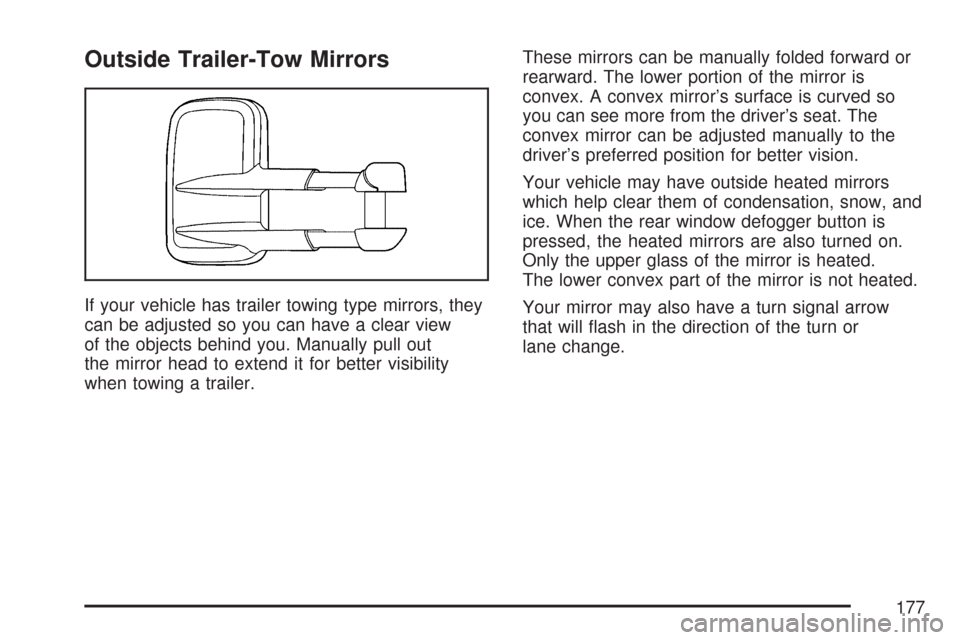
If your vehicle has trailer towing type mirrors, they
can be adjusted so you can have a clear view
of the objects behind you. Manually pull out
the mirror head to extend it for better visibility
when towing a trailer.These mirrors can be manually folded forward or
rearward. The lower portion of the mirror is
convex. A convex mirror’s surface is curved so
you can see more from the driver’s seat. The
convex mirror can be adjusted manually to the
driver’s preferred position for better vision.
Your vehicle may have outside heated mirrors
which help clear them of condensation, snow, and
ice. When the rear window defogger button is
pressed, the heated mirrors are also turned on.
Only the upper glass of the mirror is heated.
The lower convex part of the mirror is not heated.
Your mirror may also have a turn signal arrow
that will ash in the direction of the turn or
lane change.
177
Page 209 of 684
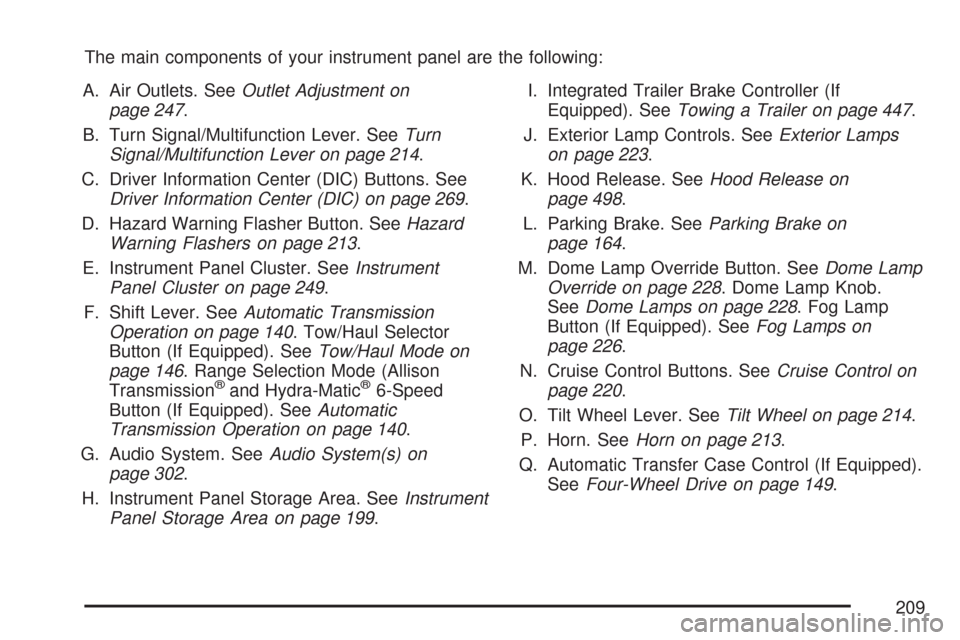
The main components of your instrument panel are the following:
A. Air Outlets. SeeOutlet Adjustment on
page 247.
B. Turn Signal/Multifunction Lever. SeeTurn
Signal/Multifunction Lever on page 214.
C. Driver Information Center (DIC) Buttons. See
Driver Information Center (DIC) on page 269.
D. Hazard Warning Flasher Button. SeeHazard
Warning Flashers on page 213.
E. Instrument Panel Cluster. SeeInstrument
Panel Cluster on page 249.
F. Shift Lever. SeeAutomatic Transmission
Operation on page 140. Tow/Haul Selector
Button (If Equipped). SeeTow/Haul Mode on
page 146. Range Selection Mode (Allison
Transmission
®and Hydra-Matic®6-Speed
Button (If Equipped). SeeAutomatic
Transmission Operation on page 140.
G. Audio System. SeeAudio System(s) on
page 302.
H. Instrument Panel Storage Area. SeeInstrument
Panel Storage Area on page 199.I. Integrated Trailer Brake Controller (If
Equipped). SeeTowing a Trailer on page 447.
J. Exterior Lamp Controls. SeeExterior Lamps
on page 223.
K. Hood Release. SeeHood Release on
page 498.
L. Parking Brake. SeeParking Brake on
page 164.
M. Dome Lamp Override Button. SeeDome Lamp
Override on page 228. Dome Lamp Knob.
SeeDome Lamps on page 228. Fog Lamp
Button (If Equipped). SeeFog Lamps on
page 226.
N. Cruise Control Buttons. SeeCruise Control on
page 220.
O. Tilt Wheel Lever. SeeTilt Wheel on page 214.
P. Horn. SeeHorn on page 213.
Q. Automatic Transfer Case Control (If Equipped).
SeeFour-Wheel Drive on page 149.
209
Page 212 of 684

E. Shift Lever. SeeAutomatic Transmission
Operation on page 140.
F. Tow/Haul Selector Button (If Equipped). See
Tow/Haul Mode on page 146.
G. Driver Information Center (DIC) Controls. See
Driver Information Center (DIC) on page 269.
H. Audio System. SeeAudio System(s) on
page 302.
I. Exterior Lamps Control. SeeExterior Lamps on
page 223.
J. Integrated Trailer Brake Controller (If
Equipped). SeeTowing a Trailer on page 447.
K. Dome Lamp Override Button. SeeDome
Lamp Override on page 228. Dome Lamp
Knob. SeeDome Lamps on page 228.
L. Automatic Transfer Case Control. (If Equipped).
SeeFour-Wheel Drive on page 149.
M. Hood Release. SeeHood Release on
page 498.
N. Parking Brake. SeeParking Brake on
page 164.
O. Cruise Control Buttons. SeeCruise Control on
page 220.
P. Tilt Wheel Lever. SeeTilt Wheel on page 214.Q. Horn. SeeHorn on page 213.
R. Audio Steering Wheel Controls. SeeAudio
Steering Wheel Controls on page 370.
S. Climate Controls. SeeClimate Control System
(With Air Conditioning ) on page 236or
Climate Control System (Heater Only) on
page 239or Dual Automatic Climate Controls
(If Equipped). SeeDual Automatic Climate
Control System on page 240.
T. Accessory Power Outlets. SeeAccessory
Power Outlet(s) on page 234. Cigarette Lighter
(If Equipped). SeeAshtray(s) and Cigarette
Lighter on page 235.
U. StabiliTrak
®Button (If Equipped). See
StabiliTrak®System on page 384. Pedal Adjust
Button (If Equipped). SeeAdjustable Throttle
and Brake Pedal on page 138. Rear Park Assist
Disable Button (If Equipped). SeeUltrasonic
Rear Parking Assist (URPA) on page 230.
Heated Windshield Washer Fluid Button
(If Equipped). SeeWindshield Washer on
page 219.
V. Passenger Airbag Off Control (If Equipped).
SeeAirbag Off Switch on page 95.
W. Glove Box. SeeGlove Box on page 198.
212
Page 258 of 684
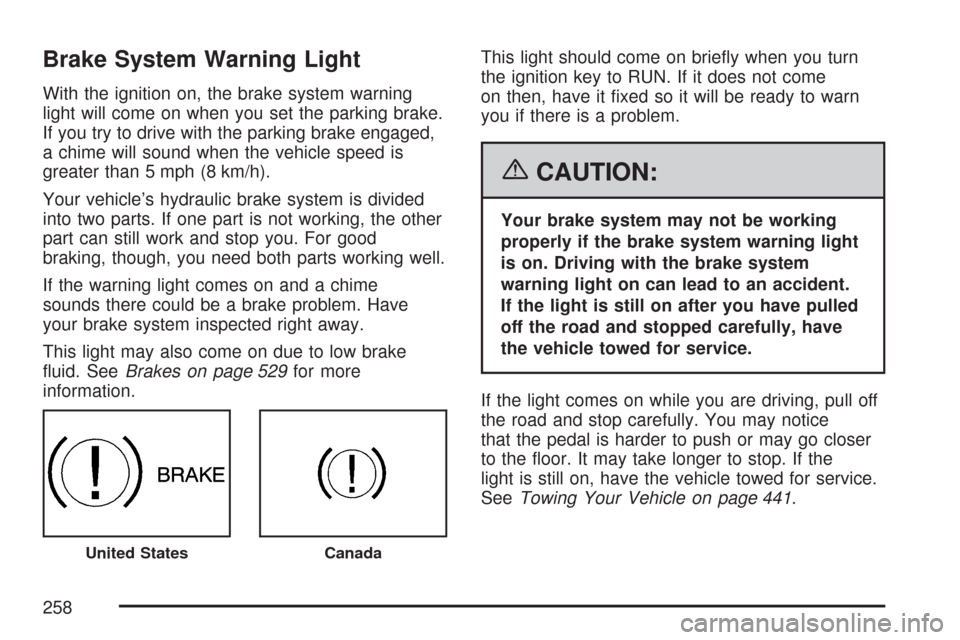
Brake System Warning Light
With the ignition on, the brake system warning
light will come on when you set the parking brake.
If you try to drive with the parking brake engaged,
a chime will sound when the vehicle speed is
greater than 5 mph (8 km/h).
Your vehicle’s hydraulic brake system is divided
into two parts. If one part is not working, the other
part can still work and stop you. For good
braking, though, you need both parts working well.
If the warning light comes on and a chime
sounds there could be a brake problem. Have
your brake system inspected right away.
This light may also come on due to low brake
uid. SeeBrakes on page 529for more
information.This light should come on briey when you turn
the ignition key to RUN. If it does not come
on then, have it xed so it will be ready to warn
you if there is a problem.
{CAUTION:
Your brake system may not be working
properly if the brake system warning light
is on. Driving with the brake system
warning light on can lead to an accident.
If the light is still on after you have pulled
off the road and stopped carefully, have
the vehicle towed for service.
If the light comes on while you are driving, pull off
the road and stop carefully. You may notice
that the pedal is harder to push or may go closer
to the oor. It may take longer to stop. If the
light is still on, have the vehicle towed for service.
SeeTowing Your Vehicle on page 441.
United StatesCanada
258
Page 263 of 684
This light should come on, as a check to show
you it is working, when the ignition is on and the
engine is not running. If the light does not
come on, have it repaired. This light will also
come on during a malfunction in one of two ways:
Light Flashing— A misre condition has
been detected. A misre increases vehicle
emissions and may damage the emission
control system on your vehicle. Diagnosis and
service may be required.
Light On Steady— An emission control
system malfunction has been detected on your
vehicle. Diagnosis and service may be
required.
If the Light is Flashing
The following may prevent more serious damage
to your vehicle:
Reducing vehicle speed
Avoiding hard accelerations
Avoiding steep uphill grades
If you are towing a trailer, reduce the amount
of cargo being hauled as soon as it is
possibleIf the light stops ashing and remains on steady,
see “If the Light Is On Steady” following.
If the light continues to ash, when it is safe to do
so, stop the vehicle. Find a safe place to park
your vehicle. Turn the key off, wait at least
10 seconds and restart the engine. If the light
remains on steady, see “If the Light Is On Steady”
following. If the light is still ashing, follow the
previous steps, and see your dealer for service as
soon as possible.
If the Light Is On Steady
You may be able to correct the emission system
malfunction by considering the following:
Did you recently put fuel into your vehicle?
If so, reinstall the fuel cap, making sure to fully
install the cap. SeeFilling the Tank on page 494.
The diagnostic system can determine if the
fuel cap has been left off or improperly installed. A
loose or missing fuel cap will allow fuel to
evaporate into the atmosphere. A few driving trips
with the cap properly installed should turn the
light off.
263
Page 275 of 684
Remember, you must reset the OIL LIFE display
yourself after each oil change. It will not reset
itself. Also, be careful not to reset the OIL LIFE
display accidentally at any time other than
when the oil has just been changed. It cannot be
reset accurately until the next oil change. To
reset the engine oil life system, seeEngine Oil
Life System on page 505.
Units
Press the vehicle information button until UNITS
displays. This display allows you to select between
English or Metric units of measurement. Once in
this display, press the set/reset button to select
between ENGLISH or METRIC units. All of
the vehicle information will then be displayed in
the unit of measurement selected.
Tire Pressure
If your vehicle has a Tire Pressure Monitor (TPM)
system, the pressure for each tire can be
viewed in the DIC. The tire pressure will be shown
in either pounds per square inch (psi) or
kilopascals (kPa). Press the vehicle information
button until the DIC displays FRONT TIRES
PSI (kPa) LEFT ## RIGHT ##. Press the vehicle
information button again until the DIC displays
REAR TIRES PSI (kPa) LEFT ## RIGHT ##.If a low or high tire pressure condition is detected
by the system while driving, a message advising
you to check the pressure in a specic tire
will appear in the display. SeeInation - Tire
Pressure on page 561andDIC Warnings
and Messages on page 281for more information.
If the tire pressure display shows dashes
instead of a value, there may be a problem with
your vehicle. If this consistently occurs, see
your dealer for service.
Trailer Gain and Output
On vehicles with the Integrated Trailer Brake
Control (ITBC) system, the trailer brake display
appears in the DIC. Press the vehicle information
button until TRAILER GAIN and OUTPUT display.
TRAILER GAIN shows the trailer gain setting. This
setting can be adjusted from 0.0 to 10.0 with
either a trailer connected or disconnected.
To adjust this setting, see “Integrated Trailer
Brake Control System” underTowing a Trailer on
page 447for more information.
275
Page 276 of 684
OUTPUT shows the power output to the trailer
anytime a trailer with electric brakes is connected.
Output is displayed in 0 to 10 bars. Dashes
may appear in the OUTPUT display. See
“Integrated Trailer Brake Control System” under
Towing a Trailer on page 447for more information.
Engine Hours
Press the vehicle information button until ENGINE
HOURS displays. This display shows the total
number of hours the engine has run.
Relearn Tire Positions
If your vehicle has a Tire Pressure Monitor (TPM)
system, after rotating the tires or after replacing
a tire or sensor, the system must re-learn the tire
positions. To re-learn the tire positions, see
Tire Pressure Monitor System on page 563. See
Tire Inspection and Rotation on page 568andDIC
Warnings and Messages on page 281for more
information.
Relearn Remote Key
This display allows you to match Remote Keyless
Entry (RKE) transmitters to your vehicle. To match
an RKE transmitter to your vehicle, do the following:
1. Press the vehicle information button until
PRESS
VTO RELEARN REMOTE KEY
displays.
2. Press the set/reset button until REMOTE KEY
LEARNING ACTIVE is displayed.
3. Press and hold the lock and unlock buttons
on the rst transmitter at the same time for
about 15 seconds.
On vehicles with memory recall seats, the rst
transmitter learned will match driver 1 and
the second will match driver 2.
A chime will sound indicating that the
transmitter is matched.
4. To match additional transmitters at this time,
repeat Step 3.
Each vehicle can have a maximum of eight
transmitters matched to it.
5. To exit the programming mode, you must
cycle the key to LOCK.
276