2007 CHEVROLET IMPALA reset
[x] Cancel search: resetPage 228 of 460
The number of favorites pages can be setup using
the MENU button. To setup the number of
favorites pages, perform the following steps:
1. Press the MENU button to display the radio
setup menu.
2. Press the pushbutton located below the
FAV 1-6 label.
3. Select the desired number of favorites pages
by pressing the pushbutton located below the
displayed page numbers.
4. Press the FAV button, or let the menu time out,
to return to the original main radio screen
showing the radio station frequency labels and
to begin the process of programming your
favorites for the chosen amount of numbered
pages.
Setting the Tone
(Bass/Midrange/Treble)
BASS/MID/TREB (Bass, Midrange, or
Treble):To adjust bass, midrange, or treble,
press the
fknob until the tone control labels
display. Continue pressing to highlight the desired
label, or press the pushbutton positioned under
the desired label.Turn the
fknob clockwise or counterclockwise to
adjust the highlighted setting. The highlighted
setting can also be adjusted by pressing either
SEEK arrow,
\FWD (forward), orsREV
(reverse) button until the desired levels are
obtained. If a station’s frequency is weak,
or has static, decrease the treble.
To quickly adjust bass, midrange, or treble to the
middle position, press the pushbutton positioned
under the BASS, MID (midrange), or TREB (treble)
label for more than two seconds. A beep sounds
and the level adjusts to the middle position.
To quickly adjust all tone and speaker controls to
the middle position, press the
fknob for more than
two seconds until a beep sounds.
EQ (Equalization):Press this button to select
preset equalization settings.
To return to the manual mode, press the EQ
button until Manual displays or start to manually
adjust the bass, midrange, or treble by
pressing the
fknob.
228
Page 241 of 460
XM Radio Messages
Radio Display Message Condition Action Required
XL (Explicit Language
Channels)XL on the radio display,
after the channel name,
indicates content with
explicit language.These channels, or any others, can be blocked at a
customer’s request, by calling 1-800-852-XMXM (9696).
XM Updating Updating encryption code The encryption code in the receiver is being updated, and
no action is required. This process should take no longer
than 30 seconds.
No XM Signal Loss of signal The system is functioning correctly, but the vehicle is in a
location that is blocking the XM™ signal. When you move
into an open area, the signal should return.
Loading XM Acquiring channel audio
(after four second delay)The audio system is acquiring and processing audio and
text data. No action is needed. This message should
disappear shortly.
Channel Off Air Channel not in service This channel is not currently in service. Tune to another
channel.
Channel Unavail Channel no
longer availableThis previously assigned channel is no longer assigned.
Tune to another station. If this station was one of the
presets, choose another station for that preset button.
No Artist Info Artist Name/Feature
not availableNo artist information is available at this time on this channel.
The system is working properly.
No Title Info Song/Program Title
not availableNo song title information is available at this time on this
channel. The system is working properly.
241
Page 314 of 460
Engine Oil Life System
When to Change Engine Oil
Your vehicle has a computer system that lets you
know when to change the engine oil and lter.
This is based on engine revolutions and engine
temperature, and not on mileage. Based on driving
conditions, the mileage at which an oil change
will be indicated can vary considerably. For the oil
life system to work properly, you must reset the
system every time the oil is changed.
When the system has calculated that oil life has
been diminished, it will indicate that an oil change
is necessary. A CHANGE ENGINE OIL SOON
message will come on. SeeDIC Warnings
and Messages on page 199.Change the oil as soon as possible within the next
600 miles (1 000 km). It is possible that, if you
are driving under the best conditions, the oil
life system might not indicate that an oil change is
necessary for over a year. However, the engine
oil and lter must be changed at least once a year
and at this time the system must be reset. Your
dealer/retailer has trained service people who
will perform this work using genuine parts
and reset the system. It is also important to check
the oil regularly and keep it at the proper level.
If the system is ever reset accidentally, you must
change the oil at 3,000 miles (5 000 km) since
your last oil change. Remember to reset the oil life
system whenever the oil is changed.
314
Page 315 of 460
How to Reset the Engine Oil Life
System
The Engine Oil Life System calculates when to
change the engine oil and lter based on vehicle
use. Whenever the oil is changed, reset the system
so it can calculate when the next oil change is
required. If a situation occurs where you change the
oil prior to a CHANGE ENGINE OIL SOON
message being turned on, reset the system.
Always reset the engine oil life to 100% after every
oil change. It will not reset itself. To reset the
Engine Oil Life System:
1. Display the OIL LIFE REMAINING on the DIC.
2. Press and hold the SET/RESET button on the
DIC for more than ve seconds. The oil life
will change to 100%.
If the CHANGE ENGINE OIL SOON message
comes back on when you start your vehicle, the
Engine Oil Life System has not reset. Repeat
the procedure.
What to Do with Used Oil
Used engine oil contains certain elements that can
be unhealthy for your skin and could even cause
cancer. Do not let used oil stay on your skin for very
long. Clean your skin and nails with soap and
water, or a good hand cleaner. Wash or properly
dispose of clothing or rags containing used engine
oil. See the manufacturer’s warnings about the use
and disposal of oil products.
Used oil can be a threat to the environment. If you
change your own oil, be sure to drain all the oil
from the lter before disposal. Never dispose of oil
by putting it in the trash, pouring it on the
ground, into sewers, or into streams or bodies of
water. Instead, recycle it by taking it to a place
that collects used oil. If you have a problem
properly disposing of used oil, ask your
dealer/retailer, a service station, or a local
recycling center for help.
315
Page 326 of 460
Overheated Engine Protection
Operating Mode
This emergency operating mode allows your
vehicle to be driven to a safe place in an
emergency situation. If an overheated engine
condition exists, an overheat protection mode
which alternates ring groups of cylinders helps
prevent engine damage. In this mode, you
will notice a signicant loss in power and engine
performance. The coolant temperature gage
will indicate an overheat condition exists. Driving
extended miles (km) and/or towing a trailer in
the overheat protection mode should be avoided.
Notice:After driving in the overheated
engine protection operating mode, to avoid
engine damage, allow the engine to cool before
attempting any repair. The engine oil will be
severely degraded. Repair the cause of coolant
loss, change the oil and reset the oil life
system. SeeEngine Oil on page 310.
Cooling System
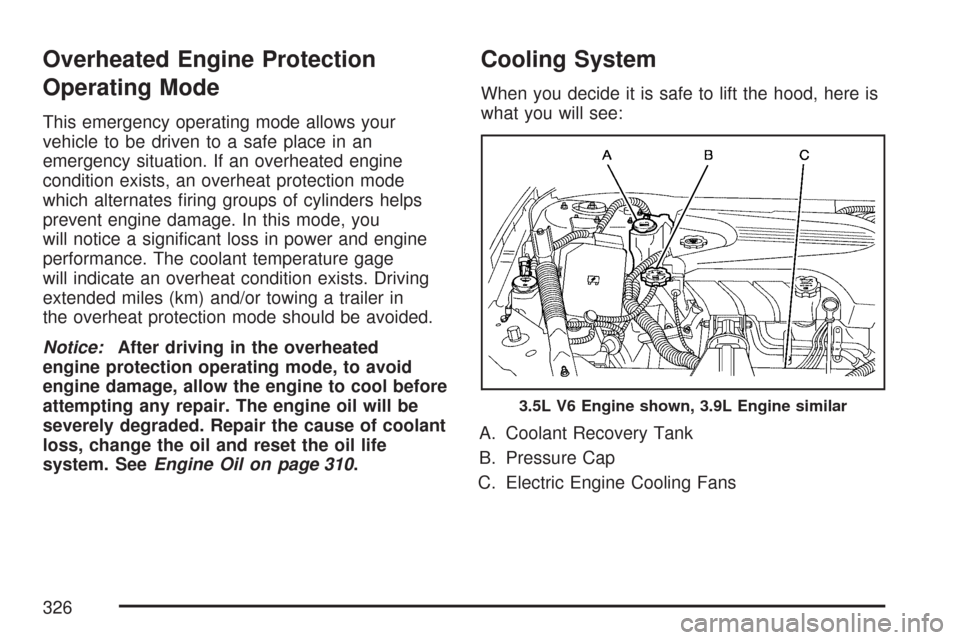
When you decide it is safe to lift the hood, here is
what you will see:
A. Coolant Recovery Tank
B. Pressure Cap
C. Electric Engine Cooling Fans
3.5L V6 Engine shown, 3.9L Engine similar
326
Page 343 of 460
To disconnect the jumper cables from both
vehicles, do the following:
1. Disconnect the black negative (−) cable from
the vehicle that had the dead battery.
2. Disconnect the black negative (−) cable from
the vehicle with the good battery.
3. Disconnect the red positive (+) cable from the
vehicle with the good battery.
4. Disconnect the red positive (+) cable from the
other vehicle.
5. Return the fuse block cover to its original
position.Headlamp Aiming
Headlamp aim has been preset at the factory and
should need no further adjustment.
However, if your vehicle is damaged in an accident,
the headlamp aim may be affected. Aim adjustment
to the low-beam headlamps may be necessary if it
is difficult to see the lane markers (for horizontal
aim), or if oncoming drivers ash their high-beam
headlamps at you (for vertical aim).
If you believe your headlamps need to be
re-aimed, it is recommend that you take the vehicle
to your dealer for service.
Bulb Replacement
For the proper type of replacement bulbs,
seeReplacement Bulbs on page 349.
For any bulb changing procedure not listed in this
section, contact your dealer.
343
Page 363 of 460

TPMS Sensor Identication Codes
Each TPMS sensor has a unique identication
code. Any time you replace one or more of
the TPMS sensors or rotate the vehicle’s tires,
the identication codes will need to be matched
to the new tire/wheel position. The sensors
are matched, to the tire/wheel positions, in the
following order: driver’s side front tire, passenger’s
side front tire, passenger’s side rear tire, and
driver’s side rear tire using a TPMS diagnostic
tool. See your GM dealer for service.
The TPMS sensors may also be matched to each
tire/wheel position by increasing or decreasing
the tire’s air pressure. When increasing the tire’s
pressure, do not exceed the maximum ination
pressure indicated on the tire’s sidewall.
You will have two minutes to match each tire
and wheel position. If it takes longer than
two minutes to match any tire and wheel position,
the matching process stops and you will need
to start over.The TPMS matching process is outlined below:
1. Set the parking brake.
2. Turn the ignition switch to RUN with the
engine off.
3. Using the DIC, press the vehicle information
button until the LEARN TIRE POSITIONS
message displays.
4. Press the set/reset button to allow the system
to learn the tire positions. The horn will sound
twice to indicate the receiver is ready, and
the TIRE LEARNING ACTIVE message
will display. The TPMS system is ready for
the sensor matching process to begin.
5. Start with the driver’s side front tire.
6. Remove the valve cap from the tire’s valve
stem. Activate the TPMS sensor by increasing
or decreasing the tire’s air pressure for
ve seconds, or until a horn chirp sounds.
The horn chirp, which may take up to
30 seconds to sound, conrms that the sensor
identication code has been matched to the
tire/wheel position. To decrease the tire’s
air-pressure use the pointed end of the valve
cap, a pencil-style air pressure gage, or a key.
363
Page 365 of 460

When rotating your tires, always use the correct
rotation pattern shown here.
Do not include the compact spare tire in your
tire rotation.
After the tires have been rotated, adjust the front
and rear ination pressures as shown on the Tire
and Loading Information label. SeeInation - Tire
Pressure on page 359andLoading Your Vehicle on
page 277.Reset the Tire Pressure Monitor System. See
“TPMS Sensor Identication Codes” under
Tire Pressure Monitor System on page 360.
Make certain that all wheel nuts are properly
tightened. See “Wheel Nut Torque” under
Capacities and Specications on page 403.
{CAUTION:
Rust or dirt on a wheel, or on the parts to
which it is fastened, can make wheel nuts
become loose after time. The wheel could
come off and cause an accident. When
you change a wheel, remove any rust or
dirt from places where the wheel attaches
to the vehicle. In an emergency, you can
use a cloth or a paper towel to do this;
but be sure to use a scraper or wire brush
later, if needed, to get all the rust or dirt
off. SeeChanging a Flat Tire on page 374.
365