2007 CHEVROLET HHR fuses
[x] Cancel search: fusesPage 114 of 446
PASS-Key®III+ Operation
Your vehicle has PASS-Key®III+ (Personalized
Automotive Security System) theft-deterrent
system. PASS-Key
®III+ is a passive
theft-deterrent system. This means you do not
have to do anything special to arm or disarm the
system. It works when you insert or remove
the key from the ignition.
When the PASS-Key
®III+ system senses that
someone is using the wrong key, it prevents the
vehicle from starting. Anyone using a
trial-and-error method to start the vehicle will be
discouraged because of the high number of
electrical key codes.
When trying to start the vehicle if the engine does
not start and the security light comes on, the
key may have a damaged transponder. Turn the
ignition off and try again.If the engine still does not start, and the key
appears to be undamaged, try another ignition
key. At this time, you may also want to check the
fuse, seeFuses and Circuit Breakers on
page 381. If the engine still does not start with the
other key, your vehicle needs service. If your
vehicle does start, the rst key may be faulty. See
your dealer who can service the PASS-Key
®III+
to have a new key made. In an emergency,
contact Roadside Assistance. SeeRoadside
Assistance Program on page 418, for more
information.
It may be possible for the PASS-Key
®III+ decoder
to “learn” the transponder value of a new or
replacement key. Up to 10 keys may be
programmed for the vehicle. The following
procedure is for programming additional keys only.
If all the currently programmed keys are lost or
do not operate, you must see your dealer or
a locksmith who can service PASS-Key
®III+ to
have keys made and programmed to the system.
See your dealer or a locksmith who can service
PASS-Key
®III+ to get a new key blank that is cut
exactly as the ignition key that operates the
system.
114
Page 156 of 446
Turn and Lane-Change Signals
The turn signal has two upward (for right) and
two downward (for left) positions. These positions
allow you to signal a turn or a lane change.
To signal a turn, move the lever all the way up or
down. When the turn is nished, the lever will
return automatically.
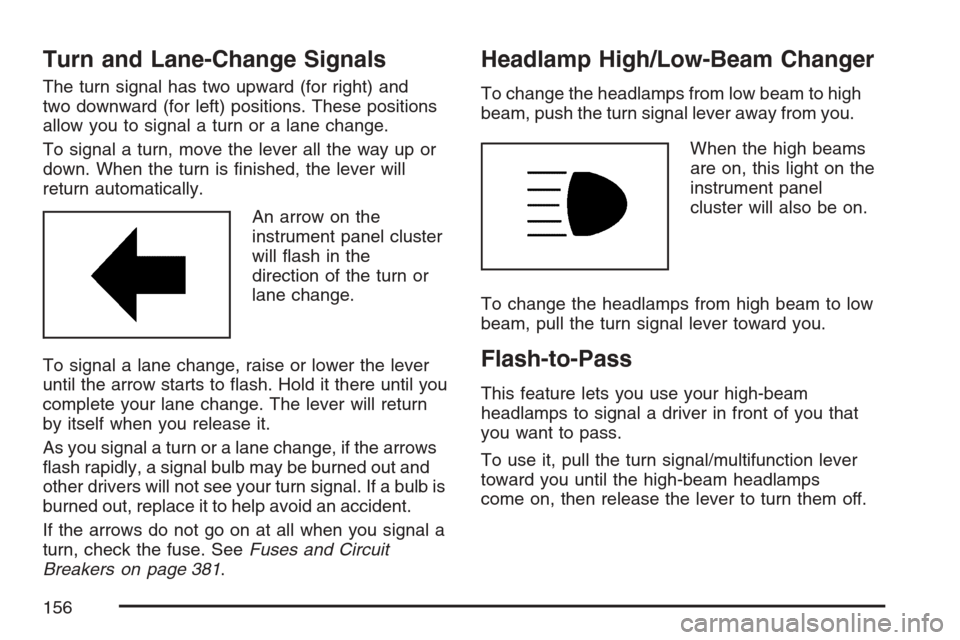
An arrow on the
instrument panel cluster
will ash in the
direction of the turn or
lane change.
To signal a lane change, raise or lower the lever
until the arrow starts to ash. Hold it there until you
complete your lane change. The lever will return
by itself when you release it.
As you signal a turn or a lane change, if the arrows
ash rapidly, a signal bulb may be burned out and
other drivers will not see your turn signal. If a bulb is
burned out, replace it to help avoid an accident.
If the arrows do not go on at all when you signal a
turn, check the fuse. SeeFuses and Circuit
Breakers on page 381.
Headlamp High/Low-Beam Changer
To change the headlamps from low beam to high
beam, push the turn signal lever away from you.
When the high beams
are on, this light on the
instrument panel
cluster will also be on.
To change the headlamps from high beam to low
beam, pull the turn signal lever toward you.
Flash-to-Pass
This feature lets you use your high-beam
headlamps to signal a driver in front of you that
you want to pass.
To use it, pull the turn signal/multifunction lever
toward you until the high-beam headlamps
come on, then release the lever to turn them off.
156
Page 169 of 446
Accessory Power Outlet(s)
Accessory power outlets can be used to connect
electrical equipment such as a cellular phone
or CB radio.
The accessory power outlet is located on the
instrument panel below the climate controls and at
the rear of the center console.
To use the outlet, remove the cover. When not
in use, always cover the outlet with the
protective cap.
Notice:Leaving electrical equipment plugged
in for an extended period of time while the
vehicle is off will drain the battery. Power is
always supplied to the outlets. Always unplug
electrical equipment when not in use and
do not plug in equipment that exceeds
the maximum 20 ampere rating.
Certain electrical accessories may not be
compatible with the accessory power outlet and
could result in blown vehicle or adapter fuses. If you
experience a problem, see your dealer for
additional information on the accessory power
outlet.Notice:Adding any electrical equipment to
your vehicle may damage it or keep other
components from working as they should. The
repairs would not be covered by your
warranty. Do not use equipment exceeding
maximum amperage rating of 20 amperes.
Check with your dealer before adding electrical
equipment.
When adding electrical equipment, be sure to
follow the installation instructions included with the
equipment.
Notice:Improper use of the power outlet can
cause damage not covered by your warranty.
Do not hang any type of accessory or
accessory bracket from the plug because the
power outlets are designed for accessory
power plugs only.
169
Page 288 of 446
When It Is Time for New Tires.................. 347
Buying New Tires...................................... 347
Different Size Tires and Wheels................ 349
Uniform Tire Quality Grading..................... 350
Wheel Alignment and Tire Balance............ 351
Wheel Replacement.................................. 352
Tire Chains............................................... 353
If a Tire Goes Flat.................................... 354
Changing a Flat Tire................................. 355
Removing the Spare Tire and Tools.......... 356
Removing the Flat Tire and Installing
the Spare Tire....................................... 359
Storing a Flat or Spare Tire and Tools...... 365
Compact Spare Tire.................................. 369
Appearance Care........................................ 370
Cleaning the Inside of Your Vehicle.......... 370
Fabric/Carpet............................................. 371
Instrument Panel, Vinyl, and Other
Plastic Surfaces..................................... 372
Care of Safety Belts.................................. 373
Weatherstrips............................................ 373
Washing Your Vehicle............................... 373
Cleaning Exterior Lamps/Lenses................ 374Finish Care............................................... 374
Windshield and Wiper Blades.................... 375
Aluminum or Chrome-Plated Wheels......... 375
Tires......................................................... 376
Sheet Metal Damage................................. 376
Finish Damage.......................................... 377
Underbody Maintenance............................ 377
Chemical Paint Spotting............................ 377
Vehicle Care/Appearance Materials............ 378
Vehicle Identication.................................. 379
Vehicle Identication Number (VIN)........... 379
Service Parts Identication Label............... 379
Electrical System........................................ 380
Add-On Electrical Equipment..................... 380
Headlamp Wiring....................................... 380
Windshield Wiper Fuses............................ 380
Power Windows and Other Power
Options.................................................. 380
Fuses and Circuit Breakers....................... 381
Floor Console Fuse Block......................... 381
Engine Compartment Fuse Block............... 383
Capacities and Specications.................... 386
Section 5 Service and Appearance Care
288
Page 380 of 446
Electrical System
Add-On Electrical Equipment
Notice:Do not add anything electrical to your
vehicle unless you check with your dealer
rst. Some electrical equipment can damage
your vehicle and the damage would not
be covered by your warranty. Some add-on
electrical equipment can keep other
components from working as they should.
Add-on equipment can drain your vehicle’s battery,
even if your vehicle is not operating.
Your vehicle has an airbag system. Before
attempting to add anything electrical to your
vehicle, seeServicing Your Airbag-Equipped
Vehicle on page 88.
Headlamp Wiring
The headlamp wiring is protected by fuses. Should
your headlamps fail to function, have your
headlamp system checked right away.
Windshield Wiper Fuses
The windshield wiper motor is protected by a
circuit breaker and a fuse. If the motor overheats
due to heavy snow or ice, the wiper will stop
until the motor cools. If the overload is caused by
some electrical problem, have it xed.
Power Windows and Other Power
Options
Fuses in the fuse block protect the power windows.
When the current load is too heavy, the fuse opens
protecting the circuit until the problem is xed.
380
Page 381 of 446
Fuses and Circuit Breakers
The wiring circuits in your vehicle are protected
from short circuits by a combination of fuses,
circuit breakers and fusible thermal links.
This greatly reduces the chance of damage
caused by electrical problems.
Look at the silver-colored band inside the fuse. If
the band is broken or melted, replace the fuse.
Be sure you replace a bad fuse with a new one of
the identical size and rating.
If you ever have a problem on the road and do not
have a spare fuse, you can “borrow” one that
has the same amperage. Just pick some feature
of your vehicle that you can get along
without — like the radio or cigarette lighter — and
use its fuse if it is the correct amperage.
Replace it as soon as you can.
There are two fuse blocks in your vehicle: the oor
console fuse block and the engine compartment
fuse block.
There are also one or two fuses located at the
back of the vehicle near the battery.
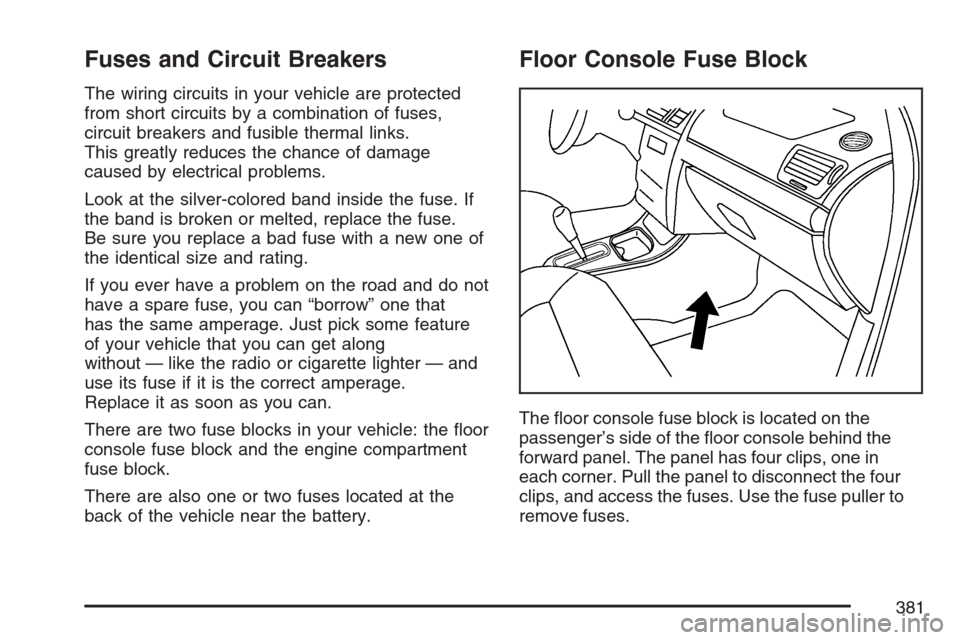
Floor Console Fuse Block
The oor console fuse block is located on the
passenger’s side of the oor console behind the
forward panel. The panel has four clips, one in
each corner. Pull the panel to disconnect the four
clips, and access the fuses. Use the fuse puller to
remove fuses.
381
Page 382 of 446
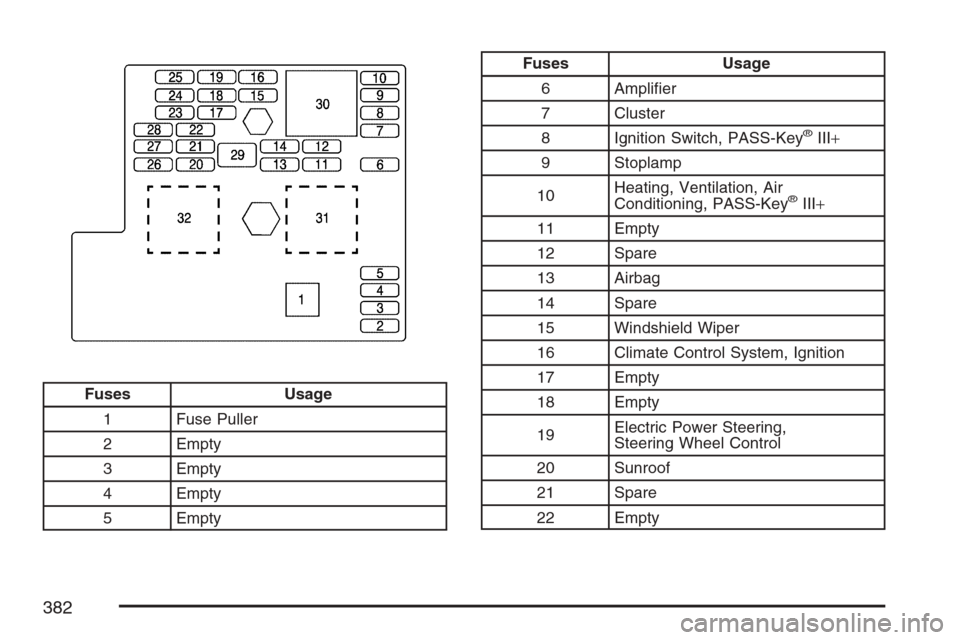
Fuses Usage
1 Fuse Puller
2 Empty
3 Empty
4 Empty
5 Empty
Fuses Usage
6 Amplier
7 Cluster
8 Ignition Switch, PASS-Key
®III+
9 Stoplamp
10Heating, Ventilation, Air
Conditioning, PASS-Key
®III+
11 Empty
12 Spare
13 Airbag
14 Spare
15 Windshield Wiper
16 Climate Control System, Ignition
17 Empty
18 Empty
19Electric Power Steering,
Steering Wheel Control
20 Sunroof
21 Spare
22 Empty
382
Page 383 of 446
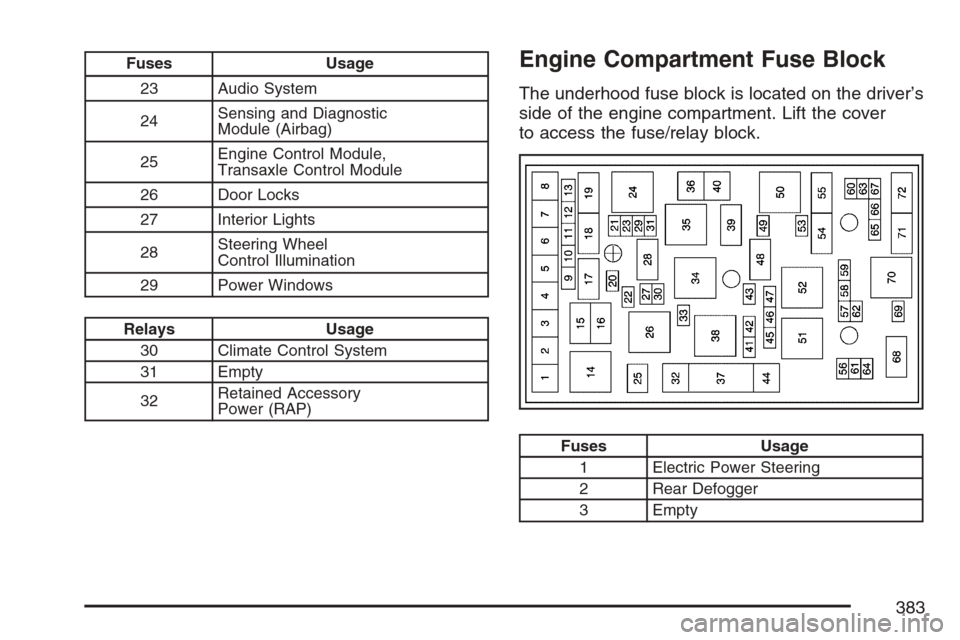
Fuses Usage
23 Audio System
24Sensing and Diagnostic
Module (Airbag)
25Engine Control Module,
Transaxle Control Module
26 Door Locks
27 Interior Lights
28Steering Wheel
Control Illumination
29 Power Windows
Relays Usage
30 Climate Control System
31 Empty
32Retained Accessory
Power (RAP)
Engine Compartment Fuse Block
The underhood fuse block is located on the driver’s
side of the engine compartment. Lift the cover
to access the fuse/relay block.
Fuses Usage
1 Electric Power Steering
2 Rear Defogger
3 Empty
383