2007 CHEVROLET HHR display
[x] Cancel search: displayPage 232 of 446
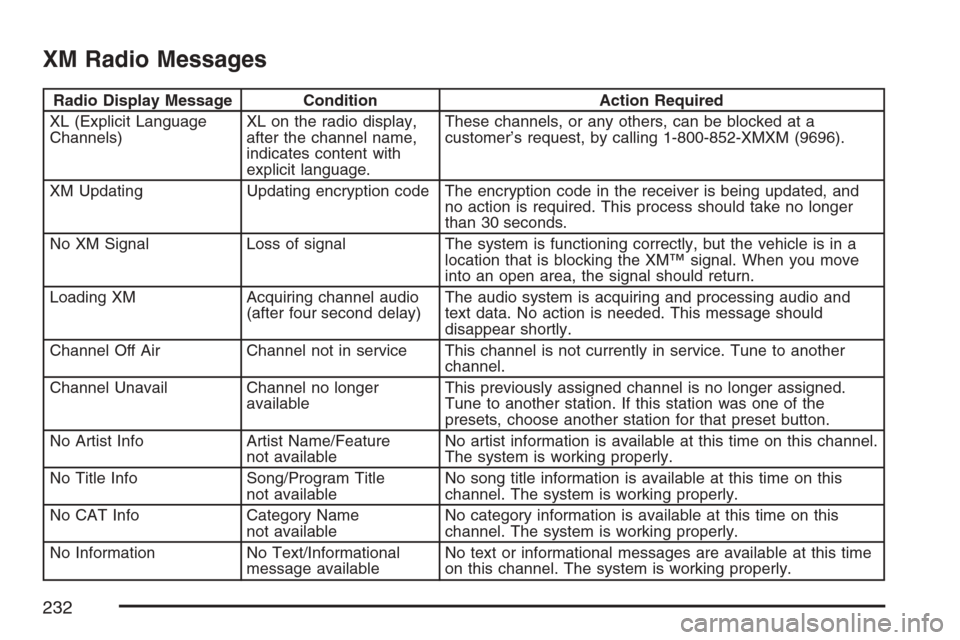
XM Radio Messages
Radio Display Message Condition Action Required
XL (Explicit Language
Channels)XL on the radio display,
after the channel name,
indicates content with
explicit language.These channels, or any others, can be blocked at a
customer’s request, by calling 1-800-852-XMXM (9696).
XM Updating Updating encryption code The encryption code in the receiver is being updated, and
no action is required. This process should take no longer
than 30 seconds.
No XM Signal Loss of signal The system is functioning correctly, but the vehicle is in a
location that is blocking the XM™ signal. When you move
into an open area, the signal should return.
Loading XM Acquiring channel audio
(after four second delay)The audio system is acquiring and processing audio and
text data. No action is needed. This message should
disappear shortly.
Channel Off Air Channel not in service This channel is not currently in service. Tune to another
channel.
Channel Unavail Channel no longer
availableThis previously assigned channel is no longer assigned.
Tune to another station. If this station was one of the
presets, choose another station for that preset button.
No Artist Info Artist Name/Feature
not availableNo artist information is available at this time on this channel.
The system is working properly.
No Title Info Song/Program Title
not availableNo song title information is available at this time on this
channel. The system is working properly.
No CAT Info Category Name
not availableNo category information is available at this time on this
channel. The system is working properly.
No Information No Text/Informational
message availableNo text or informational messages are available at this time
on this channel. The system is working properly.
232
Page 233 of 446
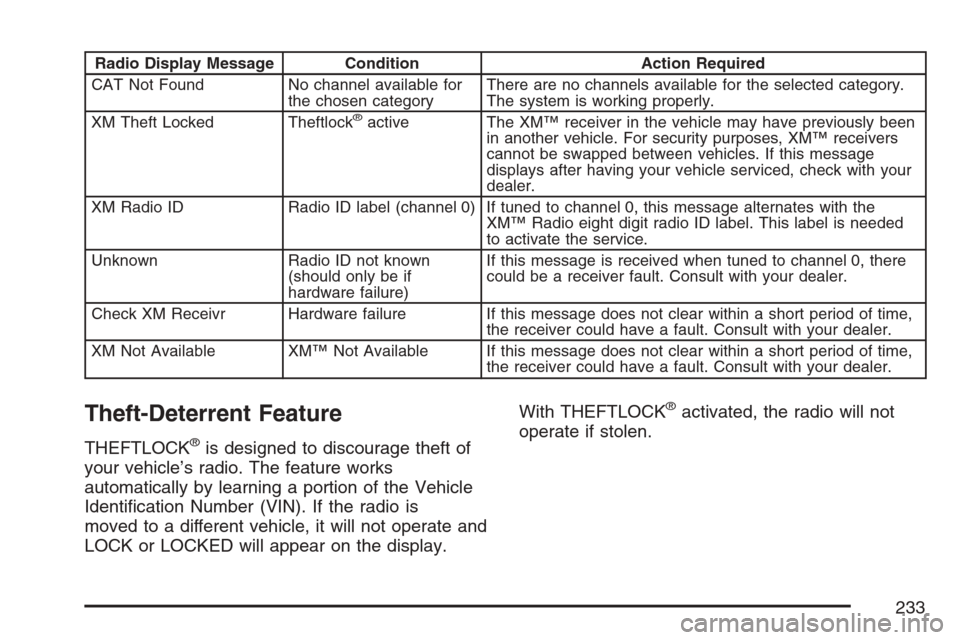
Radio Display Message Condition Action Required
CAT Not Found No channel available for
the chosen categoryThere are no channels available for the selected category.
The system is working properly.
XM Theft Locked Theftlock
®active The XM™ receiver in the vehicle may have previously been
in another vehicle. For security purposes, XM™ receivers
cannot be swapped between vehicles. If this message
displays after having your vehicle serviced, check with your
dealer.
XM Radio ID Radio ID label (channel 0) If tuned to channel 0, this message alternates with the
XM™ Radio eight digit radio ID label. This label is needed
to activate the service.
Unknown Radio ID not known
(should only be if
hardware failure)If this message is received when tuned to channel 0, there
could be a receiver fault. Consult with your dealer.
Check XM Receivr Hardware failure If this message does not clear within a short period of time,
the receiver could have a fault. Consult with your dealer.
XM Not Available XM™ Not Available If this message does not clear within a short period of time,
the receiver could have a fault. Consult with your dealer.
Theft-Deterrent Feature
THEFTLOCK®is designed to discourage theft of
your vehicle’s radio. The feature works
automatically by learning a portion of the Vehicle
Identication Number (VIN). If the radio is
moved to a different vehicle, it will not operate and
LOCK or LOCKED will appear on the display.With THEFTLOCK
®activated, the radio will not
operate if stolen.
233
Page 235 of 446
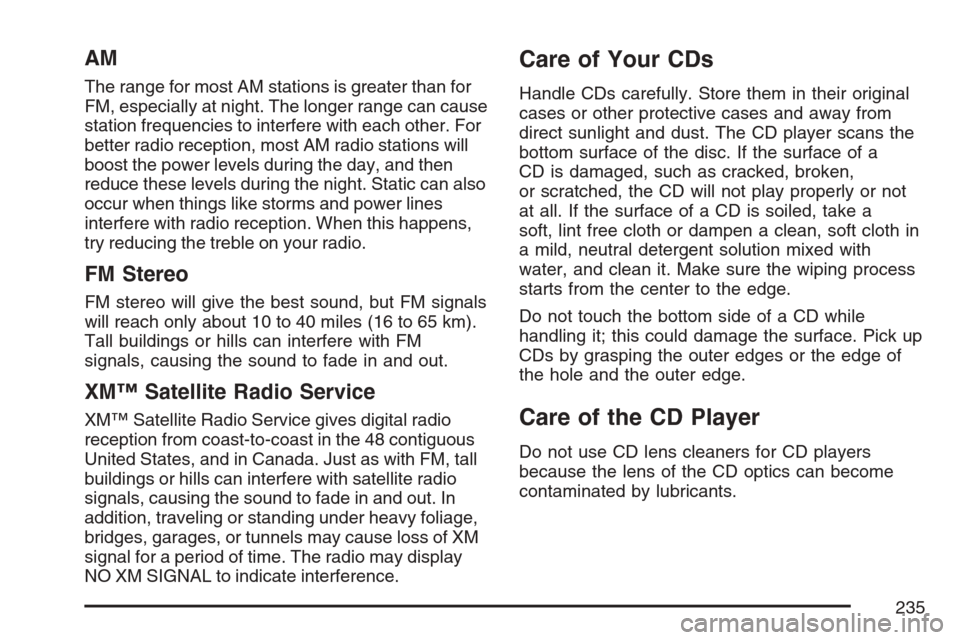
AM
The range for most AM stations is greater than for
FM, especially at night. The longer range can cause
station frequencies to interfere with each other. For
better radio reception, most AM radio stations will
boost the power levels during the day, and then
reduce these levels during the night. Static can also
occur when things like storms and power lines
interfere with radio reception. When this happens,
try reducing the treble on your radio.
FM Stereo
FM stereo will give the best sound, but FM signals
will reach only about 10 to 40 miles (16 to 65 km).
Tall buildings or hills can interfere with FM
signals, causing the sound to fade in and out.
XM™ Satellite Radio Service
XM™ Satellite Radio Service gives digital radio
reception from coast-to-coast in the 48 contiguous
United States, and in Canada. Just as with FM, tall
buildings or hills can interfere with satellite radio
signals, causing the sound to fade in and out. In
addition, traveling or standing under heavy foliage,
bridges, garages, or tunnels may cause loss of XM
signal for a period of time. The radio may display
NO XM SIGNAL to indicate interference.
Care of Your CDs
Handle CDs carefully. Store them in their original
cases or other protective cases and away from
direct sunlight and dust. The CD player scans the
bottom surface of the disc. If the surface of a
CD is damaged, such as cracked, broken,
or scratched, the CD will not play properly or not
at all. If the surface of a CD is soiled, take a
soft, lint free cloth or dampen a clean, soft cloth in
a mild, neutral detergent solution mixed with
water, and clean it. Make sure the wiping process
starts from the center to the edge.
Do not touch the bottom side of a CD while
handling it; this could damage the surface. Pick up
CDs by grasping the outer edges or the edge of
the hole and the outer edge.
Care of the CD Player
Do not use CD lens cleaners for CD players
because the lens of the CD optics can become
contaminated by lubricants.
235
Page 246 of 446
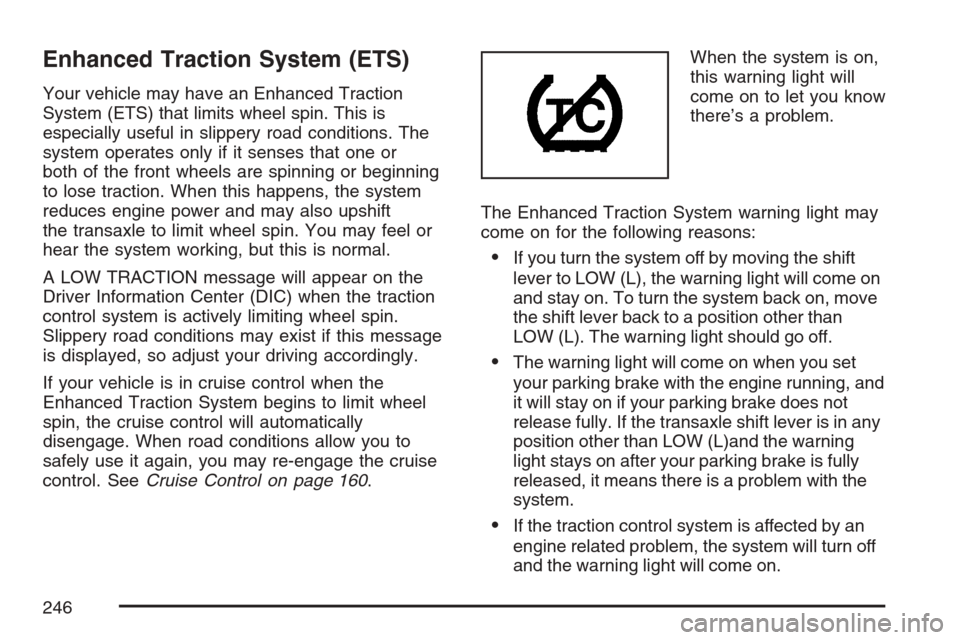
Enhanced Traction System (ETS)
Your vehicle may have an Enhanced Traction
System (ETS) that limits wheel spin. This is
especially useful in slippery road conditions. The
system operates only if it senses that one or
both of the front wheels are spinning or beginning
to lose traction. When this happens, the system
reduces engine power and may also upshift
the transaxle to limit wheel spin. You may feel or
hear the system working, but this is normal.
A LOW TRACTION message will appear on the
Driver Information Center (DIC) when the traction
control system is actively limiting wheel spin.
Slippery road conditions may exist if this message
is displayed, so adjust your driving accordingly.
If your vehicle is in cruise control when the
Enhanced Traction System begins to limit wheel
spin, the cruise control will automatically
disengage. When road conditions allow you to
safely use it again, you may re-engage the cruise
control. SeeCruise Control on page 160.When the system is on,
this warning light will
come on to let you know
there’s a problem.
The Enhanced Traction System warning light may
come on for the following reasons:
If you turn the system off by moving the shift
lever to LOW (L), the warning light will come on
and stay on. To turn the system back on, move
the shift lever back to a position other than
LOW (L). The warning light should go off.
The warning light will come on when you set
your parking brake with the engine running, and
it will stay on if your parking brake does not
release fully. If the transaxle shift lever is in any
position other than LOW (L)and the warning
light stays on after your parking brake is fully
released, it means there is a problem with the
system.
If the traction control system is affected by an
engine related problem, the system will turn off
and the warning light will come on.
246
Page 295 of 446
{CAUTION:
If you spill fuel and then something
ignites it, you could be badly burned. Fuel
can spray out on you if you open the fuel
cap too quickly. This spray can happen if
your tank is nearly full, and is more likely
in hot weather. Open the fuel cap slowly
and wait for any hiss noise to stop. Then
unscrew the cap all the way.
Be careful not to spill fuel. Do not top off or overll
the tank and wait a few seconds after you have
nished pumping before removing the nozzle.
Clean fuel from painted surfaces as soon
as possible. SeeWashing Your Vehicle on
page 373.
When replacing the fuel cap, turn it clockwise until
it clicks. Make sure the cap is fully installed.
The diagnostic system can determine if the fuel
cap has been left off or improperly installed.
This would allow fuel to evaporate into the
atmosphere. SeeMalfunction Indicator Lamp on
page 188.The CHECK GAS CAP message will be displayed
on the Driver Information Center (DIC) if the
fuel cap is not properly installed. SeeDIC
Warnings and Messages on page 197for more
information.
To close the fuel door securely, push the door to
the closed position.
{CAUTION:
If a re starts while you are refueling, do
not remove the nozzle. Shut off the ow of
fuel by shutting off the pump or by
notifying the station attendant. Leave the
area immediately.
Notice:If you need a new fuel cap, be sure to
get the right type. Your dealer can get one
for you. If you get the wrong type, it may not
t properly. This may cause your malfunction
indicator lamp to light and may damage
your fuel tank and emissions system. See
Malfunction Indicator Lamp on page 188.
295
Page 303 of 446
How to Reset the Engine Oil Life
System
The Engine Oil Life System calculates when to
change your engine oil and lter based on vehicle
use. Anytime your oil is changed, reset the
system so it can calculate when the next oil
change is required. If a situation occurs where you
change your oil prior to a CHANGE OIL SOON
message being turned on, reset the system.
After changing the engine oil, the system must be
reset as follows:
1. Turn the ignition to RUN, with the engine off.
2. Press the information and reset buttons
on the DIC at the same time to enter the
personalization menu. SeeDIC Vehicle
Personalization on page 200.
3. Press the information button to scroll through
the available personalization menu modes
until the DIC display shows OIL-LIFE RESET.
4. Press and hold the reset button until the DIC
display shows ACKNOWLEDGED. This will
tell you the system has been reset.
5. Turn the key to LOCK.If the CHANGE OIL SOON message comes back
on when you start your vehicle, the engine oil
life system has not reset. Repeat the reset
procedure.
What to Do with Used Oil
Used engine oil contains certain elements that
may be unhealthy for your skin and could
even cause cancer. Do not let used oil stay on
your skin for very long. Clean your skin and nails
with soap and water, or a good hand cleaner.
Wash or properly dispose of clothing or rags
containing used engine oil. See the manufacturer’s
warnings about the use and disposal of oil
products.
Used oil can be a threat to the environment. If you
change your own oil, be sure to drain all the oil
from the lter before disposal. Never dispose of oil
by putting it in the trash, pouring it on the
ground, into sewers, or into streams or bodies of
water. Instead, recycle it by taking it to a place
that collects used oil. If you have a problem
properly disposing of your used oil, ask your
dealer, a service station, or a local recycling
center for help.
303
Page 403 of 446
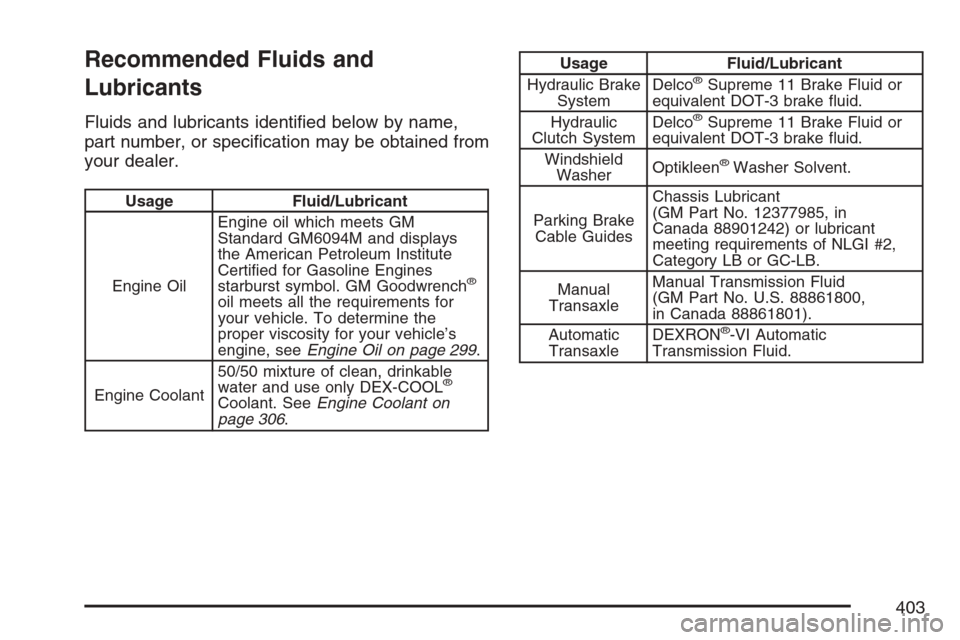
Recommended Fluids and
Lubricants
Fluids and lubricants identied below by name,
part number, or specication may be obtained from
your dealer.
Usage Fluid/Lubricant
Engine OilEngine oil which meets GM
Standard GM6094M and displays
the American Petroleum Institute
Certied for Gasoline Engines
starburst symbol. GM Goodwrench
®
oil meets all the requirements for
your vehicle. To determine the
proper viscosity for your vehicle’s
engine, seeEngine Oil on page 299.
Engine Coolant50/50 mixture of clean, drinkable
water and use only DEX-COOL
®
Coolant. SeeEngine Coolant on
page 306.
Usage Fluid/Lubricant
Hydraulic Brake
SystemDelco®Supreme 11 Brake Fluid or
equivalent DOT-3 brake uid.
Hydraulic
Clutch SystemDelco
®Supreme 11 Brake Fluid or
equivalent DOT-3 brake uid.
Windshield
WasherOptikleen
®Washer Solvent.
Parking Brake
Cable GuidesChassis Lubricant
(GM Part No. 12377985, in
Canada 88901242) or lubricant
meeting requirements of NLGI #2,
Category LB or GC-LB.
Manual
TransaxleManual Transmission Fluid
(GM Part No. U.S. 88861800,
in Canada 88861801).
Automatic
TransaxleDEXRON
®-VI Automatic
Transmission Fluid.
403
Page 436 of 446
Customer Assistance Information
Courtesy Transportation........................... 421
Customer Assistance for Text
Telephone (TTY) Users......................... 416
Customer Assistance Offices.................... 416
Customer Satisfaction Procedure.............. 412
GM Mobility Reimbursement Program...... 417
Reporting Safety Defects to
General Motors..................................... 429
Reporting Safety Defects to the
Canadian Government.......................... 429
Reporting Safety Defects to the
United States Government.................... 428
Roadside Assistance Program.................. 418
Service Publications Ordering
Information........................................... 430
D
Daytime Running Lamps............................. 164
Defensive Driving........................................ 238
Delayed Locking.......................................... 104
Disc, MP3................................................... 226
Doing Your Own Service Work.................... 290
Dome Lamp................................................ 167Door
Automatic Door Lock................................ 105
Delayed Locking...................................... 104
Locks....................................................... 103
Power Door Locks................................... 104
Programmable Automatic Door Unlock..... 105
Rear Door Security Locks........................ 105
Driver
Position, Safety Belt................................... 26
Seat Height Adjuster.................................... 9
Driver Information Center (DIC)................... 194
DIC Operation and Displays..................... 195
DIC Vehicle Personalization..................... 200
DIC Warnings and Messages................... 197
Driving
At Night................................................... 254
City.......................................................... 258
Defensive................................................. 238
Drunken................................................... 239
Freeway................................................... 259
Hill and Mountain Roads.......................... 262
In Rain and on Wet Roads...................... 256
Rocking Your Vehicle to Get it Out.......... 269
Winter...................................................... 264
436