2007 CHEVROLET CORVETTE audio
[x] Cancel search: audioPage 175 of 488
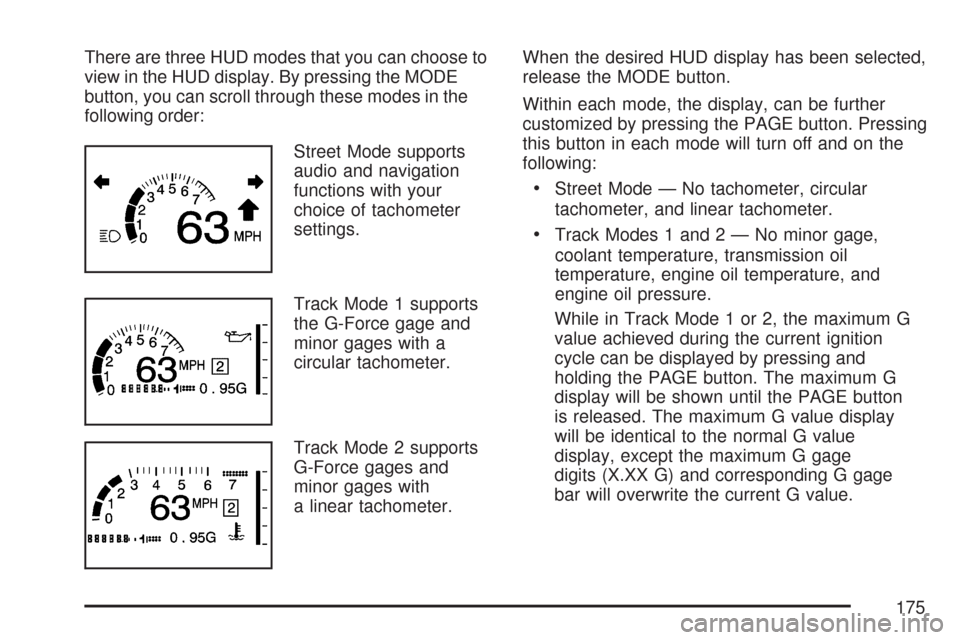
There are three HUD modes that you can choose to
view in the HUD display. By pressing the MODE
button, you can scroll through these modes in the
following order:
Street Mode supports
audio and navigation
functions with your
choice of tachometer
settings.
Track Mode 1 supports
the G-Force gage and
minor gages with a
circular tachometer.
Track Mode 2 supports
G-Force gages and
minor gages with
a linear tachometer.When the desired HUD display has been selected,
release the MODE button.
Within each mode, the display, can be further
customized by pressing the PAGE button. Pressing
this button in each mode will turn off and on the
following:
Street Mode — No tachometer, circular
tachometer, and linear tachometer.
Track Modes 1 and2—Nominor gage,
coolant temperature, transmission oil
temperature, engine oil temperature, and
engine oil pressure.
While in Track Mode 1 or 2, the maximum G
value achieved during the current ignition
cycle can be displayed by pressing and
holding the PAGE button. The maximum G
display will be shown until the PAGE button
is released. The maximum G value display
will be identical to the normal G value
display, except the maximum G gage
digits (X.XX G) and corresponding G gage
bar will overwrite the current G value.
175
Page 244 of 488
Audio System(s)
Determine which radio your vehicle has and then
read the pages following to familiarize yourself
with its features.
Driving without distraction is a necessity for a
safer driving experience. SeeDefensive Driving on
page 274. By taking a few moments to read this
manual and get familiar with your vehicle’s
audio system, you can use it with less effort, as
well as take advantage of its features. While your
vehicle is parked, set up your audio system by
presetting your favorite radio stations, setting the
tone and adjusting the speakers. Then, when
driving conditions permit, you can tune to
your favorite stations using the presets and
steering wheel controls if the vehicle has them.{CAUTION:
This system provides you with a far greater
access to audio stations and song listings.
Giving extended attention to entertainment
tasks while driving can cause a crash and
you or others can be injured or killed.
Always keep your eyes on the road and
your mind on the drive — avoid engaging
in extended searching while driving.
Keeping your mind on the drive is important for
safe driving. Here are some ways in which you can
help avoid distraction while driving.
244
Page 245 of 488

While your vehicle is parked:
Familiarize yourself with all of its controls.
Familiarize yourself with its operation.
Set up your audio system by presetting your
favorite radio stations, setting the tone, and
adjusting the speakers. Then, when driving
conditions permit, you can tune to your favorite
radio stations using the presets and steering
wheel controls if the vehicle has them.
Notice:Before adding any sound equipment
to your vehicle, such as an audio system,
CD player, CB radio, mobile telephone,
or two-way radio, make sure that it can be
added by checking with your dealer/retailer.
Also, check federal rules covering mobile radio
and telephone units. If sound equipment can
be added, it is very important to do it properly.
Added sound equipment may interfere with
the operation of your vehicle’s engine, radio,
or other systems, and even damage them.
Your vehicle’s systems may interfere with
the operation of sound equipment that
has been added.Your vehicle has a feature called Retained
Accessory Power (RAP). With RAP, the audio
system can be played even after the ignition
is turned off. SeeRetained Accessory Power
(RAP) on page 91for more information.
Setting the Time
With the ignition on and the radio off, press
the H or the M button to enter clock mode.
Press and hold H until the correct hour appears
on the display. Press and hold M until the
correct minute appears on the display.
To change the time default setting from 12 hour
to 24 hour, press either the H or the M button
to enter the clock mode. Press the tune knob
to select between the 12 or 24 hour display format.
The clock mode automatically times out with
the changed display format set as the current
default setting.
245
Page 246 of 488
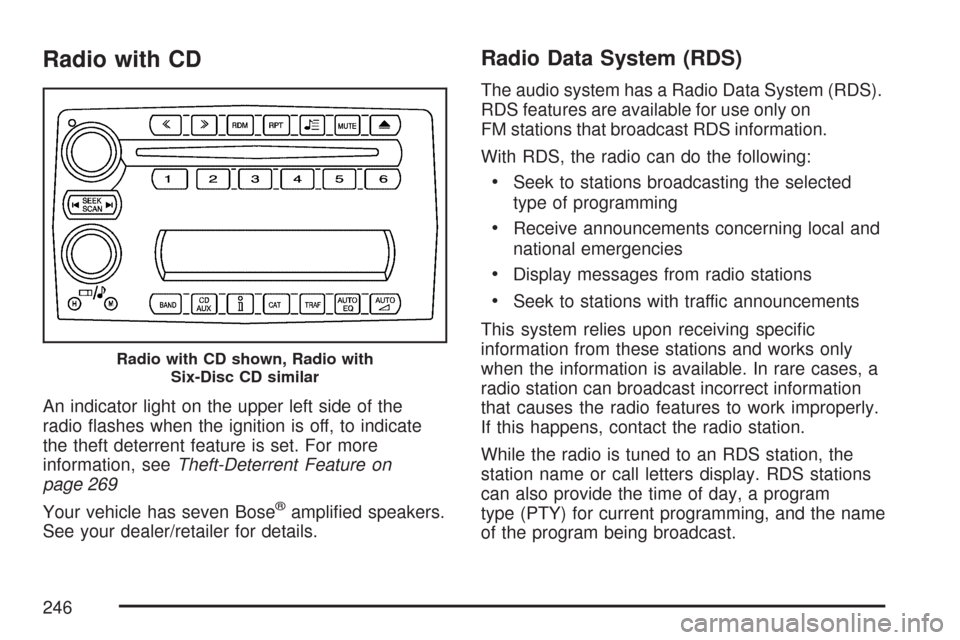
Radio with CD
An indicator light on the upper left side of the
radio ashes when the ignition is off, to indicate
the theft deterrent feature is set. For more
information, seeTheft-Deterrent Feature on
page 269
Your vehicle has seven Bose
®amplied speakers.
See your dealer/retailer for details.
Radio Data System (RDS)
The audio system has a Radio Data System (RDS).
RDS features are available for use only on
FM stations that broadcast RDS information.
With RDS, the radio can do the following:
Seek to stations broadcasting the selected
type of programming
Receive announcements concerning local and
national emergencies
Display messages from radio stations
Seek to stations with traffic announcements
This system relies upon receiving specic
information from these stations and works only
when the information is available. In rare cases, a
radio station can broadcast incorrect information
that causes the radio features to work improperly.
If this happens, contact the radio station.
While the radio is tuned to an RDS station, the
station name or call letters display. RDS stations
can also provide the time of day, a program
type (PTY) for current programming, and the name
of the program being broadcast.
Radio with CD shown, Radio with
Six-Disc CD similar
246
Page 247 of 488

XM™ Satellite Radio Service
If your vehicle has the XM™ satellite radio
service, it is based in the 48 contiguous United
States and Canada. XM™ offers a large variety of
coast-to-coast channels including music, news,
sports, talk, traffic/weather (U.S. subscribers), and
children’s programming. XM™ provides digital
quality audio and text information that includes
song title and artist name. A service fee is required
in order to receive the XM™ service. For more
information, contact XM™; In the U.S. at
www.xmradio.com or call 1-800-852-XMXM (9696)
or in Canada at www.xmradio.ca or call
1-877-GET-XMSR (438-9677).
Playing the Radio
Top Knob (Power/Volume):Press this knob to
turn the system on and off. Turn this knob
clockwise or counterclockwise to increase or
decrease the volume.
4(Information):For RDS, press the4button to
change what display while using RDS. The display
options are station name, RDS station frequency,
PTY, and the name of the program (if available).For XM™ (if equipped), press the information
button while in XM™ mode to retrieve four different
categories of information related to the current
song or channel: Artist, Song Title, Category
or PTY, Channel Number/Channel Name.
To change the default on the display, press the
4button until you see the desired display,
then hold the
4for two seconds. The radio
produces one beep and the selected display is
now the default.
AUTO
n(Automatic Volume):Automatic
volume automatically adjusts the audio system to
make up for road and wind noise as you drive,
by it increasing the volume as vehicle speed
increases.
Set the volume at the desired level. Press the
AUTO
nbutton to select AUTO VOLUME MIN
(minimum), AUTO VOLUME MED (medium),
or AUTO VOLUME MAX (maximum). Each higher
setting provides more volume compensation at
faster vehicle speeds. To turn automatic volume
off, press the AUTO
nuntil AUTO VOLUME
OFF displays.
247
Page 248 of 488
If your vehicle has the Bose®audio system, it
includes Bose®AudioPilot®noise compensation
technology. When turned on, AudioPilot®
continuously adjusts the audio system to
compensate for background noise, so that the
music always sounds the same at the set volume
level. This feature is most effective at lower radio
volume settings where background noise can affect
how well you hear the music being played. At
higher volume settings, where the music is much
louder than the background noise, there could be
little or no adjustments by AudioPilot
®.
To use AudioPilot
®, set the radio volume to your
desired level. Turn AudioPilot®on by pressing the
automatic volume button until AVOL ON displays.
As the vehicle goes faster, the background noise
increases. AudioPilot
®adjusts the audio system’s
sound level to overcome background noise. To turn
AudioPilot
®off, press the automatic volume button
until AVOL OFF displays. For additional information
on AudioPilot
®, visit www.bose.com/audiopilot.
MUTE:Press this button to silence the system.
Press this button again to turn the sound on.
This button is not available on the Radio
with Six-Disc CD.
Finding a Station
BAND:Press this button to switch between FM1,
FM2, AM, or XM1 or XM2 (if equipped). The display
shows the selection.
O/e(Tune):Turn theO/eknob to select
radio stations.
tSEEKu:Press the lefttor rightuSEEK
arrow to go to the previous or to the next station
and stay there.
The radio only seeks stations with a strong signal
that are in the selected band.
tSCANu:Press and hold either the lefttor
right
uSCAN arrow for two seconds until
FREQUENCY SCAN displays. The radio goes to a
station, plays for a few seconds, then goes on to the
next station. Press either the left
tor rightu
SCAN arrow again to stop scanning.
To scan preset stations, press and hold either the
left
tor rightuSCAN arrow for four seconds until
PRESET SCAN displays. The radio goes to the
next preset station, plays for a few seconds, then
goes to the next preset station.
248
Page 249 of 488
Press either the lefttor rightuSCAN arrow
again or one of the pushbuttons to stop scanning
presets.
The radio only scans stations with a strong signal
that are in the selected band.
Setting Preset Stations
Up to 30 stations (six FM1, six FM2, and six AM,
six XM1 and six XM2 (if equipped)), can be
programmed on the six numbered pushbuttons,
by performing the following steps:
1. Turn the radio on.
2. Press BAND to select FM1, FM2, AM,
or XM1 or XM2 (if equipped).
3. Tune in the desired station.
4. Press AUTO EQ to select the equalization.
5. Press and hold one of the six numbered
pushbuttons until a beep sounds. When
that numbered pushbutton is pressed,
the station that was set, returns and the
equalization that was selected is stored for
that pushbutton.
6. Repeat the steps for each pushbutton.
Setting the Tone (Bass/Treble)
O
/e(Bass/Treble/Midrange):Press the
O/e(tune) knob to select BASS, MIDRANGE,
or TREBLE. Turn the
O/eknob to increase or
to decrease the tone. If a station is weak or has
static, decrease the treble.
To adjust the bass, midrange, and treble to the
middle position, press and hold the
O/eknob
when the tone control is on the display. The level
changes to the middle position.
To adjust all tone and speaker controls to the
middle position, press and hold the
O/eknob
when no tone or speaker control is displayed.
AUDIO SETTINGS CENTERED displays.
AUTO EQ (Automatic Equalization):Press this
button to select customized equalization settings
designed for country/western, jazz, talk, pop, rock,
and classical. Selecting CUSTOM or changing bass
or treble, returns the EQ to the manual bass and
treble settings.
The radio saves separate AUTO EQ settings for
each preset and source.
249
Page 250 of 488
If the radio has the Bose®audio system, the
equalization settings are EQ1 through EQ6 and
CUSTOM.
Adjusting the Speakers (Balance/Fade)
O
/e(Balance/Fade):To adjust the
balance between the right and the left speakers,
press the
O/e(tune) knob until BALANCE
displays. Turn the
O/eknob to move
the sound toward the right or the left speakers.
To adjust the fade between the front and the rear
speakers, press the
O/eknob until FADE
displays. Turn the
O/eknob to move
the sound toward the front or the rear speakers.
To adjust the balance and fade to the middle
position, press and hold the
O/eknob when
the speaker control is on the display. The level
changes to the middle position.
To adjust all tone and speaker controls to the
middle position, press and hold the
O/eknob
when no tone or speaker control is displayed.
AUDIO SETTINGS CENTERED displays.
Finding a Category Station (RDS and
XM™ (if equipped))
To select and nd a desired category perform the
following:
1. Press the CAT (category) button. The last
selected category displays.
2. Turn the
O/eknob to select the category.
3. Once the desired category is displayed,
press either the left
tor rightuSEEK arrow
to go to a category’s station. SEEKING
CATEGORY displays.
4. To go to another station within that category,
press the CAT button to display the category,
then press either the left
tor rightu
SEEK arrow to go to another station.
If both category and traffic are on, the radio
searches for stations with the selected category
and traffic announcements.
If the radio cannot nd the desired category,
NONE displays and the radio returns to the last
station tuned.
250