Page 109 of 496

To engage the security locks, do the following:
1. Open one of the rear doors.
2. Using your ignition key, turn the lock to
the horizontal position.
3. Close the door.
4. Repeat these steps on the other rear door.
If you want to open a rear door when the security
lock is on, unlock the door and open the door
from the outside.
To disengage the security locks, do the following:
1. Open one of the rear doors.
2. Using your ignition key, turn the lock to the
vertical position.
3. Close the door.
4. Repeat these steps on the other rear door.Lockout Protection
If you have power door locks, this feature protects
you from locking your key in the vehicle when
the key is in the ignition and a door is open.
If the power door lock switch is pressed when
a door is open and the key is in the ignition,
all of the doors will lock and then the driver’s
door will unlock.
Rear Doors (Extended Cab)
To open a rear door, open the front door.
Then, use the handle located on the front edge
of the rear door panel to open it. You must close
the rear door before closing the front door.
109
Page 110 of 496
Tailgate
{CAUTION:
It is extremely dangerous to ride on the
tailgate, even when the vehicle is operated
at low speeds. People riding on the
tailgate can easily lose their balance and
fall in response to vehicle maneuvers.
Falling from a moving vehicle may result
in serious injuries or death. Do not allow
people to ride on the tailgate. Be sure
everyone in your vehicle is in a seat and
using a safety belt properly.You can open the tailgate by pulling up on the
outside handle while pulling the tailgate down.
When you put the tailgate back up, be sure
it latches securely.
You can lock the tailgate using your ignition key.
Turn the key counterclockwise to lock the
tailgate. Turn the key clockwise to unlock the
tailgate.
110
Page 113 of 496
Power Windows
{CAUTION:
Leaving children, helpless adults, or pets
in a vehicle with the windows closed is
dangerous. They can be overcome from
extreme heat in warm or hot weather and
suffer permanent injuries or even death
from heat stroke.
Leaving children in a vehicle with the
ignition key is dangerous for many
reasons, children or others could be badly
injured or even killed. They could operate
the power windows or other controls or
even make the vehicle move. The windows
will function with the keys in the ignition
and they could be seriously injured or killed
if caught in the path of a closing window.
Do not leave keys in a vehicle with children.
When there are children in the rear seat
use the window lockout button to prevent
unintentional operation of the windows.The power window
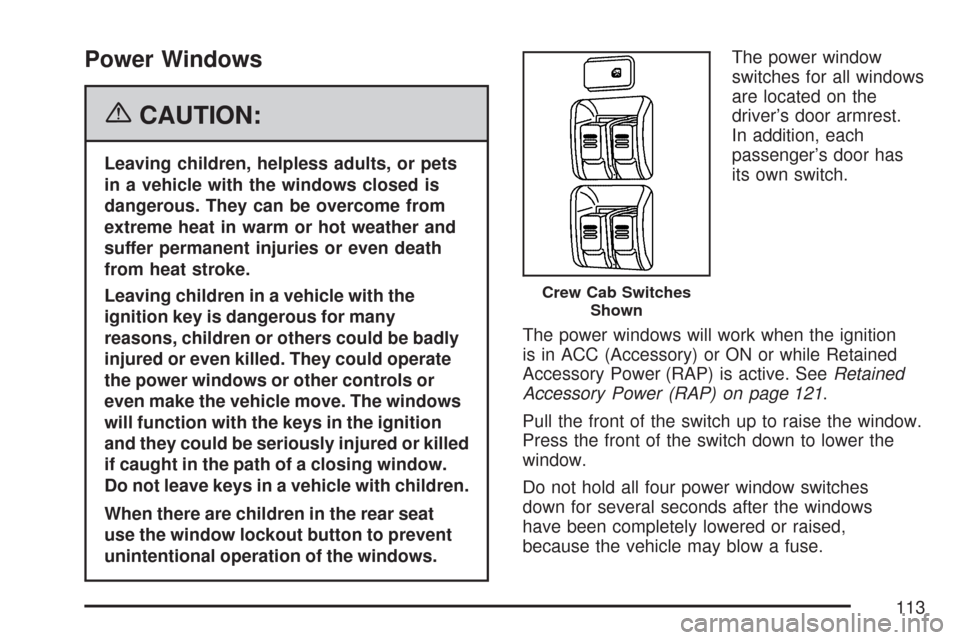
switches for all windows
are located on the
driver’s door armrest.
In addition, each
passenger’s door has
its own switch.
The power windows will work when the ignition
is in ACC (Accessory) or ON or while Retained
Accessory Power (RAP) is active. SeeRetained
Accessory Power (RAP) on page 121.
Pull the front of the switch up to raise the window.
Press the front of the switch down to lower the
window.
Do not hold all four power window switches
down for several seconds after the windows
have been completely lowered or raised,
because the vehicle may blow a fuse.
Crew Cab Switches
Shown
113
Page 116 of 496
If a locked door is not opened using the RKE
transmitter, or by OnStar®, the pre-alarm will
go off. If the engine is not started or unlock not
pressed within 10 seconds, the front turn
signal lamps will ash for two minutes, and the
horn will sound for two minutes, then will turn off
to save the battery power.
Remember, the theft-deterrent system will not
activate if you lock the doors with a key, the
manual door lock, or power door lock switch.
The system can only be activated using the
RKE transmitter, or by OnStar
®. SeeOnStar®
System on page 149for additional information.
You should also remember that you can start your
vehicle with the correct ignition key if the alarm
has been set off.
Here is how to avoid setting off the alarm by
accident:
If you do not want to activate the
theft-deterrent system, the vehicle should be
locked with the door key after the doors
are closed.
Always unlock a door with the RKE transmitter.
Unlocking a door any other way will set off
the alarm.If you set off the alarm by accident, you can turn
off the alarm by pressing unlock on the RKE
transmitter. The alarm will not stop if you try to
unlock a door any other way.
Testing the Alarm
To test the alarm:
1. From inside the vehicle, activate the system
by locking the doors with the RKE transmitter.
2. Unlock the door with the manual door lock and
open the door. This should set off the alarm.
3. To turn the alarm off, press the unlock button
on the RKE transmitter or start the engine.
If the alarm does not sound when it should but
the lights ash, check to see if the horn works.
The horn fuse may be blown. To replace the fuse,
seeFuses and Circuit Breakers on page 433.
If the alarm does not sound or the front turn signal
lamps do not ash, see your dealer/retailer for
service.
116
Page 117 of 496

Passlock®
Your vehicle has the Passlock®theft-deterrent
system.
Passlock
®is a passive theft-deterrent system.
Passlock®enables fuel if the ignition lock cylinder
is turned with a valid key. If an incorrect key is
used or the ignition lock cylinder is tampered with,
the fuel system is disabled and the vehicle will
not start.
During normal operation, the security light will turn
off approximately ve seconds after the engine
is started. SeeSecurity Light on page 196.
If the engine stalls and the security light ashes,
wait about 10 minutes until the light stops
ashing before trying to restart the engine.
Remember to release the key from START as
soon as the engine starts.If the engine does not start after three tries,
the vehicle needs service.
If the engine is running and the security light
comes on, you will be able to restart the engine if
you turn the engine off. However, your Passlock
®
system is not working properly and must be
serviced by your dealer/retailer. Your vehicle is
not protected by Passlock
®at this time. See your
dealer/retailer for service.
In an emergency, call the Roadside Assistance
Center. SeeRoadside Assistance Program
on page 466.
Do not leave the key or device that disarms
or deactivates the theft deterrent system in
the vehicle.
117
Page 119 of 496

Ignition Positions
With the key in
the ignition switch,
you can turn to
four different
positions.
LOCK (A):This position locks the ignition. It also
locks the transmission on automatic transmission
vehicles. It will locks the steering wheel on manual
transmission vehicles when the key is removed.
It is a theft-deterrent feature. You will only be
able to remove your key when the ignition is
turned to LOCK.If you have an automatic transmission, the ignition
switch cannot be turned to LOCK unless the
shift lever is in PARK (P).
Notice:Using a tool to force the key from
the ignition switch could cause damage
or break the key. Use the correct key and turn
the key only with your hand. Make sure the
key is all the way in. If it is, turn the steering
wheel left and right while you turn the key
hard. If none of this works, then your vehicle
needs service.
ACC (ACCESSORY) (B):This is the position in
which you can operate your electrical accessories
or items plugged into the accessory power
outlets. On automatic transmission vehicles,
this position unlocks the ignition. On manual
transmission vehicles, it unlocks the ignition and
steering wheel. Use this position if your vehicle
must be pushed or towed.
119
Page 120 of 496

ON (C):This is the position that the switch
returns to after you start your engine and release
the switch. The switch stays in ON when the
engine is running. But even when the engine is
not running, you can use ON to operate the
electrical accessories and to display some
instrument panel cluster warning and indicator
lights. The transmission is also unlocked in
this position on automatic transmission vehicles.
The battery could be drained if you leave the key in
the ACC or ON position with the engine off. You
may not be able to start your vehicle if the battery is
allowed to drain for an extended period of time.
START (D):This is the position that starts the
engine. When the engine starts, release the key.
The ignition switch returns to ON for driving.
When the engine is not running, ACC and ON
allows you to operate the electrical accessories,
such as the radio or items plugged into the
accessory power outlets.A warning tone will sound if you open the driver’s
door when the ignition is in ACC or LOCK and
the key is in the ignition.
Key In the Ignition
Never leave your vehicle with the keys inside, as it
is an easy target for joy riders or thieves. If you
leave the key in the ignition and park your vehicle,
a chime will sound, when you open the driver’s
door. Always remember to remove your key from
the ignition and take it with you. This will lock
your ignition and transmission. Also, always
remember to lock the doors.
The battery could be drained if you leave the
key in the ignition while your vehicle is parked.
You may not be able to start your vehicle after
it has been parked for an extended period
of time.
120
Page 121 of 496

Retained Accessory Power (RAP)
These vehicle accessories can be used for up
to 20 minutes after the engine is turned off:
Audio System
Wipers
Power Windows
These features work when the key is in ON or
ACC. Once the key is turned from ON to LOCK,
power to these features continue to work for
up to 20 minutes or until a door is opened.
Starting the Engine
Place the transmission in the proper gear.
Automatic Transmission
Move your shift lever to PARK (P) or NEUTRAL (N).
Your engine will not start in any other position – this
is a safety feature. To restart when you are already
moving, use NEUTRAL (N) only.
Notice:Do not try to shift to PARK (P) if your
vehicle is moving. If you do, you could damage
the transmission. Shift to PARK (P) only when
your vehicle is stopped.
Manual Transmission
The shift lever should be in the NEUTRAL position
and the parking brake engaged. Hold the clutch
pedal to the oor and start the engine. Your
vehicle will not start if the clutch pedal is not all
the way down. That is a safety feature.
Starting Procedure
1. With your foot off the accelerator pedal, turn
the ignition key to START. When the engine
starts, let go of the key. The idle speed will go
down as the engine gets warm. Do not race the
engine immediately after starting it. Operate
the engine and transmission gently to allow the
oil to warm up and lubricate all moving parts.
Your vehicle has a Computer-Controlled
Cranking System. This feature assists in
starting the engine and protects components.
If the ignition key is turned to the START
position, and then released when the engine
begins cranking, the engine will continue
cranking for a few seconds or until the vehicle
starts. If the engine does not start and the
key is held in START for many seconds,
cranking will be stopped after 15 seconds
to prevent cranking motor damage.
121
