2007 CHEVROLET AVEO Section 3
[x] Cancel search: Section 3Page 197 of 436
If there is no apparent damage, try a known
good CD.
Do not add any label to a CD, it could get caught
in the CD player. If a CD is recorded on a
personal computer and a description label is
needed, try labeling the top of the recorded CD
with a marking pen.
Notice:If a label is added to a CD, or more
than one CD is inserted into the slot at a time,
or an attempt is made to play scratched or
damaged CDs, the CD player could be
damaged. While using the CD player, use only
CDs in good condition without any label,
load one CD at a time, and keep the CD player
and the loading slot free of foreign materials,
liquids, and debris.
If an error displays, see “CD Messages” later in
this section.
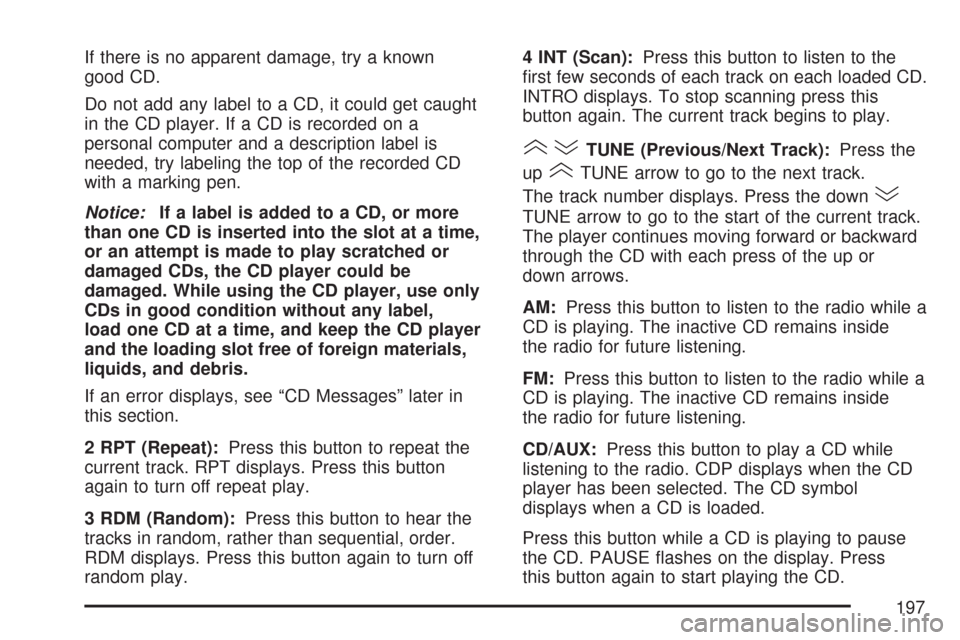
2 RPT (Repeat):Press this button to repeat the
current track. RPT displays. Press this button
again to turn off repeat play.
3 RDM (Random):Press this button to hear the
tracks in random, rather than sequential, order.
RDM displays. Press this button again to turn off
random play.4 INT (Scan):Press this button to listen to the
first few seconds of each track on each loaded CD.
INTRO displays. To stop scanning press this
button again. The current track begins to play.
()TUNE (Previous/Next Track):Press the
up
(TUNE arrow to go to the next track.
The track number displays. Press the down
)
TUNE arrow to go to the start of the current track.
The player continues moving forward or backward
through the CD with each press of the up or
down arrows.
AM:Press this button to listen to the radio while a
CD is playing. The inactive CD remains inside
the radio for future listening.
FM:Press this button to listen to the radio while a
CD is playing. The inactive CD remains inside
the radio for future listening.
CD/AUX:Press this button to play a CD while
listening to the radio. CDP displays when the CD
player has been selected. The CD symbol
displays when a CD is loaded.
Press this button while a CD is playing to pause
the CD. PAUSE flashes on the display. Press
this button again to start playing the CD.
197
Page 198 of 436
EJECT:Press this button to eject a CD. This is
the only way a CD can be ejected from the player.
The CD can eject when the ignition or the radio
is turned off.
Playing an MP3/WMA CD-R Disc
If you have a radio with a single CD (MP3), it is
capable of playing an MP3/WMA CD-R disc.
For more information on how to play an MP3/WMA
CD-R disc, see “Using an MP3” in the index.
CD Messages
CHECK CD:If this message displays and/or the
CD comes out, it could be for one of the
following reasons:
•It is very hot. When the temperature returns to
normal, the CD should play.
•You are driving on a very rough road.
When the road becomes smoother, the CD
should play.
•The CD is dirty, scratched, wet, or
upside down.
•The air is very humid. If so, wait about an
hour and try again.
•The format of the CD might not be compatible.
SeeUsing an MP3 (Radio with CD Player) on
page 207orUsing an MP3 (Radio with
Six-Disc Player) on page 211later in this
section.
•There could have been a problem while
burning the CD.
•The label could be caught in the CD player.
If the CD is not playing correctly, for any
other reason, try a known good CD.
If any error occurs repeatedly or if an error cannot
be corrected, contact your dealer/retailer. If the
radio displays an error message, write it down and
provide it to your dealer/retailer when reporting
the problem.
198
Page 204 of 436
If there is no apparent damage, try a known
good CD.
Do not add any label to a CD, it could get caught
in the CD player. If a CD is recorded on a
personal computer and a description label is
needed, try labeling the top of the recorded CD
with a marking pen.
Notice:If a label is added to a CD, or more
than one CD is inserted into the slot at a time,
or an attempt is made to play scratched or
damaged CDs, the CD player could be
damaged. While using the CD player, use only
CDs in good condition without any label,
load one CD at a time, and keep the CD player
and the loading slot free of foreign materials,
liquids, and debris.
If an error displays, see “CD Messages” later in
this section.
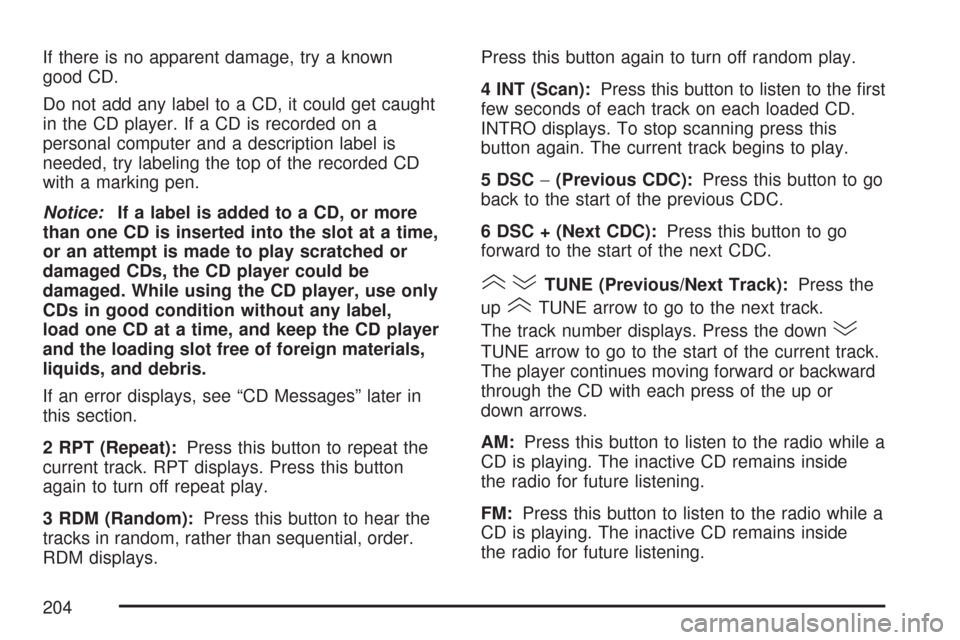
2 RPT (Repeat):Press this button to repeat the
current track. RPT displays. Press this button
again to turn off repeat play.
3 RDM (Random):Press this button to hear the
tracks in random, rather than sequential, order.
RDM displays.Press this button again to turn off random play.
4 INT (Scan):Press this button to listen to the first
few seconds of each track on each loaded CD.
INTRO displays. To stop scanning press this
button again. The current track begins to play.
5 DSC−(Previous CDC):Press this button to go
back to the start of the previous CDC.
6 DSC + (Next CDC):Press this button to go
forward to the start of the next CDC.
()TUNE (Previous/Next Track):Press the
up
(TUNE arrow to go to the next track.
The track number displays. Press the down
)
TUNE arrow to go to the start of the current track.
The player continues moving forward or backward
through the CD with each press of the up or
down arrows.
AM:Press this button to listen to the radio while a
CD is playing. The inactive CD remains inside
the radio for future listening.
FM:Press this button to listen to the radio while a
CD is playing. The inactive CD remains inside
the radio for future listening.
204
Page 205 of 436
CD/AUX:Press this button to play a CD while
listening to the radio. CDP displays when the CD
player has been selected. The CD symbol
displays when a CD is loaded.
Press this button while a CD is playing to pause
the CD. PAUSE flashes on the display. Press
this button again to start playing the CD.
EJECT:Press this button to eject the CD. Press
and hold this button to eject all CDs. This is
the only way a CD can be ejected from the player.
The CD can eject when the ignition or the radio
is turned off.
Playing an MP3/WMA CD-R Disc
If your vehicle has a radio with a six-disc CD
player, it is capable of playing an MP3/WMA CD-R
disc. For more information on how to play an
MP3/WMA disc, see “Using an MP3” in the index.
CD Messages
CHECK CD:If this message displays and/or the
CD comes out, it could be for one of the
following reasons:
•It is very hot. When the temperature returns to
normal, the CD should play.
•You are driving on a very rough road.
When the road becomes smoother, the
CD should play.
•The CD is dirty, scratched, wet, or
upside down.
•The air is very humid. If so, wait about an
hour and try again.
•The format of the CD might not be compatible.
See “Using an MP3” later in this section.
•There could have been a problem while
burning the CD.
•The label could be caught in the CD player.
205
Page 209 of 436
Playing an MP3/WMA
While the ignition is on, insert a CD partway into
the slot, label side up. The player pulls it in,
Loading, then Filecheck, and then MP3 or WMA
displays. The CD should begin playing. A CD plays
only while the ignition is on or ACC (accessory).
As each new track starts to play, the track number,
and the song name displays.
If the ignition or radio is turned off with a CD in
the player, it stays in the player. When a CD is in
the player and the ignition is turned on, the
radio must be turned on before the CD starts
playback. When the ignition and radio are turned
on, the CD starts playing where it stopped, if it
was the last selected audio source.
The CD player can play the smaller 3 inch (8 cm)
single CDs with an adapter ring. Full-size CDs
and the smaller CDs are loaded in the same
manner.
If playing a CD-R, the sound quality can be reduced
due to CD-R quality, the method of recording, the
quality of the music that has been recorded, and the
way the CD-R has been handled. There can be an
increase in skipping, difficulty in finding tracks,
and/or difficulty in loading and ejecting. If theseproblems occur, check the bottom surface of the
CD. If the surface of the CD is damaged, such as
cracked, broken, or scratched, the CD does not
play properly. If the surface of the CD is soiled,
seeCare of Your CDs on page 216for more
information.
If there is no apparent damage, try a known
good CD.
Do not add any label to a CD, it could get caught
in the CD player. If a CD is recorded on a
personal computer and a description label is
needed, try labeling the top of the recorded CD
with a marking pen.
Notice:If a label is added to a CD, or more
than one CD is inserted into the slot at a time,
or an attempt is made to play scratched or
damaged CDs, the CD player could be
damaged. While using the CD player, use only
CDs in good condition without any label,
load one CD at a time, and keep the CD player
and the loading slot free of foreign materials,
liquids, and debris.
If an error displays, see “CD Messages” later in
this section.
209
Page 213 of 436
Playing an MP3/WMA
While the ignition is on, insert a CD partway into
the slot, label side up. The player pulls it in,
Loading, then Filecheck, and then MP3 or WMA
displays. The CD should begin playing. A CD plays
only while the ignition is on or ACC (accessory).
As each new track starts to play, the track number,
and the song name displays.
If the ignition or radio is turned off with a CD in
the player, it stays in the player. When a CD is in
the player and the ignition is turned on, the
radio must be turned on before the CD starts
playback. When the ignition and radio are turned
on, the CD starts playing where it stopped, if it
was the last selected audio source.
The CD player can play the smaller 3 inch (8 cm)
single CDs with an adapter ring. Full-size CDs
and the smaller CDs are loaded in the same
manner.
If playing a CD-R, the sound quality can be
reduced due to CD-R quality, the method of
recording, the quality of the music that has been
recorded, and the way the CD-R has been
handled. There can be an increase in skipping,
difficulty in finding tracks, and/or difficulty in loadingand ejecting. If these problems occur, check the
bottom surface of the CD. If the surface of the CD
is damaged, such as cracked, broken, or
scratched, the CD will not play properly. If the
surface of the CD is soiled, seeCare of Your CDs
on page 216for more information.
If there is no apparent damage, try a known
good CD.
Do not add any label to a CD, it could get caught
in the CD player. If a CD is recorded on a
personal computer and a description label is
needed, try labeling the top of the recorded CD
with a marking pen.
Notice:If a label is added to a CD, or more
than one CD is inserted into the slot at a time,
or an attempt is made to play scratched or
damaged CDs, the CD player could be
damaged. While using the CD player, use only
CDs in good condition without any label,
load one CD at a time, and keep the CD player
and the loading slot free of foreign materials,
liquids, and debris.
If an error displays, see “CD Messages” later in
this section.
213
Page 219 of 436
Your Driving, the Road, and Your Vehicle.... 220
Defensive Driving...................................... 220
Drunken Driving........................................ 221
Control of a Vehicle.................................. 224
Braking...................................................... 224
Anti-Lock Brake System (ABS).................. 225
Braking in Emergencies............................. 227
Steering.................................................... 228
Off-Road Recovery.................................... 230
Passing..................................................... 230
Loss of Control.......................................... 232
Driving at Night......................................... 234
Driving in Rain and on Wet Roads............ 235
City Driving............................................... 238Freeway Driving........................................ 239
Before Leaving on a
Long Trip............................................... 240
Highway Hypnosis..................................... 241
Hill and Mountain Roads........................... 241
Winter Driving........................................... 243
If Your Vehicle is Stuck in Sand, Mud,
Ice, or Snow.......................................... 248
Rocking Your Vehicle to Get It Out........... 249
Loading Your Vehicle................................ 249
Towing........................................................ 258
Towing Your Vehicle................................. 258
Recreational Vehicle Towing...................... 258
Towing a Trailer........................................ 260
Section 4 Driving Your Vehicle
219
Page 231 of 436
So here are some tips for passing:
•Drive ahead. Look down the road, to the sides,
and to crossroads for situations that might
affect your passing patterns. If you have any
doubt whatsoever about making a successful
pass, wait for a better time.
•Watch for traffic signs, pavement markings, and
lines. If you can see a sign up ahead that might
indicate a turn or an intersection, delay your
pass. A broken center line usually indicates it is
all right to pass, providing the road ahead is
clear. Never cross a solid line on your side of
the lane or a double solid line, even if the road
seems empty of approaching traffic.
•Do not get too close to the vehicle you want to
pass while you are awaiting an opportunity. For
one thing, following too closely reduces your
area of vision, especially if you are following a
larger vehicle. Also, you will not have adequate
space if the vehicle ahead suddenly slows or
stops. Keep back a reasonable distance.
•When it looks like a chance to pass is coming
up, start to accelerate but stay in the right lane
and do not get too close. Time your move so
you will be increasing speed as the time comes
to move into the other lane. If the way is clear to
pass, you will have a running start that more
than makes up for the distance you would lose
by dropping back. And if something happens to
cause you to cancel your pass, you need only
slow down and drop back again and wait for
another opportunity.
•If other vehicles are lined up to pass a slow
vehicle, wait your turn. But take care that
someone is not trying to pass you as you pull
out to pass the slow vehicle. Remember to
glance over your shoulder and check the
blind spot.
231