2007 BUICK LACROSSE ECO mode
[x] Cancel search: ECO modePage 203 of 512

Fuel Menu Items (Uplevel Only)
.
(Fuel):Press this button to scroll through the
following menu items:
Fuel Range
Press the fuel button until FUEL RANGE displays.
This mode shows the approximate number of
remaining miles or kilometers the vehicle can be
driven without refueling.
Fuel range is based on several factors, including
distance traveled, fuel used, fuel capacity, etc.
This estimate will change if driving conditions
change. For example, if driving in traffic and
making frequent stops, this mode may read
one number, but if the vehicle is driven on a
freeway, the number may change even though the
same amount of fuel is in the fuel tank. This is
because different driving conditions produce
different fuel economies. Generally, freeway
driving produces better fuel economy than city
driving. Fuel range cannot be reset.
If your vehicle is low on fuel, FUEL RANGE LOW
will display followed by the LOW FUEL message.
See “LOW FUEL” underDIC Warnings and
Messages on page 208for more information.
Average Fuel Economy
Press the fuel button until AVG ECONOMY
displays. This mode shows the approximate
average miles per gallon (mpg) or liters per
100 kilometers (L/100 km). This number is
calculated based on the number of mpg (L/100 km)
recorded since the last time this menu item was
reset. To reset AVG ECONOMY, press and hold
the set/reset button. The display will return to zero.
Gages Menu Items (Uplevel Only)
2
(Gages):Press this button to scroll through
the following menu items:
Battery
Press the gages button until BATTERY displays.
This mode shows the current battery voltage.
Your vehicle’s charging system regulates voltage
based on the state of the battery. The battery
voltage may uctuate when viewing this
information on the DIC. This is normal.
If there is a problem with the battery charging
system, a DIC message will display. See
DIC Warnings and Messages on page 208for
more information.
SeeElectric Power Management on page 163for
more information.
203
Page 204 of 512

Tire Pressure
Press the gages button until FRONT TIRE
PRESSURE displays. This mode shows the
pressure for the front tires. To view the pressure
for the rear tires, press the gages button again
until REAR TIRE PRESSURE displays. The
tire pressure will be shown in either pounds per
square inch (psi) or kilopascals (kPa).
If a low or high tire pressure condition is detected
by the system while driving, a message advising
you to check the pressure in a specic tire
will appear in the display. SeeInation - Tire
Pressure on page 409andDIC Warnings
and Messages on page 208for more information.
If the tire pressure display shows dashes
instead of a value, there may be a problem with
your vehicle. If this consistently occurs, see
your dealer for service.
Oil Life
Press the gages button until OIL LIFE displays.
This mode shows an estimate of the oil’s
remaining useful life. If you see OIL LIFE 99% on
the display, that means 99% of the current oil
life remains. The engine oil life system will alert
you to change your oil on a schedule consistent
with your driving conditions.
When the remaining oil life is low, the CHANGE OIL
SOON message will appear on the display. You
should change your oil as soon as possible. See
Engine Oil on page 353. In addition to the engine oil
life system monitoring the oil life, additional
maintenance is recommended in the Maintenance
Schedule in this manual. SeeScheduled
Maintenance on page 462for more information.
Remember, you must reset the OIL LIFE yourself
after each oil change. It will not reset itself.
Also, be careful not to reset the OIL LIFE
accidentally at any time other than when the oil
has just been changed. It cannot be reset
accurately until the next oil change. To reset the
engine oil life system, seeEngine Oil Life
System on page 356. The display will show 100%
when the system is reset.
204
Page 208 of 512

DIC Warnings and Messages
Messages are displayed on the uplevel DIC to
notify the driver that the status of the vehicle has
changed and that some action may be needed
by the driver to correct the condition. Multiple
messages may appear one after another.
Some messages may not require immediate
action, but you can press any of the DIC buttons
on the uplevel vehicle to acknowledge that
you received the message and clear it from the
DIC display.
Some messages cannot be cleared from the DIC
display because they are more urgent. These
messages require action before they can be
cleared.
If there are any active warning messages when
the vehicle is turned off, two chimes sound and the
DIC goes into a reminder mode. The reminder
mode displays any active message. If there
are multiple messages, the DIC displays each
message for ve seconds. After each active
message is displayed once, the reminder mode
turns off.You should take any messages that appear on the
display seriously and remember that clearing
the messages will only make the messages
disappear, not correct the problem.
The following are the possible messages that can
be displayed and some information about them.
A/C OFF FOR ENGINE PROTECTION
This message displays when the engine coolant
becomes hotter than the normal operating
temperature. SeeEngine Coolant Temperature
Gage on page 189. To avoid added strain on a hot
engine, the air conditioning compressor is
automatically turned off. When the coolant
temperature returns to normal, the air conditioning
compressor turns back on. You can continue to
drive your vehicle.
This message comes on while the ignition is in
RUN. Press any of the DIC buttons to acknowledge
this warning message and to clear it from the
screen.
208
Page 220 of 512

REDUCED ENGINE POWER
This message displays when the vehicle’s engine
power is reduced. Reduced engine power can
affect the vehicle’s ability to accelerate. If this
message is on, but there is no reduction in
performance, proceed to your destination. The
performance may be reduced the next time the
vehicle is driven. The vehicle may be driven at a
reduced speed while this message is on, but
acceleration and speed may be reduced. Anytime
this message stays on, the vehicle should be taken
to your dealer for service as soon as possible.
This message displays and a chime sounds only
when the ignition is in RUN. Press any of the
DIC buttons to acknowledge this message and to
clear it from the screen.
This message continues to display for two seconds
if it has not been acknowledged when the engine is
turned off. It also re-displays for two seconds if the
message has been acknowledged, but the
condition still exists when the engine is turned off.
If the condition still exists, the message re-appears
when the engine is turned on.
REDUCED POWER STOP WHEN SAFE
This message displays when your vehicle is in
an overheated engine operating mode. This
operating mode allows your vehicle to be driven to
a safe place in an emergency. In this mode,
you will notice a signicant loss in power and
engine performance. SeeOverheated Engine
Protection Operating Mode on page 370for more
information. Anytime this message is on, the
vehicle should be taken to your dealer for service
as soon as possible.
This message displays and a chime sounds only
when the ignition is in RUN. Press any of the
DIC buttons to acknowledge this message and to
clear it from the screen.
This message continues to display for two seconds
if it has not been acknowledged when the engine is
turned off. It also re-displays for two seconds if the
message has been acknowledged, but the
condition still exists when the engine is turned off.
If the condition still exists, the message re-appears
when the engine is turned on.
220
Page 245 of 512
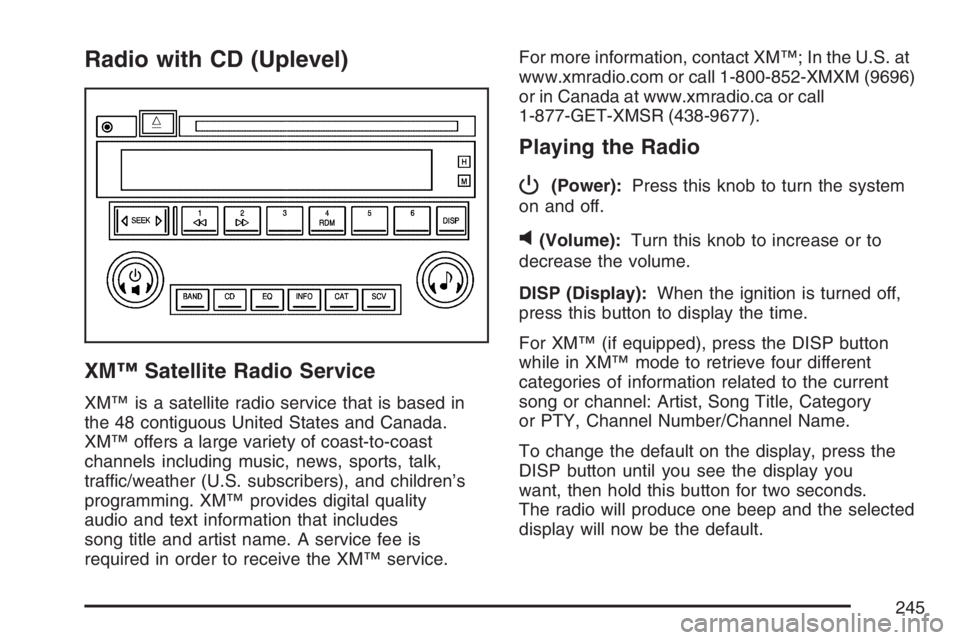
Radio with CD (Uplevel)
XM™ Satellite Radio Service
XM™ is a satellite radio service that is based in
the 48 contiguous United States and Canada.
XM™ offers a large variety of coast-to-coast
channels including music, news, sports, talk,
traffic/weather (U.S. subscribers), and children’s
programming. XM™ provides digital quality
audio and text information that includes
song title and artist name. A service fee is
required in order to receive the XM™ service.For more information, contact XM™; In the U.S. at
www.xmradio.com or call 1-800-852-XMXM (9696)
or in Canada at www.xmradio.ca or call
1-877-GET-XMSR (438-9677).
Playing the Radio
P
(Power):Press this knob to turn the system
on and off.
v(Volume):Turn this knob to increase or to
decrease the volume.
DISP (Display):When the ignition is turned off,
press this button to display the time.
For XM™ (if equipped), press the DISP button
while in XM™ mode to retrieve four different
categories of information related to the current
song or channel: Artist, Song Title, Category
or PTY, Channel Number/Channel Name.
To change the default on the display, press the
DISP button until you see the display you
want, then hold this button for two seconds.
The radio will produce one beep and the selected
display will now be the default.
245
Page 249 of 512

Scanning Categories (CAT)
(XM™ Satellite Radio Service Only)
To scan a desired category perform the following:
1. Press the CAT button to activate category
select mode. The current category will
appear on the display.
2. Turn the tune knob to select a category.
3. Once the desired category is displayed, press
either SEEK arrow for two seconds to scan
the stations in the category.
4. Press either SEEK arrow again to stop
scanning.
If the radio cannot nd the desired category,
NOT FOUND will appear on the display and the
radio will return to the last station you were
listening to.
Radio Messages
CALIBRATE:The audio system has been
calibrated for your vehicle from the factory. If
CALIBRATE appears on the display it means that
the radio has not been congured properly for
your vehicle and it must be returned to your
GM dealer for service.LOCKED:This message is displayed when the
THEFTLOCK
®system has locked up. Take
your vehicle to your GM dealer for service.
If any error occurs repeatedly or if an error cannot
be corrected, contact your GM dealer.
Radio Messages for XM™ Only
SeeXM Radio Messages on page 278later in this
section for further detail.
Playing a CD
Insert a CD partway into the slot, label side up. The
player will pull it in and the CD should begin playing.
If you want to insert a CD with the ignition off, rst
press the eject button or the DISP knob.
If the ignition or radio is turned off with a CD in
the player it will stay in the player. When the
ignition or radio is turned on, the CD will start to
play where it stopped, if it was the last selected
audio source.
When the CD is inserted, the CD symbol will appear
on the display. As each new track starts to play, the
track number will appear on the display.
249
Page 253 of 512
For more information, contact XM™; In the U.S. at
www.xmradio.com or call 1-800-852-XMXM
(9696) or in Canada at www.xmradio.ca or call
1-877-GET-XMSR (438-9677).
Playing the Radio
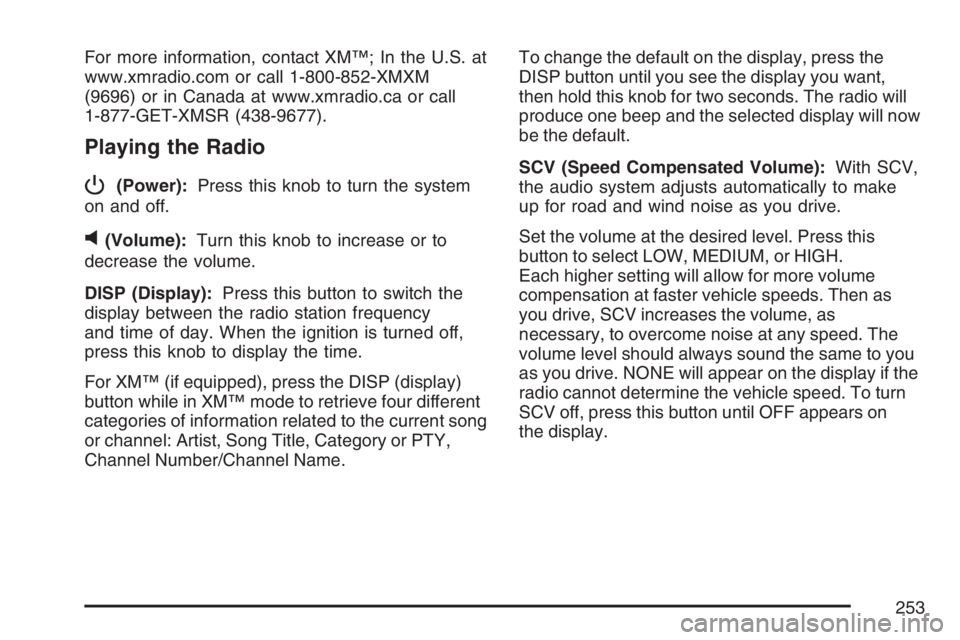
P
(Power):Press this knob to turn the system
on and off.
v(Volume):Turn this knob to increase or to
decrease the volume.
DISP (Display):Press this button to switch the
display between the radio station frequency
and time of day. When the ignition is turned off,
press this knob to display the time.
For XM™ (if equipped), press the DISP (display)
button while in XM™ mode to retrieve four different
categories of information related to the current song
or channel: Artist, Song Title, Category or PTY,
Channel Number/Channel Name.To change the default on the display, press the
DISP button until you see the display you want,
then hold this knob for two seconds. The radio will
produce one beep and the selected display will now
be the default.
SCV (Speed Compensated Volume):With SCV,
the audio system adjusts automatically to make
up for road and wind noise as you drive.
Set the volume at the desired level. Press this
button to select LOW, MEDIUM, or HIGH.
Each higher setting will allow for more volume
compensation at faster vehicle speeds. Then as
you drive, SCV increases the volume, as
necessary, to overcome noise at any speed. The
volume level should always sound the same to you
as you drive. NONE will appear on the display if the
radio cannot determine the vehicle speed. To turn
SCV off, press this button until OFF appears on
the display.
253
Page 257 of 512

Scanning Categories (CAT)
(XM™ Satellite Radio Service Only)
To scan a desired category perform the following:
1. Press the CAT button to activate category
select mode. The current category will
appear on the display.
2. Turn the tune knob to select a category.
3. Once the desired category is displayed, press
either SEEK arrow for two seconds to scan
the stations in the category.
4. Press either SEEK arrow again to stop
scanning.
If the radio cannot nd the desired category,
NOT FOUND will appear on the display and the
radio will return to the last station you were
listening to.
Radio Messages
CALIBRATE:The audio system has been
calibrated for your vehicle from the factory. If
CALIBRATE appears on the display it means that
the radio has not been congured properly for
your vehicle and it must be returned to your dealer
for service.LOCKED:This message is displayed when the
THEFTLOCK
®system has locked up. Take
your vehicle to your dealer for service.
If any error occurs repeatedly or if an error cannot
be corrected, contact your GM dealer.
Radio Messages for XM™ Only
SeeXM Radio Messages on page 278later in this
section for further detail.
Playing a CD
Insert a CD partway into the slot, label side up. The
player will pull it in and the CD should begin playing.
If you want to insert a CD with the ignition off, rst
press the eject button or the DISP knob.
If the ignition or radio is turned off with a CD in
the player it will stay in the player. When the
ignition or radio is turned on, the CD will start to
play where it stopped, if it was the last selected
audio source.
When the CD is inserted, the CD symbol will appear
on the display. As each new track starts to play, the
track number will appear on the display.
257