2007 BMW 760LI SEDAN display
[x] Cancel search: displayPage 63 of 253
Controls
61Reference
At a glance
Driving tips
Communications
Navigation
Entertainment
Mobility
If it becomes necessary to also unlock the
transmission lock of the automatic transmis-
sion, follow this sequence:
1.If necessary, start by releasing the parking
brake manually.
2.Then release the automatic transmission's
transmission lock manually, refer to
page64.
Jump starting and tow starting information,
refer to page219 and the pages that follow.
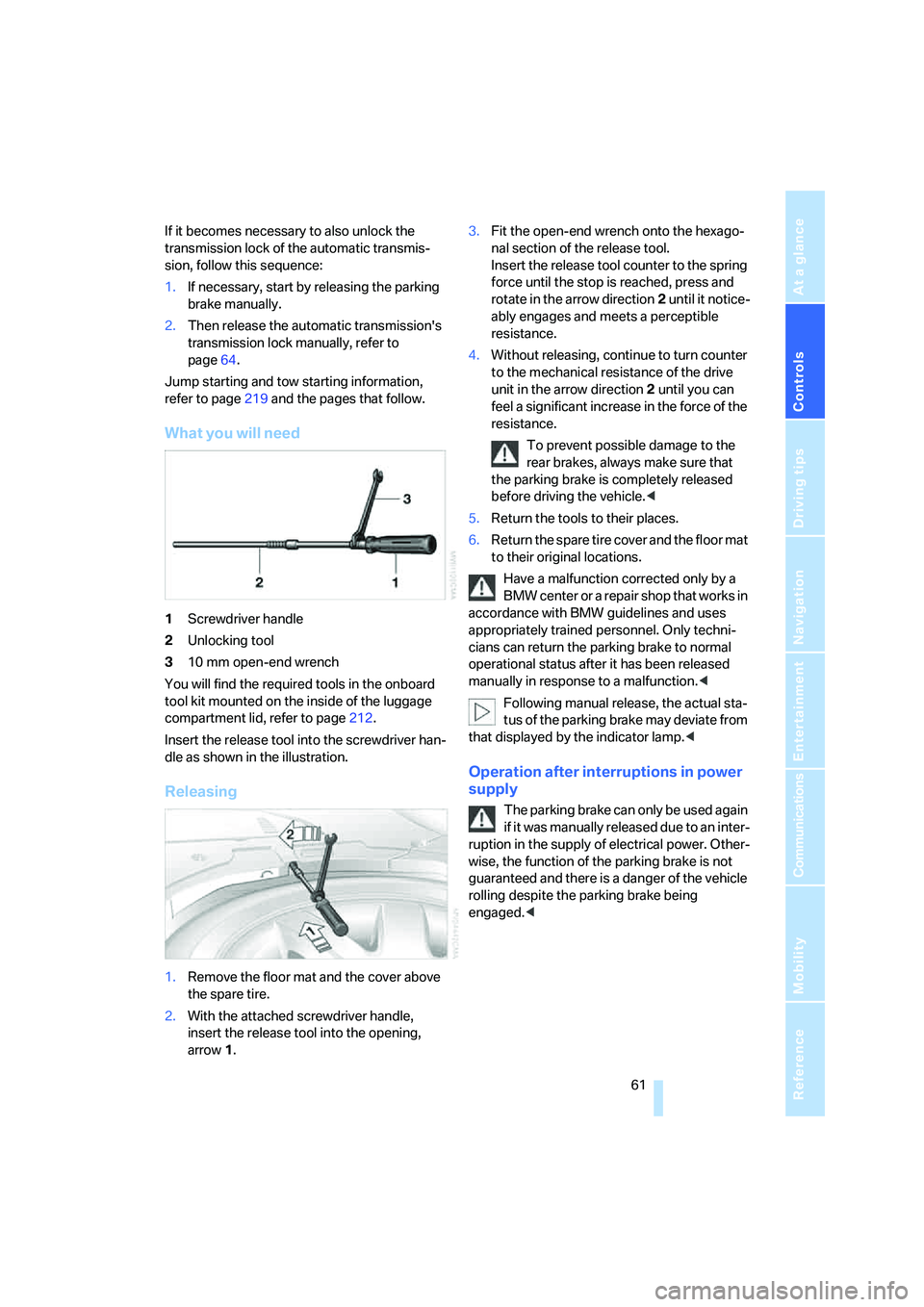
What you will need
1Screwdriver handle
2Unlocking tool
310 mm open-end wrench
You will find the required tools in the onboard
tool kit mounted on the inside of the luggage
compartment lid, refer to page212.
Insert the release tool into the screwdriver han-
dle as shown in the illustration.
Releasing
1.Remove the floor mat and the cover above
the spare tire.
2.With the attached screwdriver handle,
insert the release tool into the opening,
arrow1.3.Fit the open-end wrench onto the hexago-
nal section of the release tool.
Insert the release tool counter to the spring
force until the stop is reached, press and
rotate in the arrow direction2 until it notice-
ably engages and meets a perceptible
resistance.
4.Without releasing, continue to turn counter
to the mechanical resistance of the drive
unit in the arrow direction 2 until you can
feel a significant increase in the force of the
resistance.
To prevent possible damage to the
rear brakes, always make sure that
the parking brake is completely released
before driving the vehicle.<
5.Return the tools to their places.
6.Return the spare tire cover and the floor mat
to their original locations.
Have a malfunction corrected only by a
BMW center or a repair shop that works in
accordance with BMW guidelines and uses
appropriately trained personnel. Only techni-
cians can return the parking brake to normal
operational status after it has been released
manually in response to a malfunction.<
Following manual release, the actual sta-
tus of the parking brake may deviate from
that displayed by the indicator lamp.<
Operation after interruptions in power
supply
The parking brake can only be used again
if it was manually released due to an inter-
ruption in the supply of electrical power. Other-
wise, the function of the parking brake is not
guaranteed and there is a danger of the vehicle
rolling despite the parking brake being
engaged.<
Page 64 of 253
Driving
62 Once the electrical power supply has been
restored, you can again use the parking brake:
With the ignition on and the vehicle
stationary, briefly press the button
three times at intervals of approx.
5 seconds. This executes the fol-
lowing initialization sequence:
>Initializing the disengaged setting.
>Engaging: the system registers the new
status and the brake setting is initialized.
The indicator lamp on Info Display lights
up green.
>Releasing: the parking brake is ready for
operation.
The indicator lamp on the Info Display
goes out.
Automatic transmission with
Steptronic
In addition to fully automatic operation, you can
also shift manually using the button on the
steering wheel, refer to page63.
Transmission range selection
P R N D
Displays on Info Display
P R N D S or M1 to M6
The transmission range is indicated, and in the
manual mode, the gear currently engaged.
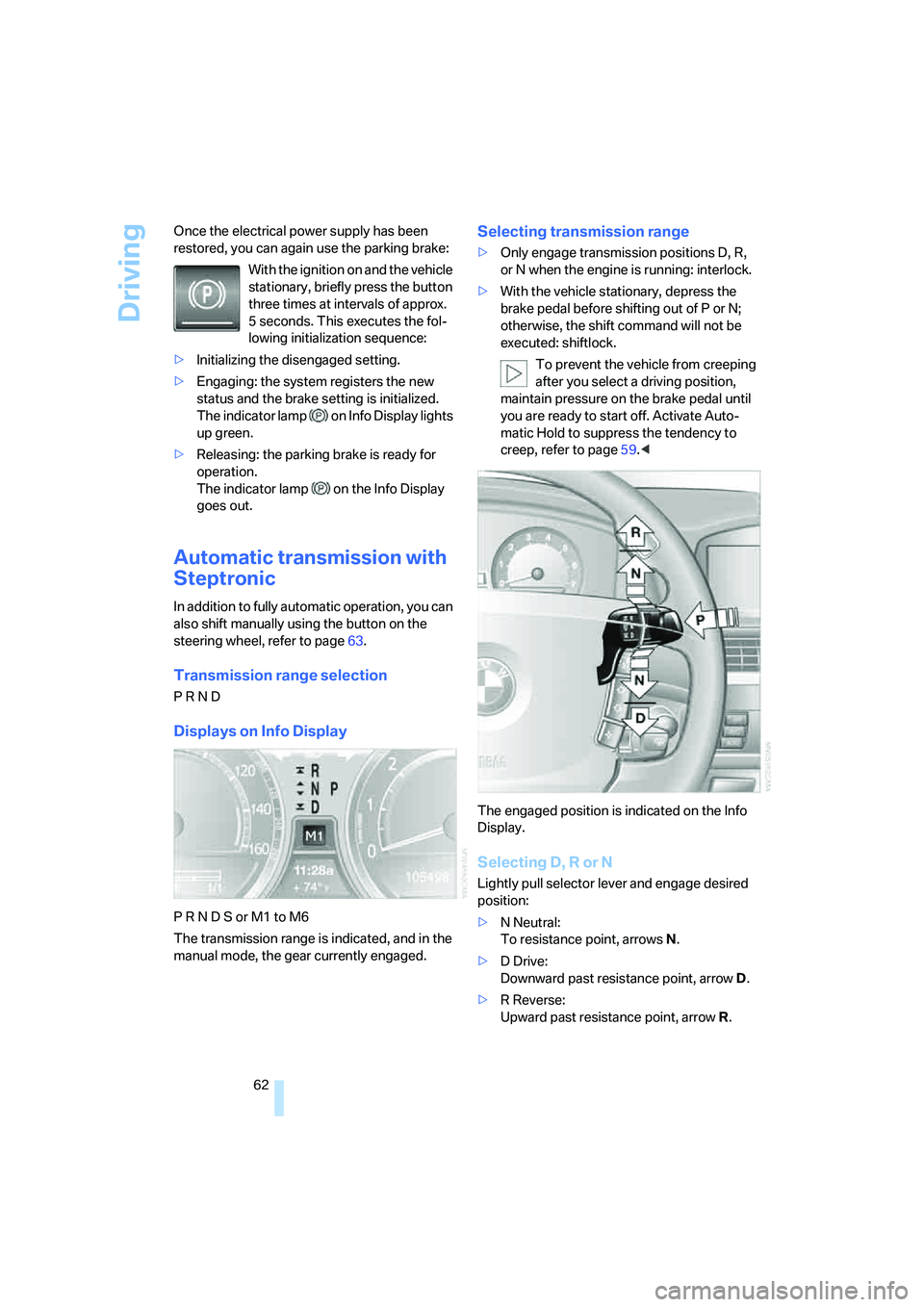
Selecting transmission range
>Only engage transmission positions D, R,
or N when the engine is running: interlock.
>With the vehicle stationary, depress the
brake pedal before shifting out of P or N;
otherwise, the shift command will not be
executed: shiftlock.
To prevent the vehicle from creeping
after you select a driving position,
maintain pressure on the brake pedal until
you are ready to start off. Activate Auto-
matic Hold to suppress the tendency to
creep, refer to page59.<
The engaged position is indicated on the Info
Display.
Selecting D, R or N
Lightly pull selector lever and engage desired
position:
>N Neutral:
To resistance point, arrowsN.
>D Drive:
Downward past resistance point, arrowD.
>R Reverse:
Upward past resistance point, arrowR.
Page 65 of 253
Controls
63Reference
At a glance
Driving tips
Communications
Navigation
Entertainment
Mobility
The selector lever immediately returns to the
center position when released.
Selecting P
Press button P.
P Park
Select only when the vehicle is stationary.
The rear wheels are locked.
Transmission automatically shifts into P
as soon as you switch off the engine
unless N is selected and the remote control is
in the ignition lock, refer to page58.<
R Reverse
Select only when the vehicle is stationary.
N Neutral
You can select this position, for example, in car
washes. The vehicle can roll.
Transmission remains in N even after the
ignition is switched off whenever you
leave the remote control in the ignition lock.
This function is useful in automatic car washes,
etc.
After approx. 30 minutes the system automati-
cally shifts into position P. Pay attention to the
messages on the Info Display.
Switching off engine, refer to page58.<
D Drive, automatic position
This is the mode recommended for normal
vehicle operation. All forward gears are avail-
able.
Under normal operating conditions, the fuel
consumption is lowest when driving in posi-
tion D.
Kick-down
The kick-down mode provides maximum accel-
eration.
Press the accelerator pedal beyond the full-
throttle resistance point.
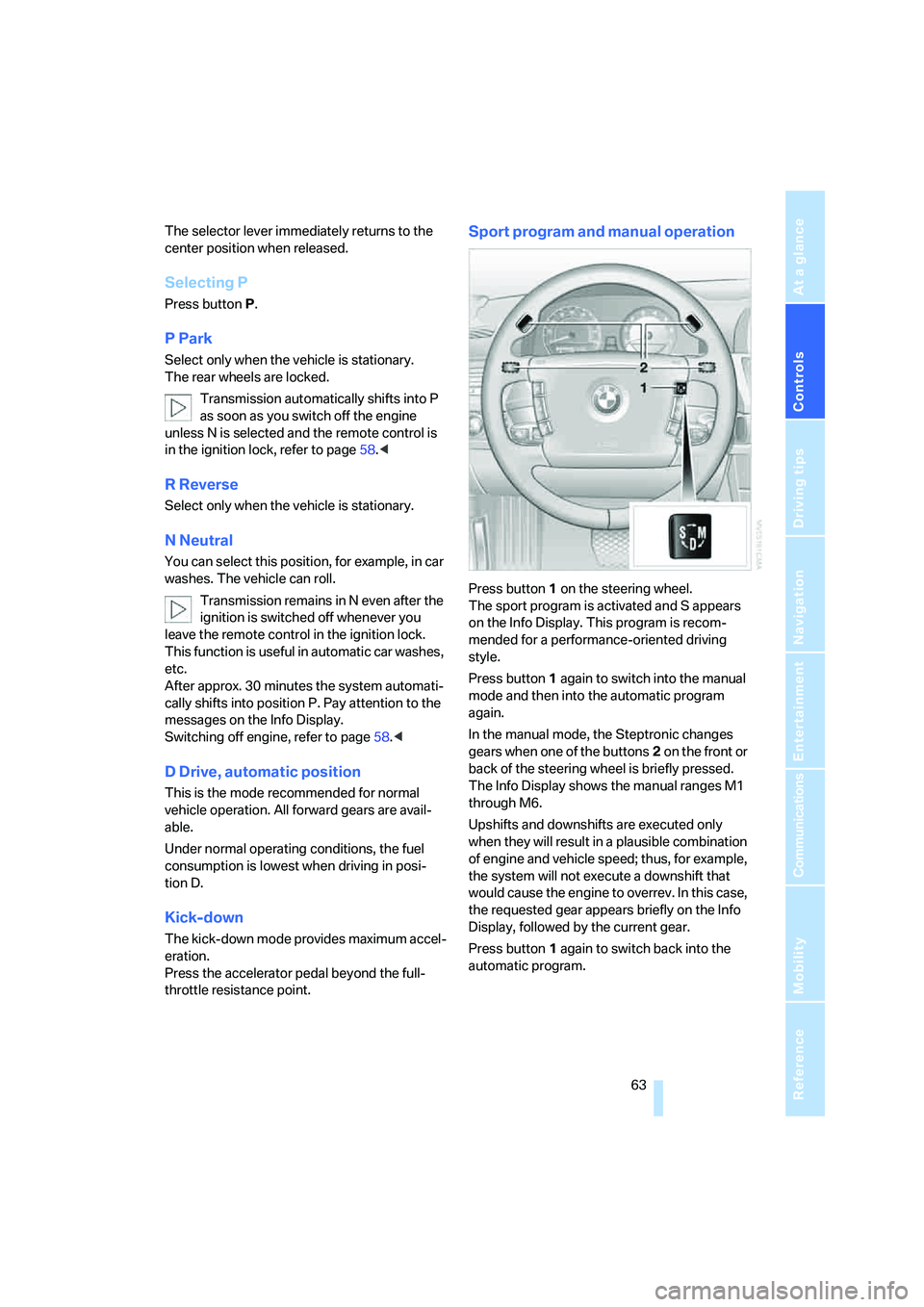
Sport program and manual operation
Press button1 on the steering wheel.
The sport program is activated and S appears
on the Info Display. This program is recom-
mended for a performance-oriented driving
style.
Press button1 again to switch into the manual
mode and then into the automatic program
again.
In the manual mode, the Steptronic changes
gears when one of the buttons2 on the front or
back of the steering wheel is briefly pressed.
The Info Display shows the manual ranges M1
through M6.
Upshifts and downshifts are executed only
when they will result in a plausible combination
of engine and vehicle speed; thus, for example,
the system will not execute a downshift that
would cause the engine to overrev. In this case,
the requested gear appears briefly on the Info
Display, followed by the current gear.
Press button1 again to switch back into the
automatic program.
Page 66 of 253
Driving
64
Manually releasing transmission lock
In the event of a power supply interrup-
tion, e.g. with a drained or disconnected
battery or when there is an electrical malfunc-
tion, the transmission lock must be released
manually; otherwise, the rear wheels are locked
and the vehicle cannot be towed.<
When manually releasing the transmis-
sion lock, depress the brake pedal; other-
wise, there is a danger of the vehicle rolling
when the transmission lock is manually
released.<
The transmission lock should only be released
for towing. Reengage the transmission lock
after parking the vehicle at its destination.
If it also becomes necessary to manually
release the parking brake, follow this sequence:
1.Start by manually releasing the parking
brake, refer to page60.
2.Then proceed to manually releasing the
transmission lock.
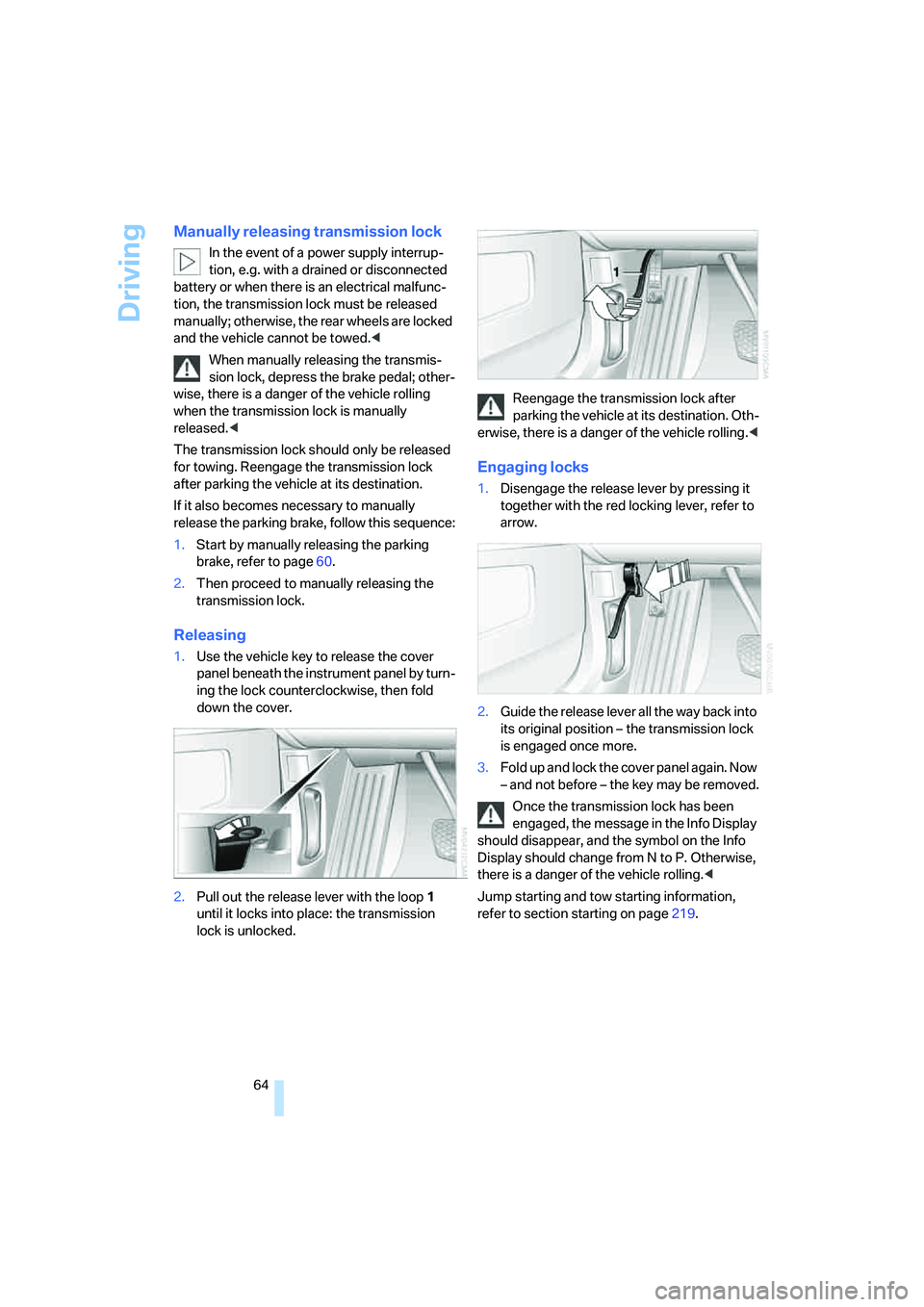
Releasing
1.Use the vehicle key to release the cover
panel beneath the instrument panel by turn-
ing the lock counterclockwise, then fold
down the cover.
2.Pull out the release lever with the loop1
until it locks into place: the transmission
lock is unlocked.Reengage the transmission lock after
parking the vehicle at its destination. Oth-
erwise, there is a danger of the vehicle rolling.<
Engaging locks
1.Disengage the release lever by pressing it
together with the red locking lever, refer to
arrow.
2.Guide the release lever all the way back into
its original position – the transmission lock
is engaged once more.
3.Fold up and lock the cover panel again. Now
– and not before – the key may be removed.
Once the transmission lock has been
engaged, the message in the Info Display
should disappear, and the symbol on the Info
Display should change from N to P. Otherwise,
there is a danger of the vehicle rolling.<
Jump starting and tow starting information,
refer to section starting on page219.
Page 69 of 253
Controls
67Reference
At a glance
Driving tips
Communications
Navigation
Entertainment
Mobility
Windshield and headlamp washer
system
Capacity: 6.3 US quarts/6 liters.
Fill with water and – if required – with a washer
antifreeze, according to manufacturer's recom-
mendations.
Programmable cruise control
The concept
The programmable cruise control is available
for use at speeds of approx. 20 mph/30 km/h
and higher. The vehicle maintains and stores
the speed that you set using the lever mounted
on the steering column.
You can also use the multilevel preset mode to
store six desired speeds for later selection with
the lever, refer to page67.
This feature assists you in quickly adapting the
vehicle speed to specific road conditions, e.g.
changes in speeds limits.
Do not use the programmable cruise con-
trol when unfavorable conditions do not
permit you to drive at a constant speed, e.g.
when driving on winding roads, in heavy traffic
or under poor road conditions such as snow,
rain, ice, or a loose road surface. If you do, you
could lose control of the vehicle and cause an
accident.<
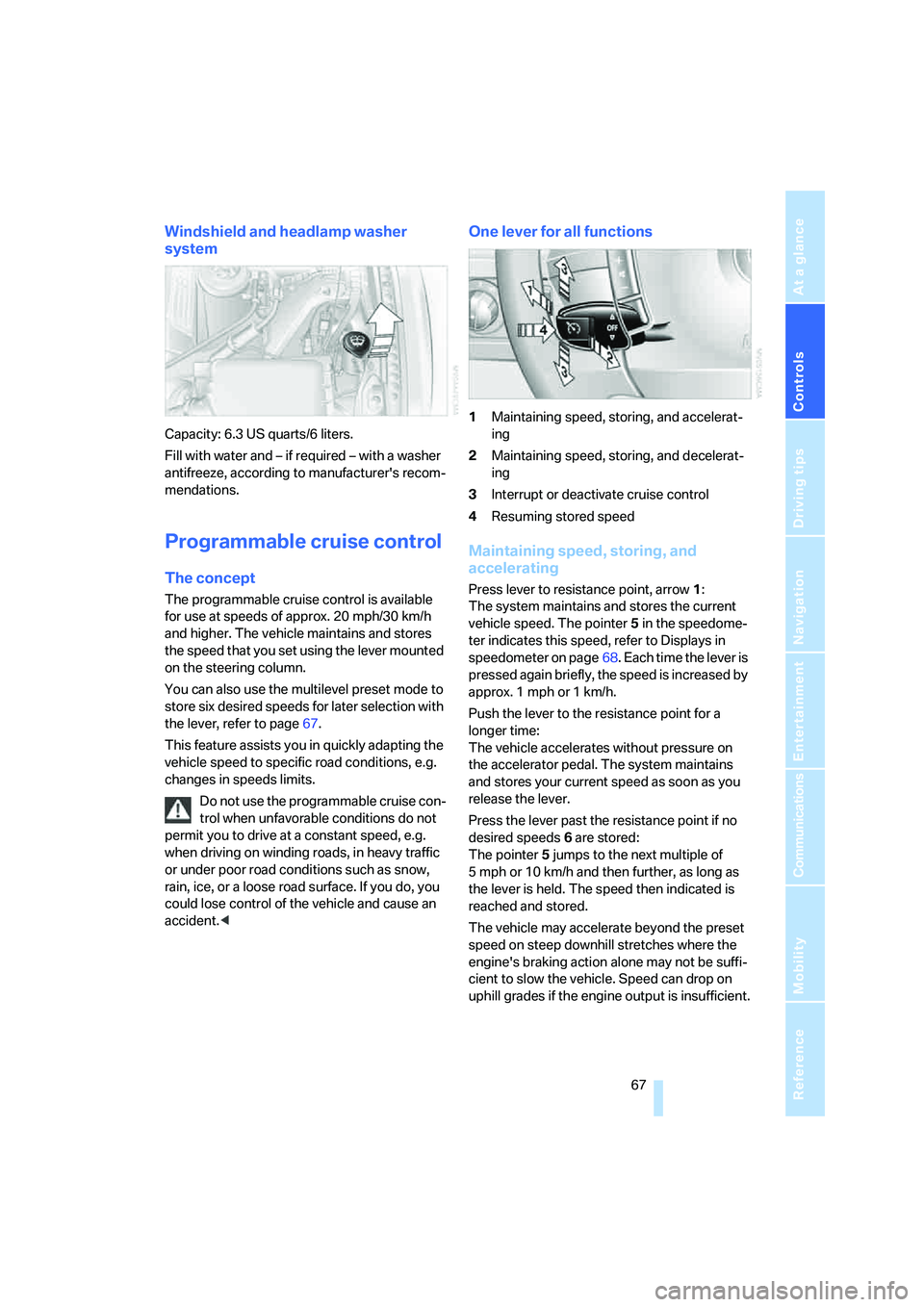
One lever for all functions
1Maintaining speed, storing, and accelerat-
ing
2Maintaining speed, storing, and decelerat-
ing
3Interrupt or deactivate cruise control
4Resuming stored speed
Maintaining speed, storing, and
accelerating
Press lever to resistance point, arrow 1:
The system maintains and stores the current
vehicle speed. The pointer5 in the speedome-
ter indicates this speed, refer to Displays in
speedometer on page68. Each time the lever is
pressed again briefly, the speed is increased by
approx. 1 mph or 1 km/h.
Push the lever to the resistance point for a
longer time:
The vehicle accelerates without pressure on
the accelerator pedal. The system maintains
and stores your current speed as soon as you
release the lever.
Press the lever past the resistance point if no
desired speeds6 are stored:
The pointer5 jumps to the next multiple of
5 mph or 10 km/h and then further, as long as
the lever is held. The speed then indicated is
reached and stored.
The vehicle may accelerate beyond the preset
speed on steep downhill stretches where the
engine's braking action alone may not be suffi-
cient to slow the vehicle. Speed can drop on
uphill grades if the engine output is insufficient.
Page 70 of 253
Driving
68
Maintaining speed, storing, and
decelerating
Pull the lever, arrow2:
Functions in the same way as1, except that the
vehicle speed is decreased.
Interrupting the cruise control
Briefly press the lever up or down, arrow3.
In addition, cruise control is interrupted auto-
matically:
>when you apply pressure to the brake pedal
>when you shift the automatic transmission
into position N
>when the DSC control is operative
Resuming stored speed
Briefly press the button4:
The vehicle accelerates back to and maintains
the stored speed.
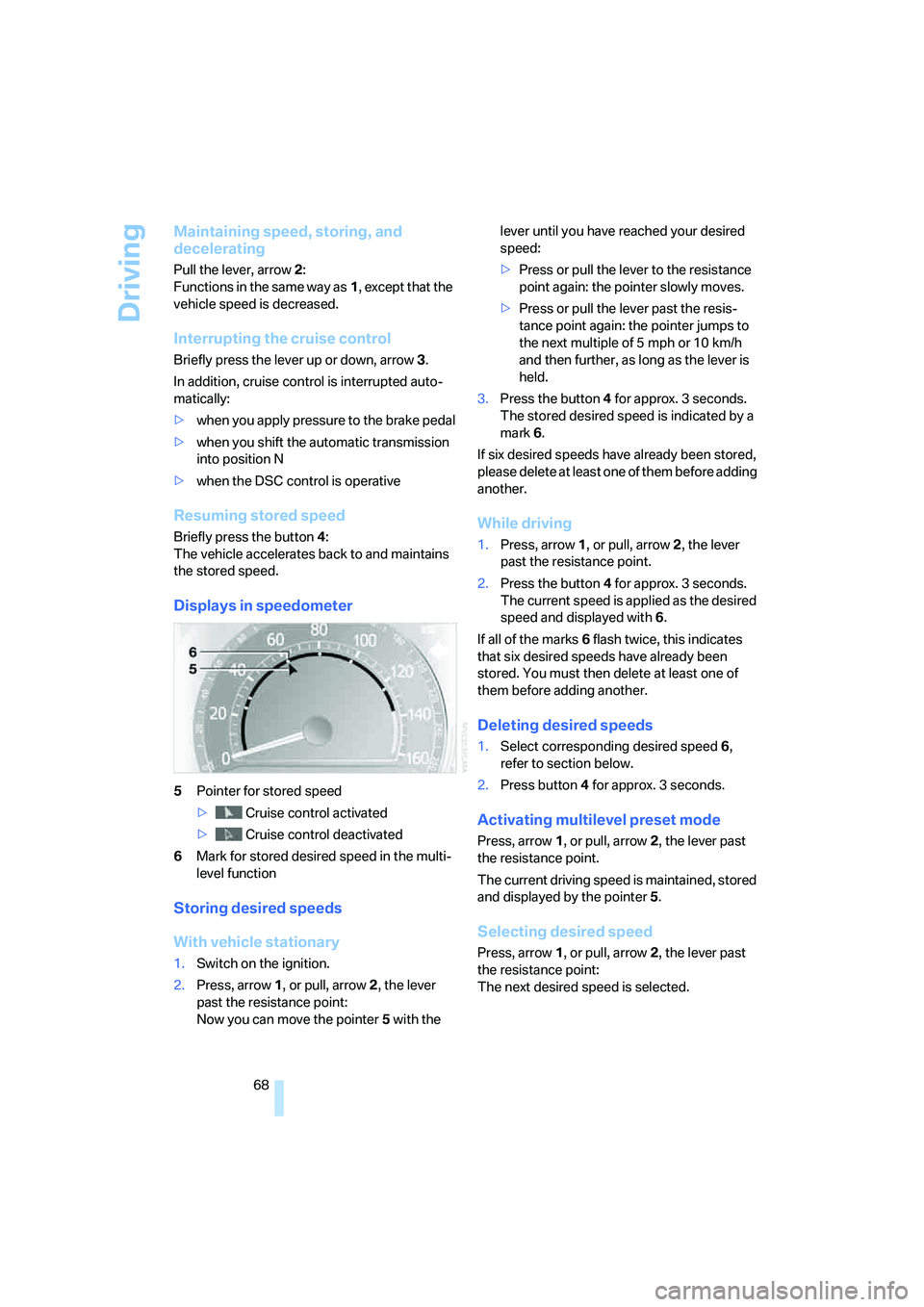
Displays in speedometer
5Pointer for stored speed
> Cruise control activated
> Cruise control deactivated
6Mark for stored desired speed in the multi-
level function
Storing desired speeds
With vehicle stationary
1.Switch on the ignition.
2.Press, arrow1, or pull, arrow2, the lever
past the resistance point:
Now you can move the pointer5 with the lever until you have reached your desired
speed:
>Press or pull the lever to the resistance
point again: the pointer slowly moves.
>Press or pull the lever past the resis-
tance point again: the pointer jumps to
the next multiple of 5 mph or 10 km/h
and then further, as long as the lever is
held.
3.Press the button4 for approx. 3 seconds.
The stored desired speed is indicated by a
mark 6.
If six desired speeds have already been stored,
please delete at least one of them before adding
another.
While driving
1.Press, arrow1, or pull, arrow2, the lever
past the resistance point.
2.Press the button4 for approx. 3 seconds.
The current speed is applied as the desired
speed and displayed with6.
If all of the marks 6 flash twice, this indicates
that six desired speeds have already been
stored. You must then delete at least one of
them before adding another.
Deleting desired speeds
1.Select corresponding desired speed6,
refer to section below.
2.Press button4 for approx. 3 seconds.
Activating multilevel preset mode
Press, arrow1, or pull, arrow2, the lever past
the resistance point.
The current driving speed is maintained, stored
and displayed by the pointer5.
Selecting desired speed
Press, arrow1, or pull, arrow2, the lever past
the resistance point:
The next desired speed is selected.
Page 72 of 253
Driving
70 desired speed to traffic conditions, control both
your driving speed and safe following distance,
and remain ready to brake at all times. Always
be ready to take action or apply the brakes if
necessary, especially when the system is
actively following a vehicle in front of you. Oth-
erwise driving situations can arise that consti-
tute an accident hazard.
The minimum desired speed is 20 mph or
30 km/h, the maximum is 110 mph or 180 km/h.
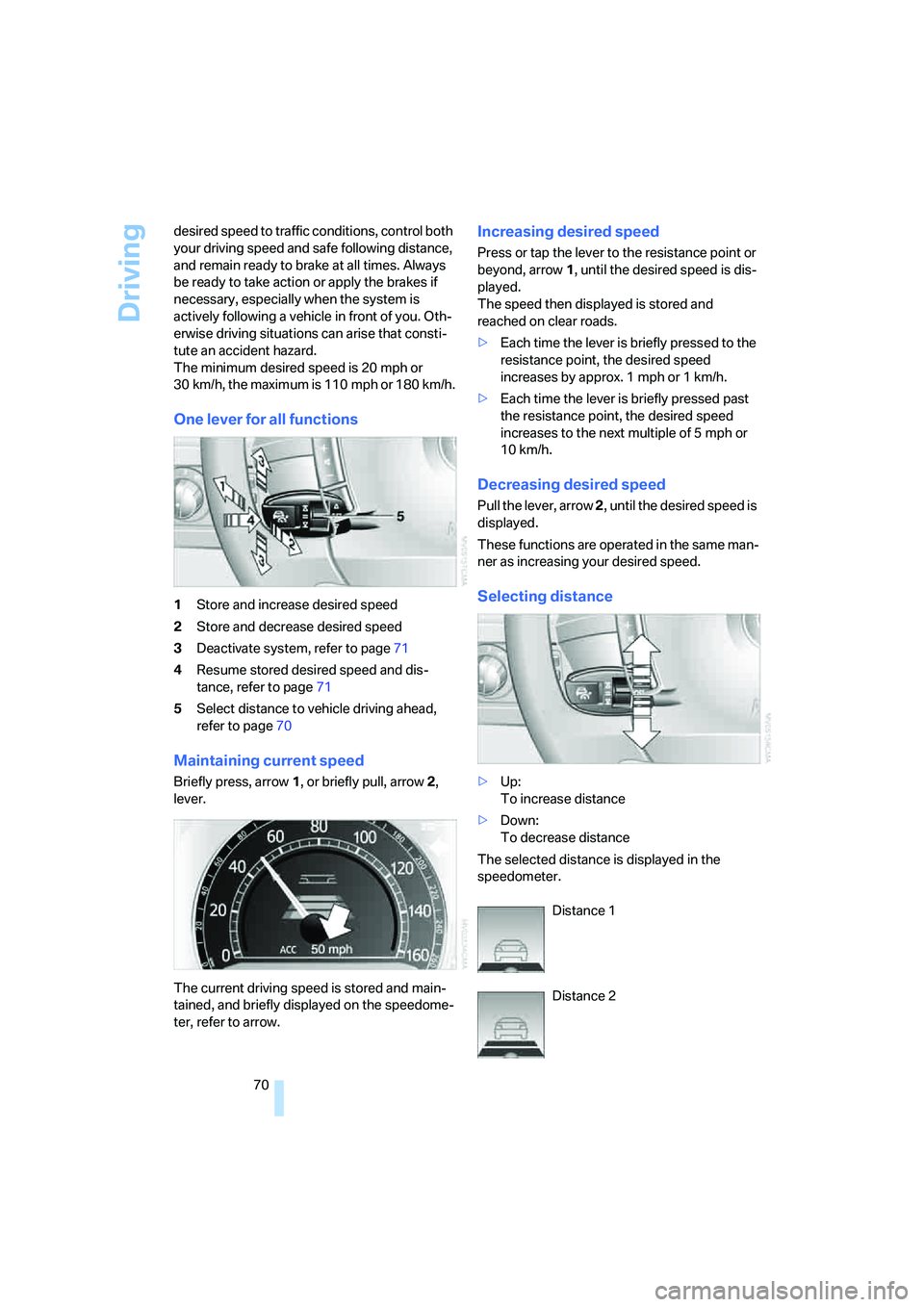
One lever for all functions
1Store and increase desired speed
2Store and decrease desired speed
3Deactivate system, refer to page71
4Resume stored desired speed and dis-
tance, refer to page71
5Select distance to vehicle driving ahead,
refer to page70
Maintaining current speed
Briefly press, arrow1, or briefly pull, arrow2,
lever.
The current driving speed is stored and main-
tained, and briefly displayed on the speedome-
ter, refer to arrow.
Increasing desired speed
Press or tap the lever to the resistance point or
beyond, arrow1, until the desired speed is dis-
played.
The speed then displayed is stored and
reached on clear roads.
>Each time the lever is briefly pressed to the
resistance point, the desired speed
increases by approx. 1 mph or 1 km/h.
>Each time the lever is briefly pressed past
the resistance point, the desired speed
increases to the next multiple of 5 mph or
10 km/h.
Decreasing desired speed
Pull the lever, arrow 2, until the desired speed is
displayed.
These functions are operated in the same man-
ner as increasing your desired speed.
Selecting distance
>Up:
To increase distance
>Down:
To decrease distance
The selected distance is displayed in the
speedometer.
Distance 1
Distance 2
Page 73 of 253
Controls
71Reference
At a glance
Driving tips
Communications
Navigation
Entertainment
Mobility
Distance 3
This distance is always set when
the system is used for the first time
after starting the engine.
Distance 4
Use good judgment to select the appro-
priate following distance given road con-
ditions, traffic, applicable laws and driving rec-
ommendations for safe following distance;
failure to do so can constitute an accident haz-
ard.<
Deactivating cruise control
Press the lever up or down. The displays in the
speedometer go out.
In addition, the system is automatically deacti-
vated:
>when the speed is reduced to below 20 mph
or 30 km/h due to a traffic situation
>when DTC is activated or DSC is deacti-
vated
>when the system does not recognize any
objects for an extended period of time, e.g.
on infrequently traveled roads without a
shoulder or guard rails, or if the radar sensor
is covered with dirt, refer to page72
>when you actuate the parking brake during
driving
>when you shift the transmission into posi-
tion NIf the system is deactivated, then it is nec-
essary for the driver to actively intervene
by braking and possibly swerving. Otherwise,
there is the danger of an accident.<
Background lighting
You can switch off the backlighting of the
speedometer and tachometer when the system
is deactivated if no other functions are being
displayed, e.g. the advance warning field in the
tachometer, refer to page75, or the route guid-
ance of the navigation system.
To do so, press the lever up or down for approx.
1second.
Resuming stored desired speed and
distance
Press button4:
The displays appear in the speedometer.
When you switch off the ignition, the stored
desired speed is deleted.
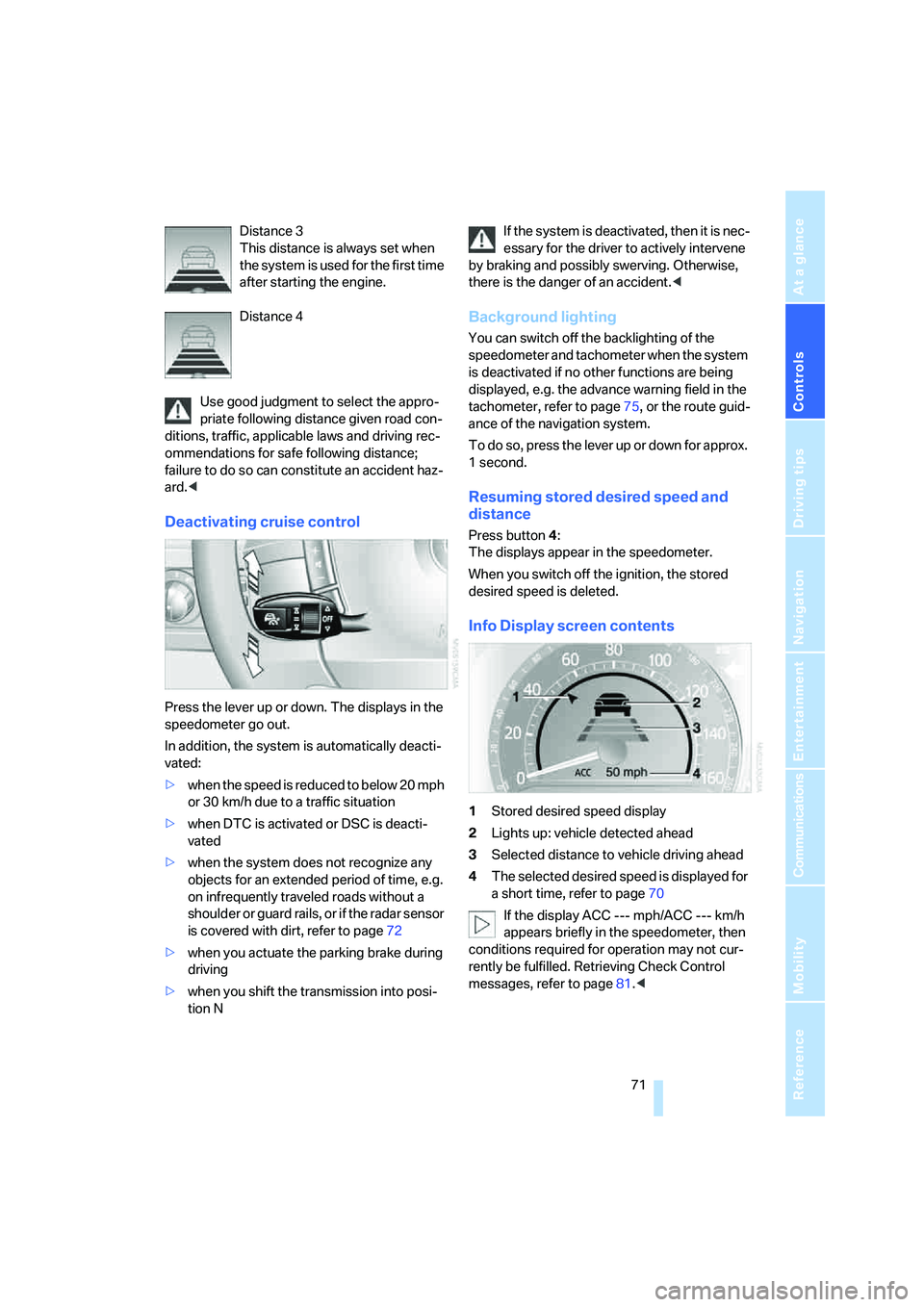
Info Display screen contents
1Stored desired speed display
2Lights up: vehicle detected ahead
3Selected distance to vehicle driving ahead
4The selected desired speed is displayed for
a short time, refer to page70
If the display ACC --- mph/ACC --- km/h
appears briefly in the speedometer, then
conditions required for operation may not cur-
rently be fulfilled. Retrieving Check Control
messages, refer to page81.<