2007 BMW 760LI SEDAN trip computer
[x] Cancel search: trip computerPage 14 of 253
Cockpit
12
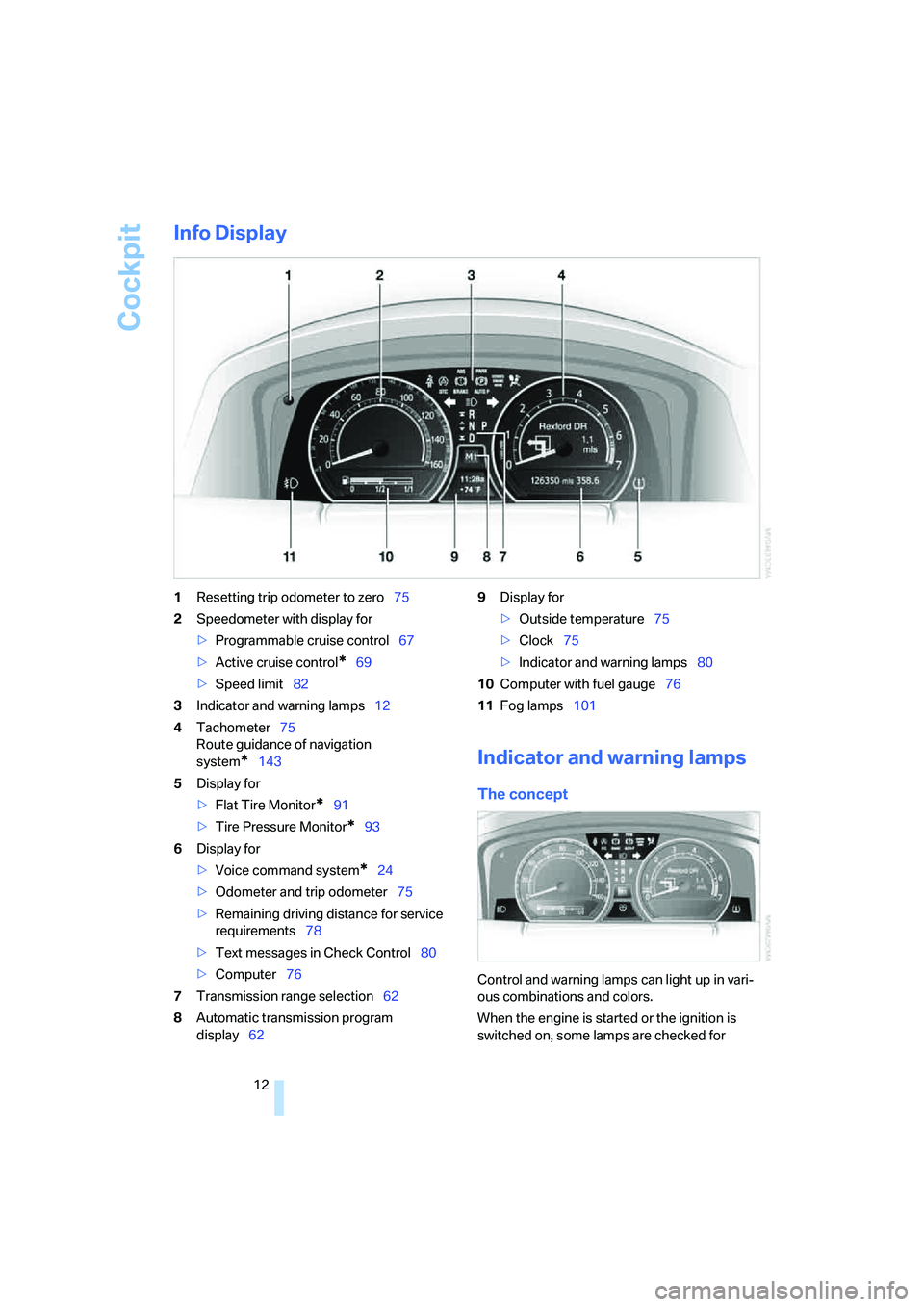
Info Display
1Resetting trip odometer to zero75
2Speedometer with display for
>Programmable cruise control67
>Active cruise control
*69
>Speed limit82
3Indicator and warning lamps12
4Tachometer75
Route guidance of navigation
system
*143
5Display for
>Flat Tire Monitor
*91
>Tire Pressure Monitor
*93
6Display for
>Voice command system
*24
>Odometer and trip odometer75
>Remaining driving distance for service
requirements78
>Text messages in Check Control80
>Computer76
7Transmission range selection62
8Automatic transmission program
display629Display for
>Outside temperature75
>Clock75
>Indicator and warning lamps80
10Computer with fuel gauge76
11Fog lamps101
Indicator and warning lamps
The concept
Control and warning lamps can light up in vari-
ous combinations and colors.
When the engine is started or the ignition is
switched on, some lamps are checked for
Page 19 of 253
At a glance
17Reference
Controls
Driving tips
Communications
Navigation
Entertainment
Mobility
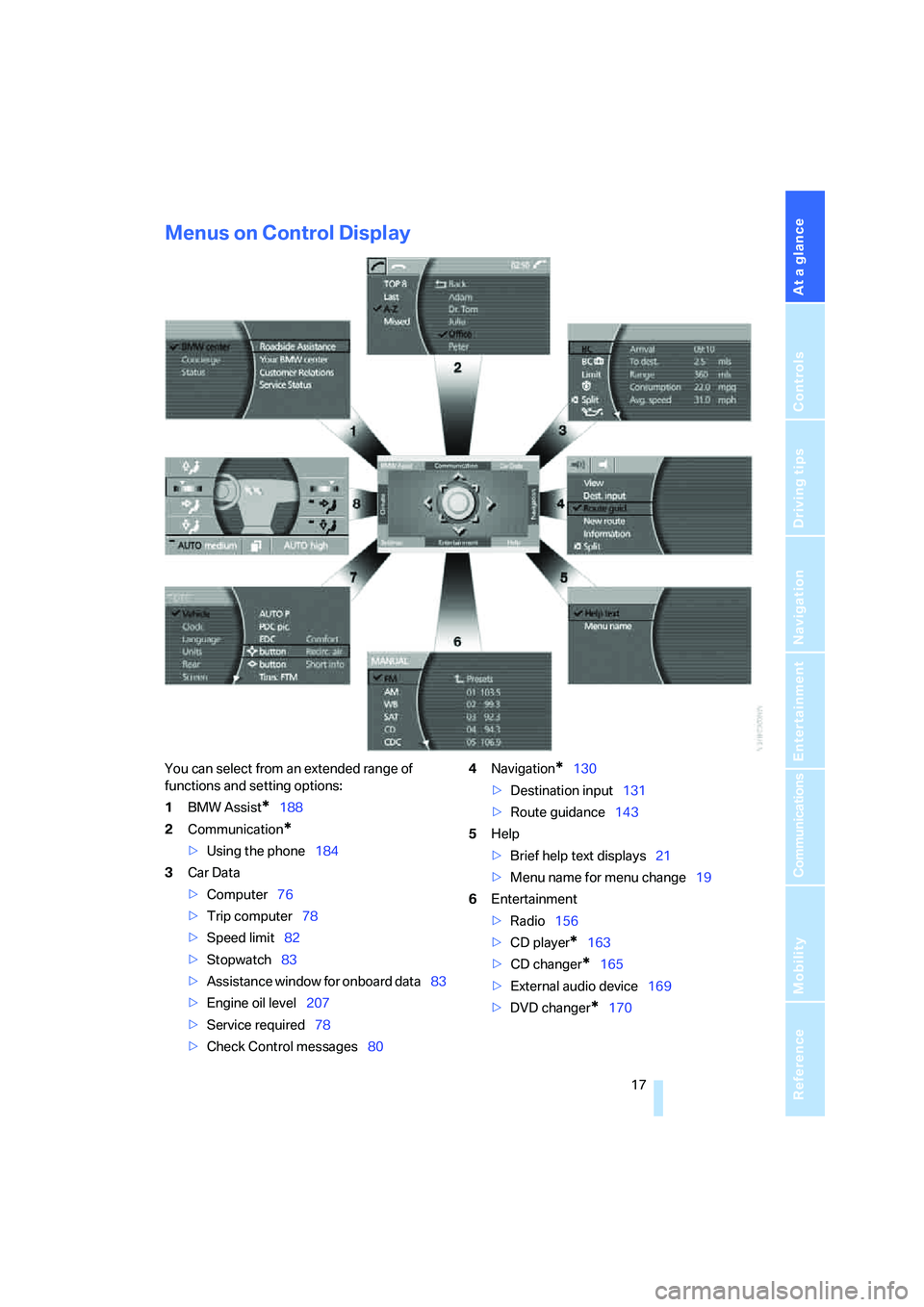
Menus on Control Display
You can select from an extended range of
functions and setting options:
1BMW Assist
*188
2Communication
*
>Using the phone184
3Car Data
>Computer76
>Trip computer78
>Speed limit82
>Stopwatch83
>Assistance window
for onboard data83
>Engine oil level207
>Service required78
>Check Control messages804Navigation
*130
>Destination input131
>Route guidance143
5Help
>Brief help text displays21
>Menu name for menu change19
6Entertainment
>Radio156
>CD player
*163
>CD changer
*165
>External audio device169
>DVD changer
*170
Page 77 of 253
Controls
75Reference
At a glance
Driving tips
Communications
Navigation
Entertainment
Mobility
Everything under control
Odometer, outside temperature display, clock
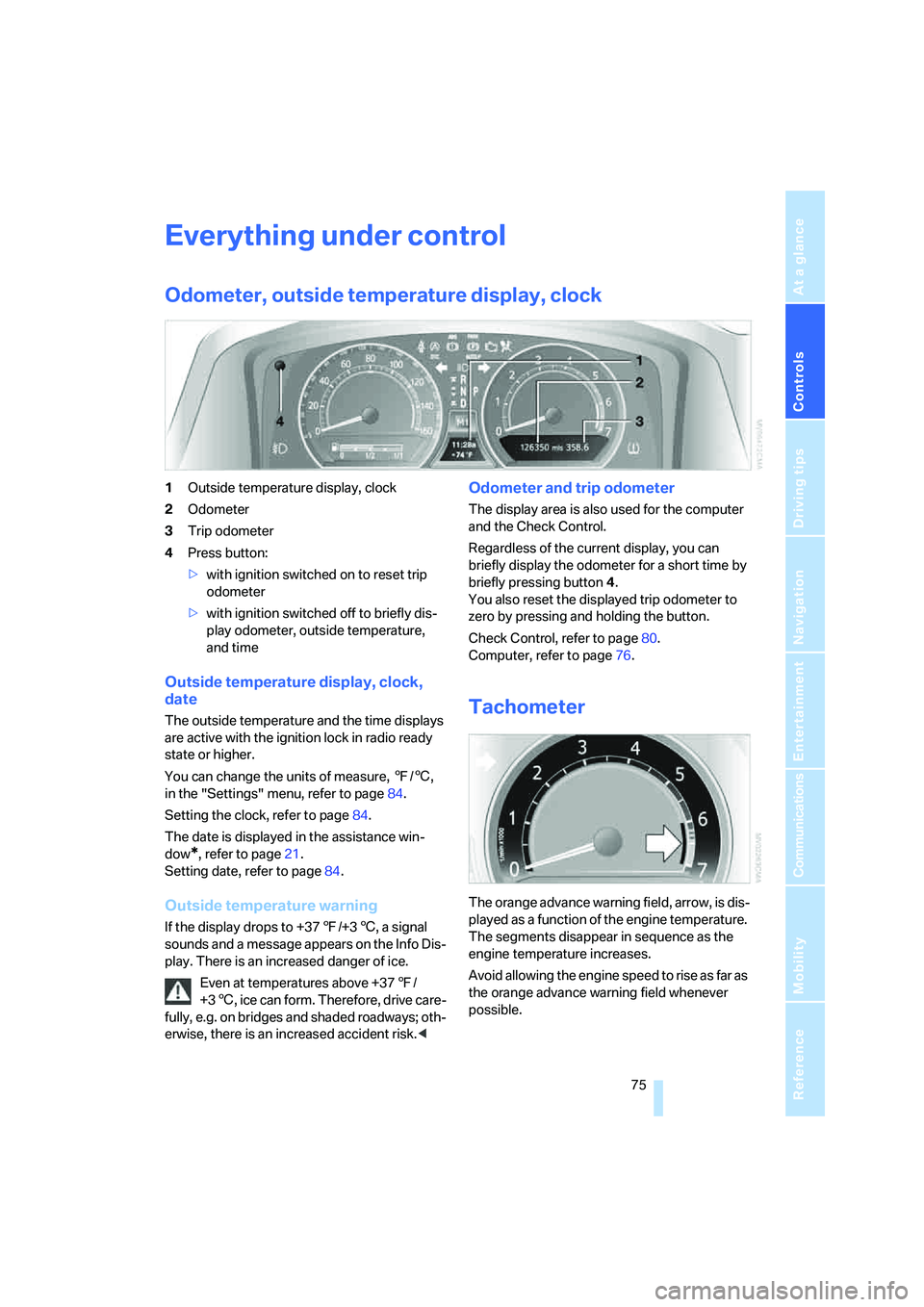
1Outside temperature display, clock
2Odometer
3Trip odometer
4Press button:
>with ignition switched on to reset trip
odometer
>with ignition switched off to briefly dis-
play odometer, outside temperature,
and time
Outside temperature display, clock,
date
The outside temperature and the time displays
are active with the ignition lock in radio ready
state or higher.
You can change the units of measure, 7/6,
in the "Settings" menu, refer to page84.
Setting the clock, refer to page84.
The date is displayed in the assistance win-
dow
*, refer to page21.
Setting date, refer to page84.
Outside temperature warning
If the display drops to +377/+36, a signal
sounds and a message appears on the Info Dis-
play. There is an increased danger of ice.
Even at temperatures above +377/
+36, ice can form. Therefore, drive care-
fully, e.g. on bridges and shaded roadways; oth-
erwise, there is an increased accident risk.<
Odometer and trip odometer
The display area is also used for the computer
and the Check Control.
Regardless of the current display, you can
briefly display the odometer for a short time by
briefly pressing button4.
You also reset the displayed trip odometer to
zero by pressing and holding the button.
Check Control, refer to page80.
Computer, refer to page76.
Tachometer
The orange advance warning field, arrow, is dis-
played as a function of the engine temperature.
The segments disappear in sequence as the
engine temperature increases.
Avoid allowing the engine speed to rise as far as
the orange advance warning field whenever
possible.
Page 79 of 253
Controls
77Reference
At a glance
Driving tips
Communications
Navigation
Entertainment
Mobility
Cruising range
Displays the estimated cruising range available
with the remaining fuel. It is projected by taking
into account the driving style over the last
20 miles/30 km.
When your cruising range falls below
30 miles/50 km, be sure to refuel. Other-
wise, engine functions are not assured and
damage can occur.<
The computer only registers refueling amounts
greater than approx. 1.3 gallons/5 liters.
Distance to destination
When you enter a destination into the naviga-
tion system, refer to page131, or manually
enter a distance in the computer, refer to
page78, prior to departure, then the system
displays the remaining distance to your desti-
nation.
The system automatically adopts the distance
to your destination on the route recommended
by the navigation system.
When you enter a destination into the
navigation system, any manual distance
entries will be overwritten once the vehicle has
traveled approx. 1,640 ft/500 m of the calcu-
lated distance.<
Energy Control/current fuel
consumption
Shows the current fuel consumption. This
allows you to see whether your current driving
style is conducive to fuel economy with mini-
mum exhaust emissions.
Average fuel consumption
The average fuel consumption is determined
for the time during which the engine is running.
Average speed
Periods with the vehicle parked and the engine
off are not included in the calculations of aver-
age speed.
You can reset value for average fuel consump-
tion and average speed, refer to Resetting val-
ues, page78.
For different route segments
You can display the average speed and average
fuel consumption for two different route seg-
ments:
>refer to Displays on Control Display below
>refer to Trip computer on page78
Time of arrival
A display of your estimated time of arrival is
available whenever you enter a destination into
the navigation system, refer to page131, or
enter the distance manually into the computer,
refer to page78, prior to departure.
A prerequisite for this is that you have the
time set correctly, refer to page84.<
Displays on Control Display
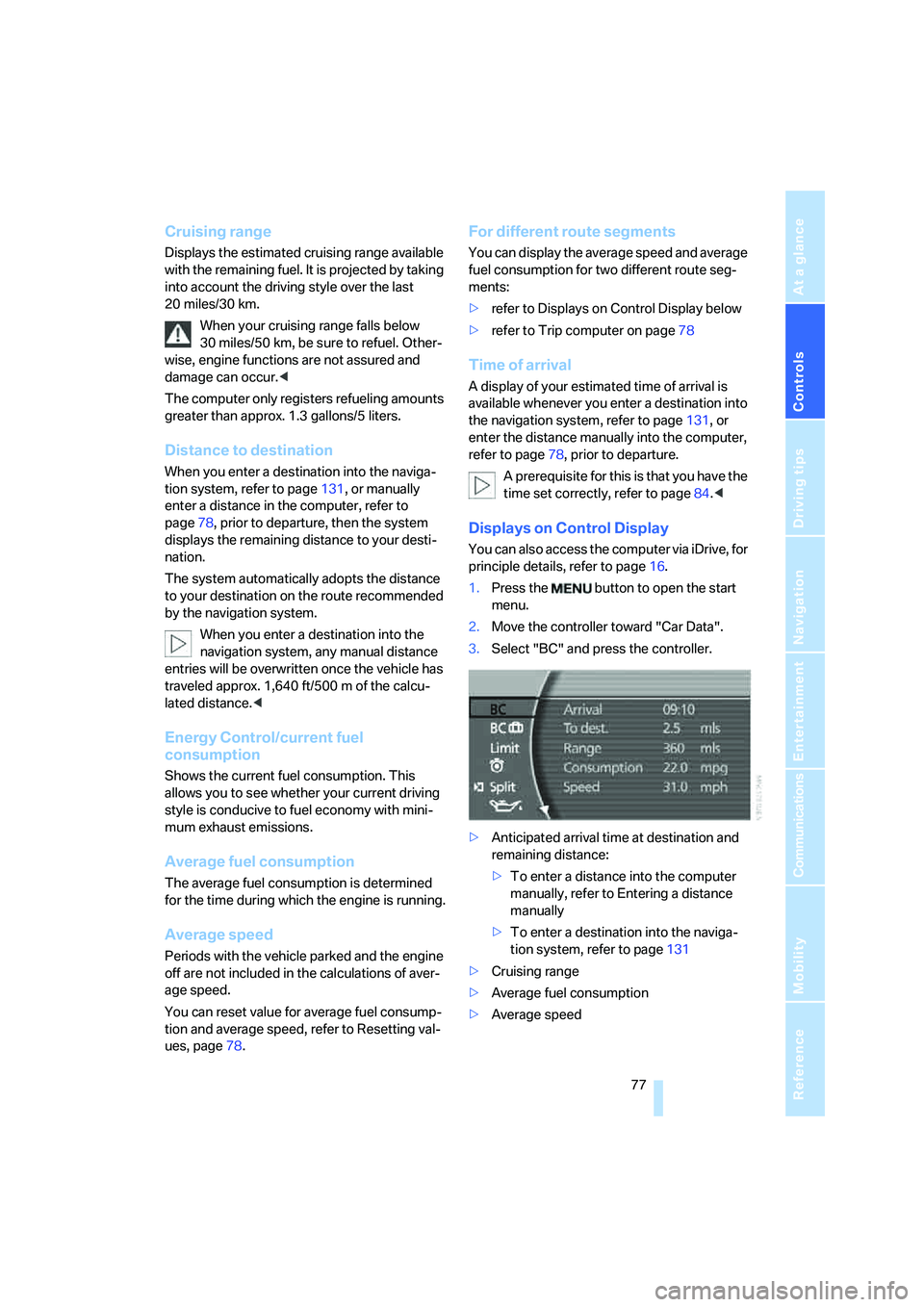
You can also access the computer via iDrive, for
principle details, refer to page16.
1.Press the button to open the start
menu.
2.Move the controller toward "Car Data".
3.Select "BC" and press the controller.
>Anticipated arrival time at destination and
remaining distance:
>To enter a distance into the computer
manually, refer to Entering a distance
manually
>To enter a destination into the naviga-
tion system, refer to page131
>Cruising range
>Average fuel consumption
>Average speed
Page 80 of 253
Everything under control
78
Resetting values
You can reset values for the average speed and
average fuel consumption:
1.Activate the relevant menu item and press
the controller.
2.Press the controller again to confirm your
selection.
This also resets the respective information
shown on the Info Display.
Entering a distance manually
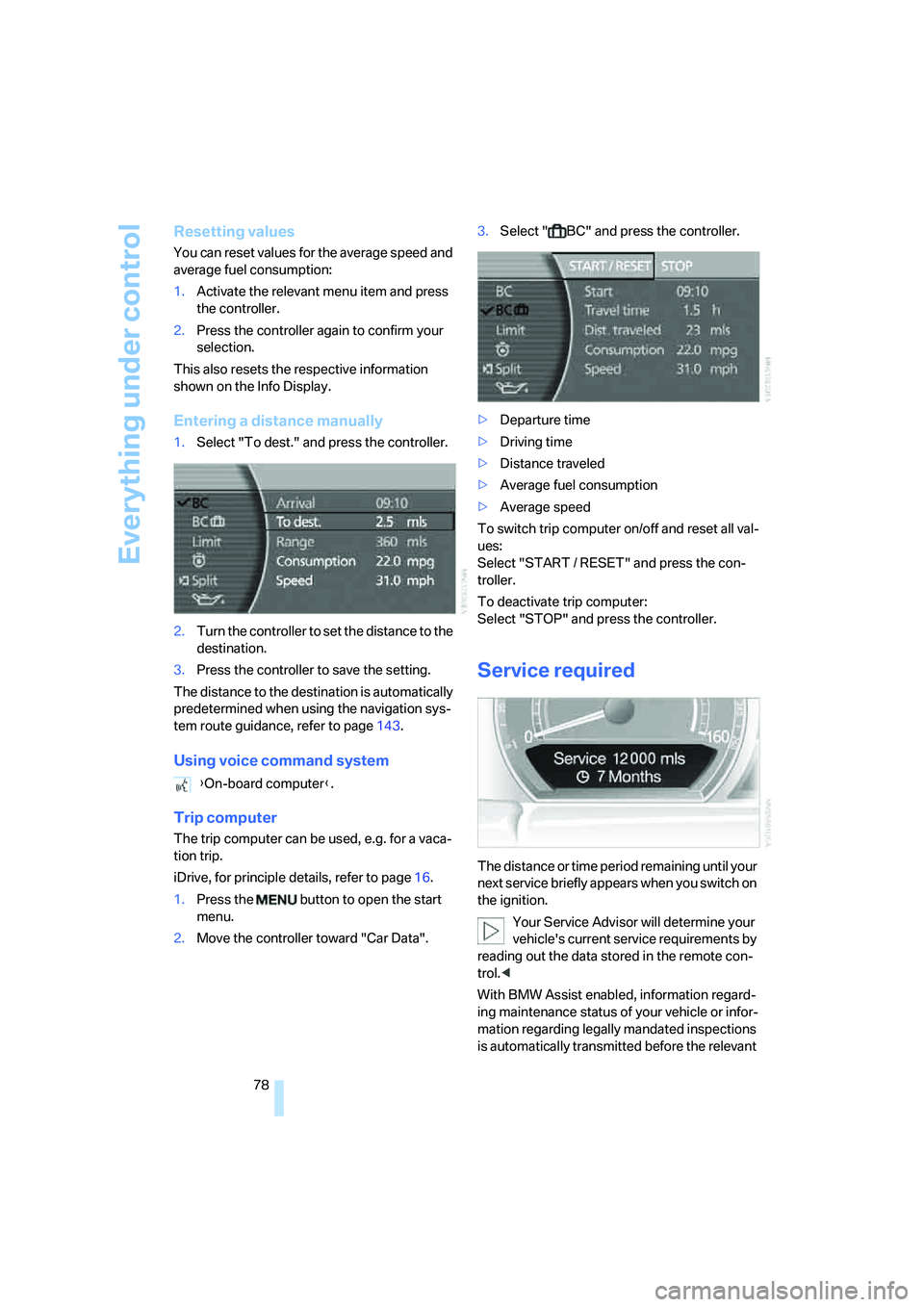
1.Select "To dest." and press the controller.
2.Turn the controller to set the distance to the
destination.
3.Press the controller to save the setting.
The distance to the destination is automatically
predetermined when using the navigation sys-
tem route guidance, refer to page143.
Using voice command system
Trip computer
The trip computer can be used, e.g. for a vaca-
tion trip.
iDrive, for principle details, refer to page16.
1.Press the button to open the start
menu.
2.Move the controller toward "Car Data".3.Select " BC" and press the controller.
>Departure time
>Driving time
>Distance traveled
>Average fuel consumption
>Average speed
To switch trip computer on/off and reset all val-
ues:
Select "START / RESET" and press the con-
troller.
To deactivate trip computer:
Select "STOP" and press the controller.
Service required
The distance or time period remaining until your
next service briefly appears when you switch on
the ignition.
Your Service Advisor will determine your
vehicle's current service requirements by
reading out the data stored in the remote con-
trol.<
With BMW Assist enabled, information regard-
ing maintenance status of your vehicle or infor-
mation regarding legally mandated inspections
is automatically transmitted before the relevant {On-board computer}.
Page 85 of 253
Controls
83Reference
At a glance
Driving tips
Communications
Navigation
Entertainment
Mobility
Limit on Info Display
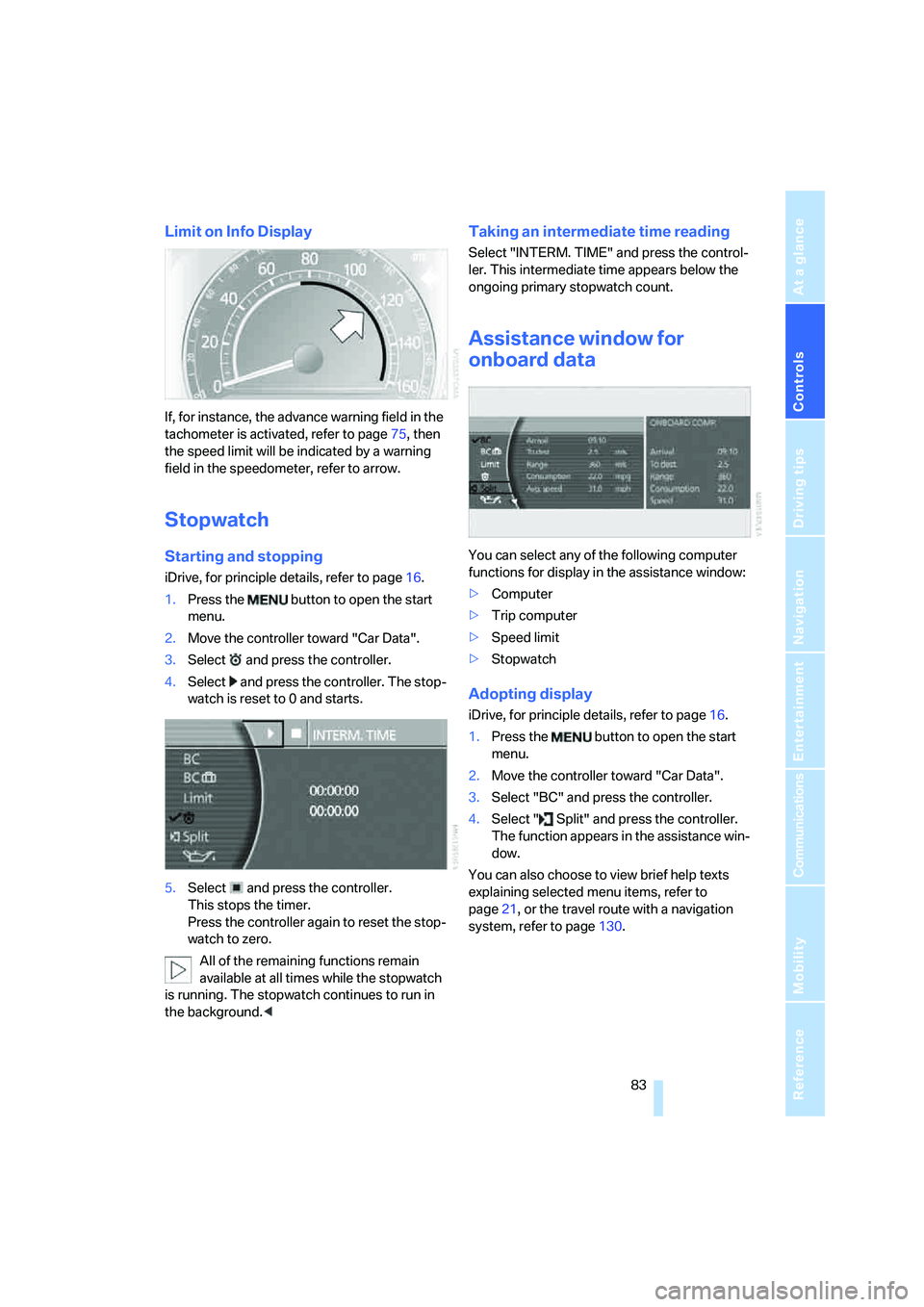
If, for instance, the advance warning field in the
tachometer is activated, refer to page75, then
the speed limit will be indicated by a warning
field in the speedometer, refer to arrow.
Stopwatch
Starting and stopping
iDrive, for principle details, refer to page16.
1.Press the button to open the start
menu.
2.Move the controller toward "Car Data".
3.Select and press the controller.
4.Select and press the controller. The stop-
watch is reset to 0 and starts.
5.Select and press the controller.
This stops the timer.
Press the controller again to reset the stop-
watch to zero.
All of the remaining functions remain
available at all times while the stopwatch
is running. The stopwatch continues to run in
the background.<
Taking an intermediate time reading
Select "INTERM. TIME" and press the control-
ler. This intermediate time appears below the
ongoing primary stopwatch count.
Assistance window for
onboard data
You can select any of the following computer
functions for display in the assistance window:
>Computer
>Trip computer
>Speed limit
>Stopwatch
Adopting display
iDrive, for principle details, refer to page16.
1.Press the button to open the start
menu.
2.Move the controller toward "Car Data".
3.Select "BC" and press the controller.
4.Select " Split" and press the controller.
The function appears in the assistance win-
dow.
You can also choose to view brief help texts
explaining selected menu items, refer to
page21, or the travel route with a navigation
system, refer to page130.
Page 246 of 253
Everything from A to Z
244 Service and Warranty
Information Booklet for
US models210
Service car, refer to Roadside
Assistance189,218
Service required78
Service requirement
display210
"Services", BMW Assist192
"Service Status", BMW
Assist190
"SET", setting speed limit82
"Set time 1", parked car
ventilation109
"Set time 2", parked car
ventilation109
Setting button, refer to
iDrive16
Setting language on Control
Display84
"Settings"
– activating/deactivating
Bluetooth link183
– logging on mobile phone in
vehicle182
Settings
– assistance window21
– BMW Night Vision98
– data and time84
– entertainment152
– Key Memory31
– language84
– units of measure84
Setting time, refer to
Preselecting activation
time109
Setting volume, speed-
dependent154
Shifting, for automatic
transmission with
Steptronic62
Shiftlock, refer to Selecting
transmission range62
Short commands of the voice
command system228
"Shortest route",
navigation141"Short info", programmable
buttons53
Shoulder support
adjustment45
Side airbags95
Side-mounted turn signals,
replacing bulbs213
Side window blind, refer to
Sun blinds112
Signal horn, refer to Horn11
Sitting safely43
– with airbags43
– with head restraint43
– with safety belts43
Ski bag117
Sliding/tilt sunroof, refer to
Glass sunroof, electric
41
Smokers' package, refer to
Ashtray115
Snap-in adapter181
Snow chains205
Socket
– for Onboard
Diagnostics211
– for remote control, refer to
Ignition lock57
Soft closure aid
– doors, refer to Automatic
soft closing35
– luggage compartment lid,
refer to Automatic soft
closing36
SOS, refer to Initiating an
emergency call218
Spare fuses217
Spare key30
– adapter30
Spare tire215
Spare wheel, refer to Spare
tire215
Special oils, refer to Approved
engine oils208
Speed
– average77
– limit82
Speed-dependent
volume154
Speed limit82Speedometer12
"Speed vol.", speed-
dependent volume
control154
"Split"
– assistance window for
onboard data83
– navigation, refer to Display in
assistance window130
Split screen view, refer to
Assistance window21
"Sport", EDC Electronic
Damper Control90
Sport program
– automatic transmission with
Steptronic63
– EDC Electronic Damper
Control90
Stability control, refer to
Driving stability control
systems87
Star button, refer to
Programming button
function52
"START", BMW Assist189
"START / RESET", trip
computer78
Start/Stop button57
Starting, refer to Starting
engine57
Starting difficulties
– jump starting219
– refer to Special starting
conditions58
Starting engine57
"State / Province",
navigation132
Stations
– refer to Radio156
– storing for radio158
"Status", BMW
Assist190,192
"Status: Resetting TPM...",
Tire Pressure Monitor93
"Status: Tire low!", Tire
Pressure Monitor93
"Status: TPM active", Tire
Pressure Monitor92
Page 247 of 253
Reference 245
At a glance
Controls
Driving tips
Communications
Navigation
Entertainment
Mobility
Status lines20
– in the assistance window21
Steering wheel
– adjustment52
– assistance getting in and
out52
– buttons on steering
wheel11
– heating52
– memory46
– programmable button52
– with multi-function
buttons11
Steptronic, refer to Automatic
transmission with
Steptronic63
"STOP", trip computer78
Stopwatch
– starting and stopping83
– taking an intermediate time
reading83
Storage, tires205
Storage
compartments114,115
– refer to Center armrest,
front113
– refer to Center armrest,
rear114
"STORE", radio159
"STORE DATE", deadlines for
state vehicle inspections80
Storing current position146
Storing desired speeds, refer
to Programmable cruise
control68
Storing destination by
voice141
Storing numbers, refer to
Phone book186
Storing sitting position, refer
to Seat, mirror and steering
wheel memory46
Storing vehicle, refer to Caring
for your vehicle brochure
Straps, refer to Loading124
"Street", navigation133
"SUBTITLE", DVD
changer173Summer tires, refer to Wheels
and tires198
Sun blinds112
Sunglasses compartment115
"SVS active", voice command
system24
Switches
– all around the steering
wheel10
– in the comfort area14
Switch for battery217
Switching cooling function on
and off manually107
Switching ignition on and
off57
Switching off engine
58
Switching off tilt alarm
sensor38
Switching on
– audio153
– CD changer165
– CD player163
– DVD changer171
– radio156
Symbols4
– indicator and warning
lamps13
T
Tachometer75
Tail lamps213
– replacing bulbs214
Tank capacity196
– also refer to Capacities227
Technical changes, refer to
For your own safety5
Technical data224
Telematics, refer to
BMW Assist188
Telephone
– accepting calls184
– refer to Telephone
overview178
Telephoning,
requirements184Temperature
– adjusting with automatic
climate control105
– changing units of
measure84
– outside temperature
warning75
– refer to Hot exhaust
system122
Temperature display
– interior temperature105
– outside temperature75
– setting units84
Temperature distribution,
seat heating49
Temperature of coolant, refer
to Coolant temperature76
Tempomat, refer to Active
cruise control69
Thawing windows, refer to
Defrosting windows and
removing condensation106
The right tires204
Thigh support adjustment,
refer to Seat adjustment44
Third brake lamp, refer to Tail
and brake lamps213
Three-point belt48
Through loading system117
Tightening torque for lug
bolts, refer to After
mounting216
Tilting down passenger-side
exterior mirror51
"Time", setting84
Time of arrival77
Timer, refer to Preselecting
switch-on times109
Tire inflation pressure198
– loss, refer to Indication of a
flat tire91
– loss, refer to Low tire
pressure message93
Tire Pressure Monitor91
– resetting system92
– system limits92
– warning light93
Tire Quality Grading202