2007 BMW 760LI SEDAN display
[x] Cancel search: displayPage 191 of 253
189
Entertainment
Reference
At a glance
Controls
Driving tips Communications
Navigation
Mobility
Response Center can determine its loca-
tion. To do so, the vehicle electronics must
be operational.
In addition, other services can be provided to
you, such as the information service or route
planning, traffic conditions and weather.
Press the SOS button in order to contact the
BMW Assist Response Center, see below.
You can also utilize BMW Assist services via the
Internet.
Special features of the services offered
The following special features apply to the ser-
vices:
>The services offered are country-specific.
>Voice contact is established or data are
transferred, depending on the equipment
and the country. In some countries, it is
possible to do both.
>The data transmitted can be vehicle data,
for example, your current position or the
data of the CBS Condition Based Service.
Using services
Contacting the BMW Assist Response
Center
All BMW Assist services, except for Tele-
Service, can be called up using the SOS button.
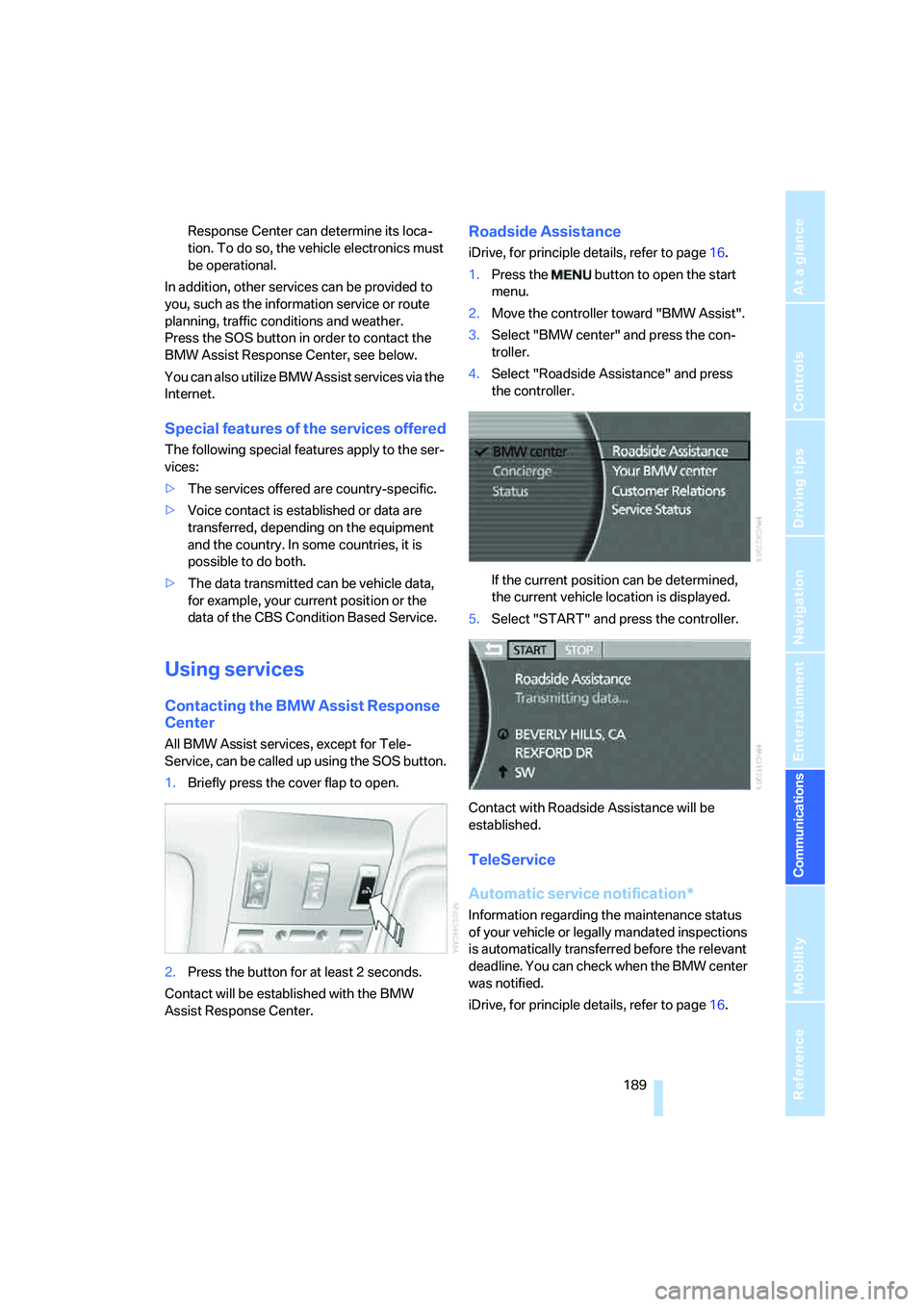
1.Briefly press the cover flap to open.
2.Press the button for at least 2 seconds.
Contact will be established with the BMW
Assist Response Center.
Roadside Assistance
iDrive, for principle details, refer to page16.
1.Press the button to open the start
menu.
2.Move the controller toward "BMW Assist".
3.Select "BMW center" and press the con-
troller.
4.Select "Roadside Assistance" and press
the controller.
If the current position can be determined,
the current vehicle location is displayed.
5.Select "START" and press the controller.
Contact with Roadside Assistance will be
established.
TeleService
Automatic service notification*
Information regarding the maintenance status
of your vehicle or legally mandated inspections
is automatically transferred before the relevant
deadline. You can check when the BMW center
was notified.
iDrive, for principle details, refer to page16.
Page 192 of 253
BMW Assist
190 1.Press the button to open the start
menu.
2.Move the controller toward "BMW Assist".
3.Select "BMW center" and press the con-
troller.
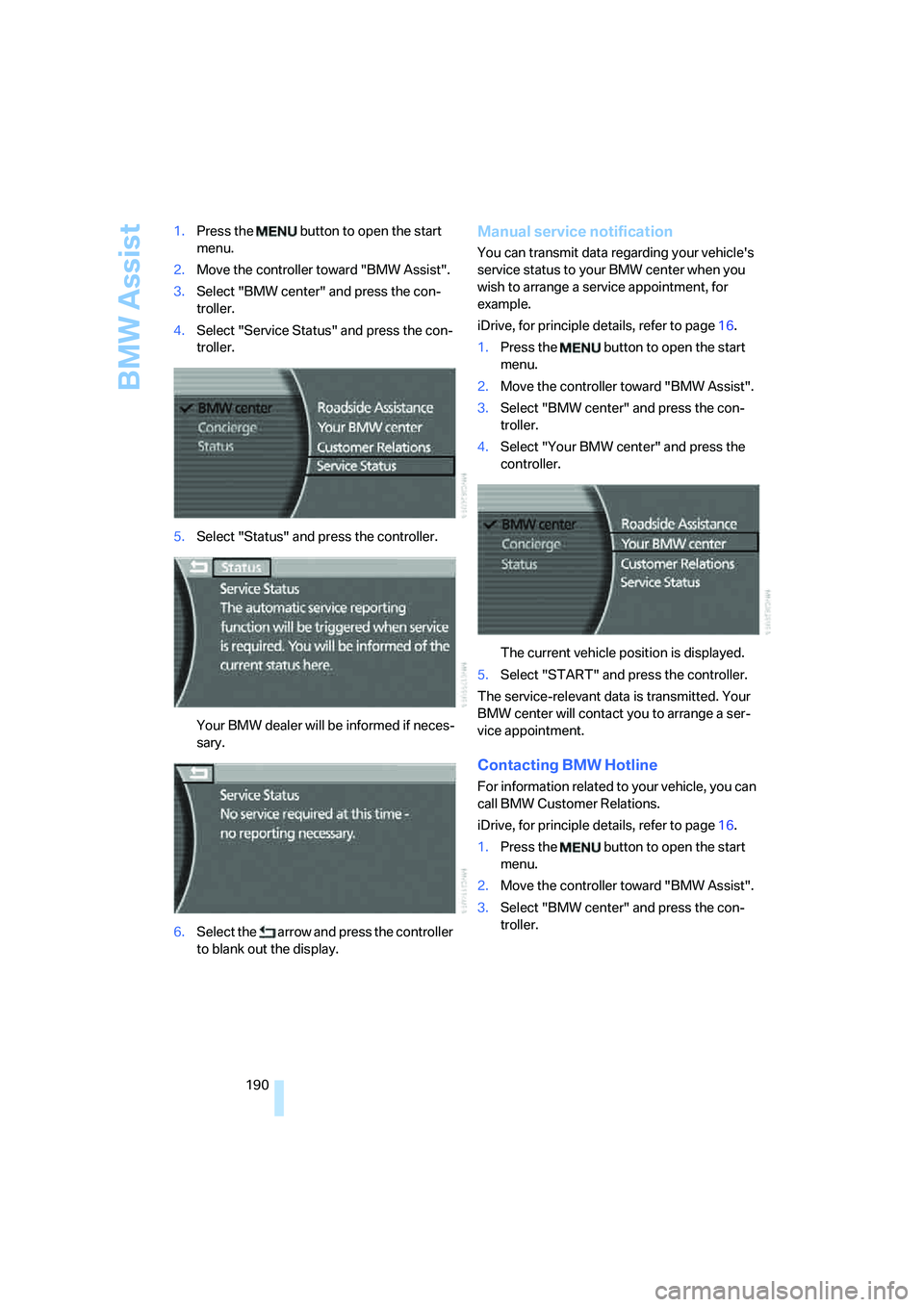
4.Select "Service Status" and press the con-
troller.
5.Select "Status" and press the controller.
Your BMW dealer will be informed if neces-
sary.
6.Select the arrow and press the controller
to blank out the display.
Manual service notification
You can transmit data regarding your vehicle's
service status to your BMW center when you
wish to arrange a service appointment, for
example.
iDrive, for principle details, refer to page16.
1.Press the button to open the start
menu.
2.Move the controller toward "BMW Assist".
3.Select "BMW center" and press the con-
troller.
4.Select "Your BMW center" and press the
controller.
The current vehicle position is displayed.
5.Select "START" and press the controller.
The service-relevant data is transmitted. Your
BMW center will contact you to arrange a ser-
vice appointment.
Contacting BMW Hotline
For information related to your vehicle, you can
call BMW Customer Relations.
iDrive, for principle details, refer to page16.
1.Press the button to open the start
menu.
2.Move the controller toward "BMW Assist".
3.Select "BMW center" and press the con-
troller.
Page 193 of 253
191
Entertainment
Reference
At a glance
Controls
Driving tips Communications
Navigation
Mobility
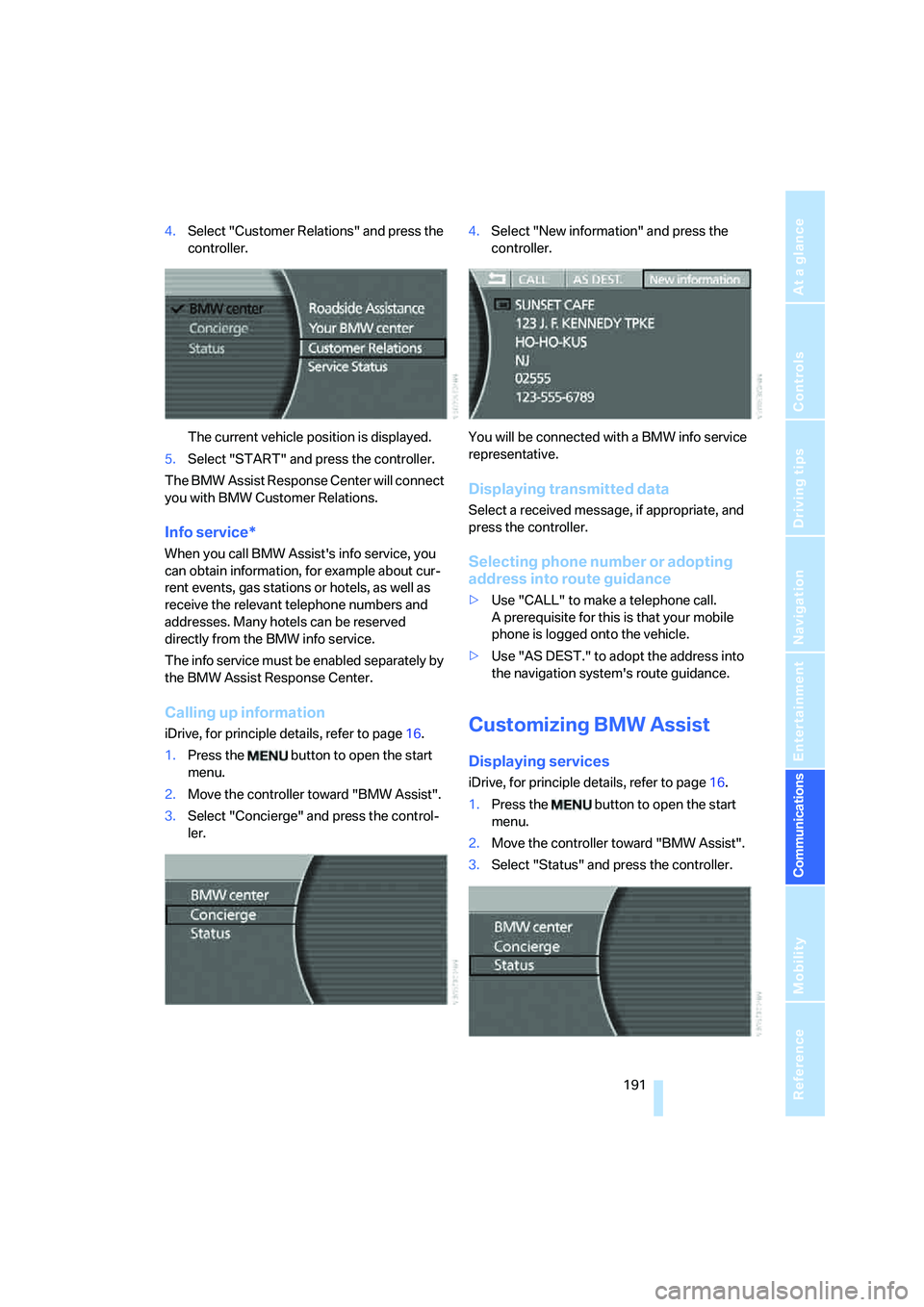
4.Select "Customer Relations" and press the
controller.
The current vehicle position is displayed.
5.Select "START" and press the controller.
The BMW Assist Response Center will connect
you with BMW Customer Relations.
Info service*
When you call BMW Assist's info service, you
can obtain information, for example about cur-
rent events, gas stations or hotels, as well as
receive the relevant telephone numbers and
addresses. Many hotels can be reserved
directly from the BMW info service.
The info service must be enabled separately by
the BMW Assist Response Center.
Calling up information
iDrive, for principle details, refer to page16.
1.Press the button to open the start
menu.
2.Move the controller toward "BMW Assist".
3.Select "Concierge" and press the control-
ler.4.Select "New information" and press the
controller.
You will be connected with a BMW info service
representative.
Displaying transmitted data
Select a received message, if appropriate, and
press the controller.
Selecting phone number or adopting
address into route guidance
>Use "CALL" to make a telephone call.
A prerequisite for this is that your mobile
phone is logged onto the vehicle.
>Use "AS DEST." to adopt the address into
the navigation system's route guidance.
Customizing BMW Assist
Displaying services
iDrive, for principle details, refer to page16.
1.Press the button to open the start
menu.
2.Move the controller toward "BMW Assist".
3.Select "Status" and press the controller.
Page 195 of 253
193
Entertainment
Reference
At a glance
Controls
Driving tips Communications
Navigation
Mobility
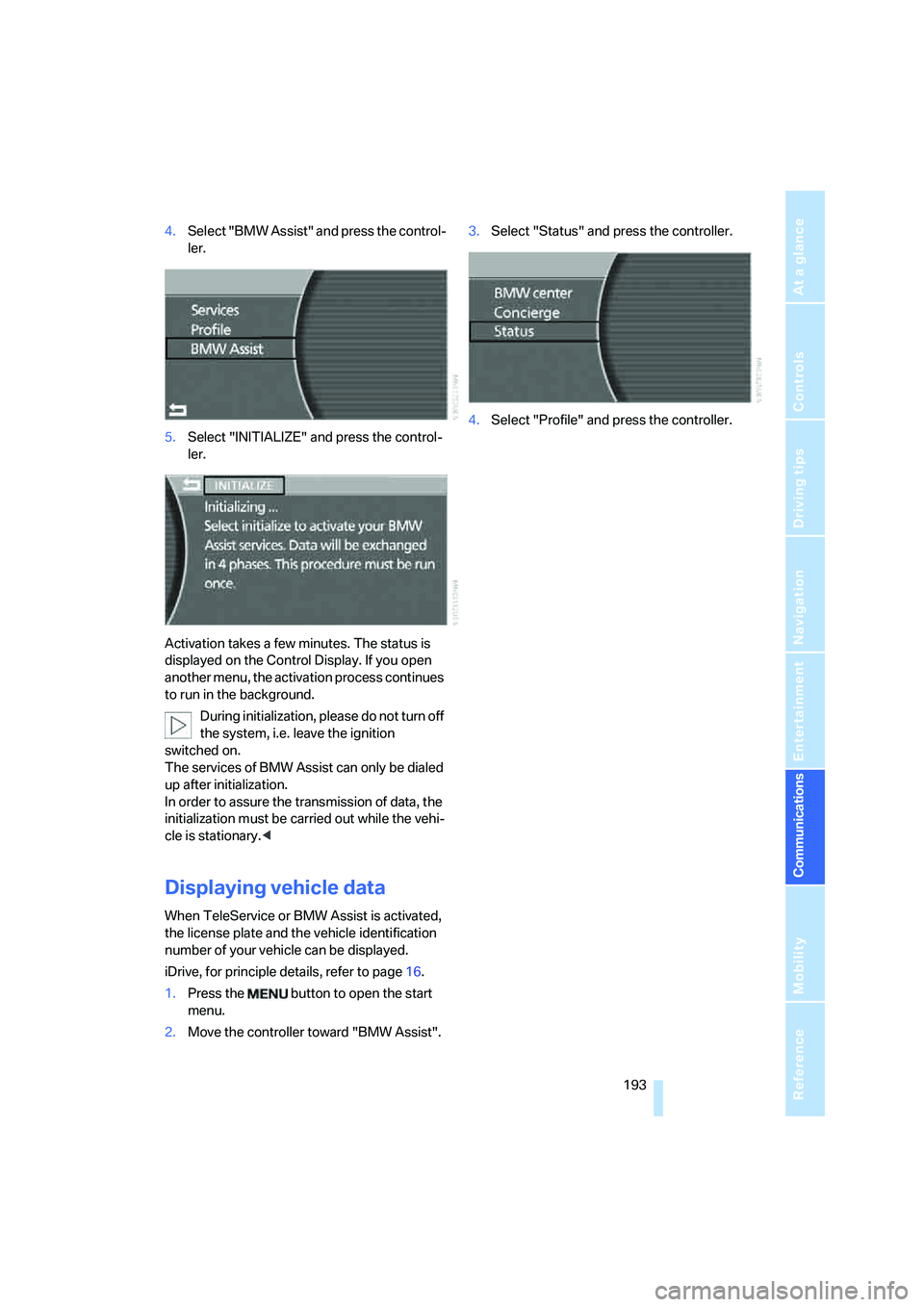
4.Select "BMW Assist" and press the control-
ler.
5.Select "INITIALIZE" and press the control-
ler.
Activation takes a few minutes. The status is
displayed on the Control Display. If you open
another menu, the activation process continues
to run in the background.
During initialization, please do not turn off
the system, i.e. leave the ignition
switched on.
The services of BMW Assist can only be dialed
up after initialization.
In order to assure the transmission of data, the
initialization must be carried out while the vehi-
cle is stationary.<
Displaying vehicle data
When TeleService or BMW Assist is activated,
the license plate and the vehicle identification
number of your vehicle can be displayed.
iDrive, for principle details, refer to page16.
1.Press the button to open the start
menu.
2.Move the controller toward "BMW Assist".3.Select "Status" and press the controller.
4.Select "Profile" and press the controller.
Page 198 of 253
Refueling
196
Refueling
Fuel filler door
Always switch off the engine before refu-
eling; otherwise, no fuel can be dispensed
into the tank and a message is displayed.<
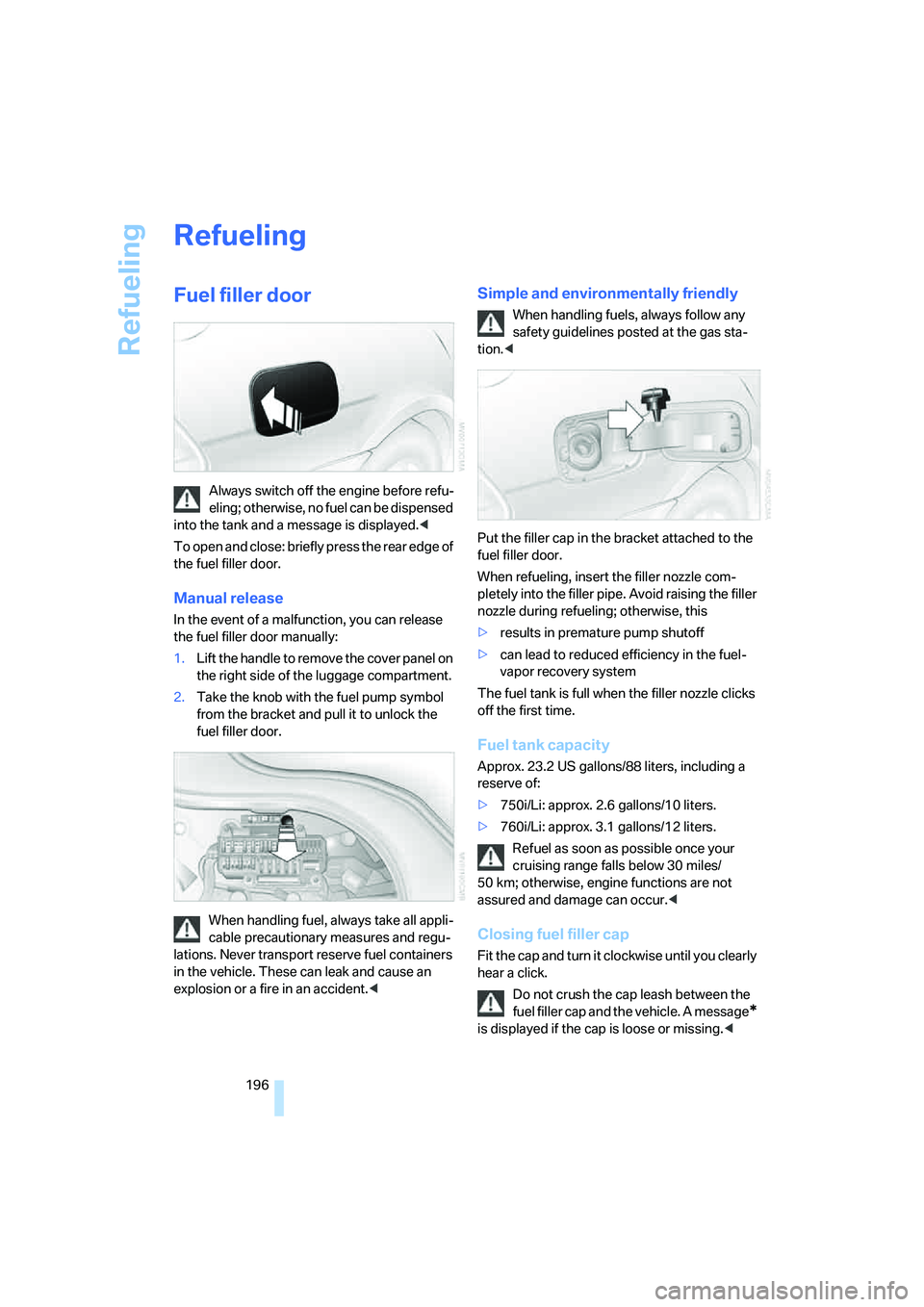
To open and close: briefly press the rear edge of
the fuel filler door.
Manual release
In the event of a malfunction, you can release
the fuel filler door manually:
1.Lift the handle to remove the cover panel on
the right side of the luggage compartment.
2.Take the knob with the fuel pump symbol
from the bracket and pull it to unlock the
fuel filler door.
When handling fuel, always take all appli-
cable precautionary measures and regu-
lations. Never transport reserve fuel containers
in the vehicle. These can leak and cause an
explosion or a fire in an accident.<
Simple and environmentally friendly
When handling fuels, always follow any
safety guidelines posted at the gas sta-
tion.<
Put the filler cap in the bracket attached to the
fuel filler door.
When refueling, insert the filler nozzle com-
pletely into the filler pipe. Avoid raising the filler
nozzle during refueling; otherwise, this
>results in premature pump shutoff
>can lead to reduced efficiency in the fuel-
vapor recovery system
The fuel tank is full when the filler nozzle clicks
off the first time.
Fuel tank capacity
Approx. 23.2 US gallons/88 liters, including a
reserve of:
>750i/Li: approx. 2.6 gallons/10 liters.
>760i/Li: approx. 3.1 gallons/12 liters.
Refuel as soon as possible once your
cruising range falls below 30 miles/
50 km; otherwise, engine functions are not
assured and damage can occur.<
Closing fuel filler cap
Fit the cap and turn it clockwise until you clearly
hear a click.
Do not crush the cap leash between the
fuel filler cap and the vehicle. A message
*
is displayed if the cap is loose or missing.<
Page 205 of 253
Mobility
203Reference
At a glance
Controls
Driving tips
Communications
Navigation
Entertainment
Temperature
The temperature grades are A, B, and C, A
being highest, and represent the tire's resis-
tance to the generation of heat and its ability to
dissipate heat when tested under controlled
conditions on a specified indoor laboratory test
wheel.
Sustained high temperature can cause the
material of the tire to degenerate and reduce
tire life, and excessive temperature can lead to
sudden tire failure. The grade C corresponds to
a level of performance which all passenger car
tires must meet under the Federal Motor Vehi-
cle Safety Standard No. 109. Grades B and A
represent higher levels of performance on the
laboratory test wheel than the minimum
required by law.
The temperature grade for this tire is
established for a tire that is properly
inflated and not overloaded. Excessive speed,
underinflation, or excessive loading, either sep-
arately or in combination, can cause heat
buildup and possible tire failure.<
RSC Run-flat tires
You will recognize run-flat tires by a circular
symbol containing the letters RSC on the side
of the tire, refer to page204.
M+S
Winter and all-season tires.
These have better winter properties than sum-
mer tires.
XL
Indicates specially reinforced tires.
Tire condition
Inspect your tires frequently for tread depth,
signs of damage and for foreign objects lodged
in the tread. Check the tread depth.
Minimum tread depth
The tread depth should not fall below 0.12 in/
3 mm, although, for example, European legisla-
tion only specifies a minimum tread depth of
0.063 in/1.6 mm.
At tread depths below 0.12 in/3 mm, there is an
increased risk of high-speed hydroplaning,
even when only small amounts of water are
present on the road surface.
Winter tires display a noticeable loss in their
ability to cope with cold-weather driving condi-
tions once the tread wears to below 0.16 in/
4 mm. To ensure continued safety, you should
always have such tires replaced.
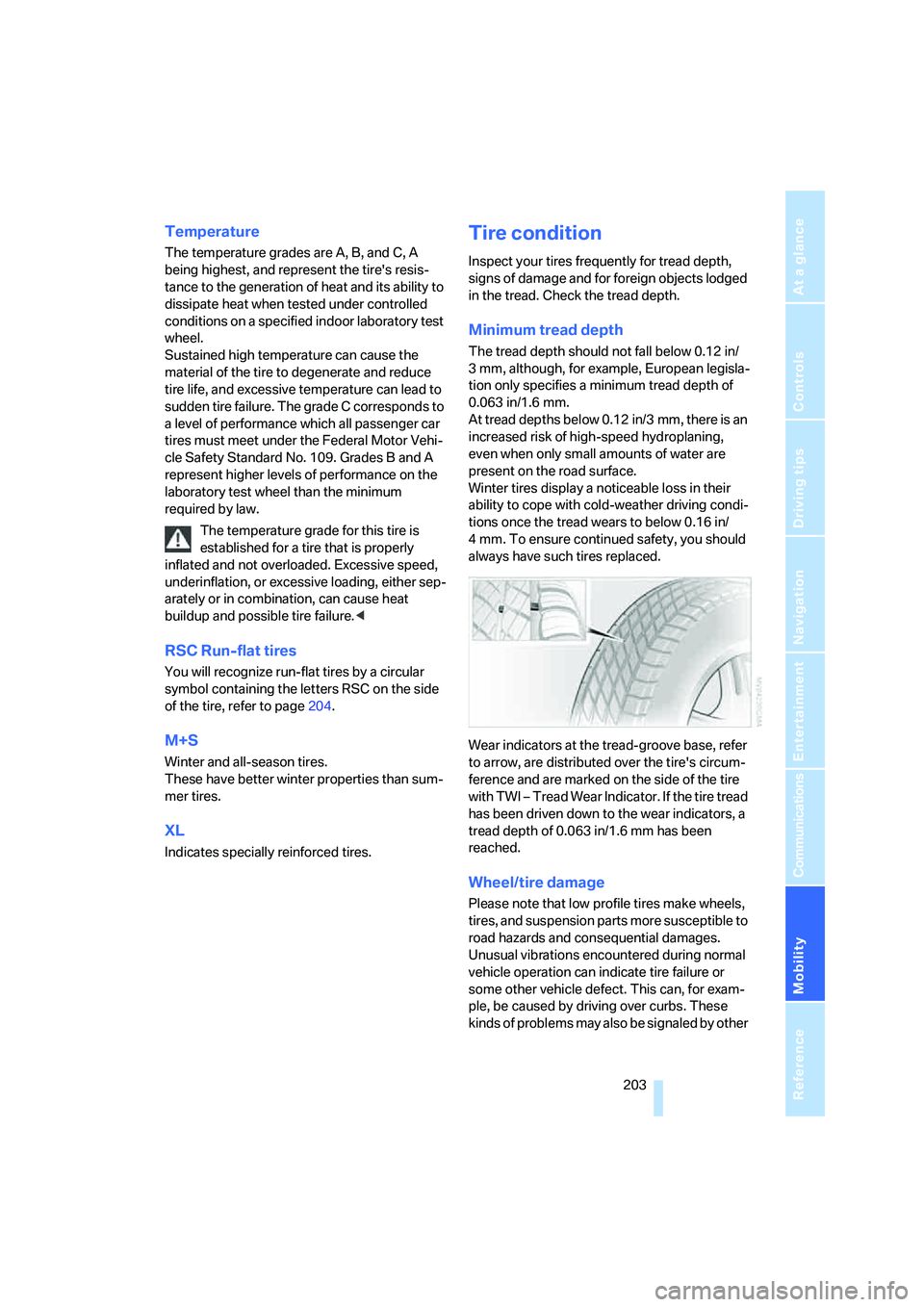
Wear indicators at the tread-groove base, refer
to arrow, are distributed over the tire's circum-
ference and are marked on the side of the tire
with TWI – Tread Wear Indicator. If the tire tread
has been driven down to the wear indicators, a
tread depth of 0.063 in/1.6 mm has been
reached.
Wheel/tire damage
Please note that low profile tires make wheels,
tires, and suspension parts more susceptible to
road hazards and consequential damages.
Unusual vibrations encountered during normal
vehicle operation can indicate tire failure or
some other vehicle defect. This can, for exam-
ple, be caused by driving over curbs. These
kinds of problems may also be signaled by other
Page 209 of 253
Mobility
207Reference
At a glance
Controls
Driving tips
Communications
Navigation
Entertainment
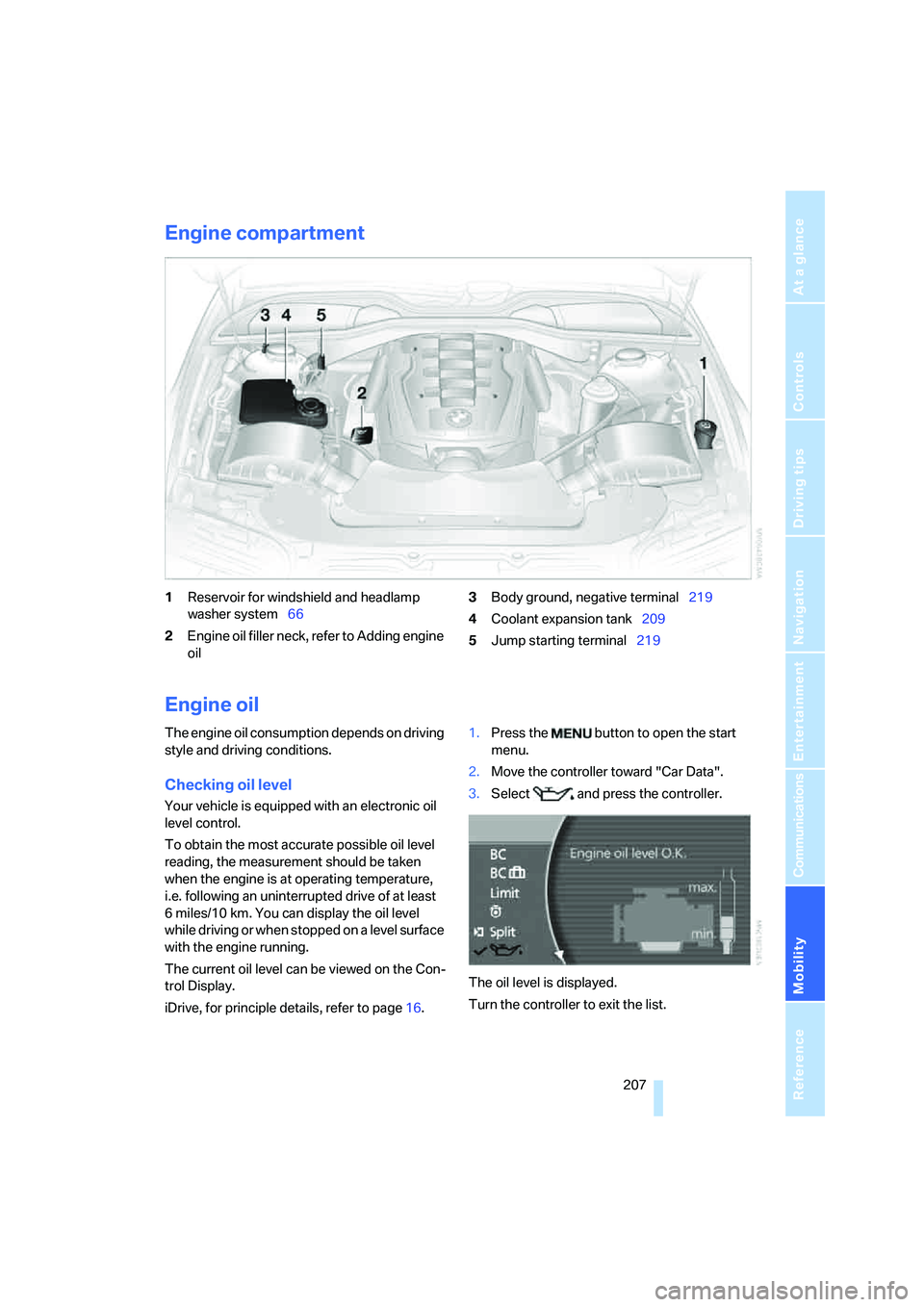
Engine compartment
1Reservoir for windshield and headlamp
washer system66
2Engine oil filler neck, refer to Adding engine
oil3Body ground, negative terminal219
4Coolant expansion tank209
5Jump starting terminal219
Engine oil
The engine oil consumption depends on driving
style and driving conditions.
Checking oil level
Your vehicle is equipped with an electronic oil
level control.
To obtain the most accurate possible oil level
reading, the measurement should be taken
when the engine is at operating temperature,
i.e. following an uninterrupted drive of at least
6 miles/10 km. You can display the oil level
while driving or when stopped on a level surface
with the engine running.
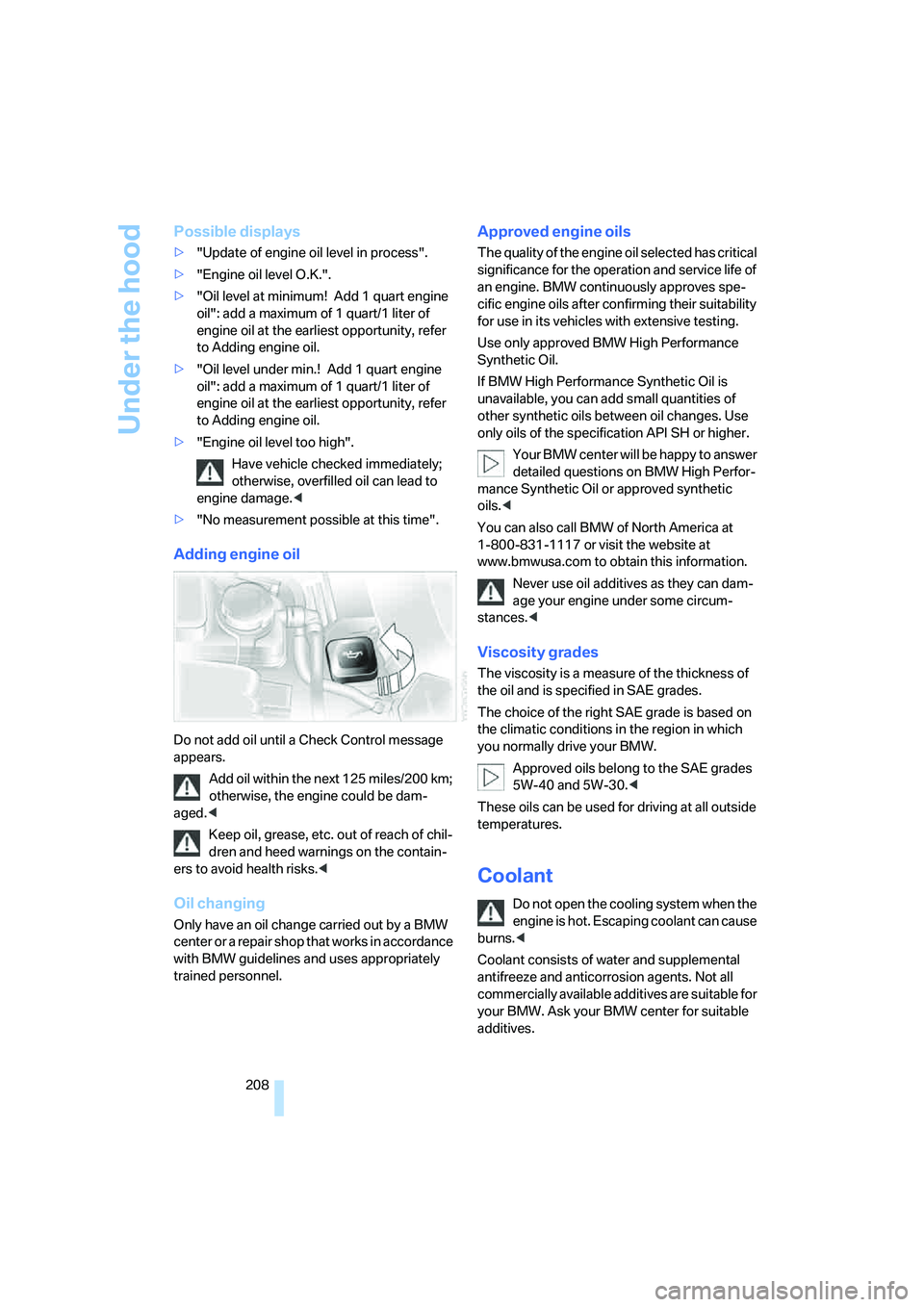
The current oil level can be viewed on the Con-
trol Display.
iDrive, for principle details, refer to page16.1.Press the button to open the start
menu.
2.Move the controller toward "Car Data".
3.Select and press the controller.
The oil level is displayed.
Turn the controller to exit the list.
Page 210 of 253
Under the hood
208
Possible displays
>"Update of engine oil level in process".
>"Engine oil level O.K.".
>"Oil level at minimum! Add 1 quart engine
oil": add a maximum of 1 quart/1 liter of
engine oil at the earliest opportunity, refer
to Adding engine oil.
>"Oil level under min.! Add 1 quart engine
oil": add a maximum of 1 quart/1 liter of
engine oil at the earliest opportunity, refer
to Adding engine oil.
>"Engine oil level too high".
Have vehicle checked immediately;
otherwise, overfilled oil can lead to
engine damage.<
>"No measurement possible at this time".
Adding engine oil
Do not add oil until a Check Control message
appears.
Add oil within the next 125 miles/200 km;
otherwise, the engine could be dam-
aged.<
Keep oil, grease, etc. out of reach of chil-
dren and heed warnings on the contain-
ers to avoid health risks.<
Oil changing
Only have an oil change carried out by a BMW
center or a repair shop that works in accordance
with BMW guidelines and uses appropriately
trained personnel.
Approved engine oils
The quality of the engine oil selected has critical
significance for the operation and service life of
an engine. BMW continuously approves spe-
cific engine oils after confirming their suitability
for use in its vehicles with extensive testing.
Use only approved BMW High Performance
Synthetic Oil.
If BMW High Performance Synthetic Oil is
unavailable, you can add small quantities of
other synthetic oils between oil changes. Use
only oils of the specification API SH or higher.
Your BMW center will be happy to answer
detailed questions on BMW High Perfor-
mance Synthetic Oil or approved synthetic
oils.<
You can also call BMW of North America at
1-800-831-1117 or visit the website at
www.bmwusa.com to obtain this information.
Never use oil additives as they can dam-
age your engine under some circum-
stances.<
Viscosity grades
The viscosity is a measure of the thickness of
the oil and is specified in SAE grades.
The choice of the right SAE grade is based on
the climatic conditions in the region in which
you normally drive your BMW.
Approved oils belong to the SAE grades
5W-40 and 5W-30.<
These oils can be used for driving at all outside
temperatures.
Coolant
Do not open the cooling system when the
engine is hot. Escaping coolant can cause
burns.<
Coolant consists of water and supplemental
antifreeze and anticorrosion agents. Not all
commercially available additives are suitable for
your BMW. Ask your BMW center for suitable
additives.