2007 AUDI R8 instrument cluster
[x] Cancel search: instrument clusterPage 22 of 210

Driver information system 20Driver information systemIntroductionThe driver information system in the instrument cluster
shows you the status of various on-board systems at a
glance.Standard display
The following information is shown in the driver information system
display when the ignition is on:•
CD* in the CD player or current radio* station
•
Outside temperature*: At temperatures below +5°C a snowflake
symbol appears next to the temperature display ⇒.
•
Door catches, engine lid and front lid warning: The warning lamp
comes on if the door, engine lid or front lid is open.
Further functions
Press the button ⇒fig. 8 one or more times to call up the
following functions in the driver information system display:
The speed warning function is also displayed in the driver informa-
tion system. For information on how to select this setting please
refer to ⇒page 31.
Auto-check control
The system runs a check on certain components and functions
when the ignition is switched on and while the vehicle is moving. It
gives an audible warning if a fault should occur or if servicing is
required, and a red or yellow warning symbol (in some cases with a
corresponding driver message) appears in the dashboard display
⇒page 33.
WARNING
Do not rely on the outside temperature display as an ice warning.
Please bear in mind that there may be ice on the roads even at
outside temperatures of +5 °C: beware of ice patches.
Note
•
On vehicles with R tronic, the displays only appear after the
driver has engaged a gear.
Fig. 7 Display:
Standard displayFig. 8 Windscreen
wiper lever: Reset
button and rocker
switch
On-board computer
⇒page 22
Digital speedometer*Menus
⇒page 24
Lap timer
⇒page 27
Reset
document_0900452a816e6cc9.book Seite 20 Mittwoch, 21. Februar 2007 1:32 13
Page 29 of 210
Driver information system27
Controls
Safety
Driving tips
General maintenance
Self-help
Technical data
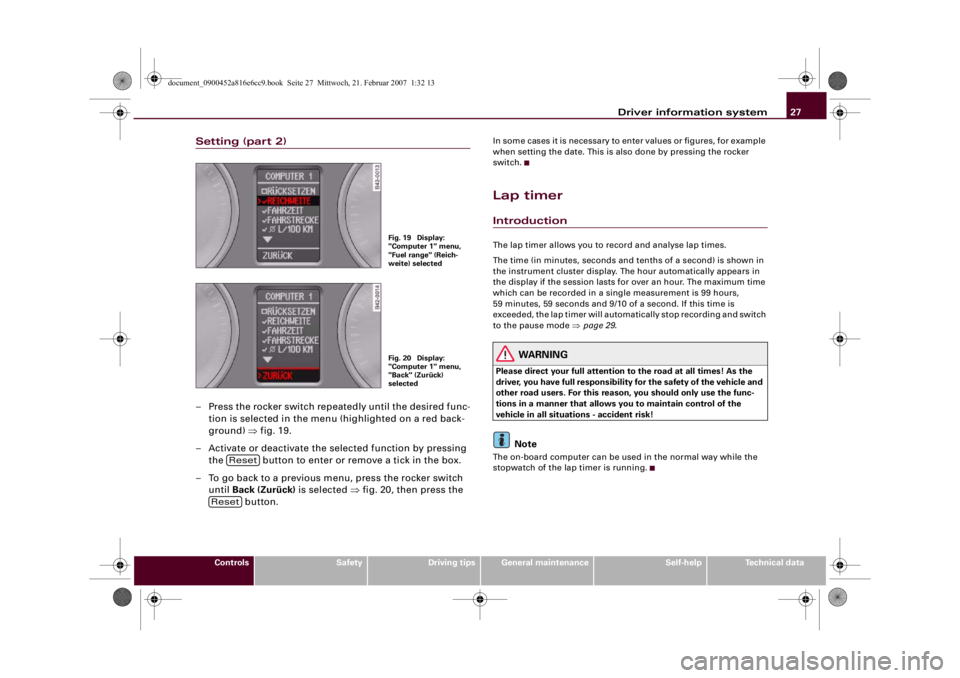
Setting (part 2)– Press the rocker switch repeatedly until the desired func-
tion is selected in the menu (highlighted on a red back-
ground) ⇒fig. 19.
– Activate or deactivate the selected function by pressing
the button to enter or remove a tick in the box.
– To go back to a previous menu, press the rocker switch
until Back (Zurück) is selected ⇒fig. 20, then press the
button.
In some cases it is necessary to enter values or figures, for example
when setting the date. This is also done by pressing the rocker
switch.Lap timerIntroductionThe lap timer allows you to record and analyse lap times.
The time (in minutes, seconds and tenths of a second) is shown in
the instrument cluster display. The hour automatically appears in
the display if the session lasts for over an hour. The maximum time
which can be recorded in a single measurement is 99 hours,
59 minutes, 59 seconds and 9/10 of a second. If this time is
exceeded, the lap timer will automatically stop recording and switch
to the pause mode ⇒page 29.
WARNING
Please direct your full attention to the road at all times! As the
driver, you have full responsibility for the safety of the vehicle and
other road users. For this reason, you should only use the func-
tions in a manner that allows you to maintain control of the
vehicle in all situations - accident risk!
Note
The on-board computer can be used in the normal way while the
stopwatch of the lap timer is running.
Fig. 19 Display:
"Computer 1" menu,
"Fuel range" (Reich-
weite) selectedFig. 20 Display:
"Computer 1" menu,
"Back" (Zurück)
selected
Reset
Reset
document_0900452a816e6cc9.book Seite 27 Mittwoch, 21. Februar 2007 1:32 13
Page 34 of 210

Driver information system 32
NotePlease bear in mind that, even with the speed warning function, it is
still important to keep a check on the car's speed with the speedom-
eter and to observe the statutory speed limits.Applies to vehicles: with speed warning functionSetting speed limit warning 1
Speed limit warning 1 is controlled via the adjuster/test
button.Selecting speed limit
– Drive at the desired maximum speed.
– Press the adjuster/test button ⇒fig. 29 and hold it down
until the symbol ⇒page 31, fig. 28 appears.
Clearing speed limit
– Drive the vehicle at a minimum of 5 km/h.
– Press the adjuster/test button for at least two seconds.The speed warning symbol
lights up briefly in the display when
the button is released to confirm that the selected speed has been
stored. The speed limit that has been set remains stored until another speed is set with a brief push of the button, or until the
memory is cleared with a long push of the button.
Applies to vehicles: with speed warning functionSetting speed limit warning 2
Speed limit warning 2 is set using the switches on the
windscreen wiper lever.Selecting speed limit
– Switch off the ignition.
– Briefly press the adjuster/test button in the instrument
cluster ⇒fig. 29. The mileage recorder display and the
digital clock will light up.
– Press the adjuster/test button for at least 2 seconds. The
display will show the speed limit which is currently set or,
if no speed limit has been set, the crossed out warning
symbol for speed limit 2.
– To change the speed limit, press the top or bottom of the
function selector switch on the windscreen wiper lever
⇒fig. 30. The speed limit displayed will then increase
or decrease in increments of 10 km/h.
Fig. 29 Detail of the
instrument cluster:
Adjuster/test button
Fig. 30 Controls
AA
document_0900452a816e6cc9.book Seite 32 Mittwoch, 21. Februar 2007 1:32 13
Page 35 of 210

Driver information system33
Controls
Safety
Driving tips
General maintenance
Self-help
Technical data
Clearing speed limit
– Switch off the ignition.
– Briefly press the adjuster/test button in the instrument
cluster ⇒page 32, fig. 29. The mileage recorder display
and the digital clock will light up.
– Press the adjuster/test button for at least 2 seconds. The
display will show the speed limit which is currently set.
– Now press and hold the button on the wind-
screen wiper lever ⇒page 32, fig. 30 until the
crossed-out warning symbol for speed limit 2 appears on
the display.The display lighting for the mileage recorder and digital clock goes
off again a few seconds after the button is released.
Note
This speed limit function can also be operated via the on-board
computer ⇒page 25, “Selecting options from the menu”.Notes and symbolsRed symbols
A red symbol warns of a serious malfunction.–Stop the vehicle.
– Switch off the engine.
– Check the function displayed. Obtain professional assist-
ance if necessary.
A red symbol is accompanied by three warning chimes. The symbol
will keep flashing until the fault is corrected. If several faults are
detected at the same time, the symbols are displayed one after the
other for about 2 seconds at a time.
Note
•
You can press the left adjuster button to display a message that
gives you more information.
•
On vehicles equipped with a navigation system the warning
symbol is displayed in the top section of the display while the route
guidance is active.
Yellow symbols
A yellow symbol indicates a malfunction or other item
requiring attention.
Reset
AB
BRAKE
Fault in the brake system
⇒page 35
COOLANT
Coolant level too low / coolant
temperature too high
⇒page 35
OIL
PRESS.
Engine oil pressure too low
⇒page 36
Tyre pressure monitoring sys-
tem*
⇒page 36
Fuel level low
⇒page 36
Check engine oil level
⇒page 37
Engine oil sensor defective
⇒page 37
document_0900452a816e6cc9.book Seite 33 Mittwoch, 21. Februar 2007 1:32 13
Page 36 of 210

Driver information system 34Yellow symbols are accompanied by one warning chime. The func-
tion indicated should be checked as soon as possible. If several
faults are detected at the same time, the symbols are displayed one
after the other for about 2 seconds at a time.
Driver messages
Additional messages to assist the driver are displayed in
conjunction with the warning lamps and symbols in the
instrument cluster.The display will show the appropriate message if the system detects
a bulb failure ⇒page 37, if the brake pads are worn or you have not
yet selected a gear on a vehicle with R tronic.
The driver can also call up messages in the display for additional
information if a red warning symbol starts flashing.
Calling up driver messages
For example, in the event of an oil pressure malfunction the oil pres-
sure symbol
will appear in the display. If you now press the
adjuster/test button ⇒fig. 31 for at least one second, the following
message will appear in the display:
SWITCH OFF ENGINE AND CHECK OIL LEVEL
The message will disappear from the display after about 5 seconds.
If required, the message can be called up again by briefly pressing
the adjuster/test button.
Brake pads worn
⇒page 37
Speed warning 1*
⇒page 37
Speed warning 2*
⇒page 37
Dynamic headlight range con-
trol faulty
⇒page 37
Washer fluid level low
⇒page 37
Battery voltage too high or too
low
⇒page 37
Bulb monitor
⇒page 37
or BRAKE
LIGHT
Brake light failure
⇒page 38
Light sensor/rain sensor (auto-
matic headlights) defective
⇒page 38
and
Selector lever defective*
No R gear*
⇒page 38
and
Clutch overheating*
⇒page 38
Fig. 31 Detail of the
instrument cluster:
Adjuster/test button
document_0900452a816e6cc9.book Seite 34 Mittwoch, 21. Februar 2007 1:32 13
Page 39 of 210

Driver information system37
Controls
Safety
Driving tips
General maintenance
Self-help
Technical data
Check engine oil level
Please check oil level
If the symbol lights up, add 1 litre of oil at the next opportunity
⇒page 158.
Engine oil sensor defective
If the
symbol lights up, take the vehicle to a qualified workshop
and have the oil level sensor checked.
Front brake pads worn
If the
symbol lights up, have the front brake pads (and, for
safety's sake the rear pads as well) inspected by a qualified
workshop.
Speed warning 1
If the
symbol lights up, this means you are exceeding the speed
that has been pre-set with the speed warning function. You should
reduce your speed accordingly ⇒page 31.
Speed warning 2
If the
symbol lights up, this means you are exceeding the speed
that has been pre-set for speed warning 2. You should reduce your
speed accordingly ⇒page 31.
Headlight range control defective
This symbol
indicates a malfunction in the dynamic headlight
range control. Take the vehicle to a qualified workshop to have the
dynamic headlight range control function repaired.
Washer fluid level low
If the
symbol lights up, top up the fluid for the windscreen
washer and headlight washer system ⇒page 164.
Battery voltage too high or too low
If the
symbol lights up, take the vehicle to a qualified workshop
and have the following items checked:
•
Poly-V belt
•
Battery condition
It is also advisable to check whether the alternator warning lamp
has come on ⇒page 18.
Bulb monitor
The bulb monitor checks whether the lights on the vehicle
are working.If a defective bulb is detected, or if one of the lights has failed for
any reason, the bulb monitor symbol
will appear in the display
together with an additional message (which goes out after
5 seconds). For instance, if the rear left turn signal is not working,
the display in the instrument cluster will show the following
message:
REAR LEFT TURN SIGNAL
document_0900452a816e6cc9.book Seite 37 Mittwoch, 21. Februar 2007 1:32 13
Page 57 of 210

Lights and vision55
Controls
Safety
Driving tips
General maintenance
Self-help
Technical data Coming home function
When the system is activated and it is dark, the coming home func-
tion will illuminate the vehicle and its surroundings by switching on
the dipped headlights, rear lights, engine compartment lighting*
and number plate lights when the driver's door is opened.
The dipped headlights will stay on for about four minutes as long as
one of the doors or the luggage lid is open.
The dipped headlights stay on for about 30 seconds to light up the
area in front of the car after all the doors and the luggage lid have
been closed.
If required, you can set the time interval to between 0 and 60
seconds in the driver information system (Lights menu) ⇒page 24.
Leaving home function
The dipped headlights and the engine compartment lighting* are
switched on when the vehicle is unlocked with the
button on the
remote control key if the leaving home function is activated in the
menu display ⇒page 24.
The dipped headlights and the engine compartment lighting*
switch off when the driver's door is opened. If the driver's door is not
opened, the dipped headlights and the engine compartment
lighting* will be switched off when the car automatically locks again
⇒page 41.
Note
•
If you always wish to use the coming home / leaving home func-
tion, you can leave it switched on permanently. As the system is
controlled via a light sensor, it will only work in dark conditions.
•
Permanent use of the coming home / leaving home function, in
particular on short journeys, will increase the load on the battery. To
make sure the battery is always sufficiently charged, occasionally
drive longer distances.
•
Observe all relevant statutory requirements when using the
lighting systems described here.
Instrument lighting
The brightness of the instrument lighting, displays and
centre console lighting can be varied as required.The basic level of brightness for the instrument lighting is
adjusted using the left-hand thumbwheel
⇒fig. 49.
The lighting of the needles in the instrument dials is regulated by a
photo-transistor integrated in the instrument cluster. When the
vehicle's lights are switched on, the illumination of the centre
console and instruments (needles and dials) is automatically
adjusted according to the prevailing light conditions. The driver can
also vary the brightness of the illumination manually if required:
With the ignition switched on
When the ignition is on, the basic level of brightness of the needles
in the instrument cluster can be adjusted by turning the thum-
bwheel.
With the vehicle's lights switched on:
When the vehicle's lights are switched on, the brightness of the
instrument lighting, displays and centre console lighting can be
varied by turning the thumbwheel.
Fig. 49 Instrument
lighting
document_0900452a816e6cc9.book Seite 55 Mittwoch, 21. Februar 2007 1:32 13
Page 59 of 210

Lights and vision57
Controls
Safety
Driving tips
General maintenance
Self-help
Technical data
Headlight flasher
– Pull the lever towards the steering wheel to operate the
flasher.
Parking lights
– Switch off the ignition.
– Move the lever up or down to turn on the right or left-
hand parking lights respectively.Notes on these functions•
The turn signals only work when the ignition is switched on. The
corresponding indicator lamp
or
flashes in the instrument
cluster ⇒page 15.
•
The turn signals are cancelled automatically when the steering
wheel is returned to the straight-ahead position.
•
The main beam headlights can only be switched on if the dipped
beam headlights are already on. The main beam headlight indicator
lamp then comes on in the instrument cluster.
•
The headlight flasher comes on for as long as you pull the lever –
even if no other lights are switched on. The main beam headlight
indicator lamp
then comes on in the instrument cluster.
•
When the parking lights are switched on, the headlight and the
rear light on one side of the car light up with reduced intensity. The
parking lights will only work with the ignition off. A warning buzzer
will sound for as long as the driver's door is open.Caution
Do not use the main beam headlights or the headlight flasher if this
would dazzle oncoming traffic.
Interior lightsInterior lights
The interior light also incorporates the reading lights for
the driver and front passenger.Activating the courtesy light function
– Press switch . The diode in the switch will light up.
Deactivating the courtesy light function
– Press switch . The diode in the switch will go out.
Front reading lights
– Press the switches to switch the left and right reading
lights on and off.If the switch is in the courtesy light position, the interior light comes
on automatically when the vehicle is unlocked or the doors are
opened. The light also comes on when the key is pulled out of the
ignition. It goes out approximately 30 seconds after the doors are
closed. The interior light is switched off immediately when the
vehicle is locked or when the ignition is switched on.
Fig. 52 Detail of head-
liner: Interior lights
AAAA
AB
document_0900452a816e6cc9.book Seite 57 Mittwoch, 21. Februar 2007 1:32 13