Page 8 of 442

�Î�Î�Î
�Î�Î �Î�Î
�Î
�Î
�Î
�Î
�Î
�ΠTo use the horn, press the center pad of the steering wheel.
Ref er to the navigation system manual.
1:
2 : On RDX model only
3:
4:
On RDX with Technology Package model only
Your Vehicle at a Glance
4
MIRROR CONTROLS VEHICLE STABILITY
ASSIST (VSA) OFF SWITCH REMOTE AUDIO
CONTROL BUTTONS
CRUISE CONTROL
BUTTONSSEAT HEATER SWITCHES
PADDLE SHIFTERS
REAR WINDOW
DEFOGGER/
HEATED MIRROR
BUTTON PASSENGER AIRBAG
OFF INDICATOR
HAZARD WARNING BUTTON
STEERING WHEEL ADJUSTMENT (P.299)
(P.237)
(P.316) (P.155)
(P.126) (P.125)
(P.178)
(P.34)
(P.125/156)
(P.230)
(P.164)
(P.150)
(P.241) ACCESSORY POWER
SOCKET
(P.179)
(P.121/122)
AUXILIARY INPUT JACK
HEADLIGHTS/TURN
SIGNAL/FOG LIGHTS
HANDSFREELINK
BUTTONS MULTI-INFORMATION
BUTTONS(P.119/120)
UPPER DISPLAY
VOICE CONTROL
BUTTONS NAVIGATION SYSTEM /
CENTER DISPLAY
(P.258) (P.79)
HORN WINDSHIELD
WIPERS/WASHERS/
REAR WINDOW
WIPER/WASHER
TM
3
33
3, 4 3, 4
2
1
�����—�����—�
���y�
���������
���y���
�(�)� �������y���������y
Page 122 of 442

�Î�Î�Î �Î
�Î �Î
�Î�Î
�Î
�Î
�Î
�Î
�ΠTo use the horn, press the center pad of the steering wheel.
Ref er to the navigation system manual. On RDX model only
1:
2:
3:
4: On RDX with Technology Package model only
Controls Near the Steering Wheel
118
HAZARD WARNING BUTTON
CRUISE CONTROL
BUTTONS SEAT HEATER SWITCHES
VEHICLE STABILITY
ASSIST (VSA) OFF
SWITCH
MIRROR CONTROLS
PASSENGER AIRBAG
OFF INDICATOR
REAR WINDOW DEFOGGER/
HEATED MIRROR BUTTON(P.179)
(P.125/156) (P.230)
ACCESSORY POWER
SOCKET
(P.164)
PADDLE SHIFTERS
(P.299)
(P.241)(P.150)
(P.237)
(P.125)
(P.34)
(P.178)
STEERING WHEEL
ADJUSTMENT
REMOTE AUDIO CONTROL
BUTTONS
(P.121/122)
(P.126)
VOICE CONTROL
BUTTONS
HANDSFREELINK
BUTTONS MULTI-INFORMATION
BUTTONS
(P.79)
HORN (P.119/120)
UPPER DISPLAY
NAVIGATION SYSTEM /
CENTER DISPLAY
AUXILIARY INPUT JACK
(P.316)
(P.155)
(P.258)
HEADLIGHTS/TURN SIGNAL/
FOG LIGHTS
WINDSHIELD
WIPERS/WASHERS/
REAR WINDOW
WIPER/WASHER
3, 4
TM
3 3
1 3
3, 4
2
�����—�����—�
���y�
����
����
���y���
�(�)� �������y���
�����y
Page 173 of 442
The climate control system in your
vehicle provides a comfortable
driving environment in all weather
conditions.
The standard audio system has
many f eatures. This section
describes those f eatures and how to
use them.
Your vehicle has an anti-theft audio
system that requires a code number
to enable it.
The security system helps to dis-
courage vandalism and thef t of your
vehicle.
Theclimatecontrolsystemandthe
audio system have a voice control
feature. Refer to the navigation
system manual f or more inf ormation................
Climate Control System .170
..........
Dual Temperature Control .175
..............
Climate Control Sensors .177
................................
Audio System .178
.
Audio System (On RDX model) .180
.....
To Play the AM/FM Radio .180
.....
Operating the CD Changer .183
..................
XM
Satellite Radio . 193
.................
Adjusting the Sound . 196
......................
Setting the Clock .198
Audio System (On RDX with Technology Package ................................
model) .199
.............................
Interf ace Dial .199
......
To Play the AM/FM Radio . 200
.....
Operating the CD Changer . 206
...................
XM
Satellite Radio .221
..................
Adjusting the Sound .227
.......................
Auxiliary Input Jack .230
............................
Radio Reception .231
..................
Protecting Your Discs . 233
.....
CD Changer Error Messages . 234
.
Playing the XM
Satellite Radio . 235
................
Remote Audio Controls . 237
.................
Radio Thef t Protection . 239
............................
Security System .240 ...............................
Cruise Control .241
......................................
AcuraLink .244
HomeLink Universal ................................
Transceiver .253
..........................
HandsFreeLink .257
.
Rear View Camera and Monitor . 275
TM
On RDX with Technology Package
model
Features
Features
169
�����—�����—�
���y�
�������������y���
�(�)� �������y���
�����y
Page 188 of 442
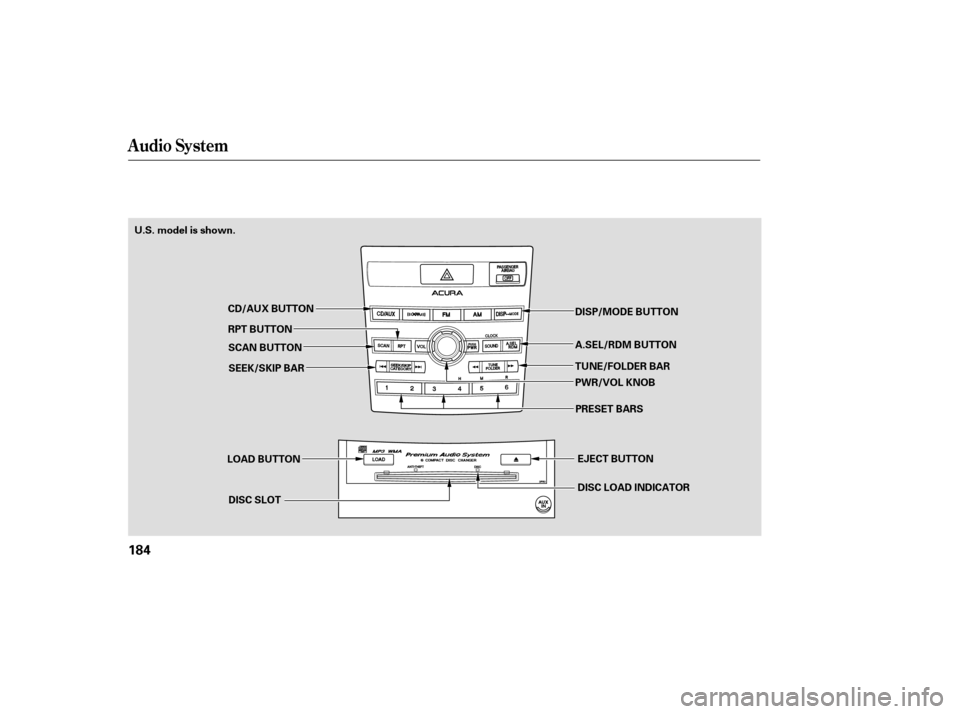
Audio System
184
LOAD BUTTONDISC SLOT EJECT BUTTON
DISC LOAD INDICATOR
CD/AUX BUTTON
RPT BUTTON SCAN BUTTON
U.S. model is shown.
DISP/MODE BUTTON
TUNE/FOLDER BAR A.SEL/RDM BUTTON
PWR/VOL KNOBPRESET BARS
SEEK/SKIP BAR
�����—�����—�
���y�
���������
���y���
�(�)� �������y���
�����y
Page 191 of 442

�µ
CONT INUED
The CD changer can play CD-Rs and
CD-RWs compressed in MP3 and
WMA format. When playing a disc in
MP3 or WMA, you will see ‘‘MP3’’ or
‘‘WMA’’ on the center display. A disc
can support more than 99 f olders,
and each folder can hold up to 255
playable f iles.
When there are more than 99 f olders
in a disc, the center display only
shows two digits.
If the disc has a complex structure, it
will be a while to read the disc bef ore
the system begins to play it.
Select the CD changer by pressing
the CD/AUX (U.S. model) or CD
(Canadian model) button. You will
see ‘‘CD’’ on the center display. The
system will begin playing the last
selected CD in the CD changer. You
will see the disc and track numbers
displayed.
When the system reaches the end of
the disc, the system will advance to
the next disc and begin to play. To
select a dif f erent disc, press an
appropriate side of the preset bar (1
6). If you select an empty position
in the CD changer, the system will
try to load the CD in the empty slot.
Youwillsee‘‘DISCREAD’’onthe
center display, then the system
begins to play the CD.
You can load a disc(s) in any mode
(AM,FM,XMradio,orAUX)if you
do not select an empty position.
If you press the LOAD button while
a disc is playing, the system will stop
playing that disc and start the
loading sequence. It will then play
the disc just loaded. You can load a CD into an empty
position while a CD is playing. Select
the empty position (the disc
indicator is not shown on the center
display) by pressing the appropriate
side of the preset bars. The current
CD stops playing and starts the
loading sequence. The CD just
loaded will play. 3.
Audio System
Playing an MP3/WMA Disc
To Play a CD
Features
187
�����—�����—�
���y�
�������������y���
�(�)� �������y���
�����y
Page 196 of 442

To pause a disc, press the
corresponding number of the
cu rrent disc on the appropriate side
of the preset bars. To play the disc
again, press the preset bar again.
If you turn the system off while a CD
is playing, either with the PWR/VOL
knob or by turning off the ignition
switch, the disc will stay in the drive.
When you turn the system back on,
the CD will begin playing where it
left off.
To take the system out of CD mode,
press the AM or FM, CD/AUX, or
button. To return to CD
mode, press the CD/AUX or CD
(Canadian model) button. The
system will continue at the same
point that it left off. To
remove the disc that is currently
playing, press and release the eject
( ) button. You will see
‘‘EJECT’’ on the center display.
When you remove the disc from the
slot, the system begins the load
sequence so you can load anoth er
disc in that position. If you do not
load another CD within 10 seconds,
the system selects the previous
mode [AM, FM1, FM2, or XM Radio
(U.S. models)]. Press
and hold the eject button until
you hear a beep to remove all the
discs from the changer.
You can also eject discs when the
ignition switch is off by pressing the
eject button. The disc that was last
selected is ejected first. You can
eject the rest of the discs one at a
time.
For information on how to handle
and protect compact discs, see page
.
For information, see page .
For information, see page .
If you do not remove the CD f rom
the slot, the system will reload the
CD af ter 10 seconds and put the CD
changer in pause mode. To begin
playing the CD, press the CD/AUX
or CD (Canadian model) button.
To remove a dif f erent CD f rom the
changer, select it with the
appropriate side of the preset bar.
When that CD begins playing, press
the eject button. 234
196
233
To Pause a Disc
To Stop Playing a Disc
Removing CDs f rom the Changer
Protecting Discs
CD Changer Error Messages
Adjusting the Sound
Audio System
192
�����—�����—�
���y�
���������
���y���
�(�)� �������y���
�����y
Page 211 of 442
CONT INUED
Audio System
Features
207
INTERFACE DIAL
AUDIO BUTTON
LOAD BUTTON SCAN BUTTON DISP/MODE BUTTON
EJECT BUTTON
TUNE/FOLDER BAR
DISC/AUX BUTTON
DISC LOAD INDICATOR
PRESET BUTTONS
DISC SLOT
PWR/VOL KNOB
U.S. model is shown.
SEEK/SKIP BAR
�����—�����—�
���y�
�������������y���
�(�)� �������y�����
���y
Page 214 of 442
You can load a CD into an empty
position while a CD is playing. Press
the AUDIO button to view the audio
control display. Select the empty
position (‘‘No Disc’’ is shown on the
audio control display) by rotating the
interf ace dial. Then press ENTER on
the selector to enter your selection.
The current CD stops playing and
starts the loading sequence. The CD
just loaded will play.You can also select the empty
position by pressing the appropriate
preset button.
You can load a disc(s) in any mode
(AM,FM,XMradio,orAUX)if you
do not select an empty position.
You cannot select the empty position
if there is no disc in the changer.
Audio System
210
EMPTY POSITION
�����—�����—�
���y�
���������
���y���
�(�)� �������y�����
���y