Page 93 of 442
�Î
�Î
�Î
�Î
�Î
Menu Item Page
Group Setup Setting Option
Description
DOOR LOCK MODE
KEYLESS LOCK
ACKNOWLEDGMENT
SECURITY RELOCK TIMER
AUTO DOOR UNLOCK 110
112
114
116
90
DOOR SETUP
(P.107)
DEFAULT ALL DRIVER DOOR
ALL DOORS
ON
OFF
30 sec
60 sec
90 sec
DRIVER’S DOOR WITH
SHIFT TO P
ALL DOORS WITH
SHIFT TO P
DRIVER’S DOOR WITH
IGN OFF
ALL DOORS WITH IGN
OFF
OFF
SET
EXIT
Changes which doors unlock with the remote
transmitter in a first push.
The exterior lights flash each time you press the
LOCK or UNLOCK button. A beeper will also
sound when you press the LOCK button twice.
Changes how long it takes (in seconds) for the
doors to relock and the security system to set after
you unlock and not opening the door.
Changes when the doors automatically unlock.
Changes all the customized settings as they were
the vehicle left the factory.
: Default setting
Multi-Inf ormation Display
Inst rument s and Cont rols
89
�����—�����—�
���y�
�����������
�y���
�(�)� �������y���������y
Page 111 of 442
�Û�Ý�Û
�Ý
�Û�Ý
�Û�Ý
CONTINUED
There are five settings to choose
from in the door setup:
AU TO DOOR LOCK
DOOR LOCK MODE
SECURITY RELOCK TIMER
KEYLESS
LOCK
ACKNOWLEDGMENT
AUTO DOOR UNLOCK
While CUSTOMIZE GROUP is
shown in the multi-info rmation
display, select DOOR SETUP by
pressing INFO ( / ) button, then
press the SEL/RESET button.
Each time you press the INFO ( /
) button, the screen changes as
shown in the illustration. Press the
INFO ( / ) button until you see
the setting you want to customize,
then press the SEL/RESET button
to enter your selection.
Multi-Information Display
Door Setup
Instrument sand Cont ro ls
107
Seepage108
See page 110
See page 112
Seepage114
See page 116
:
Press the SEL/
RESET button
or the Select/
Reset knob
: Press the INFO ( / ) button or
rotate the
Select/Reset knob
�����—�����—�
���y�
����
����
���y���
�(�)� �������y���
�
���y
Page 116 of 442
�Û�Ý
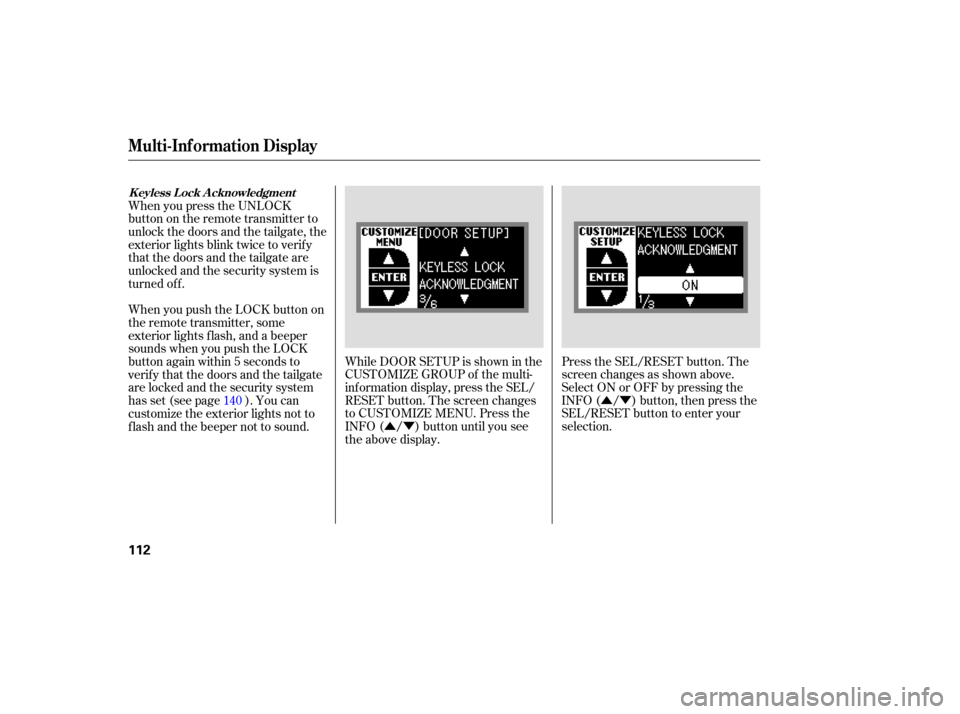
�Û�Ý Press
the SEL/RESET button. The
screen changes as shown above.
Se lect ON or OFF by pressing the
INFO ( / ) button, then press the
SEL/RESET button to enter your
selection.
While
DOOR SETUP is shown in the
CUSTOMIZE GROUP of the multi-
info rmation display, press the SEL/
RESET button. The screen changes
to CUSTOMIZE MENU. Press the
INFO ( / ) button until you see
the above display.
When
you press the UNLOCK
button on the remote transmitter to
unlock the doors and the tailgate, the
exterior lights blink twice to veri fy
that the doors and the tailgate are
unlocked and the security system is
turned off.
When you push the LOCK button on
the remote transmitter, some
exterior lights flash, and a beeper
sounds when you push the LOCK
button again within 5 seconds to
verify that the doors and the tailgate
arelockedandthesecuritysystem
has set (see page ). You can
customize the exterior lights not to
f lash and the beeper not to sound. 140
Multi-Inf ormation Display
K eyless L ock A cknowledgment
112
�����—�����—�
���y�
�������������y���
�(�)� �������y���
�
���y
Page 118 of 442
�Û�Ý
�Û�Ý
If you unlock the doors and the
tailgate with the remote transmitter,
but do not open any of the doors or
thetailgatewithin30seconds,the
doors and the tailgate automatically
relock and the security system sets.
You can change this relock time
f rom 30 seconds to 60 or 90 seconds.
Press the SEL/RESET button. The
screen changes as shown above.
Select the relock time you want (30,
60, or 90 seconds) by pressing the
INFO ( / ) button, then press the
SEL/RESET button to enter your
selection.
While DOOR SETUP is shown in the
CUSTOMIZE GROUP of the multi-
inf ormation display, press the SEL/
RESET button. The screen changes
to CUSTOMIZE MENU. Press the
INFO ( / ) button until you see
the above display.
Multi-Inf ormation Display
Securit y Relock T imer
114
�����—�����—�
���y�
�������������y���
�(�)� �������y���
�
���y
Page 119 of 442
�Û�Ý
To exit SECURITY RELOCK
TIMER without changing the
current setting, select EXIT by
pressing the INFO ( / ) button,
then press the SEL/RESET button.
The screen goes back to
CUSTOMIZE MENU.
When your choice is set, you will see
the above display f or several seconds,
then the screen goes back to
CUSTOMIZE MENU.
If your choice is not set, you will see
the above display f or several seconds,
then the screen goes back to
CUSTOMIZE MENU. If this
happens, you need to repeat the
same procedure.
Multi-Inf ormation Display
Inst rument s and Cont rols
115
�����—�����—�
���y���������������y���
�(�)� �������y���
�����y
Page 130 of 442

Make any steering wheel adjustment
bef ore you start driving.Push the lever under the steering
column all the way down.
Move the steering wheel so it
points toward your chest, not
toward your f ace. Make sure you
can see the instrument panel
gauges and indicators. The master key fits all the locks on
your vehicle. The valet key works
only in the ignition and the door
locks. You can keep the glove box
and console compartment locked
when you leave your vehicle and the
valet key at a parking f acility.
Push the lever up to lock the
steering wheel in position.
Make sure you have securely
locked the steering wheel in place
by trying to move it up, down, in,
and out.
1.
2. 3.
4.
Steering Wheel A djustment, K eys and L ocks
Steering Wheel A djustment
K eys
126
LEVERVALET KEY
(Light Gray)
KEY
NUMBER
TAG MASTER KEYS
WITH REMOTE
TRANSMITTER
Adjusting the steering wheel
position while driving may
cause you to lose control of the
vehicle and be seriously injured
inacrash.
Adjust the steering wheel only
when the vehicle is stopped.
�����—�����—�
���y�
����
����
���y���
�(�)� �������y���
���
�y
Page 131 of 442

Youshouldhavereceivedakey
number tag with your keys. You will
need this key number if you ever
have to get a lost key replaced. Use
only Acura-approved key blanks.
These keys contain electronic
circuits that are activated by the
immobilizer system. They will not
work to start the engine if the
circuits are damaged.
Protect the keys from direct
sunlight, high temperature, and
high humidity.
Donotdropthekeysorsetheavy
objects on them.
Keep the keys away from liquids.
If they get wet, dry them
immediately with a soft cloth.
The valet key does not contain a
battery. Do not try to take it apart. The
master key can be retracted into
the remote transmitter. When you
use the key, push the release button
to pop the key out of the remote
transmitter. To retract the key, push
the release button and at the same
time push the key into the remote
tran smitter until it is secu rely
latched. Always
use the fully-extended key
when you insert it to the ignition
switch. If the key does not fully
extend, the immobilizer system may
not operate properly and preven ts
from starting the engine.
Retracting or extending the key may
hurt your f inger. Make sure your
f ingers do not touch the pivot of the
key when retracting or extending the
key.
Your vehicle has two transmitters;
see page for an explanation of
the operation. 140
Keys and Locks
Retractable Master Key
Remote Transmitter
Inst rument s and Cont rols
127
RELEASE BUTTONPush
�����—�����—�
���y�
�������������y���
�(�)� �������y���
�����y
Page 144 of 442

�µ�µ
When you press the UNLOCK
button, the ceiling lights (if the front
and rear ceiling light switches are in
the door activated position) will
come on. If you do not open any door,
the lights stay on for about 30
seconds, then fade out. If you relock
the doors with the remote
transmitter before 30 seconds have
el ap sed, the lights go off
immediately.
You can change the ‘‘INTERIOR
LIGHT DIMMING TIME’’ setting in
the multi-information display (see
page ).
Press
this button once to
lock all doors and the tailgate. Some
exterior lights will flash once. When
you push LOCK twice within 5
seconds, you will hear a beep to
verify that the security system has
set. You cannot lock the doors and
thetailgateifanydoororthetailgate
is not fully closed or the key is in the
ignition switch. Press
this button once
to unlock the driver’s door. Push it
twice to unlock the remaining doors
and the tailgate. Some exterior lights
will flash twice each time you press
the button.
You can change the ‘‘KEYLESS
LOCK ACKNOWLEDGMENT’’
setting in the multi-information
display (see page ).
You can change the ‘‘DOOR LOCK
MODE’’ setting in the multi-
info rmation display (see page ).
103
110
112
On RDX with Technology Package
model
On RDX with Technology Packagemodel
Remote Transmitter
LOCK UNL OCK
140
UNLOCK
BUTTON
LOCK
BUTTON
PANIC
BUTTON
�����—�����—�
���y�
���������
���y���
�(�)� �������y���
�����y


