2006 VOLVO S60 warning lights
[x] Cancel search: warning lightsPage 4 of 132

PremAir is a registered trademark of Engelhard Corporation.
Instruments, switches and controls
Page
1. Front fog lights 32
2. Headlights/Parking lights/switch for unlocking fuel filler door32
3. Rear fog light32
4. Turn signals/High/low beams34
5. Cruise control39
6. Horniv
7. Instrument panel24
8. Audio controls in steering wheel183
9. Windshield wipers35
10. Parking brake (hand brake)41
11. Center console switches29
12. Climate control49
13. Audio system177
14. 12 V socket41
15. Hazard warning flashers37
16. Glove compartment67
17. Panel vents51
18. Text window28
19. Temperature gauge24
ProCarManuals.com
Page 5 of 132
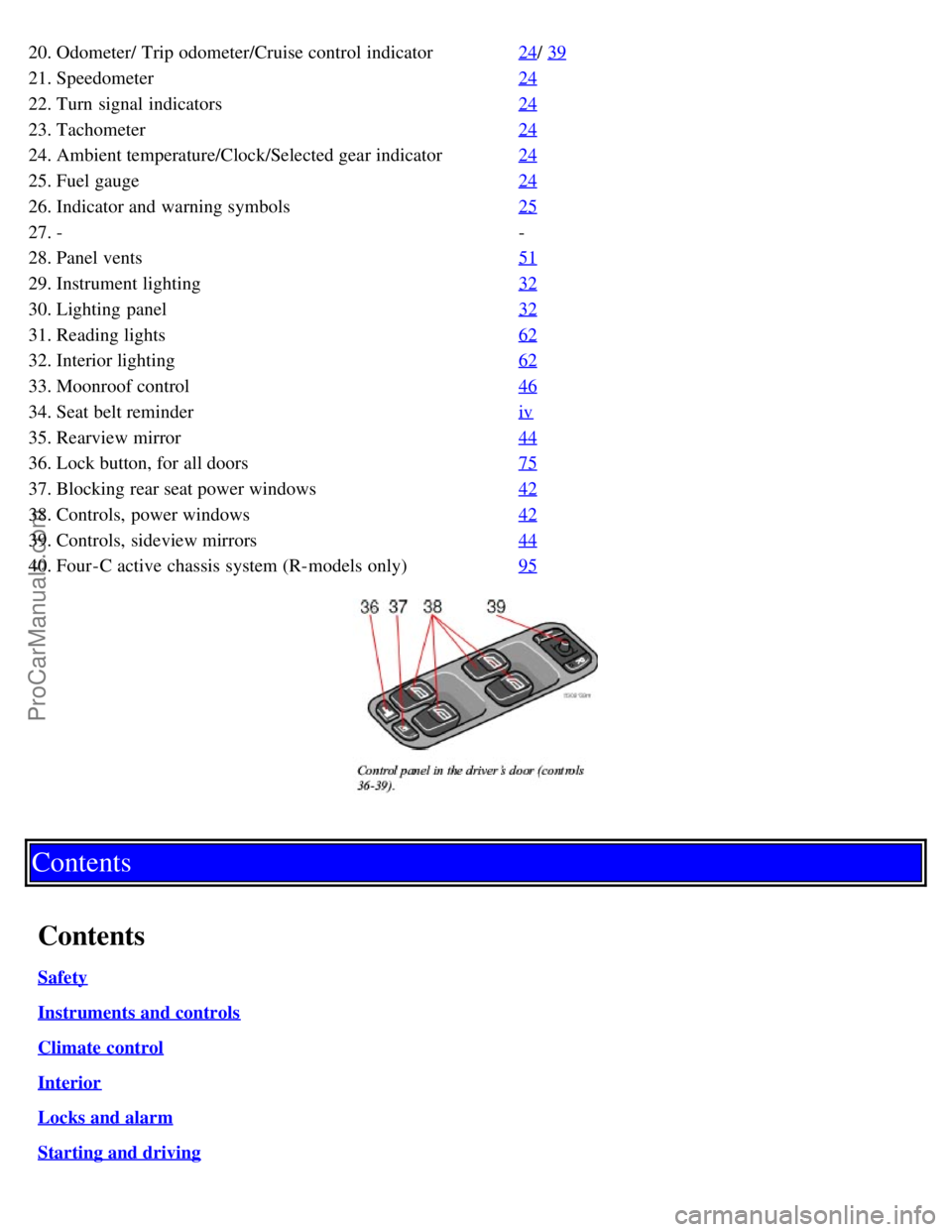
20. Odometer/ Trip odometer/Cruise control indicator24/ 39
21. Speedometer24
22. Turn signal indicators24
23. Tachometer24
24. Ambient temperature/Clock/Selected gear indicator24
25. Fuel gauge24
26. Indicator and warning symbols25
27. --
28. Panel vents 51
29. Instrument lighting32
30. Lighting panel32
31. Reading lights62
32. Interior lighting62
33. Moonroof control46
34. Seat belt reminderiv
35. Rearview mirror44
36. Lock button, for all doors75
37. Blocking rear seat power windows42
38. Controls, power windows42
39. Controls, sideview mirrors44
40. Four-C active chassis system (R-models only)95
Contents
Contents
Safety
Instruments and controls
Climate control
Interior
Locks and alarm
Starting and driving
ProCarManuals.com
Page 19 of 132

Warning symbol in center of the instrument panel
This symbol shines as a red or yellow light depending on the severity of the discovered fault.
Red symbol - Stop the vehicle as soon as possible in a suitable location and read the message shown in the text
window. The symbol and accompanying text will remain on until the fault has been corrected.
Yellow symbol - Follow the instructions shown in the text window. The text can be erased by pressing the READ
button (see page 28
), or will disappear automatically after two minutes.
When the message "TIME FOR REGULAR SERVICE" is displayed, the text can be erased and the yellow symbol
light can be turned off by pressing the READ button. The text will disappear and the symbol light will go out
automatically after two minutes.
Anti-lock brake system ABS
If the warning light comes on, there is a malfunction of the ABS system (the standard braking system will still
function). The vehicle should be driven to a Volvo retailer for inspection. See page 97
for additional information.
Stability Traction Control (STC)* system or Dynamic Stability Traction Control (DSTC) system**
This indicator light will flash when STC or DSTC is actively working to stabilize the car. See page 98
for more
detailed information.
BRAKE Brake failure warning light
If the light comes on while driving or braking, stop immediately, open the hood and check the brake fluid level in the
reservoir. See page 141
for reservoir position and page 145 for instructions.
Canadian models are equipped with this warning light:
If the BRAKE and ABS warning lights come on at the same time, this could indicate a fault in the brake system.
Stop the car in a suitable place and switch off the engine.
Restart the engine.
If both warning lights go off, no further action is required.
If both lights are still on after the engine has been restarted, switch off the engine again and check the brake fluid
level (see page 141
for the location of the brake fluid reservoir).
* Standard on all models except the T5 turbo.
** Standard on the T5 turbo, option on all other models.
pg. 26 Instruments and controls
Indicator and warning symbols (contd)
ProCarManuals.com
Page 20 of 132

WARNING!
If the fluid level is below the MIN mark in the reservoir or if a "Brake failure - Service urgent" message is displayed
in the text window: DO NOT DRIVE. Have the car towed to an authorized Volvo retailer and have the brake system
inspected.
If the brake fluid level is above the MIN mark, drive carefully to an authorized Volvo retailer and have the brake
system inspected.
pg. 27 Instruments and controls
Supplemental Restraint System SRS
If this light comes on while the car is being driven, or remains on for longer than approximately 10 seconds after the
car has been started, the SRS system's diagnostic functions have detected a fault in a seat belt lock or tensioner, a front
airbag, side impact airbag, and/or an inflatable curtain. Have the system(s) inspected by a trained and qualified Volvo
service technician as soon as possible.
Generator warning light
If the light comes on while the engine is running, have the charging system checked.
Seat belt reminder
This symbol lights up to indicate that the driver has not fastened his/her seat belt.
Tire pressure monitoring light
See page 117
for more information on this function.
PARK BRAKE Parking brake applied
This light will be on when the parking brake (hand brake) is applied. The parking brake lever is situated between the
front seats.
Canadian models are equipped with this symbol.
Rear fog light
This light indicates that the fog light is on.
Turn signal indicator - trailer (certain models)
If you are towing a trailer, this light will flash simultaneously with the turn signals on the trailer. If the light does not
flash when signaling, neither the trailer's turn signals nor the car's turn signals are functioning.
Oil pressure warning light
If the light comes on while driving, stop the car and then stop the engine immediately and check the engine oil
level. See page 143
. R-models are also equipped with an oil level warning system. If the light stays on after restart,
have the car towed to the nearest authorized Volvo retailer. After hard driving, the light may come on occasionally
when the engine is idling. This is normal, provided it goes off when the engine speed is increased.
CHECK ENGINE Malfunction indicator light
On-Board Diagnostic II (OBDII): As you drive, a computer called "OBDII" monitors your car's engine, transmission,
electrical and emission systems. The CHECK ENGINE light will light up if the computer senses a condition that
potentially may need correcting. When this happens, please have your car checked by a Volvo retailer as soon as
ProCarManuals.com
Page 29 of 132

frequently) or down (the wipers will sweep the windshield less frequently).
Activating the rain sensor:
1. Turn the ignition key to at least position I and put the windshield wiper lever in position 0.
2. Press button 2.
An LED in the button will light up to indicate that the rain sensor is active.
Deactivating the rain sensor:
Press button 2.
or
Move the windshield wiper lever down to another position.
Moving the lever up will not deactivate the rain sensor. Doing so will cause the wipers to sweep the windshield until
the lever is released, at which time the wipers return to rain sensor mode.
Continuous wiper function
Wipers operate at "high" speed
CAUTION:
The rain sensor should be deactivated when washing the car in an automatic car wash, etc. If the rain sensor function is
left on, the wipers will start inadvertently in the car wash and could be damaged.
pg. 36 Instruments and controls
Headlight wiper/washer (certain models)
When the lever is pulled to wash the windshield, high pressure jets mounted in the bumper will spray the headlights.
CAUTION:
Use ample washer fluid when washing the windshield to avoid scratching the glass.
To conserve washer fluid in driving conditions where the windshield washers are used frequently, the headlights will
only be washed once for every five times the windshield is washed within a 10- minute period.
When approximately 1 US quart (1 liter) remains in the washer fluid reservoir, the headlights will not be washed
when the lever is pulled to conserve washer fluid for the windshield.
NOTE: R-models are also equipped with headlight wipers, which are activated along with the washer function.
pg. 37 Instruments and controls
Hazard warning flashers, rear window/sideview mirror defroster, heated
front seats
ProCarManuals.com
Page 36 of 132

Rearview mirror
A Normal position
B Night position, reduces glare from following headlights
Autodim function (option)
The autodim function reacts to headlights from following traffic and automatically reduces glare.
NOTE: This function is automatically switched off when the gear selector is placed in the Reverse position.
Electrically operated sideview mirrors
The mirror control switches are located on the driver's door armrest.
Driver's side: Press the L switch (an LED in the switch will light up) to activate the adjustment control and then use
this control to adjust the driver's door mirror.
Passenger's door: Press the R switch (an LED in the switch will light up) and then use the adjustment control to
adjust the passenger's door mirror.
After you have adjusted the mirror(s), press the L or R switch again (the LED will go out) to deactivate the adjustment
control.
WARNING!
The mirrors should always be adjusted prior to driving. Objects seen in the passenger's side wide -angle sideview
mirror are closer than they appear to be.
Remote central locking and sideview mirror memory-option
If you lock the car and later unlock it with the same remote control and open the driver's door, the sideview mirrors
(and the driver's seat) will automatically move to the position they were in when you left the car. This feature will
work in the same way with all of the remote control transmitters (up to 3) that you use with your car. This feature will
not function if you lock your car with the key.
Water repellent glass-option
ProCarManuals.com
Page 64 of 132

Selecting P or N when idling at a standstill for prolonged periods of time will help prevent overheating of the
automatic transmission fluid.
WARNING!
Always place the gear selector in Park or in reverse on models with a manual transmission, and apply the parking
brake before leaving the vehicle. Never leave the car unattended with the engine running.
Always open garage doors fully before starting the engine inside a garage to ensure adequate ventilation. The
exhaust gases contain carbon monoxide, which is invisible and odorless but very poisonous
Do not race a cold engine immediately after starting.
* If two of the keys to your car are close together, e.g., on the same key ring, when you try to start the car, this could
cause interference in the immobilizer system and result in the car not starting. If this should occur, remove one of the
keys from the key ring before trying to start the car again.
pg. 86 Starting and driving
Starting the car (contd)
Ignition switch and steering wheel lock
0 - Locked position:
Remove the key to lock the steering wheel*.
WARNING!
Never turn the key to position O while driving or when the car is being towed.
I - Intermediate position** - "radio position":
Certain accessories, radio, etc. on, daytime running lights off.
II - Drive position: The key position when driving. The car's entire electrical system is connected.
III - Start position: Release the key when the engine starts. The key returns automatically to the Drive position.
A chime will sound if the key is left in the ignition and the driver's door is opened.
ProCarManuals.com
Page 74 of 132

Brake system
BRAKE Brake circuit malfunction
The brake system is a hydraulic system consisting of two master cylinders and two separate brake circuits. If a
problem should occur in one of these circuits, it is still possible to stop the car with the other brake circuit.
If the brake pedal must be depressed farther than normal and requires greater foot pressure, the stopping distance will
be longer.
A warning light in the instrument panel will light up to warn the driver that a fault has occurred.
If this light comes on while driving or braking, stop immediately and check the brake fluid level in the reservoir.
NOTE: Press the brake pedal hard and maintain pressure on the pedal - do not pump the brakes.
WARNING!
If the fluid level is below the MIN mark in the reservoir or if a "Brake failure - Service urgent" message is displayed
in the text window: DO NOT DRIVE. Have the car towed to a Volvo retailer and have the brake system inspected.
NOTE: When the car is at a standstill and the engine is idling, e.g. at a traffic light and the brake pedal is depressed,
the pedal may go down slightly. This is a normal function of the power-assisted brake system.
Power brakes function only when the engine is running
The power brakes utilize vacuum pressure which is only created when the engine is running. Never let the vehicle roll
to a stop with the engine switched off.
If the power brakes are not working, the brake pedal must be pressed approximately four times harder than usual to
make up for the lack of power assistance. This can happen for example when towing your vehicle or if the engine is
switched off when the vehicle is rolling. The brake pedal feels harder than usual.
Water on brake discs and brake pads affects braking
Driving in rain and slush or passing through an automatic car wash can cause water to collect on the brake discs and
pads. This will cause a delay in braking effect when the pedal is depressed. To avoid such a delay when the brakes are
needed, depress the pedal occasionally when driving through rain, slush etc. This will remove the water from the
brakes. Check that brake application feels normal. This should also be done after washing or starting in very damp or
cold weather.
Severe strain on the brake system
The brakes will be subject to severe strain when driving in mountains or hilly areas or towing. Vehicle speed is usually
slower, which means that the cooling of the brakes is less efficient than when driving on level roads. To reduce the
strain on the brakes, shift into a lower gear and let the engine help with the braking. Do not forget that, if you are
towing a trailer, the brakes will be subjected to a greater than normal load.
pg. 97 Starting and driving
Anti-lock brakes (ABS)
If the warning lamp lights up there is a malfunction of the ABS system (the standard braking system will however
function) and the vehicle should be driven cautiously to a Volvo retailer for inspection. The Anti-lock Braking System
(ABS) helps to improve vehicle control (stopping and steering) during severe braking conditions by limiting brake
lockup. When the system "senses" impending lockup, braking pressure is automatically modulated in order to help
ProCarManuals.com