2006 VOLVO S60 lock
[x] Cancel search: lockPage 20 of 132

WARNING!
If the fluid level is below the MIN mark in the reservoir or if a "Brake failure - Service urgent" message is displayed
in the text window: DO NOT DRIVE. Have the car towed to an authorized Volvo retailer and have the brake system
inspected.
If the brake fluid level is above the MIN mark, drive carefully to an authorized Volvo retailer and have the brake
system inspected.
pg. 27 Instruments and controls
Supplemental Restraint System SRS
If this light comes on while the car is being driven, or remains on for longer than approximately 10 seconds after the
car has been started, the SRS system's diagnostic functions have detected a fault in a seat belt lock or tensioner, a front
airbag, side impact airbag, and/or an inflatable curtain. Have the system(s) inspected by a trained and qualified Volvo
service technician as soon as possible.
Generator warning light
If the light comes on while the engine is running, have the charging system checked.
Seat belt reminder
This symbol lights up to indicate that the driver has not fastened his/her seat belt.
Tire pressure monitoring light
See page 117
for more information on this function.
PARK BRAKE Parking brake applied
This light will be on when the parking brake (hand brake) is applied. The parking brake lever is situated between the
front seats.
Canadian models are equipped with this symbol.
Rear fog light
This light indicates that the fog light is on.
Turn signal indicator - trailer (certain models)
If you are towing a trailer, this light will flash simultaneously with the turn signals on the trailer. If the light does not
flash when signaling, neither the trailer's turn signals nor the car's turn signals are functioning.
Oil pressure warning light
If the light comes on while driving, stop the car and then stop the engine immediately and check the engine oil
level. See page 143
. R-models are also equipped with an oil level warning system. If the light stays on after restart,
have the car towed to the nearest authorized Volvo retailer. After hard driving, the light may come on occasionally
when the engine is idling. This is normal, provided it goes off when the engine speed is increased.
CHECK ENGINE Malfunction indicator light
On-Board Diagnostic II (OBDII): As you drive, a computer called "OBDII" monitors your car's engine, transmission,
electrical and emission systems. The CHECK ENGINE light will light up if the computer senses a condition that
potentially may need correcting. When this happens, please have your car checked by a Volvo retailer as soon as
ProCarManuals.com
Page 23 of 132

R-models only:
The Active Yaw Control function can be deactivated. See page 98
for more information.
To help reduce the risk that the SC function is turned off inadvertently, the switch must be held in for at least half a
second to disable this function. "STC/DSTC SPIN CONTROL OFF" will be displayed in the text window.
This function will be automatically reactivated when the engine is restarted.
WARNING!
Please be aware that the car's handling characteristics may be affected if the Spin Control function is switched off.
Folding head restraints
This button is used to fold down the outboard rear head restraints. The ignition key must be in position I or II or the
engine must be running.
NOTE: If the head restraints have been folded down, they must be returned to their original position manually.
The head restraints should be in the upright position before the rear seat backrests are folded down.
WARNING!
For safety reasons, no one should be allowed to sit in the outboard rear seat positions if the head restraints are folded
down. If these positions are occupied, the head restraints should be in the upright (fixed) position.
pg. 30 Instruments and controls
Valet lock (trunk lock)
Pressing this switch locks the trunk, even if the doors are unlocked. The trunk will remain locked even if the doors are
locked/unlocked using the master key or the remote control.
To use this function:
Turn the master key to position II.
Press the "Valet lock" button. An LED in the button will light up and "VALET LOCK ON" will be displayed on the
text window to indicate that this function is activated.
The function can be turned off (deactivated) by turning the ignition key to position II and pressing the "Valet lock"
button again (the LED in the button will go out and "VALET LOCK OFF" will be displayed in the text window).
ProCarManuals.com
Page 24 of 132

Temporarily disconnecting the alarm sensors (option)
See page 79
for more details.
12 volt socket
This 12 volt socket can be used to plug in certain accessories such as cellular telephones, etc. The ignition key must be
in position 1 (or higher) for the auxiliary socket to function.
NOTE: The auxiliary sockets can also be used for cigarette lighters, which are available at your Volvo retailer.
Front/rear park assist (option/accessory)
See page 109
for more information on this function.
pg. 31 Instruments and controls
Steering wheel adjustment
Both the height and the reach of the steering wheel can be adjusted to a comfortable position for the driver. Pull down
the lever on the left of the steering column. Adjust the steering wheel to a suitable position and press the lever back
into place to lock the steering wheel in the new position. Check that the steering wheel is locked in the new position.
WARNING!
Never adjust the steering wheel while driving.
pg. 32 Instruments and controls
Lighting panel
ProCarManuals.com
Page 25 of 132

1. Headlight/parking light switch
2. Front fog lights
3. Rear fog light
4. Instrument panel lighting
5. Fuel filler door unlock button
Parking lights
The front and rear parking lights can be turned on even when the ignition is switched off.
Turn switch 1 to position . parking lights are switched on.
Headlights
Turn the ignition key to position II.
The low beam headlights (daytime running lights) illuminate automatically, except when the light switch (1) is in
position
1.
See page 34
for information on switching between high and low beams.
NOTE: Bi -Xenon headlights (option): Turn the headlight switch to position 0 to activate a daylight sensor, which
automatically switches the low beams on or off, depending on ambient light conditions. When driving in daylight, the
headlights will switch off and the daytime running lights will come on. In darkness, the daytime running lights will
switch off and the Bi -Xenon headlights will switch on.
Foglights
Front fog lights (option)
The front fog lights can be used in combination with either the headlights or the parking lights.
Turn the ignition key to position II.
Press button 2 to turn on the front fog lights. An indicator light in the button illuminates when the front fog lights are
on.
Rear fog light
The single rear fog light is located in the driver's side tail light cluster.
The rear fog light will only function in combination with the high/low beam headlights or the optional front fog lights.
Turn the ignition key to position II.
Press button 3 to turn on the rear fog light.
An indicator light in the button illuminates when the rear fog light is on.
NOTE: The rear fog light is considerably brighter than the normal tail lights and should be used only when conditions
such as fog, rain, snow, smoke or dust reduce visibility for other vehicles to less than 500 ft. (150 meters).
ProCarManuals.com
Page 26 of 132

Instrument panel lighting
The instrument panel lighting illuminates when the ignition key is in position II and the light switch (1) is in either
position
or .
Move the thumb wheel (4) up to increase brightness or down to decrease brightness.
Unlocking the fuel filler door
Press button 5 when the car is at a standstill to unlock the fuel filler door. Please note that the fuel filler door will
remain unlocked until the car begins to move forward. An audible click will be heard when the fuel filler door relocks.
NOTE: If the fuel filler door does not unlock after the button has been pressed, drive the car
1. On Canadian models, the daytime running lights will remain on with the light switch in this position.
Contents | Top of Page
ProCarManuals.com
Page 27 of 132

pg. 33 Instruments and controls
Manually unlocking the fuel filler door
at a speed of at least 5 mph (8 km/h), stop the car, and press the button again.
See the information to the right on unlocking the fuel filler door manually.
Manually unlocking the fuel filler door
The electric motor that controls the fuel filler door locking mechanism is located on the inside of the rear fender on the
passenger side of the car, just behind the fuel filler door. To unlock this door manually:
1. Turn the knob (A) 1/4 turn counterclockwise to release the cover panel (B).
2. Fold down the cover panel to access the electric motor (C).
3. Press the catch (D) rearward to unlock the fuel filler door, or forward to lock the door.
pg. 34 Instruments and controls
Left-side steering wheel lever
Lever positions
1. Turn signals, lane change position
2. Turn signals, position for normal turns
3. High beam flash
4. Toggle between high and low beams, Home Safe lighting
Turn signals
When turning
Move the lever as far up or down as possible (to position 2) to start the turn signals. The turn signals will be cancelled
automatically by the movement of the steering wheel, or the lever can be returned to its initial position by hand.
When changing lanes
The driver can flash the turn signals by moving the turn signal lever up or down to position 1 and releasing it. The turn
ProCarManuals.com
Page 28 of 132

signals will flash until the lever has been released.
NOTE: If the turn signal indicator flashes faster than normal, check for a burned-out turn signal bulb.
High/low beam headlights
Continuous high beams
Turn the ignition key to position II.
With the light switch (1) in position , (see page 32) pull the turn signal lever toward the steering wheel (position 4) to
toggle between high and low beams (this also applies on models equipped with the optional Bi -Xenon headlights).
High beam flash
Turn the ignition key to position II.
Pull the turn signal lever to position 3. The high beams will remain on until the lever is released.
Home safe lighting
When you leave your car at night, you can make use of the home safe lighting function to illuminate the area in front
of the car.
Remove the key from the ignition switch.
Pull the direction indicator lever as far as possible towards the steering wheel (to position 4) and release it.
Exit the car and lock the doors.
The headlights and parking lights will illuminate and remain on for 30
1, 60 or 90 seconds. The time interval can be
changed by an authorized Volvo retailer.
1. Factory setting
pg. 35 Instruments and controls
Right-side steering wheel lever
Windshield wipers
Windshield wipers off
If the lever is in the 0 position and you move it upwards, the wipers will sweep one stroke at a time for as long as you
hold the lever up.
Intermittent wiper function
With the lever in this position, you can set the wiper interval by twisting the control ring 1 upward to increase wiper
speed or downward to decrease the speed.
Rain sensor (option)
The rain sensor automatically regulates wiper speed according to the amount of water on the windshield.
The sensitivity of the sensor can be adjusted by twisting ring 1 up (the wipers will sweep the windshield more
ProCarManuals.com
Page 32 of 132
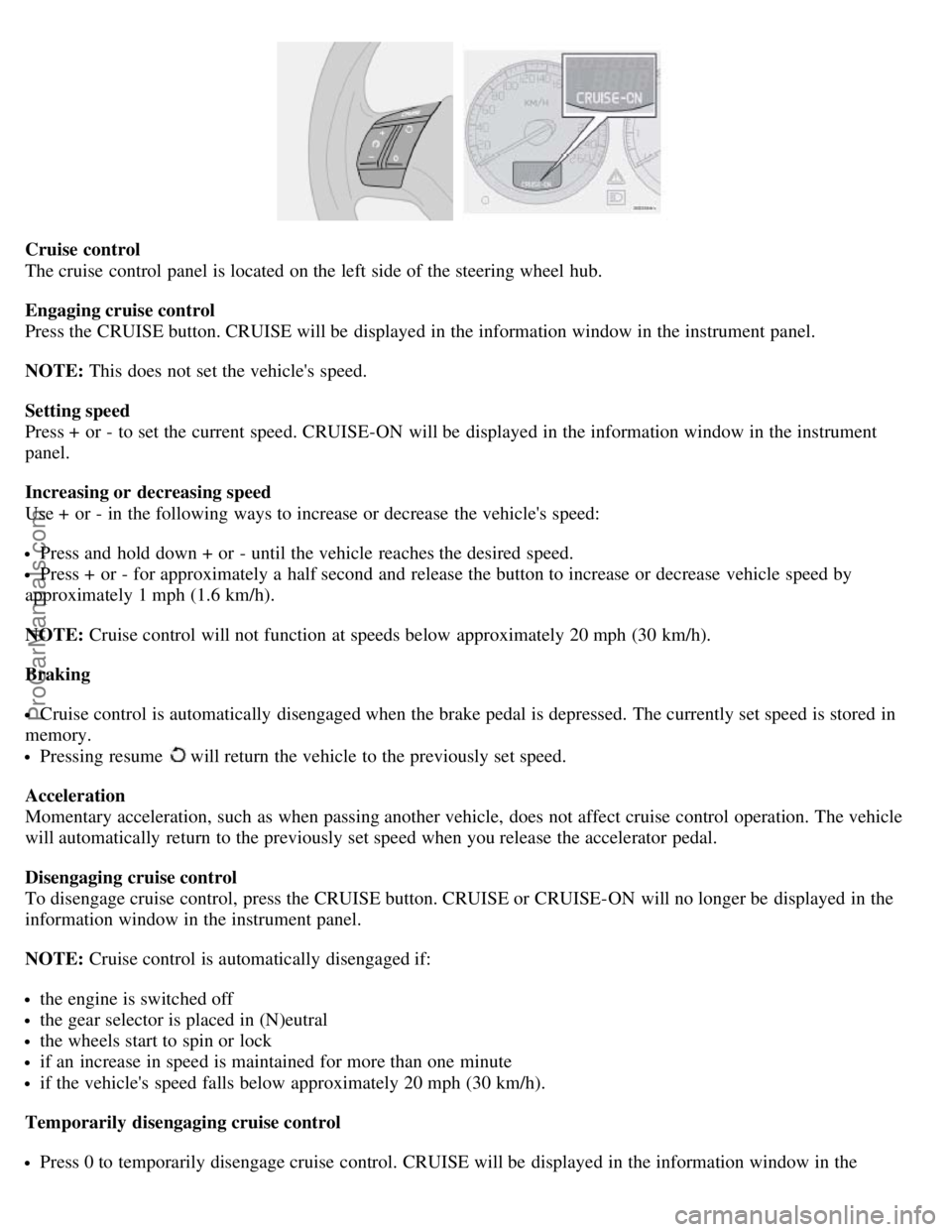
Cruise control
The cruise control panel is located on the left side of the steering wheel hub.
Engaging cruise control
Press the CRUISE button. CRUISE will be displayed in the information window in the instrument panel.
NOTE: This does not set the vehicle's speed.
Setting speed
Press + or - to set the current speed. CRUISE-ON will be displayed in the information window in the instrument
panel.
Increasing or decreasing speed
Use + or - in the following ways to increase or decrease the vehicle's speed:
Press and hold down + or - until the vehicle reaches the desired speed.
Press + or - for approximately a half second and release the button to increase or decrease vehicle speed by
approximately 1 mph (1.6 km/h).
NOTE: Cruise control will not function at speeds below approximately 20 mph (30 km/h).
Braking
Cruise control is automatically disengaged when the brake pedal is depressed. The currently set speed is stored in
memory.
Pressing resume will return the vehicle to the previously set speed.
Acceleration
Momentary acceleration, such as when passing another vehicle, does not affect cruise control operation. The vehicle
will automatically return to the previously set speed when you release the accelerator pedal.
Disengaging cruise control
To disengage cruise control, press the CRUISE button. CRUISE or CRUISE-ON will no longer be displayed in the
information window in the instrument panel.
NOTE: Cruise control is automatically disengaged if:
the engine is switched off
the gear selector is placed in (N)eutral
the wheels start to spin or lock
if an increase in speed is maintained for more than one minute
if the vehicle's speed falls below approximately 20 mph (30 km/h).
Temporarily disengaging cruise control
Press 0 to temporarily disengage cruise control. CRUISE will be displayed in the information window in the
ProCarManuals.com