Page 7 of 364

vii
Accessories, spare parts andmodification of your Toyota
A wide variety of non −genuine spare parts and accesso-
ries for Toyota vehicles are currently available in the
market. You should know that Toyota does not warrant
these products and is not responsible for their perfor-
mance, repair, or replacement, or for any damage they
may cause to, or adverse effect they may have on,
your Toyota vehicle.
This vehicle should not be modified with non −genuine
Toyota products. Modification with non −genuine Toyota
products could affect its performance, safety or durabili-
ty, and may even violate governmental regulations. In
addition, damage or performance problems resulting from
the modification may not be covered under warranty.
Installation of a mobile twoway radio system
As the installation of a mobile two −way radio system in
your vehicle could affect electronic systems such as
multiport fuel injection system/sequential multiport fuel
injection system, electronic throttle control system,
cruise control system, anti −lock brake system, active
traction control system, vehicle stability control system,
active height control suspension system, skyhook TEMS,
SRS airbag system and seat belt pretensioner system,
be sure to check with your Toyota dealer for precaution-
ary measures or special instructions regarding installa-
tion.
Page 12 of 364
2
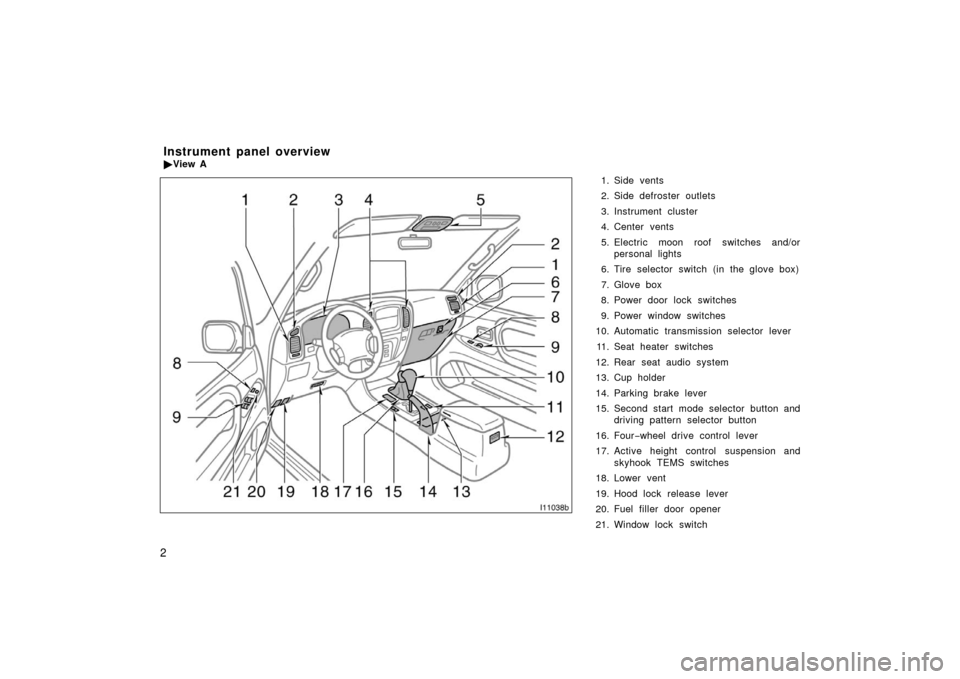
1. Side vents
2. Side defroster outlets
3. Instrument cluster
4. Center vents
5. Electric moon roof switches and/orpersonal lights
6. Tire selector switch (in the glove box)
7. Glove box
8. Power door lock switches
9. Power window switches
10. Automatic transmission selector lever
11. Seat heater switches
12. Rear seat audio system
13. Cup holder
14. Parking brake lever
15. Second start mode selector button and driving pattern selector button
16. Four −wheel drive control lever
17. Active height control suspension and skyhook TEMS switches
18. Lower vent
19. Hood lock release lever
20. Fuel filler door opener
21. Window lock switch
Instrument panel overview
� View A
I11038b
Page 13 of 364
3
1. Headlight, turn signal and front foglight switches
2. Cruise control switch
3. Ignition switch
4. Wiper and washer switches
5. Emergency flasher switch
6. Navigation system including air condi- tioning controls (See the separate
“Navigation System Owner ’s Manual”.)
7. Clock and outside temperature display
8. Front passenger ’s seat belt reminder light
9. Audio system
10. Outside rear view mirror heater switch 11. Rear air conditioning switch
12. Rear window defogger switch
13. Center differential lock switch
14. Power antenna switch
15. Power tilt and telescopic steering switch
16. Instrument panel light control dial
17. Power rear view mirror control switches
18. Tire pressure warning system reset switch
19. Power quarter window switch (left− hand side)
20. Power quarter window switch (right −hand side)
21. Roll sensing of curtain shield airbags off switch
�
View B
(Vehicles with navigation system)
11C515b
Page 14 of 364
4
1. Headlight, turn signal and front foglight switches
2. Cruise control switch
3. Ignition switch
4. Wiper and washer switches
5. Emergency flasher switch
6. Clock, outside temperature and trip in- formation display
7. Audio system
8. Front passenger ’s seat belt reminder light
9. Air conditioning controls
10. Outside rear view mirror heater switch 11. Rear air conditioning switch
12. Rear window defogger switch
13. Center differential lock switch
14. Power antenna switch
15. Power tilt and telescopic steering switch
16. Instrument panel light control dial
17. Power rear view mirror control switches
18. Tire pressure warning system reset switch
19. Power quarter window switch (left− hand side)
20. Power quarter window switch (right −hand side)
21. Roll sensing of curtain shield airbags off switch
�
View B
(Vehicles without navigation system)
11C029d
Page 17 of 364
7
Indicator symbols on the instrument panel
Brake system warning light∗1
Malfunction indicator lamp∗1Headlight high beam indicator light Turn signal indicator lights
Driver ’s seat belt reminder light∗1
Anti −lock brake system warning light∗
1
Open door warning light∗1
SRS warning light∗1
Low fuel level warning light∗1
Automatic transmission fluid temperature warning
light∗1
Unengaged “Park” warning light∗1
Charging system warning light∗1
Engine oil replacement reminder light
Center differential lock indicator light Driving pattern (“POWER” mode) indicator
light
Automatic transmission second start indicator
light
Cruise control indicator light∗2
Low tire pressure warning light∗1
Page 20 of 364
10
Keys
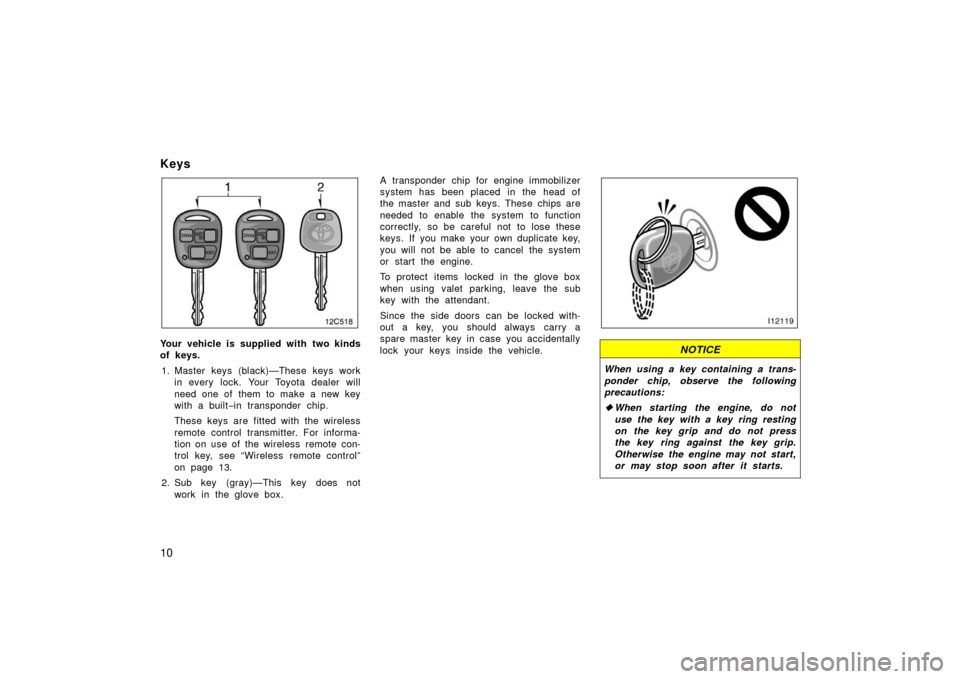
Your vehicle is supplied with two kinds
of keys.1. Master keys (black)—These keys work in every lock. Your Toyota dealer will
need one of them to make a new key
with a built −in transponder chip.
These keys are fitted with the wireless
remote control transmitter. For informa-
tion on use of the wireless remote con-
trol key, see “Wireless remote control”
on page 13.
2. Sub key (gray)—This key does not work in the glove box. A transponder chip for engine immobilizer
system has been placed in the head of
the master and sub keys. These chips are
needed to enable the system to function
correctly, so be careful not to lose these
keys. If you make your own duplicate key,
you will not be able to cancel the system
or start the engine.
To protect items locked in the glove box
when using valet parking, leave the sub
key with the attendant.
Since the side doors can be locked with-
out a key, you should always carry a
spare master key in case you accidentally
lock your keys inside the vehicle.NOTICE
When using a key containing a trans-
ponder chip, observe the following
precautions:
�
When starting the engine, do not
use the key with a key ring resting
on the key grip and do not press
the key ring against the key grip.
Otherwise the engine may not start,
or may stop soon after it starts.
Page 23 of 364
13
Inserting the registered key in the ignition
switch automatically cancels the system,
which enables the engine to start. The
indicator light will go off.
For your Toyota dealer to make a new key
with a built−in transponder chip, your
dealer will need your key number and
master key. However, there is a limit to
the number of additional keys your Toyota
dealer can make for you.
If you make your own duplicate key,
you will not be able to cancel the sys-
tem or start the engine.
FCC ID: MOZRI20BTY
This device complies with Part 15 of the
FCC Rules. Operation is subject to the
following two conditions:
(1) This device may not cause harmful
interference, and (2) this device must
accept any interference received, includ-
ing interference that may cause unde-
sired operation.
CAUTION
Changes or modifications not ex-
pressly approved by the party respon-
sible for compliance could void the
user’s authority to operate the equip-
ment.
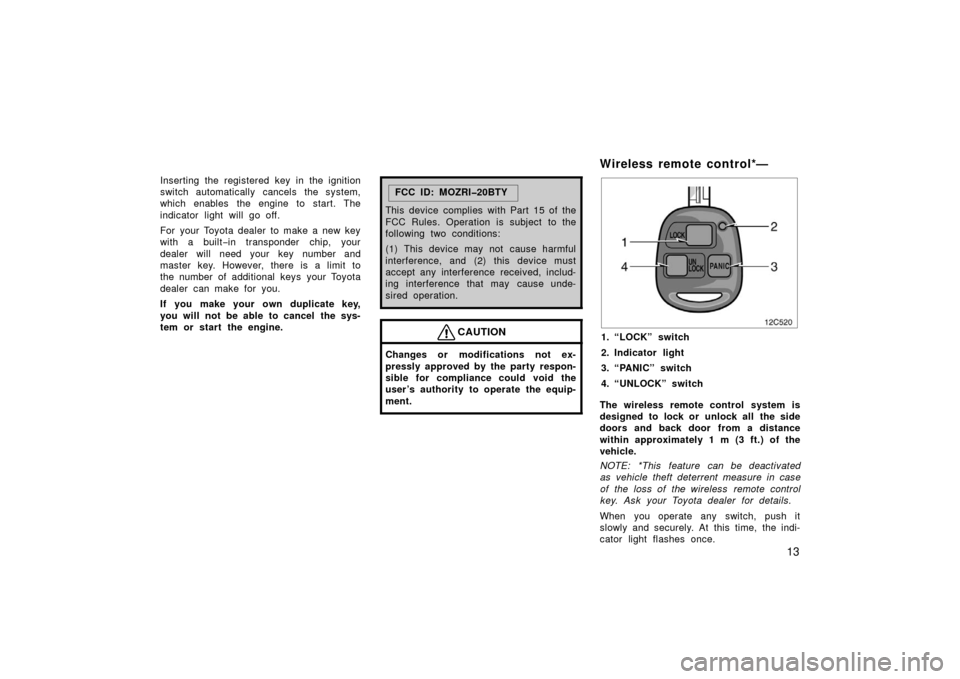
Wireless remote control*—
12c520
1. “LOCK” switch
2. Indicator light
3. “PANIC” switch
4. “UNLOCK” switch
The wireless remote control system is
designed to lock or unlock all the side
doors and back door from a distance
within approximately 1 m (3 ft.) of the
vehicle.
NOTE: *This feature can be deactivated
as vehicle theft deterrent measure in case
of the loss of the wireless remote control
key. Ask your Toyota dealer for details.
When you operate any switch, push it
slowly and securely. At this time, the indi-
cator light flashes once.
Page 24 of 364
14
The wireless remote control key is an
electronic component. Observe the follow-
ing instructions in order not to cause dam-
age and trouble to the key.
�Do not leave the key in places where
the temperature becomes high such as
on the dashboard.
�Do not disassemble it.
�Avoid knocking it hard against other
objects or dropping it.
�Avoid putting it in water.
You can use up to 4 wireless remote con-
trol keys for the same vehicle. Contact
your Toyota dealer for detailed information.
If the wireless remote control key does
not actuate the doors or operate from a
normal distance, or the indicator light on
the key is dimmed or does not come on:
�Check for closeness to a radio trans-
mitter such as a radio station or an
airport which can interfere with normal
operation of the key.
�The battery may have been consumed.
Check the battery in the key. To
replace the battery, see following
“—Replacing battery” on page 17. If you lose your wireless remote control
key, contact your Toyota dealer as soon
as possible to avoid the possibility of
theft, or an accident. (For detailed infor-
mation, see “If you lose your keys” on
page 291.)
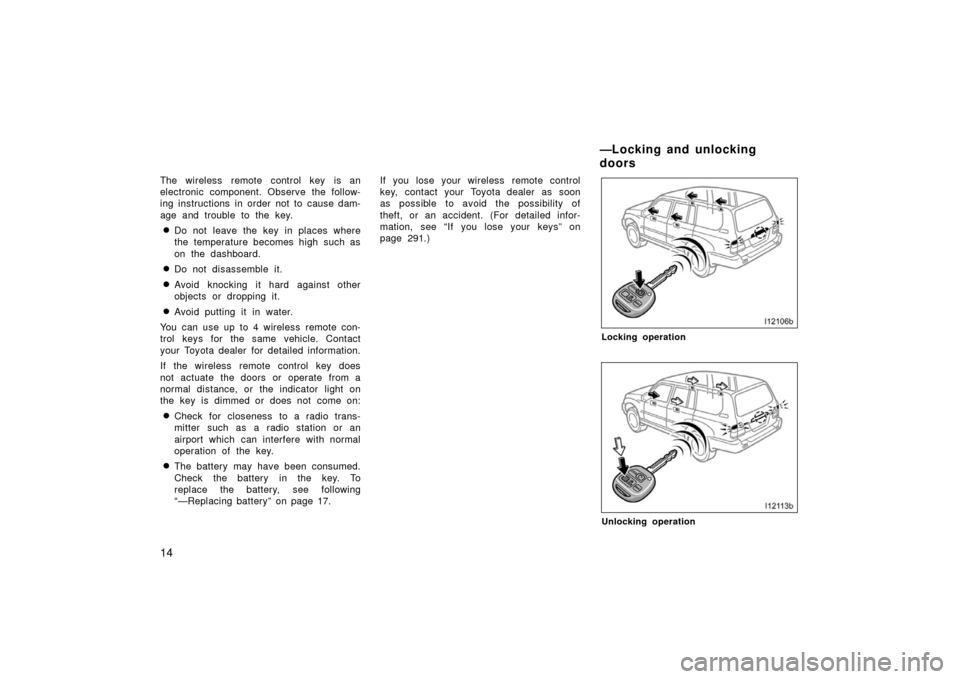
Locking operation
Unlocking operation
—Locking and unlocking
doors