2006 SUZUKI SX4 Can
[x] Cancel search: CanPage 1064 of 1556
Downloaded from www.Manualslib.com manuals search engine 8B-25 Air Bag System:
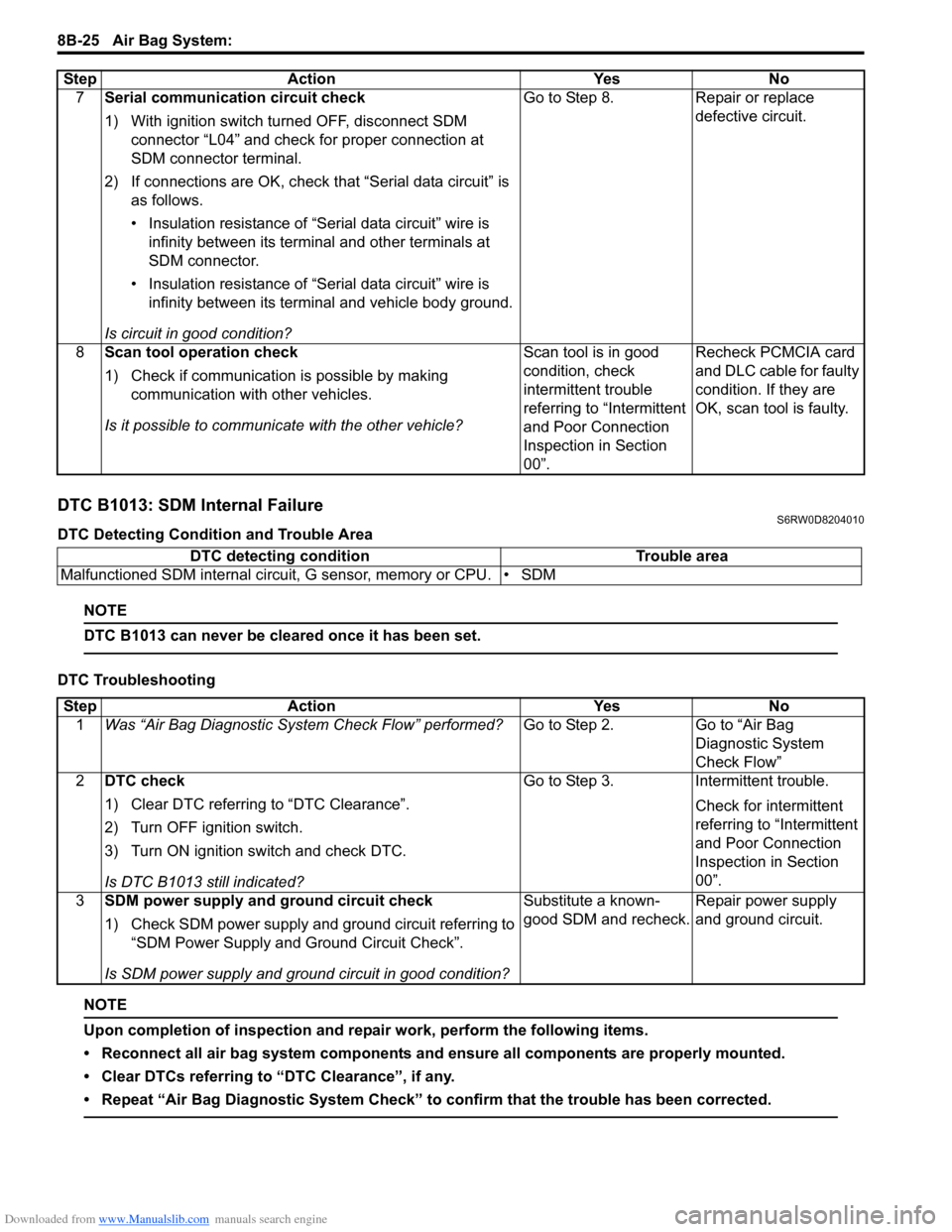
DTC B1013: SDM Internal FailureS6RW0D8204010
DTC Detecting Condition and Trouble Area
NOTE
DTC B1013 can never be cleared once it has been set.
DTC Troubleshooting
NOTE
Upon completion of inspection and repair work, perform the following items.
• Reconnect all air bag system components and ensure all components are properly mounted.
• Clear DTCs referring to “DTC Clearance”, if any.
• Repeat “Air Bag Diagnostic System Check” to confirm that the trouble has been corrected.
7Serial communication circuit check
1) With ignition switch turned OFF, disconnect SDM
connector “L04” and check for proper connection at
SDM connector terminal.
2) If connections are OK, check that “Serial data circuit” is
as follows.
• Insulation resistance of “Serial data circuit” wire is
infinity between its terminal and other terminals at
SDM connector.
• Insulation resistance of “Serial data circuit” wire is
infinity between its terminal and vehicle body ground.
Is circuit in good condition?Go to Step 8. Repair or replace
defective circuit.
8Scan tool operation check
1) Check if communication is possible by making
communication with other vehicles.
Is it possible to communicate with the other vehicle?Scan tool is in good
condition, check
intermittent trouble
referring to “Intermittent
and Poor Connection
Inspection in Section
00”.Recheck PCMCIA card
and DLC cable for faulty
condition. If they are
OK, scan tool is faulty. Step Action Yes No
DTC detecting condition Trouble area
Malfunctioned SDM internal circuit, G sensor, memory or CPU. • SDM
Step Action Yes No
1Was “Air Bag Diagnostic System Check Flow” performed?Go to Step 2. Go to “Air Bag
Diagnostic System
Check Flow”
2DTC check
1) Clear DTC referring to “DTC Clearance”.
2) Turn OFF ignition switch.
3) Turn ON ignition switch and check DTC.
Is DTC B1013 still indicated?Go to Step 3. Intermittent trouble.
Check for intermittent
referring to “Intermittent
and Poor Connection
Inspection in Section
00”.
3SDM power supply and ground circuit check
1) Check SDM power supply and ground circuit referring to
“SDM Power Supply and Ground Circuit Check”.
Is SDM power supply and ground circuit in good condition?Substitute a known-
good SDM and recheck.Repair power supply
and ground circuit.
Page 1067 of 1556
Downloaded from www.Manualslib.com manuals search engine Air Bag System: 8B-28
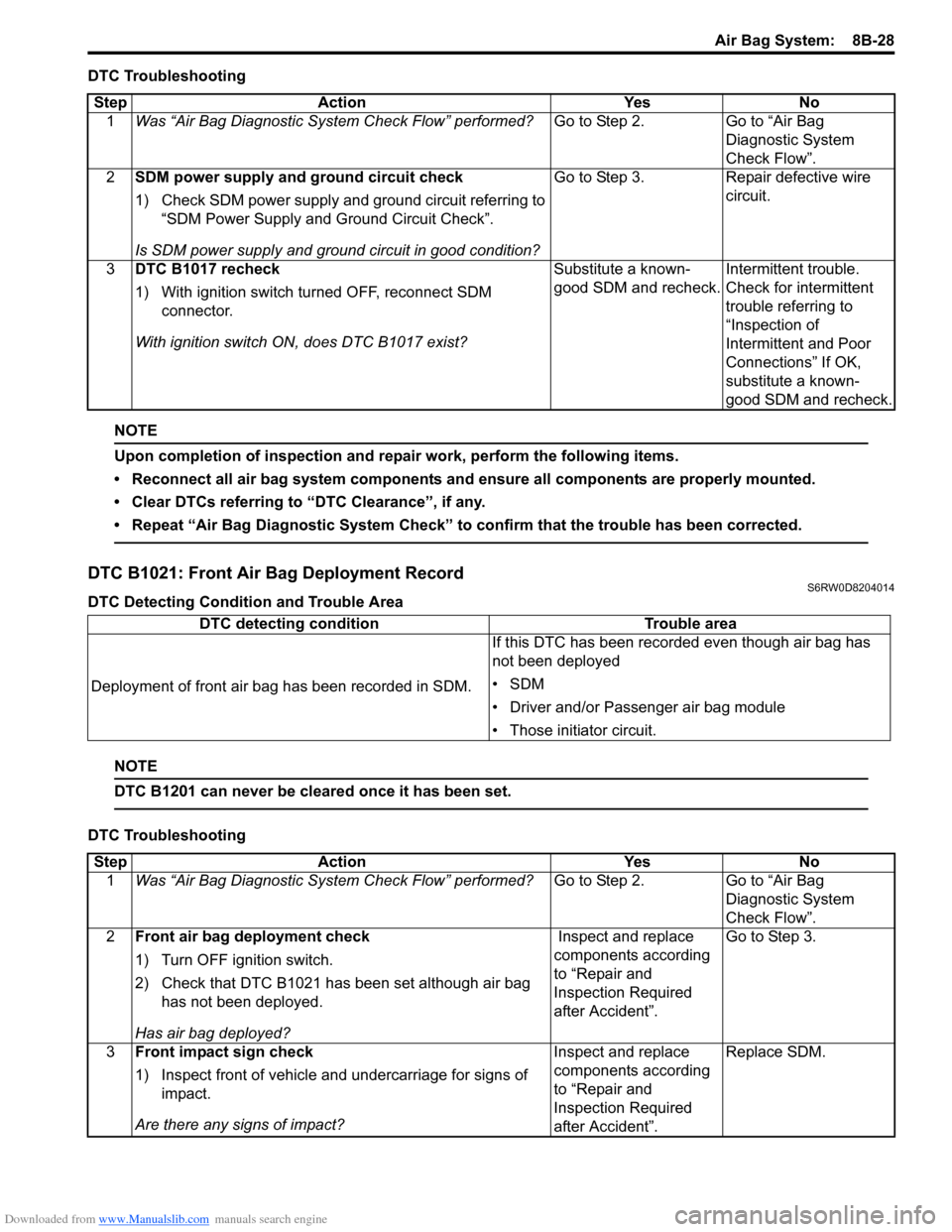
DTC Troubleshooting
NOTE
Upon completion of inspection and repair work, perform the following items.
• Reconnect all air bag system components and ensure all components are properly mounted.
• Clear DTCs referring to “DTC Clearance”, if any.
• Repeat “Air Bag Diagnostic System Check” to confirm that the trouble has been corrected.
DTC B1021: Front Air Bag Deployment RecordS6RW0D8204014
DTC Detecting Condition and Trouble Area
NOTE
DTC B1201 can never be cleared once it has been set.
DTC TroubleshootingStep Action Yes No
1Was “Air Bag Diagnostic System Check Flow” performed?Go to Step 2. Go to “Air Bag
Diagnostic System
Check Flow”.
2SDM power supply and ground circuit check
1) Check SDM power supply and ground circuit referring to
“SDM Power Supply and Ground Circuit Check”.
Is SDM power supply and ground circuit in good condition?Go to Step 3. Repair defective wire
circuit.
3DTC B1017 recheck
1) With ignition switch turned OFF, reconnect SDM
connector.
With ignition switch ON, does DTC B1017 exist?Substitute a known-
good SDM and recheck.Intermittent trouble.
Check for intermittent
trouble referring to
“Inspection of
Intermittent and Poor
Connections” If OK,
substitute a known-
good SDM and recheck.
DTC detecting condition Trouble area
Deployment of front air bag has been recorded in SDM.If this DTC has been recorded even though air bag has
not been deployed
•SDM
• Driver and/or Passenger air bag module
• Those initiator circuit.
Step Action Yes No
1Was “Air Bag Diagnostic System Check Flow” performed?Go to Step 2. Go to “Air Bag
Diagnostic System
Check Flow”.
2Front air bag deployment check
1) Turn OFF ignition switch.
2) Check that DTC B1021 has been set although air bag
has not been deployed.
Has air bag deployed? Inspect and replace
components according
to “Repair and
Inspection Required
after Accident”.Go to Step 3.
3Front impact sign check
1) Inspect front of vehicle and undercarriage for signs of
impact.
Are there any signs of impact?Inspect and replace
components according
to “Repair and
Inspection Required
after Accident”.Replace SDM.
Page 1069 of 1556
Downloaded from www.Manualslib.com manuals search engine Air Bag System: 8B-30
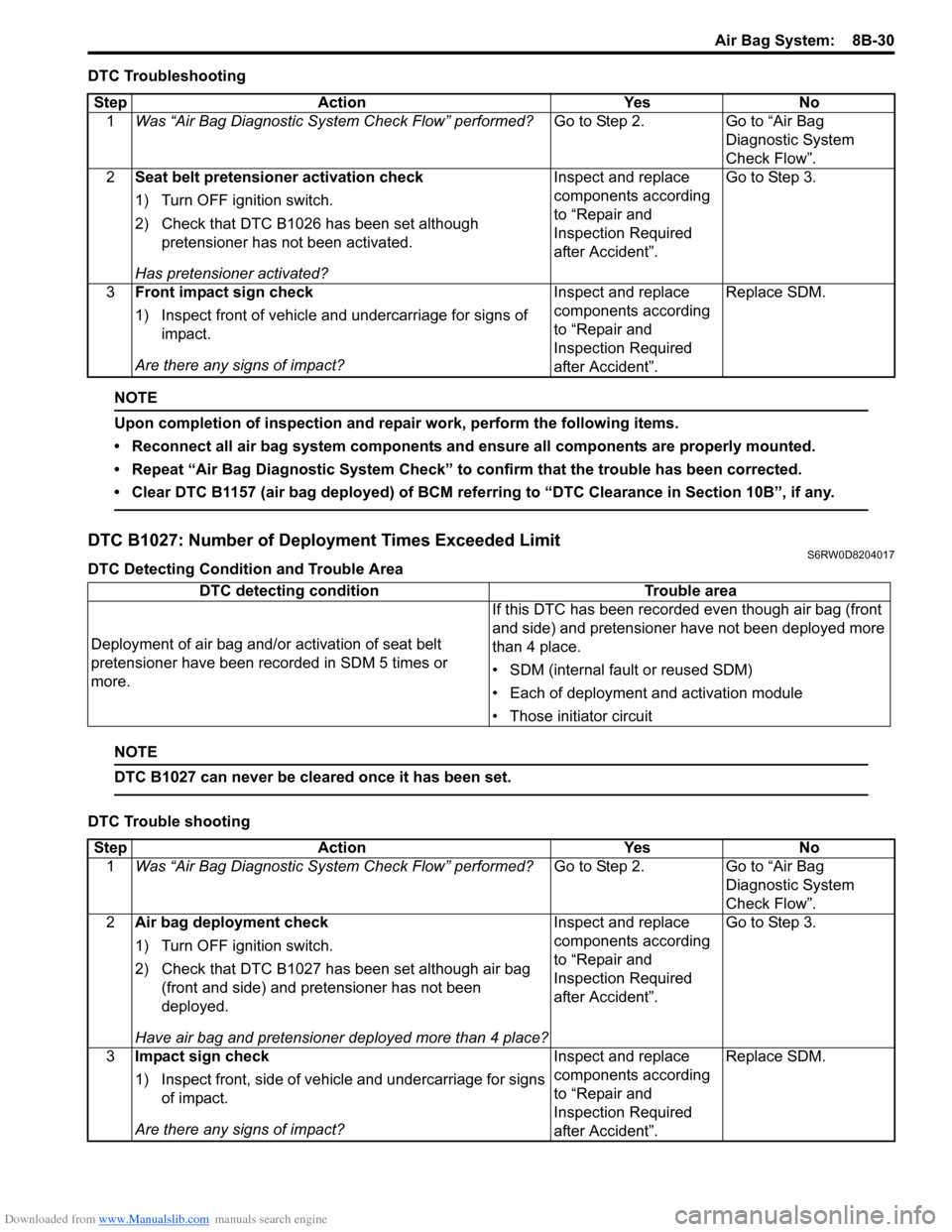
DTC Troubleshooting
NOTE
Upon completion of inspection and repair work, perform the following items.
• Reconnect all air bag system components and ensure all components are properly mounted.
• Repeat “Air Bag Diagnostic System Check” to confirm that the trouble has been corrected.
• Clear DTC B1157 (air bag deployed) of BCM referring to “DTC Clearance in Section 10B”, if any.
DTC B1027: Number of Deployment Times Exceeded LimitS6RW0D8204017
DTC Detecting Condition and Trouble Area
NOTE
DTC B1027 can never be cleared once it has been set.
DTC Trouble shootingStep Action Yes No
1Was “Air Bag Diagnostic System Check Flow” performed?Go to Step 2. Go to “Air Bag
Diagnostic System
Check Flow”.
2Seat belt pretensioner activation check
1) Turn OFF ignition switch.
2) Check that DTC B1026 has been set although
pretensioner has not been activated.
Has pretensioner activated?Inspect and replace
components according
to “Repair and
Inspection Required
after Accident”.Go to Step 3.
3Front impact sign check
1) Inspect front of vehicle and undercarriage for signs of
impact.
Are there any signs of impact?Inspect and replace
components according
to “Repair and
Inspection Required
after Accident”.Replace SDM.
DTC detecting condition Trouble area
Deployment of air bag and/or activation of seat belt
pretensioner have been recorded in SDM 5 times or
more.If this DTC has been recorded even though air bag (front
and side) and pretensioner have not been deployed more
than 4 place.
• SDM (internal fault or reused SDM)
• Each of deployment and activation module
• Those initiator circuit
Step Action Yes No
1Was “Air Bag Diagnostic System Check Flow” performed?Go to Step 2. Go to “Air Bag
Diagnostic System
Check Flow”.
2Air bag deployment check
1) Turn OFF ignition switch.
2) Check that DTC B1027 has been set although air bag
(front and side) and pretensioner has not been
deployed.
Have air bag and pretensioner deployed more than 4 place?Inspect and replace
components according
to “Repair and
Inspection Required
after Accident”.Go to Step 3.
3Impact sign check
1) Inspect front, side of vehicle and undercarriage for signs
of impact.
Are there any signs of impact?Inspect and replace
components according
to “Repair and
Inspection Required
after Accident”.Replace SDM.
Page 1105 of 1556
Downloaded from www.Manualslib.com manuals search engine Air Bag System: 8B-66
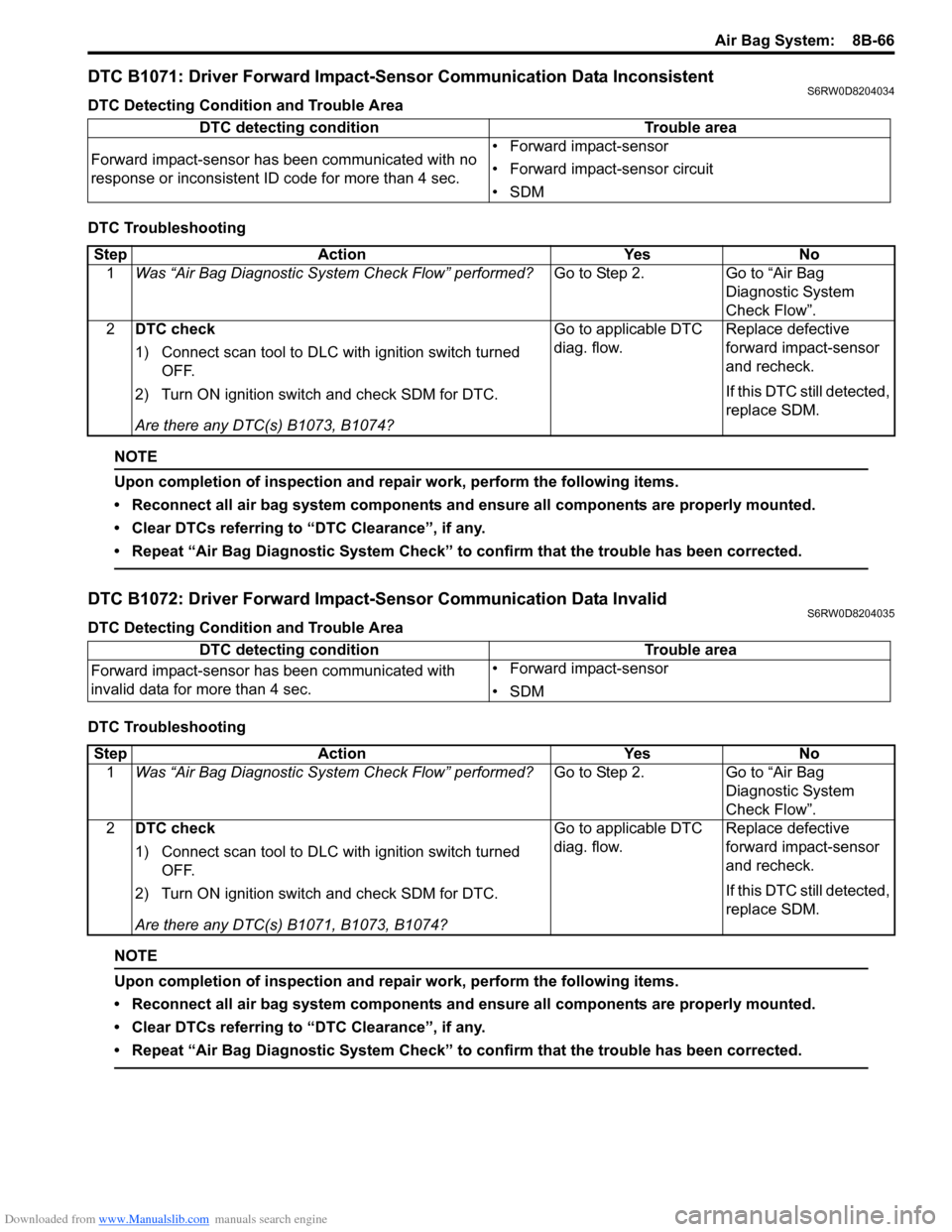
DTC B1071: Driver Forward Impact-Sensor Communication Data InconsistentS6RW0D8204034
DTC Detecting Condition and Trouble Area
DTC Troubleshooting
NOTE
Upon completion of inspection and repair work, perform the following items.
• Reconnect all air bag system components and ensure all components are properly mounted.
• Clear DTCs referring to “DTC Clearance”, if any.
• Repeat “Air Bag Diagnostic System Check” to confirm that the trouble has been corrected.
DTC B1072: Driver Forward Impact-Sensor Communication Data InvalidS6RW0D8204035
DTC Detecting Condition and Trouble Area
DTC Troubleshooting
NOTE
Upon completion of inspection and repair work, perform the following items.
• Reconnect all air bag system components and ensure all components are properly mounted.
• Clear DTCs referring to “DTC Clearance”, if any.
• Repeat “Air Bag Diagnostic System Check” to confirm that the trouble has been corrected.
DTC detecting condition Trouble area
Forward impact-sensor has been communicated with no
response or inconsistent ID code for more than 4 sec.• Forward impact-sensor
• Forward impact-sensor circuit
•SDM
Step Action Yes No
1Was “Air Bag Diagnostic System Check Flow” performed?Go to Step 2. Go to “Air Bag
Diagnostic System
Check Flow”.
2DTC check
1) Connect scan tool to DLC with ignition switch turned
OFF.
2) Turn ON ignition switch and check SDM for DTC.
Are there any DTC(s) B1073, B1074?Go to applicable DTC
diag. flow.Replace defective
forward impact-sensor
and recheck.
If this DTC still detected,
replace SDM.
DTC detecting condition Trouble area
Forward impact-sensor has been communicated with
invalid data for more than 4 sec.• Forward impact-sensor
•SDM
Step Action Yes No
1Was “Air Bag Diagnostic System Check Flow” performed?Go to Step 2. Go to “Air Bag
Diagnostic System
Check Flow”.
2DTC check
1) Connect scan tool to DLC with ignition switch turned
OFF.
2) Turn ON ignition switch and check SDM for DTC.
Are there any DTC(s) B1071, B1073, B1074?Go to applicable DTC
diag. flow.Replace defective
forward impact-sensor
and recheck.
If this DTC still detected,
replace SDM.
Page 1109 of 1556
Downloaded from www.Manualslib.com manuals search engine Air Bag System: 8B-70
DTC B1081 / B1091: Side Impact-Sensor No ResponseS6RW0D8204066
DTC B1081: Driver Side Impact-Sensor No Response
DTC B1091: Passenger Side Impact-Sensor No Response
DTC Detecting Condition and Trouble Area
DTC Troubleshooting
NOTE
Upon completion of inspection and repair work, perform the following items.
• Reconnect all air bag system components and ensure all components are properly mounted.
• Clear DTCs referring to “DTC Clearance”, if any.
• Repeat “Air Bag Diagnostic System Check” to confirm that the trouble has been corrected.
DTC B1082 / B1092: Side Impact-Sensor Communication DATA InvalidS6RW0D8204058
DTC B1082: Driver Side Impact-Sensor Communication DATA Invalid
DTC B1092: Passenger Side Impact-Sensor Communication DATA Invalid
DTC Detecting Condition and Trouble AreaDTC detecting condition Trouble area
DTC B1081:
Driver side impact-sensor has been communicated with
no response for more than 4 sec.
DTC B1091:
Passenger side impact-sensor has been communicated
with no response for more than 4 sec.• Driver / passenger side impact-sensor circuit
• Driver / passenger side impact-sensor
•SDM
Step Action Yes No
1Was “Air Bag Diagnostic System Check Flow” performed?Go to Step 2. Go to “Air Bag
Diagnostic System
Check Flow”.
2DTC check
1) Connect scan tool to DLC with ignition switch turned
OFF.
2) Turn ON ignition switch and check SDM for DTC.
Are there any DTCs B1083, B1084 (for DTC B1081) or
B1093, B1094 (for DTC B1091)?Go to applicable DTC
diag. flow.Replace defective side
impact-sensor and
recheck.
If this DTC still detected,
replace SDM.
DTC detecting condition Trouble area
DTC B1082:
Driver side impact-sensor has been communicated with
invalid data for more than 4 sec.
DTC B1092:
Passenger side impact-sensor has been communicated
with invalid data for more than 4 sec.• Driver / passenger side impact-sensor
•SDM
Page 1110 of 1556
Downloaded from www.Manualslib.com manuals search engine 8B-71 Air Bag System:
DTC Troubleshooting
NOTE
Upon completion of inspection and repair work, perform the following items.
• Reconnect all air bag system components and ensure all components are properly mounted.
• Clear DTCs referring to “DTC Clearance”, if any.
• Repeat “Air Bag Diagnostic System Check” to confirm that the trouble has been corrected.
DTC B1083 / B1093: Side Impact-Sensor Circuit Shorted to GroundS6RW0D8204059
DTC B1083: Driver Side Impact-Sensor Circuit Shorted to Ground
DTC B1093: Passenger Side Impact-Sensor Circuit Shorted to Ground
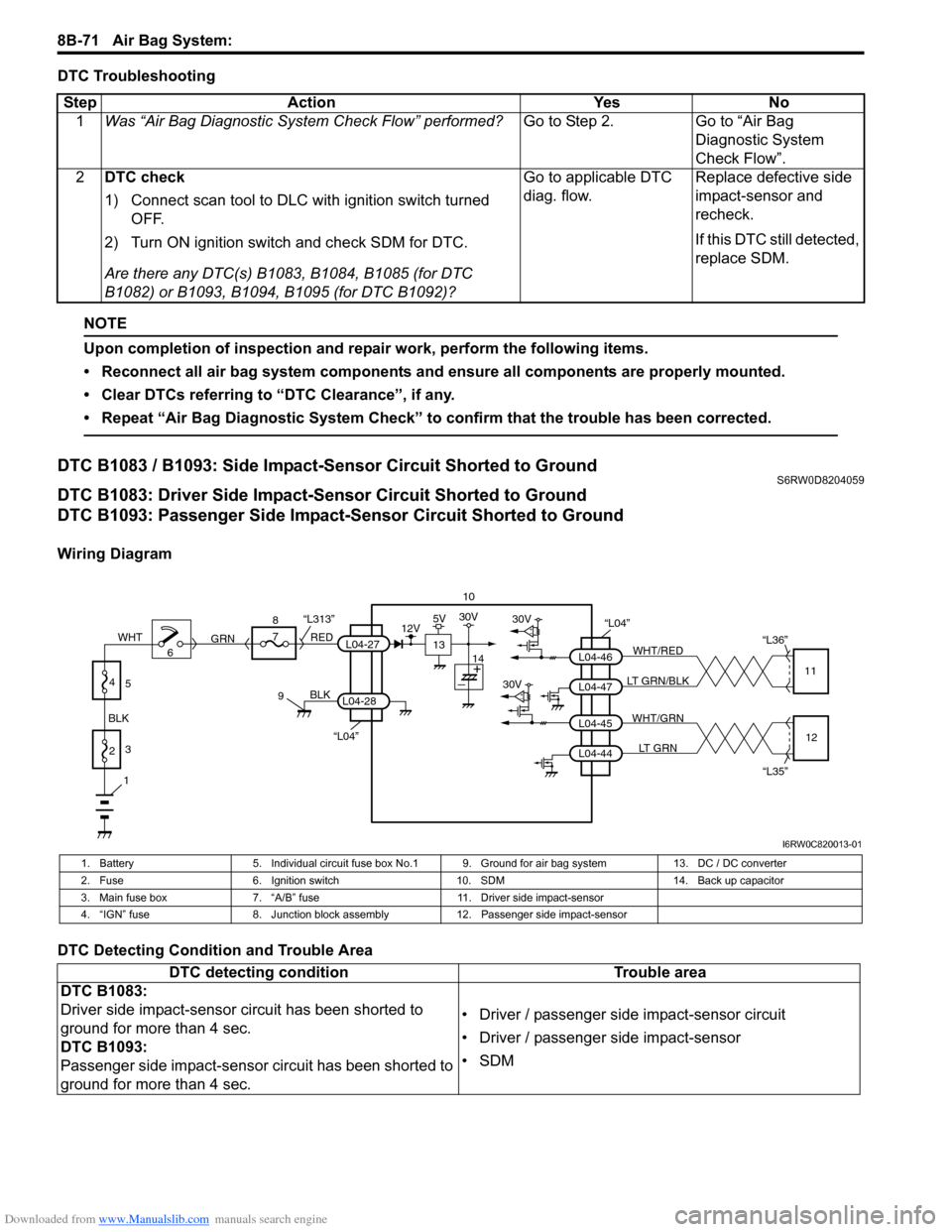
Wiring Diagram
DTC Detecting Condition and Trouble AreaStep Action Yes No
1Was “Air Bag Diagnostic System Check Flow” performed?Go to Step 2. Go to “Air Bag
Diagnostic System
Check Flow”.
2DTC check
1) Connect scan tool to DLC with ignition switch turned
OFF.
2) Turn ON ignition switch and check SDM for DTC.
Are there any DTC(s) B1083, B1084, B1085 (for DTC
B1082) or B1093, B1094, B1095 (for DTC B1092)?Go to applicable DTC
diag. flow.Replace defective side
impact-sensor and
recheck.
If this DTC still detected,
replace SDM.
10
“L04”30V
30VL04-47 L04-46WHT/RED
LT GRN/BLK“L36”
11
L04-44 L04-45WHT/GRN
LT GRN
“L35”12
“L04”
BLK
L04-28
6 8
7
RED
GRN“L313”L04-27
9
1
2 BLKWHT3
4
5
13
12V5V30V
14
I6RW0C820013-01
1. Battery 5. Individual circuit fuse box No.1 9. Ground for air bag system 13. DC / DC converter
2. Fuse 6. Ignition switch 10. SDM 14. Back up capacitor
3. Main fuse box 7. “A/B” fuse 11. Driver side impact-sensor
4. “IGN” fuse 8. Junction block assembly 12. Passenger side impact-sensor
DTC detecting condition Trouble area
DTC B1083:
Driver side impact-sensor circuit has been shorted to
ground for more than 4 sec.
DTC B1093:
Passenger side impact-sensor circuit has been shorted to
ground for more than 4 sec.• Driver / passenger side impact-sensor circuit
• Driver / passenger side impact-sensor
•SDM
Page 1113 of 1556
Downloaded from www.Manualslib.com manuals search engine Air Bag System: 8B-74
NOTE
Upon completion of inspection and repair work, perform the following items.
• Reconnect all air bag system components and ensure all components are properly mounted.
• Clear DTCs referring to “DTC Clearance”, if any.
• Repeat “Air Bag Diagnostic System Check” to confirm that the trouble has been corrected.
DTC B1085 / B1095: Side Impact-Sensor Communication DATA InconsistentS6RW0D8204061
DTC B1085: Driver Side Impact-Sensor Communication DATA Inconsistent
DTC B1095: Passenger Side Impact-Sensor Communication DATA Inconsistent
DTC Detecting Condition and Trouble Area
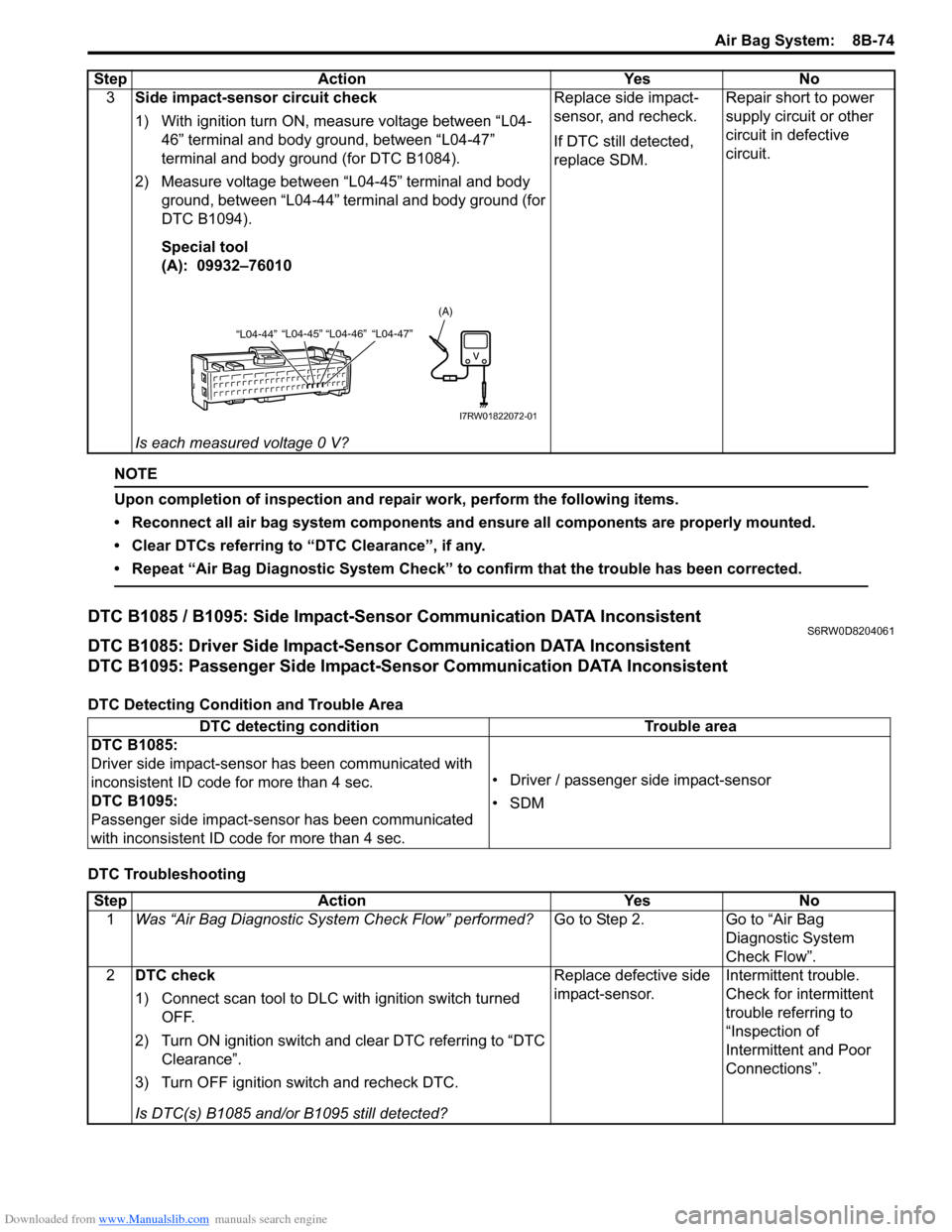
DTC Troubleshooting3Side impact-sensor circuit check
1) With ignition turn ON, measure voltage between “L04-
46” terminal and body ground, between “L04-47”
terminal and body ground (for DTC B1084).
2) Measure voltage between “L04-45” terminal and body
ground, between “L04-44” terminal and body ground (for
DTC B1094).
Special tool
(A): 09932–76010
Is each measured voltage 0 V?Replace side impact-
sensor, and recheck.
If DTC still detected,
replace SDM.Repair short to power
supply circuit or other
circuit in defective
circuit. Step Action Yes No
“L04-44”“L04-45” “L04-46” “L04-47”
(A)
I7RW01822072-01
DTC detecting condition Trouble area
DTC B1085:
Driver side impact-sensor has been communicated with
inconsistent ID code for more than 4 sec.
DTC B1095:
Passenger side impact-sensor has been communicated
with inconsistent ID code for more than 4 sec.• Driver / passenger side impact-sensor
•SDM
Step Action Yes No
1Was “Air Bag Diagnostic System Check Flow” performed?Go to Step 2. Go to “Air Bag
Diagnostic System
Check Flow”.
2DTC check
1) Connect scan tool to DLC with ignition switch turned
OFF.
2) Turn ON ignition switch and clear DTC referring to “DTC
Clearance”.
3) Turn OFF ignition switch and recheck DTC.
Is DTC(s) B1085 and/or B1095 still detected?Replace defective side
impact-sensor.Intermittent trouble.
Check for intermittent
trouble referring to
“Inspection of
Intermittent and Poor
Connections”.
Page 1130 of 1556
Downloaded from www.Manualslib.com manuals search engine 8B-91 Air Bag System:
CAUTION!
After detecting one time of such collision as
to meet deployment conditions, the SDM
must not be used.
Refer to “Air Bag Diagnostic System Check”
when checking the SDM.
Accident with Deployment / Activation – Component
Replacement
When driver and passenger air bags are deployed, the
following components must be replaced.
• Driver and passenger air bag (inflator) modules
• Driver and passenger seat belt pretensioners
• SDM after detecting such collision as to meet
deployment conditions
• Forward impact-sensor
• Instrument panel
When side-air bag and side curtain-air bag are deployed,
the following components must be replaced.
• Deployed side-air bag (inflator) module
• Deployed side curtain-air bag (inflator) module
• Side impact-sensor
•SDM
Accident with or without Deployment / Activation –
Component Inspections
Certain air bag and restraint system components must
be inspected after any crash, whether the air bag system
activated or not. If any faulty condition is found in the
following checks, replace faulty part.
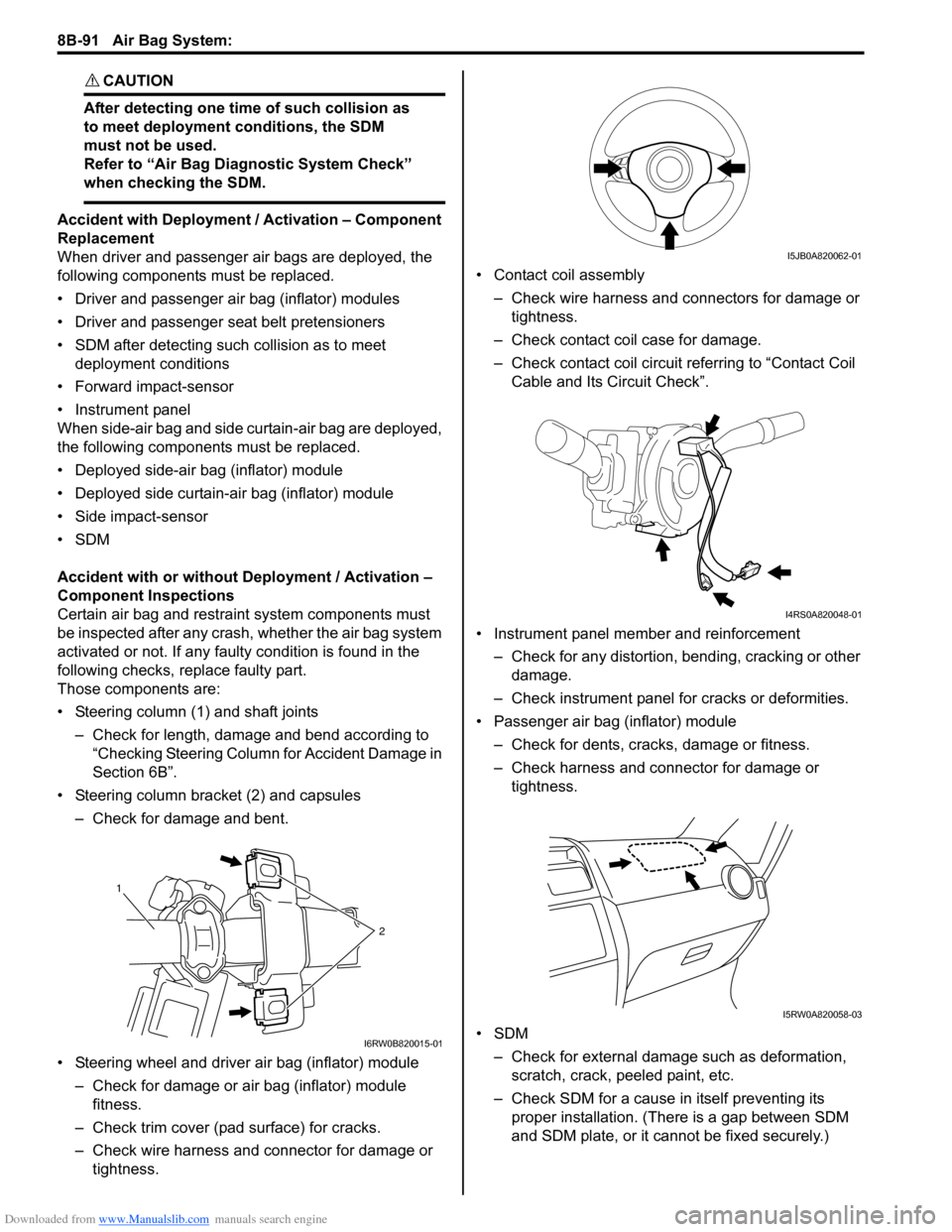
Those components are:
• Steering column (1) and shaft joints
– Check for length, damage and bend according to
“Checking Steering Column for Accident Damage in
Section 6B”.
• Steering column bracket (2) and capsules
– Check for damage and bent.
• Steering wheel and driver air bag (inflator) module
– Check for damage or air bag (inflator) module
fitness.
– Check trim cover (pad surface) for cracks.
– Check wire harness and connector for damage or
tightness.• Contact coil assembly
– Check wire harness and connectors for damage or
tightness.
– Check contact coil case for damage.
– Check contact coil circuit referring to “Contact Coil
Cable and Its Circuit Check”.
• Instrument panel member and reinforcement
– Check for any distortion, bending, cracking or other
damage.
– Check instrument panel for cracks or deformities.
• Passenger air bag (inflator) module
– Check for dents, cracks, damage or fitness.
– Check harness and connector for damage or
tightness.
•SDM
– Check for external damage such as deformation,
scratch, crack, peeled paint, etc.
– Check SDM for a cause in itself preventing its
proper installation. (There is a gap between SDM
and SDM plate, or it cannot be fixed securely.)
1
2
I6RW0B820015-01
I5JB0A820062-01
I4RS0A820048-01
I5RW0A820058-03