2006 SUZUKI SX4 tail
[x] Cancel search: tailPage 503 of 1556
Downloaded from www.Manualslib.com manuals search engine Differential: 3B-6
Input / Output Signal Table of 4WD Control ModuleS6RW0D3201008
4WD control module outputs the following signals to coupling assembly, indicators, according to the 2WD/4WD switch
operation.
On-Board Diagnostic System DescriptionS6RW0D3201009
For 4WD control system, 4WD control module has the following functions.
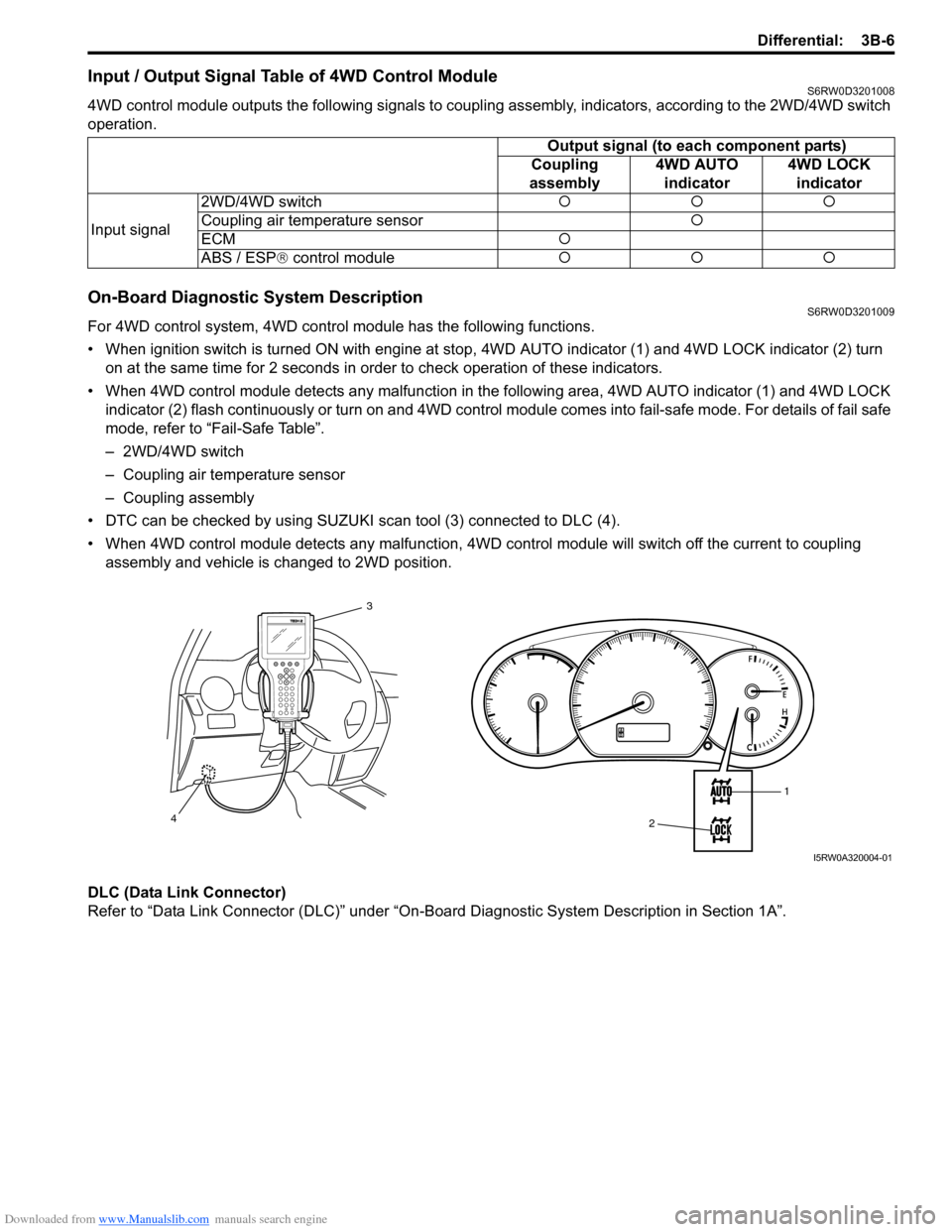
• When ignition switch is turned ON with engine at stop, 4WD AUTO indicator (1) and 4WD LOCK indicator (2) turn
on at the same time for 2 seconds in order to check operation of these indicators.
• When 4WD control module detects any malfunction in the following area, 4WD AUTO indicator (1) and 4WD LOCK
indicator (2) flash continuously or turn on and 4WD control module comes into fail-safe mode. For details of fail safe
mode, refer to “Fail-Safe Table”.
– 2WD/4WD switch
– Coupling air temperature sensor
– Coupling assembly
• DTC can be checked by using SUZUKI scan tool (3) connected to DLC (4).
• When 4WD control module detects any malfunction, 4WD control module will switch off the current to coupling
assembly and vehicle is changed to 2WD position.
DLC (Data Link Connector)
Refer to “Data Link Connector (DLC)” under “On-Board Diagnostic System Description in Section 1A”.Output signal (to each component parts)
Coupling
assembly4WD AUTO
indicator4WD LOCK
indicator
Input signal2WD/4WD switch{{{
Coupling air temperature sensor{
ECM{
ABS / ESP® control module{{{
1
2 3
4
I5RW0A320004-01
Page 505 of 1556

Downloaded from www.Manualslib.com manuals search engine Differential: 3B-8
Diagnostic Information and Procedures
4WD Control System CheckS6RW0D3204001
Refer to the following items for the details of each step.
Step Action Yes No
1) Customer complaint analysis
1) Perform customer complaint analysis.
Was customer complaint analysis performed?Go to Step 2. Perform customer
complaint analysis.
2) DTC check, record and clearance
1) Check for DTC.
Is there any DTC(s)?Print DTC or write them
down and clear them by
referring to “DTC
Clearance”. Go to Step
3.Go to Step 4.
3) Visual inspection
1) Perform visual inspection.
Is there any faulty condition?Repair or replace
malfunction part. Go to
St ep 11 .Go to Step 5.
4) Visual inspection
1) Perform visual inspection.
Is there any faulty condition?Repair or replace
malfunction part. Go to
St ep 11 .Go to Step 8.
5) Trouble symptom confirmation
1) Select 2WD/4WD switch to “2WD”, “4WD-auto” and
“4WD-lock” positions referring to “4WD Control System
Operation Inspection”.
2) Confirm trouble symptom.
Is trouble symptom identified?Go to Step 6. Go to Step 7.
6) Rechecking and record of DTC
1) Recheck for DTC referring to “DTC Check”.
Is there any DTC(s)?Go to Step 9. Go to Step 8.
7) Rechecking and record of DTC
1) Recheck for DTC referring to “DTC Check”.
Is there any DTC(s)?Go to Step 9. Go to Step 10.
8) 4WD control symptom diagnosis
1) Check and repair according to “4WD Control Symptom
Diagnosis”.
Are check and repair complete?Go to Step 11. Check and repair
malfunction part(s). Go
to Step 11.
9) Troubleshooting for DTC
1) Check and repair according to applicable DTC flow.
Are check and repair complete?Go to Step 11. Check and repair
malfunction part(s). Go
to Step 11.
10) Check for intermittent problems
1) Check for intermittent problems referring to “Intermittent
and Poor Connection Inspection in Section 00”.
Is there any faulty condition?Repair or replace
malfunction part(s). Go
to Step 11.Go to Step 11.
11) Final confirmation test
1) Clear DTC if any.
2) Perform final confirmation test.
Is there any problem symptom, DTC or abnormal condition?Go to Step 6. END.
Page 506 of 1556

Downloaded from www.Manualslib.com manuals search engine 3B-9 Differential:
Detail of 4WD Control System Check
Step 1. Customer complaint analysis
Record details of the problem (failure, complaint) and how it occurred as described by the customer.
For this purpose, use of such a questionnaire form as shown in the following will facilitate collecting information to the
point required for proper analysis and diagnosis.
Customer questionnaire (Example)
NOTE
The form is a standard sample. It should be modified according to conditions characteristic of each
market.
Customer’s name: Model: VIN:
Problem Symptoms
Frequency of Occurrence
Conditions for
Occurrence of Problem
Environmental Condition
Diagnostic Trouble Code
Date of Reg:
4WD position indicator abnormal: fails to turn on / fails to turn off /
flashes
Abnormal noise while vehicle running: from coupling assembly
other
No changed to “2WD” position
No changed to “4WD-lock” position
No changed to “4WD-auto” position
When starting: at initial start only / at every start / other
Vehicle speed: while accelerating / while decelerating / at stop /
while turning / while running at constant speed /
other
Road surface condition: Paved road / rough road / snow-covered road /
other
Wheather: fine / cloudy / rain / snow / other
Temperature: ( )
First check: Normal code / malfunction code ( )
Second check after test drive: Normal code / malfunction code ( ) Continuous / Intermittent ( times a day, a month) /
otherDate of problem: Mileage: Date of issue:
I5RW0A320007-02
Page 508 of 1556

Downloaded from www.Manualslib.com manuals search engine 3B-11 Differential:
Visual InspectionS6RW0D3204004
Check the following parts and systems visually.
DTC CheckS6RW0D3204005
1) Turn ignition switch to OFF position.
2) Connect SUZUKI scan tool to data link connector
(DLC) (1) located on underside of instrument panel.
Special tool
(A): SUZUKI scan tool
3) Turn ignition switch to ON position.
4) Read DTC according to instructions displayed on
SUZUKI scan tool and print it or write it down. Refer
to SUZUKI scan tool operator’s manual for further
details.
If communication between SUZUKI scan tool and
4WD control module is not possible, check if
SUZUKI scan tool is communicable by connecting it
to 4WD control module in another vehicle. If
communication is possible in this case, SUZUKI
scan tool is in good condition. Then check data link
connector and serial data line (circuit) in the vehicle
with which communication was not possible.
5) After completing the check, turn ignition switch OFF
and disconnect SUZUKI scan tool from data link
connector (DLC).
DTC ClearanceS6RW0D3204006
1) Turn ignition switch to OFF position.
2) Connect SUZUKI scan tool to data link connector
(DLC) (1) located on underside of instrument panel.
Special tool
(A): SUZUKI scan tool
3) Turn ignition switch to ON position.
4) Erase DTC according to instructions displayed on
SUZUKI scan tool. Refer to SUZUKI scan tool
operator’s manual for further details.
5) After completing clearance, turn ignition switch OFF
and disconnect SUZUKI scan tool from data link
connector (DLC).
6) Perform “DTC Check” and confirm that NO CODES
is displayed.
NOTE
DTC stored in 4WD control module memory
are also cleared in the following cases. Be
careful not to clear them before keeping their
record.
• When power to 4WD control module is cut
off (by disconnecting battery cable,
removing fuse or disconnecting 4WD
control module connectors).
• When the same malfunction (DTC) is not
detected again during 40 engine warm-up
cycles.
Inspection Item Referring
• Rear differential oil ---- level, leakage “Rear Differential Oil Change”
• Transfer gear oil ---- level, leakage “Transfer Oil Change in Section 3C”
• Manual transmission oil ---- level, leakage “Manual Transaxle Oil Change in Section 5B”
• Rear differential mounting(s) ---- wear and looseness
• Fuses ---- burning
• Battery ---- fluid level, corrosion of terminal “Battery Inspection in Section 1J”
• Connectors of electric wire harness ---- disconnection,
friction“Intermittent and Poor Connection Inspection in Section
00”
• Other parts that can be checked visually
1(A)I5RW0A320008-011(A)I5RW0A320008-01
Page 613 of 1556

Downloaded from www.Manualslib.com manuals search engine ABS: 4E-8
Component Location
ABS Components LocationS6RW0D4503001
Diagnostic Information and Procedures
ABS CheckS6RW0D4504001
Refer to the following items for the details of each step.
1
2
6
2
6
26
264
5
7
3
8
I5RW0A450006-02
1. ABS hydraulic unit / control module assembly 5. EBD warning light (Brake warning light)
2. Wheel speed sensors 6. Wheel speed sensor encoder (included in wheel hub assembly)
3. Brake light switch 7. Data link connector
4. ABS warning light 8. G sensor (4WD model)
Step Action Yes No
1) Malfunction analysis
1) Perform “Customer complaint analysis: ”.
2) Perform “Problem symptom confirmation: ”.
3) Perform “DTC check, record and clearance: ” and
recheck DTC.
Is there any malfunction DTC?Go to Step 4. Go to Step 2.
2) Driving test
1) Perform “Step 2: Driving Test: ”.
Is trouble symptom identified?Go to Step 3. Go to Step 6.
3) DTC check
1) Perform “DTC Check”.
Is it malfunction code?Go to Step 4. Go to Step 5.
4) ABS check
1) Inspect and repair referring to applicable DTC flow.
Does trouble recur?Go to Step 5. Go to Step 7.
5) Brakes diagnosis
1) Inspect and repair referring to “Brakes Symptom
Diagnosis in Section 4A”.
Does trouble recur?Go to Step 3. Go to Step 7.
Page 614 of 1556

Downloaded from www.Manualslib.com manuals search engine 4E-9 ABS:
Step 1: Malfunction Analysis
Customer complaint analysis
Record details of the problem (failure, complaint) and how it occurred as described by the customer.
For this purpose, use of such a questionnaire form as shown in the following will facilitate collecting information to the
point required for proper analysis and diagnosis.
Customer questionnaire (Example) 6) Check for intermittent problem
1) Check intermittent troubles referring to “Intermittent and
Poor Connection Inspection in Section 00” and related
circuit of trouble code recorded in Step 1.
Does trouble recur?Go to Step 4. Go to Step 7.
7) Final confirmation test
1) Perform “Step 7: Final Confirmation Test: ”.
Does trouble recur?Go to Step 3. End. Step Action Yes No
I2RH01450014-01
Page 616 of 1556

Downloaded from www.Manualslib.com manuals search engine 4E-11 ABS:
DTC CheckS6RW0D4504004
1) Turn ignition switch to OFF position.
2) Connect SUZUKI scan tool to data link connector
(1).
Special tool
(A): SUZUKI scan tool
3) Turn ignition switch to ON position.
4) Read DTC according to instructions displayed on
SUZUKI scan tool and print it or write it down. Refer
to SUZUKI scan tool operator’s manual for further
details.
NOTE
If SUZUKI scan tool can not communicate
ABS hydraulic unit / control module, perform
“Serial Data Link Circuit Check”.
5) After completing the check, turn ignition switch off
and disconnect SUZUKI scan tool from DLC.
DTC TableS6RW0D4504005
CAUTION!
Be sure to perform “ABS Check” before
starting diagnosis.
DTC ClearanceS6RW0D4504006
WARNING!
When performing a driving test, select a safe
place where there is neither any traffic nor
any traffic accident possibility and be very
careful during testing to avoid occurrence of
an accident.
After repair or replace malfunction part(s), clear all DTCs
by performing the following procedure or using SUZUKI
scan tool.
1) Connect SUZUKI scan tool to data link connector in
the same manner as when making this connection
for DTC check.
2) Turn ignition switch to ON position.
3) Erase DTC according to instructions displayed on
scan tool. Refer to scan tool operator’s manual for
further derails.
NOTE
For DTC C1022, C1026, C1032, C1036 and
C1061, confirm that ABS warning light turns
off after performing Step 2 of “Test Driving”
under “ABS Check”, and then clear the DTCs.
4) After completing the clearance, turn ignition switch
OFF and disconnect scan tool from data link
connector.
5) Perform “Driving Test” (Step 2 of “ABS Check”) and
“DTC Check” and confirm that NO DTC is displayed
on scan tool. DTC (displayed on
SUZUKI scan tool)Diagnostic Items
NO DTC Normal
)C1013 Control module mismatch
) C1015 G sensor circuit (for 4WD model)
)C1016 Brake light switch
)C1021 RF
Wheel speed sensor circuit )C1025 LF
)C1031 RR
)C1035 LR
)C1022 RF
Wheel speed sensor or
encoder )C1026 LF
)C1032 RR
)C1036 LR
)C1033 Wheel speed sensor deviation
(A)
1
I5RW0A450007-01
)C1041 RF
Inlet solenoid )C1045 LF
)C1051 RR
)C1055 LR
)C1042 RF
Outlet solenoid )C1046 LF
)C1052 RR
)C1056 LR
) C1057Power supply voltage too high / too
low
) C1061 Pump motor circuit
) C1063Solenoid valve power supply driver
circuit
) C1071 Control module internal defect DTC (displayed on
SUZUKI scan tool)Diagnostic Items
Page 649 of 1556

Downloaded from www.Manualslib.com manuals search engine Automatic Transmission/Transaxle: 5A-1
Transmission / Transaxle
Automatic Transmission/Transaxle
Precautions
Precautions in Diagnosing TroubleS6RW0D5100001
• Do not disconnect couplers from TCM, battery cable
from battery, TCM ground wire harness from engine or
main fuse before checking the diagnostic information
(DTC, freeze frame data, etc.) stored in TCM memory.
Such disconnection will clear memorized information
in TCM memory.
• Diagnostic information stored in TCM memory can be
cleared as well as checked by using SUZUKI scan
tool or CAN communication OBD generic scan tool.
Before using scan tool, read its Operator’s
(Instruction) Manual carefully to have good
understanding as to what functions are available and
how to use it.
It is indistinguishable which module turns on MIL
because not only ECM but also TCM turns on MIL.
Therefore, check both ECM and TCM for DTC when
MIL lights on.
When checking TCM for DTC, keep in mind that DTC
is displayed on the scan tool as follows depending on
the scan tool used.
– SUZUKI scan tool displays DTC detected by TCM.
– CAN communication OBD generic scan tool
displays DTC detected by each of ECM and TCM
simultaneously.
• Be sure to read “Precautions for Electrical Circuit
Service in Section 00” before inspection and observe
what is written there.
• TCM replacement
– When substituting a known-good TCM, check that
all relays and actuators have resistance of
specified value.
Neglecting this check may result in damage to good
TCM.
• Communication of ECM, BCM, combination meter,
keyless start control module (if equipped), ABS
control module, 4WD control module (if equipped),
TCM and DLC, is established by CAN (Controller
Area Network). (For more detail of CAN
communication for ECM, refer to “CAN
Communication System Description”). Therefore,
handle CAN communication line with care referring to
“Precaution for CAN Communication System in
Section 00”.
Precautions for Disassembly and ReassemblyS6RW0D5100002
When repairing automatic transaxle, it is necessary to
conduct the on-vehicle test to investigate where the
cause of the trouble lies first.
Then whether overhaul should be done or not is
determined. If the transaxle is disassembled without
such preliminary procedure, not only the cause of the
trouble would be unknown, but also a secondary trouble
may occur and often time would be wasted.
As the automatic transaxle consists of high precision
component, the following cautions should be strictly
observed when handling its parts in disassembly and
reassembly.
• Disassembling valve body assembly is prohibited
essentially. However, a few parts can be
disassembled. When disassembling valve body
component parts, confirm whether their parts are
allowed to disassemble or not referring to “Valve Body
Assembly Disassembly and Reassembly”.
• When component part of forward clutch, direct clutch,
2nd brake and/or O/D and 2nd coast brake, namely
clutch disc, brake disc, retaining plate and/or
separator plate, have been replaced, all learned
contents, which have been stored in TCM memory by
executing learning control, should be initialized
referring to “Learning Control Initialization”.
• Make sure to wash dirt off from the transaxle so that
no such dirt will enter the transaxle during
dismounting and remounting.
• Select a clean place free from dust and dirt for
overhauling.
• Place a rubber mat on the work bench to protect parts
from damage.
• Work gloves or shop cloth should not be used. (Use a
nylon cloth or a paper towel.)
• When separating the case joint, do not pry with a
screwdriver or such but tap with a plastic hammer
lightly.
• Make sure to wash dirt off from the transaxle so that
no such dirt will enter the transaxle during
disassembly and reassembly.
• Wash the disassembled parts in ATF (Automatic
Transaxle Fluid) or kerosene (using care not to allow
ATF or kerosene to get on your face, etc.) and confirm
that each fluid passage is not clogged by blowing air
into it. But use kerosene to wash the discs, resin
washers and rubber parts.
• Replace each gasket, oil seal and O-ring with a new
one.
• Apply ATF to sliding or rotating parts before
reassembly.