2006 SUBARU IMPREZA horn
[x] Cancel search: hornPage 6 of 365
3
CONTINUED
Vehicle symbols
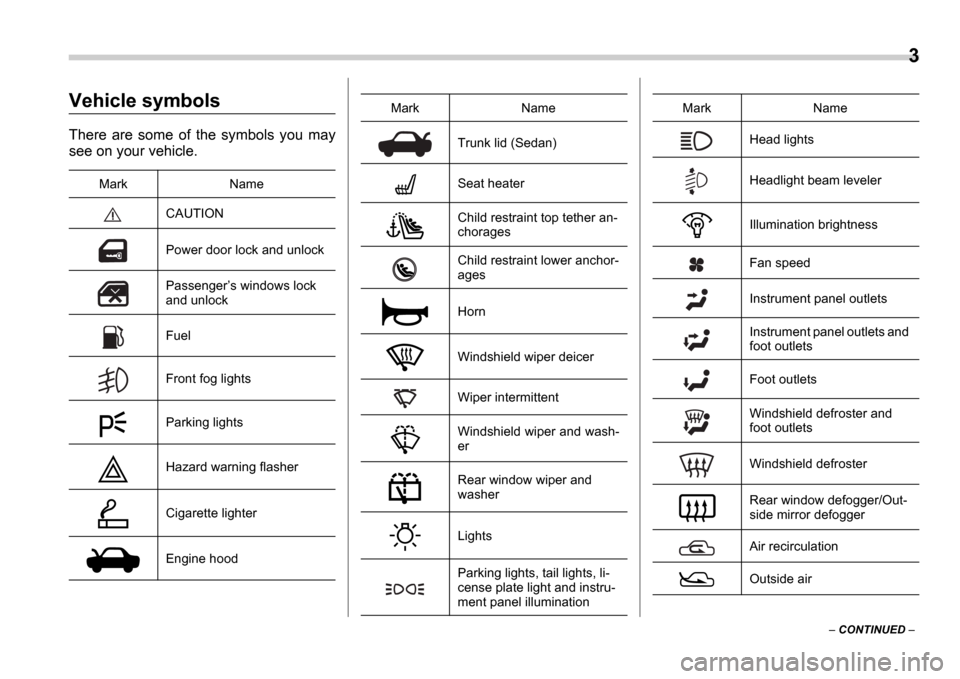
There are some of the symbols you may
see on your vehicle.
Mark Name
CAUTION
Power door lock and unlock
Passengers windows lock
and unlock
Fuel
Front fog lights
Parking lights
Hazard warning flasher
Cigarette lighter
Engine hood
Trunk lid (Sedan)
Seat heater
Child restraint top tether an-
chorages
Child restraint lower anchor-
ages
Horn
Windshield wiper deicer
Wiper intermittent
Windshield wiper and wash-
er
Rear window wiper and
washer
Lights
Parking lights, tail lights, li-
cense plate light and instru-
ment panel illumination
Mark NameHead lights
Headlight beam leveler
Illumination brightness
Fan speed
Instrument panel outlets
Instrument panel outlets and
foot outlets
Foot outlets
Windshield defroster and
foot outlets
Windshield defroster
Rear window defogger/Out-
side mirror defogger
Air recirculation
Outside air
Mark Name
Page 17 of 365

14
Instrument panel
7
6
5
4
3
2
1
15
16 14 12 10 11
13 9 8
000188
1) Door locks (page 2-4)
2) Outside mirror switch (page 3-34)
3) Light control lever (page 3-22)
4) Combination meter (page 3-11)
5) Wiper control lever (page 3-26)
6) Hazard warning flasher switch (page
3-6)
7) Audio (page 5-1)
8) Gear shift lever (5MT) (page 7-11)/
Gear shift lever (6MT) (page 7-9)/Se-
lector lever (AT) (page 7-16)
9) Climate control (page 4-1)
10) Cruise control (page 7-27)
11) Horn (page 3-35)
12) SRS airbag (page 1-35)
13) Tilt steering (page 3-35)
14) Fuse box (page 11-41)
15) Hood lock release knob (page 11-4)
16) Power windows (page 2-18)
Page 95 of 365
2-8 Keys and doors
If any of the doors (or the rear gate) is not
fully closed, an electronic chirp will sound
five times and the turn signal lights will
flash five times to alert you that the doors
(or the rear gate) are not properly closed.
When you close the door, it will automati-
cally lock.
NOTE
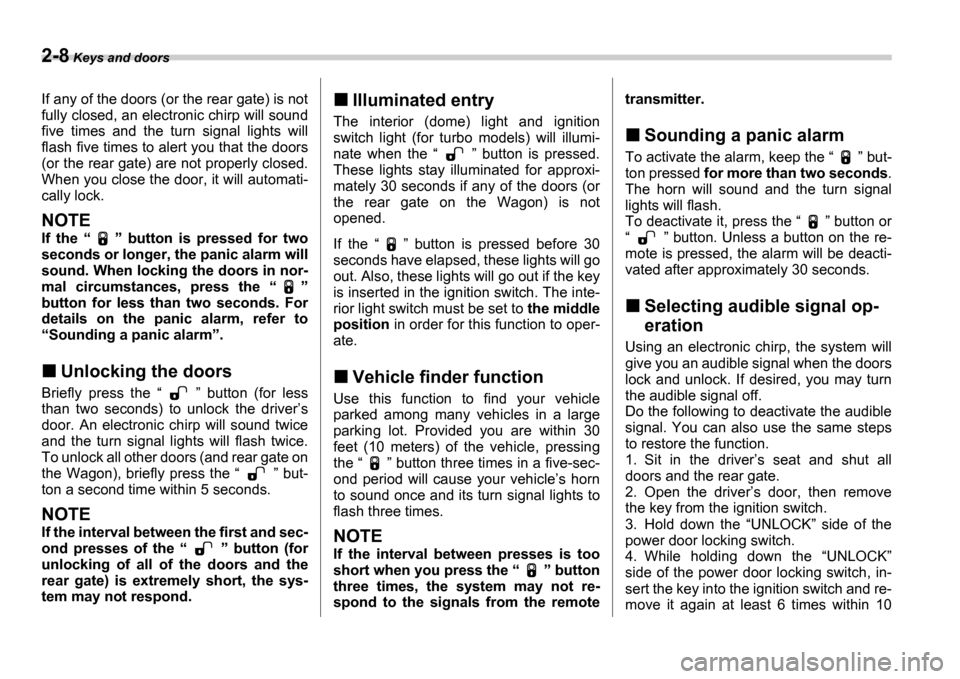
If the button is pressed for two
seconds or longer, the panic alarm will
sound. When locking the doors in nor-
mal circumstances, press the
button for less than two seconds. For
details on the panic alarm, refer to Sounding a panic alarm .
Unlocking the doors
Briefly press the button (for less
than two seconds) to unlock the driver s
door. An electronic chirp will sound twice
and the turn signal lights will flash twice.
To unlock all other doors (and rear gate on
the Wagon), briefly press the but-
ton a second time within 5 seconds.
NOTE
If the interval between the first and sec-
ond presses of the button (for
unlocking of all of the doors and the
rear gate) is extremely short, the sys-
tem may not respond.
Illuminated entry
The interior (dome) light and ignition
switch light (for turbo models) will illumi-
nate when the button is pressed.
These lights stay illuminated for approxi-
mately 30 seconds if any of the doors (or
the rear gate on the Wagon) is not
opened.
If the button is pressed before 30
seconds have elapsed, these lights will go
out. Also, these lights will go out if the key
is inserted in the ignition switch. The inte-
rior light switch must be set to the middle
position in order for this function to oper-
ate.
Vehicle finder function
Use this function to find your vehicle
parked among many vehicles in a large
parking lot. Provided you are within 30
feet (10 meters) of the vehicle, pressing
the button three times in a five-sec-
ond period will cause your vehicle s horn
to sound once and its turn signal lights to
flash three times.
NOTE
If the interval between presses is too
short when you press the button
three times, the system may not re-
spond to the signals from the remote transmitter.
Sounding a panic alarm
To activate the alarm, keep the
but-
ton pressed for more than two seconds .
The horn will sound and the turn signal
lights will flash.
To deactivate it, press the button or
button. Unless a button on the re-
mote is pressed, the alarm will be deacti-
vated after approximately 30 seconds.
Selecting audible signal op-
eration
Using an electronic chirp, the system will
give you an audible signal when the doors
lock and unlock. If desired, you may turn
the audible signal off.
Do the following to deactivate the audible
signal. You can also use the same steps
to restore the function.
1. Sit in the driver s seat and shut all
doors and the rear gate.
2. Open the driver s door, then remove
the key from the ignition switch.
3. Hold down the UNLOCK side of the
power door locking switch.
4. While holding down the UNLOCK
side of the power door locking switch, in-
sert the key into the ignition switch and re-
move it again at least 6 times within 10
Page 100 of 365

Keys and doors 2-13
CONTINUED
access to your vehicle.
Alarm system
The alarm system helps to protect your
vehicle and valuables from theft. The horn
sounds and the turn signal lights flash if
someone attempts to break into your vehi-
cle. The starter motor is also interrupted to
prevent starting the vehicle without a key.
The system can be armed and disarmed
with the remote transmitter.
The system does not operate when the
key is inserted into the ignition switch.
Your vehicle
s alarm system has been set
for activation at the time of shipment from
the factory. You can set the system for de-
activation yourself or have it done by your
SUBARU dealer.
System alarm operation
The alarm system will give the following
alarms when triggered:
The vehicle s horn will sound and the
turn signal lights will flash for 30 seconds.
In addition, the starter motor will not oper-
ate.
If any door (or the rear gate/trunk lid) re-
mains open after the 30-second period,
the horn will continue to sound for a maxi-
mum of 3 minutes. If the door (or the rear
gate/trunk lid) is closed while the horn is sounding, the horn will stop sounding with
a delay of up to 30 seconds.
The alarm is triggered by:
Opening a door, the rear gate or trunk
lid
Physical impact to the vehicle, such as
forced entry (only vehicles with shock sen-
sors (dealer option))
Activating and deactivating
the alarm system
To change the setting of your vehicle s
alarm system for activation or deactiva-
tion, do the following.
1. Disarm the alarm system (see Disarm-
ing the system in this section).
2. Sit in the driver s seat and shut all
doors (and the rear gate if your vehicle is
a Wagon).
3. Turn the ignition switch to the ON po-
sition.
4. Hold down the UNLOCK side of the
driver s power door locking switch, open
the driver s door within the following 1 sec-
ond, and wait 10 seconds without releas-
ing the switch. The setting will then be
changed as follows:
If the system was previously activated:
The odometer/trip meter screen displays AL oF and the horn sounds twice, indi-
Page 101 of 365
2-14 Keys and doors
cating that the system is now deactivated.
If the system was previously deactivated:
The odometer/trip meter screen displays AL on and the horn sounds once, indi-
cating that the system is now activated.
NOTE
You may have the above setting
change done by your SUBARU dealer.
If you have accidentally trig-
gered the alarm system
To stop the alarm
Do any of the following operations:
Press any button on the remote trans-
mitter.
Cycle the ignition switch from the
LOCK to ON position three times within
5 seconds.
Arming the system
To arm the system using remote
transmitter
1. Close all windows and the moonroof (if
so equipped).
2. Remove the key from the ignition
switch.
3. Open the doors and get out of the vehi-
cle. 4. Make sure that the engine hood (and
the trunk lid) are locked.
5. Close all doors (and the rear gate on
the Wagon).
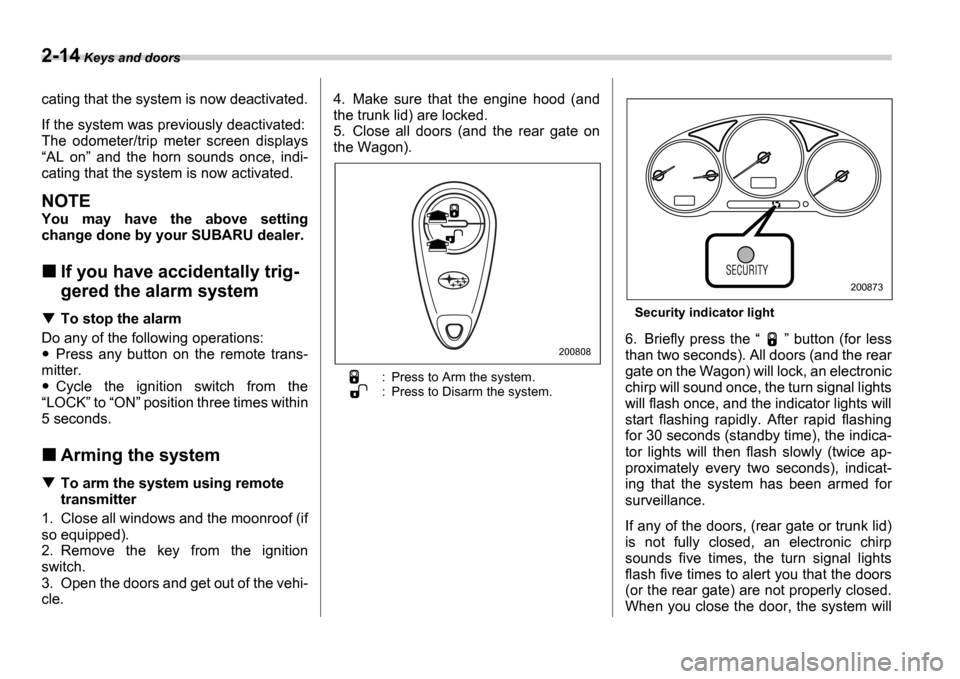
: Press to Arm the system.
: Press to Disarm the system.
Security indicator light
6. Briefly press the
button (for less
than two seconds). All doors (and the rear
gate on the Wagon) will lock, an electronic
chirp will sound once, the turn signal lights
will flash once, and the indicator lights will
start flashing rapidly. After rapid flashing
for 30 seconds (standby time), the indica-
tor lights will then flash slowly (twice ap-
proximately every two seconds), indicat-
ing that the system has been armed for
surveillance.
If any of the doors, (rear gate or trunk lid)
is not fully closed, an electronic chirp
sounds five times, the turn signal lights
flash five times to alert you that the doors
(or the rear gate) are not properly closed.
When you close the door, the system will200808
200873
Page 104 of 365
Keys and doors 2-17
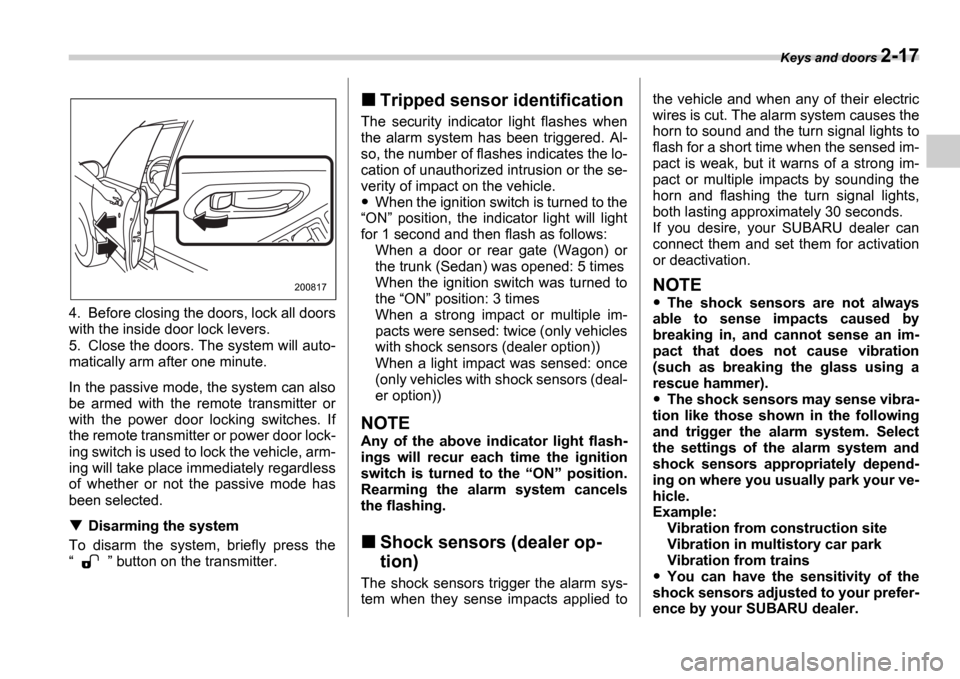
4. Before closing the doors, lock all doors
with the inside door lock levers.
5. Close the doors. The system will auto-
matically arm after one minute.
In the passive mode, the system can also
be armed with the remote transmitter or
with the power door locking switches. If
the remote transmitter or power door lock-
ing switch is used to lock the vehicle, arm-
ing will take place immediately regardless
of whether or not the passive mode has
been selected.
Disarming the system
To disarm the system, briefly press the
button on the transmitter.
Tripped sensor identification
The security indicator light flashes when
the alarm system has been triggered. Al-
so, the number of flashes indicates the lo-
cation of unauthorized intrusion or the se-
verity of impact on the vehicle.
When the ignition switch is turned to the
ON position, the indicator light will light
for 1 second and then flash as follows: When a door or rear gate (Wagon) or
the trunk (Sedan) was opened: 5 times
When the ignition switch was turned to
the ON position: 3 times
When a strong impact or multiple im-
pacts were sensed: twice (only vehicles
with shock sensors (dealer option))
When a light impact was sensed: once
(only vehicles with shock sensors (deal-
er option))
NOTE
Any of the above indicator light flash-
ings will recur each time the ignition
switch is turned to the ON position.
Rearming the alarm system cancels
the flashing.
Shock sensors (dealer op-
tion)
The shock sensors trigger the alarm sys-
tem when they sense impacts applied to the vehicle and when any of their electric
wires is cut. The alarm system causes the
horn to sound and the turn signal lights to
flash for a short time when the sensed im-
pact is weak, but it warns of a strong im-
pact or multiple impacts by sounding the
horn and flashing the turn signal lights,
both lasting approximately 30 seconds.
If you desire, your SUBARU dealer can
connect them and set them for activation
or deactivation.
NOTE
The shock sensors are not always
able to sense impacts caused by
breaking in, and cannot sense an im-
pact that does not cause vibration
(such as breaking the glass using a
rescue hammer).
The shock sensors may sense vibra-
tion like those shown in the following
and trigger the alarm system. Select
the settings of the alarm system and
shock sensors appropriately depend-
ing on where you usually park your ve-
hicle.
Example:
Vibration from construction site
Vibration in multistory car park
Vibration from trains
You can have the sensitivity of the
shock sensors adjusted to your prefer-
ence by your SUBARU dealer.
200817
Page 115 of 365

Instruments and controls
Clock .................................................................... 3-22
Light control switch .............................. ............. 3-22
Headlights ........................................ ....................... 3-22
High/low beam change (dimmer) ..................... ..... 3-23
Headlight flasher ................................. ................... 3-23
Daytime running light system ...................... ......... 3-23
Turn signal lever ................................. ................ 3-24
Illumination brightness control ................... ...... 3-25
Headlight beam leveler (U.S.-spec. WRX-STI) .............................. ........ 3-25
Parking light switch .............................. ............. 3-25
Front fog light button (if equipped) .............. .... 3-26
Wiper and washer .................................. ............. 3-26
Windshield wiper and washer switches .............. . 3-27
Rear window wiper and washer switch Wagon ............................................ .................... 3-28
Rear window defogger button ....................... .... 3-29
Windshield wiper deicer (if equipped) ............. . 3-30
Intercooler water spray switch (WRX-STI) ....... 3-3 1
Mirrors ........................................... ...................... 3-32
Inside mirror ..................................... ...................... 3-32
Outside mirrors ................................... .................... 3-33
Tilt steering wheel ............................... ............... 3-35
Horn .............................................. ....................... 3-35
Page 148 of 365
Instruments and controls 3-35
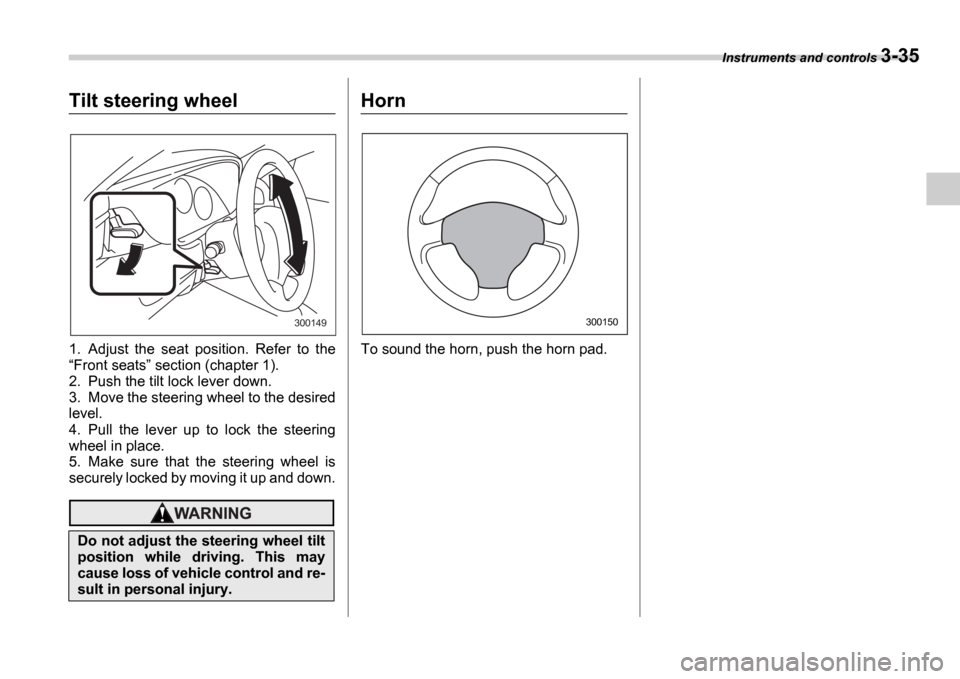
Tilt steering wheel
1. Adjust the seat position. Refer to the Front seats section (chapter 1).
2. Push the tilt lock lever down.
3. Move the steering wheel to the desired
level.
4. Pull the lever up to lock the steering
wheel in place.
5. Make sure that the steering wheel is
securely locked by moving it up and down.
Horn
To sound the horn, push the horn pad.
Do not adjust the steering wheel tilt
position while driving. This may
cause loss of vehicle control and re-
sult in personal injury.
300149300150