2006 SUBARU IMPREZA change time
[x] Cancel search: change timePage 177 of 365
5-14 Audio
operate and stop automatically on the
next station.
Continue this operation until you find the
desired station.
Automatic tuning (SCAN)
Press the SCAN button (5) to change the
radio to the SCAN mode. In this mode, the
radio scans through the radio band until a
station is found. The radio will stop at the
station for five seconds while displaying
the frequency, after which scanning will
continue until the entire band has been
scanned from the low end to the high end.
Press the SCAN button again to cancel
the SCAN mode and to stop on any dis-
played frequency.
When the SCAN button is pressed for
automatic tuning, stations are scanned in
the direction of low frequencies to high fre-
quencies only.
Automatic tuning may not function proper-
ly if the station reception is weakened by
distance from the station or proximity to
tall buildings and hills.
Selecting preset stations
Presetting a station with a Preset button
(7) allows you to select that station in a
single operation. Up to six AM, FM1 and
FM2 stations each may be preset.
How to preset stations
1. Press the FM/AM selection button to
select AM, FM1 or FM2 reception.
2. Press the SCAN button (5) or tune
the radio manually until the desired station
frequency is displayed.
3. Press one of the Preset buttons (7)
for at least 1.5 seconds to store the fre-
quency. The frequency of the station will
flash once on the display at this time. If the
button is pressed for less than 1.5 sec-
onds, the preceding selection will remain
in memory.
NOTE
If the connection between the radio
and battery is broken for any reason
such as vehicle maintenance or radio
removal, all stations stored in the pre-
set buttons are cleared. If this occurs,
it is necessary to reset the preset but-
tons.
If a cell phone is placed near the ra-
dio, it may cause the radio to emit
noise when it receives calls. This noise
does not indicate a radio fault.
Page 182 of 365
Audio 5-19
CONTINUED
In-dash 6 CD auto changer 1 (if equipped)
Loading and unloading compact discs
(5) (1) (2)
(4) (3)
500222
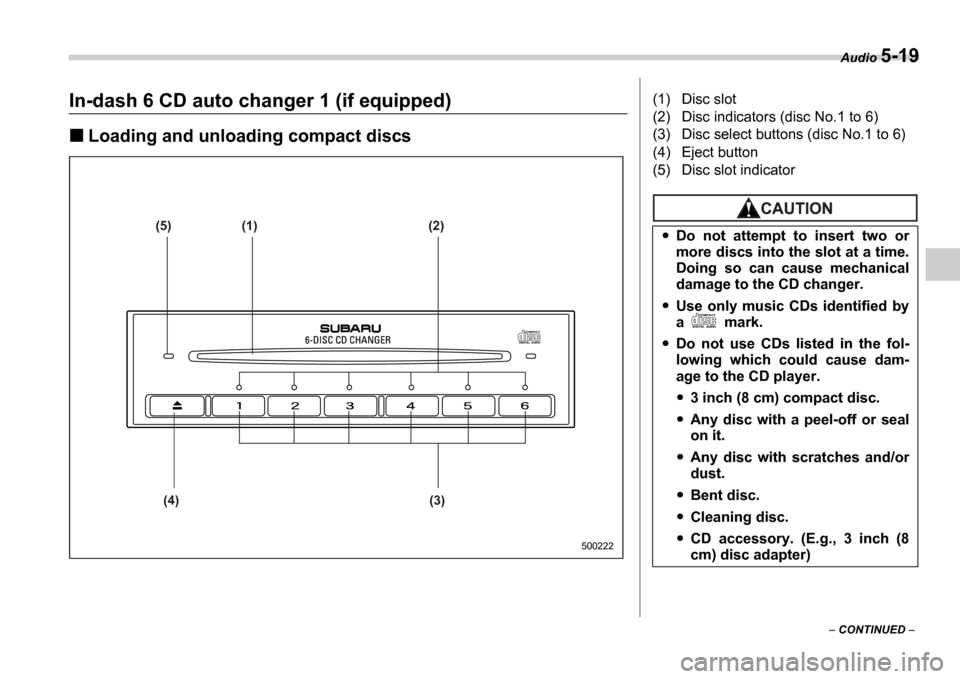
(1) Disc slot
(2) Disc indicators (disc No.1 to 6)
(3) Disc select buttons (disc No.1 to 6)
(4) Eject button
(5) Disc slot indicator
Do not attempt to insert two or
more discs into the slot at a time.
Doing so can cause mechanical
damage to the CD changer.
Use only music CDs identified by
a mark.
Do not use CDs listed in the fol-
lowing which could cause dam-
age to the CD player.
3 inch (8 cm) compact disc.
Any disc with a peel-off or seal
on it.
Any disc with scratches and/or
dust.
Bent disc.
Cleaning disc.
CD accessory. (E.g., 3 inch (8
cm) disc adapter)
Page 183 of 365

5-20 Audio
To insert a disc
1. Press one of the Disc select buttons
(3) (numbered from 1 to 6) for which the
disc indicator light (2) is OFF .
The disc indicator lights are located direct-
ly above the corresponding Disc select
buttons.
2. The indicator will begin blinking. The
blinking will last for 15 seconds.
During this period, insert a desired disc,
and the disc will begin to play. (If any disc
is not inserted during this period, the Disc
slot (1) door will close. Repeat Step 1.)
Be sure to hold a disc with the label side
(the side where titles are printed) up.
3. To insert another disc, repeat Steps 1
and 2 choosing a different disc select but-
ton.
To insert six discs at a time
1. Press and hold the Disc select button
number 1 until all disc indicators begin
blinking (approximately 1.5 seconds). 2. The indicators will blink for 15 seconds.
During this period, insert desired six discs.
3. When all discs are loaded, the first disc
will begin to play. (If no disc is inserted
within this 15 seconds, the entire disc load
sequence will be canceled.)
To remove a disc
1. Press the desired one of the Disc se-
lect buttons (3) (numbered from 1 to 6) for
which the disc indicator light is on.
2. Press the Eject button (4). The select-
ed disc will be ejected and the indicator
light will begin blinking.
3. To remove another disc, repeat Steps
1 and 2 choosing a different Disc select
button.
(To remove discs when the ignition switch
is in the Lock position, press the Eject
button, and the first disc will be ejected.
Press the Eject button again, and the
next disc will be ejected and so on. At this
time, the Disc select buttons are dis-
abled.)
To remove all discs at one time
1. Press and hold the Eject button (4)
until all Disc indicators begin blinking
(approximately 1.5 seconds), and the first
disc will be ejected.
2. When the disc is removed, the next
one will be ejected, and so on.
To replace a playing disc with an-
other
Simply press the desired one of Disc se-
lect buttons (3) (numbered from 1 to 6) or
press the Disc select button on the radio
unit to select the desired disc, and the disc
will begin to play.
Disc indicators
Lit: when the corresponding storage tray
is occupied by a disc.
Blinking: Disc player is either in loading,
eject or changing mode.
OFF: No disc is loaded or the ignition
switch is in the LOCK position.
Open/Closed disc slot indicator
When the disc slot is open, the disc indica-
tors on both sides of the slot illuminate.
Function control
Refer to CD changer control operating in-
structions described in the Type B audio
set (if equipped) section.
Do not insert or remove any disc
when the automatic transmission
selector lever is in the park posi-
tion; the selector lever in that po-
sition can interfere with disc in-
sertion or removal, causing
scratches on the disc surface (for
AT vehicles).
Page 225 of 365
7-28 Starting and operating
The vehicle will maintain the desired
speed.
Vehicle speed can be temporarily in-
creased while driving with the cruise con-
trol activated. Simply depress the acceler-
ator pedal to accelerate the vehicle. When
the accelerator pedal is released, the ve-
hicle will return to and maintain the previ-
ous cruising speed.
To temporarily cancel the
cruise control
There are five ways to cancel the cruise
control temporarily:
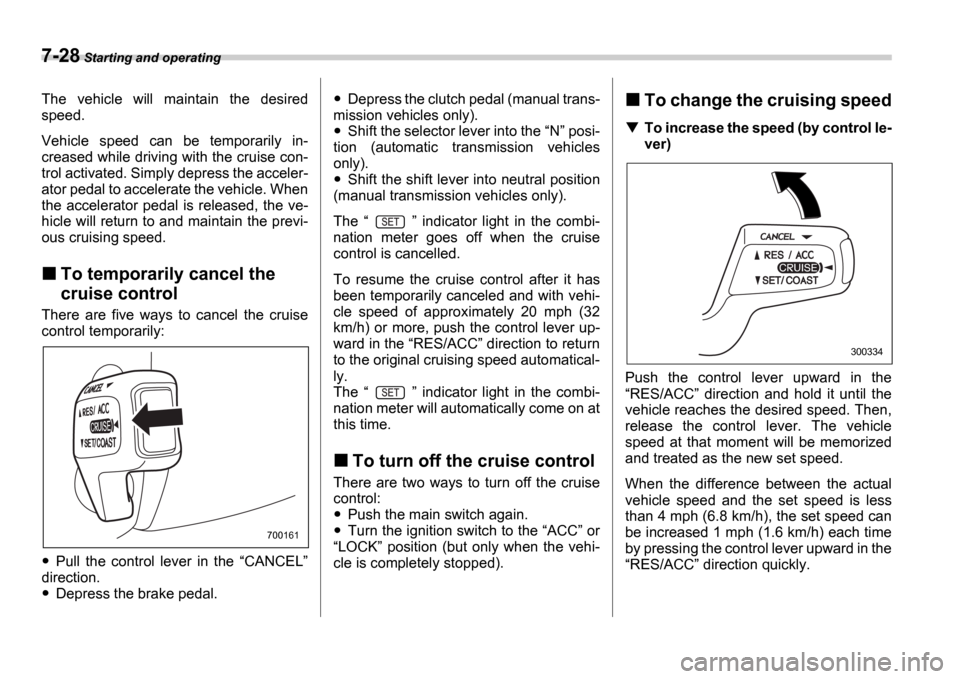
Pull the control lever in the CANCEL
direction.
Depress the brake pedal.
Depress the clutch pedal (manual trans-
mission vehicles only).
Shift the selector lever into the N posi-
tion (automatic transmission vehicles
only).
Shift the shift lever into neutral position
(manual transmission vehicles only).
The indicator light in the combi-
nation meter goes off when the cruise
control is cancelled.
To resume the cruise control after it has
been temporarily canceled and with vehi-
cle speed of approximately 20 mph (32
km/h) or more, push the control lever up-
ward in the RES/ACC direction to return
to the original cruising speed automatical-
ly.
The indicator light in the combi-
nation meter will automatically come on at
this time.
To turn off the cruise control
There are two ways to turn off the cruise
control:
Push the main switch again.
Turn the ignition switch to the ACC or
LOCK position (but only when the vehi-
cle is completely stopped).
To change the cruising speed
To increase the speed (by control le-
ver)
Push the control lever upward in the RES/ACC direction and hold it until the
vehicle reaches the desired speed. Then,
release the control lever. The vehicle
speed at that moment will be memorized
and treated as the new set speed.
When the difference between the actual
vehicle speed and the set speed is less
than 4 mph (6.8 km/h), the set speed can
be increased 1 mph (1.6 km/h) each time
by pressing the control lever upward in the RES/ACC direction quickly.
700161
300334
Page 248 of 365
Driving tips 8-21
CONTINUED
Gross Vehicle Weight (GVW) and
Gross Vehicle Weight Rating
(GVWR)
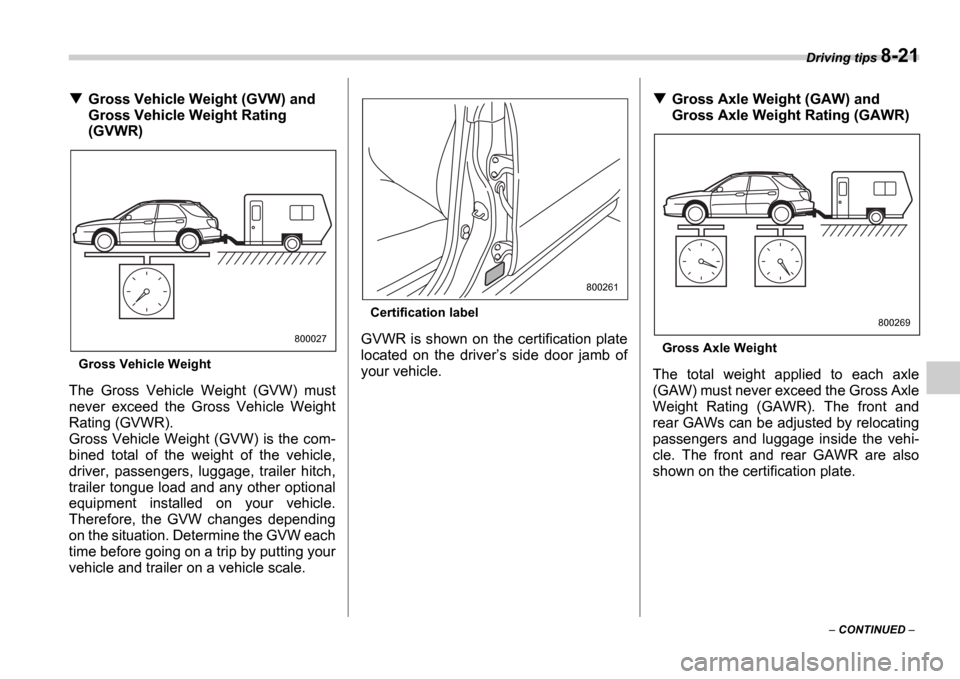
Gross Vehicle Weight
The Gross Vehicle Weight (GVW) must
never exceed the Gross Vehicle Weight
Rating (GVWR).
Gross Vehicle Weight (GVW) is the com-
bined total of the weight of the vehicle,
driver, passengers, luggage, trailer hitch,
trailer tongue load and any other optional
equipment installed on your vehicle.
Therefore, the GVW changes depending
on the situation. Determine the GVW each
time before going on a trip by putting your
vehicle and trailer on a vehicle scale.
Certification label
GVWR is shown on the certification plate
located on the driver s side door jamb of
your vehicle.
Gross Axle Weight (GAW) and
Gross Axle Weight Rating (GAWR)
Gross Axle Weight
The total weight applied to each axle
(GAW) must never exceed the Gross Axle
Weight Rating (GAWR). The front and
rear GAWs can be adjusted by relocating
passengers and luggage inside the vehi-
cle. The front and rear GAWR are also
shown on the certification plate.
800027
800261
800269
Page 252 of 365
Driving tips 8-25
CONTINUED
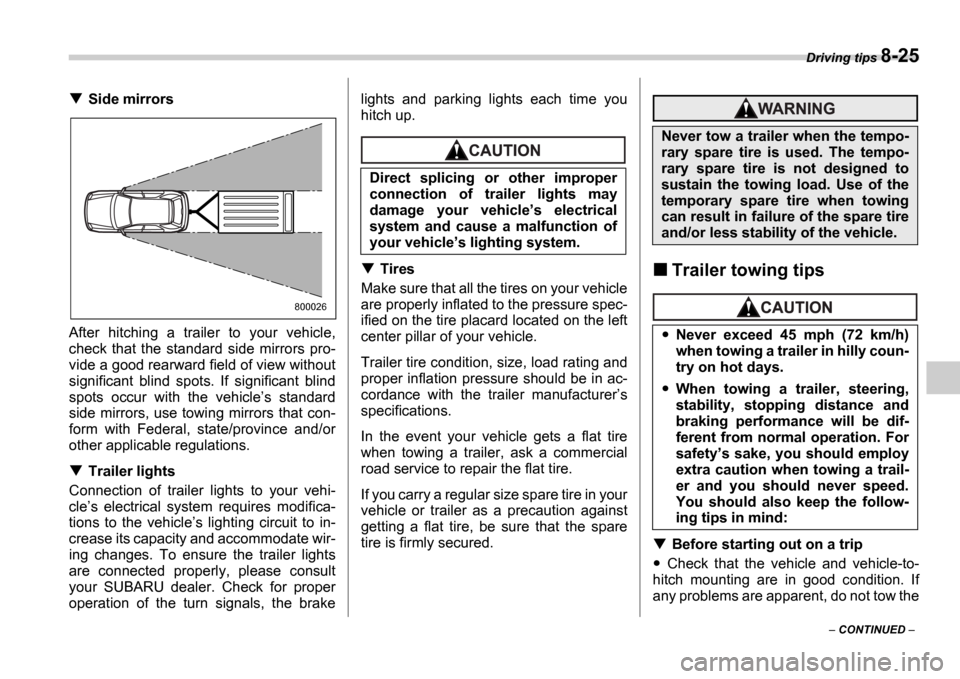
Side mirrors
After hitching a trailer to your vehicle,
check that the standard side mirrors pro-
vide a good rearward field of view without
significant blind spots. If significant blind
spots occur with the vehicle s standard
side mirrors, use towing mirrors that con-
form with Federal, state/province and/or
other applicable regulations.
Trailer lights
Connection of trailer lights to your vehi-
cle s electrical system requires modifica-
tions to the vehicle s lighting circuit to in-
crease its capacity and accommodate wir-
ing changes. To ensure the trailer lights
are connected properly, please consult
your SUBARU dealer. Check for proper
operation of the turn signals, the brake lights and parking lights each time you
hitch up.
Tires
Make sure that all the tires on your vehicle
are properly inflated to the pressure spec-
ified on the tire placard located on the left
center pillar of your vehicle.
Trailer tire condition, size, load rating and
proper inflation pressure should be in ac-
cordance with the trailer manufacturer s
specifications.
In the event your vehicle gets a flat tire
when towing a trailer, ask a commercial
road service to repair the flat tire.
If you carry a regular size spare tire in your
vehicle or trailer as a precaution against
getting a flat tire, be sure that the spare
tire is firmly secured.Trailer towing tips
Before starting out on a trip
Check that the vehicle and vehicle-to-
hitch mounting are in good condition. If
any problems are apparent, do not tow the
800026
Direct splicing or other improper
connection of trailer lights may
damage your vehicle s electrical
system and cause a malfunction of
your vehicle s lighting system.
Never tow a trailer when the tempo-
rary spare tire is used. The tempo-
rary spare tire is not designed to
sustain the towing load. Use of the
temporary spare tire when towing
can result in failure of the spare tire
and/or less stability of the vehicle.
Never exceed 45 mph (72 km/h)
when towing a trailer in hilly coun-
try on hot days.
When towing a trailer, steering,
stability, stopping distance and
braking performance will be dif-
ferent from normal operation. For
safety s sake, you should employ
extra caution when towing a trail-
er and you should never speed.
You should also keep the follow-
ing tips in mind:
Page 253 of 365
8-26 Driving tips
trailer.
Check that the vehicle sits horizontally
with the trailer attached. If the vehicle is
tipped sharply up at the front and down at
the rear, check the total trailer weight,
GVW, GAWs and tongue load again, then
confirm that the load and its distribution
are acceptable.
Check that the tire pressures are cor-
rect.
Check that the vehicle and trailer are
connected properly. Confirm that the trailer tongue is connected prop-
erly to the hitch ball. the trailer lights connector is connect-
ed properly and trailer s brake lights illu-
minate when the vehicle s brake pedal
is pressed, and that the trailer s turn sig-
nal lights flash when the vehicle s turn
signal lever is operated. the safety chains are connected prop-
erly. all cargo in the trailer is secured safe-
ty in position. the side mirrors provide a good rear-
ward field of view without a significant
blind spot.
Sufficient time should be taken to learn
the feel of the vehicle/trailer combination
before starting out on a trip. In an area free
of traffic, practice turning, stopping and
backing up.
Driving with a trailer
You should allow for considerably more
stopping distance when towing a trailer.
Avoid sudden braking because it may re-
sult in skidding or jackknifing and loss of
control.
Avoid abrupt starts and sudden acceler-
ations. If your vehicle has a manual trans-
mission, always start out in first gear and
release the clutch at moderate engine rev-
olution.
Avoid uneven steering, sharp turns and
rapid lane changes.
Slow down before turning. Make a long-
er than normal turning radius because the
trailer wheels will be closer than the vehi-
cle wheels to the inside of the turn. In a
tight turn, the trailer could hit your vehicle.
Crosswinds will adversely affect the
handling of your vehicle and trailer, caus-
ing sway. Crosswinds can be due to
weather conditions or the passing of large
tracks or buses. If swaying occurs, firmly
grip the steering wheel and slow down im-
mediately but gradually.
When passing other vehicles, consider-
able distance is required because of the
added weight and length caused by at-
taching the trailer to your vehicle.
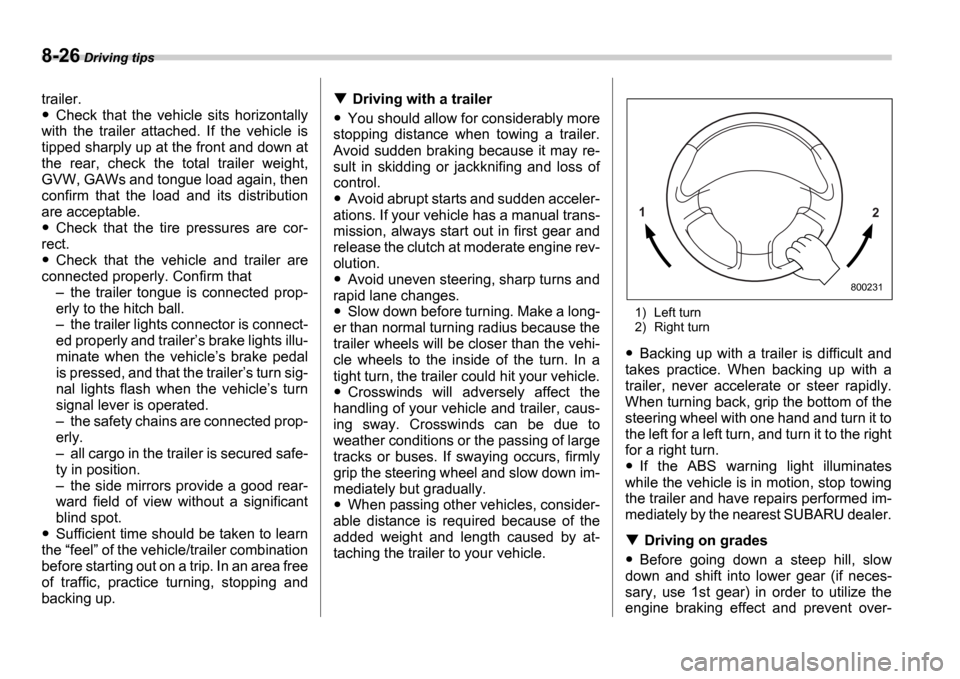
1) Left turn
2) Right turn
Backing up with a trailer is difficult and
takes practice. When backing up with a
trailer, never accelerate or steer rapidly.
When turning back, grip the bottom of the
steering wheel with one hand and turn it to
the left for a left turn, and turn it to the right
for a right turn.
If the ABS warning light illuminates
while the vehicle is in motion, stop towing
the trailer and have repairs performed im-
mediately by the nearest SUBARU dealer.
Driving on grades
Before going down a steep hill, slow
down and shift into lower gear (if neces-
sary, use 1st gear) in order to utilize the
engine braking effect and prevent over-
1 2
800231
Page 306 of 365
Maintenance and service 11-27
Brake booster
If the brake booster does not operate as
described in the following, have it checked
by your SUBARU dealer.
1. With the engine off, depress the brake
pedal several times, applying the same
pedal force each time. The distance the
pedal travels should not vary.
2. With the brake pedal depressed, start
the engine. The pedal should move slight-
ly down to the floor.
3. With the brake pedal depressed, stop
the engine and keep the pedal depressed
for 30 seconds. The pedal height should
not change.
4. Start the engine again and run for ap-
proximately one minute then turn it off.
Depress the brake pedal several times to
check the brake booster. The brake boost-
er operates properly if the pedal stroke de-
creases with each depression.
Brake pedal
Check the brake pedal free play and re-
serve distance according to the mainte-
nance schedule in the Warranty and
Maintenance Booklet .
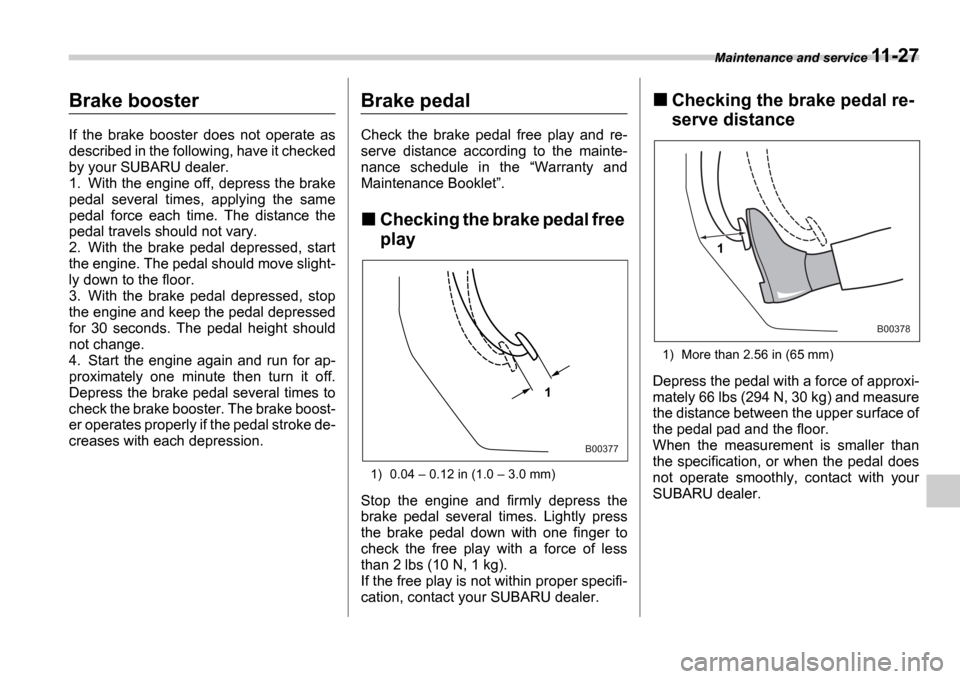
Checking the brake pedal free
play
1) 0.04 0.12 in (1.0 3.0 mm)
Stop the engine and firmly depress the
brake pedal several times. Lightly press
the brake pedal down with one finger to
check the free play with a force of less
than 2 lbs (10 N, 1 kg).
If the free play is not within proper specifi-
cation, contact your SUBARU dealer.
Checking the brake pedal re-
serve distance
1) More than 2.56 in (65 mm)
Depress the pedal with a force of approxi-
mately 66 lbs (294 N, 30 kg) and measure
the distance between the upper surface of
the pedal pad and the floor.
When the measurement is smaller than
the specification, or when the pedal does
not operate smoothly, contact with your
SUBARU dealer.1
B00377
1
B00378