2006 SUBARU IMPREZA stop start
[x] Cancel search: stop startPage 123 of 365
3-10 Instruments and controls
Setting the alarm-level en-
gine speed
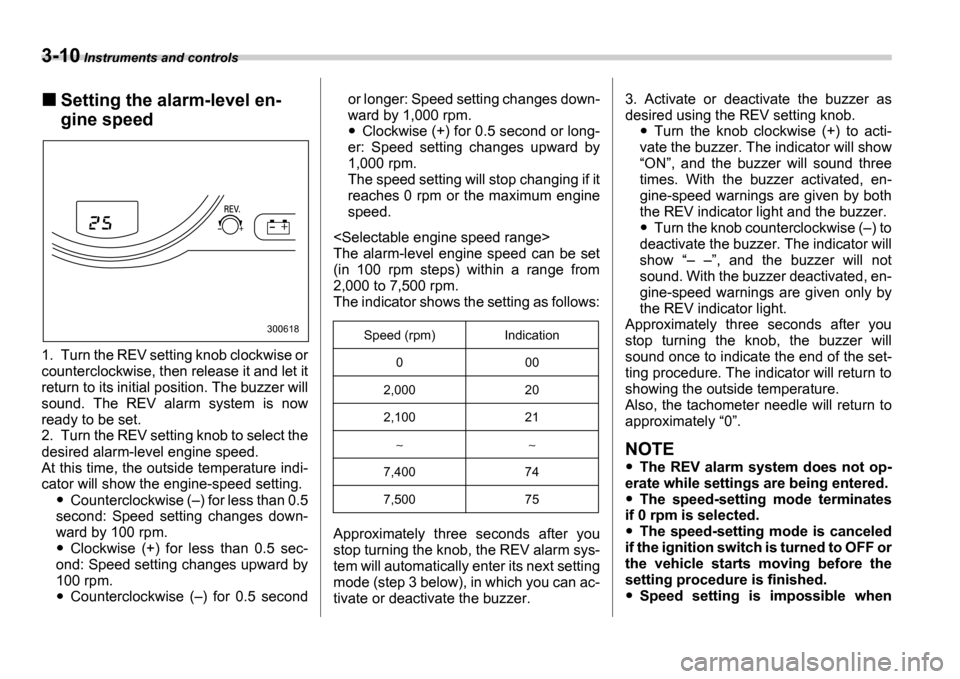
1. Turn the REV setting knob clockwise or
counterclockwise, then release it and let it
return to its initial position. The buzzer will
sound. The REV alarm system is now
ready to be set.
2. Turn the REV setting knob to select the
desired alarm-level engine speed.
At this time, the outside temperature indi-
cator will show the engine-speed setting.
Counterclockwise ( ) for less than 0.5
second: Speed setting changes down-
ward by 100 rpm.
Clockwise (+) for less than 0.5 sec-
ond: Speed setting changes upward by
100 rpm.
Counterclockwise ( ) for 0.5 second or longer: Speed setting changes down-
ward by 1,000 rpm.
Clockwise (+) for 0.5 second or long-
er: Speed setting changes upward by
1,000 rpm.
The speed setting will stop changing if it
reaches 0 rpm or the maximum engine
speed.
The alarm-level engine speed can be set
(in 100 rpm steps) within a range from
2,000 to 7,500 rpm.
The indicator shows the setting as follows:
Approximately three seconds after you
stop turning the knob, the REV alarm sys-
tem will automatically enter its next setting
mode (step 3 below), in which you can ac-
tivate or deactivate the buzzer. 3. Activate or deactivate the buzzer as
desired using the REV setting knob.Turn the knob clockwise (+) to acti-
vate the buzzer. The indicator will show ON , and the buzzer will sound three
times. With the buzzer activated, en-
gine-speed warnings are given by both
the REV indicator light and the buzzer.
Turn the knob counterclockwise ( ) to
deactivate the buzzer. The indicator will
show , and the buzzer will not
sound. With the buzzer deactivated, en-
gine-speed warnings are given only by
the REV indicator light.
Approximately three seconds after you
stop turning the knob, the buzzer will
sound once to indicate the end of the set-
ting procedure. The indicator will return to
showing the outside temperature.
Also, the tachometer needle will return to
approximately 0 .
NOTE
The REV alarm system does not op-
erate while settings are being entered.
The speed-setting mode terminates
if 0 rpm is selected.
The speed-setting mode is canceled
if the ignition switch is turned to OFF or
the vehicle starts moving before the
setting procedure is finished.
Speed setting is impossible when
300618Speed (rpm) Indication
0 00
2,000 20
2,100 21
7,400 74
7,500 75
Page 126 of 365
Instruments and controls 3-13
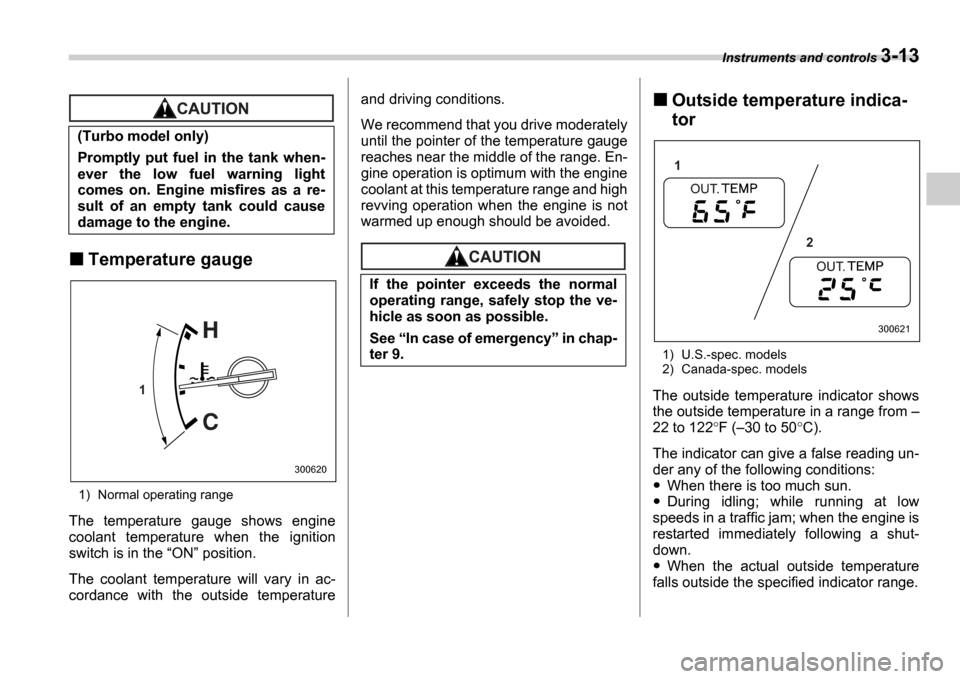
Temperature gauge
1) Normal operating range
The temperature gauge shows engine
coolant temperature when the ignition
switch is in the ON position.
The coolant temperature will vary in ac-
cordance with the outside temperature and driving conditions.
We recommend that you drive moderately
until the pointer of the temperature gauge
reaches near the middle of the range. En-
gine operation is optimum with the engine
coolant at this temperature range and high
revving operation when the engine is not
warmed up enough should be avoided.
Outside temperature indica-
tor
1) U.S.-spec. models
2) Canada-spec. models
The outside temperature indicator shows
the outside temperature in a range from
22 to 122 F ( 30 to 50 C).
The indicator can give a false reading un-
der any of the following conditions:
When there is too much sun.
During idling; while running at low
speeds in a traffic jam; when the engine is
restarted immediately following a shut-
down.
When the actual outside temperature
falls outside the specified indicator range.
(Turbo model only)
Promptly put fuel in the tank when-
ever the low fuel warning light
comes on. Engine misfires as a re-
sult of an empty tank could cause
damage to the engine.
1
300620
If the pointer exceeds the normal
operating range, safely stop the ve-
hicle as soon as possible.
See
In case of emergency in chap-
ter 9.
1
2
300621
Page 129 of 365
3-16 Instruments and controls
CHECK ENGINE warn-
ing light/Malfunction in-
dicator lamp
If this light comes on steadily or blinks
while the engine is running, it may indicate
that there is a problem or potential prob-
lem somewhere in the emission control
system.
If the light comes on steadily:
If the light comes on steadily while driving
or does not go out after the engine starts,
an emission control system malfunction
has been detected.
You should have your vehicle checked by
an authorized SUBARU dealer immedi-
ately.
NOTE
This light also comes on when the fuel
filler cap is not tightened until it clicks.
If you have recently refueled your vehicle,
the cause of the CHECK ENGINE warning
light/malfunction indicator lamp coming on
could be a loose or missing fuel filler cap.
Remove the cap and retighten it until it
clicks. Make sure nothing is interfering
with the sealing of the cap. Tightening the
cap will not make the CHECK ENGINE
warning light turn off immediately. It may
take several driving trips. If the light does
not go out, take your vehicle to your au-
thorized SUBARU dealer immediately.
If the light is blinking:
If the light is blinking while driving, an en-
gine misfire condition has been detected
which may damage the emission control
system.
To prevent serious damage to the emis-
sion control system, you should do the fol-
lowing.
Reduce vehicle speed.
Avoid hard acceleration.
Avoid steep uphill grades.
Reduce the amount of cargo, if possi-
ble.
Stop towing a trailer as soon as pos-
sible. The CHECK ENGINE warning light may
stop blinking and come on steadily after
several driving trips. You should have
your vehicle checked by an authorized
SUBARU dealer immediately.
Charge warning light
If this light comes on when the engine is
running, it may indicate that the charging
system is not working properly.
If the light comes on while driving or does
not go out after the engine starts, stop the
engine at the first safe opportunity and
check the alternator belt. If the belt is
loose, broken or if the belt is in good con-
dition but the light remains on, contact
your nearest SUBARU dealer immediate-
ly.
Oil pressure warning
light
If this light comes on when the engine is
running, it may indicate that the engine oil
pressure is low and the lubricating system
is not working properly.
If the light comes on while driving or does
not go out after the engine starts, stop the
engine at the first safe opportunity and
check the engine oil level. If the oil level is
low, add oil immediately. If the engine oil
If the CHECK ENGINE light comes
on while you are driving, have your
vehicle checked/repaired by your
SUBARU dealer as soon as possi-
ble. Continued vehicle operation
without having the emission control
system checked and repaired as
necessary could cause serious
damage, which may not be covered
by your vehicle
s warranty.
Page 130 of 365
Instruments and controls 3-17
CONTINUED
is at the proper level but the light remains
on, contact your nearest SUBARU dealer
immediately.
AT OIL TEMPerature
warning light (AT vehi-
cles)
The AT oil temperature warning light
comes on when the ignition switch is
turned to the
ON position and goes out
after approximately two seconds.
If this light comes on when the engine is
running, it may indicate that the automatic
transmission fluid temperature is too hot.
If the light comes on while driving, it is un-
necessary to stop the vehicle, but avoid
driving up steep grades or in stop and go
traffic.
Automatic transmission control
system warning
If the light flashes after the engine starts,
it may indicate that the automatic trans-
mission control system is not working
properly. Contact your nearest SUBARU dealer for service immediately.
Rear differential oil tem-
perature warning light
(WRX-STI)
If this light comes on when the engine is
running, it may indicate that the rear differ-
ential oil temperature is too hot.
At this time, the driver
s control center dif-
ferential will automatically cancel the cur-
rent torque-distribution ratio setting and
adopts its minimum ratio.
If the light comes on while driving, reduce
vehicle speed and stop the vehicle at the
nearest safe place.
Park the vehicle for several minutes. After
the light goes out, you can start driving.
If the light does not go out, contact the
nearest SUBARU dealer for service.
NOTE
If the tire pressures are not correct
and/or the tires are not all the same
size and brand, the rear differential will
be heavily loaded when the vehicle is
driven, resulting in an abnormally high
oil temperature.
The rear differential oil will deterio-
rate if its temperature increases
enough for the rear differential oil tem-
perature warning light to come on. It is
advisable to have the rear differential
oil replaced as soon as possible.
ABS warning light
The ABS warning light comes on when the
ignition switch is turned to the ON posi-
tion and goes out after approximately two
seconds.
This is an indication that the ABS system
is working properly.
Do not operate the engine with the
oil pressure warning light on. This
may cause serious engine damage.
Reduce vehicle speed and park the
vehicle in a safe place as soon as
possible if the R.DIFF TEMP light
comes on. Continued driving with
this light on can damage the rear dif-
ferential and other parts of the pow-
ertrain.
If the warning light behaves as fol-
lows, the ABS system may not work
properly.
When the warning light is on, the
ABS function shuts down; however,
the conventional brake system con-
tinues to operate normally.
(U.S.)
(Canada)
Page 131 of 365
3-18 Instruments and controls
With a vehicle equipped with an EBD sys-
tem, the ABS warning light comes on to-
gether with the brake system warning light
if the EBD system becomes faulty. For fur-
ther details of the EBD system fault warn-
ing, refer to Brake system warning light .
NOTE
If the warning light behavior is as de-
scribed in the following, the ABS sys-
tem may be considered normal.
The warning light comes on right af-
ter the engine is started but goes out
immediately, remaining off.
The warning light remains on after the engine has been started, but it goes
out when the vehicle speed reaches
approximately 8 mph (12 km/h).
The warning light comes on during
driving, but it goes out immediately
and remains off.
When driving with an insufficient battery
voltage such as when the engine is jump
started, the ABS warning light may come
on. This is due to the low battery voltage
and does not indicate a malfunction.
When the battery becomes fully charged,
the light will go out.
Brake system
warning light
This light has the following three func-
tions:
Parking brake warning
The light comes on with the parking brake
applied while the ignition switch is in the ON position. It goes out when the park-
ing brake is fully released.
Brake fluid level warning
This light comes on when the brake fluid
level has dropped to near the MIN level
of the brake fluid reservoir with the ignition
switch in the ON position and with the
parking brake fully released.
If the brake system warning light should
come on while driving (with the parking
brake fully released and with the ignition
switch positioned in ON ), it could be an
indication of leaking of brake fluid or worn
brake pads. If this occurs, immediately
stop the vehicle at the nearest safe place
and check the brake fluid level. If the fluid
level is below the MIN mark in the reser-
voir, do not drive the vehicle. Have the ve-
hicle towed to the nearest SUBARU deal-
er for repair.
Electronic Brake Force Distribution
(EBD) system warning (vehicles
with ABS)
The brake system warning light also illu-
The warning light does not come
on when the ignition switch is
turned to the ON position.
The warning light comes on when
the ignition switch is turned to the ON position, but it does not go
out even when the vehicle speed
exceeds approximately 8 mph (12
km/h).
The warning light comes on dur-
ing driving.
If any of these conditions occur,
have the ABS system repaired at the
first available opportunity by your
SUBARU dealer.
Driving with the brake system
warning light on is dangerous.
This indicates your brake system
may not be working properly. If
the light remains on, have the
brakes inspected by a SUBARU
dealer immediately.
If at all in doubt about whether the
brakes are operating properly, do
not drive the vehicle. Have your
vehicle towed to the nearest
SUBARU dealer for repair.
(U.S.)
(Canada)
Page 132 of 365
Instruments and controls 3-19
CONTINUED
minates if a malfunction occurs in the EBD
system. In that event, it comes on together
with the ABS warning light.
The EBD system may be malfunctioning if
the brake system warning light and ABS
warning light illuminate simultaneously
during driving.
Even if the EBD system fails, the conven-
tional braking system will still function.
However, the rear wheels will be more
prone to locking when the brakes are ap-
plied harder than usual and the vehicle
s
motion may therefore become somewhat
harder to control.
If the brake system warning light and ABS
warning light illuminate simultaneously,
take the following steps:
1. Stop the vehicle in the nearest safe, flat
place.
2. Shut down the engine, then restart it.
3. Release the parking brake. If both
warning lights go out, the EBD system
may be faulty. Drive carefully to the near-
est SUBARU dealer and have the system
inspected.
4. If both warning lights come on again
and stay illuminated after the engine has
been restarted, shut down the engine
again, apply the parking brake, and check
the brake fluid level.
5. If the brake fluid level is not below the MIN mark, the EBD system may be faulty. Drive carefully to the nearest
SUBARU dealer and have the system in-
spected.
6. If the brake fluid level is below the
MIN mark, DO NOT drive the vehicle. In-
stead, have the vehicle towed to the near-
est SUBARU dealer for repair.
Door open warning light
The door open warning light comes on if
any door or the rear gate is not fully
closed.
Always make sure this light is out before
you start to drive.
All-Wheel Drive warn-
ing light (AWD AT vehi-
cles if equipped)
The All-Wheel Drive warning light comes
on when the ignition switch is turned to the ON position and goes out after approxi-
mately two seconds.
This light comes on when All-Wheel Drive
is disengaged and the drive mechanism is
switched to Front Wheel Drive for mainte-
nance or similar purposes (Non-turbo ve-
hicles).
It flashes if the vehicle is driven with tires
of differing diameters fitted on the wheels
or with an excessively low air pressure in any of the tires.
Intercooler water
spray warning light
(WRX-STI)
This light comes on when the water level
in the intercooler water spray tank falls to
the lower limit (approximately 0.4 US qt,
0.4 liter, 0.4 Imp qt).
Continuing to drive with the AWD
warning light flashing can damage
the powertrain. If the AWD warning
light starts to flash, promptly park in
a safe place and check whether the
tires have differing diameters and
whether any of the tires has an ex-
cessively low inflation pressure.
Page 173 of 365
5-10 Audio
lected in a similar way.
NOTE
No disc change takes place if the
button corresponding to the storage
tray in which no disc is loaded is
pressed.
If the disc select button correspond-
ing to the disc now in playback is
pressed again, the disc will be replayed
from its beginning.
To select a song from its beginning
Forward direction
Briefly press the side of the button
(12) to skip to the beginning of the next
track. Each time this side of the button is
pressed, the indicated track number will
increase.
Backward direction
Briefly press the side of the button
(12) to skip to the beginning of the current
track. Each time this side of the button is
pressed, the indicated track number will
decrease.
Fast-forwarding and fast-reversing
Fast-forwarding
Press the side of the button (12)
continuously to fast-forward the disc.
Release the button to stop fast-forward- ing.
If you continue fast-forwarding to the end
of the disc, the CD changer will automati-
cally stop fast-forwarding and start play-
back beginning with the first track on the
current disc.
Fast-reversing
Press the side of the button (12)
continuously to fast-reverse the disc.
Release the button to stop fast-reversing.
If you continue fast-reverse to the begin-
ning of the disc, the CD changer will auto-
matically stop fast-reverse and start play-
back beginning with the first track on the
current disc.
Repeat playback
Use this to play a certain track repeatedly.
During playback, press the RPT/RDM
button (14) and release it in less than 2
seconds. The RPT indicator will come on
and the song will be played continuously.
To cancel the repeat mode, press the but-
ton again. Then the RPT indicator goes
out, and normal playback mode is re-
stored.
Random playback
Use this to play the tracks on the disc in
random order. During playback, press the RPT/RDM button (14) and hold it in for
more than 2 seconds. The RDM indica- tor will come on and all songs on the disc
will be played in a random order.
To cancel the random mode, press the
button again. Then the
RDM indicator
goes out, and normal playback mode is
restored.
Page 179 of 365

5-16 Audio
begin to play back the first track of the
disc.
To insert more discs in succession, re-
peat Steps 1 and 2. The magazine will be
loaded with discs in the ascending order
of position number.
If you do not insert any disc in 15 seconds
after you have pressed the LOAD but-
ton, the player will begin to play back the
first track of the last disc you have insert-
ed.
The disc indicator steadily lights up if a
disc is already inserted in the correspond-
ing position of the magazine.
While the player is in the loading mode,
if you press any of the other mode buttons FM (1), AM (2), the player will enter the
standby mode. Press the CD button (14)
to start playback.
Inserting a disc in a desired position
1. Press the LOAD button (9). If the
magazine in the player has an idle posi-
tion where you can insert a disc, the DISC indicator associated with the idle
position will blink.
The positions in the magazine the indica-
tor of which steadily lights up are already
loaded with discs.
2. Press the Disc select button (17) at
the position where you want to insert a
disc. The associated DISC indicator will blink, and the
LOAD will be displayed.
3. If you insert a disc during the 15-sec-
ond period while the LOAD is on display,
the disc will be automatically drawn in,
and the player will start playback of the
disc, beginning with the first track.
To insert more discs in succession, re-
peat Steps 1 and 2.
While the player is in the loading mode,
if you press any of the other mode buttons FM (1), AM (2), the player will enter
standby mode. Press the CD button (14)
to start playback.
Loading all the magazine (Full disc
loading mode)
1. If you continue to press the LOAD
button (9) for more than 1.5 seconds, the
player will produce beep sound and will
enter the full disc loading mode.
2. A DISC indicator will blink, and the
ALL LOAD will be on display for a period
of 15 seconds. If a disc is successfully
loaded during this period, the DISC indi-
cator will stop blinking and will steadily
light.
3. When the loading of a disc is complete,
the next DISC indicator will blink. Then
repeat Step 2.
4. When the magazine is filled with discs
by repeating Steps 2 and 3, the player will
start playback of the discs, beginning with the one inserted first.
If you fail to insert any disc during each 15
seconds interval, the full disc loading
mode will be canceled, and the player will
start playback of the disc inserted first.
How to play back a CD or make a
pause
When there is no CD inserted:
Insert a CD by referring to How to Insert
a CD(s) .
When a CD is loaded, the player will start
playback of the CD, beginning with the
first track.
When there are CDs loaded:
Press a desired one of the Disc select
buttons (17) the DISC indicator of which
steadily lights up. The player will then start
playback of the selected CD, beginning
with the first track.