2006 Seat Cordoba lock
[x] Cancel search: lockPage 80 of 255

Opening and closing
78close the vehicle, press the close button briefly ⇒fig. 48 . The indica-
tors flash once.
By pressing the locking button twice ⇒page 77, fig. 48 both the
locking security mechanism (double) an d the volumetric alarm* are deacti-
vated but the perimetric alarm* remains active and this is indicated by the
indicator light on the drivers door.
Selective unlocking*
When the button ⇒page 77, fig. 48 is used the driver's door is
unlocked, all others remain locked.
Press the button ⇒page 77, fig. 48 twice to unlock all doors.
WARNING
•
Incorrect use of the key can result in critical injuries.
•
Never leave children or disabled persons in the vehicle; in case of emer-
gency they may not be able to leave the vehicle or look after themselves.
•
Never leave any of the vehicle keys in the vehicle. This could result in
serious injuries, accidents or the theft of your vehicle. Always take the key
with you when you leave the vehicle.
•
Unsupervised use of a key could mean that the engine is started or that
electrical equipment is used (e.g. elec tric windows). Risk of accident. The
vehicle can be locked using the remote control key. This could result in
people being trapped in the vehicle in an emergency.Note
•
The radio-frequency remote control can also be programmed so that only
the driver's door is unlocked the first time that the unlocking button on the
radio frequency remote control key is pressed. When the button is pressed
once more, all doors and the tailgate will be unlocked.
•
The remote control functions only when you are in range ⇒page 77,
fig. 49 (red area).
•
If the vehicle is unlocked using the button, the vehicle will be
locked again automatically if any of th e doors or the tailgate are not opened
within 30 seconds of unlocking the vehicle . This function prevents the vehicle
from remaining unlocked if the unlocking button is pressed by mistake.
•
If the vehicle cannot be opened and closed using the remote control, the
remote control key will have to be re-synchronised ⇒page 78.
Changing the batteryIf the battery indicator does not flash when the buttons are pushed, the
battery must be replaced.
Caution
Use of inappropriate batteries may damage the radio frequency remote
control. For this reason, always replac e the dead battery with another of the
same size and power.
For the sake of the environment
The flat batteries must be disposed of in accordance with regulations
governing the protection of the environment.Synchronising the remote control keySynchronising the remote control key
– Use both keys that have been delivered with the vehicle; the key with the remote and the normal key ⇒page 77,
fig. 48 ⇒ page 77
, fig. 49.
A2
A2
A1
A1
A1
cordoba_ingles Seite 78 Freitag, 7. Oktober 2005 6:00 18
Page 81 of 255

Opening and closing79
Safety First
Operating instructions
Tips and Maintenance
Te c h n i c a l D a t a
–Maximum time allowed for synchronising is 30 seconds.
– The normal key is used to activa te the ignition, and the key with
the remote control is the key to be programmed.
– Check that the car is open before commencing programming.
– Place the key without remote control in the contact inside the steering and ignition lock.
– Use the key with remote control and mechanically lock the vehicle from the driver's door.
– Open and close the driver's door lock mechanically, using the remote control key.
– At the same time press the button on the remote control key.
– Complete the procedure by removing the key from the contactIt is possible that the vehicle could no longer be opened and closed with the
remote control if the button is repeatedly pressed outside of the effective
range of the radio frequency remote cont rol. The remote control key will have
to be resynchronised.
Spare remote control keys are available from Authorised Service Centres, they
must be matched to the locking system.
Anti-theft alarm system*Description of anti-theft alarm system*
The anti-theft alarm triggers an alarm if unauthorised move-
ments are detected around the vehicle.The anti-theft alarm makes it more difficult to break into the vehicle or steal
it. Audible and visible alarms are triggered if the car is opened using the
mechanical key, or if unauthorised access is gained to the vehicle.
The anti-theft alarm system is automatically switched on when the vehicle is
locked. To lock the door either turn the key once in the lock towards the
locking position or press button on the radio-frequency remote
control*. The system is activated immediately and the indicator light located
on the drivers door will flash along with the indicators indicating that the
alarm and the locking security system (double lock) have been turned on.
When the vehicle is locked the indicator lamps light up only if the alarm has
been correctly activated (all the protec tion zones should be correctly closed).
If any of the doors or the bonnet are open, when the alarm is connected these
will not be included in the protection zones of the vehicle. If the door or
bonnet is subsequently closed, they will automatically be included in the
vehicle protection zones and the indicators will flash accordingly.
When does the system trigger an alarm?
The alarm system is triggered, in the locked vehicle, when:•
a door
•
the bonnet or
•
the tailgate
are unduly opened
•
or the ignition is switched on
A1
A2
cordoba_ingles Seite 79 Freitag, 7. Oktober 2005 6:00 18
Page 82 of 255

Opening and closing
80The horn is sounded and the turn signals flash for approx. 30 seconds.
How is the alarm switched off?
To deactivate the anti theft alarm, the key must be turned to the open position
in the drivers door and the ignition must be turned on within 15 seconds, or
the button on the remote control may also be used.•
The indicator light flashes twice on opening and the alarm is deactivated.
•
The indicator light flashes once on closing and the alarm is activated.
In vehicles equipped with an additional* alarm system, if the vehicle is
opened using the driver's door key, you have 15 sec to insert the key in the
ignition lock and activate the ignition. Otherwise, the alarm will go off for 30
sec. and the ignition will be blocked.
In vehicles with keys without remote control it is necessary to wait 30 seconds
until the alarm stops. Then lock the vehicle using the key and repeat the
above process.
If the vehicle is opened at any door othe r than the driver's door or the tailgate
the alarm will go off for 30 seconds.Note
•
After 28 days the indicator light will switch off to prevent the battery
running down where the vehile has been le ft parked for a long period of time.
The alarm system remains activated.
•
If, after the alarm has stopped, attempts are made to open another
protection zone, the alarm will be triggered again.
•
The alarm system can be activated or deactivated using the remote
control ⇒ page 77.
Volumetric sensor *
Monitor or control function included in the antitheft alarm
system*, which detects, using ultrasound, unauthorised
access to the interior of the vehicle.The system has 3 sensors, 2 transmitters and one receiver.
Activation
– It is automatically switched on when the antitheft alarm is acti-
vated, whether the vehicle is closed mechanically, or by pressing
the button on the remote control.
Deactivation
– Open the vehicle with the key, either mechanically
3) or by
pressing the button on the remote control.
– Press the button twice on the remote control. Only the volu- metric sensor is deactivated. The alarm system remains acti-
vated.
The interior monitoring system will be switched on automatically with the
anti-theft alarm. All of the doors and the tailgate must be closed to activate
the sensor of the interi or monitoring system.
The interior monitor should be switched off, if for example animals are briefly
left in the locked vehicle. Their movements could otherwise trigger an alarm.
The interior monitor shoul d also be deactivated if the windows are left
slightly open, otherwise the alarm may be triggered due to the effect caused
by wind entering the vehicle.
3)The time period from when the door is opened until the key is inserted in the contact
should not exceed 15 sec., otherwise the alarm will be triggered.
cordoba_ingles Seite 80 Freitag, 7. Oktober 2005 6:00 18
Page 83 of 255

Opening and closing81
Safety First
Operating instructions
Tips and Maintenance
Te c h n i c a l D a t a
Note
•
If, after deactivating the volumetric sensor, the vehicle is locked using the
remote control or the key in the door lock in under 30 seconds, the volumetric
sensor will remain deactivated. The other functions of the antitheft alarm*
will remain activated. After this time , the deactivation function of the volu-
metric sensor is cancelled.
•
If the vehicle is relocked and the alarm is activated without the volumetric
sensor function, relocking will activate th e alarm with all its functions, except
the volumetric sensor. This function is reactivated when the alarm is next
switched on, unless it is deliberately switched off.
•
If the alarm has been triggered due to the volumetric sensor, when the
vehicle is opened the indicator light on the driver's door will flash. The flash
is different to the flash indicating the alarm is activated.
•
If the alarm is triggered three times by the volumetic sensor, the alarm
system is no longer triggered.
•
Triggering caused by other sensors (doors, boot opening, etc.) will
continue
cordoba_ingles Seite 81 Freitag, 7. Oktober 2005 6:00 18
Page 84 of 255
Opening and closing
82Ta i l g a t eOpening and locking
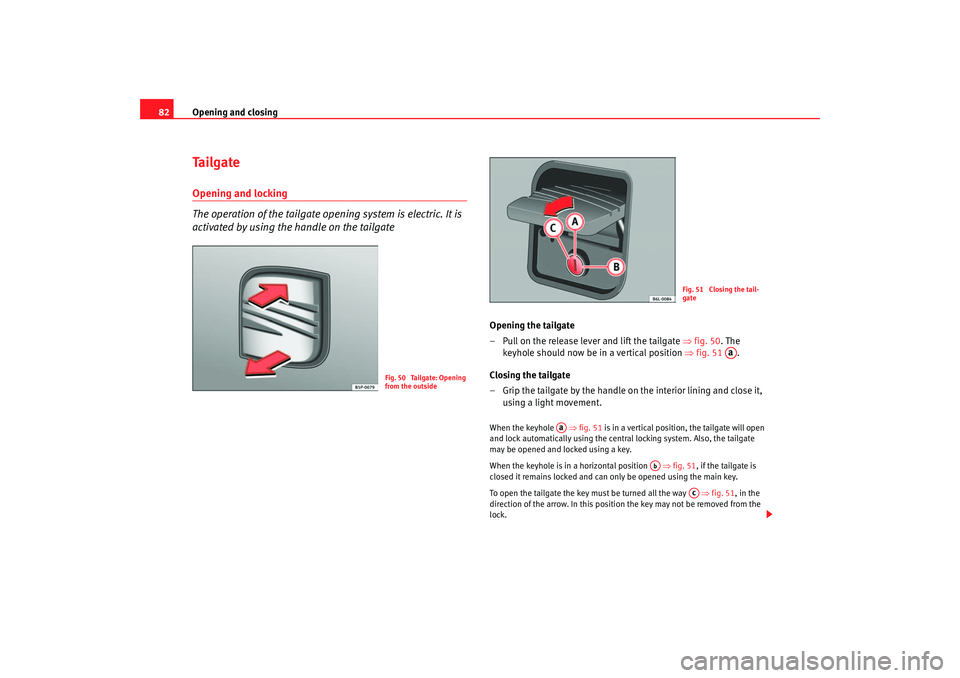
The operation of the tailgate opening system is electric. It is
activated by using the handle on the tailgate
Opening the tailgate
– Pull on the release lever and lift the tailgate ⇒fig. 50 . The
keyhole should now be in a vertical position ⇒fig. 51 .
Closing the tailgate
– Grip the tailgate by the handle on the interior lining and close it, using a light movement.When the keyhole ⇒fig. 51 is in a vertical position, the tailgate will open
and lock automatically using the central locking system. Also, the tailgate
may be opened and locked using a key.
When the keyhole is in a horizontal position ⇒fig. 51 , if the tailgate is
closed it remains locked and can only be opened using the main key.
To open the tailgate the key must be turned all the way ⇒fig. 51, in the
direction of the arrow. In this position the key may not be removed from the
lock.
Fig. 50 Tailgate: Opening
from the outside
Fig. 51 Closing the tail-
gate
Aa
Aa
Ab
Ac
cordoba_ingles Seite 82 Freitag, 7. Oktober 2005 6:00 18
Page 85 of 255

Opening and closing83
Safety First
Operating instructions
Tips and Maintenance
Te c h n i c a l D a t a
If the keyhole is in horizontal position, this implies that the tailgate is locked
and can only be opened using the main key.
WARNING
•
Always close the tailgate properly. Risk of accident or injury.
•
Do not close the tailgate by pushin
g it down with your hand on the
window. The glass could shatter. Risk of injury!
•
Ensure the tailgate is locked after closing. If not, it may open unexpect-
edly while driving.
•
Never allow children to play in or ar ound the vehicle. A locked vehicle
can be subjected to extremely high and low temperatures, depending on
the time of year. This could cause serious injuries/illness. It could even
have fatal consequences. Close and lock both the tailgate and all the other
doors when you are not using the vehicle.
•
Never close the tailgate without observing and ensuring it is clear, to do
otherwise could cause serious injury to you and others. Make sure that no
one is in the path of the tailgate.
•
Never drive with the tailgate open or half-closed, exhaust gasses may
penetrate into the interior of th e vehicle. Danger of poisoning!
•
If only the boot is opened then do not leave the key inside. The vehicle
may not be opened if the key is left inside.
WindowsOpening or closing the windows electrically
The front and rear electric windows can be operated using the
controls in the driver's door.Opening and closing the windows
– Press the button to open a window.
– Pull button to close a window ⇒.Always close the windows fully if you park the vehicle or leave it unattended
⇒ .
You can use the electric windows for approx. 10 minutes after switching off
the ignition if neither the driver door nor the front passenger door has been
opened and the key has not been removed from the ignition.
Fig. 52 Section of the
driver door: controls for
the front and rear
windows
cordoba_ingles Seite 83 Freitag, 7. Oktober 2005 6:00 18
Page 86 of 255

Opening and closing
84Buttons in the driver door
Button for window in front left door
Button for window in front right door
Buttons for rear windows* Safety switch for deactivating the electric window buttons in the rear
doors
Button for window in rear left door
Button for window in rear right door
Safety switch
*
Safety switch in the driver door can be used to disable the electric window
buttons in the rear doors.
Safety switch not pushed in: the buttons in the rear doors are enabled.
Safety switch pushed in: the buttons in the rear doors are disabled.
WARNING
•
Incorrect use of the electric windows can result in injury.
•
Never close the tailgate without observin g a n d e n s u r i n g i t i s c l e a r, t o d o
otherwise could cause serious injury to you and others. Make sure that no
one is in the path of a window.
•
Always take the vehicle key with you when you leave the vehicle.
•
Never leave children or disabled persons in the vehicle, particularly if
they have access to the keys. Unsupervised use of a key could mean that
the engine is started or that electrical equipment is used (e.g. electric
windows). Risk of accident. The door s can be locked using the remote
control key. This could result in people being trapped in the vehicle in an
emergency.
•
The electric windows will work until the key has been removed from the
ignition and one of the front doors has been opened.
•
If necessary, use the safety switch to disable the rear electric windows.
Make sure that they have been disabled.Note
If the window is not able to close becaus e it is stiff or because of an obstruc-
tion, the window will automatically open again ⇒page 85. If this happens,
check why the window could not be closed before attempting to close it
again.One-touch opening and closing*
The one-touch opening and closing function is only possible
on the front doors and can only be activated from the driver's
door.One-touch closing
– Pull up the button for the window briefly to the second position. The window closes fully.
One-touch opening
– Push down the button for the window briefly to the second posi- tion. The window opens fully.
Restoring one-touch opening and closing
– Close all windows.
A1A2A3A4A5
A3
WARNING (continued)
cordoba_ingles Seite 84 Freitag, 7. Oktober 2005 6:00 18
Page 87 of 255

Opening and closing85
Safety First
Operating instructions
Tips and Maintenance
Te c h n i c a l D a t a
– Use the key to lock the vehicle from outside and hold the key in
the lock position for at least one second. The one-touch function
is now ready for operation.The buttons ⇒ page 83, fig. 52 and have two levels for opening the
window and two for closing it. This makes it easier to open or close windows
to the desired position.
One-touch closing does not work when the ignition has been switched off,
even if the key is in the ignition.
The automatic open and close function wi ll not work if the battery has been
temporarily disconnected, or if the battery is flat. The function then has to be
reactivated.
The one-touch function and roll-back fu nction will not work if there is a
malfunction in the electric windows. Contact an Authorised Service Centre.Roll-back function
The windows have a roll-back function. This reduces the risk
of injuries when the windows are closing.•
If a window is obstructed when closing automatically, the window stops
at this point and lowers immediately ⇒ .
•
If this happens, check immediately (within 10 seconds) why the window
could not be closed before attempting to close it again. After 10 seconds the
normal automatic function resumes.
•
If the window is still obstructed, the window stops at this point.
•
If there is no obvious reason why the window cannot be closed, try to
close it again within five seconds.
If you wait longer than 10 / 5 seconds, the window will open fully when you
operate one of the buttons. One-touch closing is reactivated. The one-touch function and roll-back function will not work if there is a
malfunction in the electric windows. Contact an Authorised Service Centre.
WARNING
•
Incorrect use of the electric windows can result in injury.
•
Always take the key with you when leaving the vehicle, even if you only
intend to be gone for a short time. Plea se ensure that children are never left
unsupervised in the vehicle.
•
The electric windows will work until the key has been removed from the
ignition and one of the front doors has been opened.
•
Never close the tailgate without observin g and ensuring it is clear, to do
otherwise could cause serious injury to you and others. Make sure that no
one is in the path of a window.
•
Never allow people to remain in th e vehicle when you close the vehicle
from the outside. The windows cannot be opened even in an emergency.Note
The roll-back function is deactivate d if the windows are closed from the
outside of the vehicle using the ignition key for convenience closing
⇒ page 85.Convenience opening and closing*Using the door lock
– Hold the key in the door lock of the driver door in either the
locking or the unlocking position until all windows are either
opened or closed.
– Release the key to interrupt this function.
A1
A2
cordoba_ingles Seite 85 Freitag, 7. Oktober 2005 6:00 18