Page 230 of 2896

TROUBLE DIAGNOSIS FOR SYMPTOMS
AT-217
D
E
F
G
H
I
J
K
L
MA
B
AT
Revision: June 20062007 Versa
Engine Speed Does Not Return to Idle (Light Braking D4 → D3 )UCS005VA
SYMPTOM:
Engine speed does not smoothly return to idle when A/T shifts from D4 to D3 on “Cruise Test — Part
1”.
DIAGNOSTIC PROCEDURE
1. CHECK SELF-DIAGNOSTIC RESULTS
Perform self-diagnosis. Refer to AT-82, "
SELF-DIAGNOSTIC RESULT MODE" or AT-90, "Diagnostic Proce-
dure Without CONSULT-II" .
Is any malfunction detected by self-diagnostic results?
YES >> Check the malfunctioning system. Refer to AT- 8 2 , "SELF-DIAGNOSTIC RESULT MODE" or AT-
91, "Judgement of Self-diagnosis Code" .
NO >> GO TO 2.
2. CHECK ACCELERATOR PEDAL POSITION SENSOR
Check accelerator pedal position sensor. Refer to EC-532, "
DTC P2138 APP SENSOR" .
OK or NG
OK >> GO TO 3.
NG >> Repair or replace accelerator pedal position sensor.
3. CHECK A/T FLUID CONDITION
1. Remove oil pan. Refer to AT-257, "
Components" .
2. Check A/T fluid condition. Refer to AT-53, "
Fluid Condition Check" .
OK or NG
OK >> GO TO 5.
NG >> GO TO 4.
4. DETECT MALFUNCTIONING ITEM
1. Remove control valve assembly. Refer to AT-242, "
Control Valve Assembly and Accumulators" .
2. Check the following items:
–Overrun clutch control valve
–Overrun clutch reducing valve
–Overrun clutch solenoid valve
3. Disassemble A/T. Refer to AT- 2 6 8 , "
Disassembly" .
4. Check the following items:
–Overrun clutch assembly. Refer to AT-320, "Forward and Overrun Clutches" .
OK or NG
OK >> GO TO 6.
NG >> Repair or replace damaged parts.
5. DETECT MALFUNCTIONING ITEM
1. Remove control valve assembly. Refer to AT-242, "
Control Valve Assembly and Accumulators" .
2. Check the following items:
–Overrun clutch control valve
–Overrun clutch reducing valve
–Overrun clutch solenoid valve
OK or NG
OK >> GO TO 6.
NG >> Repair or replace damaged parts.
Page 244 of 2896
SHIFT CONTROL SYSTEM
AT-231
D
E
F
G
H
I
J
K
L
MA
B
AT
Revision: June 20062007 Versa
7. Remove the plate (1) from the control device assembly.
: Vehicle front
8. Remove the lock plate (1) from the control cable (2).
: Vehicle front
9. Remove the control cable (2) from the control device assembly.
10. Insert flat-bladed screwdrivers at points (A) and (B) as shown,
and press both tabs (E) and (F) at the front (C) and rear (D)
slightly toward the center of the control device assembly to
remove the control device assembly from the underside of the
vehicle.
: Vehicle front
SCIA6967E
SCIA6968E
SCIA6970E
Page 245 of 2896

AT-232
SHIFT CONTROL SYSTEM
Revision: June 20062007 Versa
INSTALLATION
Installation is in the reverse order of removal.
�When installing the control cable (1) to the control device
assembly (2), make sure that the control cable (1) is fully
pressed in with the ribbed surface (A) facing downward from the
vehicle.
: Vehicle front
�After installation is completed, adjust and check the A/T position.
Refer to AT-233, "
Adjustment of A/T Position" and AT-234,
"Checking of A/T Position" .
Control Device Disassembly and AssemblyUCS005VI
DISASSEMBLY
NOTE:
Refer to AT-229, "
CONTROL DEVICE COMPONENTS" to disassemble.
1. Remove selector lever knob from control device assembly. Refer to AT- 2 3 3 , "
Selector Lever Knob
Removal and Installation" .
2. Remove position lamp from position indicator plate (1).
3. Insert a flat-bladed screwdriver to (A) (at 4 locations) as shown,
and bend each hook slightly to raise position indicator plate (1)
and remove from control device assembly (2).
4. Remove bracket from control device assembly (2).
5. Remove A/T device harness connector from control device
assembly (2).
6. Release tabs (A) on shift lock solenoid and park position switch
assembly from hooks (B) on control device assembly to shift
lock solenoid and park position switch assembly.
ASSEMBLY
Assemble in the reverse order of disassembly.
SCIA6253E
SCIA6969E
SCIA6977E
Page 286 of 2896
DISASSEMBLY
AT-273
D
E
F
G
H
I
J
K
L
MA
B
AT
Revision: June 20062007 Versa
a. Remove converter housing fitting bolts (1) and (2) using a power
tool.
b. Remove bracket from converter housing
c. Remove converter housing by tapping it lightly.
d. Remove O-ring from differential lubricant hole.
24. Remove final drive assembly from transaxle case.
25. Remove differential side bearing outer race from transaxle case
and converter housing.
26. Remove differential side bearing adjusting shim from transaxle
case.
SCIA7970E
SCIA3281E
SAT2 2 8F
SCIA5378E
SCIA4938E
Page 294 of 2896
DISASSEMBLY
AT-281
D
E
F
G
H
I
J
K
L
MA
B
AT
Revision: June 20062007 Versa
43. Remove forward clutch assembly and overrun clutch assembly
(1) from transaxle case.
44. Remove needle bearing (1) and thrust washer (2) from bearing
retainer.
�Inspect needle bearing (1) and thrust washer (2), and
replace damaged or worn.
45. Remove output shaft assembly according to the following procedures.
a. Remove side cover fitting bolts.
CAUTION:
�Do not mix bolts A and B.
�Always replace bolts A as they are self-sealing bolts.
b. Remove side cover by lightly tapping it using a soft hammer.
CAUTION:
�Be careful not to drop output shaft assembly. It might
come out when removing side cover.
�Be careful not to damage side cover.
SCIA5900J
SCIA5901J
SCIA7939E
SAT4 3 4D
Page 313 of 2896
AT-300
REPAIR FOR COMPONENT PARTS
Revision: June 20062007 Versa
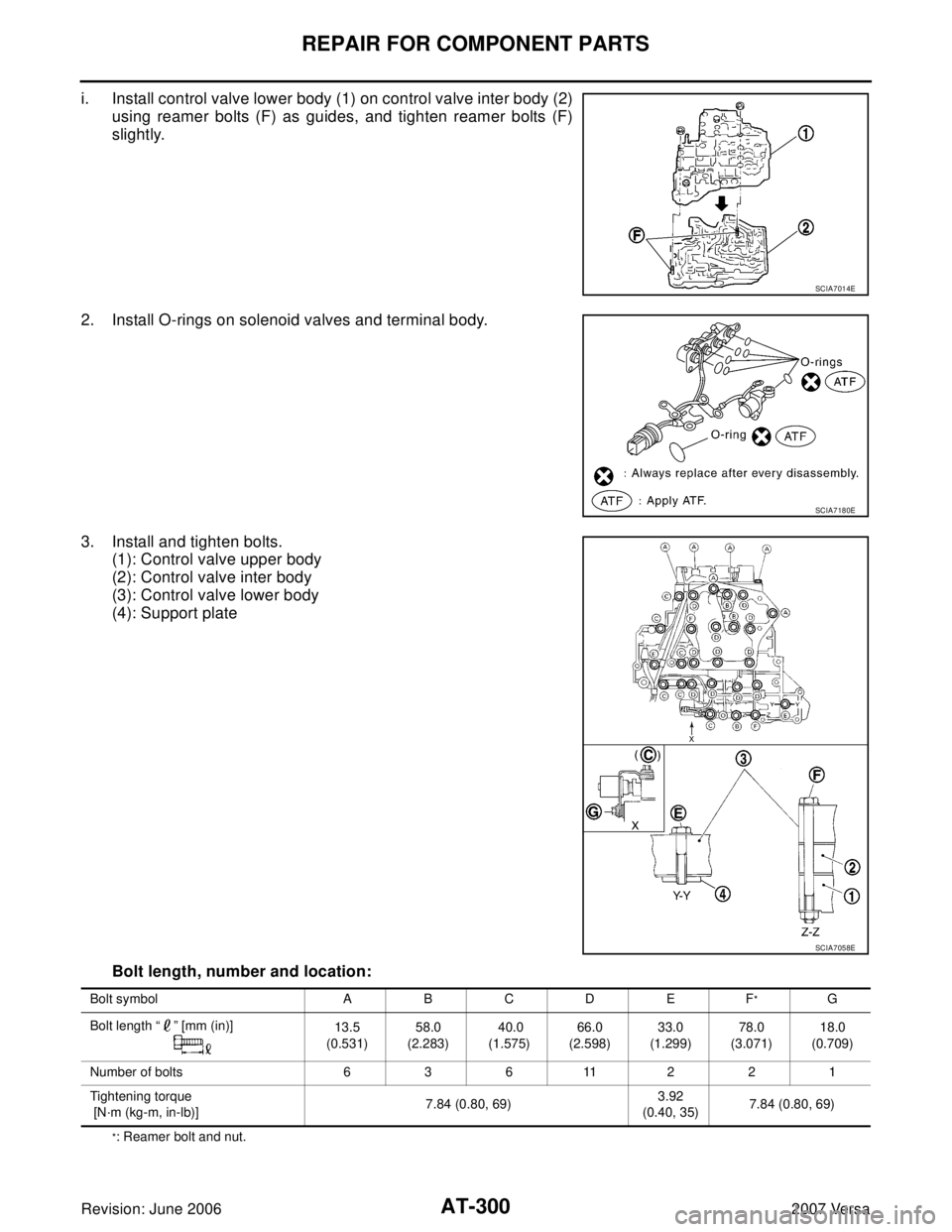
i. Install control valve lower body (1) on control valve inter body (2)
using reamer bolts (F) as guides, and tighten reamer bolts (F)
slightly.
2. Install O-rings on solenoid valves and terminal body.
3. Install and tighten bolts.
(1): Control valve upper body
(2): Control valve inter body
(3): Control valve lower body
(4): Support plate
Bolt length, number and location:
*: Reamer bolt and nut.
SCIA7014E
SCIA7180E
SCIA7058E
Bolt symbol A B C D E F*G
Bolt length “ ” [mm (in)]
13.5
(0.531)58.0
(2.283) 40.0
(1.575)66.0
(2.598)33.0
(1.299)78.0
(3.071)18.0
(0.709)
Number of bolts 63611221
Tightening torque
[N·m (kg-m, in-lb)]7.84 (0.80, 69)3.92
(0.40, 35)7.84 (0.80, 69)
Page 317 of 2896

AT-304
REPAIR FOR COMPONENT PARTS
Revision: June 20062007 Versa
c. Place mating surface of valve body face down, and remove
internal parts.
CAUTION:
�If a valve is hard to remove, place valve body face down
and lightly tap it with a soft hammer.
�Be careful not to drop or damage valves and sleeves.
INSPECTION
Valve Springs
�Check each valve spring for damage or deformation. Also mea-
sure free length and outer diameter. Refer to AT - 3 8 0 , "
Control
Va l v e s" .
�Replace valve springs if deformed or fatigued.
Control Valves
Check sliding surfaces of valves, sleeves and plugs. Replace if necessary.
ASSEMBLY
CAUTION:
�Apply ATF to all components before installation.
�Lay control valve body down when installing valves. Do not
stand control valve body upright.
Lubricate control valve body and all valves with ATF. Install control
valves by sliding them carefully into their bores.
CAUTION:
�Install each control valve one by one.
�Install control valves after checking, because some of them
are similar.
�Be careful not to scratch or damage valve body.
SAT1 3 7D
SAT1 3 8D
SAT1 3 9D
SAT1 4 0DA
Page 326 of 2896
REPAIR FOR COMPONENT PARTS
AT-313
D
E
F
G
H
I
J
K
L
MA
B
AT
Revision: June 20062007 Versa
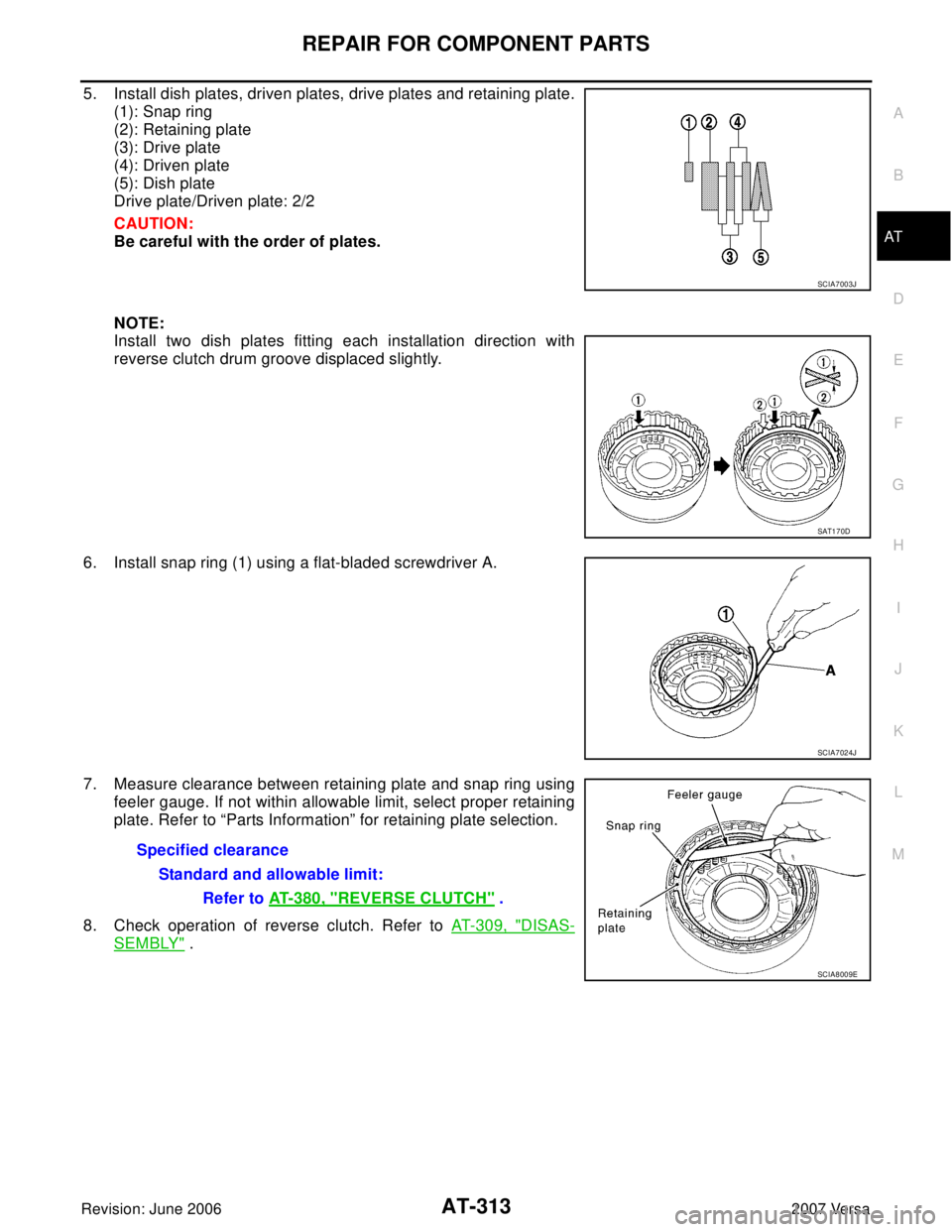
5. Install dish plates, driven plates, drive plates and retaining plate.
(1): Snap ring
(2): Retaining plate
(3): Drive plate
(4): Driven plate
(5): Dish plate
Drive plate/Driven plate: 2/2
CAUTION:
Be careful with the order of plates.
NOTE:
Install two dish plates fitting each installation direction with
reverse clutch drum groove displaced slightly.
6. Install snap ring (1) using a flat-bladed screwdriver A.
7. Measure clearance between retaining plate and snap ring using
feeler gauge. If not within allowable limit, select proper retaining
plate. Refer to “Parts Information” for retaining plate selection.
8. Check operation of reverse clutch. Refer to AT- 3 0 9 , "
DISAS-
SEMBLY" .
SCIA7003J
SAT1 7 0D
SCIA7024J
Specified clearance
Standard and allowable limit:
Refer to AT-380, "
REVERSE CLUTCH" .
SCIA8009E