2006 NISSAN ALTIMA steering
[x] Cancel search: steeringPage 63 of 304
Other supplemental front air bag precau-
tions
WARNING
cDo not place any objects on the steer-
ing wheel pad or on the instrument
panel. Also, do not place any objects
between any occupant and the steering
wheel or instrument panel. Such ob-
jects may become dangerous projec-
tiles and cause injury if the supplemen-
tal front air bag inflates.
cImmediately after inflation, several
front air bag system components will be
hot. Do not touch them; you may se-
verely burn yourself.
cNo unauthorized changes should be
made to any components or wiring of
the supplemental air bag system. This is
to prevent accidental inflation of the
supplemental air bag or damage to the
supplemental air bag system.
cDo not make unauthorized changes to
your vehicle’s electrical system, sus-
pension system or front end structure.
This could affect proper operation of
the supplemental front air bag system.cTampering with the supplemental front
air bag system may result in serious
personal injury. Tampering includes
changes to the steering wheel and the
instrument panel assembly by placing
material over the steering wheel pad
and above the instrument panel or by
installing additional trim material
around the air bag system.
cModifying or tampering with the front
passenger seat may result in serious
personal injury. For example, do not
change the front seats by placing mate-
rial on the seat cushion or by installing
additional trim material, such as seat
covers, on the seat that are not specifi-
cally designed to assure proper air bag
operation. Additionally, do not stow any
objects under the front passenger seat
or the seat cushion and seatback. Such
objects may interfere with the proper
operation of the occupant classifica-
tion sensor (pressure sensor) .
cNo unauthorized changes should be
made to any components or wiring of
the seat belt system. This may affect the
supplemental front air bag system.
Tampering with the seat belt system
may result in serious personal injury.cWork on and around the supplemental
front air bag system should be done by
a NISSAN dealer. Installation of electri-
cal equipment should also be done by a
NISSAN dealer. The Supplemental Re-
straint System (SRS) wiring should not
be modified or disconnected. Unautho-
rized electrical test equipment and
probing devices should not be used on
the air bag system.
cA cracked windshield should be re-
placed immediately by a qualified re-
pair facility. A cracked windshield could
affect the function of the supplemental
air bag system.
cThe SRS wiring harness connectors are
yellow and orange for easy
identification.
When selling your vehicle, we request that you
inform the buyer about the supplemental front air
bag system and guide the buyer to the appropri-
ate sections in this Owner’s Manual.
Safety—Seats, seat belts and supplemental restraint system1-45
ZREVIEW COPYÐ2006 Altima(l30)
Owners ManualÐUSA_English(nna)
09/08/05Ðdebbie
X
Page 72 of 304
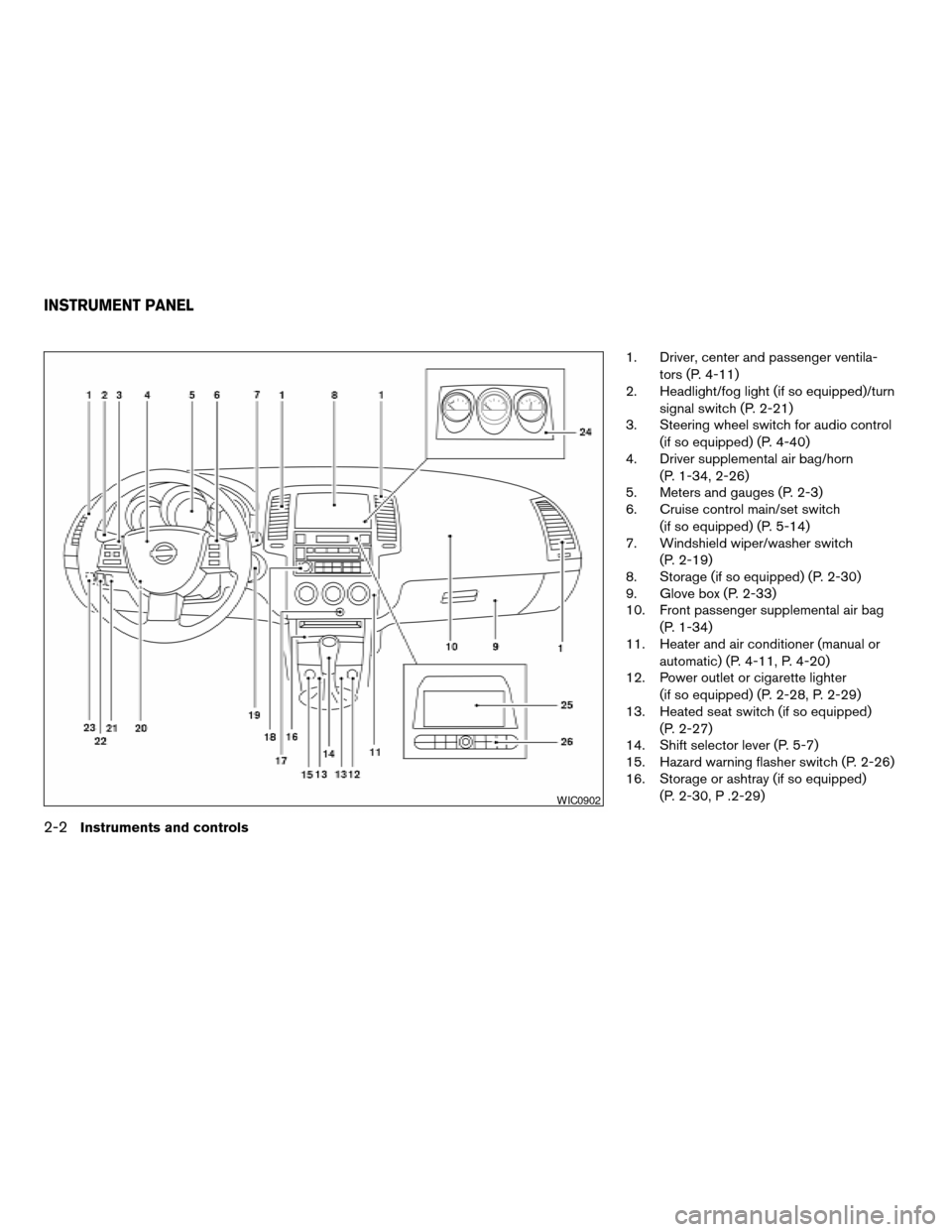
1. Driver, center and passenger ventila-
tors (P. 4-11)
2. Headlight/fog light (if so equipped)/turn
signal switch (P. 2-21)
3. Steering wheel switch for audio control
(if so equipped) (P. 4-40)
4. Driver supplemental air bag/horn
(P. 1-34, 2-26)
5. Meters and gauges (P. 2-3)
6. Cruise control main/set switch
(if so equipped) (P. 5-14)
7. Windshield wiper/washer switch
(P. 2-19)
8. Storage (if so equipped) (P. 2-30)
9. Glove box (P. 2-33)
10. Front passenger supplemental air bag
(P. 1-34)
11. Heater and air conditioner (manual or
automatic) (P. 4-11, P. 4-20)
12. Power outlet or cigarette lighter
(if so equipped) (P. 2-28, P. 2-29)
13. Heated seat switch (if so equipped)
(P. 2-27)
14. Shift selector lever (P. 5-7)
15. Hazard warning flasher switch (P. 2-26)
16. Storage or ashtray (if so equipped)
(P. 2-30, P .2-29)
WIC0902
INSTRUMENT PANEL
2-2Instruments and controls
ZREVIEW COPYÐ2006 Altima(l30)
Owners ManualÐUSA_English(nna)
09/08/05Ðdebbie
X
Page 73 of 304

17. Front passenger air bag status light
(P. 1-43)
18. Audio system controls (if so equipped)
(P. 4-23)
19. Ignition switch (P. 5-4)
20. Tilt/telescopic steering wheel controls
(P. 3-13)
21. Traction control system (TCS) off
switch (if so equipped) (P. 2-28)
22. Instrument brightness control (P. 2-24)
23. Trunk opener (P. 3-10)
24. Meters and gauges (if so equipped)
(P. 2-3)
25. Navigation system* (if so equipped)
(P. 4-2)
26. Navigation system* controls
(if so equipped) (P. 4-2)
*: Refer to the separate Navigation System
Owner’s Manual.
See the page number indicated in paren-
theses for operating details.
1. Tachometer
2. Warning/indicator lights
3. Speedometer
4. Engine coolant temperature gauge
5. Fuel gauge6. Odometer/twin trip odometer/trip com-
puter (if so equipped)
LIC0681
METERS AND GAUGES
Instruments and controls2-3
ZREVIEW COPYÐ2006 Altima(l30)
Owners ManualÐUSA_English(nna)
09/08/05Ðdebbie
X
Page 76 of 304

When the ignition switch is turned to ON, modes
of the trip computer can be selected by pushing
the trip button on the steering wheel switch for
audio controls or by the trip computer change
button located near the speedometer. The fol-
lowing modes can be selected:
Outside air temperature (ICY-°F or °C)
The outside air temperature is displayed in °F or
°C.
The outside air temperature mode includes a low
temperature warning feature: below 37°F (3°C) ,
the outside air temperature mode is automatically
selected and ICY will illuminate in order to draw
the driver’s attention. Press the trip or changebutton to toggle to the next mode, if desired. The
ICY indicator will remain illuminated as long as
the temperature remains below 39°F (4°C) .
The ambient temperature sensor is located in
front of the radiator. The sensor may be affected
by road or engine heat, wind directions and other
driving conditions. The display may differ from the
actual ambient temperature or the temperature
displayed on various signs or billboards.
Distance to empty (dte—mile or km)
The distance to empty (dte) mode provides you
with an estimation of the distance that can be
driven before refueling. The dte is constantly be-
ing calculated, based on the amount of fuel in the
fuel tank and the actual fuel consumption.
The display is updated every 30 seconds.
The dte mode includes a low range warning
feature: when the fuel level is low, the dte mode is
automatically selected and the digits blink in or-
der to draw the driver’s attention. Press the trip or
change button if you wish to return to the mode
that was selected before the warning occurred.
The dte mark (dte) will remain blinking until the
vehicle is refueled.
When the fuel level drops even lower, the dte
display will change to (----) .NOTE:
cIf the amount of fuel added while the
ignition switch is OFF is small, the dis-
play just before the ignition switch is
turned OFF may continue to be dis-
played.
cWhen driving uphill or rounding curves,
the fuel in the tank shifts, which may
momentarily change the display.
Average fuel consumption (mpg or
l/100km)
The average fuel consumption mode shows the
average fuel consumption since the last reset.
Resetting is done by pressing the trip or change
button for more than approximately 1 second.
The display is updated every 30 seconds. At
about the first 1/3 miles (500 m) after a reset, the
display shows (----) .
Average speed (mph or km/h)
The average speed mode shows the average
vehicle speed since last reset. Resetting is done
by pressing the trip or change button for more
than approximately 1 second. The display is up-
dated every 30 seconds. The first 30 seconds
after a reset, the display shows (----) .
LIC0683
2-6Instruments and controls
ZREVIEW COPYÐ2006 Altima(l30)
Owners ManualÐUSA_English(nna)
09/08/05Ðdebbie
X
Page 96 of 304
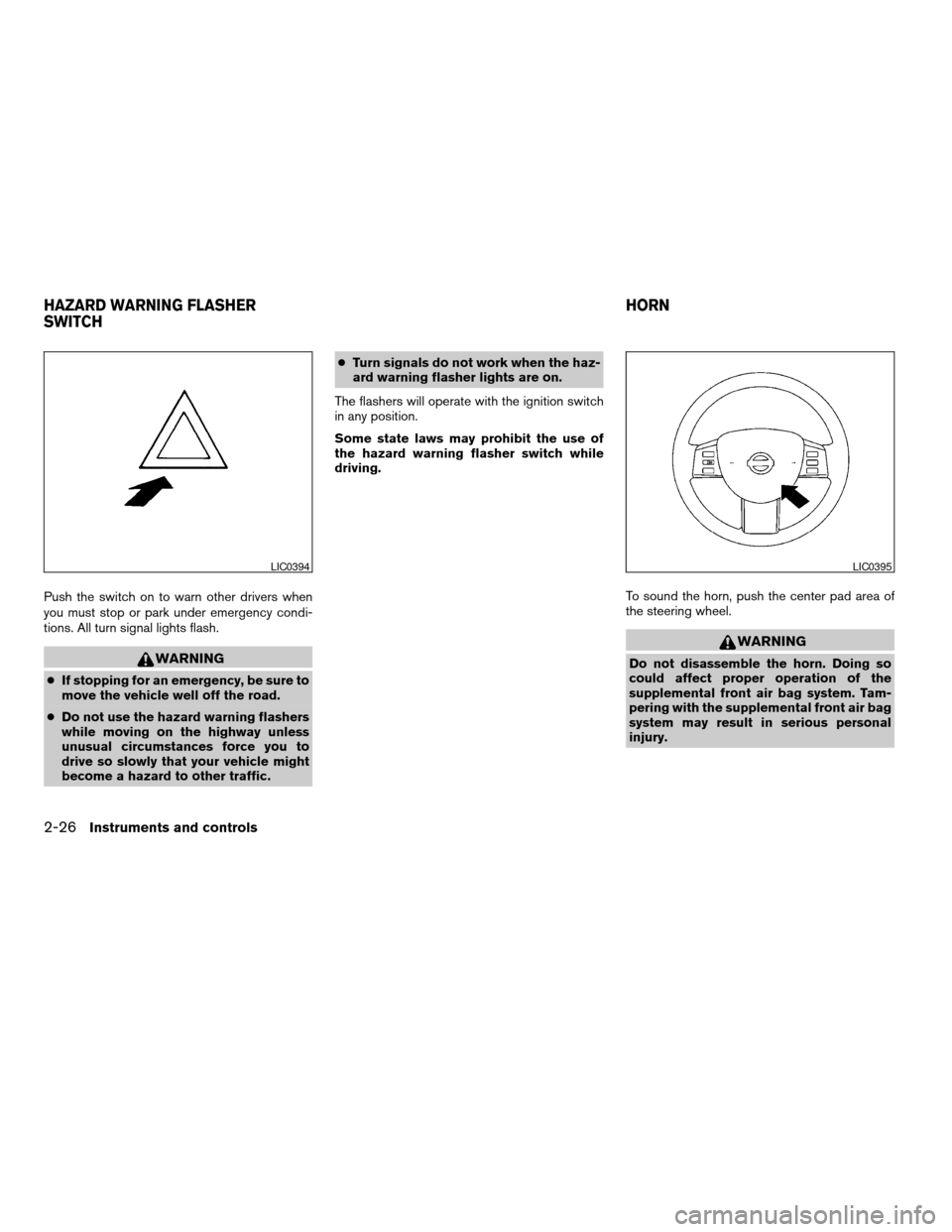
Push the switch on to warn other drivers when
you must stop or park under emergency condi-
tions. All turn signal lights flash.
WARNING
cIf stopping for an emergency, be sure to
move the vehicle well off the road.
cDo not use the hazard warning flashers
while moving on the highway unless
unusual circumstances force you to
drive so slowly that your vehicle might
become a hazard to other traffic.cTurn signals do not work when the haz-
ard warning flasher lights are on.
The flashers will operate with the ignition switch
in any position.
Some state laws may prohibit the use of
the hazard warning flasher switch while
driving.
To sound the horn, push the center pad area of
the steering wheel.
WARNING
Do not disassemble the horn. Doing so
could affect proper operation of the
supplemental front air bag system. Tam-
pering with the supplemental front air bag
system may result in serious personal
injury.
LIC0394LIC0395
HAZARD WARNING FLASHER
SWITCHHORN
2-26Instruments and controls
ZREVIEW COPYÐ2006 Altima(l30)
Owners ManualÐUSA_English(nna)
09/08/05Ðdebbie
X
Page 117 of 304

3 Pre-driving checks and adjustments
Keys .............................................3-2
Nissan vehicle immobilizer system keys...........3-2
Doors............................................3-3
Locking with key................................3-3
Locking with inside lock knob....................3-4
Locking with power door lock switch.............3-4
Child safety rear door lock.......................3-5
Remote keyless entry system (if so equipped).........3-5
How to use remote keyless entry system..........3-6
Hood............................................3-9
Trunk lid.........................................3-10
Opener operation..............................3-10
Key operation (if so equipped)..................3-11
Interior trunk lid release........................3-11Fuel-filler door...................................3-12
Opener operation..............................3-12
Fuel-filler cap.................................3-12
Tilting telescopic steering column..................3-13
Tilt operation..................................3-13
Telescopic operation...........................3-14
Sun visors.......................................3-14
Vanity mirrors.................................3-14
Mirrors..........................................3-15
Rearview mirror...............................3-15
Automatic anti-glare rearview mirror
(if so equipped)...............................3-15
Outside mirrors...............................3-15
ZREVIEW COPYÐ2006 Altima(l30)
Owners ManualÐUSA_English(nna)
09/08/05Ðdebbie
X
Page 129 of 304
cDo not fill a portable fuel container in
the vehicle or trailer. Static electricity
can cause an explosion of flammable
liquid, vapor or gas in any vehicle or
trailer. To reduce the risk of serious
injury or death when filling portable fuel
containers:
– Always place the container on the
ground when filling.
– Do not use electronic devices when
filling.
– Keep the pump nozzle in contact
with the container while you are fill-
ing it.
– Use only approved portable fuel con-
tainers for flammable liquid.CAUTION
cIf fuel is spilled on the vehicle body,
flush it away with water to avoid paint
damage.
cTighten until the fuel-filler cap clicks.
Failure to tighten the fuel-filler cap
properly may cause the
mal-
function indicator light (MIL) to illumi-
nate. If the
light illuminates be-
cause the fuel-filler cap is loose or
missing, tighten or install the cap and
continue to drive the vehicle.
The
light should turn off after a
few driving trips. If the
light
does not turn off after a few driving
trips, have the vehicle inspected by a
NISSAN dealer.
cFor additional information, see the
“Malfunction indicator light (MIL)” in
the “Instruments and Controls” section
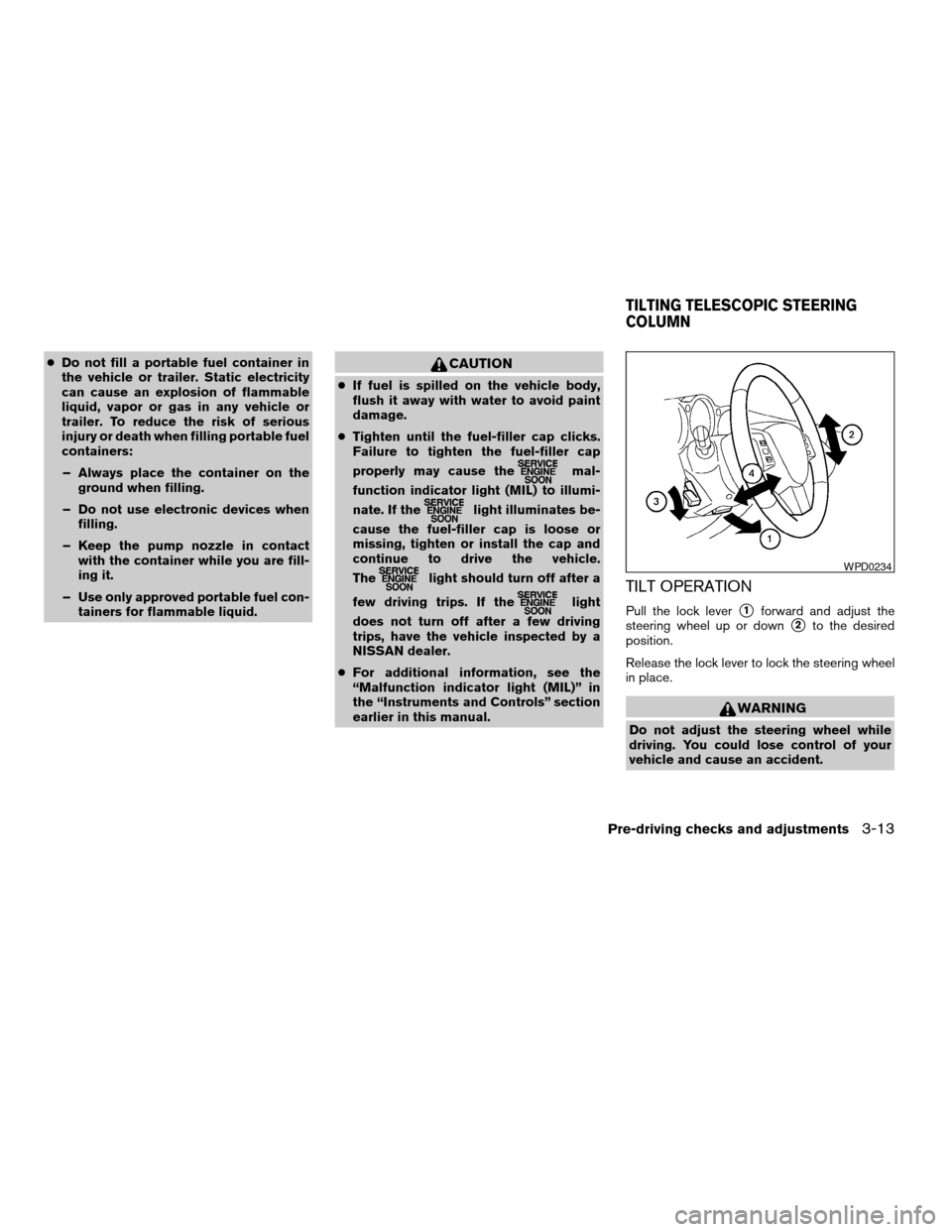
earlier in this manual.TILT OPERATION
Pull the lock levers1forward and adjust the
steering wheel up or down
s2to the desired
position.
Release the lock lever to lock the steering wheel
in place.
WARNING
Do not adjust the steering wheel while
driving. You could lose control of your
vehicle and cause an accident.
WPD0234
TILTING TELESCOPIC STEERING
COLUMN
Pre-driving checks and adjustments3-13
ZREVIEW COPYÐ2006 Altima(l30)
Owners ManualÐUSA_English(nna)
09/08/05Ðdebbie
X
Page 130 of 304
TELESCOPIC OPERATION
Push the lock levers3down and adjust the
steering wheel forward or backward
s4to the
desired position.
Pull the lock lever up firmly to lock the steering
wheel in place.
WARNING
Do not adjust the steering wheel any
closer to you than is necessary for proper
steering operation and comfort. The driv-
er’s air bag inflates with great force. If you
are unrestrained, leaning forward, sitting
sideways or out of position in any way, you
are at greater risk of injury or death in a
crash. You may also receive serious or
fatal injuries from the air bag if you are up
against it when it inflates. Always sit back
against the seatback and as far away as
practical from the steering wheel. Always
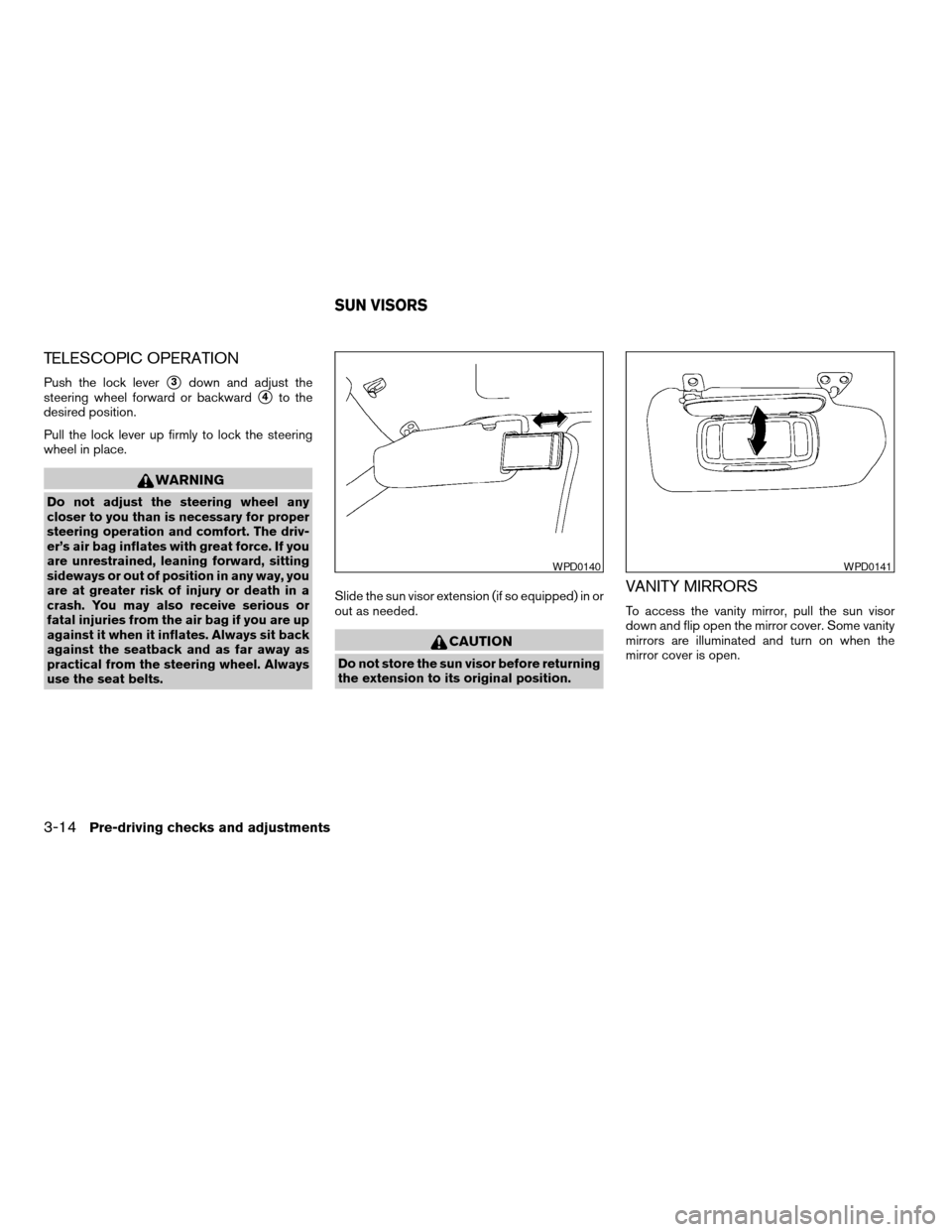
use the seat belts.Slide the sun visor extension (if so equipped) in or
out as needed.
CAUTION
Do not store the sun visor before returning
the extension to its original position.
VANITY MIRRORS
To access the vanity mirror, pull the sun visor
down and flip open the mirror cover. Some vanity
mirrors are illuminated and turn on when the
mirror cover is open.
WPD0140WPD0141
SUN VISORS
3-14Pre-driving checks and adjustments
ZREVIEW COPYÐ2006 Altima(l30)
Owners ManualÐUSA_English(nna)
09/08/05Ðdebbie
X