2006 NISSAN ALTIMA rear view mirror
[x] Cancel search: rear view mirrorPage 11 of 304

1. Glove box (P. 2-33)
2. Automatic anti-glare inside mirror
(if so equipped) (P. 3-15)
3. Sun visors (P. 3-14)
4. Interior lights, illuminated entry (P. 2-41)
5. Front seat (P. 1-2)
6. Sunroof (if so equipped) (P. 2-40)
7. Interior trunk access (P. 1-6)
8. Rear seat (P. 1-6)
9. Front console (P. 2-33)
10. Front cup holders (P. 2-32)
11. Parking brake, parking on hills
(P. 5-14, P. 5-17)
12. HomeLinkT(if so equipped) (P. 2-43)
See the page number indicated in paren-
theses for operating details.
LII0026
PASSENGER COMPARTMENT
Illustrated table of contents0-5
ZREVIEW COPYÐ2006 Altima(l30)
Owners ManualÐUSA_English(nna)
09/08/05Ðdebbie
X
Page 70 of 304

2 Instruments and controls
Instrument panel...................................2-2
Meters and gauges................................2-3
Speedometer and odometer.....................2-4
Trip computer (if so equipped)...................2-5
Tachometer....................................2-7
Engine coolant temperature gauge...............2-8
Fuel gauge....................................2-8
Engine oil pressure gauge (if so equipped)........2-9
Voltmeter (if so equipped)......................2-10
Fuel consumption gauge (if so equipped)........2-10
Warning/indicator lights and audible reminders......2-11
Checking bulbs...............................2-11
Warning lights................................2-11
Indicator lights................................2-14
Audible reminders.............................2-15
Security systems.................................2-16
Vehicle security system (if so equipped)..........2-16
Nissan vehicle immobilizer system...............2-17
Windshield wiper and washer switch...............2-19
Switch operation..............................2-19
Rear window and outside mirror (if so equipped)
defroster switch..................................2-20
Headlight and turn signal switch....................2-21Xenon headlights (if so equipped)...............2-21
Headlight control switch........................2-21
Daytime running light system (Canada only)......2-24
Instrument brightness control...................2-24
Turn signal switch.............................2-25
Fog light switch (if so equipped)................2-25
Hazard warning flasher switch.....................2-26
Horn............................................2-26
Heated seat (if so equipped).......................2-27
Traction control system (TCS) off switch
(if so equipped)..................................2-28
Power outlet.....................................2-28
Cigarette lighter and ashtray (if so equipped)........2-29
Storage.........................................2-30
Map pockets..................................2-30
Seatback pockets (if so equipped)..............2-31
Sunglasses holder.............................2-31
Cup holders..................................2-32
Glove box....................................2-33
Console box..................................2-33
Instrument panel storage (if so equipped)........2-35
Covered storage box (if so equipped)............2-36
Grocery hooks (if so equipped).................2-36
ZREVIEW COPYÐ2006 Altima(l30)
Owners ManualÐUSA_English(nna)
09/08/05Ðdebbie
X
Page 90 of 304
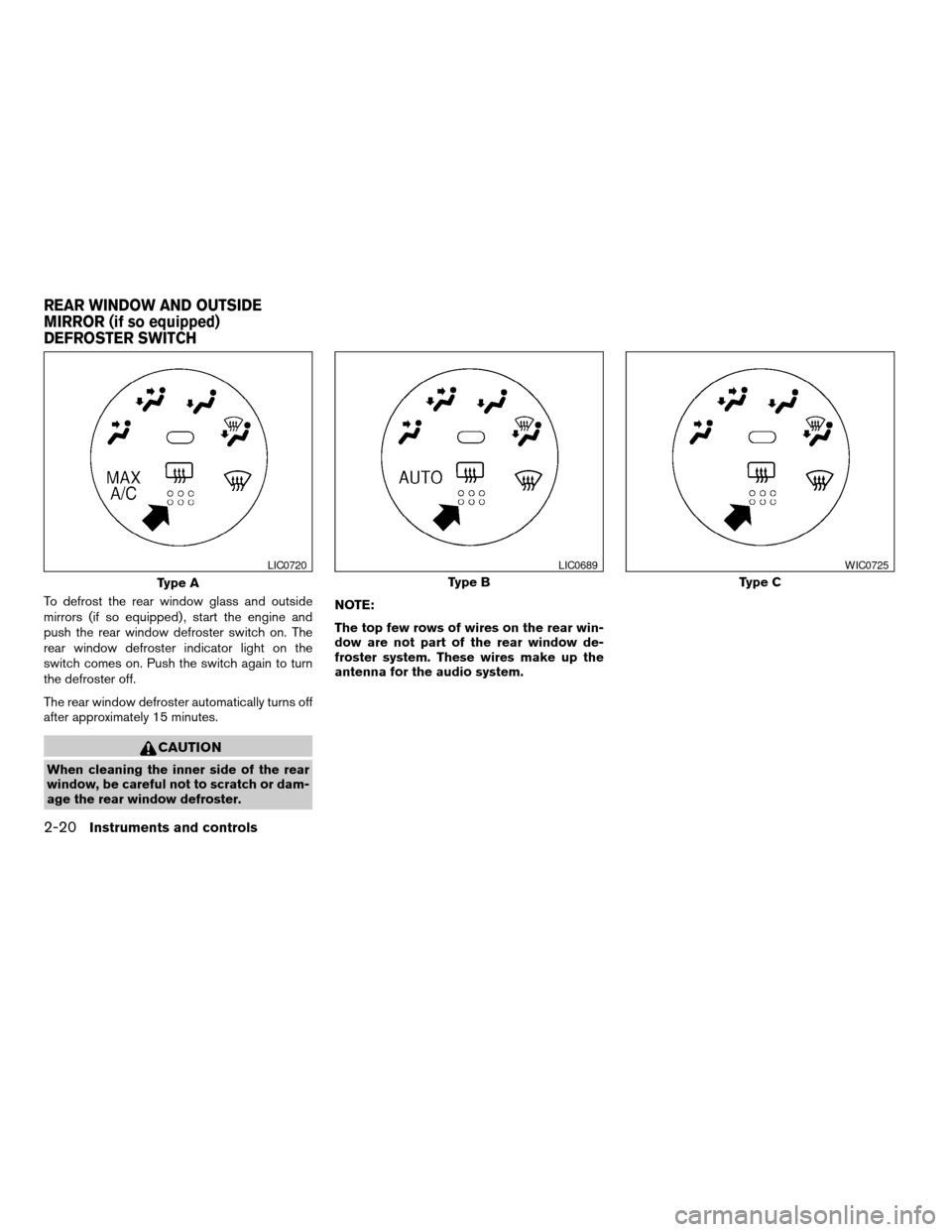
To defrost the rear window glass and outside
mirrors (if so equipped) , start the engine and
push the rear window defroster switch on. The
rear window defroster indicator light on the
switch comes on. Push the switch again to turn
the defroster off.
The rear window defroster automatically turns off
after approximately 15 minutes.
CAUTION
When cleaning the inner side of the rear
window, be careful not to scratch or dam-
age the rear window defroster.NOTE:
The top few rows of wires on the rear win-
dow are not part of the rear window de-
froster system. These wires make up the
antenna for the audio system.
Type A
LIC0720
Type B
LIC0689
Type C
WIC0725
REAR WINDOW AND OUTSIDE
MIRROR (if so equipped)
DEFROSTER SWITCH
2-20Instruments and controls
ZREVIEW COPYÐ2006 Altima(l30)
Owners ManualÐUSA_English(nna)
09/08/05Ðdebbie
X
Page 117 of 304

3 Pre-driving checks and adjustments
Keys .............................................3-2
Nissan vehicle immobilizer system keys...........3-2
Doors............................................3-3
Locking with key................................3-3
Locking with inside lock knob....................3-4
Locking with power door lock switch.............3-4
Child safety rear door lock.......................3-5
Remote keyless entry system (if so equipped).........3-5
How to use remote keyless entry system..........3-6
Hood............................................3-9
Trunk lid.........................................3-10
Opener operation..............................3-10
Key operation (if so equipped)..................3-11
Interior trunk lid release........................3-11Fuel-filler door...................................3-12
Opener operation..............................3-12
Fuel-filler cap.................................3-12
Tilting telescopic steering column..................3-13
Tilt operation..................................3-13
Telescopic operation...........................3-14
Sun visors.......................................3-14
Vanity mirrors.................................3-14
Mirrors..........................................3-15
Rearview mirror...............................3-15
Automatic anti-glare rearview mirror
(if so equipped)...............................3-15
Outside mirrors...............................3-15
ZREVIEW COPYÐ2006 Altima(l30)
Owners ManualÐUSA_English(nna)
09/08/05Ðdebbie
X
Page 131 of 304
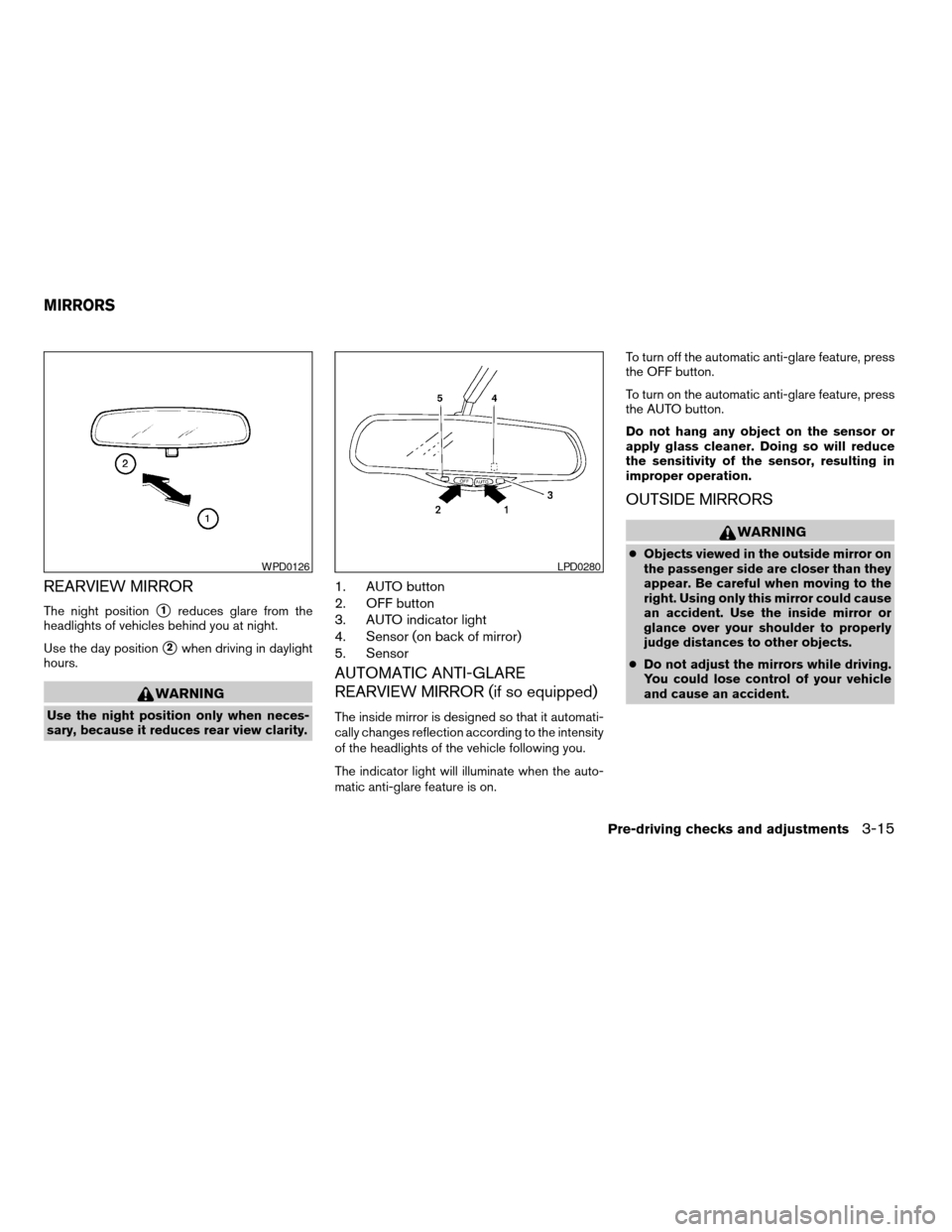
REARVIEW MIRROR
The night positions1reduces glare from the
headlights of vehicles behind you at night.
Use the day position
s2when driving in daylight
hours.
WARNING
Use the night position only when neces-
sary, because it reduces rear view clarity.
1. AUTO button
2. OFF button
3. AUTO indicator light
4. Sensor (on back of mirror)
5. Sensor
AUTOMATIC ANTI-GLARE
REARVIEW MIRROR (if so equipped)
The inside mirror is designed so that it automati-
cally changes reflection according to the intensity
of the headlights of the vehicle following you.
The indicator light will illuminate when the auto-
matic anti-glare feature is on.To turn off the automatic anti-glare feature, press
the OFF button.
To turn on the automatic anti-glare feature, press
the AUTO button.
Do not hang any object on the sensor or
apply glass cleaner. Doing so will reduce
the sensitivity of the sensor, resulting in
improper operation.
OUTSIDE MIRRORS
WARNING
cObjects viewed in the outside mirror on
the passenger side are closer than they
appear. Be careful when moving to the
right. Using only this mirror could cause
an accident. Use the inside mirror or
glance over your shoulder to properly
judge distances to other objects.
cDo not adjust the mirrors while driving.
You could lose control of your vehicle
and cause an accident.WPD0126LPD0280
MIRRORS
Pre-driving checks and adjustments3-15
ZREVIEW COPYÐ2006 Altima(l30)
Owners ManualÐUSA_English(nna)
09/08/05Ðdebbie
X
Page 132 of 304

Electric control type (if so equipped)
The outside mirror remote control only operates
when the ignition switch is in the ACC or ON
position.
Rotate the control lever to select the right or left
mirror. Adjust the mirror to the desired position by
moving the control lever.
Manual control type
The outside mirror can be moved in any direction
for a better rear view.
Heated mirrors (if so equipped)
Some outside mirrors can be heated to defrost,
defog, or de-ice for improved visibility. For addi-
tional information, see “Rear window and outside
mirror (if so equipped) defroster switch” in the
“Instrument and controls” section of this manual.
WPD0274LPD0296
3-16Pre-driving checks and adjustments
ZREVIEW COPYÐ2006 Altima(l30)
Owners ManualÐUSA_English(nna)
09/08/05Ðdebbie
X
Page 146 of 304

OFF position (Indicator light off):
Outside air is drawn into the passenger compart-
ment and distributed through the selected outlet.
Use the off position for normal heater or air con-
ditioner operation.
Air conditioner button (if so
equipped)
The button is provided only on vehicles equipped
with an air conditioner.
Start the engine, turn the fan control dial to the
desired position and push the
button to
turn on the air conditioner. The indicator light
comes on when the air conditioner is operating.
To turn off the air conditioner, push the
button again.
The air conditioner cooling function oper-
ates only when the engine is running.
Rear window defroster switch
For more information about the rear window de-
froster switch, see “Rear window and outside
mirror (if so equipped) defroster switch” in the
“Instruments and controls” section of this manual.
HEATER OPERATION
Heating
This mode is used to direct heated air to the foot
outlets. Some air also flows from the defrost
outlets.
1. Push the
button to the off position for
normal heating.
2. Turn the air flow control dial to the
position.
3. Turn the fan control dial to the desired posi-
tion.
4. Turn the temperature control dial to the de-
sired position between the middle and the
hot position.
Ventilation
This mode directs outside air to the side and
center ventilators.
1. Push the
button to the off position.
2. Turn the air flow control dial to the
position.
3. Turn the fan control dial to the desired posi-
tion.
4. Turn the temperature control dial to the de-
sired position.
Defrosting or defogging
This mode directs the air to the defrost outlets to
defrost/defog the windows.
1. Turn the air flow control dial to the
position.
2. Turn the fan control dial to the desired posi-
tion.
3. Turn the temperature control dial to the de-
sired position between the middle and the
hot position.
cTo quickly remove ice or fog from the win-
dows, turn the fan control dial to HI and the
temperature control lever to the full HOT
position.
cWhen the
position is selected, the air
conditioner automatically turns on (however,
the indicator light will not illuminate) if the
outside temperature is more than 36°F
(2°C) . The air conditioning system will con-
tinue to operate until the vehicle is restarted,
even if the air flow control dial is turned to a
position other than the
position. This
dehumidifies the air which helps defog the
windshield. The
mode automatically
turns off, allowing outside air to be drawn
into the passenger compartment to further
improve the defogging performance.
4-14Display screen, heater, air conditioner and audio systems
ZREVIEW COPYÐ2006 Altima(l30)
Owners ManualÐUSA_English(nna)
09/08/05Ðdebbie
X
Page 287 of 304
Trailer lights
CAUTION
When splicing into the vehicle electrical
system, a commercially available power-
type module/converter must be used to
provide power for all trailer lighting. This
unit uses the vehicle battery as a direct
power source for all trailer lights while
using the vehicle tail light, stoplight and
turn signal circuits as a signal source. The
module/converter must draw no more
that 15 milliamps from the stop and tail
lamp circuits. Using a module/converter
that exceeds these power requirements
may damage the vehicle’s electrical sys-
tem. See a reputable trailer dealer to ob-
tain the proper equipment and to have it
installed.
Trailer lights should comply with federal and/or
local regulations. For assistance in hooking up
trailer lights, contact a NISSAN dealer or repu-
table trailer dealer.
Trailer brakes
If your trailer is equipped with a braking system,
make sure it conforms to federal and/or local
regulations and that it is properly installed.
WARNING
Never connect a trailer brake system di-
rectly to the vehicle brake system.
Pre-towing tips
cBe certain your vehicle maintains a level
position when a loaded and/or unloaded
trailer is hitched. Do not drive the vehicle if it
has an abnormal nose-up or nose-down
condition; check for improper tongue load,
overload, worn suspension or other possible
causes of either condition.
cAlways secure items in the trailer to prevent
load shift while driving.
cLoad the trailer so approximately 60% of the
trailer load is in the front half and 40% is in
the back half.
cCheck your hitch, trailer tire pressure, ve-
hicle tire pressure, trailer light operation, and
trailer wheel lug nuts every time you attach a
trailer to the vehicle.
cBe certain your rearview mirrors conform to
all federal, state or local regulations. If not,
install any mirrors required for towing before
driving the vehicle.
Trailer towing tips
In order to gain skill and an understanding of the
vehicle’s behavior, you should practice turning,
stopping and backing up in an area which is free
from traffic. Steering stability and braking perfor-
mance will be somewhat different than under
normal driving conditions.
cAlways secure items in the trailer to prevent
load shift while driving.
cAvoid abrupt starts, acceleration or stops.
cAvoid sharp turns or lane changes.
cAlways drive your vehicle at a moderate
speed. Some states or provinces have spe-
cific speed limits for vehicles that are towing
trailers. Obey the local speed limits.
cWhen backing up, hold the bottom of the
steering wheel with one hand. Move your
hand in the direction in which you want the
trailer to go. Make small corrections and
back up slowly. If possible, have someone
guide you when you are backing up.
Technical and consumer information9-19
ZREVIEW COPYÐ2006 Altima(l30)
Owners ManualÐUSA_English(nna)
09/08/05Ðdebbie
X