2006 MINI Hardtop 2 Door fuel
[x] Cancel search: fuelPage 58 of 168

56
AUTOMATIC TRANSMISSION WITH STEPTRONIC*
In addition to the fully automatic mode,
you can shift gears manually using Step-
tronic, refer to page57.
Selector lever positions
P R N D M/S + –
Range selection
>The selector lever can be moved out of
position P when the ignition is switched
on or the engine is running: interlock.
>While the vehicle is stationary and
before shifting out of P or N, depress the
footbrake in order to disengage the
selector lever's lock mechanism: shift-
lock.
Keep your foot on the brake until start-
ing off, otherwise the vehicle will start
to move when a drive position is
engaged.
A lock prevents the selector lever from
being inadvertently moved into the R and P
positions. To override the lock, press the
button on the front of the selector lever
knob, see arrow.
If the engine speed is too high when
the vehicle is at a standstill, the selec-
tor lever is also blocked to protect the
transmission.
If the selector lever is not placed in
position P when the vehicle is parked, the
position display of the selector lever stays
on. This can lead to battery discharge.<
PPark
Select only when the vehicle is completely
stopped. The transmission locks to prevent
the drive wheels from turning.
RReverse
Select only when the vehicle is completely
stopped.
NNeutral, idle
Select this when you are in a car wash, for
example. The vehicle can roll.
D Drive: automatic driving position
This position is designed for driving under
all normal operating conditions.
Under normal operation conditions, fuel
consumption is lowest when you drive in
position D.
Page 68 of 168
66
ODOMETER CLOCK FUEL GAUGE
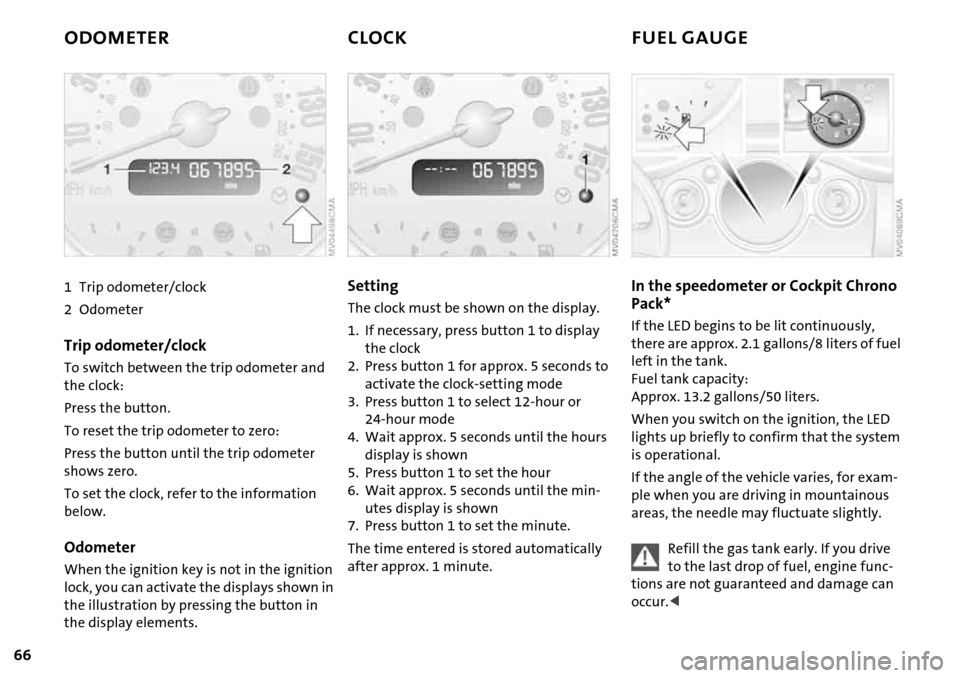
1 Trip odometer/clock
2Odometer
Trip odometer/clock
To switch between the trip odometer and
the clock:
Press the button.
To reset the trip odometer to zero:
Press the button until the trip odometer
shows zero.
To set the clock, refer to the information
below.
Odometer
When the ignition key is not in the ignition
lock, you can activate the displays shown in
the illustration by pressing the button in
the display elements.
Setting
The clock must be shown on the display.
1. If necessary, press button 1 to display
the clock
2. Press button 1 for approx. 5 seconds to
activate the clock-setting mode
3. Press button 1 to select 12-hour or
24-hour mode
4. Wait approx. 5 seconds until the hours
display is shown
5. Press button 1 to set the hour
6. Wait approx. 5 seconds until the min-
utes display is shown
7. Press button 1 to set the minute.
The time entered is stored automatically
after approx. 1 minute.
In the speedometer or Cockpit Chrono
Pack*
If the LED begins to be lit continuously,
there are approx. 2.1 gallons/8 liters of fuel
left in the tank.
Fuel tank capacity:
Approx. 13.2 gallons/50 liters.
When you switch on the ignition, the LED
lights up briefly to confirm that the system
is operational.
If the angle of the vehicle varies, for exam-
ple when you are driving in mountainous
areas, the needle may fluctuate slightly.
Refill the gas tank early. If you drive
to the last drop of fuel, engine func-
tions are not guaranteed and damage can
occur.<
Page 69 of 168

67
OVERVIEW REPAIRS OPERATIONCONTROLS DATA INDEX
FUEL GAUGE COOLANT TEMPERATURE GAUGE
In the navigation system*
Please also comply with the instruc-
tions in the previous section.<
If the LED changes from orange to red,
there are approx. 2.1 gallons/8 liters of fuel
left in the tank.
Coolant temperature gauge
Depending on the equipment version, a
coolant temperature gauge is located in
the speedometer or the Cockpit Chrono
Pack.
Low temperature:
The engine is still cold. Drive at moderate
engine and vehicle speeds.
Center position:
Normal operating temperature of the
engine.
High temperature:
As soon as there is a deviation from the
center position upwards or to the left:
Drive with moderation and at low engine
speeds. If necessary, switch off the engine
and allow it to cool down.
Checking coolant level, refer to page115.
Temperature warning
LED 1 lights up while driving:
Engine is too hot. Switch off the engine
immediately and allow it to cool down.
When you switch on the ignition, the LED 1
lights up briefly to confirm that the system
is operational.
Equipment with navigation system* or
Cockpit Chrono Pack*
Coolant-temperature warning
lamp 2 lights up while driving:
Engine is too hot. Switch off the
engine immediately and allow it to cool
down.
Page 71 of 168

69
OVERVIEW REPAIRS OPERATIONCONTROLS DATA INDEX
ONBOARD COMPUTER*
Mode selection
You can use the button in the turn signal
indicator lever to retrieve information from
the onboard computer for display in the
tachometer. By pressing the button briefly,
you can call up a new function for display.
The order of the displays:
Outside temperature, range, average con-
sumption and current consumption, aver-
age speed and current speed.
If the vehicle is equipped with a navi-
gation system, you will find more
information on the onboard computer in
the Owner's Manual for Navigation Sys-
tem.<
Outside temperature
If the vehicle is not equipped with an
onboard computer, only the outside tem-
perature is displayed.
Press the button in the turn indicator lever
to switch the display from outside temper-
ature to current speed and vice versa.
You can have the unit of measure set
to7 or6.<
Outside temperature warning
If the temperature falls to approx. +36/
377, the onboard computer automati-
cally switches to the outside temperature
display.
In addition, a signal sounds and the display
flashes.
Black ice can occur at temperatures
above +36/377 as well. You
should therefore drive carefully on bridges
and shaded roads, for example; as other-
wise there is an increased risk of an acci-
dent.<
With navigation system:
The temperature is displayed in the status
line of the navigation system, refer to the
Owner's Manual for Navigation System.
Current vehicle speed
If the vehicle is not equipped with an
onboard computer, only the current speed
is displayed.
Press the button in the turn indicator lever
to switch the display from outside temper-
ature to current speed and vice versa.
Range
The display shows a range estimate based
on the available fuel. The amount of fuel
remaining in the tank is measured, and the
range is estimated from your driving style
over the last 20 miles/30 km.
If the range displayed is less than
35 miles/50 km, be sure to refuel;
Page 72 of 168
70
ONBOARD COMPUTER*
otherwise engine functions are not guaran-
teed and damage could occur.<
Average speed, average fuel
consumption
To reset average consumption, average
speed:
Press the button in the turn signal indicator
lever for a long time.
The average consumption is determined
for the time during which the engine is run-
ning.
If the vehicle is equipped with a navi-
gation system, the displays are
shown in the area of the navigation sys-
tem.<
You can have a different unit of mea-
sure set.<
Current fuel consumption
Shows the current fuel consumption. You
can check how economically and environ-
mentally friendly you are currently driving.
You can have a different unit of mea-
sure set.<
Page 101 of 168

99
OVERVIEW REPAIRSOPERATIONCONTROLS DATA INDEX
REFUELING
Always switch off the engine before
refueling; otherwise no fuel can be
added to the tank and the SERVICE ENGINE
SOON lamp may come on.<
1. Open the fuel filler door
2. Turn the gas cap counterclockwise
3. Put the gas cap in the bracket attached
to the fuel filler door.
Always observe all applicable precau-
tionary measures and regulations
when handling fuels. Do not carry any
spare fuel containers in the vehicle. They
can leak and cause an explosion or fire in
the event of an accident.<
Observe the following when refueling
Always observe all safety precautions
posted at the service station when
handling fuel.<
When refueling, insert the filler nozzle
completely into the filler pipe. Pulling the
nozzle out of the pipe during refueling:
>Results in premature pump shutoff
>Will reduce the effect of the fuel vapor
recovery system on the pump.
As long as the filler nozzle is used properly,
the fuel tank is full whenever the nozzle
shuts off the first time.
Closing the gas cap
1. Insert gas cap
2. Turn gas cap clockwise until it clicks
3. Close fuel filler door.
Insert the cap and turn it clockwise
until it audibly clicks.
Do not jam the strap between the gas cap
and the vehicle. The following message is
displayed if the cap is loose or missing.<
US models only:
The warning lamp
* comes on.
The gas cap is not correctly closed
or missing. Check if the gas cap is
correctly closed.
Fuel tank volume
Approx. 13.2 gallons/50 liters, of which
approx. 2.1 gallons/8 liters are reserve
capacity.
Do not drive until the fuel tank is
totally empty. Otherwise engine
operations are not guaranteed and damage
could occur.<
Fuel quality
Do not fill the tank with leaded gasoline;
otherwise the catalytic converter will be
permanently damaged.
Required fuel
Premium Unleaded Gasoline,
Minimum Octane Rating: 91.
Minimum Octane Rating corresponds to
the Anti Knock Index (AKI) and is deter-
mined according to the so-called (R+M)/
2method.
Page 102 of 168

100
REFUELING
Do not use leaded gasoline; other-
wise the lambda probe and catalytic
converter will be permanently damaged.<
Use high-quality brands
Field experience has indicated significant
differences in fuel quality: volatility, com-
position, additives, etc., among gasolines
offered for sale in the United States and
Canada. Fuels containing up to and includ-
ing 10 % ethanol or other oxygenates with
up to 2.8 % oxygen by weight, that is, 15 %
MTBE or 3 % methanol plus an equivalent
amount of co-solvent, will not void the
applicable warranties with respect to
defects in materials or workmanship.
The use of poor-quality fuels may
result in driveability, starting and
stalling problems especially under certain
environmental conditions such as high
ambient temperature and high altitude.
Should you encounter driveability prob-
lems which you suspect could be related to
the fuel you are using, we recommend that
you respond by switching to a recognized
high-quality brand.
Failure to comply with these recommenda-
tions may result in unscheduled mainte-
nance.<
Manual release with the MINI
In the event of an electrical malfunction,
the fuel filler door can be unlocked manu-
ally.
1. Remove the side trim panel on the left-
hand side of the luggage compartment
2. Pull the white lever toward the rear.
The fuel filler door is released
3. Open the fuel filler door.
Manual release with the MINI
Convertible
In the event of an electrical malfunction,
the fuel filler door can be unlocked manu-
ally.
1. Remove the cover of the side trim panel
on the left-hand side, see arrow 1
2. Pull the green strap toward the rear, see
arrow 2.
The fuel filler door is released
3. Open the fuel filler door.
Page 112 of 168

110
NEW WHEELS AND TIRES SNOW CHAINS*
Special characteristics of winter tires
The manufacturer of your MINI recom-
mends winter tires for driving in adverse
winter road conditions. While all-season
tires with the M+S designation provide bet-
ter winter traction than summer tires, they
generally do not achieve the full perfor-
mance of winter tires.
Observe speed ratings:
Never exceed the maximum speed
for which the winter tires are rated.<
Storage
Store tires in a cool, dry place, protecting
them against light whenever possible. Pro-
tect the tires against contact with oil,
grease and fuel. Do not exceed the tire
inflation pressure specified on the tire side-
wall.
Only certain types of snow chains have
been tested by the manufacturer of your
MINI, classified as road-safe and recom-
mended. Contact your MINI Dealer for
more details. Their use is only permitted in
pairs on the front wheels on winter tires of
the following types:
>175/65 R 15 M+S
>175/60 R 16 M+S.
When fitting, comply with the manufac-
turer's instructions. With chains, do not
exceed a speed of 30 mph / 50 km/h.
Do not initialize the Flat Tire Monitor
after attaching snow chains to the
tires.
When driving with snow chains, it can be
helpful to switch off the ASC or DSC for a
brief period, refer to page71.<