Page 885 of 2305
DIAGNOSIS AND TESTING - GENERATOR DECOUPLER
CONDITION POSSIBLE CAUSES CORRECTION
Does not drive generator
(generator not charging)Internal failure Replace decoupler
Noise coming from decou-
plerInternal failure Replace decoupler
REMOVAL
The generator decoupler is used only with
certain engines.
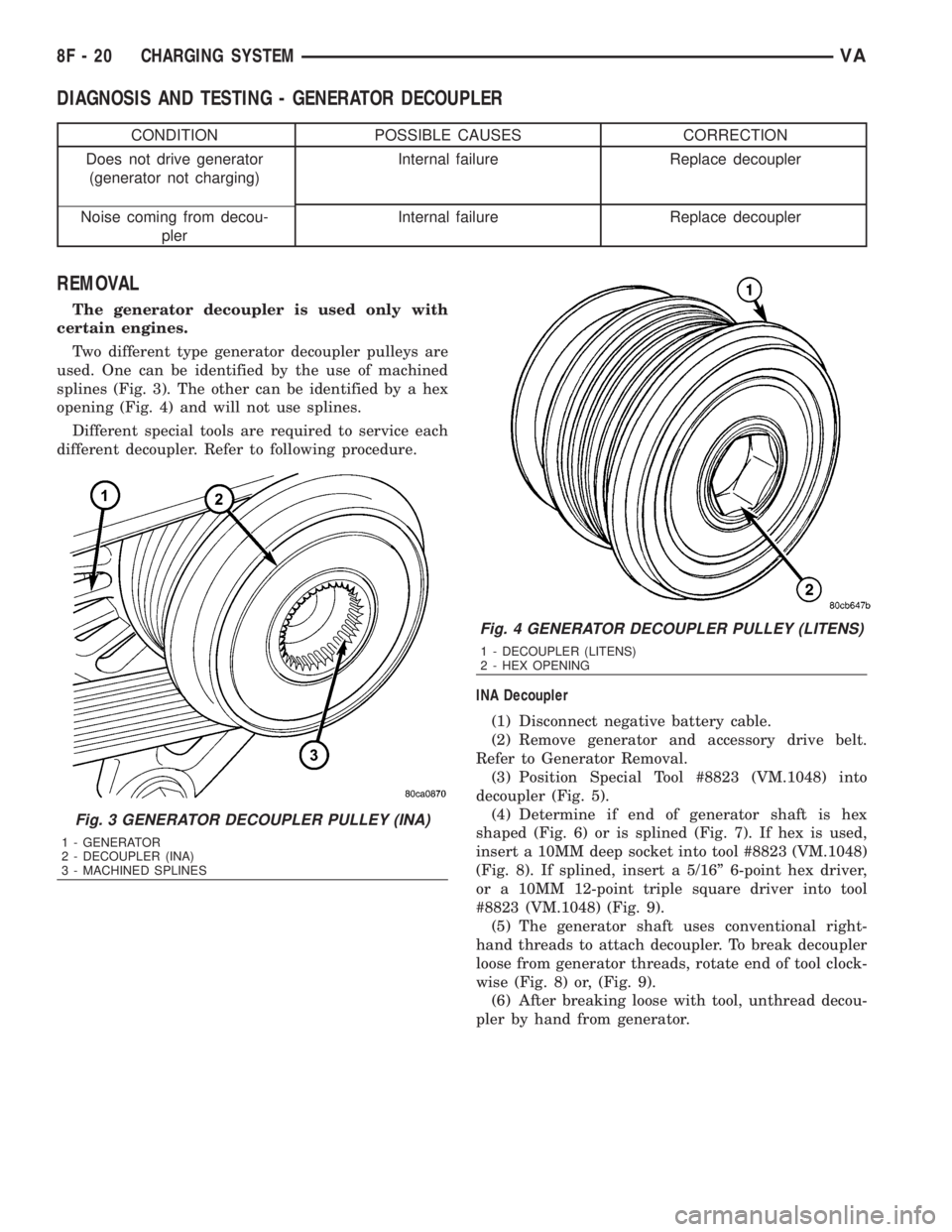
Two different type generator decoupler pulleys are
used. One can be identified by the use of machined
splines (Fig. 3). The other can be identified by a hex
opening (Fig. 4) and will not use splines.
Different special tools are required to service each
different decoupler. Refer to following procedure.
INA Decoupler
(1) Disconnect negative battery cable.
(2) Remove generator and accessory drive belt.
Refer to Generator Removal.
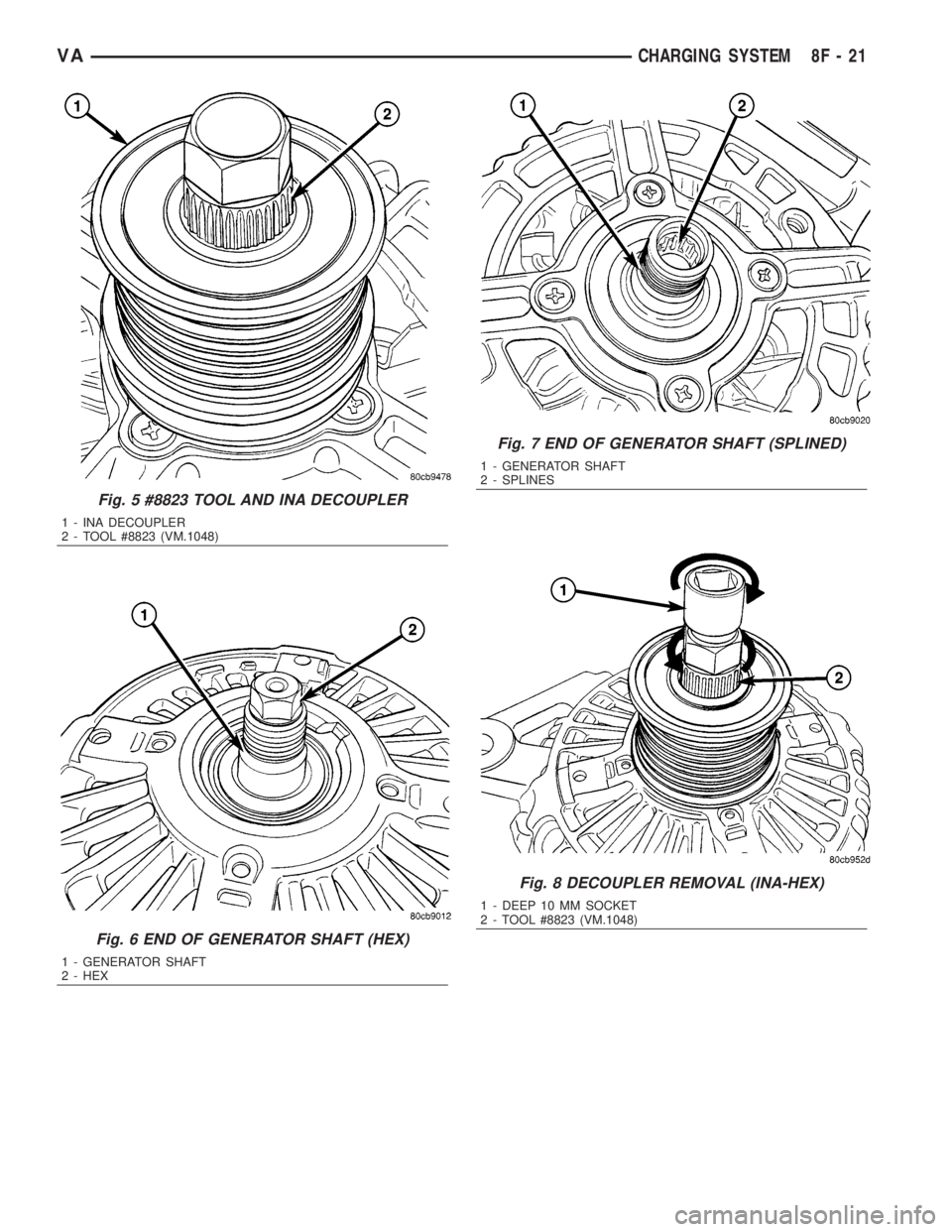
(3) Position Special Tool #8823 (VM.1048) into
decoupler (Fig. 5).
(4) Determine if end of generator shaft is hex
shaped (Fig. 6) or is splined (Fig. 7). If hex is used,
insert a 10MM deep socket into tool #8823 (VM.1048)
(Fig. 8). If splined, insert a 5/16º 6-point hex driver,
or a 10MM 12-point triple square driver into tool
#8823 (VM.1048) (Fig. 9).
(5) The generator shaft uses conventional right-
hand threads to attach decoupler. To break decoupler
loose from generator threads, rotate end of tool clock-
wise (Fig. 8) or, (Fig. 9).
(6) After breaking loose with tool, unthread decou-
pler by hand from generator.
Fig. 3 GENERATOR DECOUPLER PULLEY (INA)
1 - GENERATOR
2 - DECOUPLER (INA)
3 - MACHINED SPLINES
Fig. 4 GENERATOR DECOUPLER PULLEY (LITENS)
1 - DECOUPLER (LITENS)
2 - HEX OPENING
8F - 20 CHARGING SYSTEMVA
Page 886 of 2305
Fig. 5 #8823 TOOL AND INA DECOUPLER
1 - INA DECOUPLER
2 - TOOL #8823 (VM.1048)
Fig. 6 END OF GENERATOR SHAFT (HEX)
1 - GENERATOR SHAFT
2 - HEX
Fig. 7 END OF GENERATOR SHAFT (SPLINED)
1 - GENERATOR SHAFT
2 - SPLINES
Fig. 8 DECOUPLER REMOVAL (INA-HEX)
1 - DEEP 10 MM SOCKET
2 - TOOL #8823 (VM.1048)
VACHARGING SYSTEM 8F - 21
Page 887 of 2305
Litens Decoupler
(1) Disconnect negative battery cable.
(2) Remove generator and accessory drive belt.
Refer to Generator Removal.
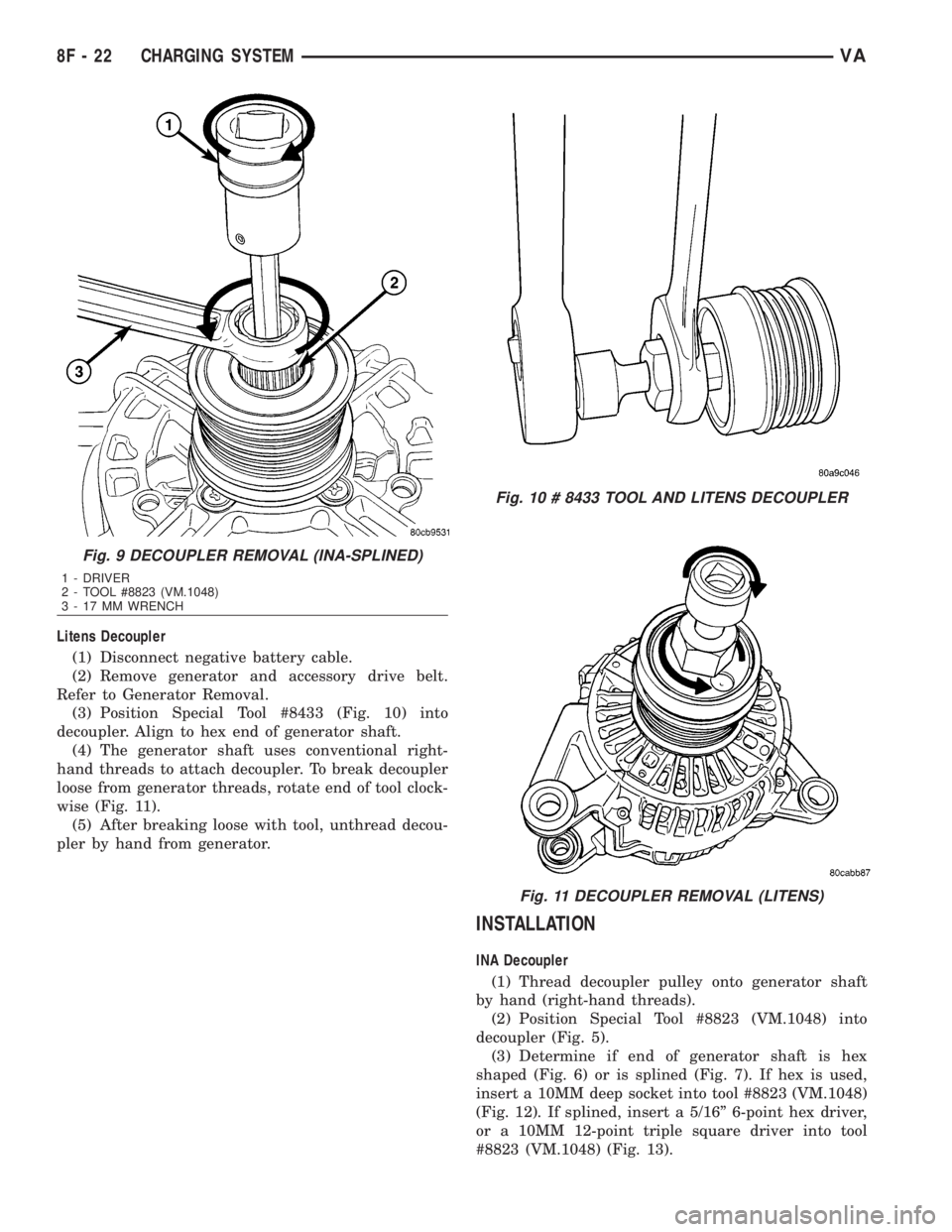
(3) Position Special Tool #8433 (Fig. 10) into
decoupler. Align to hex end of generator shaft.
(4) The generator shaft uses conventional right-
hand threads to attach decoupler. To break decoupler
loose from generator threads, rotate end of tool clock-
wise (Fig. 11).
(5) After breaking loose with tool, unthread decou-
pler by hand from generator.
INSTALLATION
INA Decoupler
(1) Thread decoupler pulley onto generator shaft
by hand (right-hand threads).
(2) Position Special Tool #8823 (VM.1048) into
decoupler (Fig. 5).
(3) Determine if end of generator shaft is hex
shaped (Fig. 6) or is splined (Fig. 7). If hex is used,
insert a 10MM deep socket into tool #8823 (VM.1048)
(Fig. 12). If splined, insert a 5/16º 6-point hex driver,
or a 10MM 12-point triple square driver into tool
#8823 (VM.1048) (Fig. 13).
Fig. 9 DECOUPLER REMOVAL (INA-SPLINED)
1 - DRIVER
2 - TOOL #8823 (VM.1048)
3 - 17 MM WRENCH
Fig. 10 # 8433 TOOL AND LITENS DECOUPLER
Fig. 11 DECOUPLER REMOVAL (LITENS)
8F - 22 CHARGING SYSTEMVA
Page 888 of 2305
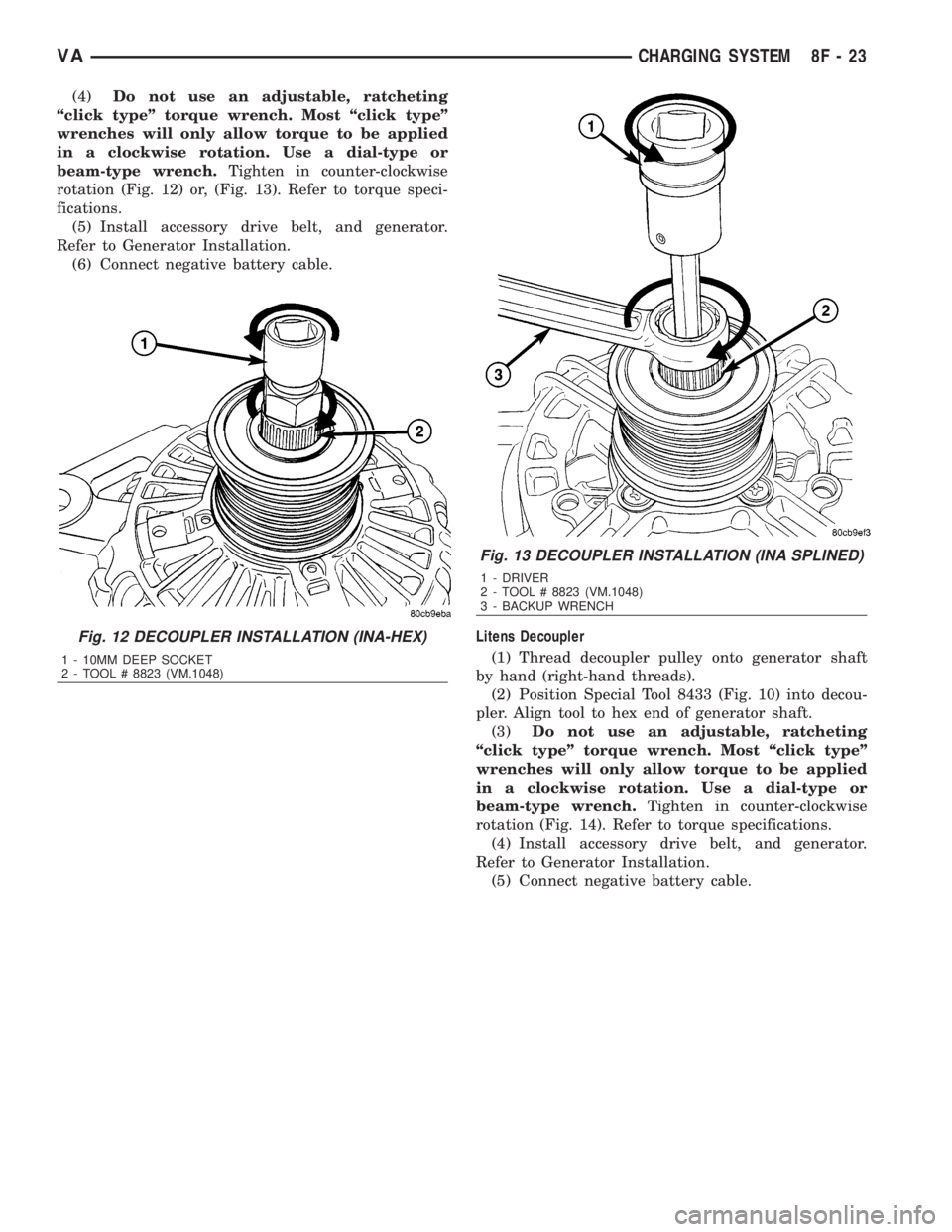
(4)Do not use an adjustable, ratcheting
ªclick typeº torque wrench. Most ªclick typeº
wrenches will only allow torque to be applied
in a clockwise rotation. Use a dial-type or
beam-type wrench.Tighten in counter-clockwise
rotation (Fig. 12) or, (Fig. 13). Refer to torque speci-
fications.
(5) Install accessory drive belt, and generator.
Refer to Generator Installation.
(6) Connect negative battery cable.
Litens Decoupler
(1) Thread decoupler pulley onto generator shaft
by hand (right-hand threads).
(2) Position Special Tool 8433 (Fig. 10) into decou-
pler. Align tool to hex end of generator shaft.
(3)Do not use an adjustable, ratcheting
ªclick typeº torque wrench. Most ªclick typeº
wrenches will only allow torque to be applied
in a clockwise rotation. Use a dial-type or
beam-type wrench.Tighten in counter-clockwise
rotation (Fig. 14). Refer to torque specifications.
(4) Install accessory drive belt, and generator.
Refer to Generator Installation.
(5) Connect negative battery cable.
Fig. 12 DECOUPLER INSTALLATION (INA-HEX)
1 - 10MM DEEP SOCKET
2 - TOOL # 8823 (VM.1048)
Fig. 13 DECOUPLER INSTALLATION (INA SPLINED)
1 - DRIVER
2 - TOOL # 8823 (VM.1048)
3 - BACKUP WRENCH
VACHARGING SYSTEM 8F - 23
Page 889 of 2305
VOLTAGE REGULATOR
DESCRIPTION
The electronic voltage regulator (1) (Fig. 15) is
attached to the rear of the generator. The regulator
may be serviced separately from the generator.
REMOVAL
CAUTION: DISCONNECT NEGATIVE CABLE FROM
BATTERY BEFORE REMOVING BATTERY OUTPUT
WIRE FROM GENERATOR. FAILURE TO DO SO
CAN RESULT IN INJURY.
(1) Disconnect and isolate negative battery cable.(2) Raise and support vehicle.
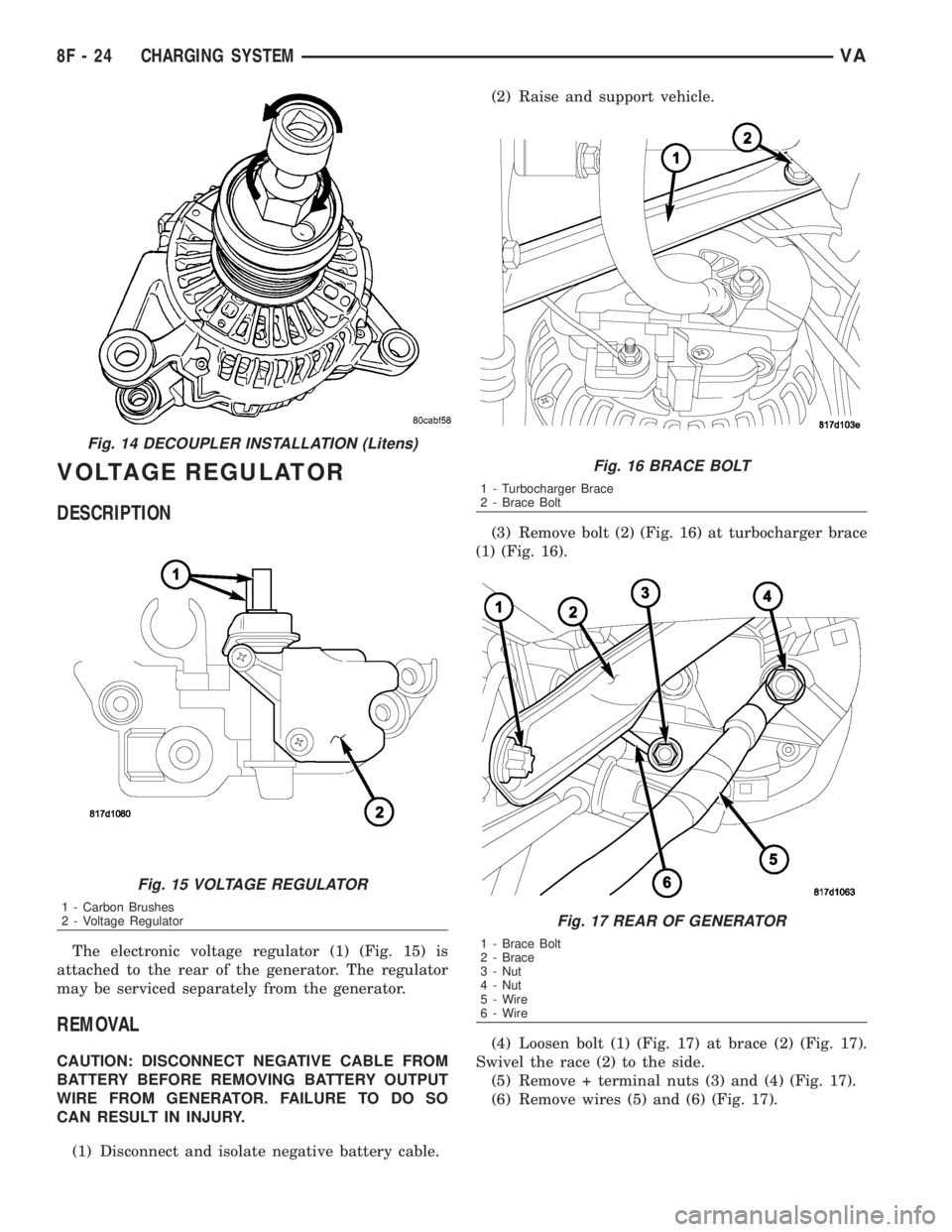
(3) Remove bolt (2) (Fig. 16) at turbocharger brace
(1) (Fig. 16).
(4) Loosen bolt (1) (Fig. 17) at brace (2) (Fig. 17).
Swivel the race (2) to the side.
(5) Remove + terminal nuts (3) and (4) (Fig. 17).
(6) Remove wires (5) and (6) (Fig. 17).
Fig. 14 DECOUPLER INSTALLATION (Litens)
Fig. 15 VOLTAGE REGULATOR
1 - Carbon Brushes
2 - Voltage Regulator
Fig. 16 BRACE BOLT
1 - Turbocharger Brace
2 - Brace Bolt
Fig. 17 REAR OF GENERATOR
1 - Brace Bolt
2 - Brace
3 - Nut
4 - Nut
5 - Wire
6 - Wire
8F - 24 CHARGING SYSTEMVA
Page 890 of 2305
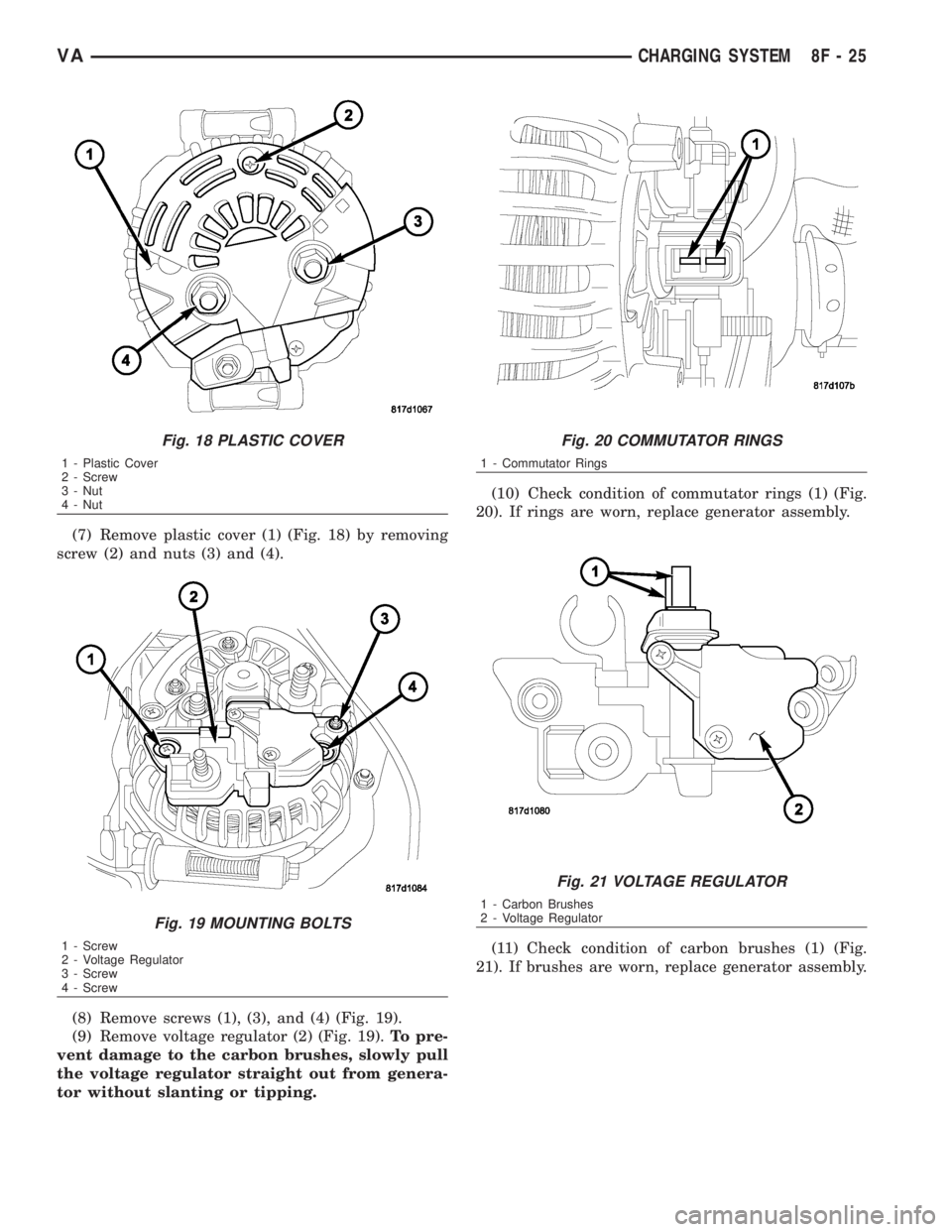
(7) Remove plastic cover (1) (Fig. 18) by removing
screw (2) and nuts (3) and (4).
(8) Remove screws (1), (3), and (4) (Fig. 19).
(9) Remove voltage regulator (2) (Fig. 19).To pre-
vent damage to the carbon brushes, slowly pull
the voltage regulator straight out from genera-
tor without slanting or tipping.(10) Check condition of commutator rings (1) (Fig.
20). If rings are worn, replace generator assembly.
(11) Check condition of carbon brushes (1) (Fig.
21). If brushes are worn, replace generator assembly.
Fig. 18 PLASTIC COVER
1 - Plastic Cover
2 - Screw
3 - Nut
4 - Nut
Fig. 19 MOUNTING BOLTS
1 - Screw
2 - Voltage Regulator
3 - Screw
4 - Screw
Fig. 20 COMMUTATOR RINGS
1 - Commutator Rings
Fig. 21 VOLTAGE REGULATOR
1 - Carbon Brushes
2 - Voltage Regulator
VACHARGING SYSTEM 8F - 25
Page 891 of 2305
INSTALLATION
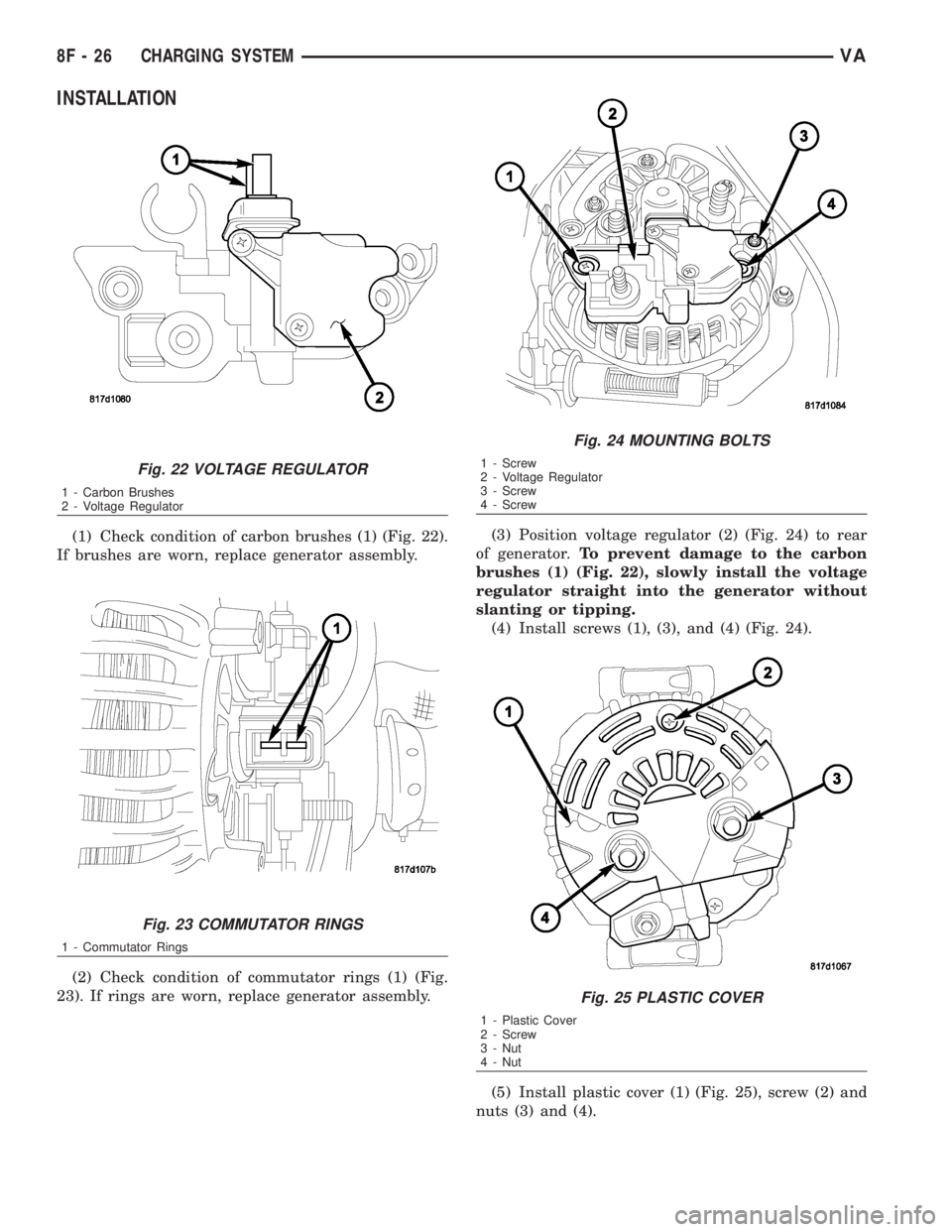
(1) Check condition of carbon brushes (1) (Fig. 22).
If brushes are worn, replace generator assembly.
(2) Check condition of commutator rings (1) (Fig.
23). If rings are worn, replace generator assembly.(3) Position voltage regulator (2) (Fig. 24) to rear
of generator.To prevent damage to the carbon
brushes (1) (Fig. 22), slowly install the voltage
regulator straight into the generator without
slanting or tipping.
(4) Install screws (1), (3), and (4) (Fig. 24).
(5) Install plastic cover (1) (Fig. 25), screw (2) and
nuts (3) and (4).
Fig. 22 VOLTAGE REGULATOR
1 - Carbon Brushes
2 - Voltage Regulator
Fig. 23 COMMUTATOR RINGS
1 - Commutator Rings
Fig. 24 MOUNTING BOLTS
1 - Screw
2 - Voltage Regulator
3 - Screw
4 - Screw
Fig. 25 PLASTIC COVER
1 - Plastic Cover
2 - Screw
3 - Nut
4 - Nut
8F - 26 CHARGING SYSTEMVA
Page 892 of 2305
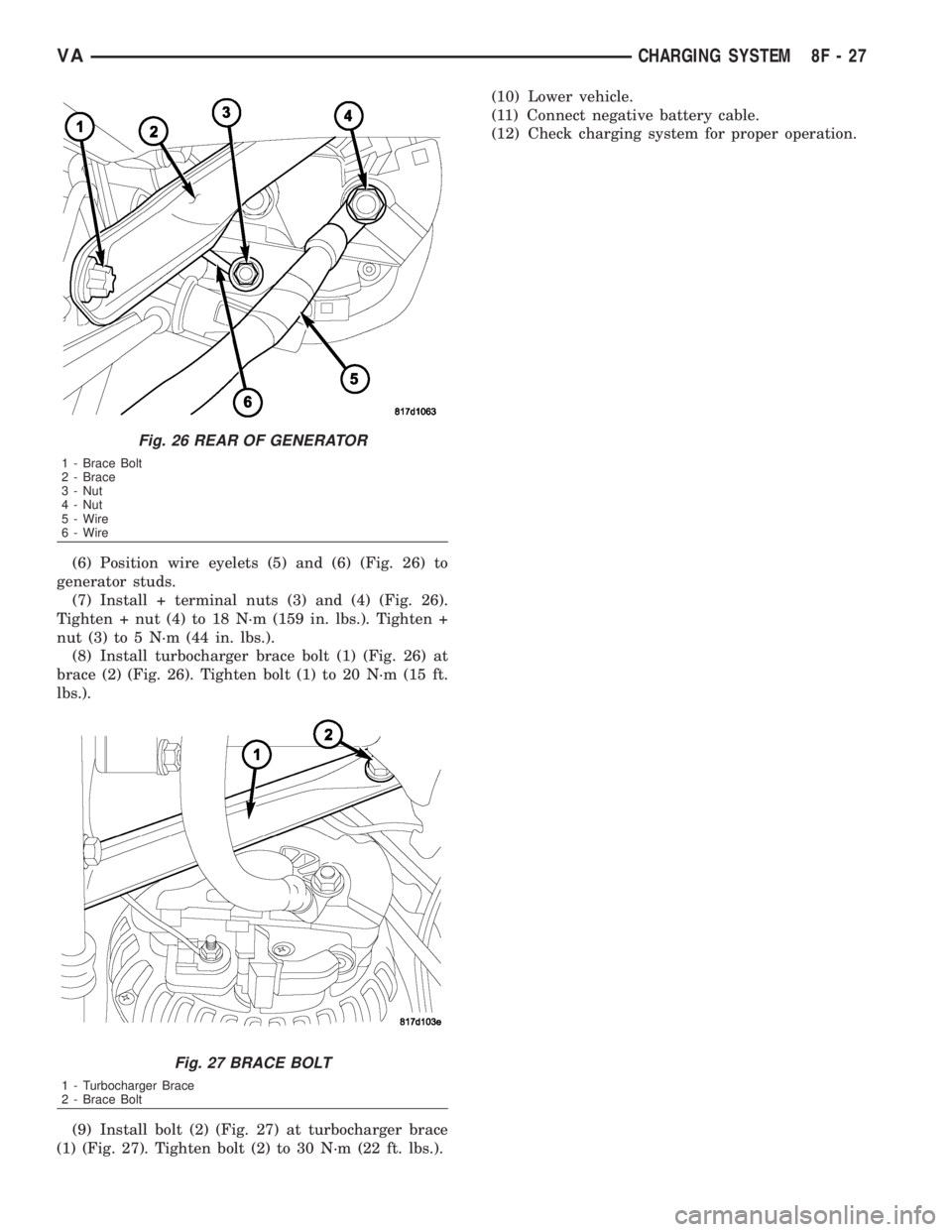
(6) Position wire eyelets (5) and (6) (Fig. 26) to
generator studs.
(7) Install + terminal nuts (3) and (4) (Fig. 26).
Tighten + nut (4) to 18 N´m (159 in. lbs.). Tighten +
nut (3) to 5 N´m (44 in. lbs.).
(8) Install turbocharger brace bolt (1) (Fig. 26) at
brace (2) (Fig. 26). Tighten bolt (1) to 20 N´m (15 ft.
lbs.).
(9) Install bolt (2) (Fig. 27) at turbocharger brace
(1) (Fig. 27). Tighten bolt (2) to 30 N´m (22 ft. lbs.).(10) Lower vehicle.
(11) Connect negative battery cable.
(12) Check charging system for proper operation.
Fig. 26 REAR OF GENERATOR
1 - Brace Bolt
2 - Brace
3 - Nut
4 - Nut
5 - Wire
6 - Wire
Fig. 27 BRACE BOLT
1 - Turbocharger Brace
2 - Brace Bolt
VACHARGING SYSTEM 8F - 27