2006 MERCEDES-BENZ SPRINTER warning
[x] Cancel search: warningPage 1056 of 2305
WARNING: To avoid personal injury or death, on
vehicles equipped with airbags, disable the supple-
mental restraint system before attempting any
steering wheel, steering column, airbag, seat belt
tensioner, or instrument panel component diagno-
sis or service. Disconnect and isolate the battery
negative (ground) cable, then wait two minutes for
the system capacitor to discharge before perform-
ing further diagnosis or service. This is the only
sure way to disable the supplemental restraint sys-
tem. Failure to take the proper precautions could
result in accidental airbag deployment.
CAUTION: Do not touch the gel-like surface of the
rain sensor or the sensor function may be impaired
and the sensor rendered unusable.
(1) Disconnect and isolate the battery negative
cable.
(2) Remove the rear view mirror and the rain sen-
sor from the rain sensor bracket. (Refer to 8 - ELEC-
TRICAL/WIPERS/WASHERS/RAIN SENSOR -
REMOVAL).
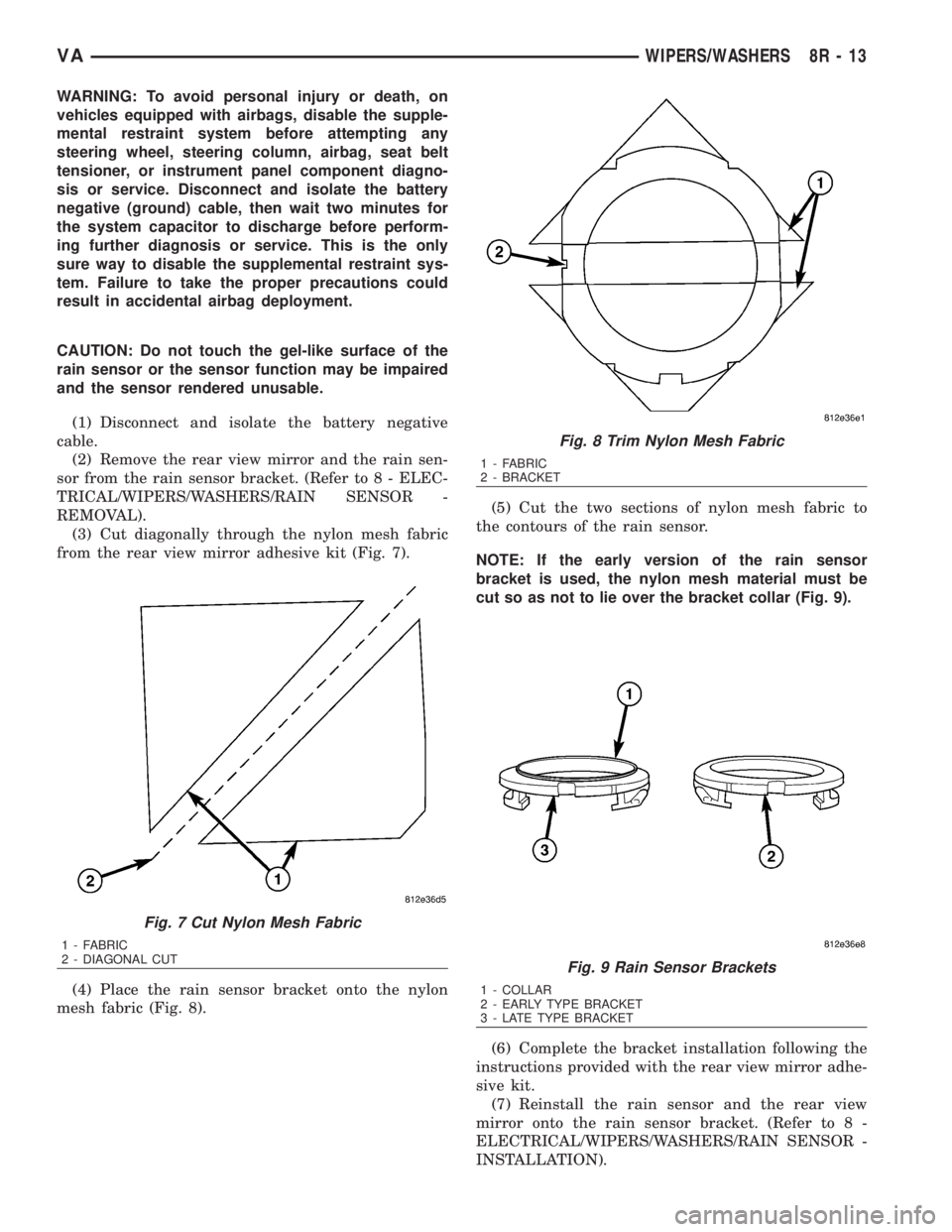
(3) Cut diagonally through the nylon mesh fabric
from the rear view mirror adhesive kit (Fig. 7).
(4) Place the rain sensor bracket onto the nylon
mesh fabric (Fig. 8).(5) Cut the two sections of nylon mesh fabric to
the contours of the rain sensor.
NOTE: If the early version of the rain sensor
bracket is used, the nylon mesh material must be
cut so as not to lie over the bracket collar (Fig. 9).
(6) Complete the bracket installation following the
instructions provided with the rear view mirror adhe-
sive kit.
(7) Reinstall the rain sensor and the rear view
mirror onto the rain sensor bracket. (Refer to 8 -
ELECTRICAL/WIPERS/WASHERS/RAIN SENSOR -
INSTALLATION).
Fig. 7 Cut Nylon Mesh Fabric
1 - FABRIC
2 - DIAGONAL CUT
Fig. 8 Trim Nylon Mesh Fabric
1 - FABRIC
2 - BRACKET
Fig. 9 Rain Sensor Brackets
1 - COLLAR
2 - EARLY TYPE BRACKET
3 - LATE TYPE BRACKET
VAWIPERS/WASHERS 8R - 13
Page 1057 of 2305
(8) Reconnect the battery negative cable.
REMOVAL
WARNING: To avoid personal injury or death, on
vehicles equipped with airbags, disable the supple-
mental restraint system before attempting any
steering wheel, steering column, airbag, seat belt
tensioner, or instrument panel component diagno-
sis or service. Disconnect and isolate the battery
negative (ground) cable, then wait two minutes for
the system capacitor to discharge before perform-
ing further diagnosis or service. This is the only
sure way to disable the supplemental restraint sys-
tem. Failure to take the proper precautions could
result in accidental airbag deployment.
(1) Disconnect and isolate the battery negative
cable.
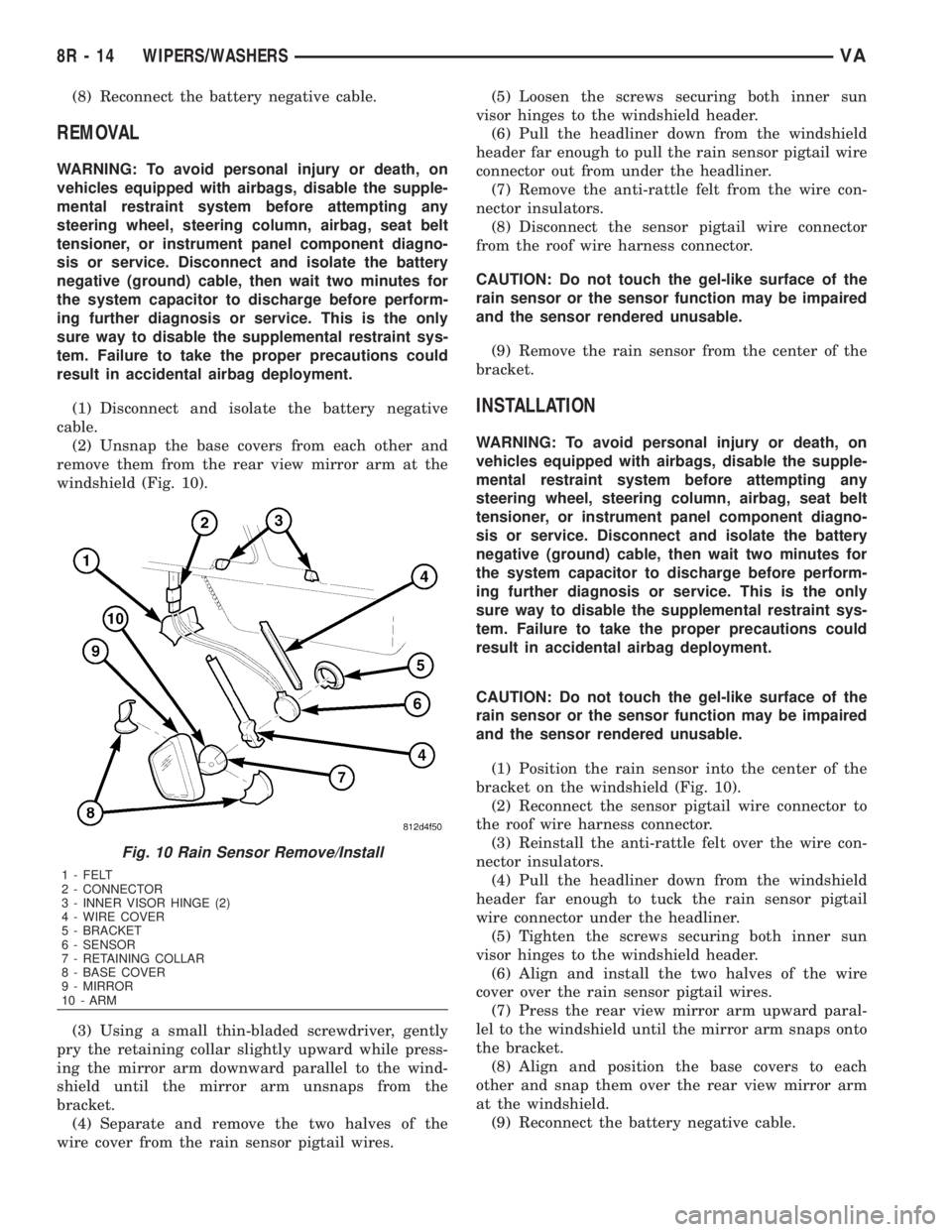
(2) Unsnap the base covers from each other and
remove them from the rear view mirror arm at the
windshield (Fig. 10).
(3) Using a small thin-bladed screwdriver, gently
pry the retaining collar slightly upward while press-
ing the mirror arm downward parallel to the wind-
shield until the mirror arm unsnaps from the
bracket.
(4) Separate and remove the two halves of the
wire cover from the rain sensor pigtail wires.(5) Loosen the screws securing both inner sun
visor hinges to the windshield header.
(6) Pull the headliner down from the windshield
header far enough to pull the rain sensor pigtail wire
connector out from under the headliner.
(7) Remove the anti-rattle felt from the wire con-
nector insulators.
(8) Disconnect the sensor pigtail wire connector
from the roof wire harness connector.
CAUTION: Do not touch the gel-like surface of the
rain sensor or the sensor function may be impaired
and the sensor rendered unusable.
(9) Remove the rain sensor from the center of the
bracket.
INSTALLATION
WARNING: To avoid personal injury or death, on
vehicles equipped with airbags, disable the supple-
mental restraint system before attempting any
steering wheel, steering column, airbag, seat belt
tensioner, or instrument panel component diagno-
sis or service. Disconnect and isolate the battery
negative (ground) cable, then wait two minutes for
the system capacitor to discharge before perform-
ing further diagnosis or service. This is the only
sure way to disable the supplemental restraint sys-
tem. Failure to take the proper precautions could
result in accidental airbag deployment.
CAUTION: Do not touch the gel-like surface of the
rain sensor or the sensor function may be impaired
and the sensor rendered unusable.
(1) Position the rain sensor into the center of the
bracket on the windshield (Fig. 10).
(2) Reconnect the sensor pigtail wire connector to
the roof wire harness connector.
(3) Reinstall the anti-rattle felt over the wire con-
nector insulators.
(4) Pull the headliner down from the windshield
header far enough to tuck the rain sensor pigtail
wire connector under the headliner.
(5) Tighten the screws securing both inner sun
visor hinges to the windshield header.
(6) Align and install the two halves of the wire
cover over the rain sensor pigtail wires.
(7) Press the rear view mirror arm upward paral-
lel to the windshield until the mirror arm snaps onto
the bracket.
(8) Align and position the base covers to each
other and snap them over the rear view mirror arm
at the windshield.
(9) Reconnect the battery negative cable.
Fig. 10 Rain Sensor Remove/Install
1 - FELT
2 - CONNECTOR
3 - INNER VISOR HINGE (2)
4 - WIRE COVER
5 - BRACKET
6 - SENSOR
7 - RETAINING COLLAR
8 - BASE COVER
9 - MIRROR
10 - ARM
8R - 14 WIPERS/WASHERSVA
Page 1058 of 2305
RAIN SENSOR CONTROL MOD-
ULE
DESCRIPTION
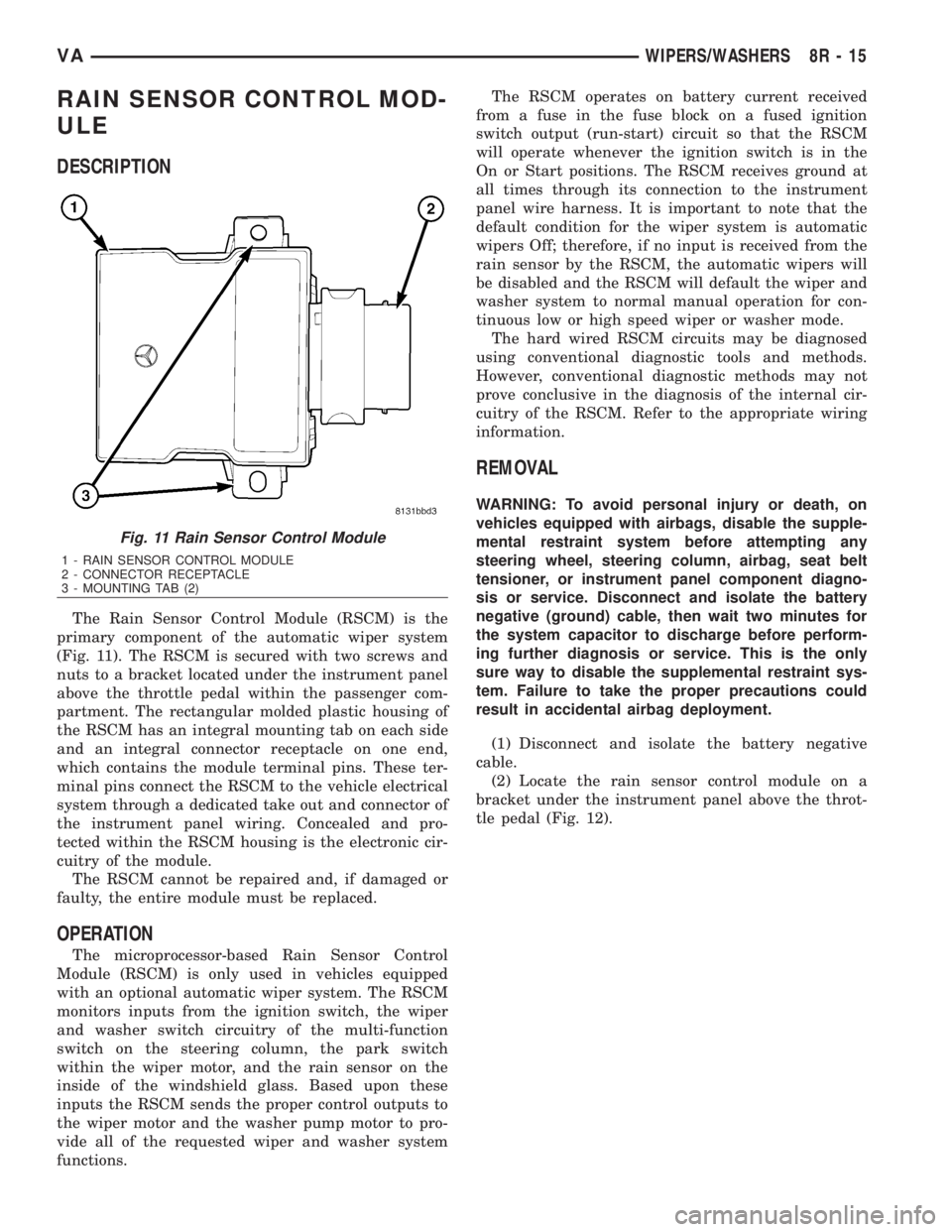
The Rain Sensor Control Module (RSCM) is the
primary component of the automatic wiper system
(Fig. 11). The RSCM is secured with two screws and
nuts to a bracket located under the instrument panel
above the throttle pedal within the passenger com-
partment. The rectangular molded plastic housing of
the RSCM has an integral mounting tab on each side
and an integral connector receptacle on one end,
which contains the module terminal pins. These ter-
minal pins connect the RSCM to the vehicle electrical
system through a dedicated take out and connector of
the instrument panel wiring. Concealed and pro-
tected within the RSCM housing is the electronic cir-
cuitry of the module.
The RSCM cannot be repaired and, if damaged or
faulty, the entire module must be replaced.
OPERATION
The microprocessor-based Rain Sensor Control
Module (RSCM) is only used in vehicles equipped
with an optional automatic wiper system. The RSCM
monitors inputs from the ignition switch, the wiper
and washer switch circuitry of the multi-function
switch on the steering column, the park switch
within the wiper motor, and the rain sensor on the
inside of the windshield glass. Based upon these
inputs the RSCM sends the proper control outputs to
the wiper motor and the washer pump motor to pro-
vide all of the requested wiper and washer system
functions.The RSCM operates on battery current received
from a fuse in the fuse block on a fused ignition
switch output (run-start) circuit so that the RSCM
will operate whenever the ignition switch is in the
On or Start positions. The RSCM receives ground at
all times through its connection to the instrument
panel wire harness. It is important to note that the
default condition for the wiper system is automatic
wipers Off; therefore, if no input is received from the
rain sensor by the RSCM, the automatic wipers will
be disabled and the RSCM will default the wiper and
washer system to normal manual operation for con-
tinuous low or high speed wiper or washer mode.
The hard wired RSCM circuits may be diagnosed
using conventional diagnostic tools and methods.
However, conventional diagnostic methods may not
prove conclusive in the diagnosis of the internal cir-
cuitry of the RSCM. Refer to the appropriate wiring
information.
REMOVAL
WARNING: To avoid personal injury or death, on
vehicles equipped with airbags, disable the supple-
mental restraint system before attempting any
steering wheel, steering column, airbag, seat belt
tensioner, or instrument panel component diagno-
sis or service. Disconnect and isolate the battery
negative (ground) cable, then wait two minutes for
the system capacitor to discharge before perform-
ing further diagnosis or service. This is the only
sure way to disable the supplemental restraint sys-
tem. Failure to take the proper precautions could
result in accidental airbag deployment.
(1) Disconnect and isolate the battery negative
cable.
(2) Locate the rain sensor control module on a
bracket under the instrument panel above the throt-
tle pedal (Fig. 12).
Fig. 11 Rain Sensor Control Module
1 - RAIN SENSOR CONTROL MODULE
2 - CONNECTOR RECEPTACLE
3 - MOUNTING TAB (2)
VAWIPERS/WASHERS 8R - 15
Page 1059 of 2305
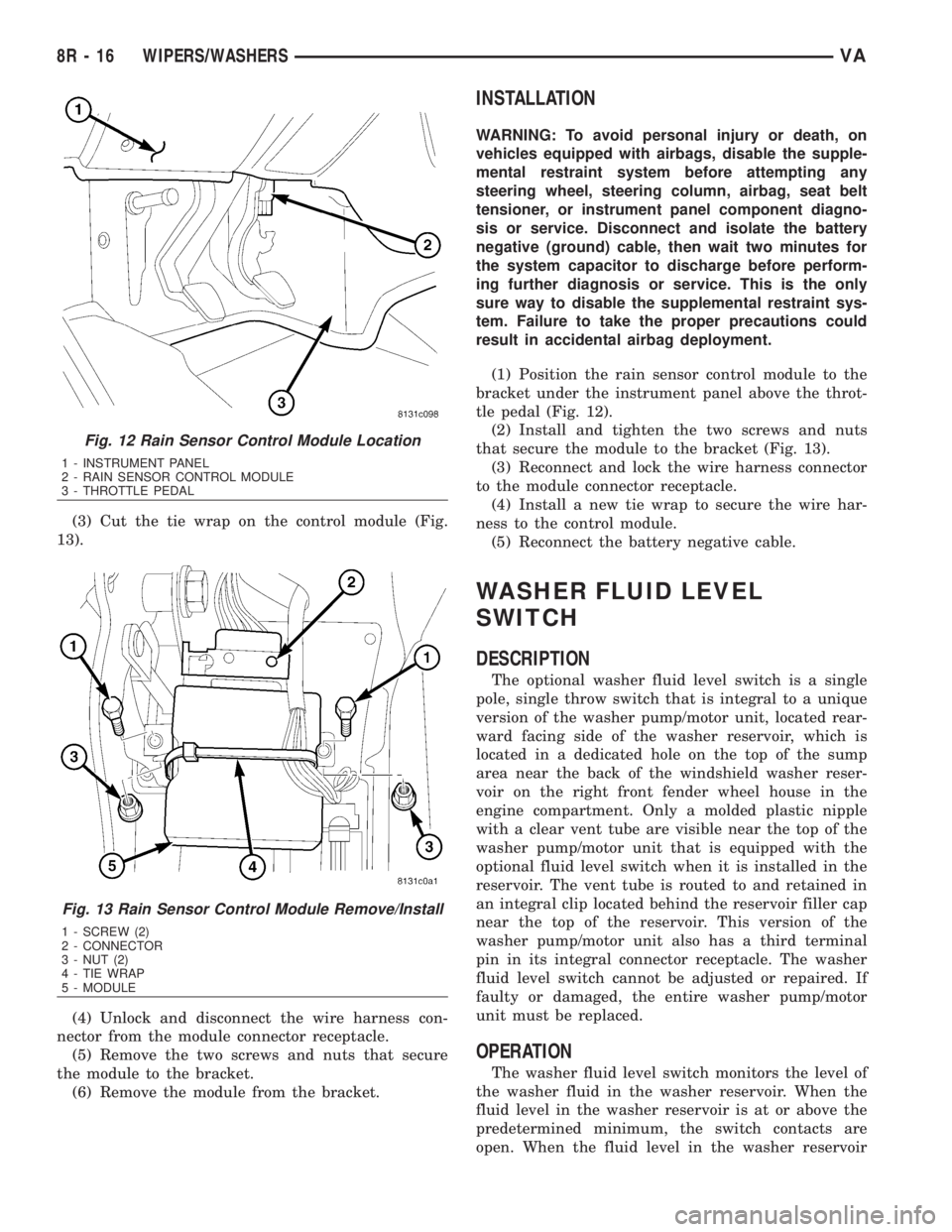
(3) Cut the tie wrap on the control module (Fig.
13).
(4) Unlock and disconnect the wire harness con-
nector from the module connector receptacle.
(5) Remove the two screws and nuts that secure
the module to the bracket.
(6) Remove the module from the bracket.
INSTALLATION
WARNING: To avoid personal injury or death, on
vehicles equipped with airbags, disable the supple-
mental restraint system before attempting any
steering wheel, steering column, airbag, seat belt
tensioner, or instrument panel component diagno-
sis or service. Disconnect and isolate the battery
negative (ground) cable, then wait two minutes for
the system capacitor to discharge before perform-
ing further diagnosis or service. This is the only
sure way to disable the supplemental restraint sys-
tem. Failure to take the proper precautions could
result in accidental airbag deployment.
(1) Position the rain sensor control module to the
bracket under the instrument panel above the throt-
tle pedal (Fig. 12).
(2) Install and tighten the two screws and nuts
that secure the module to the bracket (Fig. 13).
(3) Reconnect and lock the wire harness connector
to the module connector receptacle.
(4) Install a new tie wrap to secure the wire har-
ness to the control module.
(5) Reconnect the battery negative cable.
WASHER FLUID LEVEL
SWITCH
DESCRIPTION
The optional washer fluid level switch is a single
pole, single throw switch that is integral to a unique
version of the washer pump/motor unit, located rear-
ward facing side of the washer reservoir, which is
located in a dedicated hole on the top of the sump
area near the back of the windshield washer reser-
voir on the right front fender wheel house in the
engine compartment. Only a molded plastic nipple
with a clear vent tube are visible near the top of the
washer pump/motor unit that is equipped with the
optional fluid level switch when it is installed in the
reservoir. The vent tube is routed to and retained in
an integral clip located behind the reservoir filler cap
near the top of the reservoir. This version of the
washer pump/motor unit also has a third terminal
pin in its integral connector receptacle. The washer
fluid level switch cannot be adjusted or repaired. If
faulty or damaged, the entire washer pump/motor
unit must be replaced.
OPERATION
The washer fluid level switch monitors the level of
the washer fluid in the washer reservoir. When the
fluid level in the washer reservoir is at or above the
predetermined minimum, the switch contacts are
open. When the fluid level in the washer reservoir
Fig. 12 Rain Sensor Control Module Location
1 - INSTRUMENT PANEL
2 - RAIN SENSOR CONTROL MODULE
3 - THROTTLE PEDAL
Fig. 13 Rain Sensor Control Module Remove/Install
1 - SCREW (2)
2 - CONNECTOR
3 - NUT (2)
4 - TIE WRAP
5 - MODULE
8R - 16 WIPERS/WASHERSVA
Page 1064 of 2305
WASHER RESERVOIR
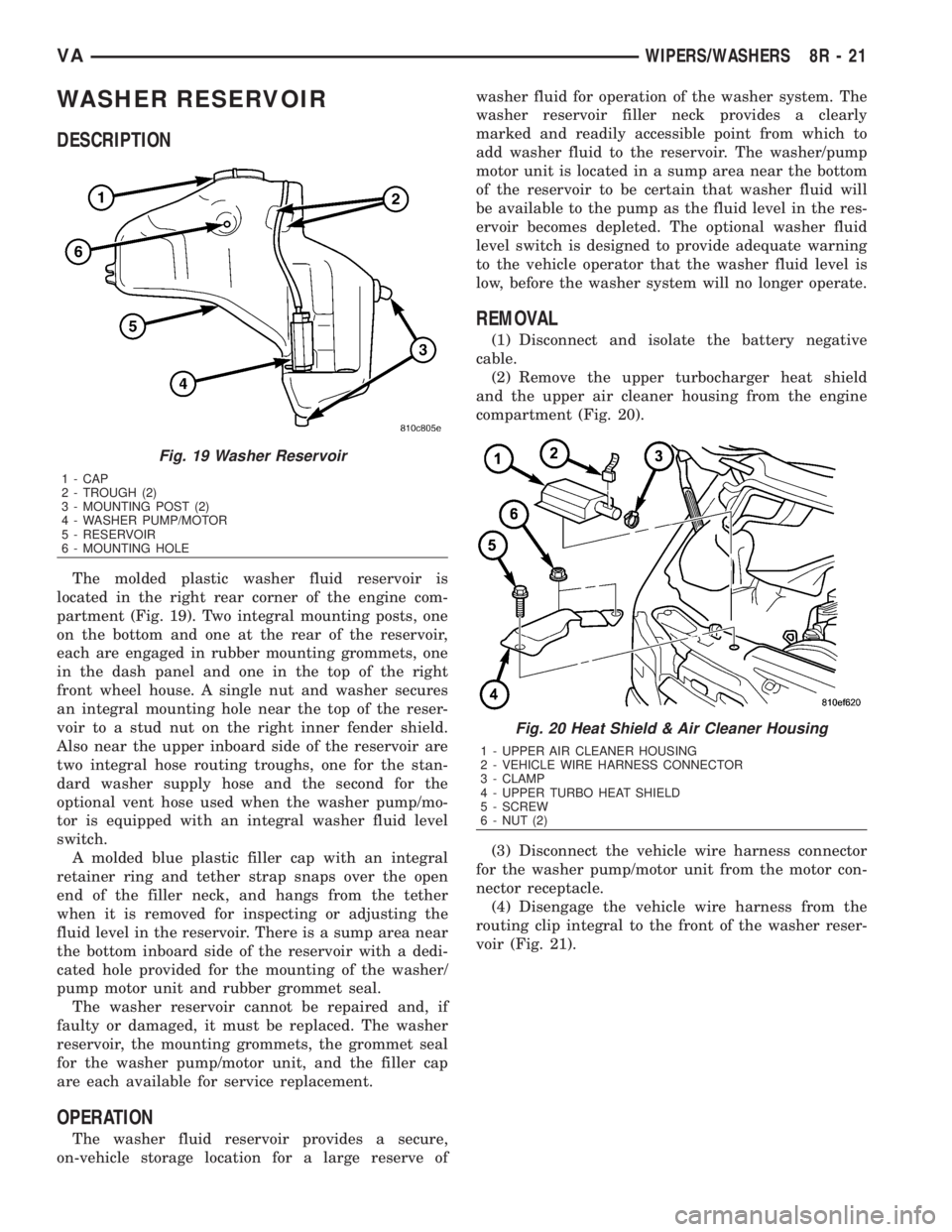
DESCRIPTION
The molded plastic washer fluid reservoir is
located in the right rear corner of the engine com-
partment (Fig. 19). Two integral mounting posts, one
on the bottom and one at the rear of the reservoir,
each are engaged in rubber mounting grommets, one
in the dash panel and one in the top of the right
front wheel house. A single nut and washer secures
an integral mounting hole near the top of the reser-
voir to a stud nut on the right inner fender shield.
Also near the upper inboard side of the reservoir are
two integral hose routing troughs, one for the stan-
dard washer supply hose and the second for the
optional vent hose used when the washer pump/mo-
tor is equipped with an integral washer fluid level
switch.
A molded blue plastic filler cap with an integral
retainer ring and tether strap snaps over the open
end of the filler neck, and hangs from the tether
when it is removed for inspecting or adjusting the
fluid level in the reservoir. There is a sump area near
the bottom inboard side of the reservoir with a dedi-
cated hole provided for the mounting of the washer/
pump motor unit and rubber grommet seal.
The washer reservoir cannot be repaired and, if
faulty or damaged, it must be replaced. The washer
reservoir, the mounting grommets, the grommet seal
for the washer pump/motor unit, and the filler cap
are each available for service replacement.
OPERATION
The washer fluid reservoir provides a secure,
on-vehicle storage location for a large reserve ofwasher fluid for operation of the washer system. The
washer reservoir filler neck provides a clearly
marked and readily accessible point from which to
add washer fluid to the reservoir. The washer/pump
motor unit is located in a sump area near the bottom
of the reservoir to be certain that washer fluid will
be available to the pump as the fluid level in the res-
ervoir becomes depleted. The optional washer fluid
level switch is designed to provide adequate warning
to the vehicle operator that the washer fluid level is
low, before the washer system will no longer operate.
REMOVAL
(1) Disconnect and isolate the battery negative
cable.
(2) Remove the upper turbocharger heat shield
and the upper air cleaner housing from the engine
compartment (Fig. 20).
(3) Disconnect the vehicle wire harness connector
for the washer pump/motor unit from the motor con-
nector receptacle.
(4) Disengage the vehicle wire harness from the
routing clip integral to the front of the washer reser-
voir (Fig. 21).
Fig. 19 Washer Reservoir
1 - CAP
2 - TROUGH (2)
3 - MOUNTING POST (2)
4 - WASHER PUMP/MOTOR
5 - RESERVOIR
6 - MOUNTING HOLE
Fig. 20 Heat Shield & Air Cleaner Housing
1 - UPPER AIR CLEANER HOUSING
2 - VEHICLE WIRE HARNESS CONNECTOR
3 - CLAMP
4 - UPPER TURBO HEAT SHIELD
5 - SCREW
6 - NUT (2)
VAWIPERS/WASHERS 8R - 21
Page 1078 of 2305
²The normally closed terminal (87A) is connected
to battery current through a fused ignition switch
output circuit whenever the ignition switch is in the
On position.
The wiper relay can be diagnosed using conven-
tional diagnostic tools and methods.
REMOVAL
WARNING: To avoid personal injury or death, on
vehicles equipped with airbags, disable the supple-
mental restraint system before attempting any
steering wheel, steering column, airbag, seat belt
tensioner, or instrument panel component diagno-
sis or service. Disconnect and isolate the battery
negative (ground) cable, then wait two minutes for
the system capacitor to discharge before perform-
ing further diagnosis or service. This is the only
sure way to disable the supplemental restraint sys-
tem. Failure to take the proper precautions could
result in accidental airbag deployment.
(1) Disconnect and isolate the battery negative
cable.
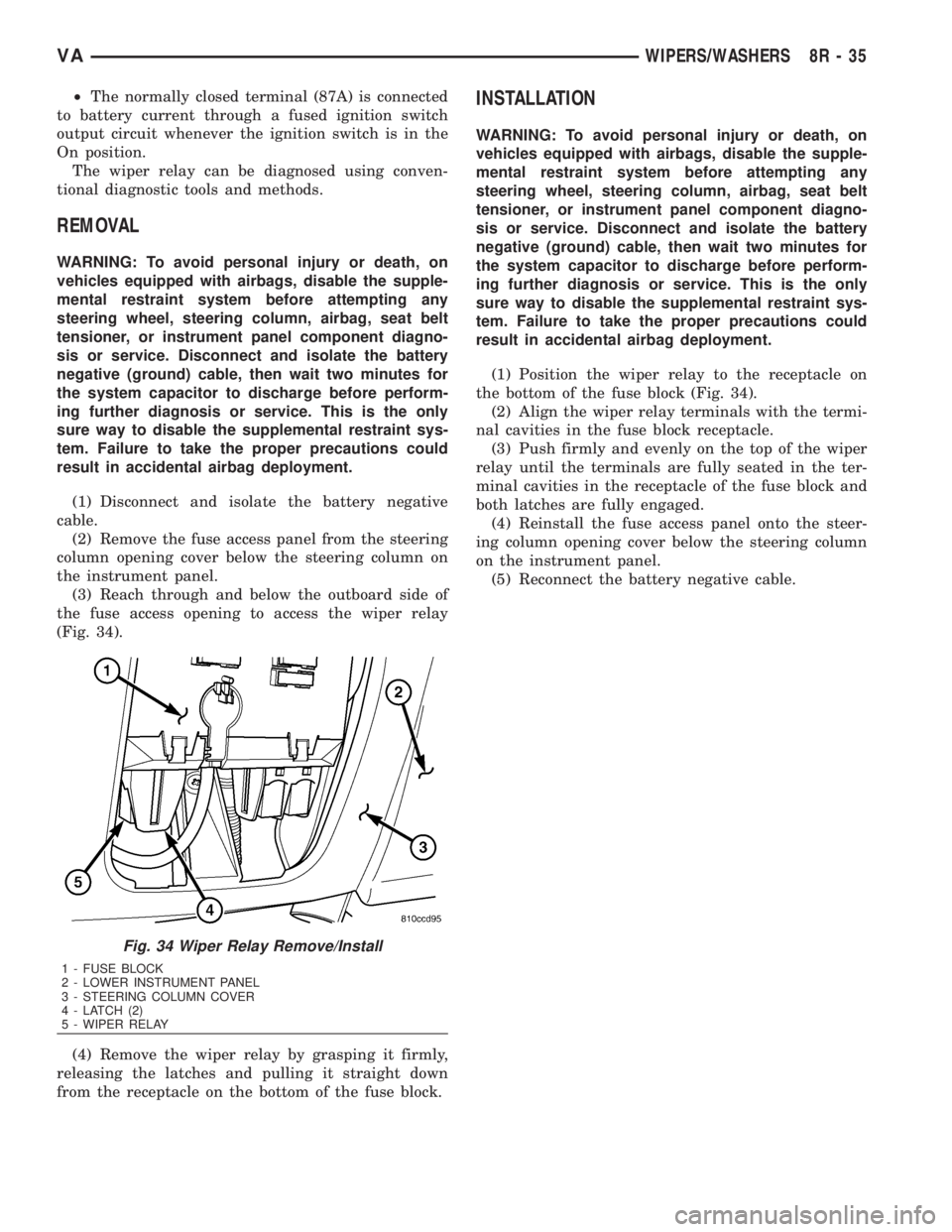
(2) Remove the fuse access panel from the steering
column opening cover below the steering column on
the instrument panel.
(3) Reach through and below the outboard side of
the fuse access opening to access the wiper relay
(Fig. 34).
(4) Remove the wiper relay by grasping it firmly,
releasing the latches and pulling it straight down
from the receptacle on the bottom of the fuse block.
INSTALLATION
WARNING: To avoid personal injury or death, on
vehicles equipped with airbags, disable the supple-
mental restraint system before attempting any
steering wheel, steering column, airbag, seat belt
tensioner, or instrument panel component diagno-
sis or service. Disconnect and isolate the battery
negative (ground) cable, then wait two minutes for
the system capacitor to discharge before perform-
ing further diagnosis or service. This is the only
sure way to disable the supplemental restraint sys-
tem. Failure to take the proper precautions could
result in accidental airbag deployment.
(1) Position the wiper relay to the receptacle on
the bottom of the fuse block (Fig. 34).
(2) Align the wiper relay terminals with the termi-
nal cavities in the fuse block receptacle.
(3) Push firmly and evenly on the top of the wiper
relay until the terminals are fully seated in the ter-
minal cavities in the receptacle of the fuse block and
both latches are fully engaged.
(4) Reinstall the fuse access panel onto the steer-
ing column opening cover below the steering column
on the instrument panel.
(5) Reconnect the battery negative cable.
Fig. 34 Wiper Relay Remove/Install
1 - FUSE BLOCK
2 - LOWER INSTRUMENT PANEL
3 - STEERING COLUMN COVER
4 - LATCH (2)
5 - WIPER RELAY
VAWIPERS/WASHERS 8R - 35
Page 1082 of 2305
8W-01 WIRING DIAGRAM INFORMATION
TABLE OF CONTENTS
page page
WIRING DIAGRAM INFORMATION
DESCRIPTION
HOW TO USE WIRING DIAGRAMS.........1
CIRCUIT INFORMATION.................5
SECTION IDENTIFICATION AND
INFORMATION........................5
CONNECTOR, GROUND, AND SPLICE
INFORMATION........................5
WARNINGS - GENERAL...................6
DIAGNOSIS AND TESTING
WIRING HARNESS.....................6
STANDARD PROCEDURE
ELECTROSTATIC DISCHARGE (ESD)
SENSITIVE DEVICES...................7
TESTING FOR VOLTAGE POTENTIAL.......7
TESTING FOR CONTINUITY..............7
TESTING FOR A SHORT TO GROUND......8TESTING COMPONENTS FOR A SHORT TO
GROUND ON A FUSE POWERING
SEVERAL LOADS......................8
TESTING FOR A VOLTAGE DROP.........8
CONNECTOR
REMOVAL.............................9
INSTALLATION..........................9
DIODE
REMOVAL.............................9
INSTALLATION..........................9
TERMINAL
REMOVAL.............................10
INSTALLATION.........................10
WIRE
STANDARD PROCEDURE
WIRE SPLICING......................10
WIRING DIAGRAM INFORMA-
TION
DESCRIPTION
HOW TO USE WIRING DIAGRAMS
DaimlerChrysler Corporation wiring diagrams are
designed to provide information regarding the vehi-
cles wiring content. In order to effectively use the
wiring diagrams to diagnose and repair
DaimlerChrysler Corporation vehicles, it is important
to understand all of their features and characteris-
tics.
Diagrams are arranged such that the power (B+)
side of the circuit is placed near the top of the page,
and the ground (B-) side of the circuit is placed near
the bottom of the page (Fig. 1).
All switches, components, and modules are shown
in the at rest position with the doors closed and the
key removed from the ignition (Fig. 2).Components are shown two ways. A solid line
around a component indicates that the component is
complete. A dashed line around the component indi-
cates that the component is being shown is not com-
plete. Incomplete components have a reference
number to indicate the page where the component is
shown complete.
It is important to realize that no attempt is made
on the diagrams to represent components and wiring
as they appear on the vehicle. For example, a short
piece of wire is treated the same as a long one. In
addition, switches and other components are shown
as simply as possible, with regard to function only.
SYMBOLS
International symbols are used throughout the wir-
ing diagrams. These symbols are consistent with
those being used around the world (Fig. 3).
VA8W-01 WIRING DIAGRAM INFORMATION 8W - 01 - 1
Page 1087 of 2305
²Grounds and ground connectors are identified
with a ªGº and follow the same series numbering as
the in-line connectors.
²Splices are identified with an ªSº and follow the
same series numbering as the in-line connectors.
²Component connectors are identified by the com-
ponent name instead of a number. Multiple connec-
tors on a component use a C1, C2, etc. identifier.
LOCATIONS
Section 8W-91 contains connector/ground/splice
location illustrations. The illustrations contain the
connector name (or number)/ground number/splice
number and component identification. Connector/
ground/splice location charts in section 8W-91 refer-
ence the figure numbers of the illustrations.
The abbreviation T/O is used in the component
location section to indicate a point in which the wir-
ing harness branches out to a component. The abbre-
viation N/S means Not Shown in the illustrations
WARNINGS - GENERAL
WARNINGSprovide information to prevent per-
sonal injury and vehicle damage. Below is a list of
general warnings that should be followed any time a
vehicle is being serviced.
WARNING: ALWAYS WEAR SAFETY GLASSES FOR
EYE PROTECTION.
WARNING: USE SAFETY STANDS ANYTIME A PRO-
CEDURE REQUIRES BEING UNDER A VEHICLE.
WARNING: BE SURE THAT THE IGNITION SWITCH
ALWAYS IS IN THE OFF POSITION, UNLESS THE
PROCEDURE REQUIRES IT TO BE ON.
WARNING: SET THE PARKING BRAKE WHEN
WORKING ON ANY VEHICLE. AN AUTOMATIC
TRANSMISSION SHOULD BE IN PARK. A MANUAL
TRANSMISSION SHOULD BE IN NEUTRAL.
WARNING: OPERATE THE ENGINE ONLY IN A
WELL-VENTILATED AREA.
WARNING: KEEP AWAY FROM MOVING PARTS
WHEN THE ENGINE IS RUNNING, ESPECIALLY THE
FAN AND BELTS.
WARNING: TO PREVENT SERIOUS BURNS, AVOID
CONTACT WITH HOT PARTS SUCH AS THE RADIA-TOR, EXHAUST MANIFOLD(S), TAIL PIPE, CATA-
LYTIC CONVERTER AND MUFFLER.
WARNING: DO NOT ALLOW FLAME OR SPARKS
NEAR THE BATTERY. GASES ARE ALWAYS
PRESENT IN AND AROUND THE BATTERY.
WARNING: ALWAYS REMOVE RINGS, WATCHES,
LOOSE HANGING JEWELRY AND AVOID LOOSE
CLOTHING.
DIAGNOSIS AND TESTING
WIRING HARNESS
TROUBLESHOOTING TOOLS
When diagnosing a problem in an electrical circuit
there are several common tools necessary. These tools
are listed and explained below.
²Jumper Wire - This is a test wire used to con-
nect two points of a circuit. It can be used to bypass
an open in a circuit.
WARNING: NEVER USE A JUMPER WIRE ACROSS
A LOAD, SUCH AS A MOTOR, CONNECTED
BETWEEN A BATTERY FEED AND GROUND.
²Voltmeter - Used to check for voltage on a cir-
cuit. Always connect the black lead to a known good
ground and the red lead to the positive side of the
circuit.
CAUTION: Most of the electrical components used
in today's vehicles are Solid State. When checking
voltages in these circuits, use a meter with a 10 -
megohm or greater impedance rating.
²Ohmmeter - Used to check the resistance
between two points of a circuit. Low or no resistance
in a circuit means good continuity.
CAUTION: Most of the electrical components used
in today's vehicles are Solid State. When checking
resistance in these circuits use a meter with a 10 -
megohm or greater impedance rating. In addition,
make sure the power is disconnected from the cir-
cuit. Circuits that are powered up by the vehicle's
electrical system can cause damage to the equip-
ment and provide false readings.
²Probing Tools - These tools are used for probing
terminals in connectors (Fig. 4). Select the proper
size tool from Special Tool Package 6807, and insert
it into the terminal being tested. Use the other end
of the tool to insert the meter probe.
8W - 01 - 6 8W-01 WIRING DIAGRAM INFORMATIONVA