Page 120 of 213

119 Telephone*
SMS (Mail)
The SMS inbox shows the list of received
messages. The list is sorted chronological-
ly, the last message received is displayed
at the top of the list.
The corresponding date and time appears
in the status bar when the selected mes-
sage has been received.
�Use or to select another mes-
sage.The SMS inbox offers the following op-
tions:
�Switching between subject and sender.
�Reading a message (�page 120).
�Deleting a message (�page 120).
Switching between subject and sender
The incoming SMS can be displayed by the
sender or the subject. In the SMS inbox
(
�page 118) you can either see the
Subject soft key or the Sender soft key.
�Press the Subject soft key.
The first characters of the message
text(s) appears;
or
�Press the Sender soft key.
The name(s) or phone number(s) of the
message sender(s) appear(s).
i
The symbol at the beginning of a list
entry indicates that the message has
not been read.
i
The sender’s number only appears if it
has been transmitted.
The sender’s name only appears if the
number and the name are stored in the
phone book (
�page 114).
Page 121 of 213
120 Telephone*
SMS (Mail)
�In the SMS inbox (�page 118),
use or to select a message.
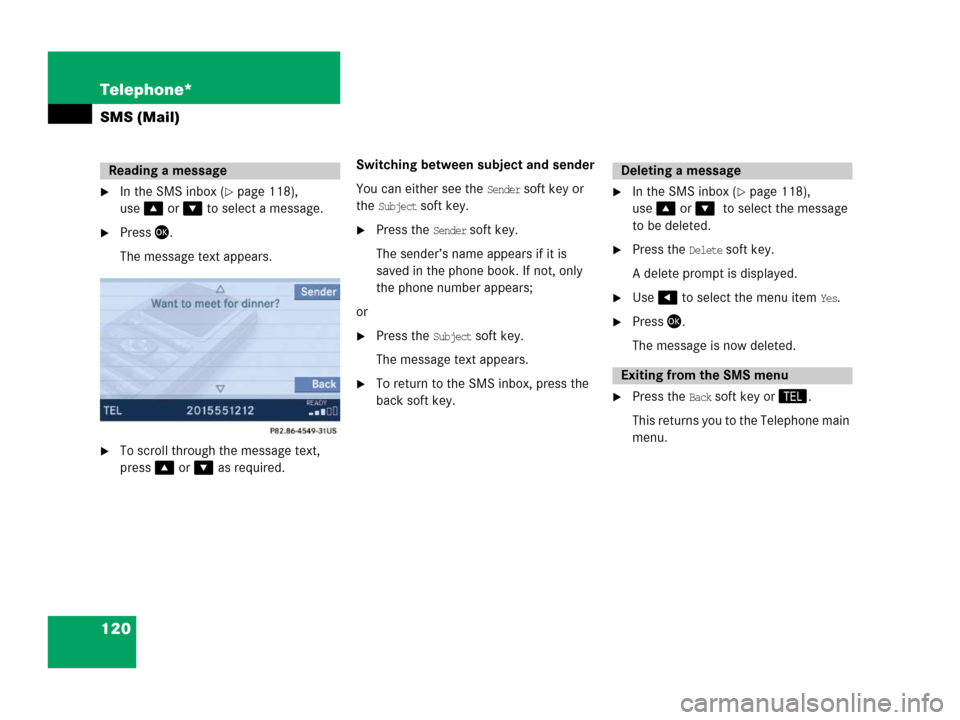
�Press.
The message text appears.
�To scroll through the message text,
press or as required.Switching between subject and sender
You can either see the
Sender soft key or
the
Subject soft key.
�Press the Sender soft key.
The sender’s name appears if it is
saved in the phone book. If not, only
the phone number appears;
or
�Press the Subject soft key.
The message text appears.
�To return to the SMS inbox, press the
back soft key.
�In the SMS inbox (�page 118),
use or to select the message
to be deleted.
�Press the Delete soft key.
A delete prompt is displayed.
�Use to select the menu item Yes.
�Press.
The message is now deleted.
�Press the Back soft key or.
This returns you to the Telephone main
menu.
Reading a messageDeleting a message
Exiting from the SMS menu
Page 189 of 213

188 Service
Tele Aid*
Tele Aid* incorporates the following func-
tions:
�Emergency call system
�Roadside Assistance
�Information
For certain emergency situations, the sys-
tem automatically triggers an emergency
call. An emergency call can also be trig-
gered manually. Refer to your vehicle Op-
erator's Manual for additional information.
If the system initiates an emergency call,
Connecting appears on the display.
During the emergency call
Call Connected
appears on the display. No operation from
COMAND is possible.Mercedes-Benz Roadside Assistance will
assist if technical problems with your vehi-
cle are experienced.
Roadside Assistance can be requested
manually. Refer to your vehicle Operator's
Manual for additional information.
Upon request of Roadside Assistance the
system initiates the call to the Mercedes-
Benz Response Center.
Connecting appears on the display.
If the connection is made, the message
Call Connected appears on the display.Even after termination of the connection,
the service may remain active for up to an-
other 5 minutes in order to transmit any re-
quired data. During this time, phone calls
cannot be made, nor can SMS messages
be received.
During activation of a roadside assistance
call, it is not possible to switch to another
application.
The transmitted data can contain, e.g., text
messages or address details of a
Mercedes-Benz Center.
Emergency call system
Roadside Assistance
Page 191 of 213
190 Service
Tele Aid*
Even after the connection has been termi-
nated, the service will remain active for 5
minutes in order to transmit any required
data. During this time, phone calls can not
be made, nor can SMS messages be re-
ceived.
The transmitted data can contain, e.g., text
messages or address details of a Mer-
cedes-Benz Center.
Cancelling text messages
�Press after you have read the mes-
sage.
The message disappears.Starting route guidance
You are prompted to confirm if route guid-
ance to the address is to be started.
�Use to select the Yes menu item
and confirm with .
The system starts the route calcula-
tion, and subsequently the route guid-
ance to the defined address
(
�page 152)
Page 198 of 213
197 System
System settings
�Night mode:
The display is constantly set to night-
time design.
�Automatic:
The display will change depending on
the illumination of the instrument clus-
ter.
�Use or to select an entry.
�Press.
Adjusting display brightness
�In the Display Settings menu, press the
Bright. soft key.
The Brightness display appears.
�Press or .
The brightness changes accordingly.
�Press the Back soft key or wait for the
screen to change.
The new setting is stored.Actuating the Reset function resets
COMAND to the factory settings.
In addition, it deletes:
�Telephone*: All phone book entries
�SMS: All SMS messages.
�Navigation*: All entries in the Destina-
tion memory and in the
Last destina-
tions
memory.
Reset activation
�Call up the System menu (�page 192).
�Press the Reset soft key.
Reset function
��
Page 200 of 213

199 Glossary
Autostore
Enters the stations with the best recep-
tion (signal strength) into the autostore
memory in order of their reception
quality (from strong to weak).
Balance
Volume adjustment between left and
right speakers.
Bit
(Bi
nary digit)
The smallest unit of digital information.
Bit rate (MP3)
Measurement of transmission speed.
Indicates the number of ->bits trans-
mitted per time unit.
CD
(C
ompact Disc)
Digital storage medium in disc form.CD-R
(CD
Recordable)
->CD which can be read and written but
not deleted.
CD-RW
(CD
Rewriteable)
->CD which can be read, written and
deleted.
COMAND
(Co
ckpit Management and Data Sys-
tem)
Information and operating center for
vehicle sound and communication sys-
tems, including the radio and CD play-
er, as well as for other optional
equipment (CD changer*, telephone*,
satellite radio*, navigation*).
Coordinates
Indicate the geographical position on
the earth's surface.DVD
(D
igital Versatile Disc)
Digital storage medium in disc form for
storing large volumes of data.
Folder
Alternative designation for directories.
Data saved on a storage medium can
be organized into directories for im-
proved clarity. Can be likened to a filing
cabinet containing a number of folders,
each of which holds a number of docu-
ments.
GPS
(G
lobal Positioning System)
Satellite-based system for relaying
geographic location information to and
from vehicles equipped with special re-
ceivers. Employs DVD digital maps for
navigation.
Greenwich meridian
A specific north-south line running
through Greenwich, England.
Glossary
Page 201 of 213

200 Glossary
GSM
(G
lobal System for Mobile communica-
tion)
A standard network protocol used
throughout the world for digital cellular
communication.
ID3 tag
Additional information which may be
included in MP3 files (e.g. title, artist,
album).
ISO9660
Standard for recording data on CDs.
Joliet
Standard for recording data on CDs.
Latitude
One of the two ->coordinates that
indicate the geographical position on
the earth's surface. The latitude indi-
cates the north-south position in rela-
tion to the equator.LOGIC7®
A 7-channel surround matrix that con-
verts any 2-channel material into
breathtaking multi-channel surround
sound, creating a natural, 360-degree
“enveloping” soundfield with a maxi-
mum “audio sweetspot” for all passen-
gers.
Longitude
One of the two ->coordinates that
indicate the geographical position on
the earth's surface. The longitude indi-
cates the east-west position in relation
to the ->Greenwich meridian.
MP3
The term used in everyday speech for
->MPEG1 Audio Layer 3.Multi session
A method for recording data, e.g. for
CDs. Data is written to the CD in a num-
ber of sessions.
PIN
(P
ersonal Identification Number)
Personal identification number, must
be entered to activate the telephone.
POI
(P
oint of Interest)
Points of Interest include service sta-
tions, rest areas, parking lots, hospi-
tals, sight-seeing points, etc.
Provider
Service provider offering access to a
mobile communication network or oth-
er services within the network.
PUK
(P
ersonal Unblocking Key)
Must be entered if the wrong PIN was
entered three consecutive times.
Page 202 of 213

201 Glossary
Root directory
The uppermost directory on a storage
medium.
Scan rate (MP3)
Indicates the frequency at which volt-
age samples are taken during the con-
version of an analog signal into a digital
signal. The analog-to-digital converter
converts the samples into digital sig-
nals.
SCAN search
Plays receivable radio stations, or CD
tracks in succession, each for approx.
8 seconds.
SIM
(S
ubscriber Identity Module)
Card provided by the GSM telephone
service provider. Necessary for access-
ing a mobile communication network.SMS
(S
hort Message Service)
With this function, you can receive,
read and delete short text messages
(if SMS service is provided by your ser-
vice provider).
Soft keys
Keys to activate different functions,
depending on the selected operating
mode.
Tele Aid
(Tele
matic Alarm Identification on De-
mand)
The Tele Aid system consists of three
types of response: automatic and man-
ual emergency, roadside assistance
and information. Tele Aid is initially
activated by completing a subscriber
agreement and placing an acquain-
tance call.
The Tele Aid system is operational pro-
vided the vehicle's battery is charged,
properly connected, not damaged and
cellular and GPS coverage are avail-
able.Unlock code
Your unlock code prevents unautho-
rized persons from using your tele-
phone. The unlock code is a number
string, which you have to enter when
switching on the telephone.
UTC
(U
niversal Time Coordinated)
The mean sun time associated with lon-
gitude zero (world time). It functions as
basis for the time zones.
WB
W
eather Band