Page 104 of 213
103 Telephone*
Telephone operation
The unlock code protects the telephone
against unauthorized use. To activate the
unlock code (
�Telephone Operation
Guide).
Commit your unlock code to memory.
Most telephone functions are not available
before entering the unlock code.
Example: unlock code 2307
�In sequence, press the number
keys, , and .
In case of erroneous entry, you can de-
lete the last or more digits.
�Press the Delete soft key as often as
required.
�After entering all digits, press or the
OK soft key.
All telephone functions are available if
the correct number has been entered.
After registering, information referring
to the telephone signal appears at the
right end of the status bar.
The unlock code has to be entered
again if the entry was incorrect.Entering the unlock code
i
The screen switches back to the last
active mode if the unlock code is not
entered within 8 seconds after you are
prompted to do so.
Page 105 of 213

104 Telephone*
Telephone operation
When COMAND is switched ON, switching
to telephone mode from any other mode is
done as follows:
On the COMAND control unit
�Press.
This also opens the Telephone main
menu.
On the multifunction steering wheel
�See (�page 27)
1 Observe all legal requirements�
Press.
The Telephone main menu appears.
Telephone status information is displayed
on the right end of the status bar.
The following displays are possible:Switching to telephone mode Telephone main menu
WarningG
Some jurisdictions prohibit the driver from
using a cellular telephone while driving.
Whether or not prohibited by law, for safety
reasons, the driver should not use the cellu-
lar telephone while the vehicle is in motion.
Stop the vehicle in a safe location before
placing or answering a call.
If you nonetheless choose to use the cellular
phone while driving, please use the hands-
free device and be sure to pay attention to
the traffic situation at all times. Use the cel-
lular phone
1 only when road, weather and
traffic conditions permit.
Page 106 of 213

105 Telephone*
Telephone operation
�READY = telephone is logged into your
mobile communcations home network
and ready for use,
�ROAMING = telephone is logged into a mo-
bile communications network outside
your home network,
�NO SERV. = no network available,
� = telephone signal strength,
� = call active (�page 112).
Other messages could also appear:
�If the message
Please insert phone, Phone not installed
or Please insert SIM card
appears, see chapter “Switching the
phone ON / OFF” (
�page 99).
�If the message
Please Enter PIN: appears, see “Enter-
ing the PIN” (
�page 101).
�If the message
Enter unlock code: appears, see “Enter-
ing unlock code” (
�page 103).
Selectable soft keys and options
� soft key
Opens the phone book (
�page 114),
�Recvd.# soft key
Opens the accepted and missed calls
list (
�page 109),
�Dialed # soft key
Opens dialed calls list (
�page 110),
�SMS soft key
Provides access to the SMS menu
(
�page 118),
�Entry of a phone number (�page 107).
i
If a list is empty, the corresponding soft
key ( ,
Recvd.#, Dialed # or SMS) is
without function and appears shaded
out.
Page 107 of 213
106 Telephone*
Telephone operation
The ringing tone is audible in the event of
an incoming call. The call screen pops up
on the current display.
If the multifunction display in the instru-
ment cluster is set to telephone mode, the
call screen also appears in the multifunc-
tion display.Answering calls
On the COMAND control unit
�Press.On the multifunction steering wheel
�Presss .
In both cases the call is active. Commu-
nication is conducted via the hands-free
system. The call volume can be adjusted
(
�page 32).
For other user functions, see
“Active call” (
�page 112).
Ending or refusing a call
On the COMAND control unit
�Press.
Answering an incoming call
i
The caller’s number appears only if it is
transmitted.
The caller’s name only appears if the
number and the name are stored in the
phone book (
�page 114).
Page 108 of 213

107 Telephone*
Telephone operation
On the multifunction steering wheel
�Presst .
The desired phone number has to be en-
tered when placing an outgoing call.
The following options are available:
�entering a phone number directly
�initiating redial (�page 108)
�selecting an entry in the accepted and
missed calls list (
�page 109)
�selecting an entry in the dialed calls list
(
�page 110)
�using speed dial (�page 112)
�opening the phone book and selecting
an entry (
�page 116)
Entering a phone number
�Open the Telephone main menu
(
�page 104).
�Use - to enter the phone num-
ber.
In case of erroneous entry, you can de-
lete the last or more digits.
�Press the Delete soft key as often as
required.
�After entering the phone number,
press.
The telephone dials the entered num-
ber.
The call is activated the moment the
other party answers the call. Communi-
cation is conducted via the hands-free
system.
The volume can be adjusted
(
�page 32).
For other user functions, see “Active
call” (
�page 112).
i
It is also possible to accept, refuse or
end a call from the cell phone
(
�Telephone Operation Guide).
Placing an outgoing call
Page 109 of 213

108 Telephone*
Telephone operation
Initiating redial
On the COMAND control unit
Immediate re-dialing of the number dialed
last can be initiated:
�Press in the Telephone main
menu twice.
The telephone establishes the connec-
tion with the number dialed last.
On the multifunction steering wheel
�Switch the multifunction display in the
instrument cluster to the Telephone
main display (
�page 27).
�Presss twice.
The telephone establishes the connec-
tion with the number dialed last.
In both cases the telephone initiates the
call. The call is activated the moment the
other party answers the call. Communica-
tion is conducted via the hands-free sys-
tem.
The volume can be adjusted (
�page 32).
For other user functions, see “Active call”
(
�page 112).After switching to telephone operation,
COMAND can display the number of
missed calls in the status bar.
i
When pressings only once, the di-
aled calls list appears in the multifunc-
tion display (
�page 110).
Accepted and missed calls
Page 110 of 213
109 Telephone*
Telephone operation
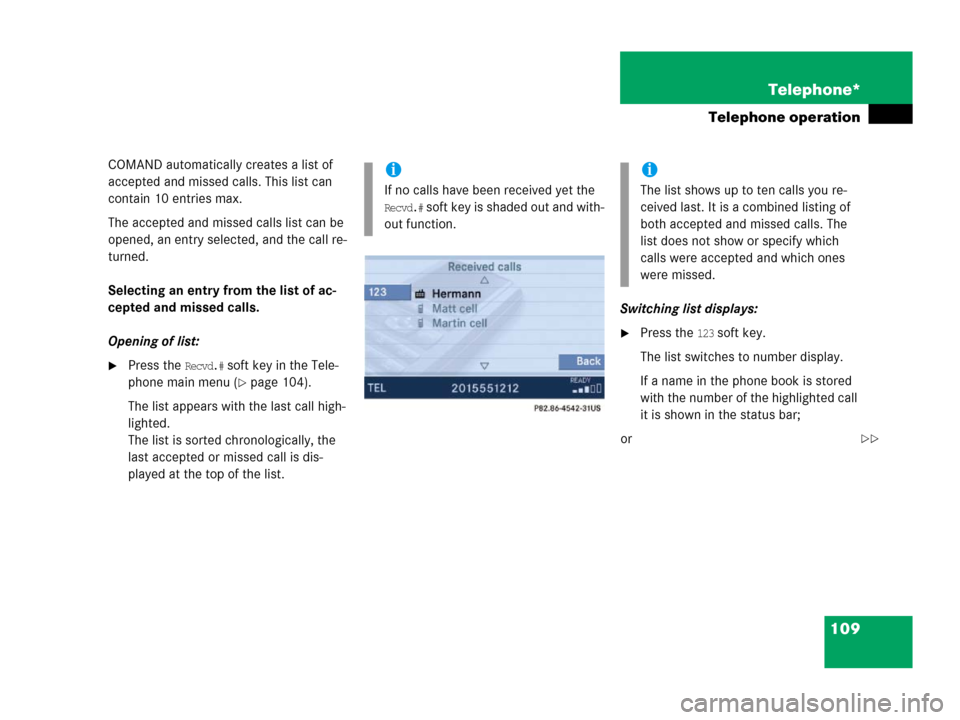
COMAND automatically creates a list of
accepted and missed calls. This list can
contain 10 entries max.
The accepted and missed calls list can be
opened, an entry selected, and the call re-
turned.
Selecting an entry from the list of ac-
cepted and missed calls.
Opening of list:
�Press the Recvd.# soft key in the Tele-
phone main menu (
�page 104).
The list appears with the last call high-
lighted.
The list is sorted chronologically, the
last accepted or missed call is dis-
played at the top of the list.Switching list displays:
�Press the 123 soft key.
The list switches to number display.
If a name in the phone book is stored
with the number of the highlighted call
it is shown in the status bar;
or
i
If no calls have been received yet the
Recvd.# soft key is shaded out and with-
out function.
i
The list shows up to ten calls you re-
ceived last. It is a combined listing of
both accepted and missed calls. The
list does not show or specify which
calls were accepted and which ones
were missed.
��
Page 111 of 213
110 Telephone*
Telephone operation
�Press the ABC soft key.
The list switches to name display.
The number in the phone book that be-
longs to the highlighted name is shown
in the status bar.
Selecting a list entry and establishing
the connection:
�Use or to select the desired
entry.
�Press.
The telephone initiates the call to the
selected number.Selecting an entry from the list of di-
aled calls
COMAND automatically creates a list of di-
aled calls. This list can contain 10 entries
max. The list is sorted chronologically, the
last dialed call is displayed at the top of the
list.
On the COMAND control unit
Opening the list:
�Press the Dialed # soft key in the Tele-
phone main menu (
�page 104).
The list appears.
Dialed callsi
If no calls have been placed yet the
Dialed # soft key is shaded out and
without function.


