Page 34 of 226
32 At a glance
Quick reference COMAND
Activating the sound functions*
In Radio, CD, CDC*, MP3-CD, DVD or
satellite radio* operation:
�Activate the main menu for the
respective operating mode
(
�page 24).
�Press the Sound soft key.
The Sound menu appears.
�Press g or G to select the desired
function.
�Press E.
The function is activated.
230_AeBlick_US_B.fm Seite 32 Mittwoch, 8. Dezember 2004 3:28 15
Page 35 of 226
33
Audio
Audio menu
Radio operation CD operation
MP3-CD operation DVD operation
230_Audio_US_B.fm Seite 33 Mittwoch, 8. Dezember 2004 4:28 16
Page 36 of 226
34 Audio
Audio menu
� Audio menu
In chapter “Audio” you will find detailed
information regarding
�Radio operation
�CD operation
�MP3-CD operation
�DVD operation
If you have not done so already, please fa-
miliarize yourself with these functions by
reading chapter “At a glance”.
�Press A.
Audio menu
�If an audio submenu is displayed, press
the
Back soft key until the Audio menu
is displayed.
or
�Press A again.
�In the Audio menu, press the soft key
for the desired audio source, e.g.
Radio.
Switching On
�Press J.
The system mutes the active audio
source.
Switching off
�Press J again .
or
�Press A, B , g or h or any
of the available soft keys for the active
audio source.
Opening the Audio menu Selecting an audio source
Muting
230_Audio_US_B.fm Seite 34 Mittwoch, 8. Dezember 2004 4:28 16
Page 48 of 226
46 Audio
CD operation
Playback locations for audio CDs are:
�the CD drive in the COMAND
�the CD changer*.
Differences regarding the CD mode depen-
ding on the audio source are highlighted.
�In the Audio menu (�page 34), press
the
CD soft key (for CD drive) or
the
CD soft key (for CD changer*).
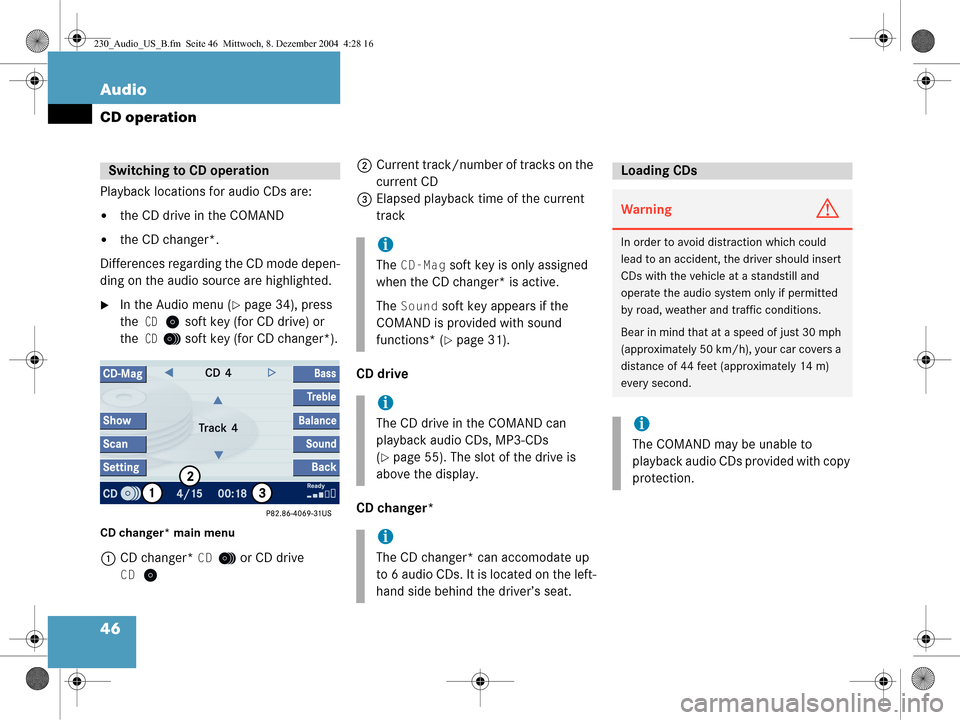
CD changer* main menu
1 CD changer* CD or CD drive
CD
2Current track/number of tracks on the
current CD
3 Elapsed playback time of the current
track
CD drive
CD changer*Switching to CD operation
i
The CD-Mag soft key is only assigned
when the CD changer* is active.
The
Sound soft key appears if the
COMAND is provided with sound
functions* (
�page 31).
i
The CD drive in the COMAND can
playback audio CDs, MP3-CDs
(
�page 55). The slot of the drive is
above the display.
i
The CD changer* can accomodate up
to 6 audio CDs. It is located on the left-
hand side behind the driver’s seat.
Loading CDs
WarningG
In order to avoid distraction which could
lead to an accident, the driver should insert
CDs with the vehicle at a standstill and
operate the audio system only if permitted
by road, weather and traffic conditions.
Bear in mind that at a speed of just 30 mph
(approximately 50 km/h), your car covers a
distance of 44 feet (approximately 14 m)
every second.
i
The COMAND may be unable to
playback audio CDs provided with copy
protection.
230_Audio_US_B.fm Seite 46 Mittwoch, 8. Dezember 2004 4:28 16
Page 57 of 226

55
Audio
MP3-CD operation
� MP3-CD operation
General Information
WarningG
In order to avoid distraction which could
lead to an accident, the driver should insert
CDs with the vehicle at a standstill and
operate the audio system only if permitted
by road, weather and traffic conditions.
Bear in mind that at a speed of just 30 mph
(approximately 50 km/h), your car covers a
distance of 44 feet (approximately 14 m)
every second.
WarningG
The CD drive and CD changer* are Class 1
laser products. There is a danger of invisible
laser radiation when you open or damage
the cover.
Do not remove the cover. The CD drive and
the CD changer* do not contain any parts
which can be serviced by the user. For safe-
ty reasons, have any necessary service work
performed by qualified personnel.
i
When you create a MP3-CD you can
define structures and input information
in addition to the title information.
i
The COMAND plays the tracks on the
MP3-CD in alphabetical order. To
preserve the order on the original CD,
number the tracks in ascending order
when you record them.
The smallest possible data rate for
MP3-CDs is 56 KB/s.
i
The COMAND does not play back
MP3-CDs containing files with ISO
9660 Level 3 standard. Such MP3 CDs
contain fragmented files.
230_Audio_US_B.fm Seite 55 Mittwoch, 8. Dezember 2004 4:28 16
Page 58 of 226

56 Audio
MP3-CD operation
�Treat MP3-CDs with care to prevent
malfunctions during playback.
�Do not scratch, touch or soil your MP3-
CDs.
�Do not attach labels to or write on your
MP3-CDs.
�From time to time, clean your MP3-CDs
with a commercially available cleaning
cloth. Never wipe circularly, but in a
straight line from inside to outside.
�After use, put your MP3-CDs into the
CD box.
�Protect your MP3-CDs from high
temperatures and direct sunlight.
�Activate the MP3-CD main menu
(
�page 57).
or
�Load an MP3-CD into the COMAND
(
�page 56).
CD drive
Loading an MP3-CD
�Insert a MP3-CD into the slot
(
�page 14). The MP3-CD should be
inserted with the label side up.
The COMAND pulls the MP3-CD into
the drive. The display changes.
Tips on caring for your MP3-CDsSwitching to MP 3-CD operation
i
The MP3-CDs are played in the same
drive as normal audio CDs.
The MP3-CD drive is above the display.
WarningG
In order to avoid distraction which could
lead to an accident, the driver should insert
CDs with the vehicle at a standstill and
operate the audio system only if permitted
by road, weather and traffic conditions.
WarningG
Bear in mind that at a speed of just 30 mph
(approximately 50 km/h), your car covers a
distance of 44 feet (approximately 14 m)
every second.
i
A CD already loaded must be ejected
before inserting a new MP3-CD.
Inserting a second MP3-CD with
another CD still loaded will cause
damage to the CD drive which is not
covered by the Mercedes-Benz Limited
Warranty.
230_Audio_US_B.fm Seite 56 Mittwoch, 8. Dezember 2004 4:28 16
Page 59 of 226
57
Audio
MP3-CD operation
After that the message Loading
Medium Please Wait
will appear.
After loading, the MP3-CD main menu
(
�page 57) will appear. Playback
begins. Ejecting an MP3-CD
�With the COMAND switched on, press
l
.
The system ejects the MP3-CD already
loaded.
�Remove the MP3-CD from the slot.
�Insert another MP3-CD into the slot.
The MP3-CD should be inserted with
the label side up.
�Activate the Audio menu (�page 34).
�Press the MP3-CD soft key.
or
�Load a MP3-CD (�page 56).
The MP3-CD main menu will appear.
MP3-CD main menu
1 Current track/number of tracks on the
current MP3-CD
2 Elapsed playback time of the current
track
i
If you do not remove the MP3-CD from
the slot within around 15 seconds, the
COMAND will pull the MP3-CD into the
drive again.
MP3-CD main menu
230_Audio_US_B.fm Seite 57 Mittwoch, 8. Dezember 2004 4:28 16
Page 60 of 226

58 Audio
MP3-CD operation
The first line shows the name of the
current folder. At the center you see the
currently played track.
�Activate the MP3-CD main menu.
(
�page 57).
�Use H or h to select a folder.
The track list only displays the tracks of
the selected folder.
Playback of the first track of the
selected folder will begin.
You can select a track:
�in the track list (�page 58)
�with the number keypad (�page 58)
�with g or h (�page 59)
�with MP3-CD track scan (�page 59) In the track list
The track list includes all tracks of the
selected folder of the currently played
MP3-CD. Only one list entry is visible at a
time.
�Open the MP3-CD main menu
(
�page 57).
�Press
G or g .
The track list is displayed. You will see
up to 3 entries. The track shown in
black is the one currently playing.
�Press G.
You move forward through the track
list.
�Press g.
You move backward through the track
list. With the number keypad
�Activate the MP3-CD main menu
(
�page 57).
�In short succession, press button
*
and the number key of the desired
track, e.g. 24.
�After your entry wait approx. 3
seconds.
The selected track is played. The
MP3-CD main menu will appear.
Selecting a folder
Selecting a track
i
If the current folder contains less
tracks, the system will only recognize
the first digit entered and play the ap-
propriate track.
230_Audio_US_B.fm Seite 58 Mittwoch, 8. Dezember 2004 4:28 16


