Page 61 of 226
59
Audio
MP3-CD operation
Skip Track
�Activate the MP3-CD main menu
(
�page 57).
Forward
�Press D .
The next track from the track list is
played.
Backward
�Press d.
If the track has been playing for more
than approx. 10 seconds, the track is
replayed from the start. If the playing
time is shorter, the previous track is
played. MP3-CD track scan
The tracks of the current folder can be
scanned one after the other for 8 seconds
each. Subfolders ar
e not considered.
The function will switch off automatically
when the starting is reached.
You can also manually stop the scan
search.
Starting the Scan Search�Activate the MP3-CD main menu
(
�page 57).
�Press the Scan soft key. Ending the scan function
Scan search is running.
�Press the Scan soft key.
or
�Press E.
The last scanned trac k is played back.
i
When you start the scan search, the
playback mode
Normal Sequence
(�page 60) is automatically activated.
230_Audio_US_B.fm Seite 59 Mittwoch, 8. Dezember 2004 4:28 16
Page 62 of 226

60 Audio
MP3-CD operation
The following options are available:
�Normal Sequence (�page 60)
�Folder Mix (�page 61)
�CD-ROM Mix (�page 61)
�Repeat Track (�page 61)
�Repeat Folder (�page 61)
Activating playback mode
E.g.:
Option
Normal Sequence
�Press the Setting soft key.
The Settings menu is displayed.
�Use g or G to select the playback
mode
Normal Sequence.
�Press E.
The option is activated. Wait a few
seconds for the MP3-CD main menu to
appear. Explanation of the Playback Options
�Normal Sequence
The tracks of the current folder are
played in alphabetical order.
If the current folder contains sub-
folders:
The sub-folders and their tracks are
played in alphabetical order.
The current folder does not contain
sub-folders:
The track of the folder next in the
alphabet is played back.
Playback mode
OptionSymbol
Function active_
Function not active-
i
After selection, the following playback
options are displayed on the status bar.
230_Audio_US_B.fm Seite 60 Mittwoch, 8. Dezember 2004 4:28 16
Page 63 of 226
61
Audio
MP3-CD operation
�Folder Mix
The tracks of the current folder and its
sub-folders are played in alphabetical
order.
�CD-ROM Mix
All tracks of the MP3-CD are played in
random order.
�Repeat Track
The system repeats the current track
until you switch the function off.
�Repeat Folder
The system repeats the tracks of the
current folder until you switch the
function off.
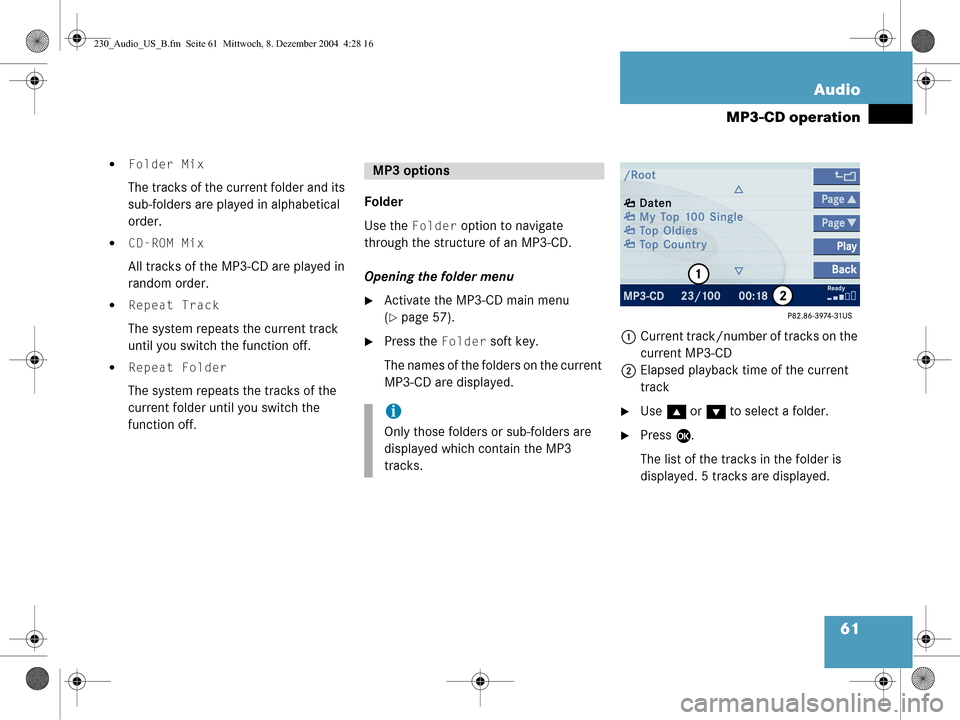
Folder
Use the
Folder option to navigate
through the structur e of an MP3-CD.
Opening the folder menu
�Activate the MP3-CD main menu
(
�page 57).
�Press the Folder soft key.
The names of the folders on the current
MP3-CD are displayed. 1
Current track/number of tracks on the
current MP3-CD
2 Elapsed playback time of the current
track
�Use g or G to select a folder.
�Press E.
The list of the tracks in the folder is
displayed. 5 tracks are displayed.
MP3 options
i
Only those folders or sub-folders are
displayed which contain the MP3
tracks.
230_Audio_US_B.fm Seite 61 Mittwoch, 8. Dezember 2004 4:28 16
Page 64 of 226
62 Audio
MP3-CD operation
�Use g or G to navigate through the
track list.
�Press the Play soft key.
or
�Press E to play the selected track.
�Soft key :
Brings you one level up in the folder
structure. Displaying title information
�Activate the MP3-CD menu main
(
�page 57).
�Press the Show soft key.
The information on the current track
stored on the MP3-CD is displayed.
230_Audio_US_B.fm Seite 62 Mittwoch, 8. Dezember 2004 4:28 16
Page 207 of 226

205
Glossary
Audio source
This includes the systems radio, CD
(CD drive in the control unit, CD chan-
ger*), MP3-CD and DVD (only audible).
Balance Defines sound-center left/right.
Bird’s-eye view The map is shown in three dimensions
with sky and horizon.
COMAND (Co
ckpit Management and Data Sys-
tem)
Information and operating center for
vehicle sound and communications
systems, including the radio and
CD/DVD player, as well as for other op-
tional equipment (CD changer*, tele-
phone*, etc.). DVD
(D
igital Versatile Disc)
Digital storage medium for storing lar-
ge amounts of data.
Emergency call This function places a call to a local
911 provider. It does not initiate a
->Tele Aid* call. Please note that the
911 emergency call system is a public
service. Using it without due cause is a
criminal offense.
GPS (G
lobal Positioning System)
Satellite-based system for relaying
geographic location information to and
from vehicles equipped with special re-
ceivers. Employs DVD digital maps for
navigation. Heading Up
Dynamic map alignment, map is dis-
played facing driving direction pointing
up.
Navigation DVD Contains all the destination addresses
(town, road, intersection, house num-
ber, special destinations) and the digi-
tal map material for a country or a
region for destination entry, route cal-
culation and destination guidance.
North Up The map is displayed facing north du-
ring route guidance.
Provider is the network operator who makes
available (provides) telephone services
230_Fachwörter_US_B.fm Seite 205 Mittwoch, 8. Dezember 2004 4:42 16
Page 212 of 226

210 Index
CD operation 44fast forward/reverse 52
general information 44
playback mode 53
switching to CD mode 46
Changing address book entry 179
map display 142
mobile phone internal memory entry 182
CHECK SIM CARD (EMERGENCY CALL "911" ONLY POSSIBLE WITH TEL.) 91
COMAND switching off 27
switching on 27
CONNECTING CALL 189
CONTINUE ROUTE GUIDANCE 118
Coordinates 137
Current vehicle location 141 D
DATA HAS BEEN SAVED 172, 174, 175
DEACTIVATING TELEPHONE 92
Deleting
address book entry 186
phone book entry 108
SMS message 175
Destination input 124
Destination memory 156
Details on a mobile phone internal memory entry 182
on an address book entry 178
Dialing subsequent dialing 99
Displaying phone book 104
route list 145
route on the map 145
subtitles (DVD operation) 73 DVD
loadinginto the CD/DVD drive 65
DVD operation DVD playback requirements 64
general information 63
E
Ejecting CD 47
DVD 66
MP3-CD 57
Emergency call "911" 93
Emergency call system 189
Ending call 98, 99
ENTER PIN 90
ENTER UNLOCK CODE 90
Entering data 193via 12-button keypad 195
via selection menu 193
230_US_Edition_B_2005SIX.fm Seite 210 Mittwoch, 8. Dezember 2004 4:42 16
Page 213 of 226
211
Index
destination address 125
house number 132
intersection 131
name or number in the phone
book 107
parking 133
PIN code 95
PUK 96
street 129
telephone number 98
ENTRY IMPORTED TO ADDRESS BOOK 183
ERROR OCCURED WHILE SAVING DATA 174
Exporting address book entry 181
F
Frequency band 38
Frequency range 38 G
GPS 115
H
Hands-free microphone
switching on/off 103
I
Important notes Telephone 88
Importing mobile phone internal memory entry 183
Incoming call 97
L
Loading CDinto the CD changer* 47
into the CD/DVD drive 47
DVD into the CD/DVD drive 65
MP3-CD 56 into the CD/DVD drive 57 Loading/ejecting
navigation DVD 115
M
Making display settings 201
Map orientation 2D Heading Up 142
2D North Up 142
Memory destination memory 156
last destinations 155
Memory functions radio operation 40
Menu functions 25
main area 24
soft key sections 24
status bar 24
Menu display 24
Menu system 24
230_US_Edition_B_2005SIX.fm Seite 211 Mittwoch, 8. Dezember 2004 4:42 16
Page 214 of 226
212 Index
MP3-CDCD-ROM MIX 61
FOLDER MIX 61
loading into the CD/DVD drive 57
REPEAT FOLDER 61
REPEAT TRACK 61
MP3-CD operation folder 61
general information 55
playback mode 60
selecting a folder 58
selecting a track 58
Muting audio 34
CD operation 53
current voice instructions 140
satellite radio* operation 81 N
Navigation
Important notes 114
Navigation announcements 121
NAVIGATION BEING ACTIVATED. PLEASE WAIT. 166
Navigation displays 140
Navigation DVD 115 loading/ejecting 115
NAVIGATION IS NOT ACTIVE 121
NEW RTE 139
NO SERV. 90, 96
O
Opening Audio menu 34
Operating elements CD 14 navigation 20
radio 12
satellite radio* 16
service 22
telephone* 18
Outgoing calls 98
P
Phone book 104
PIN BLOCKED PLEASE ENTER PUK ON CELL PHONE 95
PIN code entering 95
POIs 160
Program category 81
PUK entering 96
230_US_Edition_B_2005SIX.fm Seite 212 Mittwoch, 8. Dezember 2004 4:42 16