Page 109 of 417
108 Controls in detail
Memory function
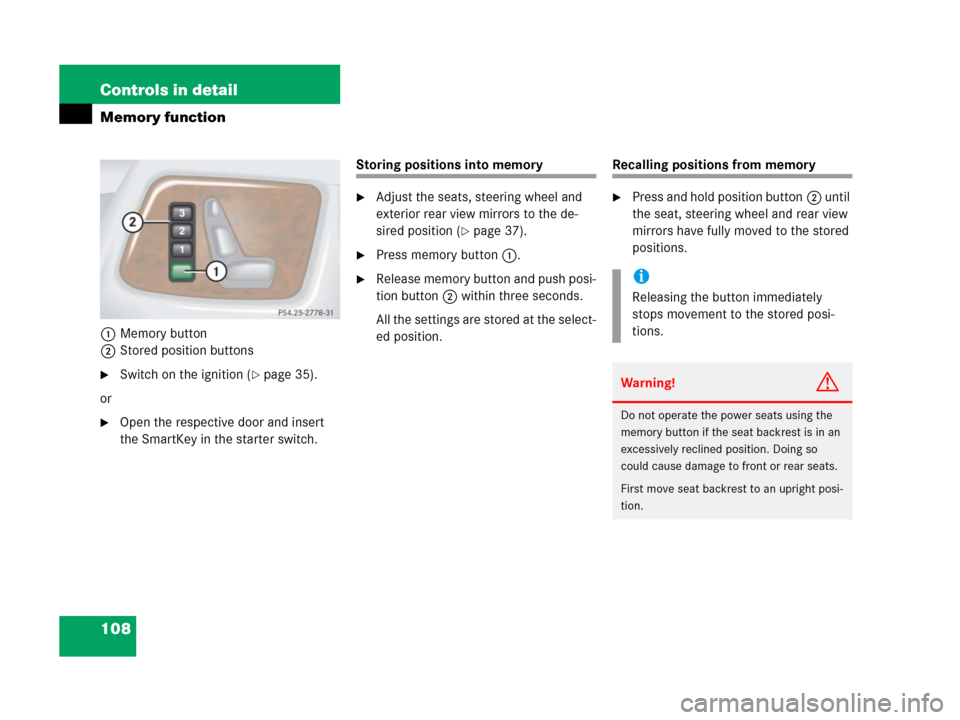
1Memory button
2Stored position buttons
�Switch on the ignition (�page 35).
or
�Open the respective door and insert
the SmartKey in the starter switch.
Storing positions into memory
�Adjust the seats, steering wheel and
exterior rear view mirrors to the de-
sired position (
�page 37).
�Press memory button1.
�Release memory button and push posi-
tion button2 within three seconds.
All the settings are stored at the select-
ed position.
Recalling positions from memory
�Press and hold position button2 until
the seat, steering wheel and rear view
mirrors have fully moved to the stored
positions.
i
Releasing the button immediately
stops movement to the stored posi-
tions.
Warning!G
Do not operate the power seats using the
memory button if the seat backrest is in an
excessively reclined position. Doing so
could cause damage to front or rear seats.
First move seat backrest to an upright posi-
tion.
Page 111 of 417
110 Controls in detail
Lighting
For information on how to switch on the
headlamps and use the turn signals, see
“Switching on headlamps” (
�page 51)
and “Turn signals” (
�page 52).
Exterior lamp switch
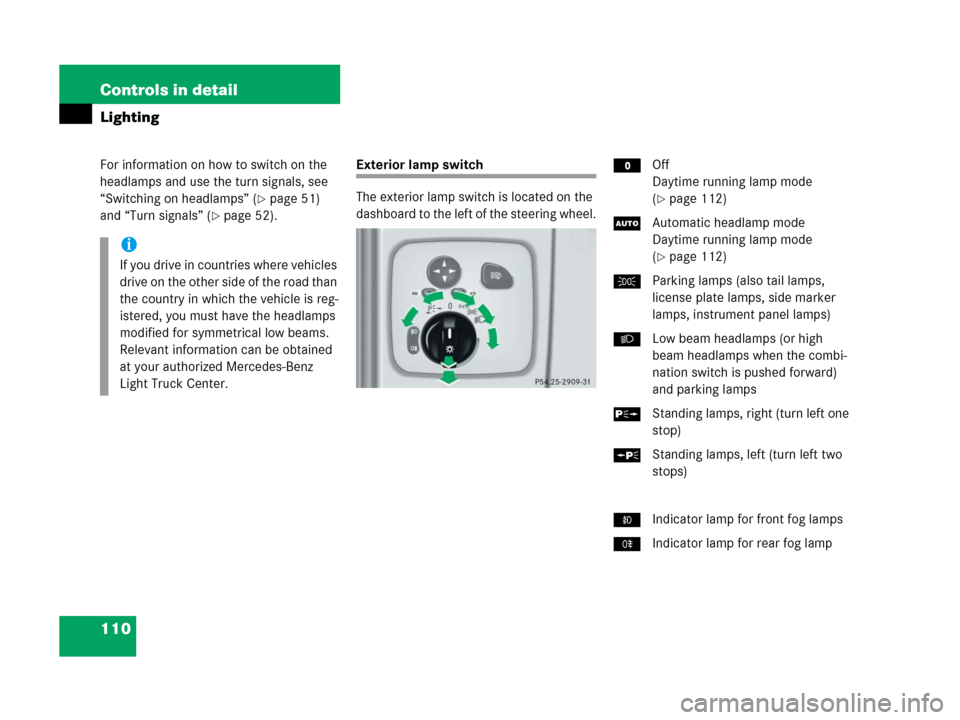
The exterior lamp switch is located on the
dashboard to the left of the steering wheel.MOff
Daytime running lamp mode
(
�page 112)
UAutomatic headlamp mode
Daytime running lamp mode
(
�page 112)
CParking lamps (also tail lamps,
license plate lamps, side marker
lamps, instrument panel lamps)
BLow beam headlamps (or high
beam headlamps when the combi-
nation switch is pushed forward)
and parking lamps
ˆStanding lamps, right (turn left one
stop)
‚Standing lamps, left (turn left two
stops)
‡Indicator lamp for front fog lamps
†Indicator lamp for rear fog lampi
If you drive in countries where vehicles
drive on the other side of the road than
the country in which the vehicle is reg-
istered, you must have the headlamps
modified for symmetrical low beams.
Relevant information can be obtained
at your authorized Mercedes-Benz
Light Truck Center.
Page 115 of 417
114 Controls in detail
Lighting
Rear fog lamp (driver’s side only)
�Switch on the front fog lamps
(
�page 113).
�Pull out the exterior lamp switch to
second stop.
The rear fog lamp switches on.
The yellow indicator lamp† in the
exterior lamp switch comes on
(
�page 110).
�Push in the exterior lamp switch to first
stop.
The rear fog lamp switches off.
The yellow indicator lamp† in the
exterior lamp switch goes out.
The front fog lamps remain lit.
Combination switch
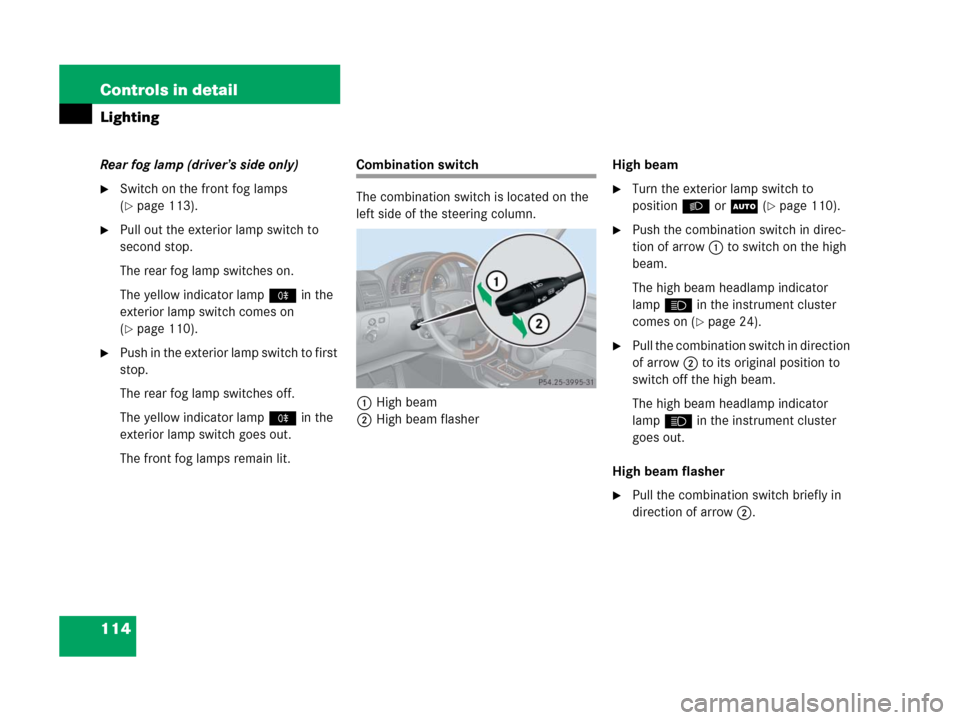
The combination switch is located on the
left side of the steering column.
1High beam
2High beam flasherHigh beam
�Turn the exterior lamp switch to
positionB orU (
�page 110).
�Push the combination switch in direc-
tion of arrow1 to switch on the high
beam.
The high beam headlamp indicator
lampA in the instrument cluster
comes on (
�page 24).
�Pull the combination switch in direction
of arrow2 to its original position to
switch off the high beam.
The high beam headlamp indicator
lampA in the instrument cluster
goes out.
High beam flasher
�Pull the combination switch briefly in
direction of arrow2.
Page 122 of 417
121 Controls in detail
Instrument cluster
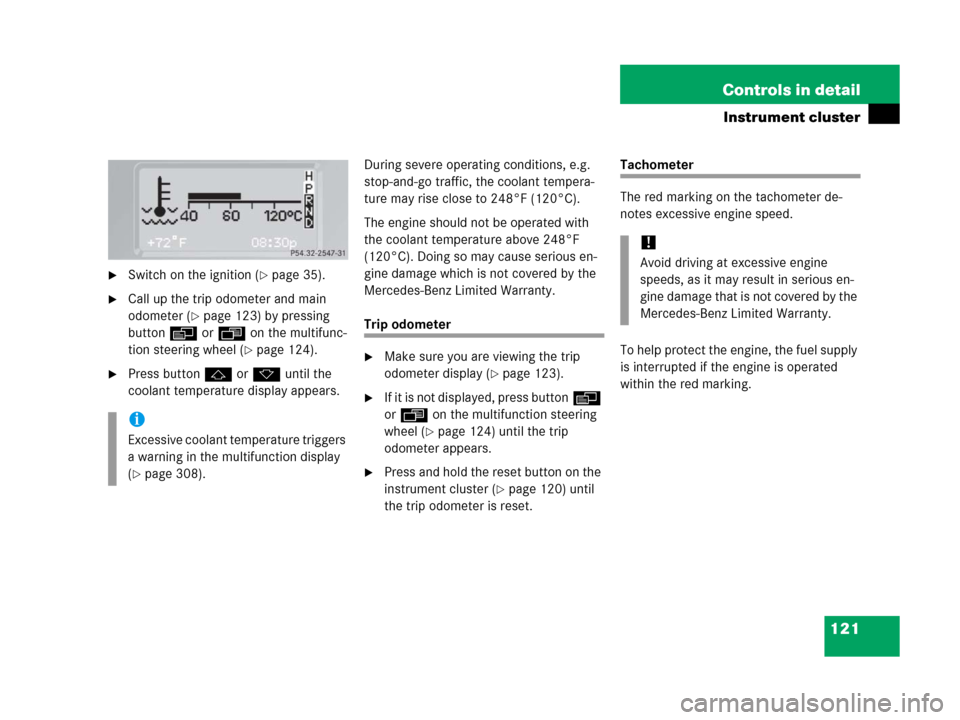
�Switch on the ignition (�page 35).
�Call up the trip odometer and main
odometer (
�page 123) by pressing
buttonè orÿ on the multifunc-
tion steering wheel (
�page 124).
�Press buttonj ork until the
coolant temperature display appears.During severe operating conditions, e.g.
stop-and-go traffic, the coolant tempera-
ture may rise close to 248°F (120°C).
The engine should not be operated with
the coolant temperature above 248°F
(120°C). Doing so may cause serious en-
gine damage which is not covered by the
Mercedes-Benz Limited Warranty.
Trip odometer
�Make sure you are viewing the trip
odometer display (
�page 123).
�If it is not displayed, press buttonè
orÿ on the multifunction steering
wheel (
�page 124) until the trip
odometer appears.
�Press and hold the reset button on the
instrument cluster (
�page 120) until
the trip odometer is reset.
Tachometer
The red marking on the tachometer de-
notes excessive engine speed.
To help protect the engine, the fuel supply
is interrupted if the engine is operated
within the red marking.
i
Excessive coolant temperature triggers
a warning in the multifunction display
(
�page 308).
!
Avoid driving at excessive engine
speeds, as it may result in serious en-
gine damage that is not covered by the
Mercedes-Benz Limited Warranty.
Page 124 of 417
123 Controls in detail
Control system
�Control system
The control system is activated as soon as
the SmartKey in the starter switch is
turned to position1. The control system
enables you to
�call up information about your vehicle
�change vehicle settings
For example, you can use the control sys-
tem to find out when your vehicle is next
due for service, to set the language for
messages in the instrument cluster display
and much more.
The control system relays information to
the multifunction display.
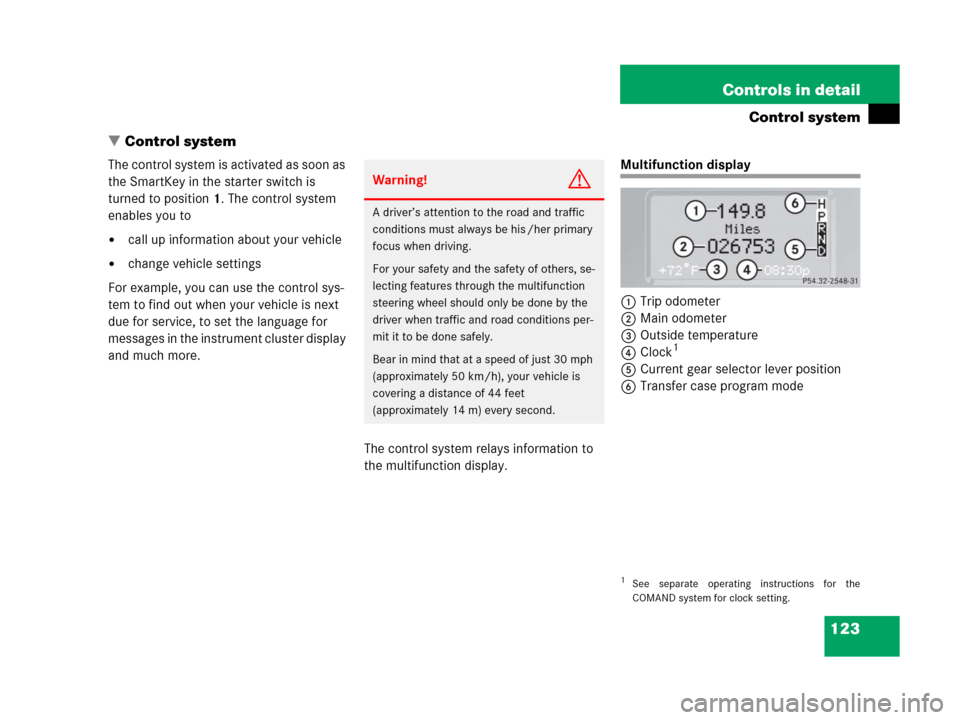
Multifunction display
1Trip odometer
2Main odometer
3Outside temperature
4Clock
1
5Current gear selector lever position
6Transfer case program mode
Warning!G
A driver’s attention to the road and traffic
conditions must always be his /her primary
focus when driving.
For your safety and the safety of others, se-
lecting features through the multifunction
steering wheel should only be done by the
driver when traffic and road conditions per-
mit it to be done safely.
Bear in mind that at a speed of just 30 mph
(approximately 50 km/h), your vehicle is
covering a distance of 44 feet
(approximately 14 m) every second.
1See separate operating instructions for the
COMAND system for clock setting.
Page 125 of 417
124 Controls in detail
Control system
Multifunction steering wheel
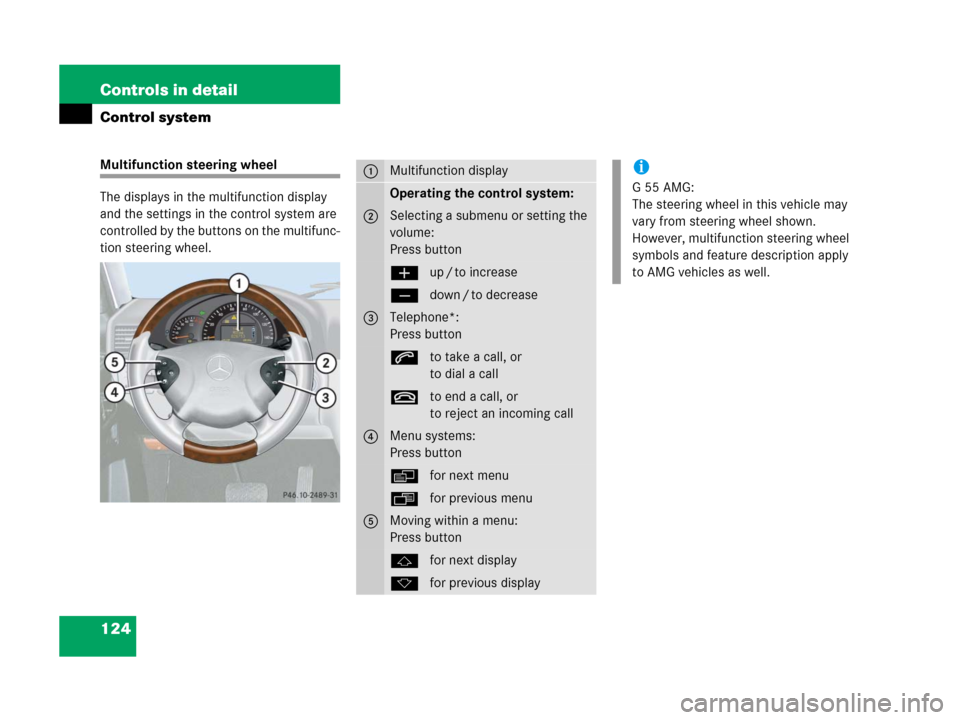
The displays in the multifunction display
and the settings in the control system are
controlled by the buttons on the multifunc-
tion steering wheel.1Multifunction display
Operating the control system:
2Selecting a submenu or setting the
volume:
Press button
æup / to increase
çdown / to decrease
3Telephone*:
Press button
sto take a call, or
to dial a call
tto end a call, or
to reject an incoming call
4Menu systems:
Press button
èfor next menu
ÿfor previous menu
5Moving within a menu:
Press button
jfor next display
kfor previous display
i
G55AMG:
The steering wheel in this vehicle may
vary from steering wheel shown.
However, multifunction steering wheel
symbols and feature description apply
to AMG vehicles as well.
Page 126 of 417
125 Controls in detail
Control system
Pressing any of the buttons on the multi-
function steering wheel will alter what is
shown in the multifunction display.
The information available in the multifunc-
tion display is arranged in menus, each
containing a number of functions or sub-
menus.
The individual functions are then found
within the relevant menu (radio or CD op-
erations under
AUDIO, for example). These
functions serve to call up relevant informa-
tion or to customize the settings for your
vehicle.It is helpful to think of the menus, and the
functions within each menu, as being ar-
ranged in a circular pattern.
�If you press buttonè orÿ
repeatedly, you will pass through each
menu one after the other.
�If you press buttonk orj
repeatedly, you will pass through each
function display, one after the other, in
the current menu.In the
SETTINGS... menu, instead of func-
tions you will find a number of submenus
for calling up and changing settings. For in-
structions on using these submenus, see
the “Settings menu” section (
�page 132).
The number of menus available in the sys-
tem depends on which optional equipment
is installed in your vehicle.
i
The headings used in the menus table
are designed to facilitate navigation
within the system and are not neces-
sarily identical to those shown in the
control system displays.
The first function displayed in each
menu will automatically show you
which part of the system you are in.
Page 144 of 417
143 Controls in detail
Control system
Convenience submenu
Access the
CONVENIENCE submenu via the
SETTINGS menu. Use the CONVENIENCE sub-
menu to change the settings for a number
of convenience features. The following
functions are available:Activating easy-entry/exit feature
Use this function to activate and deacti-
vate the easy-entry/exit feature
(
�page 100).
�Move the selection marker with
theæ orç button to the
CONVENIENCE submenu.
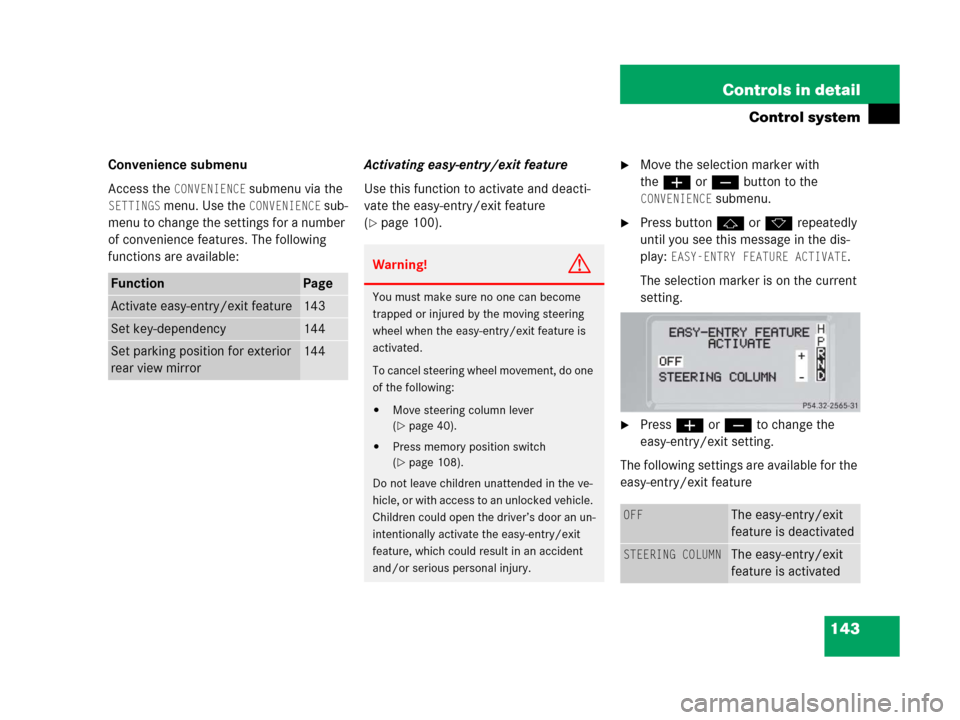
�Press buttonj ork repeatedly
until you see this message in the dis-
play:
EASY-ENTRY FEATURE ACTIVATE.
The selection marker is on the current
setting.
�Pressæ orç to change the
easy-entry/exit setting.
The following settings are available for the
easy-entry/exit feature
FunctionPage
Activate easy-entry/exit feature143
Set key-dependency144
Set parking position for exterior
rear view mirror144
Warning!G
You must make sure no one can become
trapped or injured by the moving steering
wheel when the easy-entry/exit feature is
activated.
To cancel steering wheel movement, do one
of the following:
�Move steering column lever
(
�page 40).
�Press memory position switch
(
�page 108).
Do not leave children unattended in the ve-
hicle, or with access to an unlocked vehicle.
Children could open the driver’s door an un-
intentionally activate the easy-entry/exit
feature, which could result in an accident
and/or serious personal injury.
OFFThe easy-entry/exit
feature is deactivated
STEERING COLUMNThe easy-entry/exit
feature is activated