Page 246 of 521

245 Controls in detail
Driving systems
Distronic displays in the speedometer
dial
1Set speed
If Distronic is activated, one or two seg-
ments come on around the set speed.
Warning!
G
Close attention to road and traffic condi-
tions is imperative at all times, regardless of
whether or not Distronic is activated.
Use of Distronic can be dangerous on wind-
ing roads or in heavy traffic because condi-
tions do not allow safe driving at a steady
speed.
Distronic will not react to stationary objects
in the roadway (e.g. a stopped vehicle in a
traffic jam or a disabled vehicle). Distronic
will also not respond to oncoming vehicles.
Switch off Distronic:�
when changing from the left to the right
lane if vehicles are moving more slowly
in the left lane
�
when entering a turn lane or highway off
ramp
�
in complex driving situations, such as in
highway construction zones
In these situations, Distronic will continue to
maintain the set speed unless deactivated.
Distronic is designed and intended only to
maintain a set speed and keep a set dis-
tance from moving objects in front of it.Warning!
G
The “Resume” function should only be oper-
ated if the driver is fully aware of the previ-
ously set speed and wishes to resume this
particular preset speed.
iThe vehicle speed displayed on the
speedometer can briefly vary from the
speed setting on the Distronic system.
Page 248 of 521
247 Controls in detail
Driving systems
Distronic menu in the control system
In the Distronic menu you can read the cur-
rent settings for Distronic. What appears in
the multifunction display depends on
whether Distronic and the distance warn-
ing function are turned on or off.�
Press buttonè orÿ repeatedly
until you see one of the following dis-
plays.Distronic deactivated
When Distronic is deactivated you will see
the standard display of Distronic in the
multifunction display.
1Vehicle ahead, if detected
2Actual distance to vehicle ahead
3Preset distance threshold to vehicle
ahead
4Your vehicle
5Symbol for activated distance warning
function
Warning!
G
Distronic brakes your vehicle with a maxi-
mum deceleration of 6.5 ft/s
2 (2 m/s
2).
This corresponds to about 20% of the maxi-
mum deceleration ability of your vehicle.
Distronic brakes the vehicle in an effort to
restore the preset distance or to maintain
the speed.
Page 249 of 521

248 Controls in detailDriving systemsDistronic activated
If you turn Distronic on, you will see the set
speed in the multifunction display for
about 5 seconds. When Distronic is
activated, you will see the following display
in the multifunction display.
1Distronic activatedCruise control lever
The Distronic system is operated by means
of the cruise control lever.
The cruise control lever is the uppermost
lever on the left-hand side of the steering
column.
1Set current or higher speed
2Set current or lower speed
3Deactivate Distronic
4Resume at last set speedActivating Distronic
You can activate Distronic if
�
you are driving between 20 mph
(30km/h) and 110mph (180km/h)
�
the ESP
® is activated (
�page 93)
If Distronic has not been activated after
pressing the cruise control lever you will
see the message
---
in the multifunction
display.
In the following cases you cannot activate
Distronic
�
up to 2 minutes after starting the en-
gine
�
when you brake
�
if you have set the parking brake
�
if the gear selector lever is in
positionP, R or N
�
if the ESP
® is switched off
Page 252 of 521
251 Controls in detail
Driving systems
Distronic deactivates automatically when�
you set the parking brake
�
you drive slower than 20 mph
(30 km /h)
�
the ESP
® is active (
�page 93) or you
deactivate the ESP
®
�
you move the gear selector lever into
positionN
A signal will sound. The
Distronic off
message appears in the multifunction
display for approximately 5 seconds.Setting the following distance in
Distronic
You can set the specified following dis-
tance for Distronic by varying the time set-
ting between 1.0 and 2.0 seconds. Using
this time setting and the current speed of
your vehicle, Distronic calculates and sets
the required following distance to the vehi-
cle ahead. The set distance will be shown
in the multifunction display.
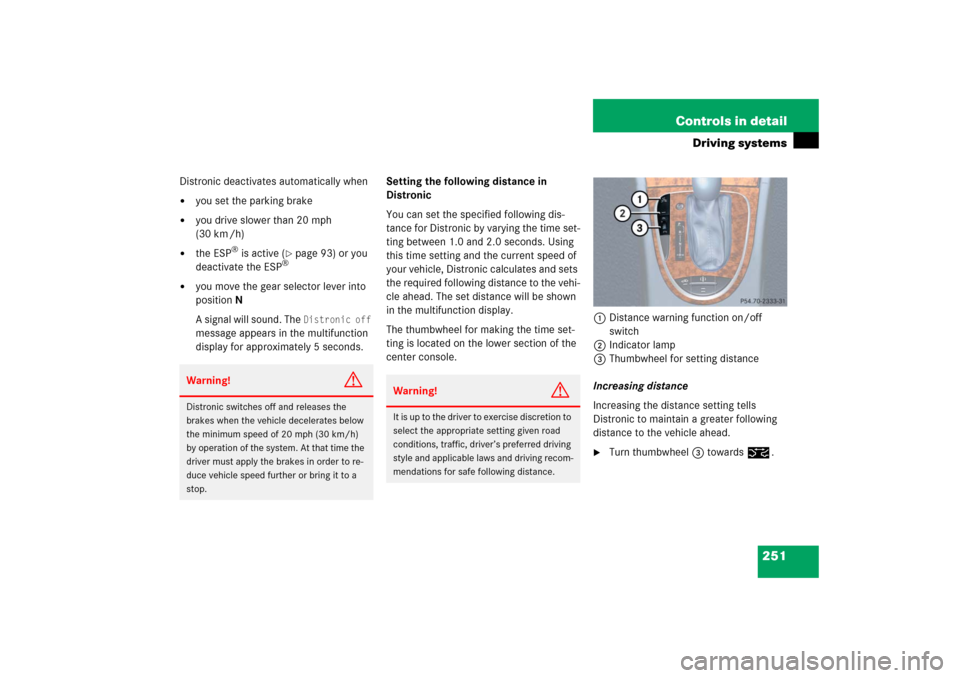
The thumbwheel for making the time set-
ting is located on the lower section of the
center console.1Distance warning function on/off
switch
2Indicator lamp
3Thumbwheel for setting distance
Increasing distance
Increasing the distance setting tells
Distronic to maintain a greater following
distance to the vehicle ahead.
�
Turn thumbwheel3 towards¯.
Warning!
G
Distronic switches off and releases the
brakes when the vehicle decelerates below
the minimum speed of 20 mph (30 km/h)
by operation of the system. At that time the
driver must apply the brakes in order to re-
duce vehicle speed further or bring it to a
stop.
Warning!
G
It is up to the driver to exercise discretion to
select the appropriate setting given road
conditions, traffic, driver’s preferred driving
style and applicable laws and driving recom-
mendations for safe following distance.
Page 253 of 521
252 Controls in detailDriving systemsDecreasing distance
Decreasing the distance setting tells
Distronic to maintain a smaller following
distance to the vehicle ahead.�
Turn thumbwheel3 towards®.
Distance warning function
When Distronic is deactivated, this func-
tion will continue to warn you when recog-
nizing a stationary obstacle or a slower
vehicle moving in the vehicle’s path and
the danger of a collision exists:
�
The distance warning lampl in the
instrument cluster comes on.
�
An intermittent warning will sound if
necessary.
If these warnings are issued, you must
brake manually to maintain a safe distance
and avoid a collision with the vehicle
ahead.
When pressing the brake pedal, the warn-
ing sound ceases. The warning sound will
also cease when the distance to the vehi-cle ahead is sufficient again without apply-
ing the brakes. In this case, the distance
warning lamp will also go out.Activating
�
Press switch1.
Indicator lamp 2 on the switch comes
on. A loudspeaker symbol appears in
the multifunction display (
�page 248).
Deactivating
�
Press switch1.
Indicator lamp 2 on the switch goes
out. No loudspeaker symbol appears in
the multifunction display.
Warning!
G
If the distance warning lampl in the in-
strument cluster comes on while driving
and/or an intermittent warning sounds, im-
mediate attention on the part of the driver is
required. As required by the traffic situation,
apply the brakes and navigate around a pos-
sible obstacle. However, do not drive by re-
lying on the distance warning function, as
this will result in an emergency braking ap-
plication. Especially depending on road sur-
face conditions and driver reaction, this will
not always enable you to avoid a collision.iComplex driving situations are not al-
ways fully recognized by Distronic. This
could result in wrong or missing dis-
tance warnings.
Page 254 of 521

253 Controls in detail
Driving systems
Driving with Distronic
This section describes a number of driving
situations where special precaution is re-
quired on the part of the driver. Be pre-
pared to brake in such situations. This will
deactivate the Distronic system.The most likely cause for a malfunctioning
system is a dirty sensor (located behind
the hood grille), especially at times of snow
and ice or heavy rain. In such a case,
Distronic will switch off, and the message
Distronic
Currently unavailable
See Operator’s Manualappears in the multifunction display.
For cleaning and care of the Distronic sen-
sor, see “Cleaning the Distronic* system
sensor cover” (
�page 366).
Warning!
G
Distronic works to maintain the speed se-
lected by the driver unless a moving obsta-
cle proceeding directly ahead of it in the
same travel direction is detected (e.g. fol-
lowing another vehicle ahead of you at a dis-
tance set by Distronic). This means that:�
Your vehicle can pass another vehicle
after you change lanes.
�
While in a sharp turn or if the vehicle in
front is in a sharp turn, Distronic could
lose sight of a vehicle traveling in front
of it, then your vehicle could accelerate
to the previously selected speed.
Distronic regulates only the distance be-
tween your vehicle and those directly ahead
of it, but does not register stationary objects
in the road, e.g.: �
a stopped vehicle in a traffic jam
�
a disabled vehicle
�
an oncoming vehicle
The driver must always be on the alert, ob-
serve all traffic and intercede as required by
steering or braking the vehicle.
Warning!
G
Distronic should not be used in snowy or icy
road conditions.
iIf the message Distronic
Currently unavailable
See Operator’s Manualdisappears during driving and the last
speed stored flashes for approximately
5 seconds, the dirt (e.g. slush) has dis-
solved; Distronic works again.
Page 256 of 521

255 Controls in detail
Driving systems
Narrow vehicles
Because of their narrow profile, the vehi-
cles traveling near the outer edges of the
lane have not yet been detected by Dis-
tronic. There will be insufficient distance to
the vehicles ahead.
Airmatic DC (Dual Control)*
Airmatic automatically selects the opti-
mum suspension tuning and ride height for
your vehicle. The Airmatic consists of two
components:�
Adaptive Damping System (ADS)
�
Vehicle level control
The ADS automatically selects the opti-
mum damping for the respective driving
conditions. At the same time the suspen-
sion is set to either Sport 1, Sport 2 or
Comfort.Suspension tuning
The suspension tuning is set according to:
�
Your driving style
�
Road surface conditions
�
Your choice of suspension style,
Sport 1, Sport 2 or Comfort, which you
select using the damping button1
(�page 256).
The following suspension styles are
available:
�
Comfort
Both indicator lamps2
(�page 256) are off.
�
Sport 1
One indicator lamp2
(�page 256) is on.
�
Sport 2
Both indicator lamps2
(�page 256) are on.
Page 264 of 521
263 Controls in detail
Loading
�
Fold the seat backrest forward
(�page 260).
Loading instructions
The total load weight including vehicle oc-
cupants and luggage/cargo should not ex-
ceed the load limit or vehicle capacity
weight indicated on the corresponding
placard located on the driver’s door B-pil-
lar.The handling characteristics of a fully load-
ed vehicle depend greatly on the load dis-
tribution. It is therefore recommended to
load the vehicle according to the illustra-
tions shown, with the heaviest items being
placed towards the front of the vehicle.
Always place items being carried against
front or rear seat backrests, and fasten
them as securely as possible.
The heaviest portion of the cargo should al-
ways be kept as low as possible since it in-
fluences the handling characteristics of
the vehicle.
!Leave the seat cushion hinge in this po-
sition. The upholstery could be dam-
aged if you fold the hinge back.

