Page 253 of 521
252 Controls in detailDriving systemsDecreasing distance
Decreasing the distance setting tells
Distronic to maintain a smaller following
distance to the vehicle ahead.�
Turn thumbwheel3 towards®.
Distance warning function
When Distronic is deactivated, this func-
tion will continue to warn you when recog-
nizing a stationary obstacle or a slower
vehicle moving in the vehicle’s path and
the danger of a collision exists:
�
The distance warning lampl in the
instrument cluster comes on.
�
An intermittent warning will sound if
necessary.
If these warnings are issued, you must
brake manually to maintain a safe distance
and avoid a collision with the vehicle
ahead.
When pressing the brake pedal, the warn-
ing sound ceases. The warning sound will
also cease when the distance to the vehi-cle ahead is sufficient again without apply-
ing the brakes. In this case, the distance
warning lamp will also go out.Activating
�
Press switch1.
Indicator lamp 2 on the switch comes
on. A loudspeaker symbol appears in
the multifunction display (
�page 248).
Deactivating
�
Press switch1.
Indicator lamp 2 on the switch goes
out. No loudspeaker symbol appears in
the multifunction display.
Warning!
G
If the distance warning lampl in the in-
strument cluster comes on while driving
and/or an intermittent warning sounds, im-
mediate attention on the part of the driver is
required. As required by the traffic situation,
apply the brakes and navigate around a pos-
sible obstacle. However, do not drive by re-
lying on the distance warning function, as
this will result in an emergency braking ap-
plication. Especially depending on road sur-
face conditions and driver reaction, this will
not always enable you to avoid a collision.iComplex driving situations are not al-
ways fully recognized by Distronic. This
could result in wrong or missing dis-
tance warnings.
Page 254 of 521

253 Controls in detail
Driving systems
Driving with Distronic
This section describes a number of driving
situations where special precaution is re-
quired on the part of the driver. Be pre-
pared to brake in such situations. This will
deactivate the Distronic system.The most likely cause for a malfunctioning
system is a dirty sensor (located behind
the hood grille), especially at times of snow
and ice or heavy rain. In such a case,
Distronic will switch off, and the message
Distronic
Currently unavailable
See Operator’s Manualappears in the multifunction display.
For cleaning and care of the Distronic sen-
sor, see “Cleaning the Distronic* system
sensor cover” (
�page 366).
Warning!
G
Distronic works to maintain the speed se-
lected by the driver unless a moving obsta-
cle proceeding directly ahead of it in the
same travel direction is detected (e.g. fol-
lowing another vehicle ahead of you at a dis-
tance set by Distronic). This means that:�
Your vehicle can pass another vehicle
after you change lanes.
�
While in a sharp turn or if the vehicle in
front is in a sharp turn, Distronic could
lose sight of a vehicle traveling in front
of it, then your vehicle could accelerate
to the previously selected speed.
Distronic regulates only the distance be-
tween your vehicle and those directly ahead
of it, but does not register stationary objects
in the road, e.g.: �
a stopped vehicle in a traffic jam
�
a disabled vehicle
�
an oncoming vehicle
The driver must always be on the alert, ob-
serve all traffic and intercede as required by
steering or braking the vehicle.
Warning!
G
Distronic should not be used in snowy or icy
road conditions.
iIf the message Distronic
Currently unavailable
See Operator’s Manualdisappears during driving and the last
speed stored flashes for approximately
5 seconds, the dirt (e.g. slush) has dis-
solved; Distronic works again.
Page 258 of 521
257 Controls in detail
Driving systems
Select the “Raised” level only when re-
quired by current driving conditions. Oth-
erwise�
handling may be impaired
�
fuel consumption may increaseiThese height adjustments are so small
that you may not notice any change.Warning!
G
To help avoid personal injury, keep hands
and feet away from wheel housing area, and
stay away from under the vehicle when low-
ering the vehicle chassis.
Page 261 of 521

260 Controls in detailLoadingSplit rear bench seat
To expand the cargo compartment, you
can fold down the left and right rear seat
backrests.
The two sections can be folded down sep-
arately to enlarge the cargo compartment.Folding the backrest forward
1Release catch
2Seat cushion
�
Pull release catch1 and use it to pull
seat cushion2 up.1Release catch
2Seat backrest
�
Pull release catch1 up.
The seat backrest is released and the
head restraints fold back.
�
Fold the seat backrest2 forward.
Warning!
G
When expanding the cargo compartment, al-
ways fold the seat cushions fully forward.
Unless you are transporting cargo, the back-
rests must remain properly locked in the up-
right position.
In an accident, during hard braking or sud-
den maneuvers, loose items will be thrown
around inside the vehicle, and cause injury
to vehicle occupants unless the items are
securely fastened in the vehicle.
Always use the cargo tie down rings
(�page 264).
!You must always release the seat cush-
ion and fold it up before folding the seat
backrests forward. The upholstery on
the backrest may otherwise be dam-
aged.
iIf tall persons have occupied the
driver’s and front passenger seats, it
may be necessary to move these seats
forward slightly in order to fold the rear
seat backrests forward.
Page 262 of 521
261 Controls in detail
Loading
Returning seat backrest to original po-
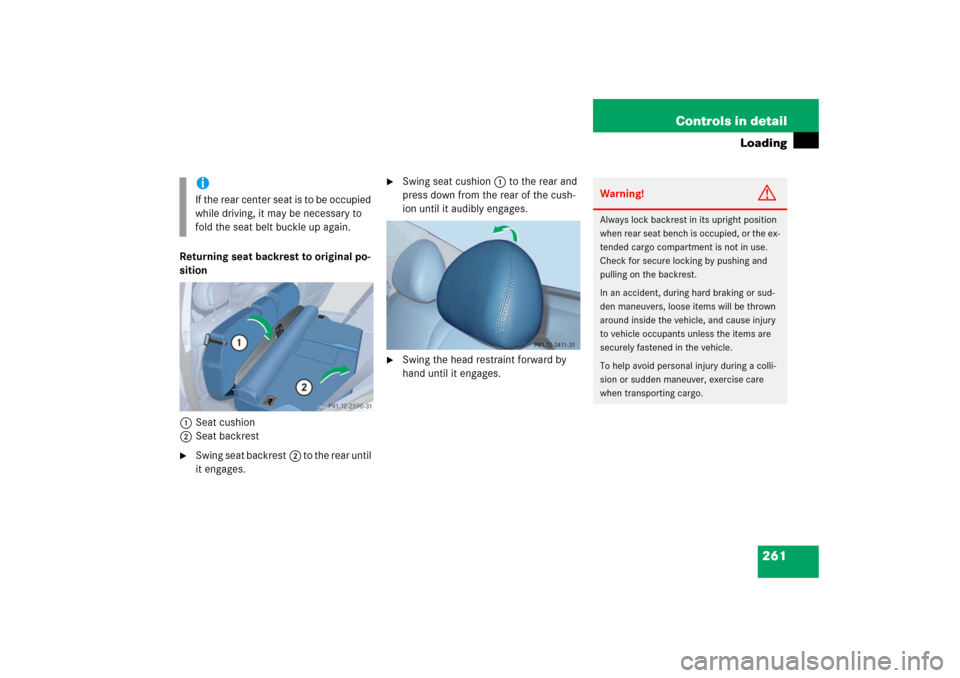
sition
1Seat cushion
2Seat backrest�
Swing seat backrest2 to the rear until
it engages.
�
Swing seat cushion1 to the rear and
press down from the rear of the cush-
ion until it audibly engages.
�
Swing the head restraint forward by
hand until it engages.
iI f t h e r e a r ce n t e r s e a t i s t o b e o c c u p i e d
while driving, it may be necessary to
fold the seat belt buckle up again.
Warning!
G
Always lock backrest in its upright position
when rear seat bench is occupied, or the ex-
tended cargo compartment is not in use.
Check for secure locking by pushing and
pulling on the backrest.
In an accident, during hard braking or sud-
den maneuvers, loose items will be thrown
around inside the vehicle, and cause injury
to vehicle occupants unless the items are
securely fastened in the vehicle.
To help avoid personal injury during a colli-
sion or sudden maneuver, exercise care
when transporting cargo.
Page 265 of 521

264 Controls in detailLoading
Cargo tie-down rings
Four rings1 are located in the cargo com-
partment.�
Carefully secure cargo by applying
even load on all rings with rope of suffi-
cient strength to hold down the cargo.
Always follow loading instructions
(�page 263).Rear seat
There is a cargo tie-down ring located on
each side of the footwell under the rear
seat.
Warning!
G
Always fasten items being carried as secure-
ly as possible.
In an accident, during hard braking or sud-
den maneuvers, loose items will be thrown
around inside the vehicle and can cause in-
jury to vehicle occupants unless the items
are securely fastened in the vehicle.
To help avoid personal injury during a colli-
sion or sudden maneuver, exercise care
when transporting cargo. Put luggage or car-
go in the cargo compartment if possible. Do
not pile luggage or cargo higher than the
seat backs.
Never drive vehicle with tailgate open.
Deadly carbon monoxide (CO) gases may
enter vehicle interior resulting in uncon-
sciousness and death.
Page 267 of 521
266 Controls in detailLoading�
Turn mounting element 2 toL.
�
Insert mounting element 2 in cargo
rail 1.
�
Turn mounting element 2 until it en-
gages in the‹ position.
You should be able to feel the mounting
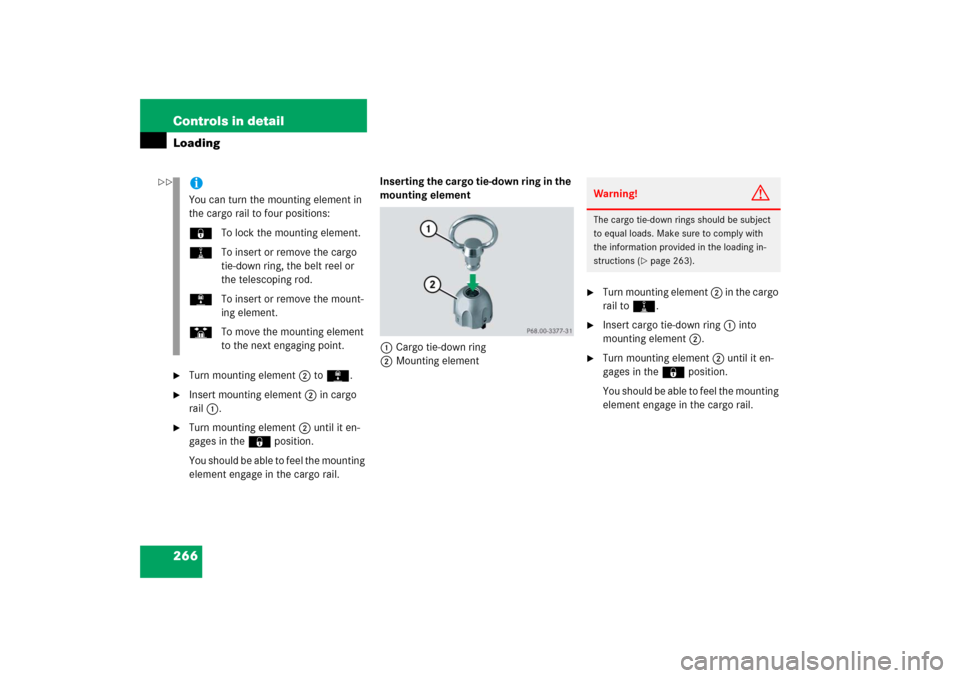
element engage in the cargo rail.Inserting the cargo tie-down ring in the
mounting element
1Cargo tie-down ring
2Mounting element
�
Turn mounting element 2 in the cargo
rail toN.
�
Insert cargo tie-down ring 1 into
mounting element 2.
�
Turn mounting element 2 until it en-
gages in the‹ position.
You should be able to feel the mounting
element engage in the cargo rail.
iYou can turn the mounting element in
the cargo rail to four positions:
‹To lock the mounting element.
NTo insert or remove the cargo
tie-down ring, the belt reel or
the telescoping rod.
LTo insert or remove the mount-
ing element.
STo move the mounting element
to the next engaging point.
Warning!
G
The cargo tie-down rings should be subject
to equal loads. Make sure to comply with
the information provided in the loading in-
structions (
�page 263).
��
Page 269 of 521

268 Controls in detailLoading�
Insert one mounting element 2 into
each cargo rail.
�
Turn mounting element 2 in cargo rail
toN.
�
Insert telescoping rod 1 into mount-
ing element 2.
�
Turn mounting element 2 in cargo rail
until it engages in the‹ position.
You should be able to feel the mounting
element engage in the cargo rail.Storage box in cargo compartment
(Canada only)
1Storage boxWarning!
G
When you are using the storage box in the
cargo compartment, the backrests of the
seats in front of it must be completely en-
gaged to the rear, and the twin roller blind
must be installed.
Do not exceed the storage box’s maximum
load of 44 lbs (20 kg), as it could otherwise
become detached during an accident or
sharp braking maneuvers, and could injure
you or other passengers.
When leaving the vehicle, always remove the
SmartKey or the SmartKey with
KEYLESS-GO* from the starter switch, take
it with you, and lock the vehicle. Do not
leave children unattended in the vehicle, or
with access to an unlocked vehicle. Unsu-
pervised use of vehicle equipment may
cause an accident and/or serious personal
injury.
