Page 93 of 185
92 Telephone*
Telephone operation
Entering a phone number
�Open the Telephone main menu
(
�page 89).
�Use - to enter the phone num-
ber.
In case of erroneous entry, you can de-
lete the last or more digits.
�Press the Delete soft key as often as
required.
�After entering the phone number,
press.
The telephone dials the entered num-
ber. The call is activated the moment
the other party answers the call. Com-
munication is conducted via the hands-
free system. The volume can be adjust-
ed (
�page 30).
For other user functions, see
“Active call” (
�page 96).Initiating redial
On the COMAND control unit
Immediate re-dialing of the number dialed
last can be initiated:
�Press in the Telephone main
menu twice.
The telephone establishes the connec-
tion with the number dialed last.
On the multifunction steering wheel
�Switch the multifunction display in the
instrument cluster to the Telephone
main display (
�page 25).
�Presss twice.
The telephone establishes the connec-
tion with the number dialed last.In both cases the telephone initiates the
call. The call is activated the moment the
other party answers the call. Communica-
tion is conducted via the hands-free sys-
tem. The volume can be adjusted
(
�page 30).
For other user functions, see
“Active call” (
�page 96).
After switching to telephone operation,
COMAND can display the number of
missed calls in the status bar.
i
When pressings only once, the di-
aled calls list appears in the multifunc-
tion display (
�page 94).
Accepted and missed calls
Page 94 of 185
93 Telephone*
Telephone operation
COMAND automatically creates a list of
accepted and missed calls. This list can
contain 10 entries max.
The accepted and missed calls list can be
opened, an entry can be selected, and the
call can be returned.Selecting an entry from the list of ac-
cepted and missed calls.
Opening of list
�Press the Recvd.# soft key in the Tele-
phone main menu (
�page 89).
The list appears with the last call high-
lighted.
The list is sorted chronologically, the
last accepted or missed call is dis-
played at the top of the list.
i
If no calls have been received yet the
Recvd.# soft key is shaded out and with-
out function.
i
The list shows up to ten calls you re-
ceived last. It is a combined listing of
both accepted and missed calls. The
list does not show or specify which
calls were accepted and which ones
were missed.
Page 95 of 185
94 Telephone*
Telephone operation
Switching between number and names
�Press the 123 soft key.
This switches the list to number dis-
play.
or
�Press the ABC soft key.
This switches the list to name display.
The number in the phone book that be-
longs to the highlighted name is shown
in the status bar.
Selecting a list entry and establishing
the connection
�Use or to select the desired
entry.
�Press.
The telephone initiates the call to the
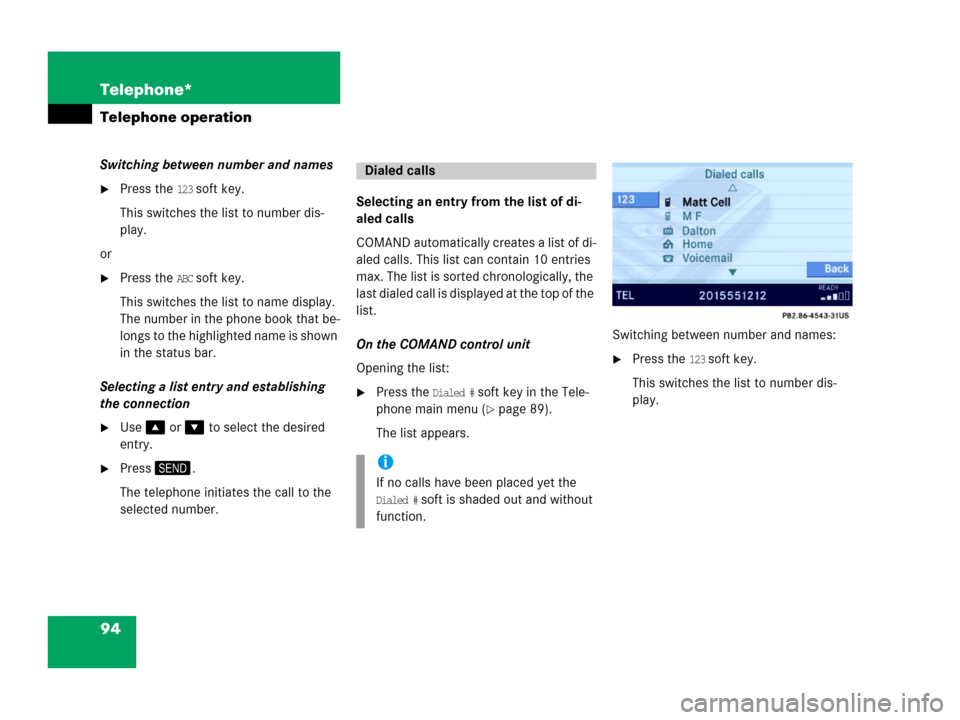
selected number.Selecting an entry from the list of di-
aled calls
COMAND automatically creates a list of di-
aled calls. This list can contain 10 entries
max. The list is sorted chronologically, the
last dialed call is displayed at the top of the
list.
On the COMAND control unit
Opening the list:
�Press the Dialed # soft key in the Tele-
phone main menu (
�page 89).
The list appears.Switching between number and names:
�Press the 123 soft key.
This switches the list to number dis-
play.
Dialed calls
i
If no calls have been placed yet the
Dialed # soft is shaded out and without
function.
Page 96 of 185
95 Telephone*
Telephone operation
If a name in the phonebook is stored
with the number of the highlighted call
it is shown in the status bar.
�Press the ABC soft key.
This switches the list to name display.
The number in the phone book that be-
longs to the highlighted name is shown
in the status bar.
Selecting a list entry and establishing the
connection:
�Use or to select the desired
entry.
�Press.
The telephone initiates the call to the
selected number.On the multifunction steering wheel
Opening the list:
�Switch the multifunction display in the
instrument cluster to the Telephone
main display (
�page 25).
�Presss once.
The last dialed call is displayed on the
multifunction display.
Selecting a list entry and establishing the
connection:
�Pressj or k repeatedly until
the desired entry is shown on the mul-
tifunction display.
�Presss .
The telephone initiates the call to the
selected number.
On the cellular phone, telephone numbers
can be stored in a speed dial memory
(
�Telephone Operation Guide).
You can retrieve the entries of the speed
dial memory via COMAND.
�Open the Telephone main menu
(
�page 89).
�Press a number key between and
and hold it for more than approx.
2 seconds.
The telephone establishes the connec-
tion with the stored number.
i
If you presss twice, the telephone
will immediately establish a connection
with the phone number dialed last.
Speed dial
Page 97 of 185
96 Telephone*
Telephone operation
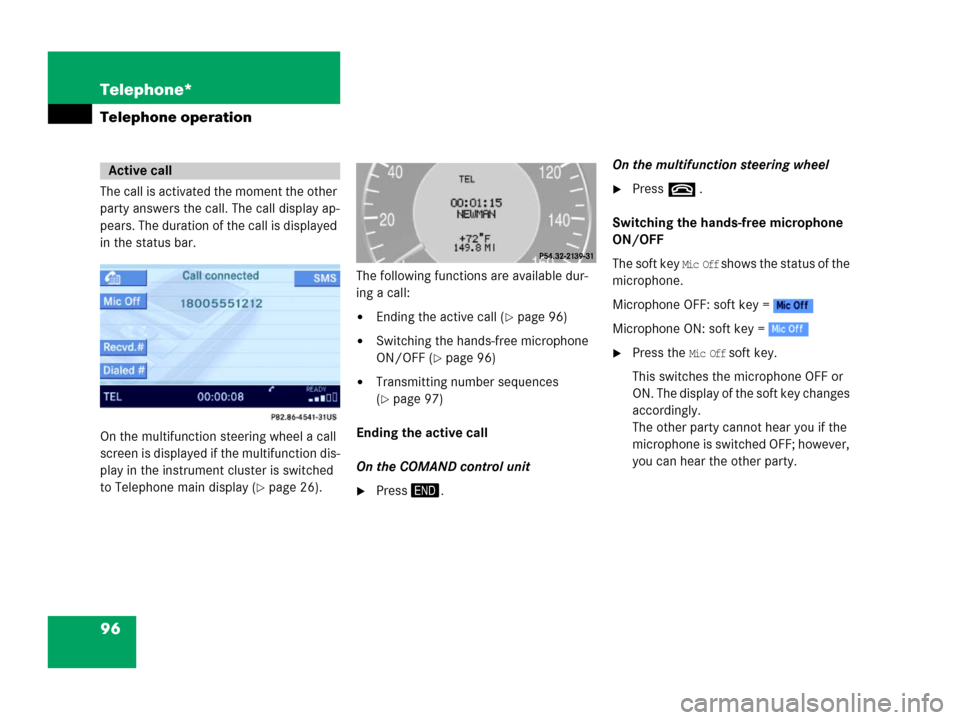
The call is activated the moment the other
party answers the call. The call display ap-
pears. The duration of the call is displayed
in the status bar.
On the multifunction steering wheel a call
screen is displayed if the multifunction dis-
play in the instrument cluster is switched
to Telephone main display (
�page 26).The following functions are available dur-
ing a call:
�Ending the active call (�page 96)
�Switching the hands-free microphone
ON/OFF (
�page 96)
�Transmitting number sequences
(
�page 97)
Ending the active call
On the COMAND control unit
�Press.On the multifunction steering wheel
�Presst .
Switching the hands-free microphone
ON/OFF
The soft key
Mic Off shows the status of the
microphone.
Microphone OFF: soft key =
Microphone ON: soft key =
�Press the Mic Off soft key.
This switches the microphone OFF or
ON. The display of the soft key changes
accordingly.
The other party cannot hear you if the
microphone is switched OFF; however,
you can hear the other party.
Active call
Page 99 of 185
98 Telephone*
Phone book
The phone book contains all entries of the
cellular phone memory.
On the COMAND control unit
�Press the soft key in the Telephone
main menu (
�page 89).
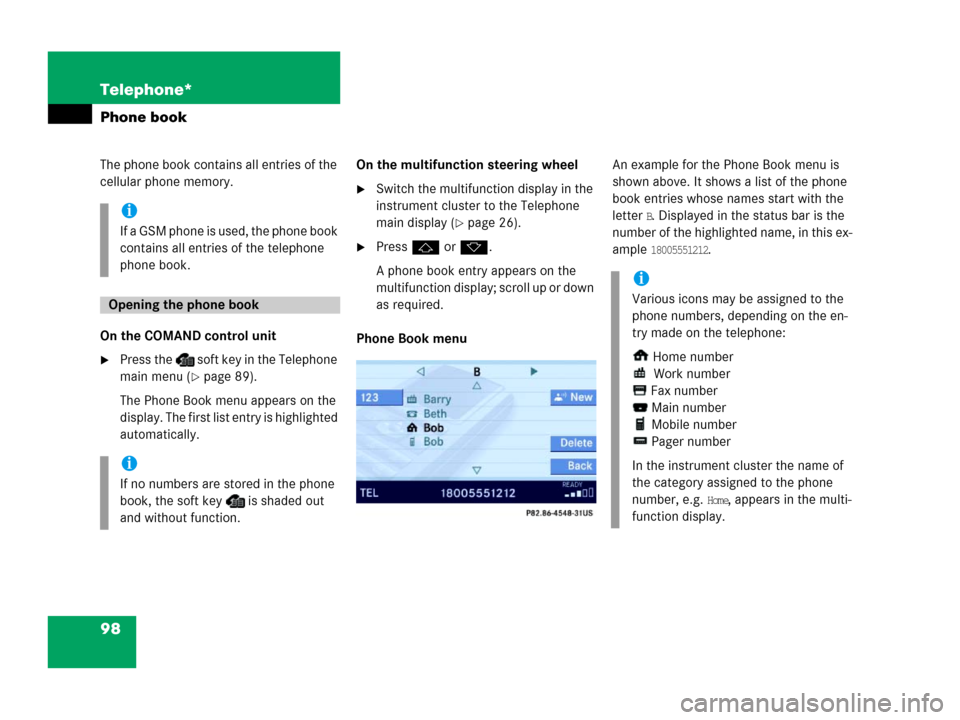
The Phone Book menu appears on the
display. The first list entry is highlighted
automatically.On the multifunction steering wheel
�Switch the multifunction display in the
instrument cluster to the Telephone
main display (
�page 26).
�Pressj or k.
A phone book entry appears on the
multifunction display; scroll up or down
as required.
Phone Book menu An example for the Phone Book menu is
shown above. It shows a list of the phone
book entries whose names start with the
letter
B. Displayed in the status bar is the
number of the highlighted name, in this ex-
ample
18005551212.
i
If a GSM phone is used, the phone book
contains all entries of the telephone
phone book.
Opening the phone book
i
If no numbers are stored in the phone
book, the soft key is shaded out
and without function.
i
Various icons may be assigned to the
phone numbers, depending on the en-
try made on the telephone:
Home number
Work number
Fax number
Main number
Mobile number
Pager number
In the instrument cluster the name of
the category assigned to the phone
number, e.g.
Home, appears in the multi-
function display.
Page 100 of 185
99 Telephone*
Phone book
The following options are now available:
�Switching between number and
name(
�page 99).
�Selecting a phone book entry and est-
sablishing a connection(
�page 99).
�Adding spoken names to a phone book
entry (
�page 100). This option is only
available for vehicles with voice control
system*.
�Deleting a phone book entry
(
�page 100).
Switching between number and name
�Open the phone book from COMAND
(
�page 98).
�Press the 123 soft key.
This switches the display to number
display. The name of the highlighted
entry is shown in the status bar;
or
�Press the ABC soft key.
This switches the display to name dis-
play. The number of the highlighted en-
try is shown in the status bar.
On the COMAND control unit
�Open the phone book (�page 98).
A list of phone book entries appears,
beginning with a specific first letter (ini-
tial).
Changing initials
�Press or once or repeatedly.
Each time you press the button, the
display changes to the next letter up or
down. At the end of the list of letters is the
category
Other. This category combines
all entries without a name, or entries
whose names start with a special char-
acter (e.g.
* or #).
Selecting an entry
�If necessary, change the initial letter
(
�page 99).
�Select an entry using or .
If you press and hold either one of the
buttons, the scrolling up or down accel-
erates.
Establishing a connection
�Press.
The telephone initiates the connection
with the appropriate number.
Selecting a phone book entry and es-
tablishing a connection
Page 101 of 185
100 Telephone*
Phone book
On the multifunction steering wheel
�Switch the multifunction display in the
instrument cluster to the Telephone
main display (
�page 89).
�Pressj or k repeatedly until
the desired entry is shown in the multi-
function display.
�Presss .
The telephone initiates the connection
with the selected number.
If your vehicle is equipped with voice con-
trol system* you can add up to 20 spoken
names to each phone book entry.
Via the voice control system* you can dial
a number by speaking the name.
(
�Voice control system* Operator's man-
ual).
�Select a phone book entry (�page 99).
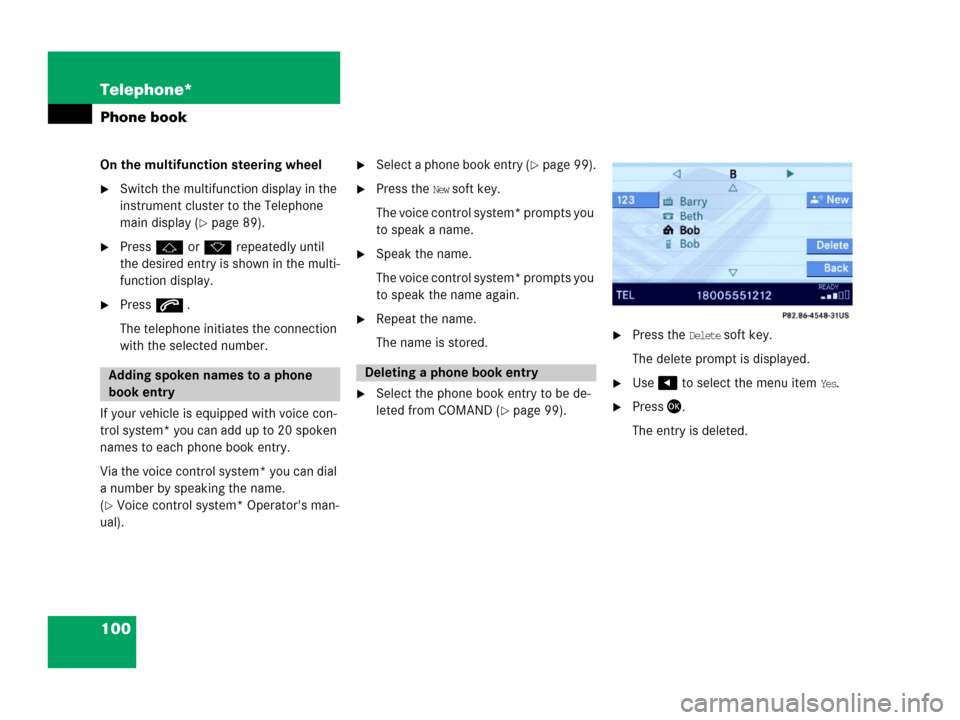
�Press the New soft key.
The voice control system* prompts you
to speak a name.
�Speak the name.
The voice control system* prompts you
to speak the name again.
�Repeat the name.
The name is stored.
�Select the phone book entry to be de-
leted from COMAND (
�page 99).
�Press the Delete soft key.
The delete prompt is displayed.
�Use to select the menu item Yes.
�Press.
The entry is deleted.
Adding spoken names to a phone
book entryDeleting a phone book entry
