Page 429 of 651

STARTING AND DRIVING
408
(h) Driving in snow mode
Use this mode when starting your vehicle in ice or snow.
To set the snow mode, push the switch. In the “ECT SNOW”
indicator on the instrument cluster is on. To cancel the snow
mode, push the switch again. The “ECT SNOW” indicator light
will go off when the snow mode is cancelled.
If the engine is turned off with the snow mode is on, the snow
mode is cancelled when the engine is restarted.
REAR VIEW MONITOR SYSTEM
The rear view monitor system assists the driver by
displaying an image of the rear of the vehicle while
backing up. The displayed image on the screen is a
horizontally reversed mirror image of the inside rear view
mirror.
To display the rear view image on the screen, place the
selector lever in the “R” position when the ignition switch
is in the “ON” position.
If you move the selector lever out of the “R” position, the screen
returns to the previous screen. Operating another function of
the navigation system will display another screen.
The rear view monitor system is a supplemental device
intended to assist back up. When backing up, be sure to check
behind and all around the vehicle visually.
Page 434 of 651
STARTING AND DRIVING
413
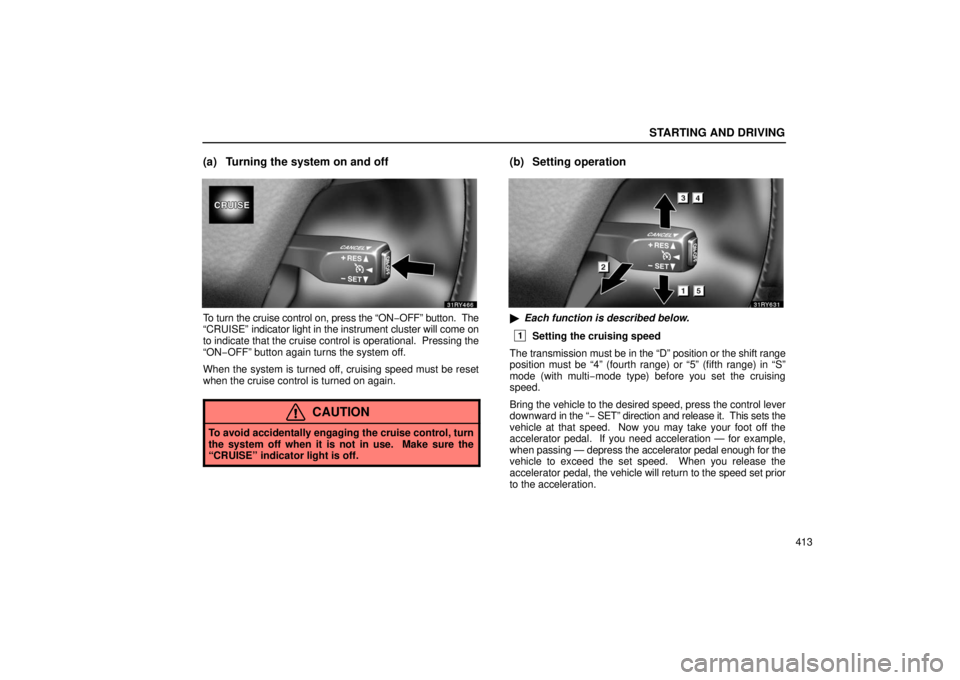
(a) Turning the system on and off
To turn the cruise control on, press the “ON−OFF” button. The
“CRUISE” indicator light in the instrument cluster will come on
to indicate that the cruise control is operational. Pressing the
“ON−OFF” button again turns the system off.
When the system is turned off, cruising speed must be reset
when the cruise control is turned on again.
CAUTION
To avoid accidentally engaging the cruise control, turn
the system off when it is not in use. Make sure the
“CRUISE” indicator light is off.
(b) Setting operation
� Each function is described below.
1Setting the cruising speed
The transmission must be in the “D” position or the shift range
position must be “4” (fourth range) or “5” (fifth range) in “\
S”
mode (with multi−mode type) before you set the cruising
speed.
Bring the vehicle to the desired speed, press the control lever
downward in the “ − SET” direction and release it. This sets the
vehicle at that speed. Now you may take your foot off the
accelerator pedal. If you need acceleration — for example,
when passing — depress the accelerator pedal enough for the
vehicle to exceed the set speed. When you release the
accelerator pedal, the vehicle will return to the speed set prior
to the acceleration.
Page 444 of 651

STARTING AND DRIVING
423
�If other vehicles are driving outside of the laser radar
detection range, a delay in the detection of the
vehicle cutting in at short range or failure to detect a
motorcycle running on the side of the same lane will
occur. In this case, the dynamic laser cruise control
system will not function properly.
� When a slower vehicle in front of you leaves the lane,
the dynamic laser cruise control will no longer detect
a vehicle ahead and will attempt to accelerate the
vehicle to the faster preset speed.
(b) Turning the system on and off
To turn the dynamic laser cruise control on, press the
“ON−OFF” button. The “CRUISE” and “READY” indicator
lights on the instrument cluster will come on to indicate that the
vehicle −to−vehicle distance control mode is operational.
Pressing the “ON −OFF” button again turns the system off.
When the system is turned off, cruising speed and
vehicle −to−vehicle distance must be reset when the
vehicle −to−vehicle distance control mode is turned on again.
When the ignition is turned off, the system is also automatically
turned off. To use dynamic laser cruise control again, press the
“ON−OFF” button again to turn it on.
When the ignition is turned off, all the preset data is cleared.
When you use the dynamic laser cruise control again, you
need to reset the data.
Page 452 of 651

STARTING AND DRIVING
431
(l) Vehicletovehicle distance control mode failure
warning
�1Warning code2 “CRUISE” indicator light
3Master warning light
If a system malfunction is detected when the
vehicle −to−vehicle distance control mode is on, the master
warning light comes on, a warning tone sounds and a warning
code appears on the display. Dynamic laser cruise control is
automatically cancelled.
If “E3” appears on the display, the “CRUISE” indicator light in
the instrument cluster also flashes. If “E1” appears on the display,
the system cannot easily
measure the vehicle −to−vehicle distance because of a dirty
laser radar sensor glass.
If this code appears, clean the sensor glass with a soft cloth
and try setting the preset speed again. If the dirt is removed
without cleaning, the system will automatically enter the ready
mode.
If the system does not enter the ready mode even after
cleaning or the code remains on the display, the system might
be malfunctioning. Although the vehicle may still be operated,
please contact your Lexus dealer.
CAUTION
Always keep the sensor glass clear and never allow it to
be covered with icicle or any substance, so it can detect
the vehicle in front.
Page 455 of 651
STARTING AND DRIVING
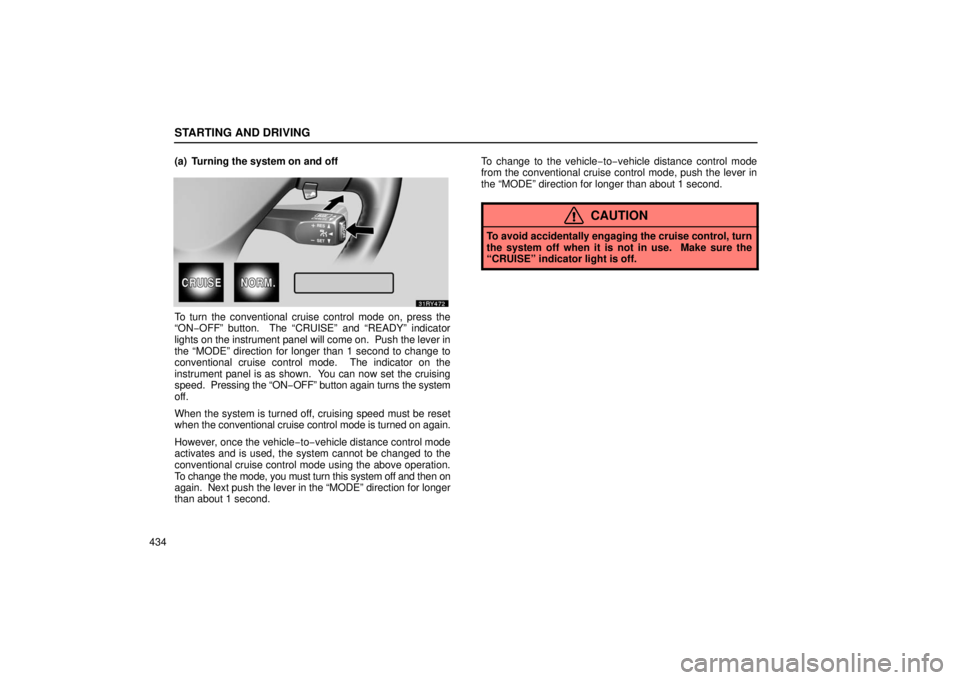
434(a) Turning the system on and off
To turn the conventional cruise control mode on, press the
“ON−OFF” button. The “CRUISE” and “READY” indicator
lights on the
instrument panel will come on. Push the lever in
the “MODE” direction for longer than 1 second to change to
conventional cruise control mode. The indicator on the
instrument panel is as shown. You can now set the cruising
speed. Pressing the “ON− OFF” button again turns the system
off.
When the system is turned off, cruising speed must be reset
when the conventional cruise control mode is turned on again.
However, once the vehicle −to−vehicle distance control mode
activates and is used, the system cannot be changed to the
conventional cruise control mode using the above operation.
To change the mode, you must turn this system off and then on
again. Next pu sh the lever in the “MODE” direction for longer
than about 1 second. To change to the vehicle
−to−vehicle distance control mode
from the conventional cruise control mode, push the lever in
the “MODE” direction for longer than about 1 second.
CAUTION
To avoid accidentally engaging the cruise control, turn
the system off when it is not in use. Make sure the
“CRUISE” indicator light is off.
Page 458 of 651
STARTING AND DRIVING
437
(g) Conventional cruise control mode failure warning
If there is trouble in the conventional cruise control mode, the
“CRUISE” indicator light in the instrument cluster flashes, the
master warning light comes on and the alarm sounds, the
warning code “E3” will appear on the display.
If a system malfunction is detected when the conventional
cruise control mode is in the ready mode or operating, the
master warning light comes on, an alarm sounds and the
above code appears.
If this code appears, press the “ON
−OFF” button to turn the
system off and then push it again to turn it on. If the setting still
cannot be made or the same code appears again, the system
might have malfunctioned. Although there is no problem to
continue driving, please contact your Lexus dealer.
ELECTRONICALLY MODULATED AIR SUSPENSION
�1Easy access mode switch
2Height control switch
3Height select switch
Page 486 of 651

STARTING AND DRIVING
465
4. With the vehicle stopped, push the reset switch on the left
lower instrument panel and hold it until the low tire pressure
warning light blinks three times.
Initialization is
completed after driving at the speeds of 30 km/h
(19 mph) or over for about a few hours total, when the tire
pressure warning system detects the normal tire pressure. If
the following driving conditions are satisfied, initialization will
be completed in about one hour.
� Vehicle speed varies between 30 km/h (19 mph) and 80
km/h (50 mph)
� Normal road surface
When the warning light blinks twice every second while driving,
you may be unable to reset the system. In this case, set the
system again according to the above procedure.
Do not push the reset switch without adjusting the tire inflation
pressure to the specified level. Otherwise, the low tire
pressure warning light may not come on even if the tire
pressure is low, or it may come on when the tire inflation
pressure is actually normal.
If you push the reset switch while the vehicle is moving,
initialization is not performed.
If the low tire pressure warning light does not blink when you
push and hold the reset switch, have the low pressure warning
system checked at your Lexus dealer.
BRAKE PAD WEAR LIMIT INDICATORS
The brake pad wear limit indicators on your disc brakes
give a warning noise when the brake pads are worn to the
extent that replacement is required.
If you hear a squealing or scraping noise while driving, have the
brake pads checked and replaced by your Lexus dealer as
soon as possible. Expensive rotor damage can result if the
pads are not replaced when needed.
Page 511 of 651
DRIVING TIPS
490
CARGO AND LUGGAGE
Stowage precautions
When stowing cargo and luggage in or on the
vehicle, observe the following:
�Put cargo and luggage in the luggage compartment
when at all possible. Be sure all items are secured
in place.
� Be careful to keep the vehicle level. Placing the
weight as far forward as possible helps maintain
vehicle balance.
� For better fuel economy, do not carry unnecessary
weight.
CAUTION
�To prevent cargo and luggage from sliding
forward during braking, do not stack anything
in the luggage compartment higher than the
seatbacks. Keep cargo and luggage low, as
close to the floor as possible.
�Never allow anyone to ride in the luggage
compartment. It is not designed for
passengers. They should ride in their seats
with their seat belts properly fastened.
Otherwise, they are much more likely to suffer
serious bodily injury, in the event of sudden
braking or a collision.
� Do not place anything on the luggage cover.
Such items may be thrown about and possibly
injure people in the vehicle during sudden
braking or an accident.
� Do not drive with objects left on top of the
instrument panel. They may interfere with the
driver’s field of view. Or they may move
during sharp vehicle acceleration or turning,
and impair the driver’s control of the vehicle.
In an accident they may injure the vehicle
occupants.
