Page 332 of 651
AUDIO
311
NOTICE
Observe the followings, otherwise the remote control
may be damaged.
�Do not drop or strongly knock the remote control
against hard objects.
� Do not sit on or place heavy objects on the remote
control.
� Do not leave the remote control exposed to high
temperatures (such as on the instrument panel) for a
long time, otherwise the remote control may be
damaged.
(c) Locating the remote control
If you lose sight of the remote control, push and hold the
“CURSOR (REMOTE)” button on the DVD player unit until you
hear a beep. A buzzer sounds from the remote control to let you
know where it is.
To stop the buzzer, push any button of the remote control.
If the remote control is located close to something that blocks
the signal, such as some kind of metal, the remote control may
not receive the signal and the buzzer may not sound.
Page 391 of 651

AUDIO
370
Power outlet (115 VAC)
This power outlet is designed for use as a power supply
for the audio device connected to the input terminal
adapter.
The key must be in the “ON” position for the power outlet to be
used.
The maximum capacity for this power outlet is 115 VAC/100W.
If you attempt to use an appliance that requires more than 115
VAC or 100W, the protection circuit will activate and cut the
power supply. The power supply will restart automatically
when you use an appliance that operates within the 115
VAC/100W limits.
� Main switch
To use the power outlet, push the main switch on the
instrument panel.
An indicator light will illuminate to indicate that the power outlet
is ready for use.
Push the main switch once again to turn the power outlet off.
When the power outlet is not in use, make sure that the main
switch is turned off.
NOTICE
� To prevent the battery from being discharged, do not
use the power outlet longer than necessary when the
engine is not running.
Page 392 of 651

AUDIO
371
�
Close the power outlet lid when the power outlet is
not in use. Inserting anything other than an
appropriate plug that fits the outlet may cause
electrical failure or short circuit.
The power outlet is not designed for the following electric
appliances even though their power consumption is
under 115 VAC/100W. These appliances may not operate
properly.
�Appliances with high initial peak wattage: Cathode −ray
tube type televisions, compressor −driven refrigerators,
electric pumps, electric tools, etc.
� Measuring devices which process precise data: Medical
equipment, measuring instruments, etc.
� Other appliances requiring an extremely stable power
supply: Microcomputer −controlled electric blankets, touch
sensor lamps, etc.
Certain electrical appliances may cause radio noise.
Headphone jacks
You can enjoy the rear seat entertainment system with
commercial headphones.
To use the headphones, connect them to the jack.
The key must be in the “ACC” or “ON” position.
Page 408 of 651
STARTING AND DRIVING
387
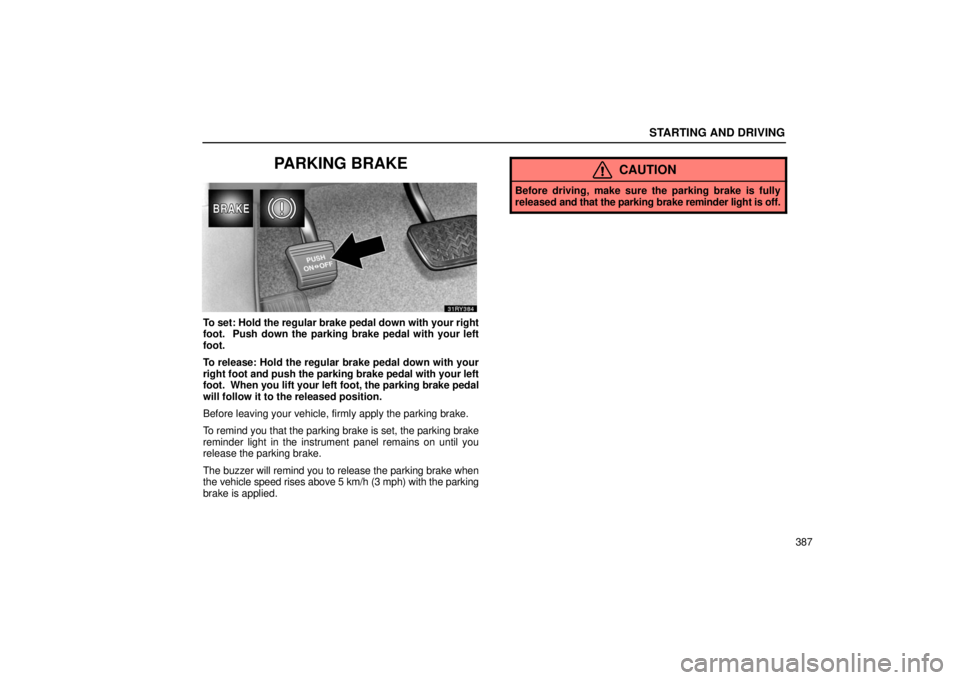
PARKING BRAKE
To set: Hold the regular brake pedal down with your right
foot. Push down the parking brake pedal with your left
foot.
To release: Hold the regular brake pedal down with your
right foot and push the parking brake pedal with your left
foot. When you lift your left foot, the parking brake pedal
will follow it to the released position.
Before leaving your vehicle, firmly apply the parking brake.
To remind you that the parking brake is set, the parking brake
reminder light in the instrument panel remains on until you
release the parking brake.
The buzzer will remind you to release the parking brake when
the vehicle speed rises above 5 km/h (3 mph) with the parking
brake is applied.
CAUTION
Before driving, make sure the parking brake is fully
released and that the parking brake reminder light is off.
Page 411 of 651

STARTING AND DRIVING
390�
The shift position is displayed on the instrument
cluster.
P: Parking, engine starting and key removal position
R: Reverse position
N: Neutral position
D: Normal driving position (Shifting into overdrive possible)
4: Position for engine braking (Shifting into overdrive not
possible)
Vehicle with the cruise control —
When the cruise control is being used, even if you
downshift from “D” to “4”, engine braking will not be
enabled because the cruise control is not cancelled. For
vehicle speed reduction, see page 415.
Vehicle with the dynamic laser cruise control —
When the cruise control is being used in the
conventional (fixed speed) cruise control mode or in the
vehicle −to−vehicle distance control mode, even if you
downshift from “D” to “4”, engine braking will not be
enabled because the cruise control is not cancelled. For
vehicle speed reduction, see pages 427 and 436.
3, 2: Position for more powerful engine braking
L: Position for maximum engine braking Correct
use of the automatic transmission is explained in
the following parts.
(a) Normal driving
(b) Using engine braking
(c) Using the “3”, “2” and “L” positions
(d) Backing up
(e) Parking
(f) Good driving practice
(g) If you cannot shift the selector lever
(h) Driving in snow mode
Page 418 of 651
STARTING AND DRIVING
397
(g) If you cannot shift the selector lever
If you cannot shift the selector lever even though the brake
pedal is depressed, use the shift lock override button. For
instructions, see “If you cannot shift automatic transmission
selector lever” on page 524.
(h) Driving in snow mode
Use this mode when starting your vehicle in ice or snow.
To set the snow mode, push the switch. In the “ECT SNOW”
indicator on the instrument cluster is on. To cancel the snow
mode, push the switch again. The “ECT SNOW” indicator light
will go off when the snow mode is cancelled.
If the engine is turned off with the snow mode is on, the snow
mode is cancelled when the engine is restarted.
Page 419 of 651
STARTING AND DRIVING
398
AUTOMATIC TRANSMISSION(multimode type)
Your automatic transmission has a shift lock system to
minimize the possibility of incorrect operation. This
means you can only shift out of “P” position when the
brake pedal is depressed with the ignition switch in “ON”
position. (� )
31RY303
�The shift position or shift range position is displayed
on the instrument cluster.
P: Parking, engine starting and key removal position
R: Reverse position
N: Neutral position
D: Normal driving position (shifting into overdrive possible)
S: “S” mode driving
+: Upshifting
: Downshifting
Page 422 of 651

STARTING AND DRIVING
401
(b) Driving in “S” mode
�1Upshifting2Downshifting
3“S” mode position
4Shift range position indicator
You can change the shift range position in the “S” mode.
The shift range position can be switched between “5”
(fifth range) and “1” (first range) by moving the selector
lever up to the “+” side or down to the “” side. The fir\
st
shift range position is “4” (fourth range) when the selector
lever is shifted to the “S” position.
� Shift range position indicator
The shift range position is displayed on the instrument cluster.
� Shift range positions
“5” (fifth range): The most suitable gear is automatically
selected between first and overdrive (fifth) gears according
to vehicle speed and driving conditions. Always use the “5”
(fifth range) position to improve fuel economy and for quiet
driving.
“4” (fourth range): The most s uitable gear is automatically
selected between first and fourth gears according to vehicle
speed and driving conditions. In the “4” (fourth range)
position, the automatic transmission system will select the
most suitable gear to handle current running conditions
such as hill climbing, hard towing, etc.