Page 164 of 651
OCCUPANT RESTRAINT SYSTEMS
143
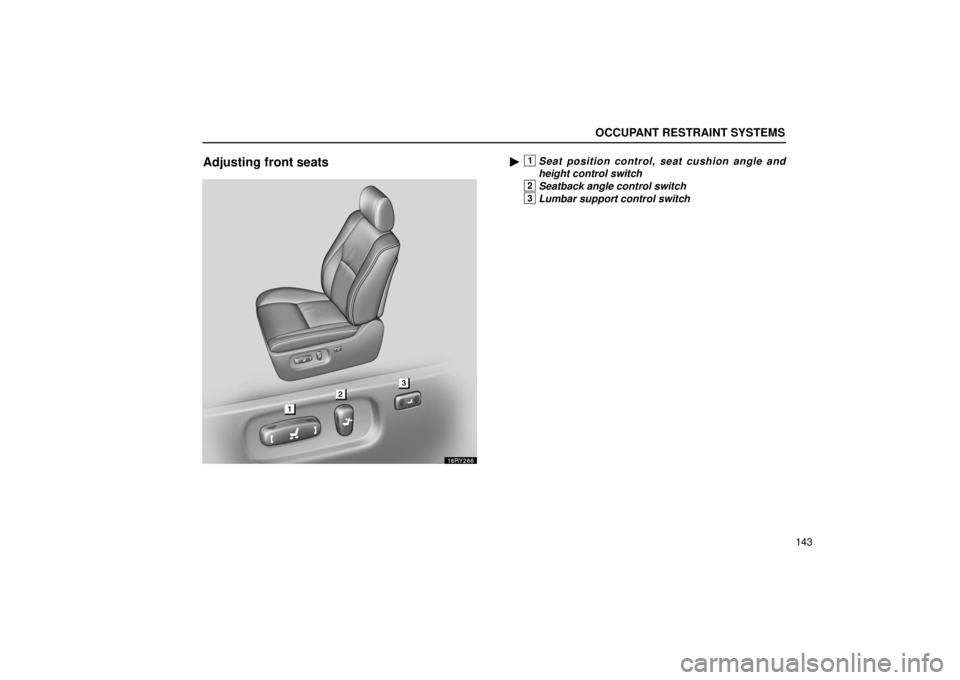
Adjusting front seats�1Seat position control, seat cushion angle and
height control switch
2Seatback angle control switch
3Lumbar support control switch
Page 166 of 651
OCCUPANT RESTRAINT SYSTEMS
145
CAUTION
Avoid reclining the seatback any more than needed.
The seat belts provide maximum protection in a frontal
or rear collision when the driver and the front passenger
are sitting up straight and well back in the seats. If you
are reclined, the lap belt may slide past your hips and
apply restraint forces directly to the abdomen or your
neck may contact the shoulder belt. In the event of a
frontal collision, the more the seat is reclined, the
greater the risk of death or personal injury.
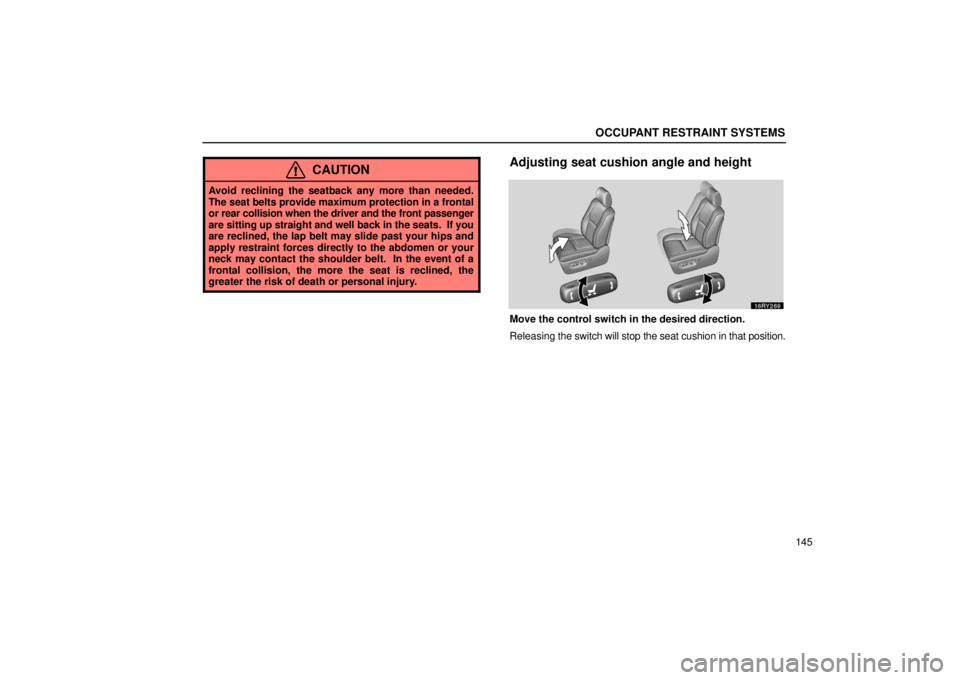
Adjusting seat cushion angle and height
Move the control switch in the desired direction.
Releasing the switch will stop the seat cushion in that position.
Page 406 of 651
STARTING AND DRIVING
385
BEFORE STARTING THE ENGINE
1. Check the area around the vehicle before entering it.
2. Adjust seat position, seatback angle, seat cushion height,
seat cushion angle, head restraint height and steering wheel
angle.
3. Adjust the inside and outside rear view mirrors.
4. Lock all doors.
5. Fasten seat belts.
Remember to check that the service reminder indicators
function when turning the key to “ON”, and check the fuel
gauge to see that you have sufficient fuel.
IGNITION SWITCH
“START” — Starter motor on. The key will return to the
“ON” position when released.
For starting tips, see page 388.
“ON” — Engine on and all accessories on.
This is the normal driving position.
NOTICE
Do not leave the key in the “ON” position if the engine
is not running. The battery will discharge and the
electronic ignition system could be damaged.
Page 458 of 651
STARTING AND DRIVING
437
(g) Conventional cruise control mode failure warning
If there is trouble in the conventional cruise control mode, the
“CRUISE” indicator light in the instrument cluster flashes, the
master warning light comes on and the alarm sounds, the
warning code “E3” will appear on the display.
If a system malfunction is detected when the conventional
cruise control mode is in the ready mode or operating, the
master warning light comes on, an alarm sounds and the
above code appears.
If this code appears, press the “ON
−OFF” button to turn the
system off and then push it again to turn it on. If the setting still
cannot be made or the same code appears again, the system
might have malfunctioned. Although there is no problem to
continue driving, please contact your Lexus dealer.
ELECTRONICALLY MODULATED AIR SUSPENSION
�1Easy access mode switch
2Height control switch
3Height select switch
Page 459 of 651

STARTING AND DRIVING
438This electronically modulated air suspension allows the
driver to
control the vehicle’s height in order to adjust for
driving conditions. Select your desired height among the
“HI” (high), “N” (normal) and “LO” (low) modes with the
height select switch.
You can turn on or off the easy access mode with the easy
access mode switch. If the engine is stopped when the easy
access mode is on, the vehicle height is lowered automatically.
(a) Vehicle height modes
Vehicle’s height mm (in.)
“N”
− 7.0 (0.3)
Vehicle speedkm/h (mph)
80
(50) 100
(62)
�
“N” (normal) mode
“N” (normal) mode: The vehicle’s height in this mode is
standard.
This mode is suitable for ordinary driving.
When the vehicle speed exceeds approximately 100 km/h (62
mph), the vehicle’s height automatically lowers about 7 mm
(0.3 in.) from normal height to provide better stability. When the
vehicle speed reduces to under approximately 80 km/h (50
mph), the vehicle’s height automatically returns to the normal
height.
Page 460 of 651
STARTING AND DRIVING
439
Vehicle’s height mm (in.)Vehicle speedkm/h (mph)
80
(50) 100
(62)
“HI”
+30 (1.2)
30 (19) — 50 (31)
“N”
− 7.0 (0.3)
� “HI” (high) mode
“HI” (high) mode: The vehicle’s height is about 30 mm (1.2
in.) higher than the normal height.
This mode is suitable for driving on bumpy roads.
When the vehicle speed exceeds approximately 50 km/h (31
mph) or driving at the speeds of 30 km/h (19 mph) or over for
ten seconds total in “HI” mode, “N” mode is automatically
selected. Even if the vehicle speed then reduces to under 50
km/h (31 mph), the vehicle’s height will not return to “HI” mode.
CAUTION
The “HI” mode should be used for severe offroad
driving conditions only. As the vehicle’s center of
gravity is higher in this setting, the vehicle may become
unstable when turning abruptly, resulting in an
unexpected accident.
Page 461 of 651
STARTING AND DRIVING
440
Vehicle’s height mm (in.)Vehicle speedkm/h (mph)
“N”
“LO”
− 15 (0.6)
� “LO” (low) mode
“LO” (low) mode: The vehicle’s height is about 15 mm (0.6 in.)
lower than the normal height.
This mode is suitable for sporty driving such as on winding
mountain roads and high speed driving.
When the engine is turned off and then restarted, the “N”
(normal) mode will automatically be selected.
Vehicle’s height mm (in.)
Vehicle speedkm/h (mph)
“N”
− 7.0 (0.3)
“LO”
− 15 (0.6)
Easy access − 30 (1.2 in.) 80
(50) 100
(62)
12
(8)
� Easy access mode
Easy access mode: The vehicle’s height is about 30 mm (1.2
in.) lower than the normal height.
This mode allows easy access to the vehicle (getting in and
out) and easy loading and unloading operations.
This mode is available when “N” or “LO” mode is selected.
When the engine is stopped, easy access mode is
automatically selected, and the height adjusted.
Page 462 of 651

STARTING AND DRIVING
441
In the following cases, vehicle height is changed to “N”
(normal) mode height automatically.
�
Vehicle speed exceeds approximately 12 km/h (8 mph).
� The engine is restarted and the easy access mode is
canceled.
CAUTION
�When the engine is stopped in easy access mode,
vehicle height is changed quickly. Be careful not to
get your head, hands or other parts of your body
caught by the lowering underbody of the vehicle.
� You must also make sure nobody places his or her
head, hands or other parts of their body between the
body of the vehicle and tires.
NOTICE
Be careful when you drive in any place where overhead
space is limited and you have selected the easy access
mode. When the vehicle begins to move after stopping,
“N” (normal) mode will automatically be selected,
raising the vehicle’s height, and potentially causing
damage to the vehicle.
(b) Automatic leveling function
Regardless of the number of occupants or the luggage
load, vehicle height in any mode is always adjusted
automatically to a fixed height.
(c) Selecting “LO”, “HI” or “N” mode
Selection conditions: To select the vehicle’s height, it is
necessary to meet the following conditions.
� The engine is running.
� The height control “OFF” indicator light is off.
� The vehicle is within the speed limitations. Refer to the
following table.
Yes = The mode can be selected.
No = The mode cannot be selected.
“LO”
mode“N”
mode“HI”
mode
At vehicle
stoppageYe sYe sYe s
Under
approximately
30 km/h (19 mph)
Ye sYe sYe s
Approximately
30 km/h (19 mph)
or over
Ye sYe sNo